2017 VOLVO V90 gearbox
[x] Cancel search: gearboxPage 366 of 594

||
DRIVER SUPPORT
* Option/accessory.
364
Along the sides
Parking assistance side sensors are activated automatically when the engine is started. Theyare active at speeds below 10 km/h (6 mph). The measuring range starts approx. 30 cm from the sides. The acoustic signal for obstacles onthe sides comes from the side loudspeakers.
Forwards
NOTE: The illustration is schematic - details may vary depending on car model.
The front parking assistance sensors are acti- vated automatically when the engine is started.The front sensors are active at speedsbelow 10 km/h (6 mph). The measuring range starts approx. 0.8 metres in front of the car.
NOTE
Parking assistance is deactivated when the parking brake is applied or P mode is
selected in a car with an automatic gearbox.
IMPORTANT
When auxiliary lamps are fitted: Remember that these must not obscure the sensors - theauxiliary lamps may then be perceived as anobstacle.
Related information
• Activating/deactivating Parking assistance
*
(p. 365)
• Limitations of Parking assistance
* (p. 365)
• Messages for Park Assist
* (p. 367)
• Park Assist Camera
* (p. 368)
• Park Assist Pilot
* (p. 374)
Page 391 of 594
STARTING AND DRIVING
}}
389
11. Start the engine in the car with the dis-
charged battery.
IMPORTANT
Do not touch the connections between cable and car during the starting attempt. There is arisk of sparks forming.
12. Remove the jump leads in reverse order -first the black and then the red. Make sure that none of the black jump lead's clamps comes into contact with the car'spositive jump-starting point/donor battery'spositive terminal or the clamp connected tothe red jump lead.
WARNING
• The battery can generate oxyhydrogen gas, which is highly explosive. A spark canbe formed if a jump lead is connectedincorrectly, and this can be enough forthe battery to explode.
• The battery contains sulphuric acid, whichcan cause serious burns.
• If sulphuric acid comes into contact witheyes, skin or clothing, flush with largequantities of water. If acid splashes intothe eyes - seek medical attention imme-diately.
Related information
•Starter battery (p. 530)
• Ignition positions (p. 385)
• Starting the car (p. 386)
• Opening and closing the bonnet (p. 514)
Gearbox
The gearbox is part of the car's driveline (power transmission) between engine and drive wheels.The function of the gearbox is to change thegear ratio depending on speed and powerrequirements.
There are two main types of gearbox, manual and automatic. The manual gearbox has six gears. The automatic gearbox can have either eight gears or six gearsdepending on which engine the car is equippedwith. The number of gear changes means thatthe engine's torque and power range can beused effectively. It is also possible to select gears manually with the automatic gearbox. The driver display respec-tively shows which gear or gear position is cur-rently in use.
IMPORTANT
To prevent damage to any drive system com- ponents, the working temperature of thegearbox is checked. If there is a risk of over-heating, a warning symbol illuminates in thedriver display and a text message is shown -follow the recommendation given.
Symbols in the driver displayIf a fault should occur in the gearbox, the driver display shows a symbol and a message.
Page 392 of 594
||
STARTING AND DRIVING
* Option/accessory.
390
Symbol Specification
Information or error message for gearbox. Follow the recommenda-tion given.
Hot or overheated gearbox. Follow the recommendation given.
Related information
•Gear positions for automatic gearbox (p. 390)
• Manual gearbox (p. 392)
• Gear shift indicator
* (p. 392)
Gear positions for automatic gearbox
With an automatic gearbox, the system chooses the gear so that driving is optimal. The gearboxalso has a manual gearshift mode.
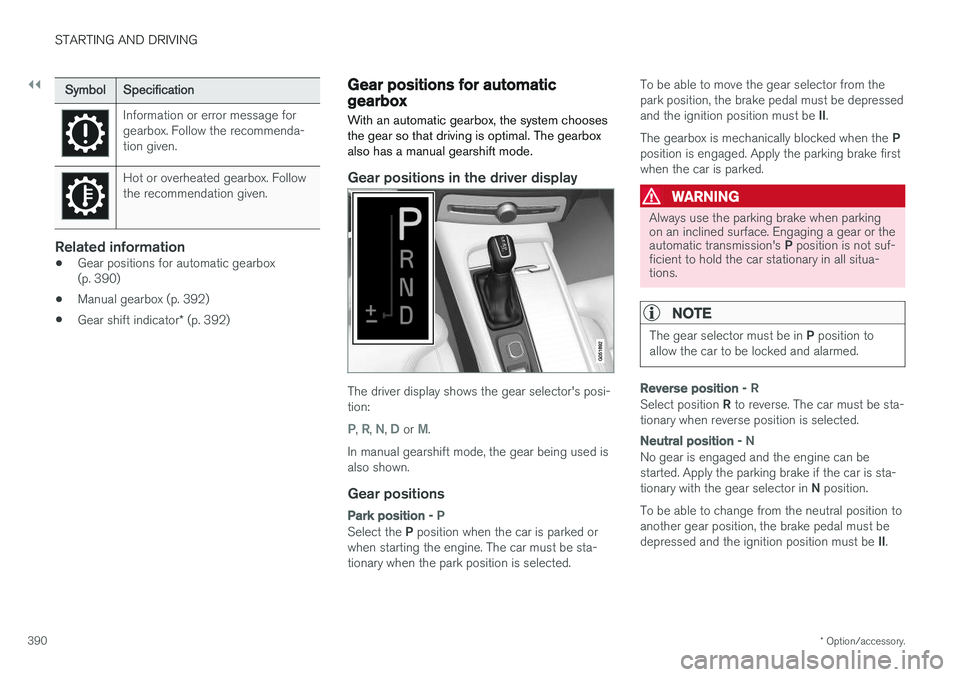
Gear positions in the driver display
The driver display shows the gear selector's posi- tion:
P, R, N, D or M.
In manual gearshift mode, the gear being used is also shown.
Gear positions
Park position - P
Select the P position when the car is parked or
when starting the engine. The car must be sta- tionary when the park position is selected. To be able to move the gear selector from thepark position, the brake pedal must be depressed and the ignition position must be
II.
The gearbox is mechanically blocked when the P
position is engaged. Apply the parking brake first when the car is parked.
WARNING
Always use the parking brake when parking on an inclined surface. Engaging a gear or the automatic transmission's P position is not suf-
ficient to hold the car stationary in all situa- tions.
NOTE
The gear selector must be in P position to
allow the car to be locked and alarmed.
Reverse position - R
Select position R to reverse. The car must be sta-
tionary when reverse position is selected.
Neutral position - N
No gear is engaged and the engine can be started. Apply the parking brake if the car is sta- tionary with the gear selector in N position.
To be able to change from the neutral position to another gear position, the brake pedal must be depressed and the ignition position must be II.
Page 393 of 594
STARTING AND DRIVING
* Option/accessory.391
Drive position - D
D is the normal driving position. Shifting up and
down takes place automatically based on the level of acceleration and speed. The car must be stationary when changing gear from R position to
D position.
Manual gearshift mode - M
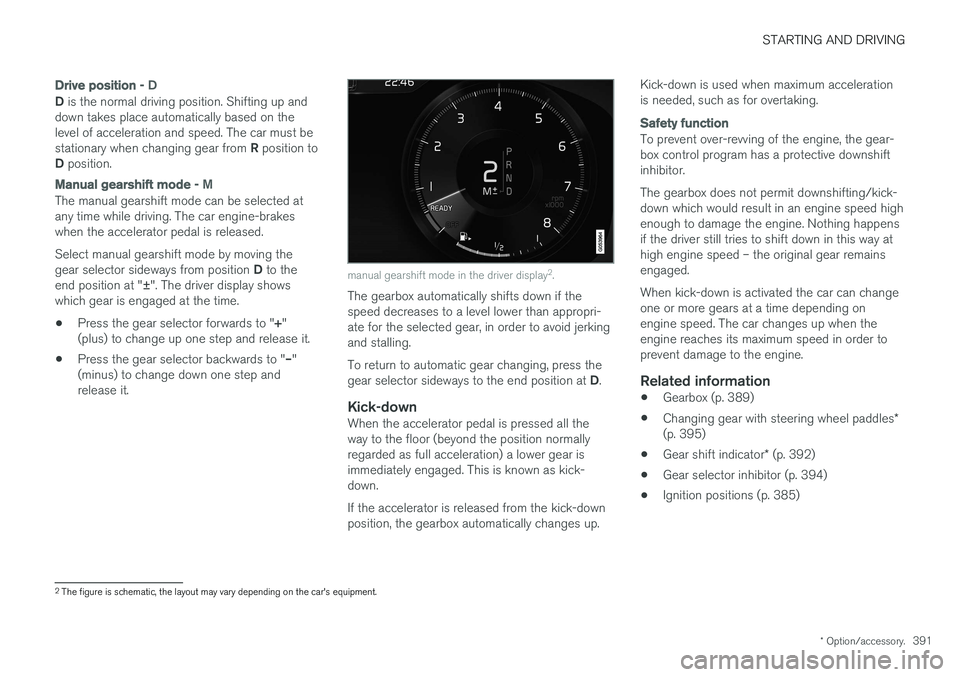
The manual gearshift mode can be selected at any time while driving. The car engine-brakeswhen the accelerator pedal is released. Select manual gearshift mode by moving the gear selector sideways from position D to the
end position at " ±". The driver display shows
which gear is engaged at the time.
• Press the gear selector forwards to "
+"
(plus) to change up one step and release it.
• Press the gear selector backwards to "
–"
(minus) to change down one step and release it.
manual gearshift mode in the driver display 2
.
The gearbox automatically shifts down if the speed decreases to a level lower than appropri-ate for the selected gear, in order to avoid jerkingand stalling. To return to automatic gear changing, press the gear selector sideways to the end position at D.
Kick-downWhen the accelerator pedal is pressed all the way to the floor (beyond the position normallyregarded as full acceleration) a lower gear isimmediately engaged. This is known as kick-down. If the accelerator is released from the kick-down position, the gearbox automatically changes up. Kick-down is used when maximum accelerationis needed, such as for overtaking.
Safety function
To prevent over-revving of the engine, the gear- box control program has a protective downshiftinhibitor. The gearbox does not permit downshifting/kick- down which would result in an engine speed highenough to damage the engine. Nothing happensif the driver still tries to shift down in this way athigh engine speed – the original gear remainsengaged. When kick-down is activated the car can change one or more gears at a time depending onengine speed. The car changes up when theengine reaches its maximum speed in order toprevent damage to the engine.
Related information
•
Gearbox (p. 389)
• Changing gear with steering wheel paddles
*
(p. 395)
• Gear shift indicator
* (p. 392)
• Gear selector inhibitor (p. 394)
• Ignition positions (p. 385)
2
The figure is schematic, the layout may vary depending on the car's equipment.
Page 394 of 594

STARTING AND DRIVING
* Option/accessory.
392
Manual gearbox
With a manual gearbox, the driver selects a suit- able gear manually, according to speed andpower requirements at the time.
Changing gearThe manual gearbox has six gears, the shifting pattern is imprinted on the gear lever.
Gearing pattern.
• Depress the clutch pedal fully during each gear change.
• Take your foot off the clutch pedal betweengear changes.
Reverse gear inhibitorThe reverse gear inhibitor hinders the possibilityof mistakenly attempting to engage reverse gearduring normal forward travel. •
Follow the gearing pattern printed on the gear lever and start from neutral position,
N
before moving it to R position.
• Engage reverse gear only when the car is stationary.
During parking
WARNING
Always apply the parking brake when parking on a slope - leaving the car in gear is not suf-ficient to hold the car in all situations.
Related information
• Gearbox (p. 389)
• Gear shift indicator
* (p. 392)
Gear shift indicator *
The gear shift indicator in the driver display shows the current gear during manual gearshift-ing and when it is appropriate to engage thenext gear for optimum fuel economy.
For eco-driving during manual gear changing, it is important to drive in the right gear and to changegear in good time.
Page 395 of 594

STARTING AND DRIVING
393
With automatic gearbox
The gear shift indicator shows the current gear in the driver display and uses an up arrow to indi-cate when shifting to a higher gear is recom-mended.
Gear shift indicator in the 12-inch driver display.
Gear shift indicator in the 8-inch driver display.
With manual gearbox
An up-arrow indicates a recommended change to a higher gear, and a down-arrow a recommendedchange to a lower gear.
Gear shift indicator in the 12-inch driver display.
Gear shift indicator in the 8-inch driver display.
Related information
•Gearbox (p. 389)
• Gear positions for automatic gearbox (p. 390)
• Manual gearbox (p. 392)
Page 396 of 594

STARTING AND DRIVING
394
Gear selector inhibitorThe gear selector inhibitor prevents accidental changing between different gear positions in anautomatic gearbox.
There are two different types of gear selector inhibitor - mechanical and automatic.
Mechanical gear selector inhibitor
The gear selector can be moved forward and back freely between N and D. Other positions are
locked with a latch that is released with the inhib- itor button on the gear selector. With the inhibitor button depressed the lever can be moved forwards or backwards between P, R ,
N and D.
Automatic gear selector inhibitorThe automatic gear selector inhibitor has special safety systems.
From park position - P
To be able to move the gear selector from the P
position, the brake pedal must be depressed and the ignition position must be II.
From neutral position - N
If the gear selector is in the N position and the
car has been stationary for at least 3 seconds (irrespective of whether the engine is running)then the gear selector is locked. To be able to move the gear selector from the N
position to another gear position, the brake pedal must be depressed and the ignition position must be II.
Deactivate automatic gear selector
inhibitor
If the car cannot be driven, e.g. due to a dis- charged battery, the gear selector must be moved to the
N position so that the car can be
moved.
Lift the rubber mat in the compartment in front of the gear selector. Locate the holewith a spring-loaded button in the bottom ofthe compartment.
Press a small screwdriver into the hole and hold.
Move the gear selector to position N and
release the button.
4. Put the rubber mat back in place.
Related information
• Gear positions for automatic gearbox (p. 390)
• Ignition positions (p. 385)
Page 398 of 594

||
STARTING AND DRIVING
* Option/accessory.
396
Automatic deactivation
In gear position D the steering wheel paddles are
deactivated after a short time if they are not used. This is indicated by means of the figure for thecurrent gear extinguishing. The exception is during engine braking - then the paddles are activated for as long as engine brak-ing is in progress. In gear position M there is no automatic deactiva-
tion.
Related information
• Gear positions for automatic gearbox (p. 390)
• Gear shift indicator
* (p. 392)
Start/Stop
With the Start/Stop function, the engine switches off temporarily when the car has stop-ped e.g. at traffic lights or in a traffic queue, andthen starts again automatically when the journeyis resumed.
Start/Stop is one of several energy-saving func- tions intended to reduce fuel consumption, whichin turn helps to reduce exhaust emissions. The system makes it possible to adopt an envi- ronmentally-conscious driving style by allowingthe car to engine auto-stop when possible.
Related information
• Using the Start/Stop function (p. 396)
• Conditions for the Start/Stop function(p. 398)
Using the Start/Stop function The Start/Stop function temporarily switches off the engine when stationary and then restarts itautomatically when the journey is resumed.
The Start/Stop function is available when the engine is started and can be activated if certainconditions have been met. The driver display indi-cates whether the function is available, active orunavailable, see heading "Symbols in driver dis-play" below. All of the car's normal systems such as lighting, radio, etc. work normally, even when the engine isauto-stopped. However, some equipment mayhave its output temporarily reduced, e.g. the cli-mate control system's fan speed or extremelyhigh volume on the audio system.
Auto-stopThe following is required for the engine to auto-stop: