Page 409 of 672
SIENNA_OM_OM08007U_(U)
4095-11. Using the voice command system
5
Audio system
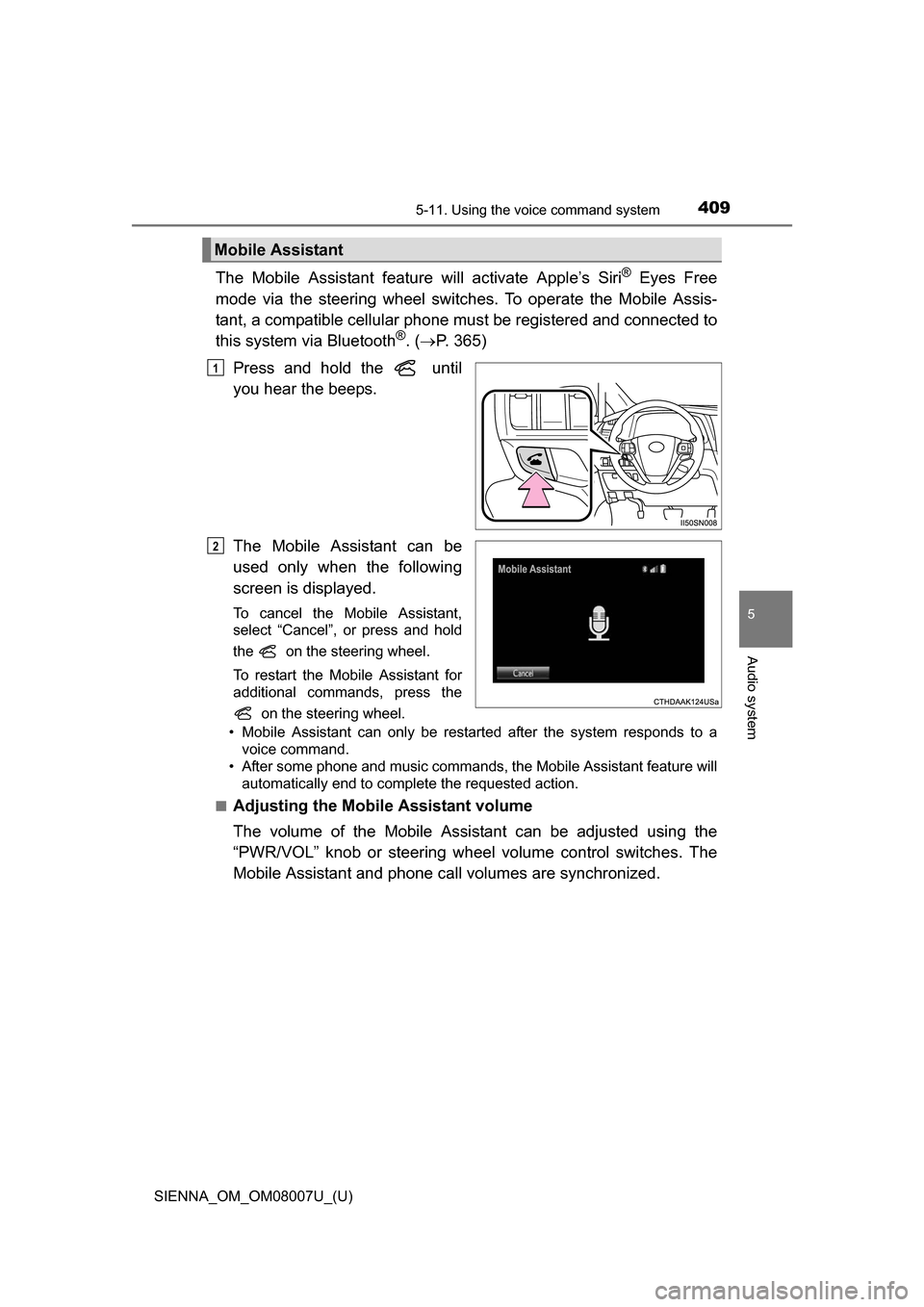
The Mobile Assistant feature will activate Apple’s Siri® Eyes Free
mode via the steering wheel switches. To operate the Mobile Assis-
tant, a compatible cellular phone must be registered and connected to
this system via Bluetooth
®. ( P. 365)
Press and hold the until
you hear the beeps.
The Mobile Assistant can be
used only when the following
screen is displayed.
To cancel the Mobile Assistant,
select “Cancel”, or press and hold
the on the steering wheel.
To restart the Mobile Assistant for
additional commands, press the on the steering wheel.
• Mobile Assistant can only be restarted after the system responds to a voice command.
• After some phone and music commands, the Mobile Assistant feature will automatically end to complete the requested action.
■
Adjusting the Mobile Assistant volume
The volume of the Mobile Assistant can be adjusted using the
“PWR/VOL” knob or steering wheel volume control switches. The
Mobile Assistant and phone call volumes are synchronized.
Mobile Assistant
1
2
Page 411 of 672
411
SIENNA_OM_OM08007U_(U)
6Interior features
6-1. Using the air conditioning system and defogger
Front automatic air conditioning system ........ 412
Rear automatic air conditioning system ........ 421
Heated steering wheel/seat heaters .......... 424
• Heated steering wheel ............................ 425
• Seat heaters ................. 426
6-2. Using the interior lights Interior lights list ................ 427• Personal/interior light
main switch ................... 428
• Personal/interior lights ............................. 428
• Rear ceiling lights ......... 429 6-3. Using the storage features
List of storage features ..... 430• Glove boxes .................. 431
• Console box .................. 432
• Cup holders .................. 434
• Bottle holders ................ 436
• Door pockets................. 437
• Auxiliary boxes.............. 438
Luggage compartment features ........................... 441
6-4. Using the other interior features
Other interior features ....... 443 • Sun visors ..................... 443
• Vanity mirrors................ 443
• Clock ............................. 444
• Conversation mirror ...... 444
• Power outlets ................ 445
• Armrests ....................... 448
• Assist grips ................... 449
• Rear side sunshades .... 450
• Grocery bag hooks ....... 451
Garage door opener.......... 452
Compass ........................... 457
Safety Connect ................. 461
Page 424 of 672
424
SIENNA_OM_OM08007U_(U)
6-1. Using the air conditioning system and defogger
Heated steering wheel/seat heaters
: If equipped
Heated steering wheel and seat heaters heat the side grips of the
steering wheel and seats, respectively.
WARNING
●Care should be taken to prevent injury if anyone in the following categories
comes in contact with the steering wheel and seats when the heater is on:
• Babies, small children, the elderly, the sick and the physically chal-
lenged
• Persons with sensitive skin
• Persons who are fatigued
• Persons who have taken alcohol or drugs that induce sleep (sleeping drugs, cold remedies, etc.)
● Observe the following precautions to prevent minor burns or overheating:
• Do not cover the seat with a blanket or cushion when using the seat
heater.
• Do not use seat heater more than necessary.
NOTICE
● Do not put heavy objects that have an uneven surface on the seat and do
not stick sharp objects (needles, nails, etc.) into the seat.
● To prevent battery discharge, do not use the functions when the engine is
not running.
Page 425 of 672
SIENNA_OM_OM08007U_(U)
4256-1. Using the air conditioning system and defogger
6
Interior features
Turns the heated steering wheel
on/off
The indicator light comes on when
the heated steering wheel is oper-
ating.
●The heated steering wheel can be used when the engine switch is in IGNI-
TION ON mode.
● The heated steering wheel will automatically turn off after about 30 minutes.
Heated steering wheel
Page 467 of 672
467
SIENNA_OM_OM08007U_(U)
7Maintenance and care
7-1. Maintenance and careCleaning and protecting the vehicle exterior .......... 468
Cleaning and protecting the vehicle interior ........... 471 7-2. Maintenance
Maintenance requirements ................... 474
General maintenance........ 477
Emission inspection and maintenance (I/M)
programs ......................... 480
7-3. Do-it-yourself maintenance Do-it-yourself service precautions ..................... 481
Hood ................................. 483
Positioning a floor jack ...... 485
Engine compartment ......... 486
Tires .................................. 496
Tire inflation pressure ....... 504
Wheels .............................. 507
Air conditioning filter.......... 509
Wireless remote control/ electronic key battery ...... 511
Checking and replacing fuses ............................... 514
Light bulbs......................... 517
Page 468 of 672
468
SIENNA_OM_OM08007U_(U)
7-1. Maintenance and care
Cleaning and protecting the vehicle exterior
●Working from top to bottom, liber ally apply water to the vehicle
body, wheel wells and underside of the vehicle to remove any dirt
and dust.
● Wash the vehicle body using a sponge or soft cloth, such as a
chamois.
● For hard-to-remove marks, use car wash soap and rinse thoroughly
with water.
● Wipe away any water.
● Wax the vehicle when the wate rproof coating deteriorates.
If water does not bead on a clean surface, apply wax when the vehicle
body is cool.
■Automatic car washes
●Before washing the vehicle:
• Fold the mirrors.
• Turn off the power back door system. (if equipped)
• Turn off the power sliding door system. (if equipped)
Start washing from the front of the vehicle. Make sure to extend the mirrors
before driving.
● Brushes used in automatic car washes may scratch the vehicle surface and
harm your vehicle’s paint.
■ High pressure car washes
●Do not allow the nozzles of the car wash to come within close proximity of
the windows.
● Before using the car wash, check that the fuel filler door on your vehicle is
closed properly.
■ When using a car wash (veh icles with a smart key system)
● If the door handle becomes wet while the electronic key is within the effec-
tive range, the door may lock and unlock repeatedly. Place the key in a posi-
tion 6 ft. (2 m) or more separate from the vehicle while the vehicle is being
washed. (Take care to ensure that the key is not stolen.)
● If the electronic key is inside the vehicle and a door handle becomes wet
during a car wash, a message may be shown on the multi-information dis-
play and a buzzer will sound outside the vehicle. To turn off the alarm, lock
all the doors.
Perform the following to protect the vehicle and maintain it in
prime condition:
Page 469 of 672

SIENNA_OM_OM08007U_(U)
4697-1. Maintenance and care
7
Maintenance and care
■Aluminum wheels
●Remove any dirt immediately by using a neutral detergent. Do not use hard
brushes or abrasive cleaners. Do not use strong or harsh chemical clean-
ers.
Use the same mild detergent and wax as used on the paint.
● Do not use detergent on the wheels when they are hot, for example after
driving for long distance in the hot weather.
● Wash detergent from the wheels immediately after use.
■ Bumpers and side moldings
Do not scrub with abrasive cleaners.
WARNING
■When washing the vehicle
Do not apply water to the inside of the engine compartment. Doing so may
cause the electrical components etc. to catch fire.
■ When cleaning the windshield (veh icles with rain-sensing windshield
wiper)
● When the upper part of the windshi eld where the raindrop sensor is
located is touched by hand
● When a wet rag or similar is held close to the raindrop sensor
● If something bumps against the windshield
● If you directly touch the raindrop sensor body or if something bumps into
the raindrop sensor
■ Precautions regarding the exhaust pipe
Exhaust gasses cause the exhaust pipe to become quite hot.
When washing the vehicle, be careful not to touch the pipe until it has
cooled sufficiently, as touching a hot exhaust pipe can cause burns.
■ Precaution regarding the Blind Spot Monitor (if equipped)
If the paint of the rear bumper is chipped or scratched, the system may mal-
function. If this occurs, consult your Toyota dealer.
Set the wiper switch to off.
If the wiper switch is in “AUTO”, the wip-
ers may operate unexpectedly in the fol-
lowing situations, and may result in
hands being caught or other serious inju-
ries and cause damage to the wiper
blades.
Off
Page 470 of 672

470
SIENNA_OM_OM08007U_(U)
7-1. Maintenance and care
NOTICE
■To prevent paint deterioration and corrosion on the body and compo-
nents (aluminum wheels etc.)
● Wash the vehicle immediately in the following cases:
• After driving near the sea coast
• After driving on salted roads
• If coal tar or tree sap is present on the paint surface
• If you see dead insects, insect droppings or bird droppings on the paint
• After driving in an area contaminated with soot, oily smoke, mine dust,
iron powder or chemical substances
• If the vehicle becomes heavily soiled in dust or mud
• If liquids such as benzene and gasoline are spilled on the paint surface
● If the paint is chipped or scratched, have it repaired immediately.
● To prevent the wheels from corroding, remove any dirt and store in a place
with low humidity when storing wheels.
■ Cleaning the exterior lights
●Wash carefully. Do not use organic substances or scrub with a hard brush.
This may damage the surface of the lights.
● Do not apply wax on the surfaces of the lights.
Wax may cause damage to the lenses.
■ When using an automatic car wash (vehicles with rain-sensing wind-
shield wipers)
Set the wiper switch to the off position. If the wiper switch is in “AUTO”, the
wipers may operate and the wiper blades may be damaged.
■ When using a high pressure car wash
Do not bring the nozzle tip close to boots (rubber or resin manufactured
cover), connectors or the following parts. The parts may be damaged if they
come into contact with high-pressure water.
• Traction related parts
• Steering parts
• Suspension parts
• Brake parts