2017 TOYOTA RAV4 Eco
[x] Cancel search: EcoPage 108 of 741

108
RAV4_OM_OM0R005U_(U)
3-2. Opening, closing and locking the doors
◆Key
Vehicles without smart key system
Locks all the doors
Unlocks all the doors
Turning the key unlocks the
driver’s door. Turning the key
again within 3 seconds unlocks
the other doors.
Vehicles with smart key system
The doors can also be locked and unlocked with the mechanical
key. ( →P. 656)
■Operation signals
A buzzer sounds and the emergency flashers flash to indicate that the doors
have been locked/unlocked. (Locked: once; Unlocked: twice)
■ Security feature
If a door is not opened within approximately 60 seconds after the vehicle is
unlocked, the security feature automatically locks the vehicle again.
■ When the door ca nnot be locked by the lock sen sor on the upper part of
the door handle (vehicles with smart key system)
■ Door lock buzzer
If an attempt to lock the doors is made when a door is not fully closed, a
buzzer sounds continuously for 5 seconds. Fully close the door to stop the
buzzer, and lock the vehicle once more.
■ If the smart key system or the wireless remote control does not operate
properly
●Vehicles with smart key system: Use the mechanical key to lock and unlock
the doors. (→P. 656)
● Replace the key battery with a new one if it is depleted. ( →P. 585)
1
2
If the door will not lock even when the top-
side sensor area is touched, try touching
both the topside and underside sensor
areas at the same time.
Page 111 of 741

RAV4_OM_OM0R005U_(U)
1113-2. Opening, closing and locking the doors
3
Operation of each component
■Switching the door unlock functi on (vehicles with smart key system)
It is possible to set which doors the entry function unlocks using the wireless
remote control.
Turn the engine switch off.
When the indicator light on the key surface is not on, press and hold ,
or for approximately 5 seconds while pressing and holding
.
The setting changes each time an operation is performed, as shown below.
(When changing the setting continuously, release the buttons, wait for at least
5 seconds, and repeat step .)
■ Impact detection door lock release system (if equipped)
In the event that the vehicle is subject to a strong impact, all the doors are
unlocked. Depending on the force of the impact or the type of accident, how-
ever, the system may not operate.
■ When all the doors are locked with the entry function (vehicles with
smart key system), wireless remote control or key
The doors cannot be unlocked with the door lock switch.
The door lock switch can be reset by unlocking all the doors with the wireless
remote control or key.
■ Conditions affecting the operation
Vehicles without smart key system
→P. 101
Vehicles with smart key system
→P. 132
■ Customization
Settings (e.g. unlocking function using a key) can be changed.
(Customizable features: →P. 696)
1
2
2
Unlocking functionBeep
Holding the driver’s door handle
unlocks only the driver’s door.
Exterior: Beeps 3 times
Interior: Pings once
Holding any of the passenger door
handles unlocks all the doors.
Holding a door handle unlocks all
the doors.Exterior: Beeps twice
Interior: Pings once
Page 113 of 741

113
RAV4_OM_OM0R005U_(U)
3-2. Opening, closing and locking the doors
3
Operation of each component
Back door
◆Smart key system (if equipped)
Carry the electronic key to enable this function.Press the button to unlock all
the doors.
The doors cannot be unlocked
for 3 seconds after the doors are
locked.
Lock the back door again when
you leave the vehicle. The back
door will not lock automatically
after it has been opened and
then closed.
Press the button to lock all the doors.
Check that the door is securely locked.
◆Wireless remote control
→P. 9 9
◆Door lock switch
→P. 1 0 9
Press and hold the switch to open
or close, when the power back
door is unlocked. (A buzzer
sounds.)
Pressing the switch while the back
door is opening/closing stops the
operation.
The back door can be locked/unl ocked and opened/closed by
the following procedures.
Locking and unlocking the back door
1
Opening/closing the back door from inside the vehicle (vehicles
with power back door)
2
Page 121 of 741

RAV4_OM_OM0R005U_(U)
1213-2. Opening, closing and locking the doors
3
Operation of each component
■Security feature
If a door is not opened within approximately 60 seconds after the vehicle is
unlocked, the security feature automatically locks the vehicle again.
■ Jam protection function (veh icles with power back door)
If anything obstructs the power back door while it is closing/opening, the back
door will automatically operate in the opposite direction or stop.
■ When reconnecting th e battery (vehicles with power back door)
To enable the power back door to operate properly, close the back door man-
ually.
■ Back door closer (vehicl es with power back door)
In the event that the back door is left slightly open, the back door closer will
automatically close it to the fully closed position.
■ Fall-down protection function (vehicles with power back door)
While the power back door is opening automatically, applying excessive force
to it will stop the opening operation to prevent the power back door from sud-
denly shutting.
■ Back door closing assist (veh icles with power back door)
If the back door is lowered manually when the back door is stopped at an
open position, the back door will fully close automatically.
■ Canceling the adjusted open positi on of the back door (vehicles with
power back door)
Press and hold the power back door switch on the back door until the buzzer
sounds 4 times, pauses momentarily, and then sounds 2 times. The open
position is initialized to the fully opened position.
■ Situations in which the touchless sensor may operate unintentionally
(vehicles with touc hless power back door)
In the following situations, the touchless sensor may operate unintentionally.
To prevent unintentional operation, keep the electronic key out of the opera-
tional range or disable the touchless sensor operation. (→P. 697)
● When water is applied to the lower center part of the rear bumper, such as in
the rain or in a car wash
● When dirt is wiped off the lower center part of the rear bumper
● When a metal object is brought near the lower center part of the rear
bumper
● When a vehicle cover is installed or removed
● When pets or other moving things suddenly enter the area below the rear
bumper
● When attempting to remove an object from below the lower center part of
the rear bumper
● When attempting to remove snow, etc. from below the lower center part of
the rear bumper
Page 124 of 741
124
RAV4_OM_OM0R005U_(U)
3-2. Opening, closing and locking the doors
WARNING
●Do not pull on the back door damper stay (vehicles without power back
door) or back door spindle (vehicles with power back door) to close the
back door, and do not hang on the back door damper stay (vehicles with-
out power back door) or back door spindle (vehicles with power back
door).
Doing so may cause hands to be caught or the back door damper stay
(vehicles without power back door) or back door spindle (vehicles with
power back door) to break, causing an accident.
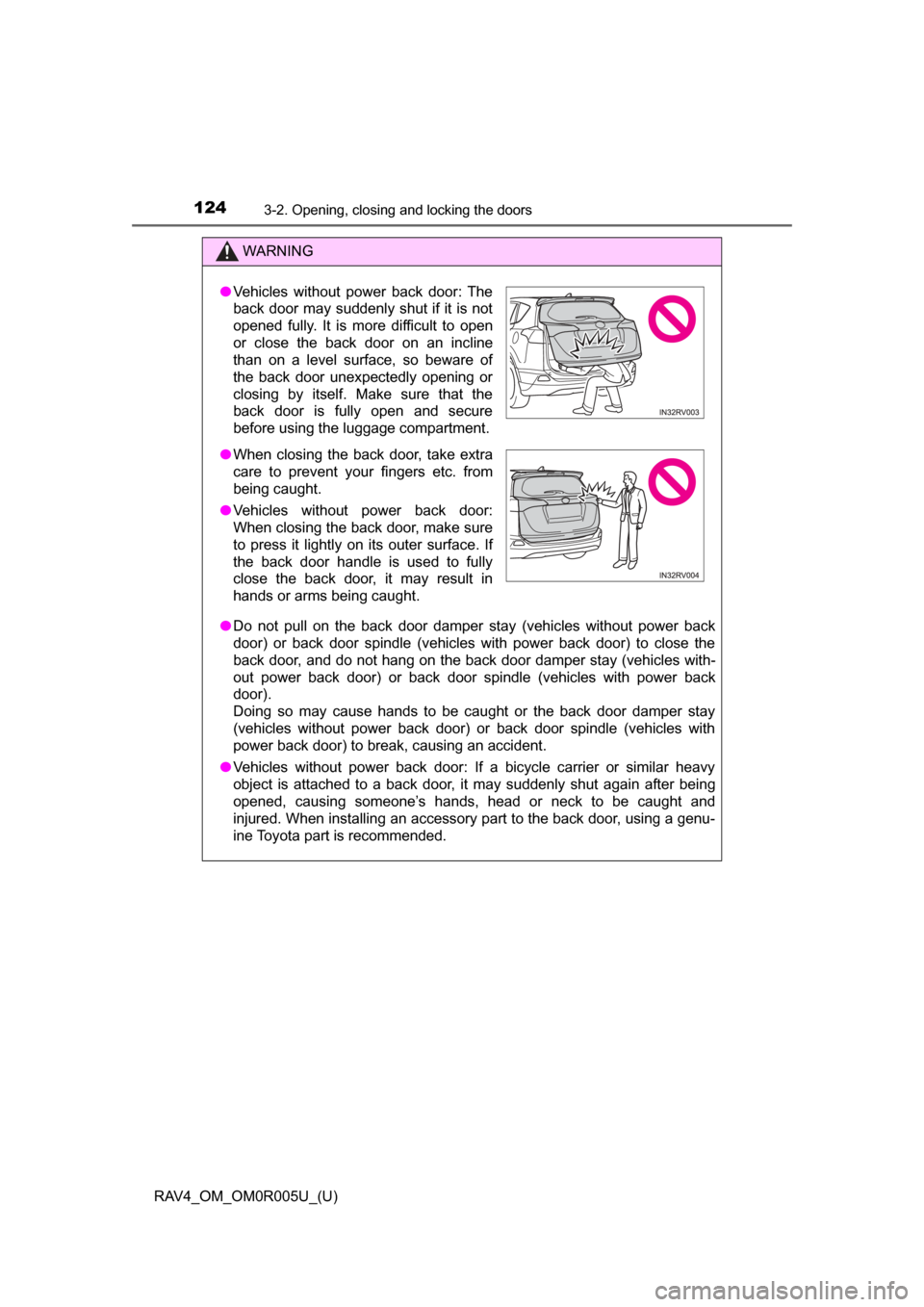
● Vehicles without power back door: If a bicycle carrier or similar heavy
object is attached to a back door, it may suddenly shut again after being
opened, causing someone’s hands, head or neck to be caught and
injured. When installing an accessory part to the back door, using a genu-
ine Toyota part is recommended.
●Vehicles without power back door: The
back door may suddenly shut if it is not
opened fully. It is more difficult to open
or close the back door on an incline
than on a level surface, so beware of
the back door unexpectedly opening or
closing by itself. Make sure that the
back door is fully open and secure
before using the luggage compartment.
● When closing the back door, take extra
care to prevent your fingers etc. from
being caught.
● Vehicles without power back door:
When closing the back door, make sure
to press it lightly on its outer surface. If
the back door handle is used to fully
close the back door, it may result in
hands or arms being caught.
Page 125 of 741
RAV4_OM_OM0R005U_(U)
1253-2. Opening, closing and locking the doors
3
Operation of each component
WARNING
■Back door closer (vehicles with power back door)
● Use caution when using the back door closer as it still operates when the
power back door system is canceled.
■ Power back door (if equipped)
Observe the following precautions when operating the power back door.
Failure to do so may cause death or serious injury.
● Check the safety of the surrounding area to make sure there are no obsta-
cles or anything that could cause any of your belongings to get caught.
● If anyone is in the vicinity, make sure they are safe and let them know that
the back door is about to open or close.
● If the power back door system is turned off while the back door is operat-
ing during automatic operation, the back door stops operating. Take extra
care when on an incline, as the back door may open or close suddenly.
● If the operating conditions of the power back door are no longer met, a
buzzer may sound and the back door may stop opening or closing. The
back door then has to be operated manually. Take extra care in this situa-
tion, as the back door may move abruptly.
● On an incline, the back door may suddenly shut after it opens automati-
cally. Make sure the back door is fully open and secure.
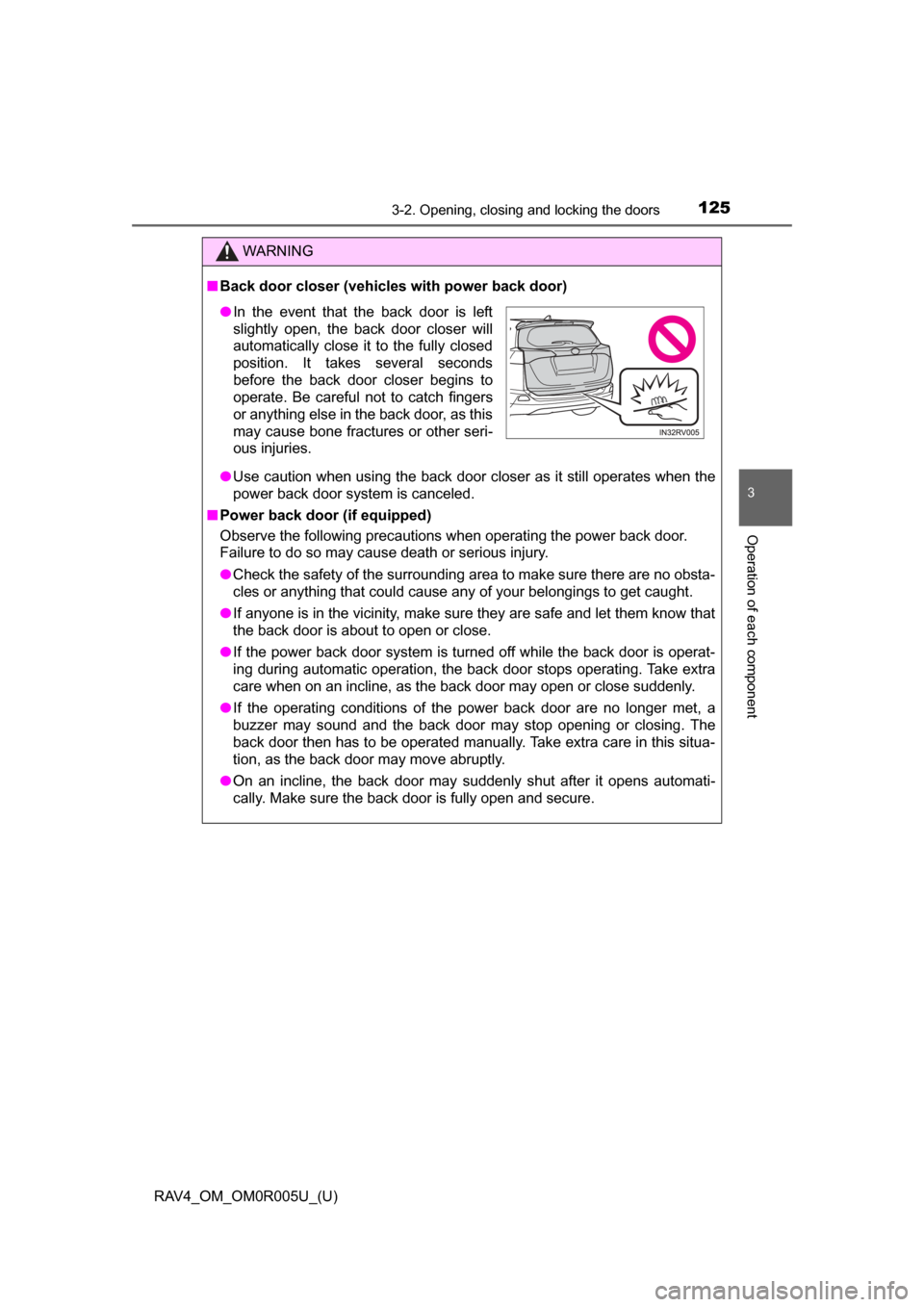
●In the event that the back door is left
slightly open, the back door closer will
automatically close it to the fully closed
position. It takes several seconds
before the back door closer begins to
operate. Be careful not to catch fingers
or anything else in the back door, as this
may cause bone fractures or other seri-
ous injuries.
Page 131 of 741

RAV4_OM_OM0R005U_(U)
1313-2. Opening, closing and locking the doors
3
Operation of each component
■Alarms and warning indicators
A combination of exterior and interior alarms as well as warning messages
shown on the multi-information display are used to prevent theft of the vehicle
and accidents resulting from erroneous operation. Take appropriate mea-
sures in response to any warning message on the multi-information dis-
play.( →P. 636)
The following table describes circumstances and correction procedures when
only alarms are sounded.
■ Battery-saving function
The battery-saving function will be activated in order to prevent the electronic
key battery and the vehicle battery from being discharged while the vehicle is
not in operation for a long time.
●In the following situations, the smart key system may take some time to
unlock the doors.
• The electronic key has been left in an area of approximately 6 ft. (2 m) of
the outside of the vehicle for 10 minutes or longer.
• The smart key system has not been used for 5 days or longer.
● If the smart key system has not been used for 14 days or longer, the doors
cannot be unlocked at any doors except the driver’s door. In this case, take
hold of the driver’s door handle, or use the wireless remote control or the
mechanical key, to unlock the doors.
■ Electronic Key Battery-Saving Function
When battery-saving mode is set, battery depletion is minimized by stopping
the electronic key from receiving radio waves.
AlarmSituationCorrection procedure
Exterior alarm sounds
once for 5 secondsAn attempt was made
to lock the vehicle while
a door was open.Close all of the doors
and lock the doors
again.
Interior alarm sounds
continuously
The engine switch was
turned to ACCESSORY
mode while the driver’s
door was open (or the
driver’s door was
opened while the
engine switch was in
ACCESSORY mode).
Turn the engine switch
off and close the
driver’s door.
Press twice while pressing and
holding . Confirm that the electronic
key indicator flashes 4 times.
While the battery-saving mode is set, the
smart key system cannot be used. To
cancel the function, press any of the elec-
tronic key buttons.
Page 133 of 741

RAV4_OM_OM0R005U_(U)
1333-2. Opening, closing and locking the doors
3
Operation of each component
■Note for the entry function
●Even when the electronic key is within the effective range (detection areas),
the system may not operate properly in the following cases:
• The electronic key is too close to the window or outside door handle, near
the ground, or in a high place when the doors are locked or unlocked.
• The electronic key is near the ground or in a high place, or too close to
the rear bumper center when the back door is opened.
• The electronic key is on the instrument panel, luggage cover or floor, or in the door pockets or glove box when the engine is started or engine switch
modes are changed.
● Do not leave the electronic key on top of the instrument panel or near t\
he
door pockets when exiting the vehicle. Depending on the radio wave recep-
tion conditions, it may be detected by the antenna outside the cabin and the
door will become lockable from the out side, possibly trapping the electronic
key inside the vehicle.
● As long as the electronic key is within the effective range, the doors may be
locked or unlocked by anyone. However, only the doors detecting the elec-
tronic key can be used to unlock the vehicle.
● Even if the electronic key is not inside the vehicle, it may be possible to start
the engine if the electronic key is near the window.
● The doors may unlock or lock if a large amount of water splashes on the
door handle, such as in the rain or in a car wash when the electronic key is
within the effective range. (The doors will automatically be locked after
approximately 60 seconds if the doors are not opened and closed.)
● If the wireless remote control is used to lock the doors when the electronic
key is near the vehicle, there is a possibility that the door may not be
unlocked by the entry function. (Use the wireless remote control to unlock
the doors.)
● Touching the door lock sensor while wearing gloves may delay or prevent
lock operation. Remove the gloves and touch the lock sensor again.
● When the lock operation is performed using the lock sensor, recognition sig-
nals will be shown up to two consecutive times. After this, no recognition
signals will be given.
● If the door handle becomes wet while the electronic key is within the effec-
tive range, the door may lock and unlock repeatedly. In that case, follow the
following correction procedures to wash the vehicle:
• Place the electronic key in a location 6 ft. (2 m) or more away from the
vehicle. (Take care to ensure that the key is not stolen.)
• Set the electronic key to battery-saving mode to disable the smart key
system. ( →P. 131)
● If the electronic key is inside the vehicle and a door handle becomes wet
during a car wash, a message may be shown on the multi-information dis-
play and a buzzer will sound outside the vehicle. To turn off the alarm, lock
all the doors.