Page 480 of 741

RAV4_OM_OM0R005U_(U)
4795-23. Other function
5
Audio system
■Microphone
→P. 442
■ When using the microphone
●It is unnecessary to speak directly into the microphone when giving a com-
mand.
● When “Voice Prompt Interrupt” is set on, it is not necessary to wait for the
confirmation beep before speaking a command. ( →P. 402)
● Voice commands may not be recognized if:
• They are spoken too quickly.
• They are spoken at a low or high volume.
• The roof or windows are open.
• Passengers are talking while voice commands are spoken.
• The air conditioning speed is set high.
• The air conditioning vents are turned towards the microphone.
● In the following conditions, the system may not recognize the command
properly and using voice commands may not be possible:
• The command is incorrect or unclear. Note that certain words, accents or
speech patterns may be difficult for the system to recognize.
• There is excessive background noise, such as wind noise.
Due to natural language speech recognition technology, this system
enables recognition of a command when spoken naturally. However,
the system cannot recognize ev ery variation of each command.
In some situations, it is possibl e to omit the command for the proce-
dure and directly state the desired operation.
Not all voice commands are displayed in the shortcut menu.
This function is available in English, Spanish and French.
■Expression examples for each function
Casual speech recognization
CommandExpression examples
“Call
”Get me .
I need to call at right away.
“Dial ”Please dial the number <3334445555>.
Ring <3334445555>.
Page 481 of 741
480
RAV4_OM_OM0R005U_(U)
5-23. Other function
Some recognizable voice commands and their actions are shown
below as examples.
Basic
Phone
Command list
CommandAction
“Help”Prompts voice guidance to offer examples of com-
mands or operation methods
“Go Back”Returns to the previous screen
CommandAction
“Redial”Places a call to the phone number of the latest outgo-
ing call
“Call Back”Places a call to the phone number of latest incoming
call
“Show Recent
Calls”Displays the call history screen
“Dial
ber>”Places a call to the said phone number
“Call
”Places a call to the said phone type of the contact
from the phone book
Page 489 of 741
488
RAV4_OM_OM0R005U_(U)
6-1. Using the air conditioning system and defogger
■Operation of the air conditio ning system in Eco drive mode
In Eco drive mode, the air conditioning system is controlled to prioritize fuel
efficiency by regulating the engine speed and compressor operation to
restrict the heating/cooling capacity.
To improve air conditioning performance, perform the following operations:
● Adjust the fan speed
● Adjust the temperature setting
● Turn off Eco drive mode ( →P. 205)
■ Fogging up of the windows
●The windows will easily fog up when the humidity in the vehicle is high.
Turning on will dehumidify the air from the outlets and defog the wind-
shield effectively.
● If you turn off, the windows may fog up more easily.
● The windows may fog up if the recirculated air mode is used.
■ Outside/recirculated air mode
When driving on dusty roads such as tunnels or in heavy traffic, set the out-
side/recirculated air mode button to the recirculated air mode. This is effective
in preventing outside air from entering the vehicle interior. During cooling
operation, setting the recirculated air mode will also cool the vehicle interior
effectively.
■ When the outside temperature is low (vehicles with the “A/C” button)
The dehumidification function may not operate even when the “A/C” button is
pressed.
■ Ventilation and air conditioning odors
●To let fresh air in, set the air conditioning system to the outside air m\
ode.
● During use, various odors from inside and outside the vehicle may enter into
and accumulate in the air conditioning system. This may then cause odor to
be emitted from the vents.
● To reduce potential odors from occurring:
It is recommended that the air conditioning system be set to outside air
mode prior to turning the vehicle off.
■ Air conditioning filter
→P. 583
Page 496 of 741
RAV4_OM_OM0R005U_(U)
4956-1. Using the air conditioning system and defogger
6
Interior features
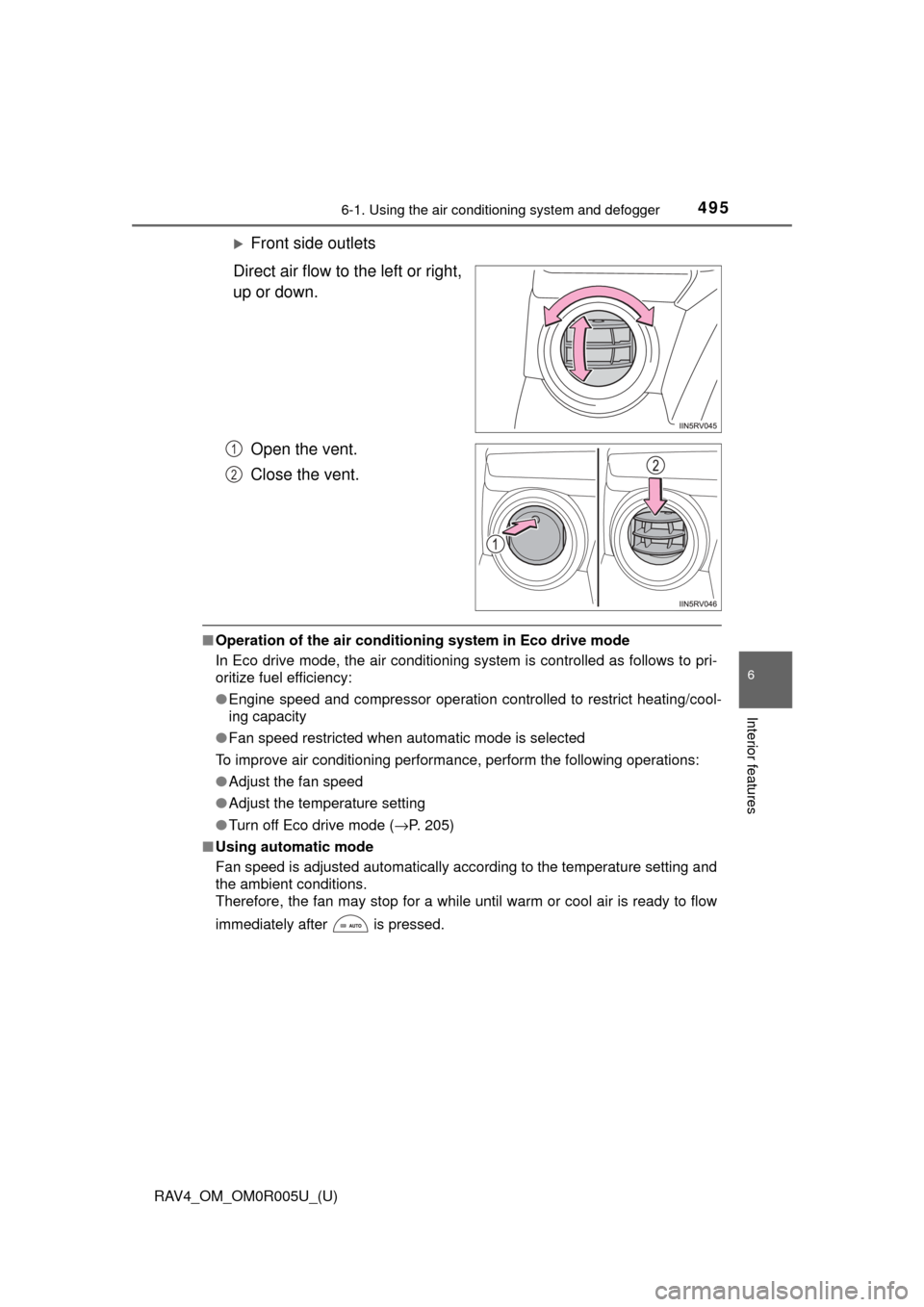
Front side outlets
Direct air flow to the left or right,
up or down.
Open the vent.
Close the vent.
■Operation of the air conditio ning system in Eco drive mode
In Eco drive mode, the air conditioning system is controlled as follows to pri-
oritize fuel efficiency:
● Engine speed and compressor operation controlled to restrict heating/cool-
ing capacity
● Fan speed restricted when automatic mode is selected
To improve air conditioning performance, perform the following operations:
● Adjust the fan speed
● Adjust the temperature setting
● Turn off Eco drive mode ( →P. 205)
■ Using automatic mode
Fan speed is adjusted automatically according to the temperature setting and
the ambient conditions.
Therefore, the fan may stop for a while until warm or cool air is ready to flow
immediately after is pressed.
1
2
Page 498 of 741
RAV4_OM_OM0R005U_(U)
4976-1. Using the air conditioning system and defogger
6
Interior features
■Ventilation and air conditioning odors
●To let fresh air in, set the air conditioning system to the outside air mo\
de.
● During use, various odors from inside and outside the vehicle may enter into
and accumulate in the air conditioning system. This may then cause odor to
be emitted from the vents.
● To reduce potential odors from occurring:
• It is recommended that the air conditioning system be set to outside air
mode prior to turning the vehicle off.
• The start timing of the blower may be delayed for a short period of time
immediately after the air conditioning system is started in automatic
mode.
■ Air conditioning filter
→P. 583
■ Customization
Settings (e.g. outside/recirculated air mode) can be changed.
(Customizable features →P. 701)
WARNING
■To prevent the windshield from fogging up
● Do not use during cool air operation in extremely humid weather.
The difference between the temperature of the outside air and that of the
windshield can cause the outer surface of the windshield to fog up, block-
ing your vision.
■ To prevent burns
● Vehicles with outside rear view mirror defoggers: Do not touch the rear
view mirror surfaces when the outsi de rear view mirror defoggers are on.
● Vehicles with windshield wiper de-icer: Do not touch the glass at lower part
of the windshield or to the side of the front pillars when the windshield
wiper de-icer is on.
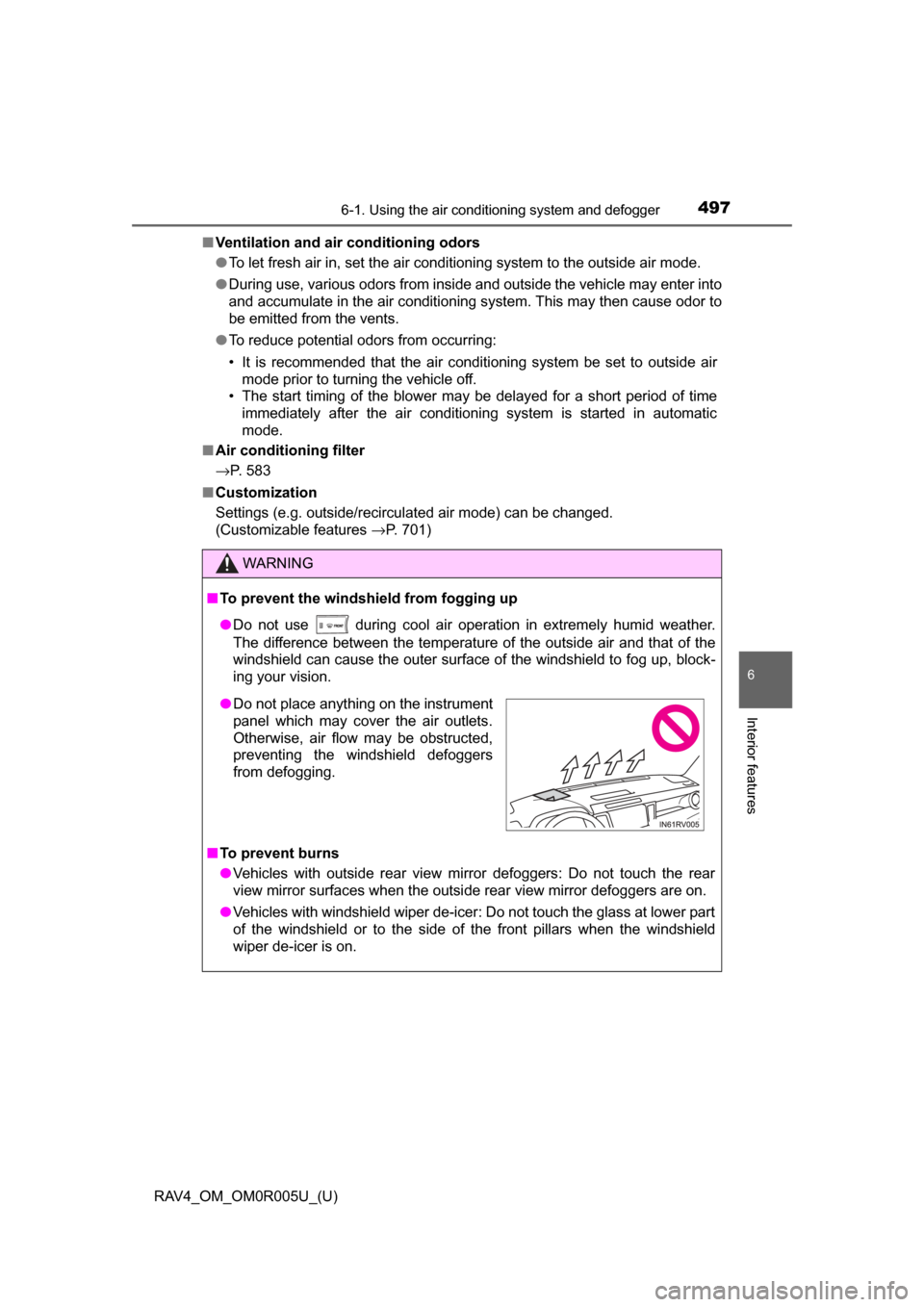
●Do not place anything on the instrument
panel which may cover the air outlets.
Otherwise, air flow may be obstructed,
preventing the windshield defoggers
from defogging.
Page 505 of 741
504
RAV4_OM_OM0R005U_(U)
6-3. Using the storage features
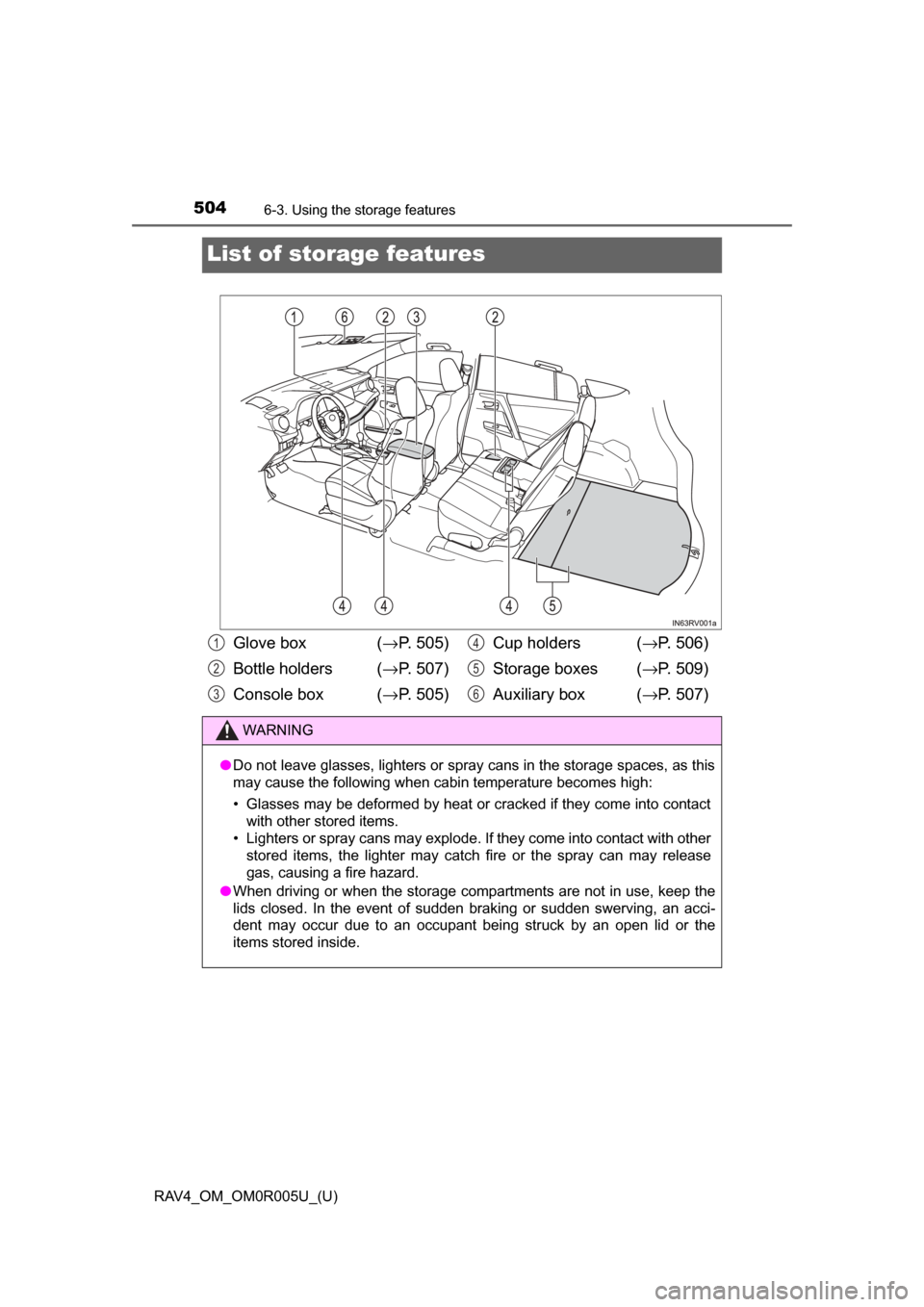
List of storage features
Glove box (→P. 505)
Bottle holders (→ P. 507)
Console box (→ P. 505)Cup holders (
→P. 506)
Storage boxes ( →P. 509)
Auxiliary box ( →P. 507)
WARNING
● Do not leave glasses, lighters or spray cans in the storage spaces, as this
may cause the following when cabin temperature becomes high:
• Glasses may be deformed by heat or cracked if they come into contact
with other stored items.
• Lighters or spray cans may explode. If they come into contact with other stored items, the lighter may catch fire or the spray can may release
gas, causing a fire hazard.
● When driving or when the storage com partments are not in use, keep the
lids closed. In the event of sudden braking or sudden swerving, an acci-
dent may occur due to an occupant being struck by an open lid or the
items stored inside.
1
2
3
4
5
6
Page 522 of 741
RAV4_OM_OM0R005U_(U)
5216-4. Using the other interior features
6
Interior features
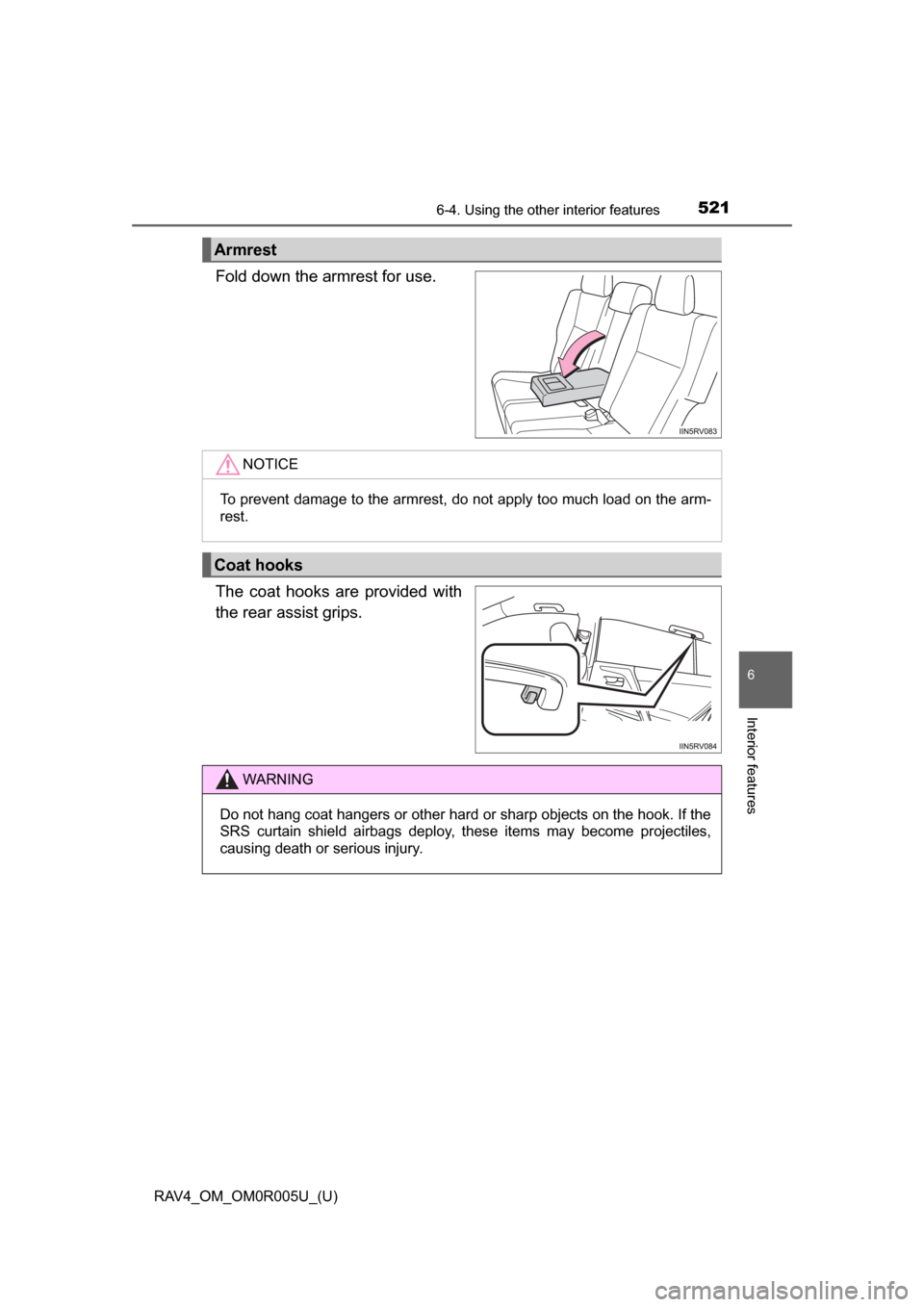
Fold down the armrest for use.
The coat hooks are provided with
the rear assist grips.
Armrest
NOTICE
To prevent damage to the armrest, do not apply too much load on the arm-
rest.
Coat hooks
WARNING
Do not hang coat hangers or other hard or sharp objects on the hook. If the
SRS curtain shield airbags deploy, these items may become projectiles,
causing death or serious injury.
Page 524 of 741
523
RAV4_OM_OM0R005U_(U)
6-4. Using the other interior features
6
Interior features
Garage door opener∗
The HomeLink® wireless control system in your vehicle has 3 buttons
which can be programmed to operate 3 different devices. Refer to the
programming methods on the foll owing pages to determine the
method which is appr opriate for the device.
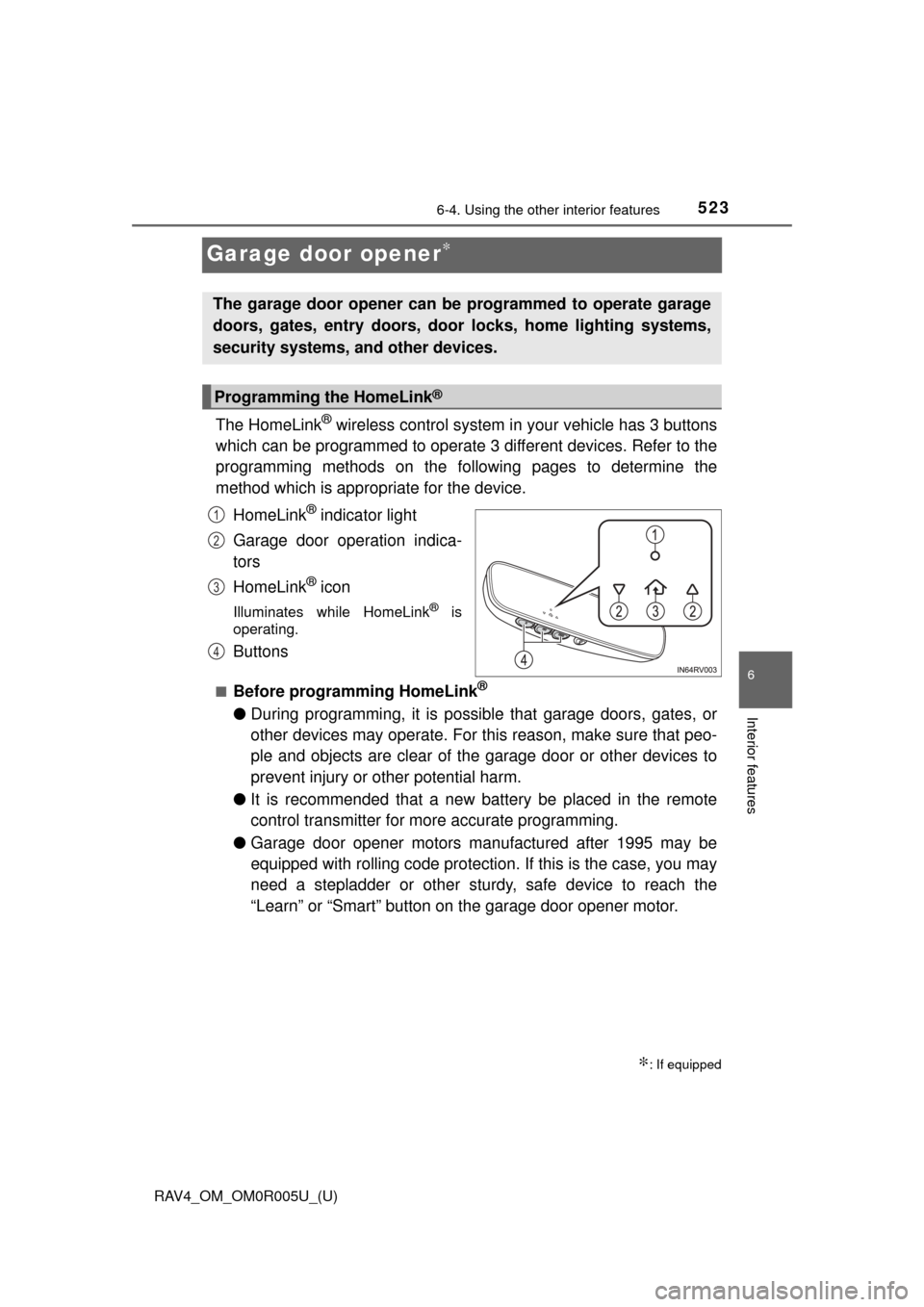
HomeLink
® indicator light
Garage door operation indica-
tors
HomeLink
® icon
Illuminates while HomeLink® is
operating.
Buttons
■Before programming HomeLink®
● During programming, it is possible that garage doors, gates, or
other devices may operate. For this reason, make sure that peo-
ple and objects are clear of the garage door or other devices to
prevent injury or other potential harm.
● It is recommended that a new battery be placed in the remote
control transmitter for more accurate programming.
● Garage door opener motors manufactured after 1995 may be
equipped with rolling code protection. If this is the case, you may
need a stepladder or other sturdy, safe device to reach the
“Learn” or “Smart” button on the garage door opener motor.
∗: If equipped
The garage door opener can be programmed to operate garage
doors, gates, entry doors, door locks, home lighting systems,
security systems, and other devices.
Programming the HomeLink®
1
2
3
4