Page 440 of 741
439
RAV4_OM_OM0R005U_(U)
5-19. Bluetooth® Audio
5
Audio system
Listening to Bluetooth® Audio
You can check such indicators as signal strength and battery charge
on the screen.
Connection status
Battery charge
The battery charge indicator may
not be displayed depending on the
connected device.
The Bluetooth® audio system enables the user to enjoy music
played on a portable player from the vehicle speakers via wire-
less communication.
When a Bluetooth
® device cannot be connected, check the connec-
tion status on the “Bl uetooth* Audio” screen. If the device is not con-
nected, either register or reconnect the device. (→ P. 434)
*: Bluetooth is a registered trademark of Bluetooth SIG, Inc.
Status display
1
2
IndicatorsConditions
Connection statusGood Not connected
Battery chargeFull Empty
Page 442 of 741
441
RAV4_OM_OM0R005U_(U)
5-20. Bluetooth® Phone
5
Audio system
Using a Bluetooth® Phone
To display the screen shown below, press the switch on the steer-
ing wheel or the button.
Several functions are available to operate on each screen that is dis-
played by selecting the 4 tabs.
Device name
Bluetooth
® connection status
The hands-free system is a function that allows you to use your
cellular phone without touching it.
This system supports Bluetooth
®. Bluetooth® is a wireless data
system that allows the cellular phone to wirelessly connect to
the hands-free system and make/receive calls.
Before making a phone call, check the connection status, battery
charge, call area and signal strength. ( →P. 442)
If a Bluetooth
® device cannot be connected, check the connection
status on the phone screen. If th e device is not connected, either
register or reconnect it. ( →P. 434)
Phone screen
1
2
Page 449 of 741

448
RAV4_OM_OM0R005U_(U)
5-20. Bluetooth® Phone
■Release Tones
●A continuous tone signal is a character string that consists of numbers and
the characters p or w. (e.g.056133w0123p#1 ∗)
● When the “p” pause tone is used, the tone data up until the next pause tone
will be automatically sent after 2 seconds have elapsed. When the “w”
pause tone is used, the tone data up until the next pause tone will be a\
uto-
matically sent after a user operation is performed.
● Release tones can be used when automated operation of a phone based
service such as an answering machine or bank phone service is desired. A
phone number with continuous tone signals can be registered in the contact
list.
● Tone data after a “w” pause tone can be operated on voice command during
a call.
Turn the “Handset mode” on to switch from a hands-free call to a cel-
lular phone call.
Turn the “Handset mode” off to switch from a cellular phone call to a
hands-free call.
Select “Transmit Volume”.
Select the desired level for the transmit volume.
Select “OK”.
Press the switch on the steering wheel or select .
To transfer a call
Transmit volume setting
To hang up
1
2
3
Page 469 of 741
468
RAV4_OM_OM0R005U_(U)
5-22. Bluetooth®
What to do if... (Troubleshooting)
If there is a problem with the hands-free system or a Bluetooth®
device, first check the table below.
When using the hands-free system with a Bluetooth® device
The hands-free system or Bluetooth® device does not work.
The connected device may not be a compatible Bluetooth® cellular phone.
→ For a list of specific devices whic h operation has been confirmed
on this system, check with your To yota dealer or the following web-
site: http://www.toyota.com/entune/
The Bluetooth version of the connected cellular phone may be older than
the specified version.
→ Use a cellular phone with Bluetooth version 2.0 or higher (recom-
mended: Ver. 3.0 with EDR or higher). ( →P. 472)
Page 475 of 741

474
RAV4_OM_OM0R005U_(U)
5-22. Bluetooth®
■Compatible models
The Bluetooth® audio system supports portable audio players with the follow-
ing specifications
● Bluetooth
® specifications:
Ver. 2.0, or higher (Recommended: Ver. 3.0+EDR or higher)
● Profiles:
• A2DP (Advanced Audio Distribution Profile) Ver. 1.0, or higher
(Recommended: Ver. 1.2 or higher)
This is a profile to transmit stereo audio or high quality sound to the audio
system.
• AVRCP (Audio/Video Remote Control Profile) Ver. 1.0 or higher (Recommended: Ver. 1.4 or higher)
This is a profile to allow remote control the A/V equipment.
However, please note that some functions may be limited depending on the
type of portable audio player connected.
The hands-free system supports cellular phones with the following specifica-
tions.
● Bluetooth
® specification:
Ver. 2.0 or higher (Recommended: Ver. 3.0+EDR or higher)
● Profiles:
• HFP (Hands Free Profile) Ver. 1.0 or higher (Recommended: Ver. 1.6 or
higher)
This is a profile to allow hands-free phone calls using a cellular phone or
head set. It has outgoing and incoming call functions.
• OPP (Object Push Profile) Ver. 1. 1 or higher (Recommended: Ver. 1.2)
This is a profile to transfer contact data. When a Bluetooth
® compatible
cellular phone has both PBAP and OPP, OPP cannot be used.
• PBAP (Phone Book Access Profile ) Ver. 1.0 or higher (Recommended:
Ver. 1.1)
This is a profile to transfer contact data.
• MAP (Message Access Profile) Ver. 1.0 or higher
If the cellular phone does not support HFP, you cannot register it with the
hands-free system. OPP, PBAP or MAP services must be selected individu-
ally.
Page 476 of 741
RAV4_OM_OM0R005U_(U)
4755-22. Bluetooth®
5
Audio system
■Reconnecting the portable audio player
If the portable audio player is disconnected due to poor reception when the
engine switch is in the “ACC” or “ON” position (vehicles without smart \
key
system) or ACCESSORY or IGNITION ON mode (vehicles with smart key
system), the system automatically reconnects the portable audio player.
If you have switched off the portable audio player yourself, follow the instruc-
tions below to reconnect:
●Select the portable audio player again
● Enter the portable audio player
■ When you sell your car
Be sure to delete your personal data. ( →P. 398)
■ Certification
Page 478 of 741

RAV4_OM_OM0R005U_(U)
4775-22. Bluetooth®
5
Audio system
WARNING
■While driving
Do not operate the portable audio player, cellular phone or connect a device
to the Bluetooth
® system.
■ Caution regarding interfer ence with electronic devices
● Your audio unit is fitted with Bluetooth
® antennas. People with implantable
cardiac pacemakers, cardiac resynchronization therapy-pacemakers or
implantable cardioverter defibrillators should maintain a reasonable dis-
tance between themselves and the Bluetooth
® antennas. The radio waves
may affect the operation of such devices.
● Before using Bluetooth
® devices, users of any electrical medical device
other than implantable cardiac pacemakers, cardiac resynchronization
therapy-pacemakers or implantable cardioverter defibrillators should con\
-
sult the manufacturer of the device for information about its operation
under the influence of radio waves. Radio waves could have unexpected
effects on the operation of such medical devices.
NOTICE
■ When leaving the vehicle
Do not leave your portable audio player or cellular phone in the vehicle. The
inside of the vehicle may become hot, causing damage to the portable
audio player or cellular phone.
Page 479 of 741
478
RAV4_OM_OM0R005U_(U)
5-23. Other function
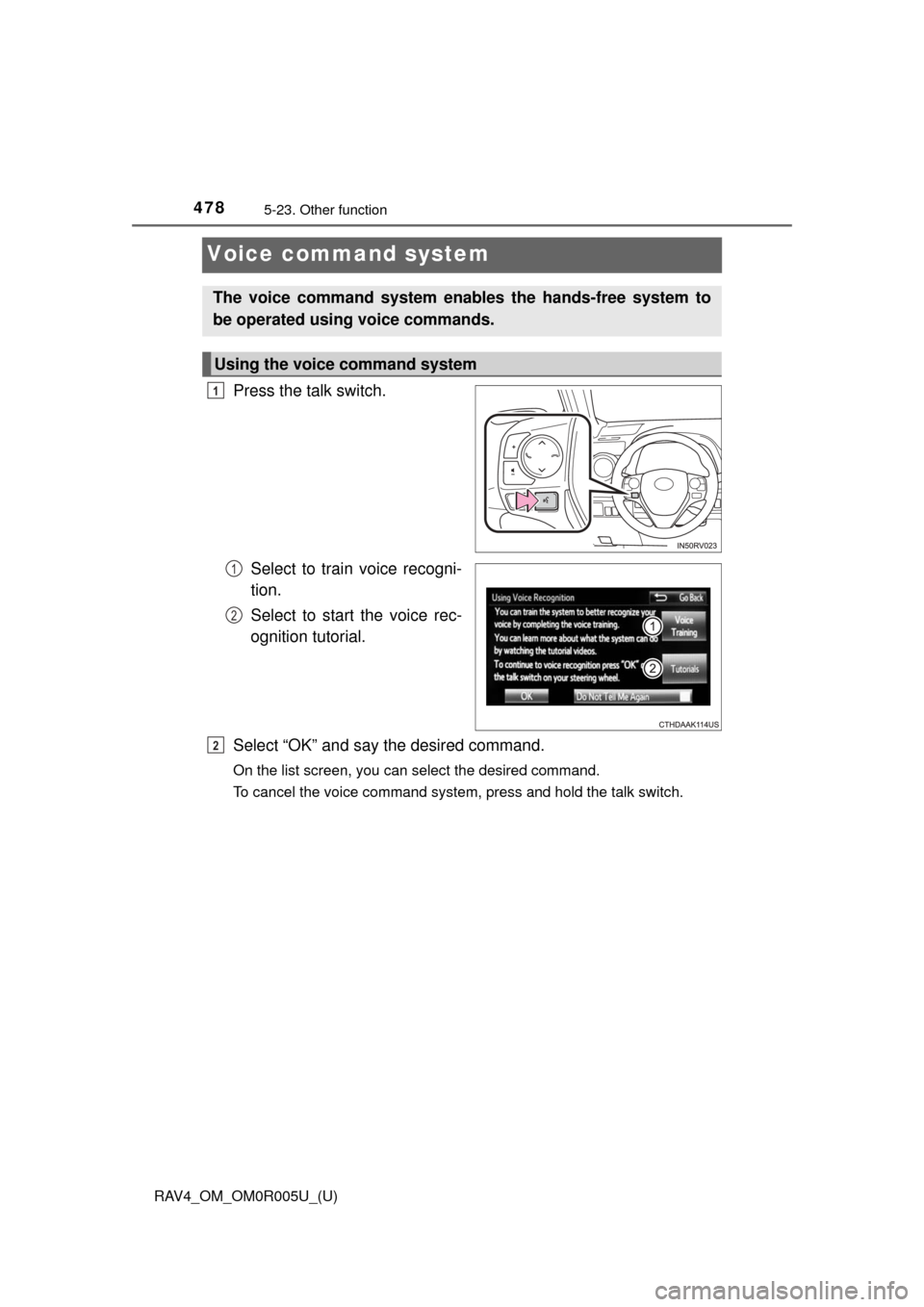
Voice command system
Press the talk switch.Select to train voice recogni-
tion.
Select to start the voice rec-
ognition tutorial.
Select “OK” and say the desired command.
On the list screen, you can select the desired command.
To cancel the voice command system, press and hold the talk switch.
The voice command system enables the hands-free system to
be operated using voice commands.
Using the voice command system
1
1
2
2