2017 TOYOTA PRIUS V ad blue
[x] Cancel search: ad bluePage 183 of 290

183
3. WHAT TO DO IF...
PRIUS v_Navi_OM47B31U_(U)
16.03.03 17:47
PHONE
6
When using the Bluetooth® message function
SymptomLikely causeSolution
Page
Cellular
phoneThis
system
Messages cannot be
viewed.
Message transfer is
not enabled on the
cellular phone.
Enable message trans-
fer on the cellular
phone (approve mes-
sage transfer on the
phone).
Automatic transfer
function on this sys-
tem is set to off.Set automatic transfer
function on this system
to on.
176
New message notifi-
cations are not dis-
played.
Notification of SMS/
MMS/E-mail recep-
tion on this system
is set to off.Set notification of SMS/
MMS/E-mail reception
on this system to on.
176
Automatic message
transfer function is
not enabled on the
cellular phone.Enable automatic
transfer function on the
cellular phone.
Page 184 of 290
184
3. WHAT TO DO IF...
PRIUS v_Navi_OM47B31U_(U)
16.03.03 17:47
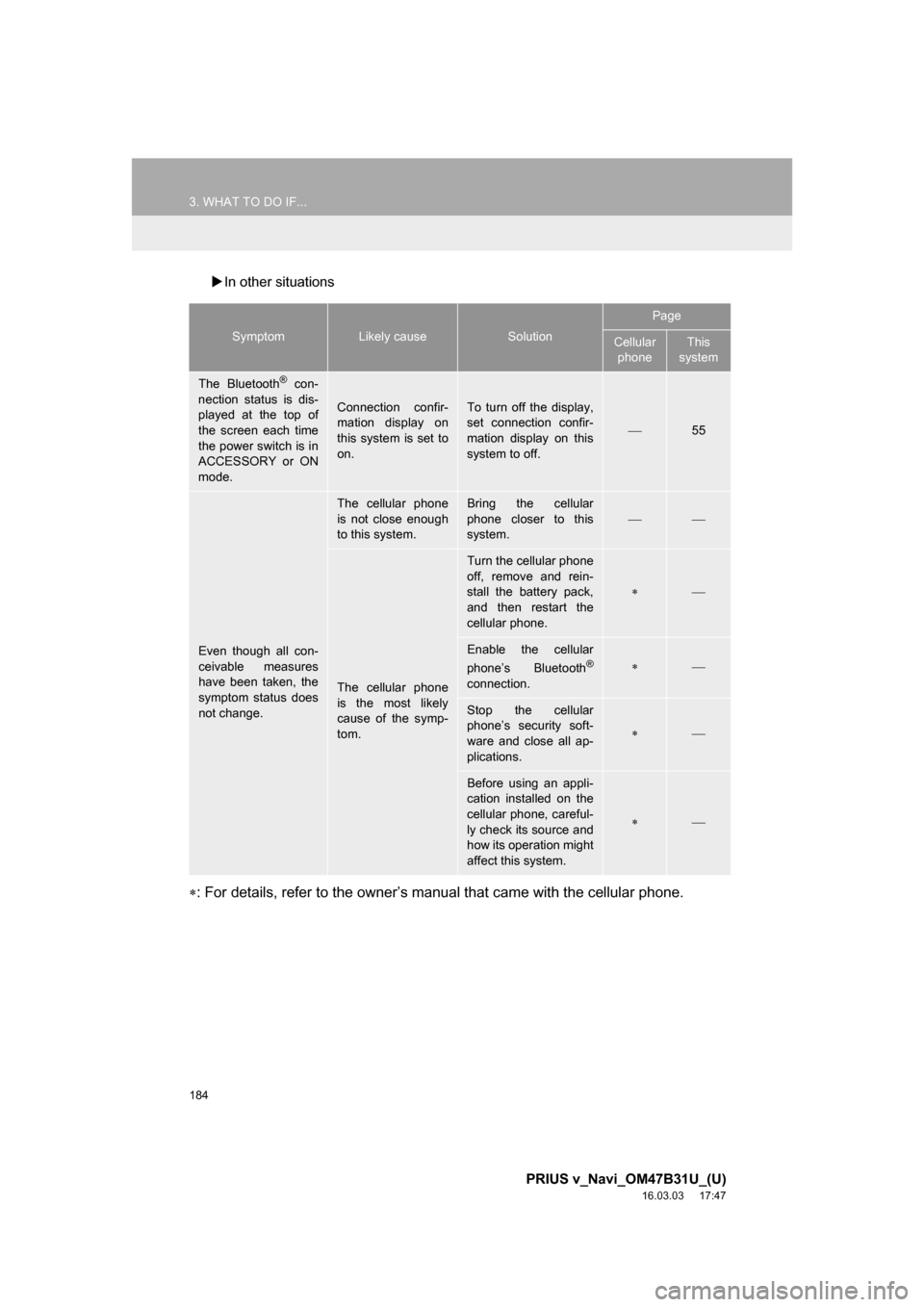
In other situations
: For details, refer to the owner’s manual that came with the cellular phone.
SymptomLikely causeSolution
Page
Cellular
phoneThis
system
The Bluetooth® con-
nection status is dis-
played at the top of
the screen each time
the power switch is in
ACCESSORY or ON
mode.
Connection confir-
mation display on
this system is set to
on.To turn off the display,
set connection confir-
mation display on this
system to off.
55
Even though all con-
ceivable measures
have been taken, the
symptom status does
not change.
The cellular phone
is not close enough
to this system.Bring the cellular
phone closer to this
system.
The cellular phone
is the most likely
cause of the symp-
tom.
Turn the cellular phone
off, remove and rein-
stall the battery pack,
and then restart the
cellular phone.
Enable the cellular
phone’s Bluetooth®
connection.
Stop the cellular
phone’s security soft-
ware and close all ap-
plications.
Before using an appli-
cation installed on the
cellular phone, careful-
ly check its source and
how its operation might
affect this system.
Page 261 of 290

261
1. Entune App Suite OVERVIEW
PRIUS v_Navi_OM47B31U_(U)
16.03.03 17:47
Entune App Suite
8
Perform the following actions.
In order to use Entune App Suite, the fol-
lowing actions must first be performed:
User registration with a service contract
( P.261)
Download the Entune App Suite applica-
tion onto your cellular phone, and login to
the application. ( P.262)
Register the cellular phone that the
Entune App Suite application was down-
loaded to with the system. ( P.262)
Register a Bluetooth
® phone with the
hands-free system. ( P.44)
Download Entune App Suite applications
to the system. ( P.264)
1Perform user registration at
http://www.toyota.com/entune/
.
PREPARATION BEFORE
USING Entune App Suite
SETUP REQUIRED TO USE
Entune App Suite
1User registration
2Download the Entune App Suite ap-
plication to your cellular phone.
3Register the cellul ar phone to the sys-
tem.
4Download Entune App Suite applica-
tions to the system.
USER REGISTRATION
Page 266 of 290
266
2. Entune App Suite OPERATION
PRIUS v_Navi_OM47B31U_(U)
16.03.03 17:47
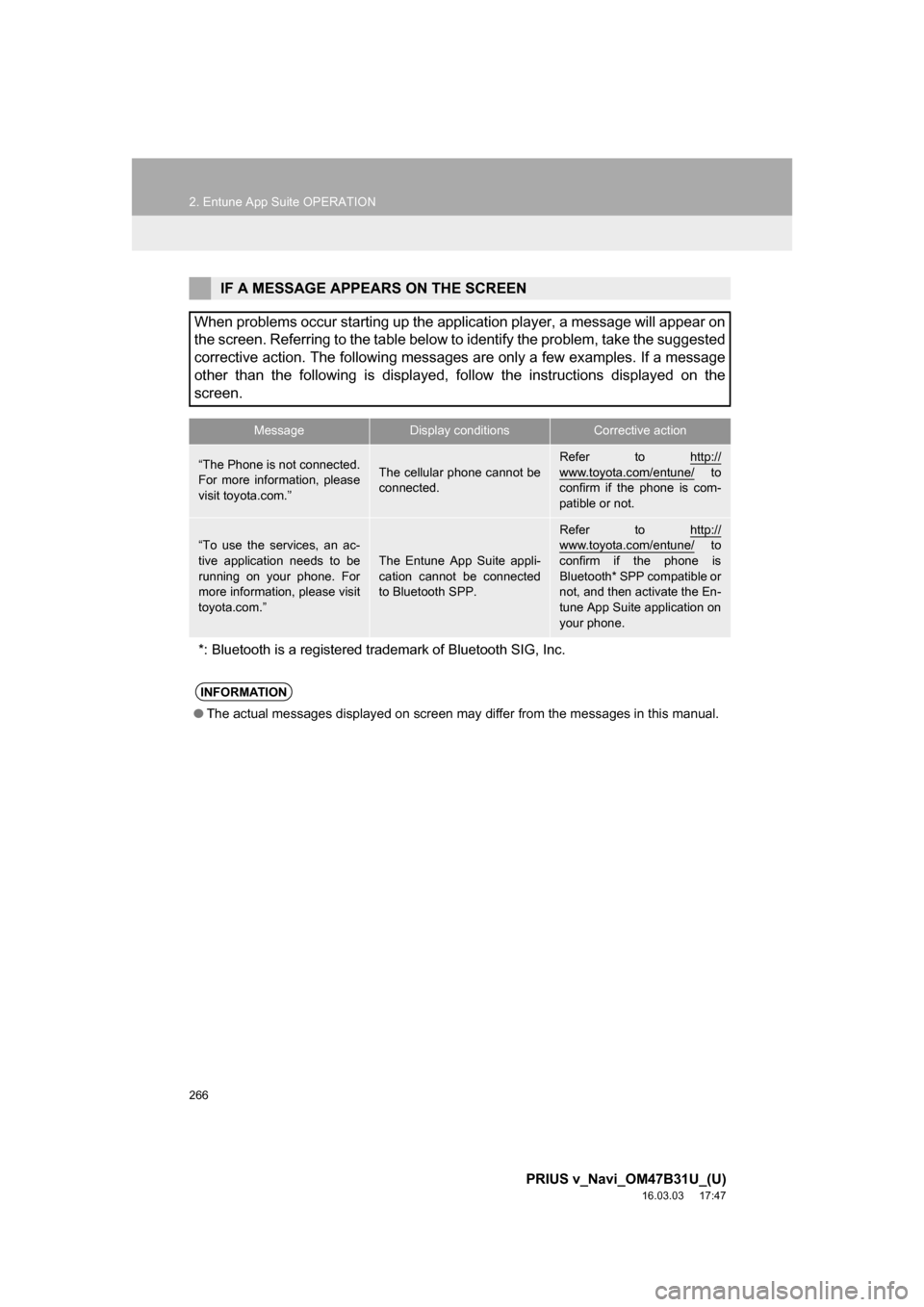
IF A MESSAGE APPEARS ON THE SCREEN
When problems occur starting up the application player, a message will appear on
the screen. Referring to the table below to identify the problem, take the suggested
corrective action. The following messages are only a few examples. If a message
other than the following is displayed, follow the instructions displayed on \
the
screen.
MessageDisplay conditionsCorrective action
“The Phone is not connected.
For more information, please
visit toyota.com.”The cellular phone cannot be
connected.
Refer to http://
www.toyota.com/entune/ to
confirm if the phone is com-
patible or not.
“To use the services, an ac-
tive application needs to be
running on your phone. For
more information, please visit
toyota.com.”
The Entune App Suite appli-
cation cannot be connected
to Bluetooth SPP.
Refer to http://www.toyota.com/entune/ to
confirm if the phone is
Bluetooth* SPP compatible or
not, and then activate the En-
tune App Suite application on
your phone.
*: Bluetooth is a registered trade mark of Bluetooth SIG, Inc.
INFORMATION
●The actual messages displayed on screen may differ from the messages in this manual.
Page 274 of 290
274
ALPHABETICAL INDEX
PRIUS v_Navi_OM47B31U_(U)
16.03.03 17:47
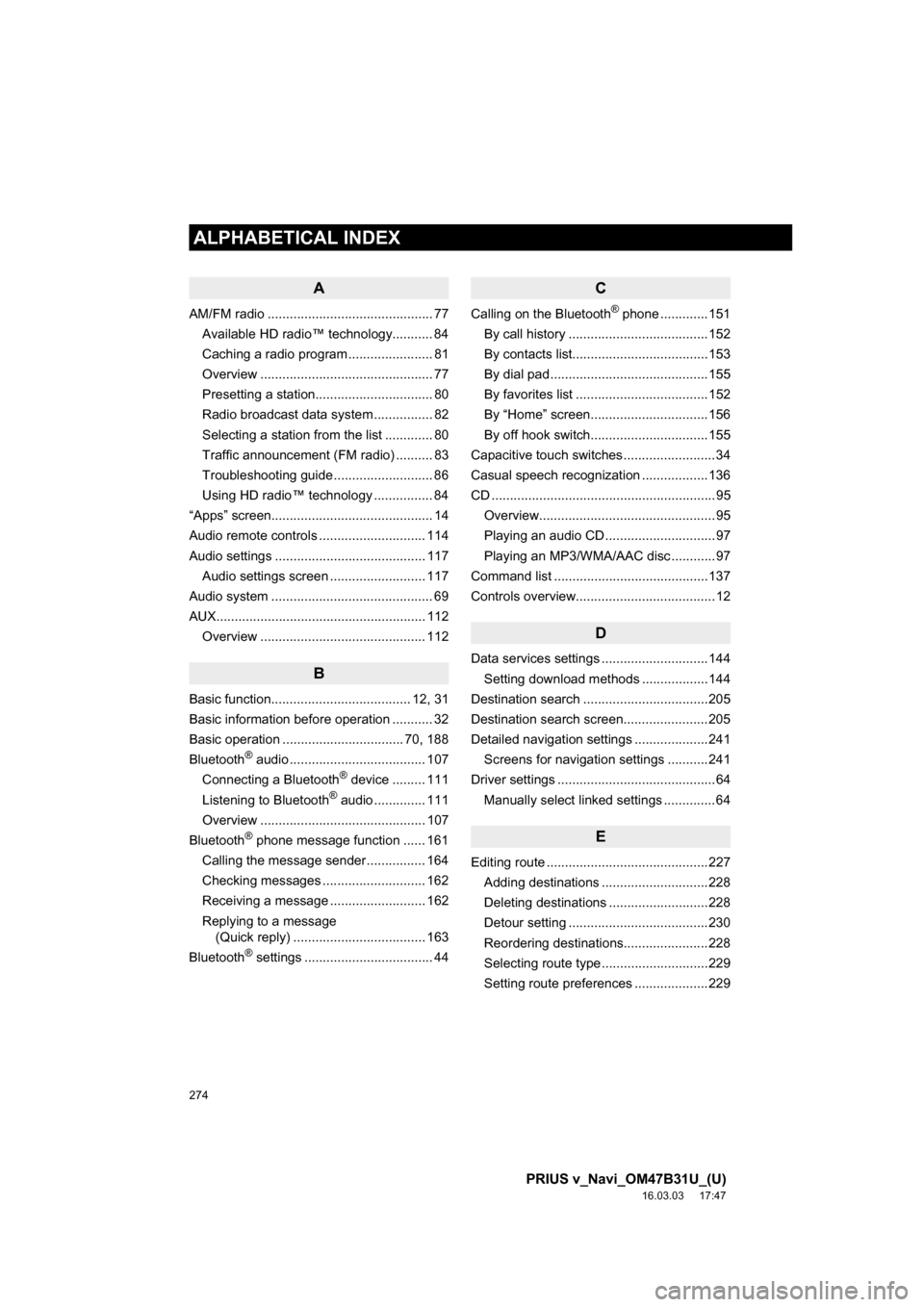
A
AM/FM radio ............................................. 77Available HD radio™ technology........... 84
Caching a radio program ....................... 81
Overview ............................................... 77
Presetting a station................................ 80
Radio broadcast data system ................ 82
Selecting a station from the list ............. 80
Traffic announcement (FM radio) .......... 83
Troubleshooting guide ........................... 86
Using HD radio™ technology ................ 84
“Apps” screen............................................ 14
Audio remote controls ............................. 114
Audio settings ......................................... 117 Audio settings screen .......................... 117
Audio system ....... ..................................... 69
AUX......................................................... 112 Overview ............................................. 112
B
Basic function...................................... 12, 31
Basic information before operation ........... 32
Basic operation ................................. 70, 188
Bluetooth
® audio ..................................... 107
Connecting a Bluetooth® device ......... 111
Listening to Bluetooth® audio .............. 111
Overview ............................................. 107
Bluetooth
® phone message function ...... 161
Calling the message sender ................ 164
Checking messages ............................ 162
Receiving a message .......................... 162
Replying to a message (Quick reply) .................................... 163
Bluetooth
® settings ................................... 44
C
Calling on the Bluetooth® phone .............151
By call history ......................................152
By contacts list.....................................153
By dial pad ...........................................155
By favorites list ....................................152
By “Home” screen................................156
By off hook switch................................155
Capacitive touch switches .........................34
Casual speech recognization ..................136
CD .............................................................95 Overview................................................95
Playing an audio CD ..............................97
Playing an MP3/WMA/AAC disc ............97
Command list ..........................................137
Controls overview......................................12
D
Data services settings .............................144 Setting download methods ..................144
Destination search ..................................205
Destination search screen.......................205
Detailed navigation settings ....................241 Screens for navigation settings ...........241
Driver settings ...........................................64 Manually select linked settings ..............64
E
Editing route ............................................227Adding destinations .............................228
Deleting destinations ...........................228
Detour setting ......................................230
Reordering destinations.......................228
Selecting route type .............................229
Setting route preferences ....................229
ALPHABETICAL INDEX
Page 276 of 290

276
ALPHABETICAL INDEX
PRIUS v_Navi_OM47B31U_(U)
16.03.03 17:47
Memory points settings ........................... 231Deleting previous destinations ............ 240
Setting up address book...................... 235
Setting up areas to avoid..................... 238
Setting up home .................................. 232
Setting up preset destinations ............. 233
Mobile assistant ...................................... 139
Mobile assistant operation ...................... 139
N
Navigation operation ................................. 22
Navigation system........... ..................... ... 186
O
Operating information ............................. 119
CD player and disc .............................. 120
Error messages ................................... 127
File information .................................... 123
iPod ..................................................... 122
Radio ................................................... 119
Terms .................................................. 126
Operation flow: Guiding the route ............. 26
Other settings............................................ 57
P
Phone...................................................... 145
Phone operation (Hands-free system for cellular phones) .............................. 146
Phone/message settings......................... 166
“Contact/Call History Settings” screen .............................................. 168
“Messaging Settings” screen ............... 176
“Phone Display Settings” screen ......... 178
Phone/message settings screen ......... 166
“Sound Settings” screen ...................... 167
Q
Quick guide ...............................................11
Quick reference ...................20, 70, 146, 188 Map screen ..........................................188
Navigation options screen ...................190
R
Radio operation .........................................77
Receiving on the Bluetooth® phone ........157
Incoming calls ......................................157
Receiving weather information ................142 Displaying weather information ...........142
Registering home ......................................22
Registering preset destinations .................24
Registering/connecting Bluetooth
®
device ....................................................44
Certification............................................48
Profiles...................................................46
Registering a Bluetooth
® audio
player for the first time .......................45
Registering a Bluetooth
® phone for
the first time .......................................44
Route guidance .......................................221
Route guidance screen ...........................221 During freeway driving .........................223
Route overview ....................................222
Screen for route guidance ...................221
Turn list screen ....................................225
Turn-by-turn arrow screen ...................225
When approaching intersection ...........224
Page 277 of 290
277
PRIUS v_Navi_OM47B31U_(U)
16.03.03 17:47
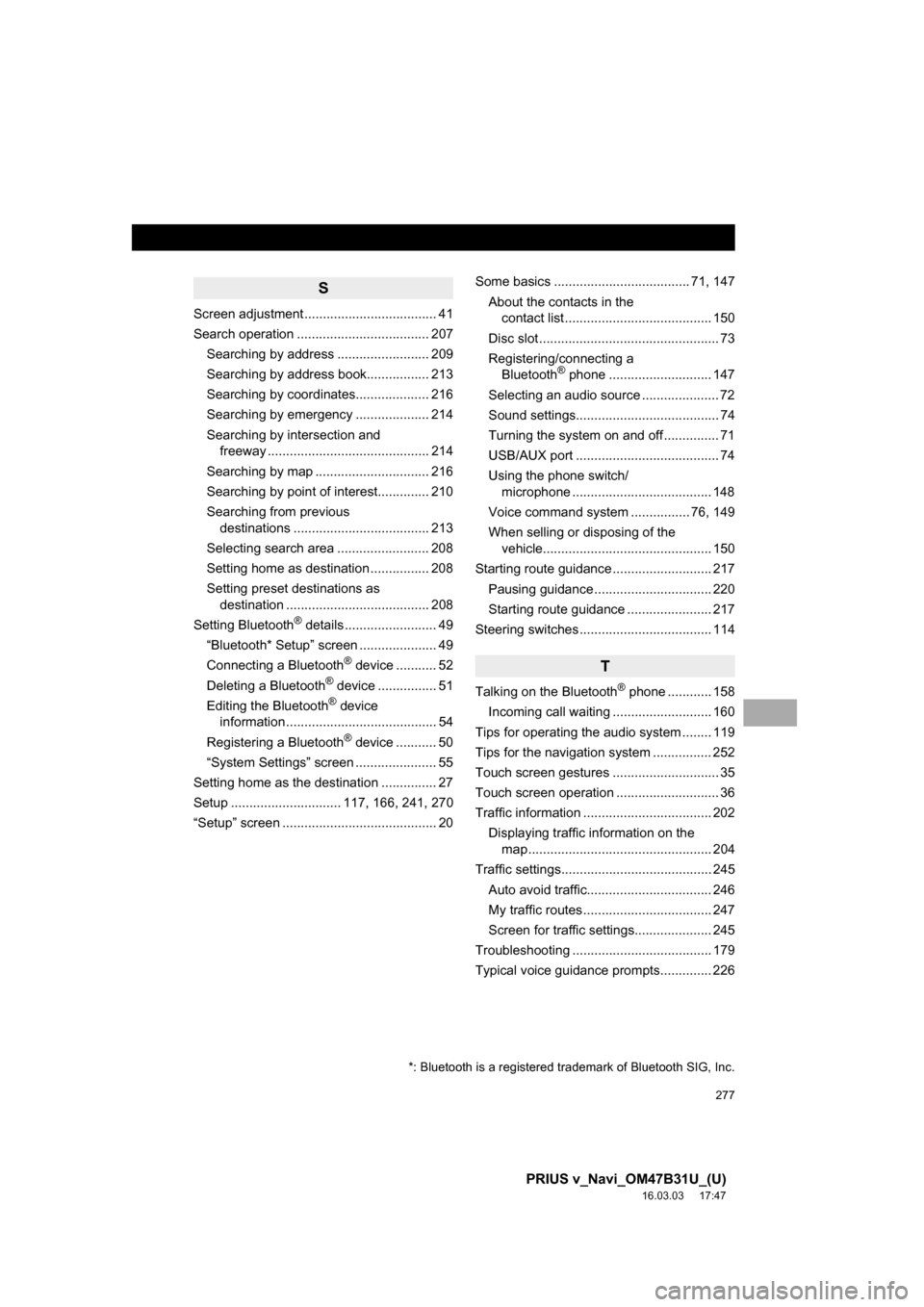
S
Screen adjustment .................................... 41
Search operation .................................... 207Searching by address ......................... 209
Searching by address book................. 213
Searching by coordinates.................... 216
Searching by emergency .................... 214
Searching by intersection and freeway ............................................ 214
Searching by map ............................... 216
Searching by point of interest.............. 210
Searching from previous destinations ..................................... 213
Selecting search area ......................... 208
Setting home as destination ................ 208
Setting preset destinations as destination ....................................... 208
Setting Bluetooth
® details ......................... 49
“Bluetooth* Setup” screen ..................... 49
Connecting a Bluetooth
® device ........... 52
Deleting a Bluetooth® device ................ 51
Editing the Bluetooth® device
information ......................................... 54
Registering a Bluetooth
® device ........... 50
“System Settings” screen ...................... 55
Setting home as the destination ............... 27
Setup .............................. 117, 166, 241, 270
“Setup” screen .......................................... 20 Some basics ..................................... 71, 147
About the contacts in the contact list ........................................ 150
Disc slot ................................................. 73
Registering/connecting a Bluetooth
® phone ............................ 147
Selecting an audio source ..................... 72
Sound settings....................................... 74
Turning the system on and off ............... 71
USB/AUX port ....................................... 74
Using the phone switch/ microphone ...................................... 148
Voice command system .... ............ 76, 149
When selling or disposing of the vehicle.............................................. 150
Starting route guidance ........................... 217 Pausing guidance ................................ 220
Starting route guidance ....................... 217
Steering switches .................................... 114
T
Talking on the Bluetooth® phone ............ 158
Incoming call waiting ........................... 160
Tips for operating the audio system ........ 119
Tips for the navigation system ................ 252
Touch screen gestures ............................. 35
Touch screen operation ............................ 36
Traffic information ................................... 202 Displaying traffic information on the map .................................................. 204
Traffic settings......................................... 245 Auto avoid traffic.................................. 246
My traffic routes ................................... 247
Screen for traffic settings..................... 245
Troubleshooting ...................................... 179
Typical voice guidance prompts.............. 226
*: Bluetooth is a registered trademark of Bluetooth SIG, Inc.