2017 TOYOTA PRIUS PRIME ESP
[x] Cancel search: ESPPage 244 of 784

244
PRIUS PRIME_OM_OM47A88U_(U)
3. Instrument cluster
■Enabling/disabling of the head-up display
When the head-up display is turned off with the “HUD” switch, it is not dis-
played until the “HUD” switch is used to turn the head-up display on again.
(Operation of the head-up display is not linked with the power switch.)
■ Display brightness
●The brightness of the head-up display is automatically adjusted according to
the operation status of the headlights (on/off) and the brightness of the sur-
roundings.
● When the brightness of the head-up display is adjusted to a certain level or
higher, the display automatically dims when the vehicle is stopped. Once the
vehicle starts off and the vehicle speed reaches approximately 3.1 mph
(5 km/h) or more, the display automatically returns to its previous bright-
ness.
■ Vehicle speed display
In extremely cold environments, the display of the speedometer and the vehi-
cle speed of the head-up display may slightly differ.
■ Head-up display
The head-up display may seem dark and hard to see when viewed through
sunglasses, especially polarized sunglasses.
■ When the 12-volt battery is disconnected
The customize settings of the head-up display will be reset.
■ Route guidance display
The route guidance is not displayed on both the head-up display and multi-
information display simultaneously. When the route guidance is displayed on
the head-up display, the multi-information display does not display the route
guidance even if the navigation system-linked display ( →P. 225) is selected
on the multi-information display.
Page 272 of 784

272
PRIUS PRIME_OM_OM47A88U_(U)
4-2. Opening, closing and locking the doors
WARNING
■To prevent an accident
Observe the following precautions while driving the vehicle.
Failure to do so may result in a door opening and an occupant throwing out
of the vehicle, resulting in death or serious injury.
● Ensure that all doors are properly closed and locked.
● Do not pull the inside handle of the doors while driving.
Be especially careful for the front doors, as the doors may be opened even
if the inside lock buttons are in locked position.
● Set the rear door child-protector locks when children are seated in the rear
seats.
■ When opening or closing a door
Check the surroundings of the vehicle such as whether the vehicle is on an
incline, whether there is enough space for a door to open and whether a
strong wind is blowing. When opening or closing the door, hold the door
handle tightly to prepare for any unpredictable movement.
■ When using the wireless remote co ntrol and operating the power win-
dows
Operate the power window after checking to make sure that there is no pos-\
sibility of any passenger having any of their body parts caught in the side
window. Also, do not allow children to operate the wireless remote control. It
is possible for children and other passengers to get caught in the power
window.
Page 293 of 784
PRIUS PRIME_OM_OM47A88U_(U)
2934-3. Adjusting the seats
4
Operation of each component
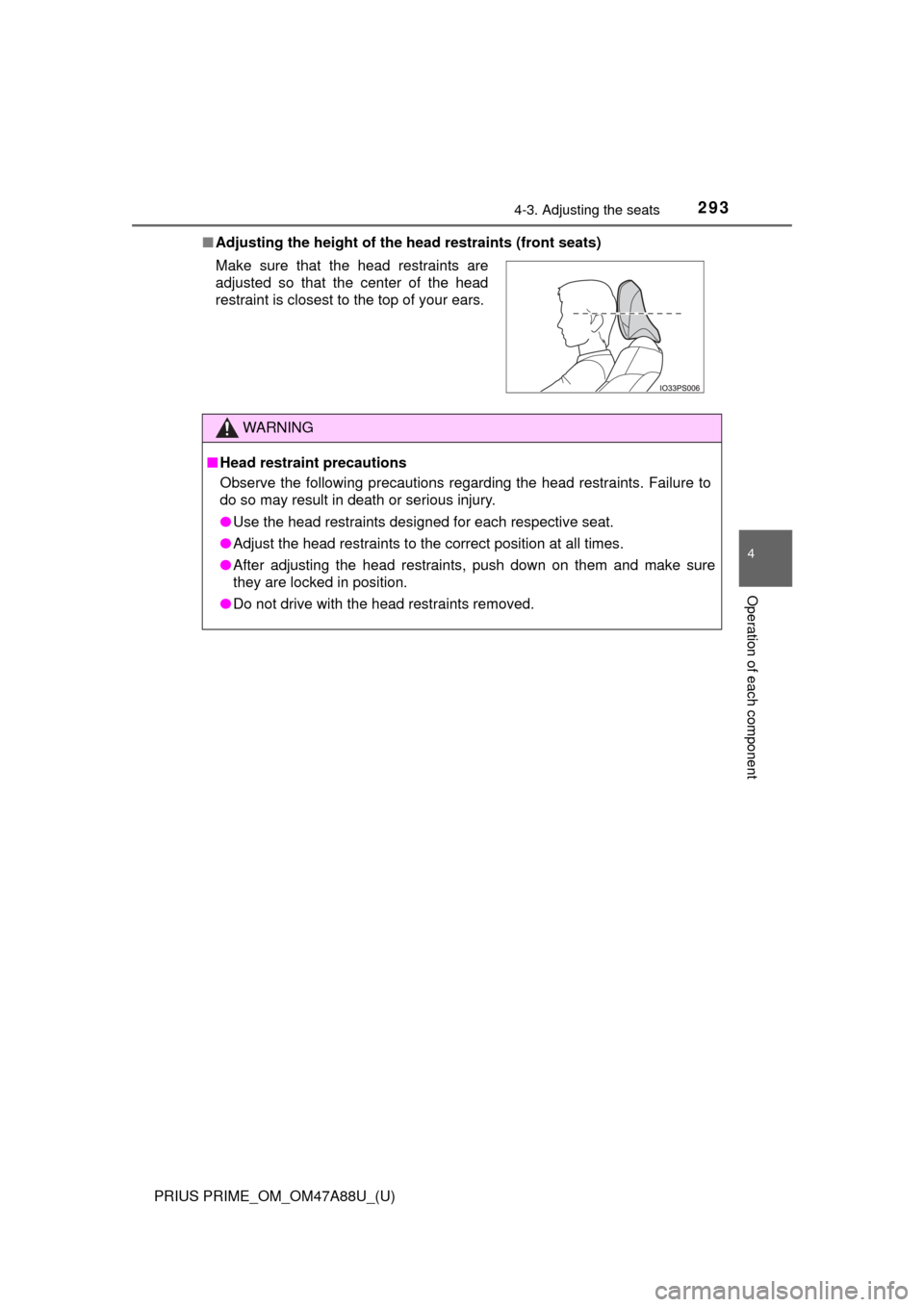
■Adjusting the height of the head restraints (front seats)
Make sure that the head restraints are
adjusted so that the center of the head
restraint is closest to the top of your ears.
WARNING
■ Head restraint precautions
Observe the following precautions regarding the head restraints. Failure to
do so may result in death or serious injury.
● Use the head restraints designed for each respective seat.
● Adjust the head restraints to the correct position at all times.
● After adjusting the head restraints, push down on them and make sure
they are locked in position.
● Do not drive with the head restraints removed.
Page 297 of 784

2974-4. Adjusting the steering wheel and mirrors
PRIUS PRIME_OM_OM47A88U_(U)
4
Operation of each component
Auto anti-glare inside rear view mirror
Responding to the level of brightne ss of the headlights of vehicles
behind, the reflected light is automatically reduced.
Changing automatic anti-glare
function mode
On
Off
When the automatic anti-glare
function is in ON mode, the indica-
tor illuminates.
The function will set to ON mode
each time the power switch is
turned to ON mode.
Pressing the button turns the func-
tion to OFF mode. (The indicator
also turns off.)
■To prevent sensor error (vehicles with auto anti-glare inside rear view
mirror)
Indicator
1
2
To ensure that the sensors operate prop-
erly, do not touch or cover them.
WARNING
Do not adjust the position of the mirror while driving.
Doing so may lead to mishandling of the vehicle and cause an accident,
resulting in death or serious injury.
Page 302 of 784
302
PRIUS PRIME_OM_OM47A88U_(U)
4-5. Opening and closing the windows
■Door lock linked window operation
●The power windows can be opened and closed using the mechanical key.
*
(→P. 690)
● The power windows can be opened using the wireless remote control.
*
(→P. 268)
*: These settings must be customized at your Toyota dealer.
■ Power window open reminder function
The buzzer sounds and a message is shown on the multi-information display
in the instrument cluster when the power switch is turned off and the driver’s
door is opened with the power windows open.
■ Customization
Settings (e.g. linked door lock operation) can be changed.
(Customizable features: →P. 732)
WARNING
Observe the following precautions.
Failing to do so may result in death or serious injury.
■Closing the windows
● The driver is responsible for all the power window operations, including the
operation for the passengers. In order to prevent accidental operation,
especially by a child, do not let a child operate the power windows. It is
possible for children and other passengers to have body parts caught in
the power window. Also, when riding with a child, it is recommended to use
the window lock switch. ( →P. 300)
● When using the wireless remote control or mechanical key and operating
the power windows, operate the power window after checking to make
sure that there is no possibility of any passenger having any of their body
parts caught in the side window. Also do not let a child operate side win-
dow by the wireless remote control or mechanical key. It is possible for
children and other passengers to get caught in the power window.
● When exiting the vehicle, turn the power switch off, carry the key and exit
the vehicle along with the child. There may be accidental operation, due to
mischief, etc., that may possibly lead to an accident.
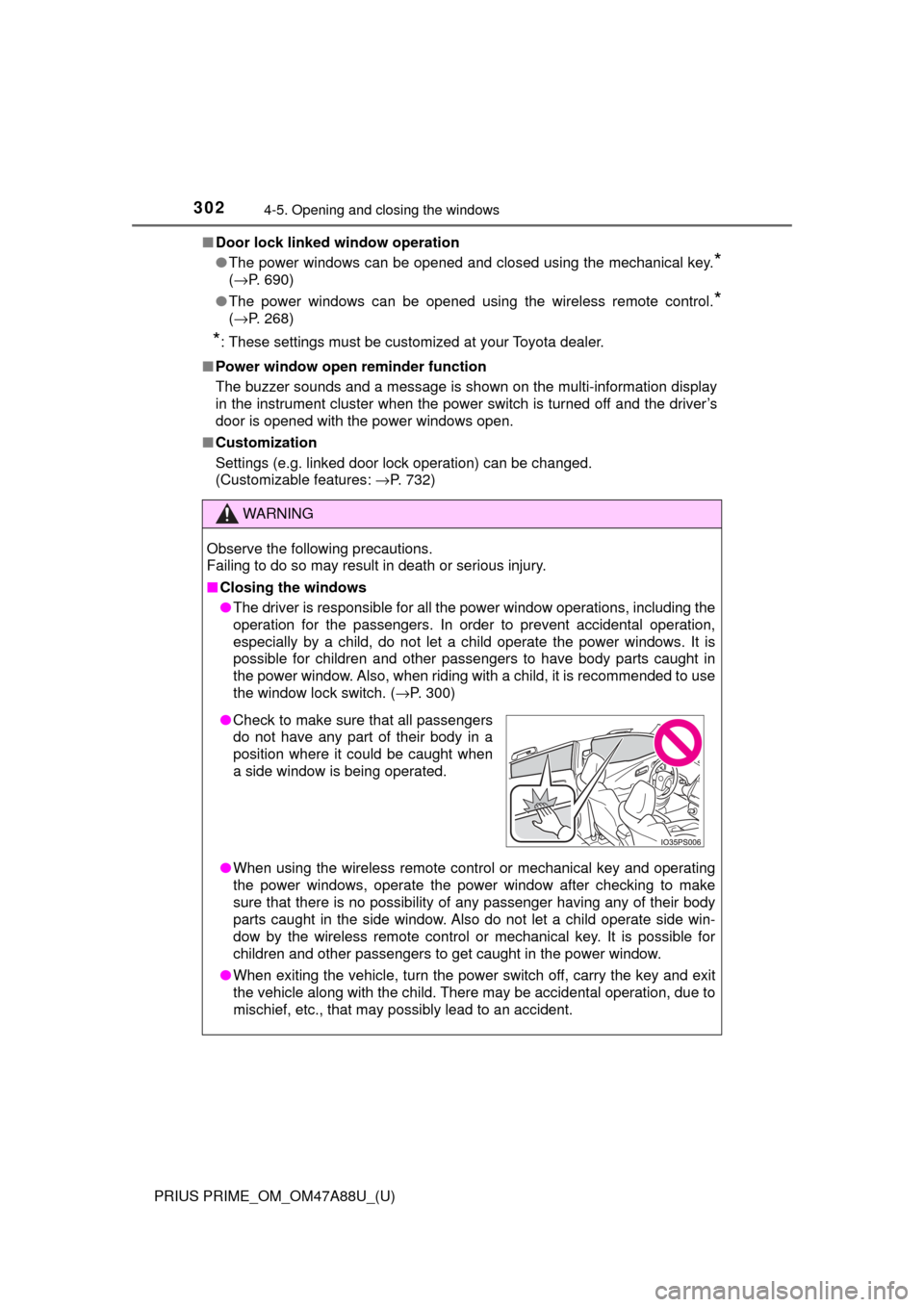
●Check to make sure that all passengers
do not have any part of their body in a
position where it could be caught when
a side window is being operated.
Page 307 of 784

PRIUS PRIME_OM_OM47A88U_(U)
3075-1. Before driving
5
Driving
Stop the vehicle completely.
Set the parking brake. (→P. 337)
Shift the shift position to P. ( →P. 331)
Check that the shift position indicator shows P.
Press the power switch to stop the hybrid system.
Slowly release the brake pedal.
Lock the door, making sure that you have the electronic key on your
person.
If parking on a hill, block the wheels as needed.
Firmly set the parking brake with the brake pedal depressed, and
then shift the shift position to D.
Release the brake pedal and gentl y depress the accelerator pedal.
Release the parking brake.
■ When starting off on an uphill
The hill-start assist control will activate. ( →P. 477)
■ For electricity-saving and fuel-efficient driving
Understand the system characteristics of the vehicle to use the functions of
the hybrid system. Also, keep in mind that hybrid vehicles are similar to con-
ventional vehicles, and it is necessary to refrain from activities such as sud-
den acceleration. Refer to “Plug-in hybrid vehicle driving tips” ( →P. 97).
■ Driving in the rain
●Drive carefully when it is raining, because visibility will be reduced, the win-
dows may become fogged-up, and the road will be slippery.
● Drive carefully when it starts to rain, because the road surface will be espe-
cially slippery.
● Refrain from high speeds when driving on an expressway in the rain,
because there may be a layer of water between the tires and the road sur-
face, preventing the steering and brakes from operating properly.
Parking the vehicle
Starting off on a steep uphill
1
2
3
4
5
6
1
2
3
Page 310 of 784

310
PRIUS PRIME_OM_OM47A88U_(U)
5-1. Before driving
WARNING
Observe the following precautions.
Failure to do so may result in death or serious injury.
■When starting the vehicle
Always keep your foot on the brake pedal while stopped with the “READY”
indicator is illuminated. This prevents the vehicle from creeping.
■ When driving the vehicle
● Do not drive if you are unfamiliar with the location of the brake and ac\
cel-
erator pedals to avoid depressing the wrong pedal.
• Accidentally depressing the accelerator pedal instead of the brake
pedal will result in sudden acceleration that may lead to an accident.
• When backing up, you may twist your body around, leading to a diffi- culty in operating the pedals. Make sure to operate the pedals properly.
• Make sure to keep a correct driving posture even when moving the vehicle only slightly. This allows you to depress the brake and accelera-
tor pedals properly.
• Depress the brake pedal using your right foot. Depressing the brake pedal using your left foot may delay response in an emergency, result-
ing in an accident.
● The driver should pay extra attention to pedestrians when the vehicle is
powered only by the electric motor (traction motor). As there is no engine
noise, the pedestrians may misjudge the vehicle’s movement. Even
though the vehicle is equipped with the vehicle proximity notification sys-
tem, drive with care as pedestrians in the vicinity may still not notice the
vehicle if the surrounding area is noisy.
● Do not drive the vehicle over or stop the vehicle near flammable materials.
The exhaust system and exhaust gases can be extremely hot. These hot
parts may cause a fire if there is any flammable material nearby.
● During normal driving, do not turn off the hybrid system. Turning the hybrid
system off while driving will not cause loss of steering or braking control,
however, power assist to the steering will be lost. This will make it more
difficult to steer smoothly, so you should pull over and stop the vehicle as
soon as it is safe to do so.
In the event of an emergency, such as if it becomes impossible to stop the
vehicle in the normal way: →P. 645
Page 361 of 784
361
PRIUS PRIME_OM_OM47A88U_(U)
5-5. Using the driving support systems
5
Driving
Toyota Safety Sense P
◆PCS (Pre-Collision System)
→P. 3 6 9
◆LDA (Lane Departure Alert with steering control)
→P. 3 8 1
◆Automatic High Beam
→P. 3 4 3
◆Dynamic radar cruise cont rol with full-speed range
→ P. 3 9 1
The Toyota Safety Sense P consists of the following drive assist
systems and contributes to a safe and comfortable driving expe-
rience:
WARNING
■Toyota Safety Sense P
The Toyota Safety Sense P is designed to operate under the assumption
that the driver will drive safely, and is designed to help reduce the impact to
the occupants and the vehicle in the case of a collision or assist the driver in
normal driving conditions.
As there is a limit to the degree of recognition accuracy and control perfor-
mance that this system can provide, do not overly rely on this system. The
driver is always responsible for paying attention to the vehicle’s surround-
ings and driving safely.