2017 TOYOTA PRIUS PRIME ECO mode
[x] Cancel search: ECO modePage 130 of 784
130
PRIUS PRIME_OM_OM47A88U_(U)
2-2. Charging
■Searching charging stations (vehicles with 11.6-inch display)
After applying to Entune, it is possible to use the smartphone application to
search the nearby charging stations.
For details about Entune, refer to http://www.toyota.com/entune/.
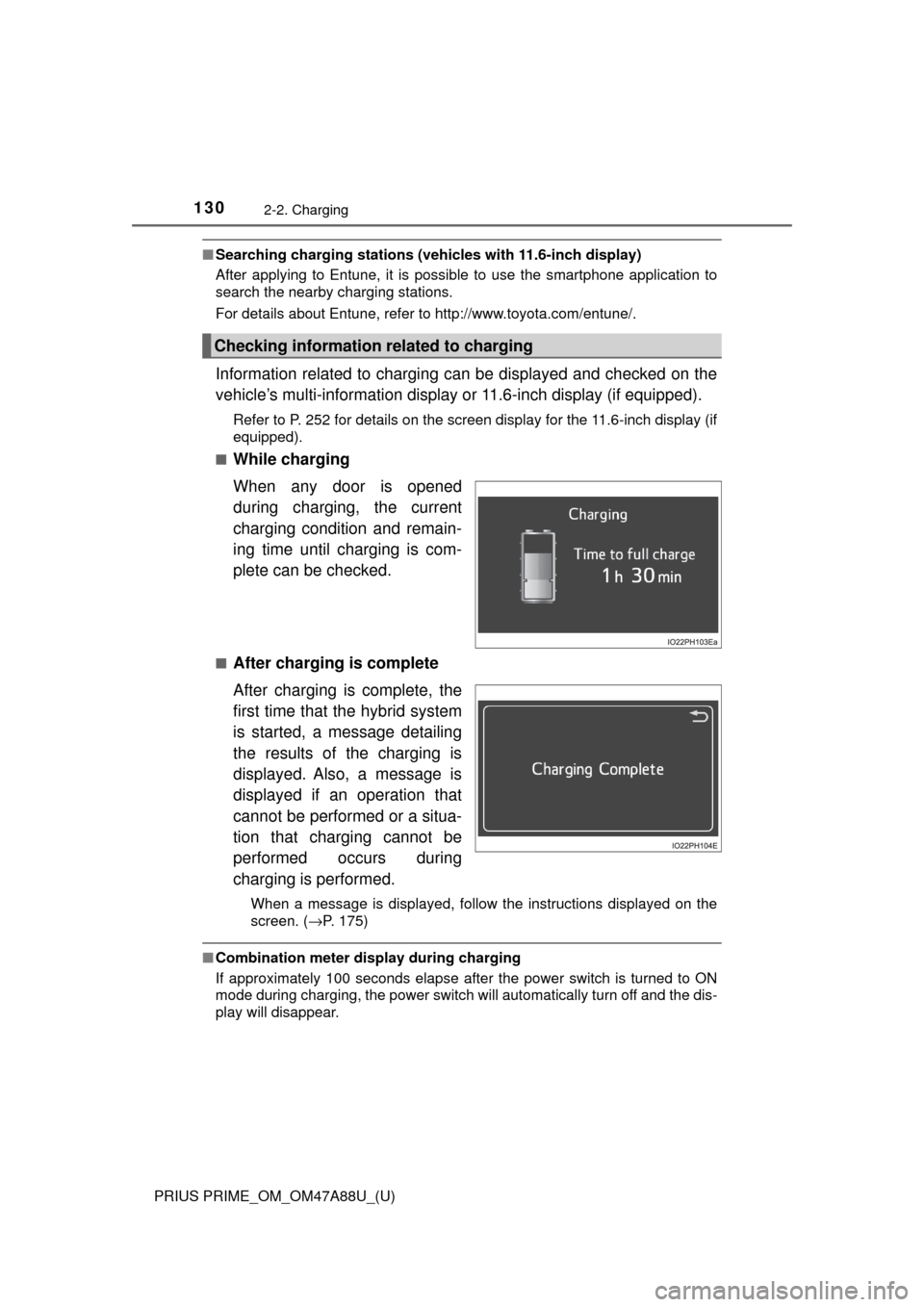
Information related to charging can be displayed and checked on the
vehicle’s multi-information display or 11.6-inch display (if equipped).
Refer to P. 252 for details on the screen display for the 11.6-inch display (if
equipped).
■
While charging
When any door is opened
during charging, the current
charging condition and remain-
ing time until charging is com-
plete can be checked.
■After charging is complete
After charging is complete, the
first time that the hybrid system
is started, a message detailing
the results of the charging is
displayed. Also, a message is
displayed if an operation that
cannot be performed or a situa-
tion that charging cannot be
performed occurs during
charging is performed.
When a message is displayed, follow the instructions displayed on the
screen. ( →P. 175)
■Combination meter display during charging
If approximately 100 seconds elapse after the power switch is turned to ON
mode during charging, the power switch will automatically turn off and the dis-
play will disappear.
Checking information related to charging
Page 133 of 784

PRIUS PRIME_OM_OM47A88U_(U)
1332-2. Charging
2
Plug-in hybrid system
■Capacity reduction of the hybr id battery (traction battery)
The capacity of the hybrid battery (traction battery) will decline gradually
when the hybrid battery (traction battery) is in use. The rate at which it
declines will differ in accordance with environmental conditions and the way
in which the vehicle is used. Observing the following can help suppress bat-
tery capacity decline.
● Avoid parking the vehicle in areas with a high temperature under direct su\
n-
light when the hybrid battery (traction battery) is fully charged.
● Avoid accelerating and decelerating frequently and suddenly when EV driv-
ing.
● Avoid frequent driving near the top speed for EV driving. ( →P. 87)
● Leave a low level of charge in the hybrid battery (traction battery) when
leaving the vehicle undriven for a long period of time.
After confirming that EV mode has switched to HV mode, turn the power
switch off.
● Use the charging timer function as much as possible in order to fully
charge the hybrid battery (traction battery) immediately before starting
off. ( →P. 147)
Also, if the hybrid battery (traction battery) capacity reduces, the distance that
can be driven in EV mode decreases. However, vehicle performance does
not significantly become worse.
■ When the remaining charge of the hybr id battery (traction battery) is low
after charging
In the following situations, the remaining charge of the hybrid battery (traction
battery) after charging completes may be less than normal in order to protect
the system (the EV driving range after the battery is fully charged may be
shorter).
*
● Charging is carried out when the outside temperature is low or high
● Charging is carried out immediately af ter high-load driving or in extreme
heat
When none of the above situations apply and there is a drastic drop in the
remaining charge of the hybrid battery (traction battery) after charging com-
pletes, have the vehicle inspected by your Toyota dealer.
*: When this occurs, even if the remaining charge display of the hybrid battery (traction battery) shows that it is fully charged, the remaining charg\
e rapidly
decreases faster than normal.
■ Certification
This device complies with Part 15 of the FCC Rules.
Operation is subject to the following two conditions:
(1) this device may not cause harmful interference, and
(2) this device must accept any interference received, including interference
that may cause undesired operation.
Page 141 of 784

PRIUS PRIME_OM_OM47A88U_(U)
1412-2. Charging
2
Plug-in hybrid system
Remove the plug from the out-
let when the charging equip-
ment will not be used for a
prolonged period of time.
Hold the body of the plug when
removing.
Make sure to put the cable away
immediately after disconnecting.
(→P. 145)
When leaving the plug inserted, inspect the plug and connector once a
month to check if dirt or dust has accumulated.
■ Charging time
→P. 125
■ Safety function
If the latch release button is pressed, charging will not begin even if the
charging cable is connected.
Also, charging will be stopped if the latch release button is pressed and held
for several seconds during charging. When restarting charging, reinsert the
charging connector after pulling it out, and check that the charging indicator
illuminates.
■ When the outside temper ature is low or high
The level shown on the remaining charge display ( →P. 216) may drop slightly
when the power switch is turned to ON mode, even if charging has been com-
pleted and the hybrid battery (traction battery) is fully charged. However, this
does not indicate a malfunction.
■ Charging time may increase
→P. 126
■ While charging
When the power switch is turned to ON mode and the energy monitor dis-
plays, the charging connector is displayed on the energy monitor and the flow
of electricity during charging is displayed ( →P. 208). Also, when the charging
connector is locked, is displayed.
*
*
: Vehicles with smart lid & connector locking system only
5
Page 172 of 784

172
PRIUS PRIME_OM_OM47A88U_(U)
2-2. Charging
Refer to the following table and carry out the appropriate correction
procedure.
When charging timer function does not operate normally
Likely causeCorrection procedure
Cannot charge at desired time
Vehicle clock is not properly
adjustedCheck the clock settings and adjust
it to the proper time. ( →P. 185)
Charging cable is not connected to
vehicleBefore using the charging timer,
connect the charging cable.
Incorrect charging mode selected
Check the charging mode setting.
(→ P. 147)
When the charging mode is “Start”,
charging starts at the set time, but
when it is “Departure”, charging is
completed by the set time. (The
charging start time is automatically
controlled by the system.)
Cannot change timer setting from smartphone application (vehicles with
11.6-inch display)
*
Smartphone is outside its coverage
area
Check the signal strength. If the
smartphone is outside its coverage
area, move to a place with a better
signal.
Page 173 of 784

PRIUS PRIME_OM_OM47A88U_(U)
1732-2. Charging
2
Plug-in hybrid system
Charging starts immediately, even though charge schedule is registered
“Charge Now” is set to “On”
When charging according to the
timer, set “Charge Now” to “Off”.
(→ P. 156, 165)
Charge schedule is set to “Off”Check that charge schedule is not
set to “Off”. (→P. 154, 164)
Charging mode is set to “Departure”
and schedule departure time is
close to current time
When the system determines that
there is no time to finish charging by
the set scheduled departure time, it
starts charging immediately. Check
the charge schedules.
Charging cable was removed and
reinserted while charging indicator
was flashing
If the charging cable is removed and
reinserted while the charging indica-
tor is flashing, the charging timer is
canceled ( →P. 139). Temporarily
remove the charging cable, and then
reconnect it.
The Remote Air Conditioning Sys-
tem was operated
When the Remote Air Conditioning
System is operated, the system will
start charging immediately, even if
the charge schedule is registered.
To carry out charging using the
timer, stop the Remote Air Condi-
tioning System, and then reconnect
the charging cable.
“Traction Battery Heater” ( →P. 126)
operated
When the charging mode is set to
“Departure”, “Traction Battery
Heater” may operate before
charging starts. Check the status of
the charging indicator. ( →P. 106)
Outside temperature is low and
hybrid battery (traction battery)
warming control (→P. 127) of the
hybrid battery (traction battery) oper-
ated
(Alaska and Canada only)When hybrid battery (traction bat-
tery) warming control of the hybrid
battery (traction battery) operates,
the timer settings are ignored and
charging starts immediately. In order
to protect the hybrid battery (traction
battery), allow charging to continue.
Likely causeCorrection procedure
Page 186 of 784

186
PRIUS PRIME_OM_OM47A88U_(U)
3. Instrument cluster
■The meters and display illuminate when
The power switch is in ON mode.
■ Adjusting the instrument cluster brightness (→P. 182)
● The brightness levels that can be selected differ depending on whether the
tail lights are on and surrounding brightness levels, as shown in the table
below.
*: 22 levels of the brightness are displayed on the setting screen. However,
the brightness setting will be the brightest when other than 1st level (the
darkest) is selected. If other than 1st or 22nd level is selected, when the
tail lights are turned on in a dark place, the instrument cluster brightness
setting will be the selected level.
● If the taillights are illuminated in a dark environment, the instrument cluster
light dims. However, when the brightness of the instrument cluster is set to
minimum or maximum (1st or 22nd level of the instrument cluster bright-
ness), even if the taillights are illuminated, the instrument cluster light will
not dim.
■ When disconnecting and reconnect ing 12-volt battery terminals
The settings of the clock will be reset.
■ Calendar settings
●Until the calendar settings are set, the check screen is displayed every time
the power switch is turned to ON mode.
● After the calendar information is set, it can be changed in the “Meter Cus-
tomize” settings. ( →P. 233)
The tail lights are offThe tail lights are on
In a bright place2 levels*2 levels*
In a dark place22 levels
If calendar recording is interrupted due to
replacement of the 12-volt battery or 12-
volt battery discharge, etc., when the
power switch is turned to ON mode after
maintenance, the calendar settings check
screen is automatically displayed on the
multi-information display.
● If date information is not set, the electric-
ity and fuel consumption record cannot
be stored correctly. When the calendar
settings check screen is displayed,
make sure to always set the settings.
(→P. 231)
Page 190 of 784

190
PRIUS PRIME_OM_OM47A88U_(U)
3. Instrument cluster
*1: These lights turn on when the power switch is turned to ON mode to indi-cate that a system check is being performed. They will turn off after the
hybrid system is on, or after a few seconds. There may be a malfunction in
a system if a light does not come on, or if the lights do not turn off. Have
the vehicle inspected by your Toyota dealer.
*2: The light flashes to indicate a malfunction.
*1, 2ICS OFF indicator (if equipped) P. 655
Open door warning lightP. 655
Low fuel level warning lightP. 655
Driver’s and front passenger’s seat belt
reminder lightP. 656
Rear passengers’ seat belt reminder light
(U.S.A. only)
P. 656
*1Master warning light
P. 656
*1Tire pressure warning lightP. 656
Warning lightsPages
Page 192 of 784

192
PRIUS PRIME_OM_OM47A88U_(U)
3. Instrument cluster
*1: These lights turn on when the power switch is turned to ON mode to indi-cate that a system check is being performed. They will turn off after the
hybrid system is on, or after a few seconds. There may be a malfunction in
a system if a light does not come on, or if the lights do not turn off. Have
the vehicle inspected by your Toyota dealer.
*2: The light flashes to indicate that the system is operating.
*3: The light comes on when the system is turned off.
Cruise control “SET” indicator P. 391
*1, 3PCS warning lightP. 373
LDA indicator P. 384
Steering control indicatorP. 385
*1Automatic High Beam indicatorP. 343
Heated steering wheel indicator (if equipped) P. 514
“BSM” indicator (if equipped)P. 408
Intuitive parking assist indicator (if equipped) P. 420
*1, 3ICS OFF indicator (if equipped) P. 431
*1S-APGS indicator (if equipped)P. 446
*1“AIR BAG ON/OFF” indicator (U.S.A.) P. 50
*1“AIR BAG ON/OFF” indicator (Canada)P. 50
IndicatorsPages