Page 265 of 796
PRIUS_OM_OM47B54U_(U)
2654-4. Refueling
4
Driving
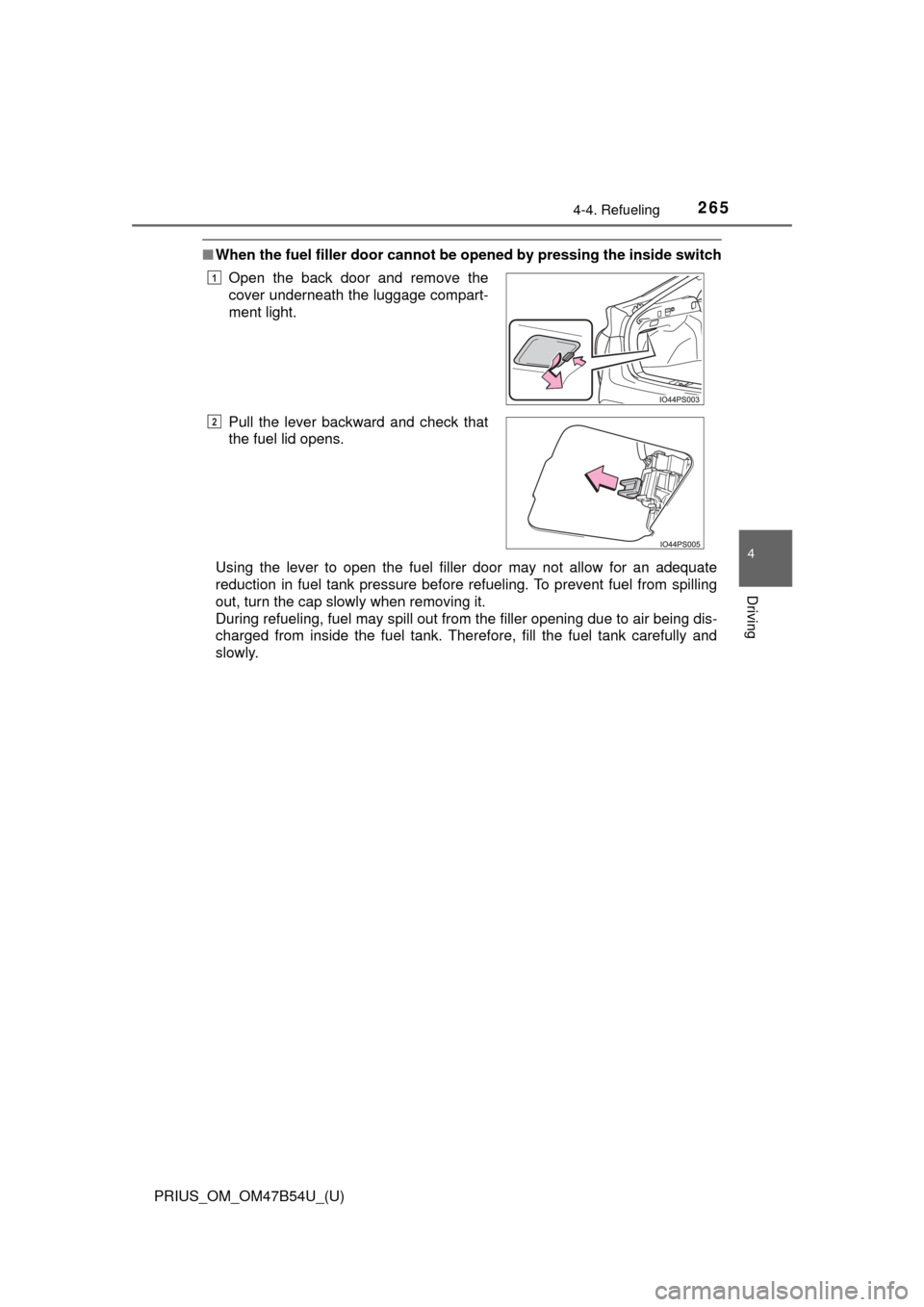
■When the fuel filler door cannot be opened by pressing the inside switch
Using the lever to open the fuel filler door may not allow for an adequate
reduction in fuel tank pressure before refueling. To prevent fuel from spilling
out, turn the cap slowly when removing it.
During refueling, fuel may spill out from the filler opening due to air being dis-
charged from inside the fuel tank. Therefore, fill the fuel tank carefully and
slowly.Open the back door and remove the
cover underneath the luggage compart-
ment light.
Pull the lever backward and check that
the fuel lid opens.
1
2
Page 266 of 796
266
PRIUS_OM_OM47B54U_(U)
4-4. Refueling
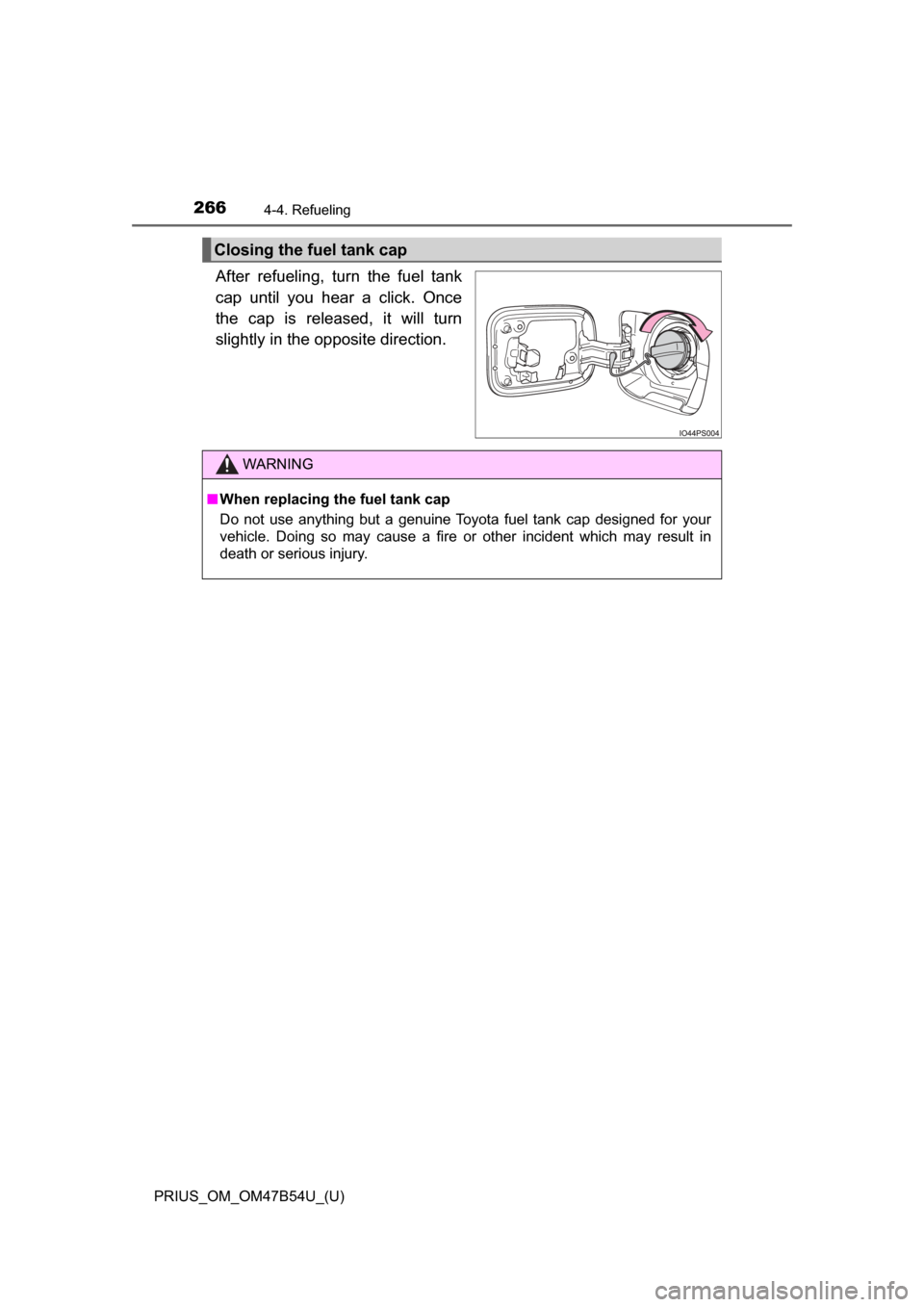
After refueling, turn the fuel tank
cap until you hear a click. Once
the cap is released, it will turn
slightly in the opposite direction.
Closing the fuel tank cap
WARNING
■When replacing the fuel tank cap
Do not use anything but a genuine Toyota fuel tank cap designed for your
vehicle. Doing so may cause a fire or other incident which may result in
death or serious injury.
Page 319 of 796
PRIUS_OM_OM47B54U_(U)
3194-5. Using the driving support systems
4
Driving
Normal mode
Suitable for normal driving.
When normal mode is selected, the “ECO MODE” and “PWR MODE”
indicators turn off.
Power mode
Suitable for when crisp handling and enhanced accelerator
response are desired, such as when driving on mountainous roads.
When power mode is selected, the “PWR MODE” indicator will illuminate
on the main display.
Eco drive mode
Suitable for driving that improv es fuel economy by generating
torque in response to accelerator pedal operations more smoothly
than in normal mode.
When Eco drive mode is selected, the “ECO MODE” indicator will illumi-
nate on the main display.
While the air conditioning is being used, the system automatically
switches to air conditioning eco mode ( →P. 514), allowing for driving
that leads to even better fuel economy.
■ When canceling Eco drive mode/power mode
●Press the switch again. Also, power mode will be canceled automatically
when the power switch is turned off.
● However, Normal mode and Eco drive mode will not be canceled automati-
cally until the switch is pressed, even if the power switch is turned off.
■ Switching the drive mode when in EV drive mode
→P. 232
1
2
3
Page 409 of 796
409
PRIUS_OM_OM47B54U_(U)
4-6. Driving tips
4
Driving
Hybrid vehicle driving tips
◆Using Eco drive mode
When using Eco drive mode, the torque corresponding to the accel-
erator pedal depression amount can be generated more smoothly
than it is in normal conditions. In addition, the operation of the air
conditioning system (h eating/cooling) will be minimized, improving
the fuel economy. ( →P. 318)
◆Use of Hybrid System Indicator
The Eco-friendly driving is possible by keeping the Hybrid System
Indicator within Eco area. ( →P. 1 1 9 )
◆Shift position operation
Shift the shift position to D when st opped at a traffic light, or driving
in heavy traffic etc. Shift the sh ift position to P when parking. When
using the N, there is no positive effect on fuel consumption. In the
N, the gasoline engine operates but electricity cannot be gener-
ated. Also, when using the air cond itioning system, etc., the hybrid
battery (traction batter y) power is consumed.
◆Accelerator pedal/brake pedal operation
●Drive your vehicle smoothly. Avoid abrupt acceleration and
deceleration. Gradual accelerati on and deceleration will make
more effective use of the electric motor (traction motor) without
having to use gasoline engine power.
● Avoid repeated acceleration. Repeated acceleration consumes
hybrid battery (traction battery) power, resulting in poor fuel con-
sumption. Battery power can be restored by driving with the
accelerator pedal slightly released.
For economical and ecological driv ing, pay attention to the fol-
lowing points:
Page 410 of 796

410
PRIUS_OM_OM47B54U_(U)
4-6. Driving tips
◆When braking
Make sure to operate the brakes gently and in a timely manner. A
greater amount of electrical energy can be regenerated when slow-
ing down.
◆Delays
Repeated acceleration and deceleration, as well as long waits at
traffic lights, will lead to bad fuel economy. Check traffic reports
before leaving and avoid delays as much as possible. When driving
in a traffic jam, gently release the brake pedal to allow the vehicle to
move forward slightly while avoi ding overuse of the accelerator
pedal. Doing so can help control excessive gasoline consumption.
◆Highway driving
Control and maintain the vehicle at a constant speed. Before stop-
ping at a toll booth or similar, allow plenty of time to release the
accelerator and gently apply the br akes. A greater amount of elec-
trical energy can be regenerated when slowing down.
◆Air conditioning
Use the air conditioning only when necessary. Doing so can help
reduce excessive gasoline consumption.
In summer: When the ambient temperature is high, use the recircu-
lated air mode. Doing so will help to reduce the burden on the air
conditioning system and reduce fuel consumption as well.
In winter: Because the gasoline eng ine will not automatically cut out
until it and the interior of the vehi cle are warm, it will consume fuel.
Fuel consumption can be improved by avoiding overuse of the
heater.
Page 411 of 796
PRIUS_OM_OM47B54U_(U)
4114-6. Driving tips
4
Driving
◆Checking tire inflation pressure
Make sure to check the tire inflation pressure frequently. Improper
tire inflation pressure can cause poor fuel economy.
Also, as snow tires can cause larg e amounts of friction, their use on
dry roads can lead to poor fuel economy. Use tires that are appro-
priate for the season.
◆Luggage
Carrying heavy luggage will lead to poor fuel economy. Avoid carry-
ing unnecessary luggage. Installing a large roof rack will also cause
poor fuel economy.
◆Warming up before driving
Since the gasoline engine starts up and cuts out automatically
when cold, warming up the engine is unnecessary. Moreover, fre-
quently driving short distances wi ll cause the engine to repeatedly
warm up, which can lead to excess fuel consumption.
Page 427 of 796
427
PRIUS_OM_OM47B54U_(U)
5-2. Setup
5
Audio system
General settings
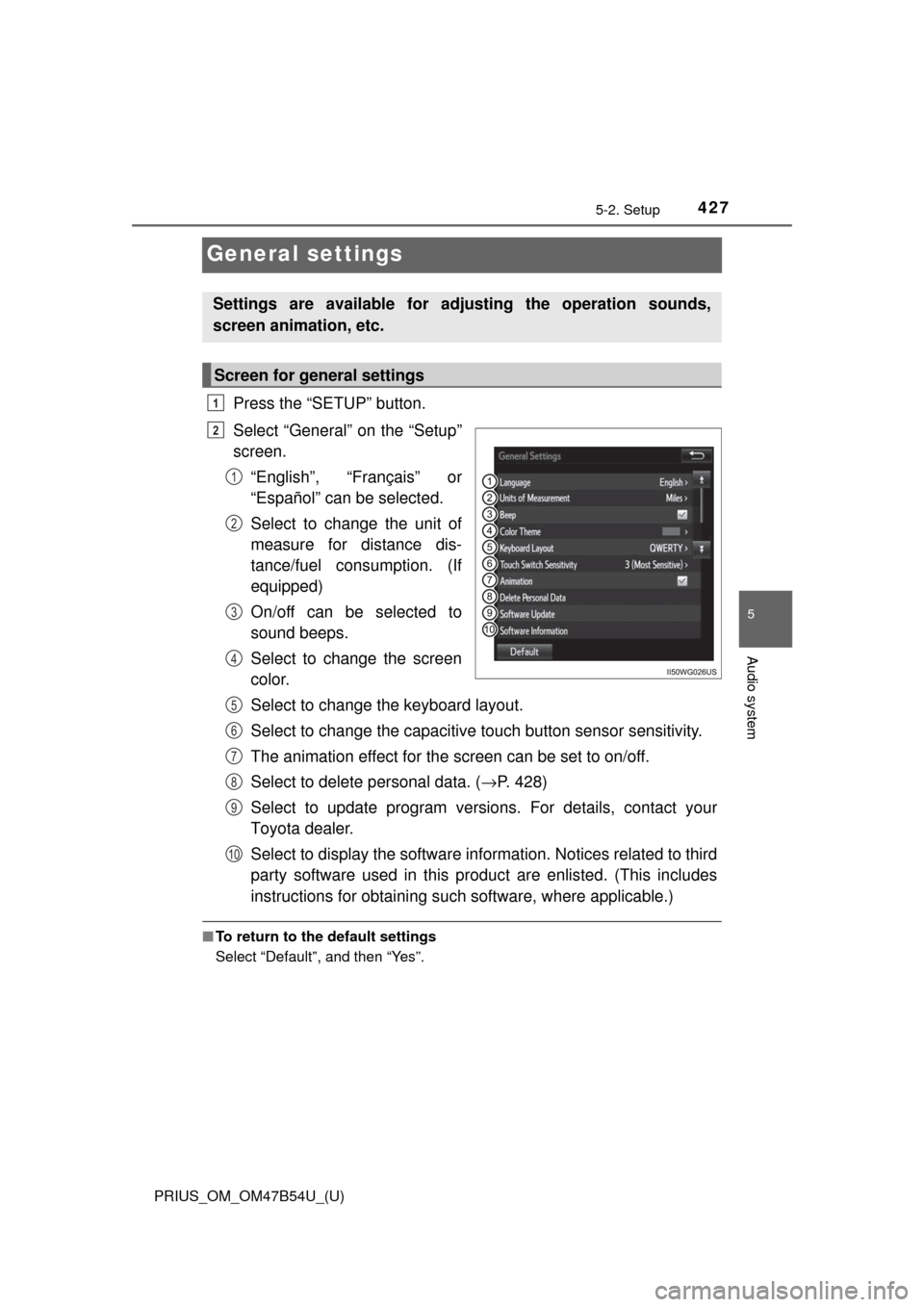
Press the “SETUP” button.
Select “General” on the “Setup”
screen.“English”, “Français” or
“Español” can be selected.
Select to change the unit of
measure for distance dis-
tance/fuel cons umption. (If
equipped)
On/off can be selected to
sound beeps.
Select to change the screen
color.
Select to change the keyboard layout.
Select to change the capacitive touch button sensor sensitivity.
The animation effect for the screen can be set to on/off.
Select to delete personal data. ( →P. 428)
Select to update program versions. For details, contact your
Toyota dealer.
Select to display the software info rmation. Notices related to third
party software used in this produc t are enlisted. (This includes
instructions for obta ining such software, where applicable.)
■To return to the default settings
Select “Default”, and then “Yes”.
Settings are available for adjusting the operation sounds,
screen animation, etc.
Screen for general settings
1
2
1
2
3
4
5
6
7
8
9
10
Page 514 of 796
5146-1. Using the air conditioning system and defogger
PRIUS_OM_OM47B54U_(U)■
Switching between outside air
and recirculated air modes
Press .
The mode switches between outside air mode (indicator off) and recir-
culated air mode (indicator on) each time is pressed.
■
Fresh air intake system while parking
When parking, the system automatically switches to fresh air intake
mode to encourage better air circulation throughout the vehicle,
helping to reduce odors that occur when starting the vehicle.
■Using the Climate control
Press .
When “ECO” is displayed on the air conditioning screen, the air
conditioning is controlled with lo w fuel consumption prioritized such
as reducing fan speed, etc.
The Climate control is turned on when the power switch is turned to ON
mode while the driving mode is Eco drive mode.
Pressing again will cancel climate control.
Other functions