2017 TOYOTA MIRAI Heat
[x] Cancel search: HeatPage 222 of 464
2225-5. Using the driving support systems
MIRAI_OM_USA_OM62023U
NOTICE
■To prevent damage to or incorr ect operation of the LDA system
Observe the following to ensure that the LDA system functions correctly.
● Do not modify the headlights or attach stickers to the surface of the lights.
● Do not modify the suspension.
If any suspension parts need to be replaced, contact your Toyota dealer.
● Do not install or place anything on the hood or the grille. Also, do not install
a grille guard (bull bars, kangaroo bar, etc.).
● If your windshield needs repairs, contact your Toyota dealer.
■ Camera sensor
Observe the following to ensure that the LDA system functions correctly.
● Keep the windshield clean at all times.
Performance could be affected if the windshield is dirty, or if raindrops,
condensation or ice are adhering to the windshield.
● Do not spill liquid onto the camera sensor.
● Do not attach window tinting to the windshield.
● Do not install an antenna in front of the camera lens.
● If the windshield area in front of the camera sensor is fogged up, use the
windshield defogger to remove the fog from that area. ( →P. 261)
When it is cold, using the heater with air blowing to the feet may allow the
upper part of the windshield to fog up. This will have a negative effect on
the images.
● Do not scratch the camera lens, or let it get dirty.
When cleaning the inside of the windshield, be careful not to get any glass
cleaner, etc., on the lens. Also, do not touch the lens.
For lens repair, contact your Toyota dealer.
● Do not change the installation position or direction of the camera sensor or
remove it.
The direction of the camera sensor is precisely adjusted.
● Do not subject the camera sensor to strong impact or force, and do not
disassemble the camera sensor.
● If the windshield needs to be replaced, contact your Toyota dealer.
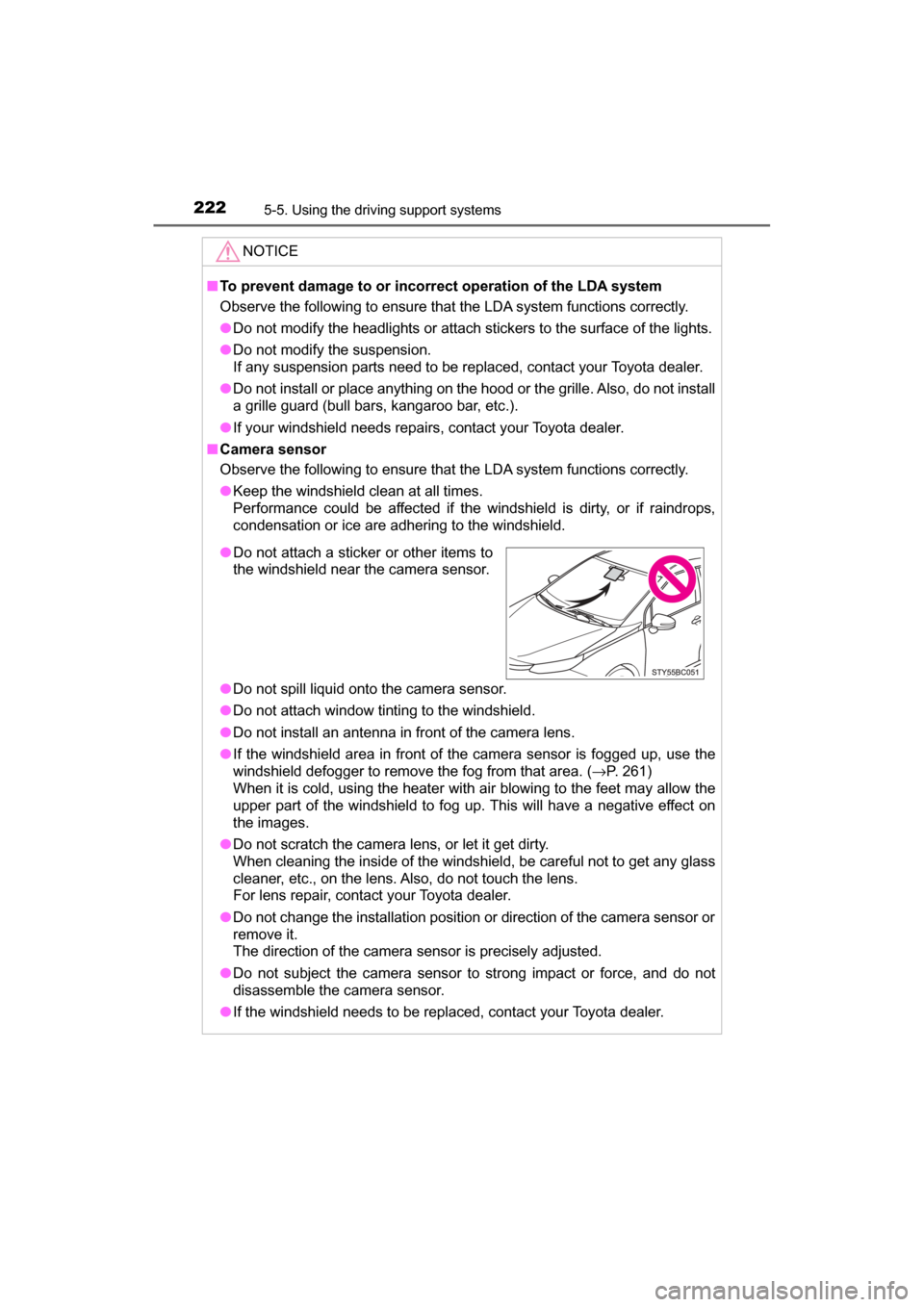
●Do not attach a sticker or other items to
the windshield near the camera sensor.
Page 235 of 464

2355-5. Using the driving support systems
5
Driving
MIRAI_OM_USA_OM62023U■
Reduced effectiveness of the EPS system
The effectiveness of the EPS system is reduced to prevent the system from
overheating when there is frequent steering input over an extended period of
time. The steering wheel may feel heavy as a result. Should this occur, refrain
from excessive steering input or stop the vehicle and turn the fuel cell system
off. The EPS system should return to normal within 10 minutes.
■ Automatic reactivation of TRAC and VSC systems
After turning the TRAC and VSC systems off, the systems will be automati-
cally re-enabled in the following situations:
● When the power switch is turned off
● If only the TRAC system is turned off, the TRAC will turn on when vehicle
speed increases
If both the TRAC and VSC systems are turned off, automatic re-enabling will
not occur when vehicle speed increases
■ Operating conditions of hill-start assist control
When the following four conditions are met, the hill-start assist control will
operate:
● The shift position is in a position other than P or N (when starting off forward/
backward on an upward incline).
● The vehicle is stopped.
● The accelerator pedal is not depressed.
● The parking brake is not engaged.
■ Automatic system cancelation of hill-start assist control
The hill-start assist control will turn off in any of the following situations:
● Shift the shift position to P or N.
● The accelerator pedal is depressed.
● The parking brake is engaged.
● Approximately 2 seconds elapse after the brake pedal is released.
■ Operating conditions of emergency brake signal
When the following three conditions are met, the emergency brake signal will
operate:
●The emergency flashers are off.
● Actual vehicle speed is over 35 mph (55 km/h).
● The brake pedal is depressed in a manner that cause the system to judge
from the vehicle deceleration that this is a sudden braking operation.
■ Automatic system cancelatio n of emergency brake signal
The emergency brake signal will turn off in any of the following situations:
● The emergency flashers are turned on.
● The brake pedal is released.
● The system judges from the vehicle deceleration that is not a sudden brak-
ing operation.
Page 257 of 464

257
6Interior features
MIRAI_OM_USA_OM62023U6-1. Using the air
conditioning system
and defogger
Automatic air conditioning system............................. 258
Heated steering wheel/ seat heaters .................... 267
6-2. Using the interior lights
Interior lights list ................ 269 • Interior lights ................. 270
• Personal lights .............. 270 6-3. Using the storage
features
List of storage features ..... 272 • Glove box...................... 273
• Console box .................. 273
• Cup holders .................. 274
• Bottle holders ................ 276
• Auxiliary box ................. 276
Trunk features ................... 277
6-4. Other interior features Other interior features ....... 279• Sun visors ..................... 279
• Vanity mirrors................ 279
• Clock ............................. 280
• Armrest ......................... 281
• Coat hooks.................... 281
• Assist grips ................... 282
• Power outlet .................. 283
• Wireless charger ........... 284
Garage door opener.......... 292
Safety Connect ................. 299
Page 260 of 464
2606-1. Using the air conditioning system and defogger
MIRAI_OM_USA_OM62023U
Touch .
The dehumidification function begins to operate. Air outlets and fan
speed are automatically adjusted according to the temperature set-
ting.
Adjust the temperature setting.
Touch .
The cooling and dehumidification function switches between on and
off each time the button is touched.
To stop the operation, touch .
■Automatic mode indicator
If the fan speed setting or air fl ow modes are operated, the auto-
matic mode indicator goes off. However, automatic mode for func-
tions other than that operated are maintained.
■Switching between outside air and recirculated air modes
Press .
The mode switches between outside air mode (indicator off) and recir-
culated air mode (indicator on) each time is pressed.
■
Using the ECO HEAT/COOL mode
Touch .
is displayed on the air conditioning screen, and the air condition-
ing is controlled with low fuel consumption prioritized. When is
touched and held, is displayed on the screen, and the air condi-
tioning is controlled, even more, with low fuel consumption prioritized.
(The air conditioning will have more reserved operation.)
When canceling ECO HEAT/COOL mode, touch the again.
may be canceled when other air conditioning operation switches
are touched.
Using the automatic air conditioning system
Other functions
1
2
3
4
Page 263 of 464
2636-1. Using the air conditioning system and defogger
6
Interior features
MIRAI_OM_USA_OM62023U■
Fogging up of the windows
●The windows will easily fog up when the humidity in the vehicle is high.
Turning on will dehumidify the air from the outlets and defog the wind-
shield effectively.
● If you turn off, the windows may fog up more easily.
● The windows may fog up if the recirculated air mode is used.
■ Windshield fog detection function
When automatic mode is set, the humidity sensor ( →P. 266) detects fog on
the windshield and controls the air conditioning system to prevent fog.
■ Outside/recirculated air mode
●When driving on dusty roads such as tunnels or in heavy traffic, set the out-
side/recirculated air mode button to recirculated air mode. This is effective in
preventing outside air from entering the vehicle interior. During cooling oper-
ation, setting the recirculated air mode will also cool the vehicle interior
effectively.
● Outside/recirculated air mode may automatically switch depending on the
temperature setting or the inside temperature.
■ Operation of the air conditioni ng system in ECO HEAT/COOL mode
● In ECO HEAT/COOL mode, the air conditioning system is controlled as fol-
lows to prioritize fuel efficiency:
• Fluid (heating) heater and compressor operation controlled to restrict
heating/cooling capacity
• Fan speed restricted when automatic mode is selected
● To improve air conditioning performance, perform the following operations:
• Adjust the temperature settings and fan speed
• Touch while in , and is set
• Touch while in , and ECO HEAT/COOL mode is canceled
■ Operation of the air conditio ning system in Eco drive mode
When ECO MODE switch is pressed, oper ations switch over to ECO HEAT/
COOL mode. ( →P. 183)
■ When the outside temperature exceeds 75°F (24°C) and the air condition-
ing system is on
● In order to reduce the air conditioning power consumption, the air condition-
ing system may switch to recirculated air mode automatically. This may also
reduce fuel consumption.
● Recirculated air mode is selected as a default mode when the power switch
is turned to ON mode.
● It is possible to switch to outside air mode at any time by pressing .
Page 267 of 464
2676-1. Using the air conditioning system and defogger
6
Interior features
MIRAI_OM_USA_OM62023U
Heated steering wheel/seat heaters
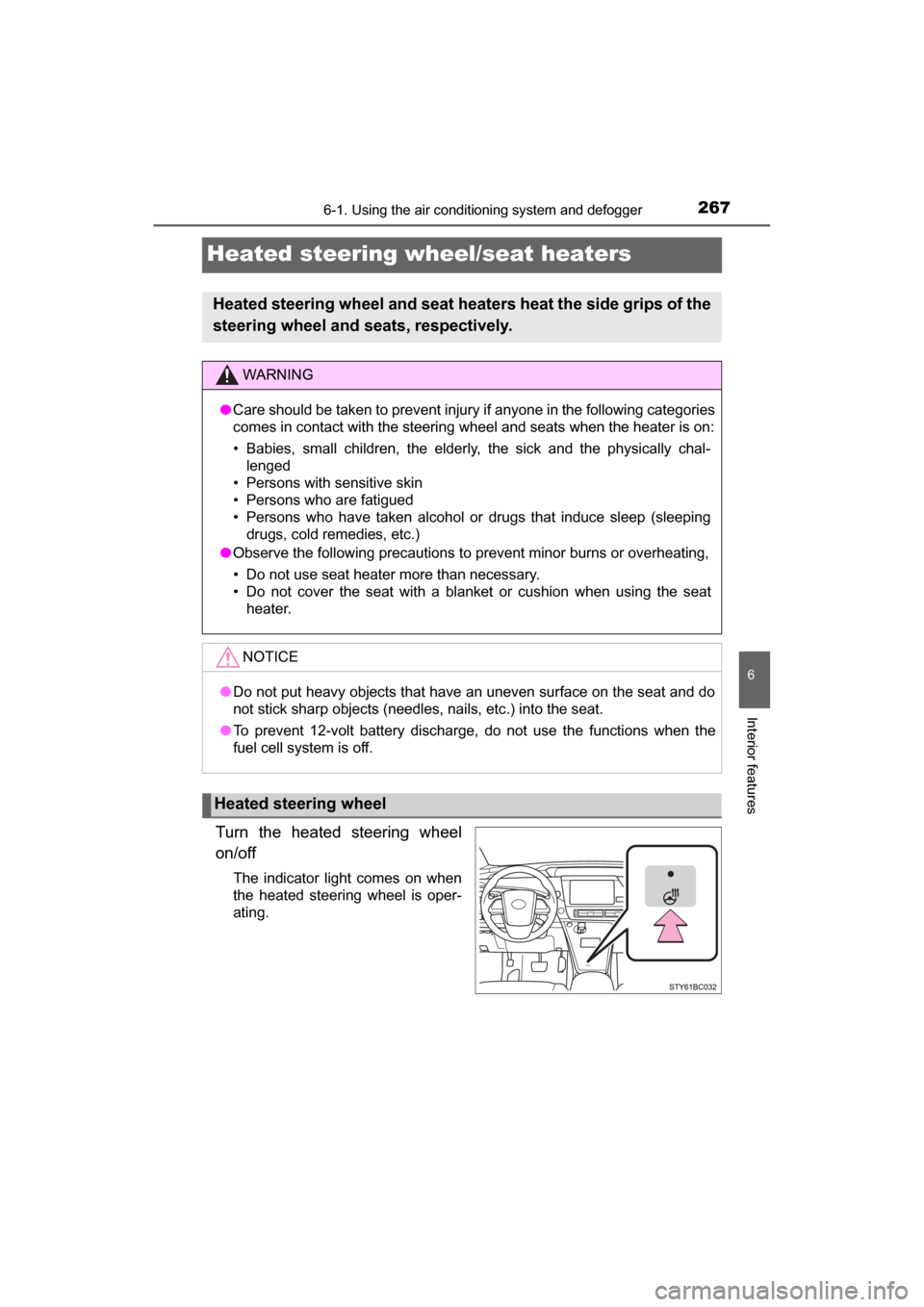
Turn the heated steering wheel
on/off
The indicator light comes on when
the heated steering wheel is oper-
ating.
Heated steering wheel and seat heaters heat the side grips of the
steering wheel and seats, respectively.
WARNING
● Care should be taken to prevent injury if anyone in the following categories
comes in contact with the steering wheel and seats when the heater is on:
• Babies, small children, the elderly, the sick and the physically chal-
lenged
• Persons with sensitive skin
• Persons who are fatigued
• Persons who have taken alcohol or drugs that induce sleep (sleeping drugs, cold remedies, etc.)
● Observe the following precautions to prevent minor burns or overheating,
• Do not use seat heater more than necessary.
• Do not cover the seat with a blanket or cushion when using the seat
heater.
NOTICE
●Do not put heavy objects that have an uneven surface on the seat and do
not stick sharp objects (needles, nails, etc.) into the seat.
● To prevent 12-volt battery discharge, do not use the functions when the
fuel cell system is off.
Heated steering wheel
Page 268 of 464
2686-1. Using the air conditioning system and defogger
MIRAI_OM_USA_OM62023U
■Operation condition
The heated steering wheel can be used when the power switch is in ON
mode.
■ Timer
The heated steering wheel will automatically turn off after about 30 minutes.
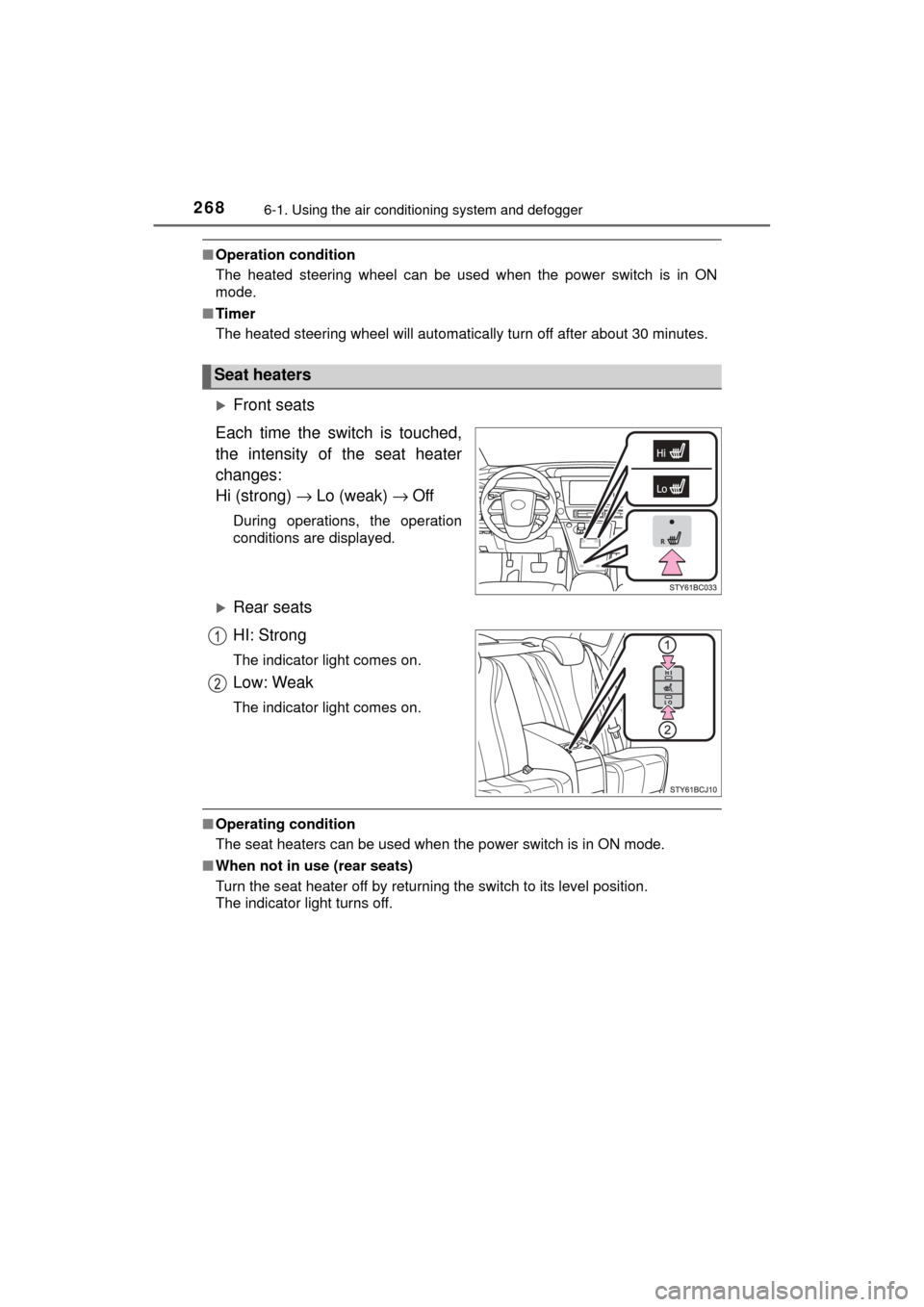
Front seats
Each time the switch is touched,
the intensity of the seat heater
changes:
Hi (strong) → Lo (weak) → Off
During operations, the operation
conditions are displayed.
Rear seats
HI: Strong
The indicator light comes on.
Low: Weak
The indicator light comes on.
■Operating condition
The seat heaters can be used when the power switch is in ON mode.
■ When not in use (rear seats)
Turn the seat heater off by returning the switch to its level position.
The indicator light turns off.
Seat heaters
Page 272 of 464
2726-3. Using the storage features
MIRAI_OM_USA_OM62023U
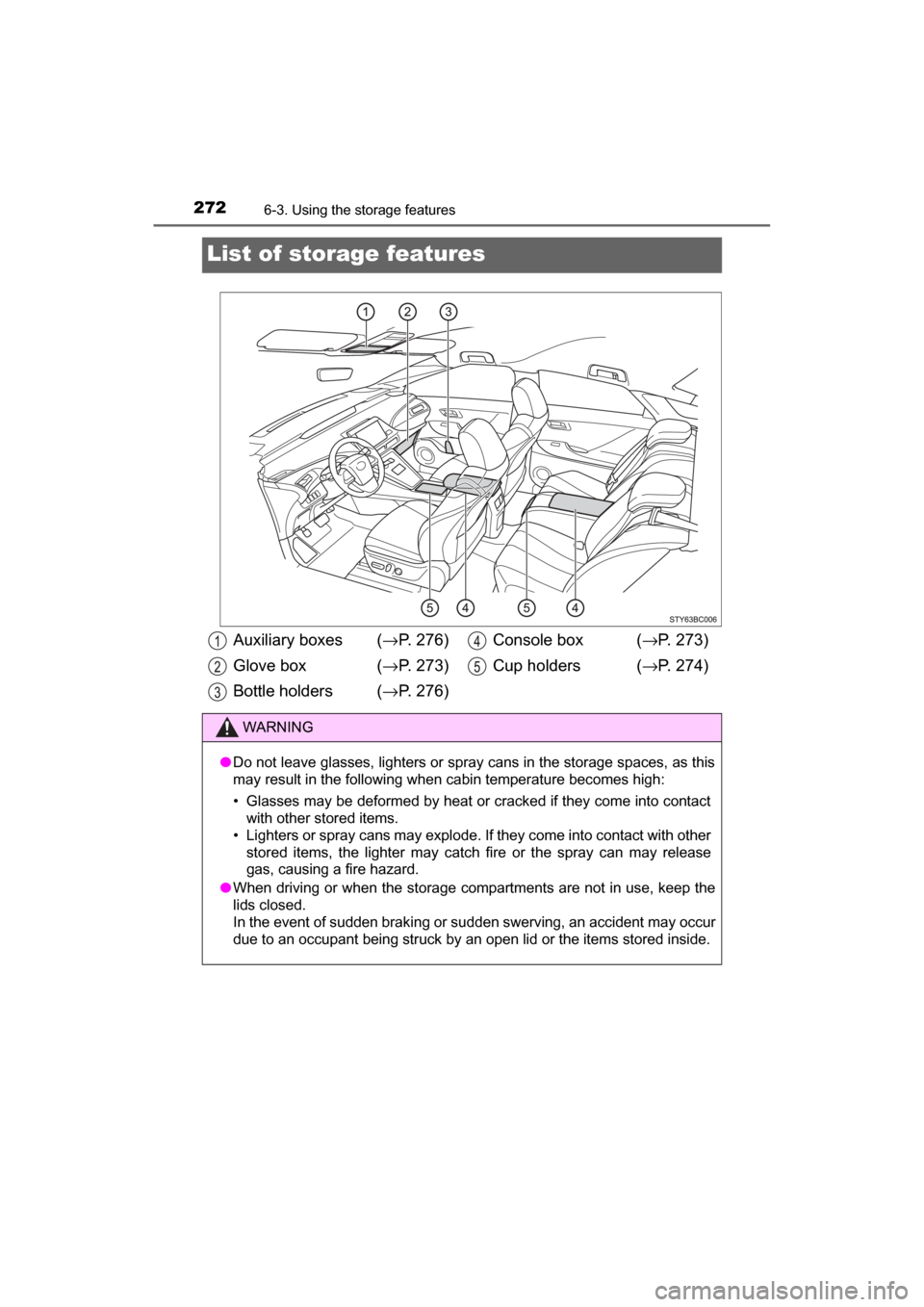
List of storage features
Auxiliary boxes (→P. 276)
Glove box ( →P. 273)
Bottle holders (→ P. 276)Console box (
→P. 273)
Cup holders ( →P. 274)
WARNING
● Do not leave glasses, lighters or spray cans in the storage spaces, as this
may result in the following when cabin temperature becomes high:
• Glasses may be deformed by heat or cracked if they come into contact
with other stored items.
• Lighters or spray cans may explode. If they come into contact with other
stored items, the lighter may catch fire or the spray can may release
gas, causing a fire hazard.
● When driving or when the storage com partments are not in use, keep the
lids closed.
In the event of sudden braking or sudden swerving, an accident may occur
due to an occupant being struck by an open lid or the items stored inside.