Page 95 of 464
952. Fuel cell vehicle
2
Fuel cell system
MIRAI_OM_USA_OM62023U
◆Using Eco drive mode
Using Eco drive mode (→P. 181) makes torque generation less
aggressive than normal when stepping on the accelerator pedal,
leading to improvement in fuel economy.
Also, is displayed on the air conditioning screen, indicating
the switch to ECO HEAT/COOL mode ( →P. 260).
◆Air conditioning system on/off
● Turn off the air conditioning sy stem operation switch except
when necessary to help curb fuel consumption.
In summer: When the ambient temper ature is high, use the recircu-
lated air mode. This decreas es the load on the air con-
ditioning system.
In winter: Avoid excess heating. Use the seat heater to minimize
the need for cabin heating ( →P. 268).
● By pushing , ECO HEAT/COOL mode is turned on. This
helps curb fuel consumption even with the air conditioning system
turned on.
◆Checking tire inflation pressure
Make sure to check the tire infl ation pressure frequently. Improper
tire inflation pressure can cause poor fuel economy.
Additionally, snow tire s have more rolling friction and their use on
dry roads lead to poor fuel econom y. Use tires that are appropriate
for the season.
◆Luggage
Avoid carrying unnecessary luggage and unload excess weight in
order avoid poor fuel ec onomy. Installing a large roof rack will also
reduce fuel economy.
Page 106 of 464

1063. Instrument cluster
MIRAI_OM_USA_OM62023U■
Outside temperature display
●In the following situations, the correct outside temperature may not be dis-
played, or the display may take longer than normal to change.
• When stopped, or driving at low speeds (less than 16 mph [25 km/h])
• When the outside temperature has changed suddenly (at the entrance/
exit of a garage, tunnel, etc.)
● When “--” or “E” is displayed, the system may be malfunctioning.
Take your vehicle to your Toyota dealer.
■ Liquid crystal display
Small spots or light spots may appear on the display. This phenomenon is
characteristic of liquid crystal displays, and there is no problem continuing to
use the display.
■ Customization
The meter display can be customized on the multi-information display.
(Customizable features: →P. 439)
NOTICE
■To prevent damage to the fuel cell system and its components
This vehicle is equipped with high coolant temperature warning light
(→ P. 369), instead of, coolant temperature gauge.
The fuel cell system may be overheating if the high coolant temperature
warning light flashes or comes on. In this case, immediately stop the
vehicle in a safe place, and check the fuel cell system after it has cooled
completely.
Page 129 of 464
1294-2. Opening, closing and locking the doors
4
Operation of each component
MIRAI_OM_USA_OM62023U
P. 11 7
WARNING
Observe the following precautions.
Failure to do so may result in death or serious injury.
■Before driving
● Make sure that the trunk lid is fully closed. If the trunk lid is not fully closed,
it may open unexpectedly while driving and hit near-by objects or luggage
in the trunk may be thrown out, causing an accident.
● Do not allow children to play in the trunk.
If a child is accidentally locked in the trunk, they could suffer from heat
exhaustion, suffocation or other injuries.
● Do not allow a child to open or close the trunk lid.
Doing so may cause the trunk lid to open unexpectedly, or cause the
child’s hands, head, or neck to be caught by the closing trunk lid.
■ Important points while driving
Never let anyone sit in the trunk. In the event of sudden braking or a colli-
sion, they are susceptible to death or serious injury.
Page 175 of 464
1755-2. Driving procedures
5
Driving
MIRAI_OM_USA_OM62023U■
Starting the fuel cell syst em in cold temperatures
● When the power switch is pressed and the fuel cell system starts ( →P. 172)
during cold temperatures, the fuel cell stack is quickly warmed up using the
waste heat during power generation.
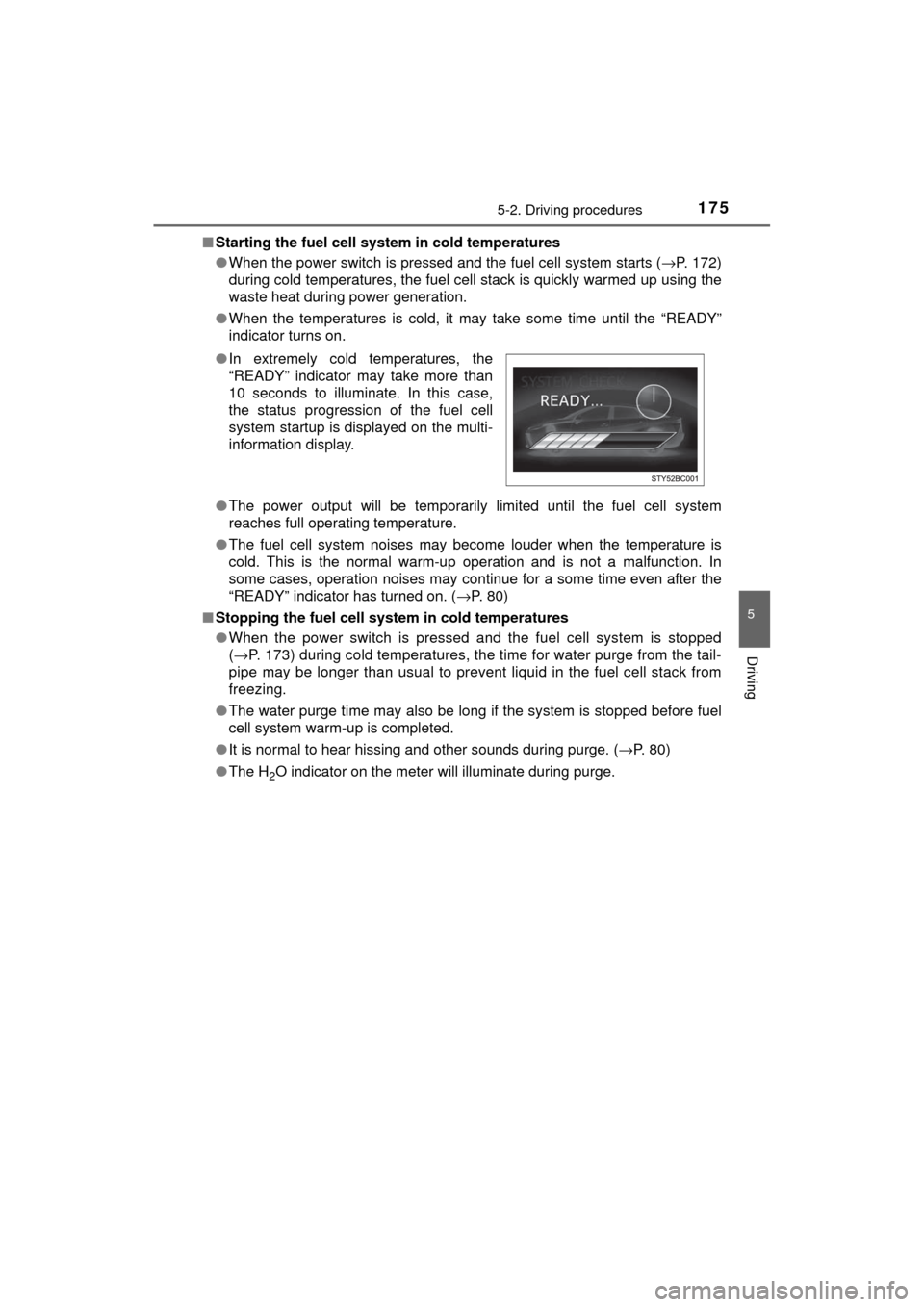
● When the temperatures is cold, it may take some time until the “READY”
indicator turns on.
● The power output will be temporarily limited until the fuel cell system
reaches full operating temperature.
● The fuel cell system noises may become louder when the temperature is
cold. This is the normal warm-up operation and is not a malfunction. In
some cases, operation noises may continue for a some time even after the
“READY” indicator has turned on. ( →P. 80)
■ Stopping the fuel cell system in cold temperatures
●When the power switch is pressed and the fuel cell system is stopped
(→ P. 173) during cold temperatures, the time for water purge from the tail-
pipe may be longer than usual to prevent liquid in the fuel cell stack from
freezing.
● The water purge time may also be long if the system is stopped before fuel
cell system warm-up is completed.
● It is normal to hear hissing and other sounds during purge. ( →P. 80)
● The H
2O indicator on the meter will illuminate during purge.
●
In extremely cold temperatures, the
“READY” indicator may take more than
10 seconds to illuminate. In this case,
the status progression of the fuel cell
system startup is displayed on the multi-
information display.
Page 181 of 464
1815-2. Driving procedures
5
Driving
MIRAI_OM_USA_OM62023U
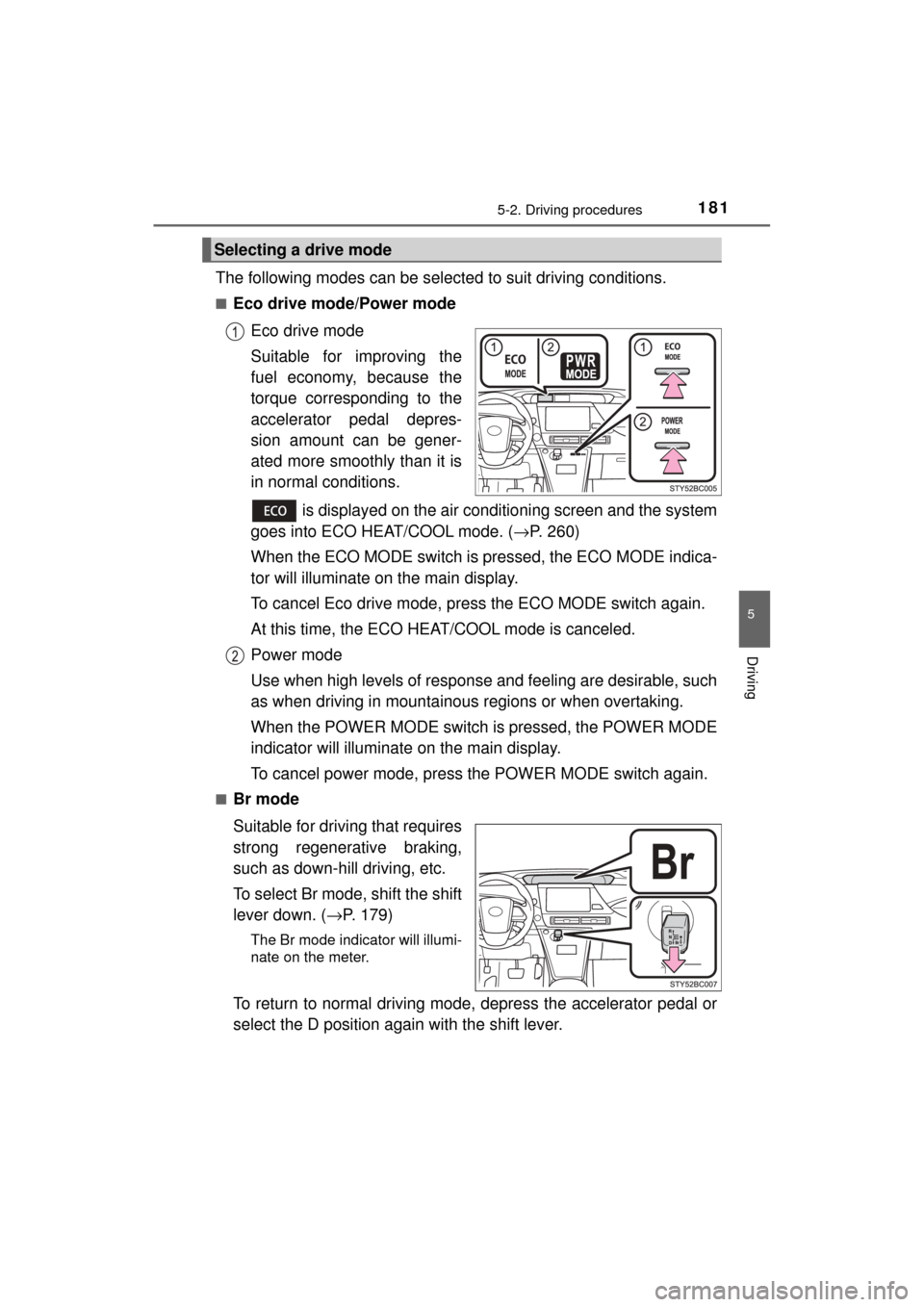
The following modes can be selected to suit driving conditions.
■Eco drive mode/Power modeEco drive mode
Suitable for improving the
fuel economy, because the
torque corresponding to the
accelerator pedal depres-
sion amount can be gener-
ated more smoothly than it is
in normal conditions.
is displayed on the air conditioning screen and the system
goes into ECO HEAT/COOL mode. ( →P. 260)
When the ECO MODE switch is pr essed, the ECO MODE indica-
tor will illuminate on the main display.
To cancel Eco drive mode, press the ECO MODE switch again.
At this time, the ECO HE AT/COOL mode is canceled.
Power mode
Use when high levels of response and feeling are desirable, such
as when driving in mountainous regions or when overtaking.
When the POWER MODE switch is pressed, the POWER MODE
indicator will illuminate on the main display.
To cancel power mode, press the POWER MODE switch again.
■Br mode
Suitable for driving that requires
strong regenerative braking,
such as down-hill driving, etc.
To select Br mode, shift the shift
lever down. ( →P. 179)
The Br mode indicator will illumi-
nate on the meter.
To return to normal driving mode, depress the accelerator pedal or
select the D position again with the shift lever.
Selecting a drive mode
Page 183 of 464
1835-2. Driving procedures
5
Driving
MIRAI_OM_USA_OM62023U■
Regenerative Braking
When the shift position is in D, regenerative braking is engaged when the foot
is released from the accelerator pedal.
■ ECO HEAT/COOL mode operation for Eco drive mode
●When the ECO MODE switch is pressed, the system switches over to ECO
HEAT/COOL mode. ( →P. 263) During the use of Eco drive mode, only the
ECO HEAT/COOL mode can be canceled.
● When it is desired to improve the effectiveness of the air conditioning sys-
tem, perform the following operations.
• Adjust the temperature settings and airflow mode.
• Press of the air conditioning operation panel ( →P. 258) and can-
cel the ECO HEAT/COOL mode, or cancel Eco drive mode.
■ Power mode automatic deactivation
Power mode is automatically deactivated if the power switch is turned off after
driving in power mode.
■ Shifting from P on a slope
When changing to another position from P when parked on a slope in the P
position, vibrations may be felt.
WARNING
■ When driving on slippery road surfaces
Do not accelerate or shift the shift position suddenly.
Sudden changes in regenerative braking may cause the vehicle to spin or
skid, resulting in an accident.
■ For the shift lever
Do not remove the shift lever knob or use anything but a genuine Toyota
shift lever knob. Also, do not hang anything on the shift lever.
Doing so could prevent the shift lever from returning to position, causing
unexpected accidents to occur when the vehicle is in motion.
■ P position switch
Do not press the P position switch while the vehicle is moving.
If the P position switch is pressed when driving at very low speeds (for
example, directly before stopping the vehicle), the vehicle may stop sud-
denly when the shift position switches to P, which could lead to an accident.
Page 186 of 464
1865-2. Driving procedures
MIRAI_OM_USA_OM62023U
Parking brake
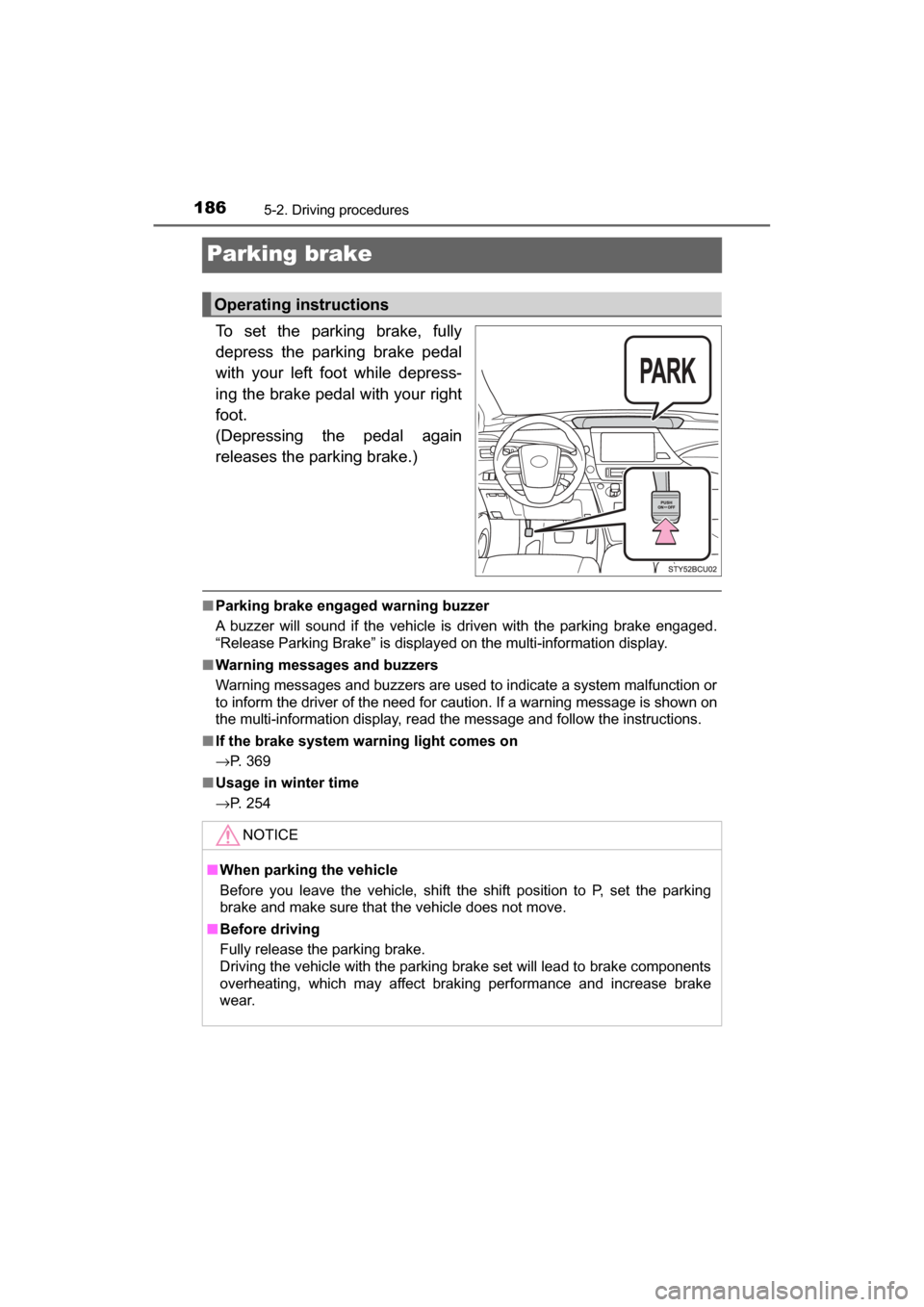
To set the parking brake, fully
depress the parking brake pedal
with your left foot while depress-
ing the brake pedal with your right
foot.
(Depressing the pedal again
releases the parking brake.)
■Parking brake engaged warning buzzer
A buzzer will sound if the vehicle is driven with the parking brake engaged.
“Release Parking Brake” is displayed on the multi-information display.
■ Warning messages and buzzers
Warning messages and buzzers are used to indicate a system malfunction or
to inform the driver of the need for caution. If a warning message is shown on
the multi-information display, read the message and follow the instructions.
■ If the brake system warning light comes on
→P. 369
■ Usage in winter time
→P. 254
Operating instructions
NOTICE
■When parking the vehicle
Before you leave the vehicle, shift the shift position to P, set the parking
brake and make sure that the vehicle does not move.
■ Before driving
Fully release the parking brake.
Driving the vehicle with the parking brake set will lead to brake components
overheating, which may affect braking performance and increase brake
wear.
Page 197 of 464
1975-3. Operating the lights and wipers
5
Driving
MIRAI_OM_USA_OM62023U
NOTICE
■When the windshield is dry
Do not use the wipers, as they may damage the windshield.
■ When the washer fluid tank is empty
Do not operate the switch continually as the washer fluid pump may over-
heat.
■ When a nozzle becomes blocked
In this case, contact your Toyota dealer.
Do not try to clear it with a pin or other object. The nozzle will be damaged.
■ To prevent 12-volt battery discharge
Do not leave the wipers on longer than necessary when the fuel cell system
is off.