Page 293 of 608
LC200_OM_OM60P24U_(U)
2934-5. Using the driving support systems
4
Driving
■When the brake system operates continuously
The brake system may overheat. In this case, a buzzer will sound, the TRAC
OFF indicator will flash, and Multi-terrain Select will be temporarily inopera-
ble. In this event, stop the vehicle immediately in a safe place, and allow the
brake system to cool down sufficiently. (There is no problem with continuing
normal driving.)
After a short time, the TRAC OFF indicator will go off, and you will be able to
use Multi-terrain Select.
■ When there is a malfunction in the system
The slip indicator light will come on. Have the vehicle inspected by your
Toyota dealer immediately.
WARNING
■When using the Multi-terrain Select
Observe the following precautions to avoid an accident that could result in
death or serious injuries:
● There is a chance that the selected mode may not be the most appropriate
in terms of road conditions such as pitch, slipperiness, undulation, etc.
(→P. 291)
● Multi-terrain Select is not intended to expand the limits of the vehicle.
Check the road conditions thoroughly beforehand, and drive safely and
carefully.
NOTICE
■ Precaution for use
The Multi-terrain Select is intended for use during off-road driving. Do not
use the system at any other time.
Page 347 of 608
LC200_OM_OM60P24U_(U)
3474-5. Using the driving support systems
4
Driving
WARNING
■Handling the radar sensor
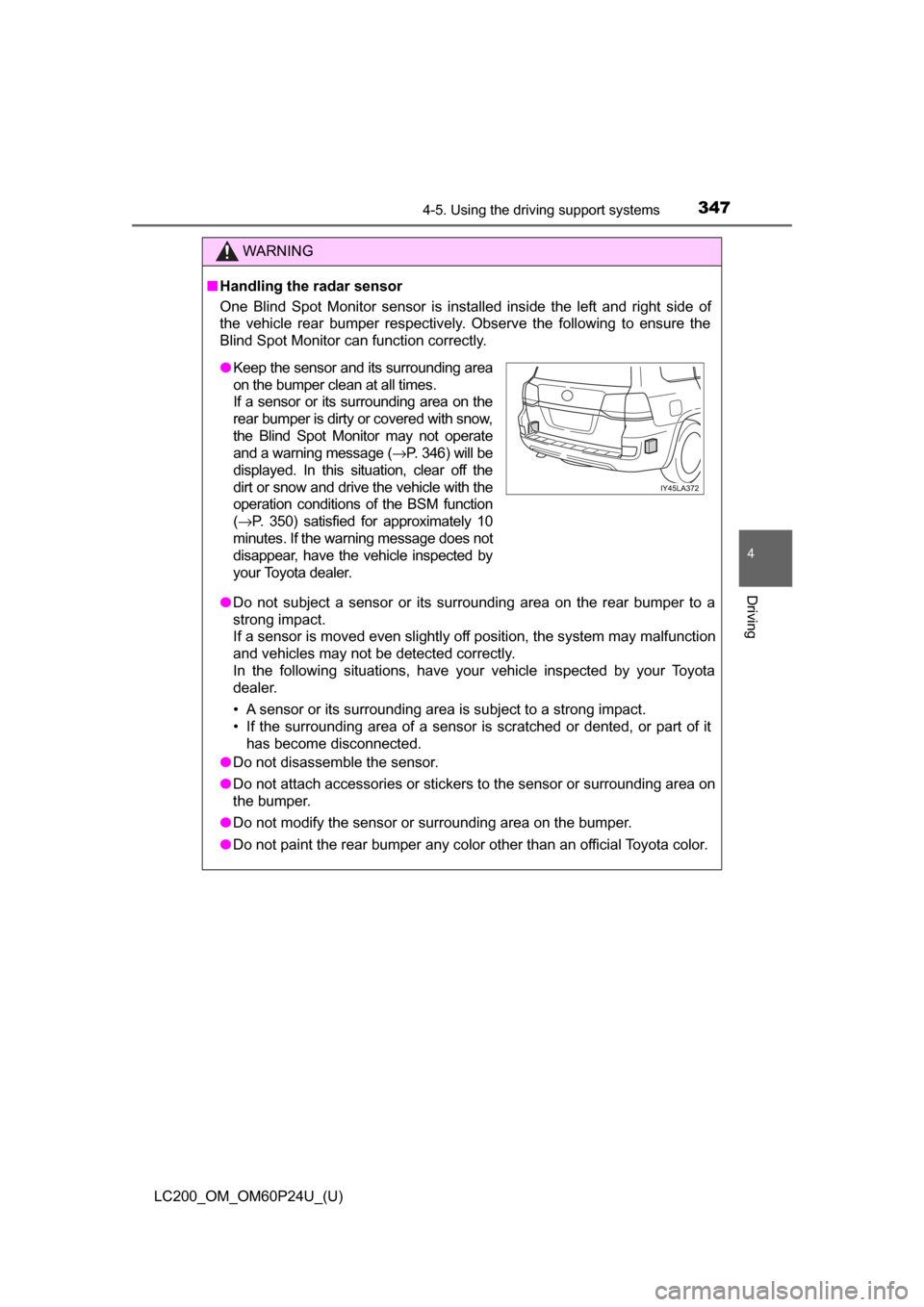
One Blind Spot Monitor sensor is installed inside the left and right side of
the vehicle rear bumper respectively. Observe the following to ensure the
Blind Spot Monitor can function correctly.
● Do not subject a sensor or its surrounding area on the rear bumper to a
strong impact.
If a sensor is moved even slightly off position, the system may malfunction
and vehicles may not be detected correctly.
In the following situations, have your vehicle inspected by your Toyota
dealer.
• A sensor or its surrounding area is subject to a strong impact.
• If the surrounding area of a sensor is scratched or dented, or part of it
has become disconnected.
● Do not disassemble the sensor.
● Do not attach accessories or stickers to the sensor or surrounding area on
the bumper.
● Do not modify the sensor or surrounding area on the bumper.
● Do not paint the rear bumper any color other than an official Toyota color.
●Keep the sensor and its surrounding area
on the bumper clean at all times.
If a sensor or its surrounding area on the
rear bumper is dirty or covered with snow,
the Blind Spot Monitor may not operate
and a warning message ( →P. 346) will be
displayed. In this situation, clear off the
dirt or snow and drive the vehicle with the
operation conditions of the BSM function
( → P. 350) satisfied for approximately 10
minutes. If the warning message does not
disappear, have the vehicle inspected by
your Toyota dealer.
Page 360 of 608
360
LC200_OM_OM60P24U_(U)
4-5. Using the driving support systems
If the vehicle gets stuck in fres h snow or mud, Active TRAC may
reduce power from the engine to the wheels. You may need to turn
the system off to enable you to rock the vehicle in order to free it.
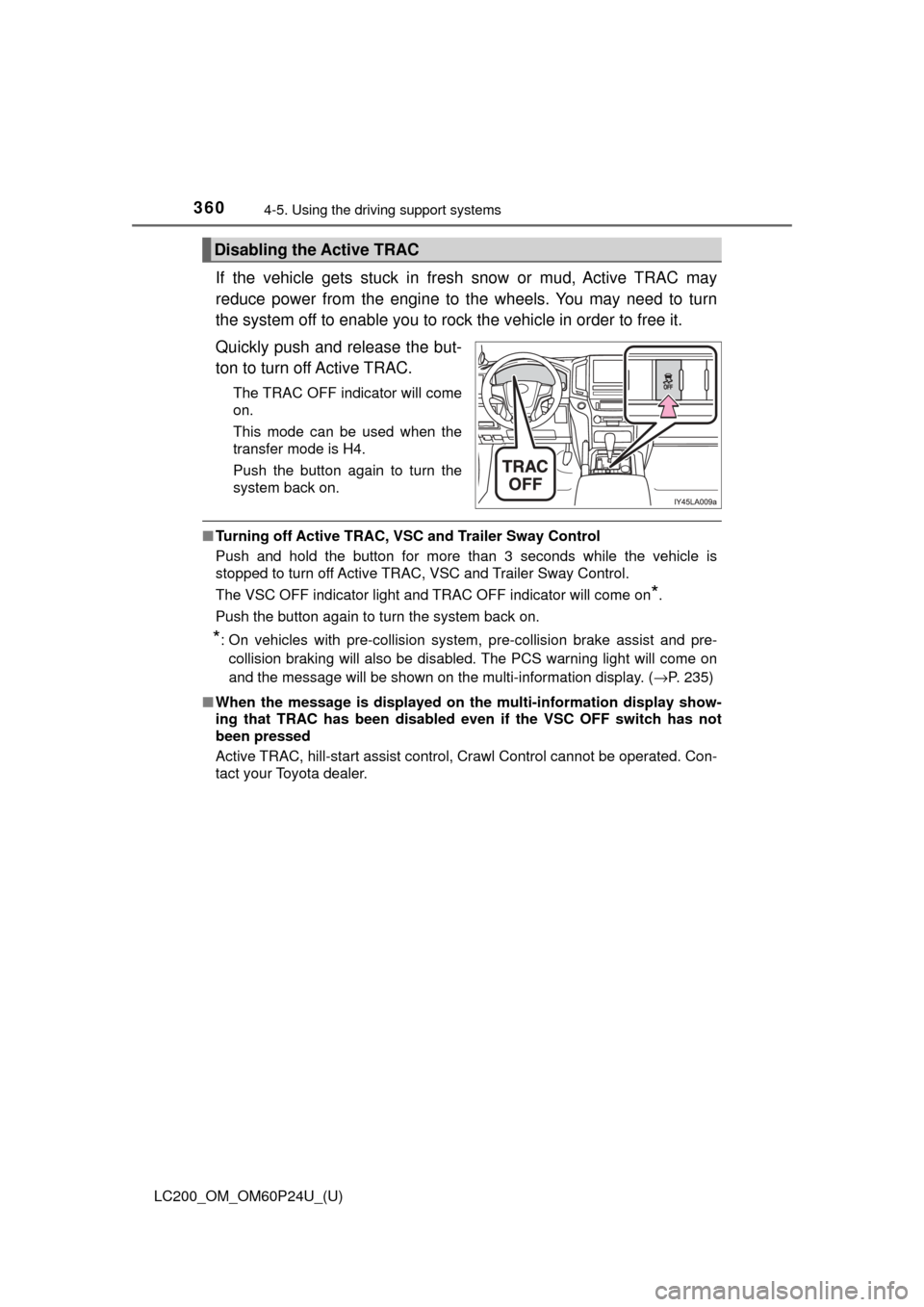
Quickly push and release the but-
ton to turn off Active TRAC.
The TRAC OFF indicator will come
on.
This mode can be used when the
transfer mode is H4.
Push the button again to turn the
system back on.
■ Turning off Active TRAC, VSC and Trailer Sway Control
Push and hold the button for more than 3 seconds while the vehicle is
stopped to turn off Active TRAC, VSC and Trailer Sway Control.
The VSC OFF indicator light and TRAC OFF indicator will come on
*.
Push the button again to turn the system back on.
*: On vehicles with pre-collision system, pre-collision brake assist and pre- collision braking will also be disabled. The PCS warning light will come on
and the message will be shown on the multi-information display. ( →P. 235)
■ When the message is displayed on th e multi-information display show-
ing that TRAC has been disabled even if the VSC OFF switch has not
been pressed
Active TRAC, hill-start assist control, Crawl Control cannot be operated. Con-
tact your Toyota dealer.
Disabling the Active TRAC
Page 363 of 608

LC200_OM_OM60P24U_(U)
3634-5. Using the driving support systems
4
Driving
WARNING
■When the VSC and Trailer Sway Control are activated
The slip indicator light flashes. Always drive carefully.
Reckless driving may cause an accident. Exercise particular care when the
indicator light flashes.
■
Replacing tires
Make sure that all tires are of the same size, brand, tread pattern and
total load capacity. In addition, make sure that the tires are inflated to
the specified tire pressure level.
The Multi Terrain ABS, Active TRAC, VSC and Trailer Sway Control will
not function correctly if differen t tires are fitted on the vehicle.
Contact your Toyota dealer for furt her information when replacing tires
or wheels.
■Handling of tires and suspension
Using tires with any kind of problem or modifying the suspension will
affect the driving assist systems, and may cause the system to malfunc-
tion.
■ Trailer Sway Control precaution
The Trailer Sway Control system is not able to reduce trailer sway in all situ-
ations. Depending on many factors such as the conditions of the vehicle,
trailer, road surface, and driving environment, the Trailer Sway Control sys-
tem may not be effective. Refer to your trailer owner’s manual for informa-
tion on how to tow your trailer properly.
■ If trailer sway occurs
Observe the following precautions.
Failing to do so may cause death or serious injury.
● Firmly grip the steering wheel. Steer straight ahead.
Do not try to control trailer swaying by turning the steering wheel.
● Begin releasing the accelerator pedal immediately but very gradually to
reduce speed.
Do not increase speed. Do not apply vehicle brakes.
If you make no extreme correction with the steering or brakes, your vehicle
and trailer should stabilize. (→P. 189)
Page 396 of 608
396
LC200_OM_OM60P24U_(U)
5-3. Using the storage features
List of storage features
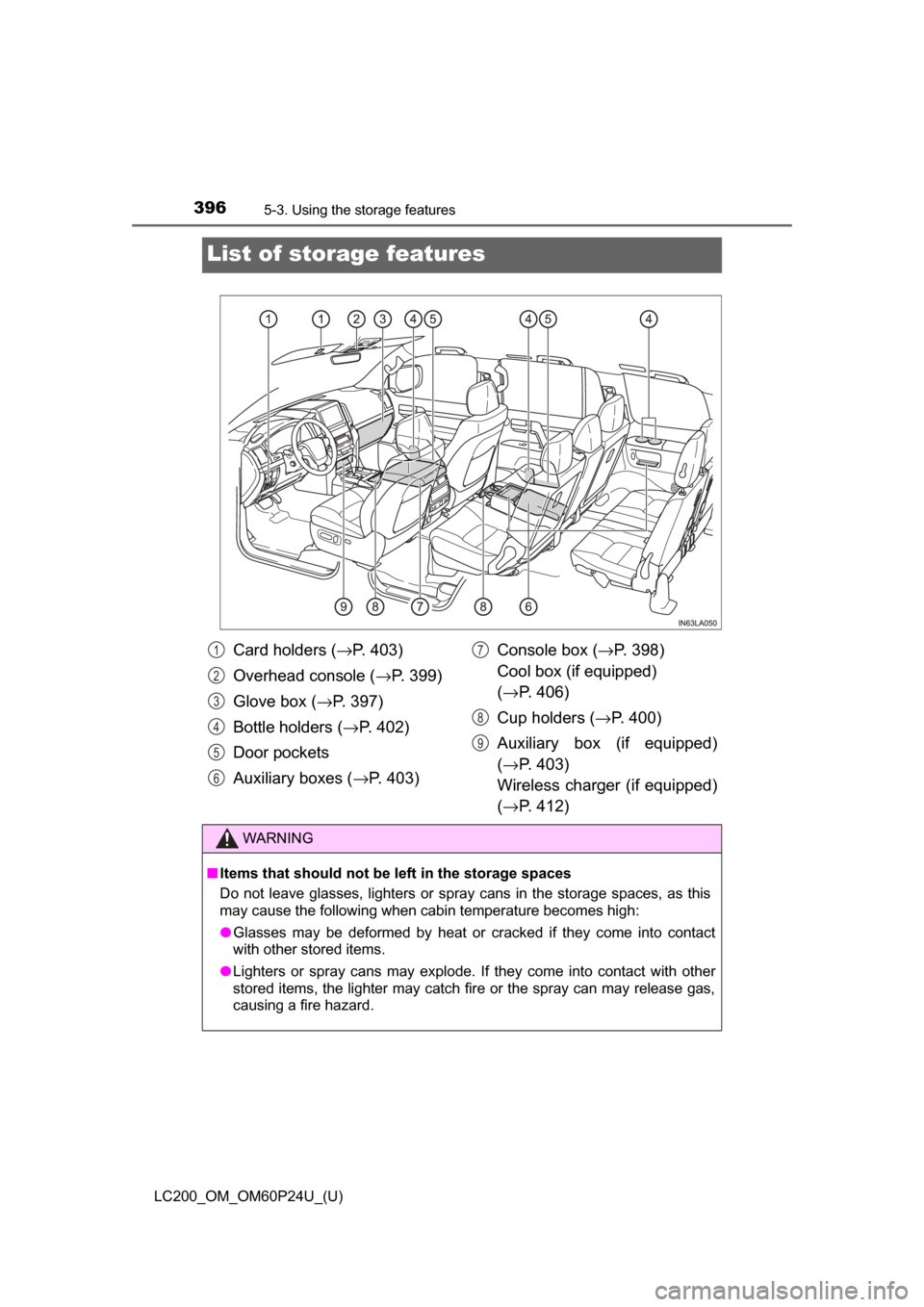
Card holders (→P. 403)
Overhead console ( →P. 399)
Glove box ( →P. 397)
Bottle holders ( →P. 402)
Door pockets
Auxiliary boxes ( →P. 403) Console box (
→P. 398)
Cool box (if equipped)
( → P. 406)
Cup holders ( →P. 400)
Auxiliary box (if equipped)
( → P. 403)
Wireless charger (if equipped)
( → P. 412)
WARNING
■Items that should not be left in the storage spaces
Do not leave glasses, lighters or spray cans in the storage spaces, as this
may cause the following when cabin temperature becomes high:
● Glasses may be deformed by heat or cracked if they come into contact
with other stored items.
● Lighters or spray cans may explode. If they come into contact with other
stored items, the lighter may catch fire or the spray can may release gas,
causing a fire hazard.
1
2
3
4
5
6
7
8
9
Page 397 of 608
LC200_OM_OM60P24U_(U)
3975-3. Using the storage features
5
Interior features
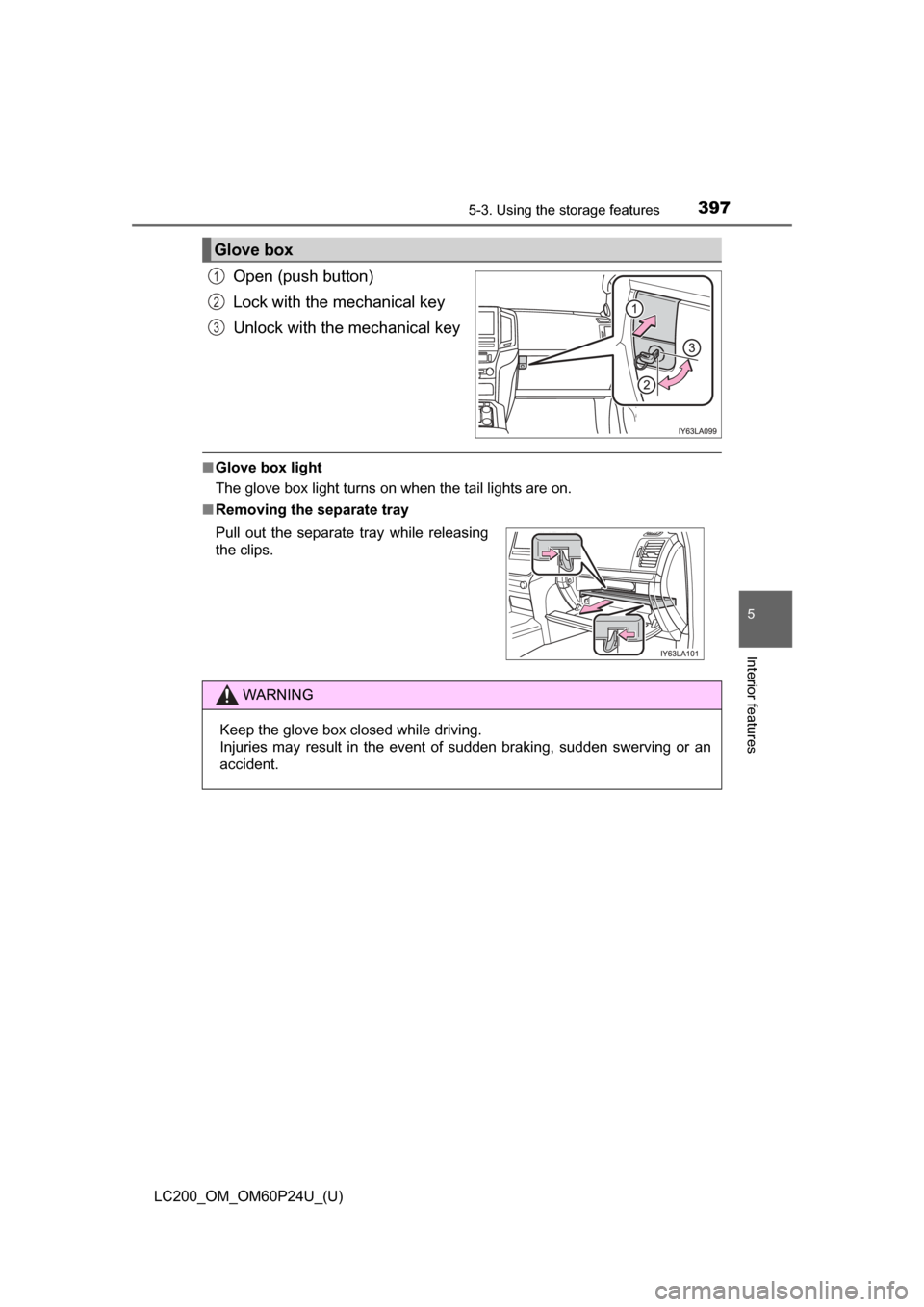
Open (push button)
Lock with the mechanical key
Unlock with the mechanical key
■Glove box light
The glove box light turns on when the tail lights are on.
■ Removing the separate tray
Glove box
1
2
3
Pull out the separate tray while releasing
the clips.
WARNING
Keep the glove box closed while driving.
Injuries may result in the event of sudden braking, sudden swerving or an
accident.
Page 419 of 608
LC200_OM_OM60P24U_(U)
4195-4. Using the other interior features
5
Interior features
WARNING
■Conditions in which the function may not operate correctly
In the following conditions, it may not operate correctly
● The portable device is fully charged
● There is foreign matter between the charge area and portable device
● The temperature of the portable device gets higher from charging
● The charging surface of the portable device is facing up
● The placement of the portable device is out of alignment with the charge
area
● Near a TV tower, electric power plant, gas station, radio station, large dis-
play, airport or other facility that generates strong radio waves or electri\
cal
noise
● When the electronic key is in contact with, or is covered by the following
metallic objects
• Cards to which aluminum foil is attached
• Cigarette boxes that have aluminum foil inside
• Metallic wallets or bags
• Coins
• Hand warmers made of metal
• Media such as CDs and DVDs
● When other wireless keys (that emit radio waves) are being used nearby
In addition, excluding the above-mentioned, when the charger does not per-
form normally or the operation indicator light is flashing continuously, it is
considered that the wireless charger is malfunctioning. Contact your Toyota
dealer.
■ To prevent failure or damage to data
● Do not bring magnetic cards, such as credit cards, or magnetic recording
media, etc., close to the charger while charging, otherwise, data may dis-
appear under the influence of magnetism. Also, do not bring precision
instruments such as wrist watches, etc., close to the charger, as such
objects may break.
● Do not leave portable devices in the cabin. The temperature inside the
cabin may become high, when under the sun, and cause damage to the
device.
■ To prevent battery discharge
When the engine is stopped, do not use the wireless charger for a long
time.
Page 449 of 608
449
LC200_OM_OM60P24U_(U)
6-3. Do-it-yourself maintenance
6
Maintenance and care
Hood
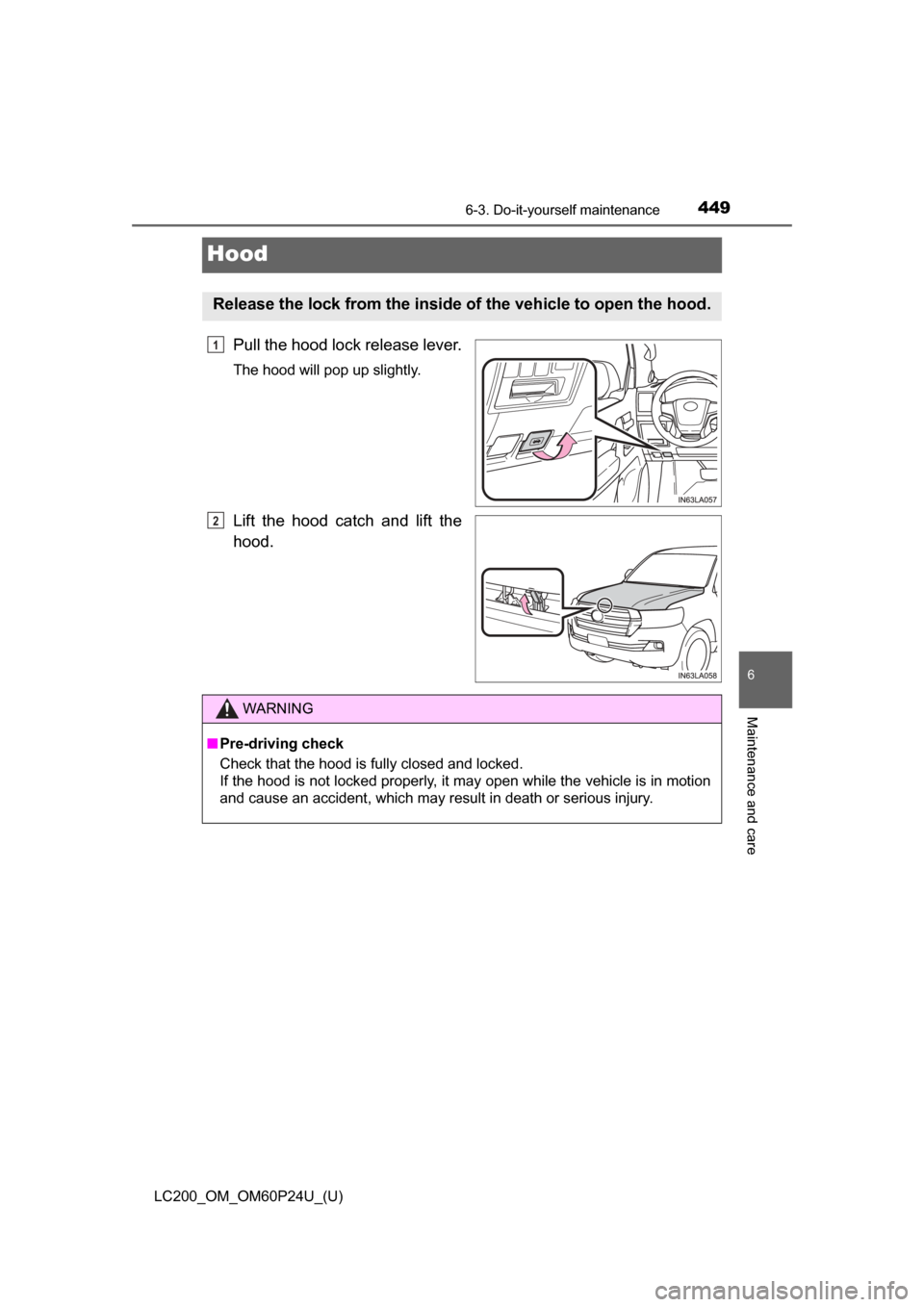
Pull the hood lock release lever.
The hood will pop up slightly.
Lift the hood catch and lift the
hood.
Release the lock from the inside of the vehicle to open the hood.
1
2
WARNING
■ Pre-driving check
Check that the hood is fully closed and locked.
If the hood is not locked properly, it may open while the vehicle is in motion
and cause an accident, which may result in death or serious injury.