Page 430 of 732
4305-11. Using the voice command system
HIGHLANDER_U (OM0E017U)
■Microphone
→P. 398
■ When using the microphone
●It is unnecessary to speak directly into the microphone when giving a com-
mand.
● When “Voice Prompt Interrupt” set to on, it is not necessary to wait for the
confirmation beep before speaking a command. ( →P. 362)
● Voice commands may not be recognized if:
• Spoken too quickly.
• Spoken at a low or high volume.
• The roof or windows are open.
• Passengers are talking while voice commands are spoken.
• The air conditioning speed is set high.
• The air conditioning vents are turned towards the microphone.
● In the following conditions, the system may not recognize the command
properly and using voice commands may not be possible:
• The command is incorrect or unclear. Note that certain words, accents or
speech patterns may be difficult for the system to recognize.
• There is excessive background noise, such as wind noise.
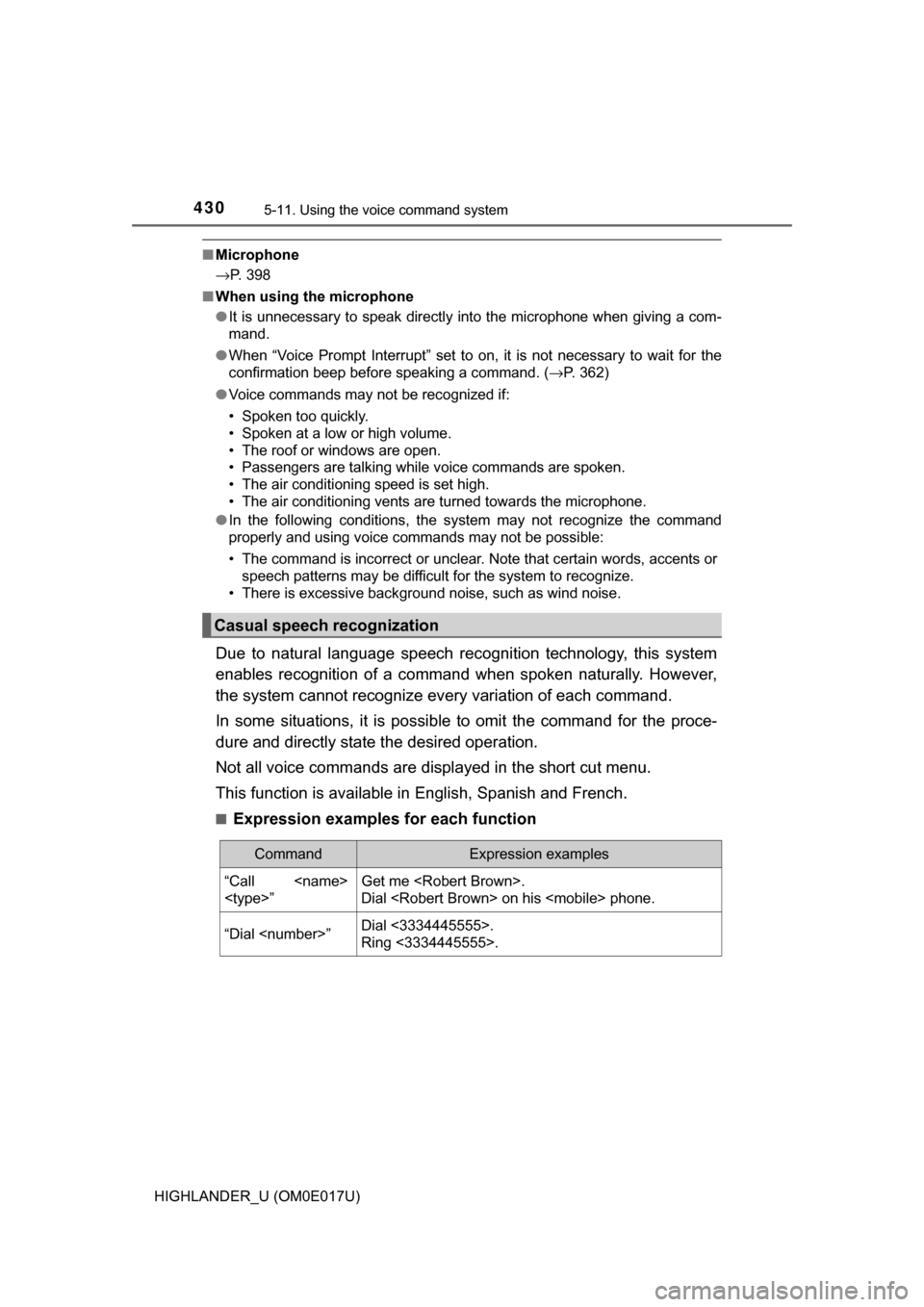
Due to natural language speech recognition technology, this system
enables recognition of a command when spoken naturally. However,
the system cannot recognize ev ery variation of each command.
In some situations, it is possibl e to omit the command for the proce-
dure and directly state the desired operation.
Not all voice commands are displayed in the short cut menu.
This function is available in English, Spanish and French.
■Expression examples for each function
Casual speech recognization
CommandExpression examples
“Call
”Get me .
Dial on his phone.
“Dial ”Dial <3334445555>.
Ring <3334445555>.
Page 431 of 732
4315-11. Using the voice command system
5
Audio system
HIGHLANDER_U (OM0E017U)
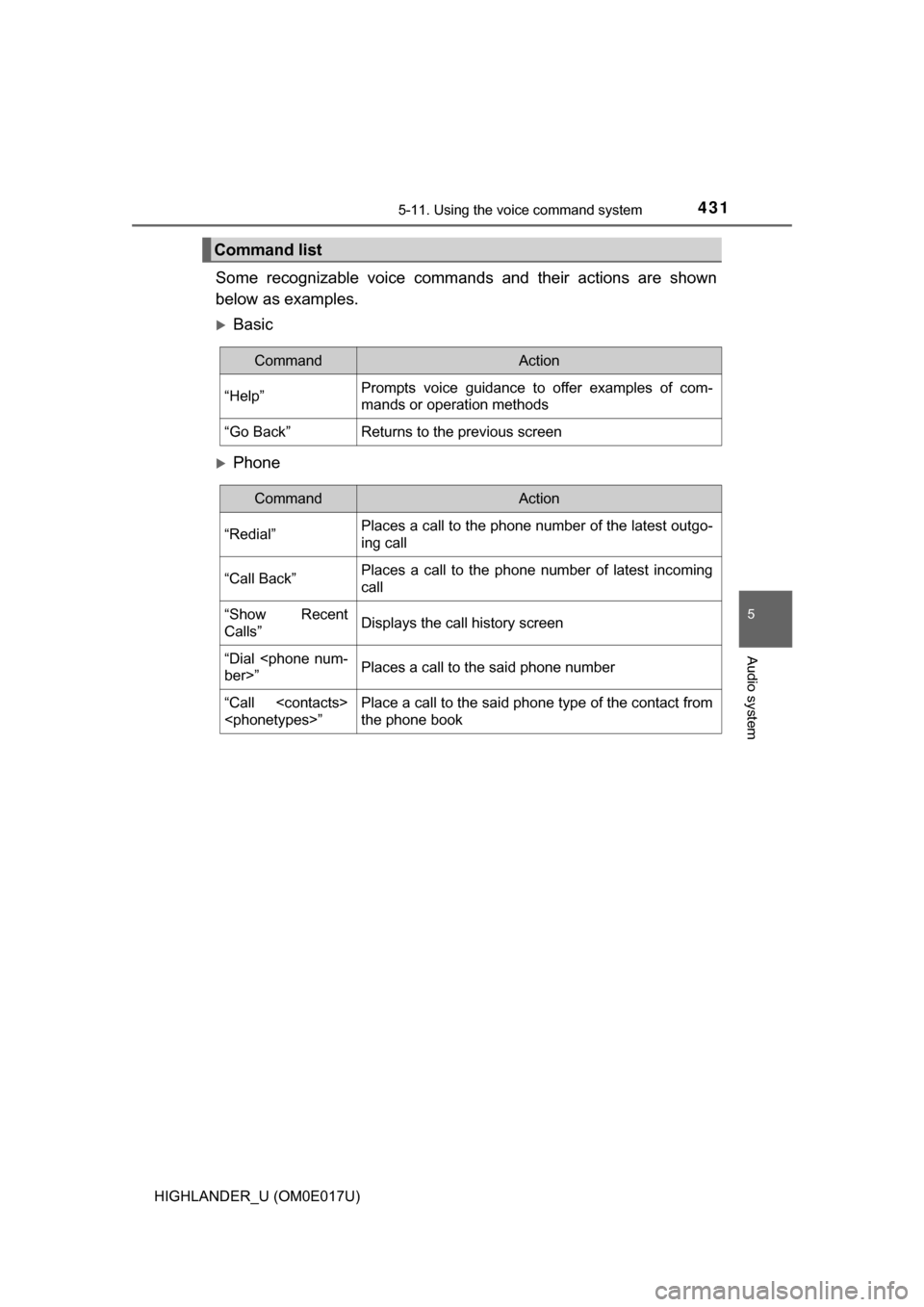
Some recognizable voice commands and their actions are shown
below as examples.
Basic
Phone
Command list
CommandAction
“Help”Prompts voice guidance to offer examples of com-
mands or operation methods
“Go Back”Returns to the previous screen
CommandAction
“Redial”Places a call to the phone number of the latest outgo-
ing call
“Call Back”Places a call to the phone number of latest incoming
call
“Show Recent
Calls”Displays the call history screen
“Dial
ber>”Places a call to the said phone number
“Call
”Place a call to the said phone type of the contact from
the phone book
Page 432 of 732
4325-11. Using the voice command system
HIGHLANDER_U (OM0E017U)
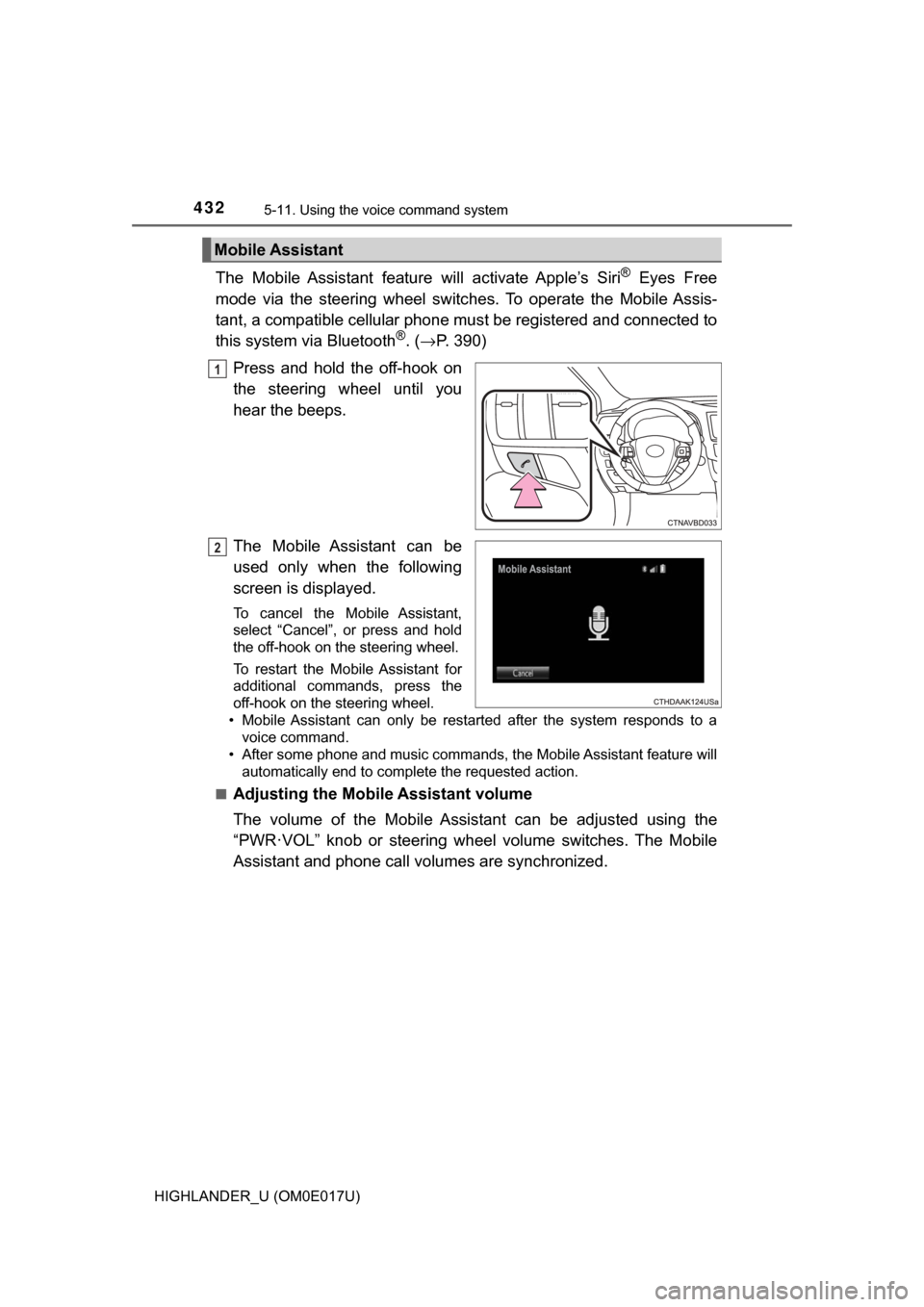
The Mobile Assistant feature will activate Apple’s Siri® Eyes Free
mode via the steering wheel switc hes. To operate the Mobile Assis-
tant, a compatible cellular phone must be registered and connected to
this system via Bluetooth
®. ( → P. 390)
Press and hold the off-hook on
the steering wheel until you
hear the beeps.
The Mobile Assistant can be
used only when the following
screen is displayed.
To cancel the Mobile Assistant,
select “Cancel”, or press and hold
the off-hook on the steering wheel.
To restart the Mobile Assistant for
additional commands, press the
off-hook on the steering wheel.
• Mobile Assistant can only be restarted after the system responds to a voice command.
• After some phone and music commands, the Mobile Assistant feature will automatically end to complete the requested action.
■
Adjusting the Mobile Assistant volume
The volume of the Mobile Assistant can be adjusted using the
“PWR·VOL” knob or steering whee l volume switches. The Mobile
Assistant and phone call volumes are synchronized.
Mobile Assistant
1
2
Page 433 of 732
4335-11. Using the voice command system
5
Audio system
HIGHLANDER_U (OM0E017U)
■ Notes about Mobile Assistant
●The available features and functions may vary based on the iOS version
installed on the connected device.
● Some Siri features are limited in Eyes Free mode. If you attempt to use an
unavailable function, Siri will inform you that the function is not avai\
lable.
● If Siri is not enabled on the cellular phone connected via Bluetooth
®, an
error message will be displayed on the screen.
● While a phone call is active, the Mobile Assistant cannot be used.
● If using the navigation feature of the cellular phone, ensure the active audio
source is Bluetooth
® audio or iPod in order to hear turn by turn direction
prompts.
Page 488 of 732
4886-4. Using the other interior features
HIGHLANDER_U (OM0E017U)■
System components
Microphone
LED light indicators
“SOS” button
Safety Connect∗
∗: If equipped
Safety Connect is a subscripti on-based telematics service that
uses Global Positioning System (GPS) data and embedded cel-
lular technology to provide safety and security features to sub-
scribers. Safety Connect is s upported by Toyota’s designated
response center, which operates 24 hours per day, 7 days per
week.
Safety Connect service is avai lable by subscription on select,
telematics hardware-equipped vehicles.
By using the Safety Connect service, you are agreeing to be
bound by the Telematics Subscription Service Agreement and
its Terms and Conditions, as in ef fect and amended from time to
time, a current copy of which is available at Toyota.com. All use
of the Safety Connect service is subject to such then-applicable
Terms and Conditions.
1
2
3
Page 490 of 732

4906-4. Using the other interior features
HIGHLANDER_U (OM0E017U)
■Safety Connect Services Information
●Phone calls using the vehicle’s Bluetooth® technology will not be possible
during Safety Connect.
● Safety Connect is available beginning Fall 2009 on select Toyota models.
Contact with the Safety Connect response center is dependent upon the
telematics device being in operative condition, cellular connection availabil-
ity, and GPS satellite signal reception, which can limit the ability to reach the
response center or receive emergency service support. Enrollment and
Telematics Subscription Service Agreement are required. A variety of sub-
scription terms are available; charges vary by subscription term selected.
● Automatic Collision Notification, Emergency Assistance, Stolen Vehicle
Location, and Enhanced Roadside Assistance will function in the United
States, including Hawaii and Alaska, and in Canada. No Safety Connect
services will function outside of the United States in countries other than
Canada.
● Safety Connect services are not subject to section 255 of the Telecommuni-
cations Act and the device is not TTY compatible.
■ Languages
The Safety Connect response center will offer support in multiple languages.
The Safety Connect system will offer voice prompts in English and Spanish.
Please indicate your language of choice when enrolling.
■ When contacting th e response center
You may be unable to contact the response center if the network is busy.
Page 493 of 732

4936-4. Using the other interior features
6
Interior features
HIGHLANDER_U (OM0E017U)
Important! Read this information before using Safety Connect.
■Exposure to radio frequency signals
The Safety Connect system install ed in your vehicle is a low-power
radio transmitter and receiver. It receives and also sends out radio
frequency (RF) signals.
In August 1996, the Federal Communications Commission (FCC)
adopted RF exposure gui delines with safety levels for mobile wire-
less phones. Those guidelines are c onsistent with the safety stan-
dards previously set by the fo llowing U.S. and international
standards bodies.
● ANSI (American National Stand ards Institute) C95.1 [1992]
● NCRP (National Council on Radi ation Protection and Measure-
ment) Report 86 [1986]
● ICNIRP (International Commiss ion on Non-Ionizing Radiation
Protection) [1996]
Those standards were based on comprehensive and periodic eval-
uations of the relevant scientific literature. Over 120 scientists, engi-
neers, and physicians from uni versities, and government health
agencies and industries reviewed t he available body of research to
develop the ANSI Standard (C95.1).
The design of Safety Connect complies with the FCC guidelines in
addition to those standards.
■ Certification for Safety Connect
FCC ID: O6Y-CDMRF101
FCC ID: XOECDMRF101B
FCC ID: N7NGTM2
NOTE:
This device complies with Part 15 of the FCC Rules. Operation is subject to
the following two conditions: (1) This device may not cause harmful interfer-
ence, and (2) this device must accept any interference received, including
interference that may cause undesired operation.
FCC WARNING:
Changes or modifications not expressly approved by the party responsible for
compliance could void the user's authority to operate the equipment.
Safety information for Safety Connect
Page 537 of 732

5377-3. Do-it-yourself maintenance
7
Maintenance and care
HIGHLANDER_U (OM0E017U)■
Situations in which the tire pressure warning system may not oper-
ate properly
●In the following cases, the tire pr
essure warning system may not operate
properly.
• If non-genuine Toyota wheels are used.
• A tire has been replaced with a tire that is not an OE (Original Equip- ment) tire.
• A tire has been replaced with a tire that is not of the specified size.
• Tire chains etc. are equipped.
• An auxiliary-supported run- flat tire is equipped.
• If a window tint that affects the radio wave signals is installed.
• If there is a lot of snow or ice on the vehicle, particularly around the wheels or wheel housings.
• If the tire inflation pressure is extremely higher than the specified level.
• If the spare tire is in a location subject to poor radio wave signal
reception.
*
• If a large metallic object which ca n interfere with signal reception is
put in the luggage compartment.
*
*
: Vehicles with a full- size spare tire only
●Performance may be affected in the following situations.
• Near a TV tower, electric power plant, gas station, radio station, large
display, airport or other facility that generates strong radio waves or
electrical noise
• When carrying a portable radio, cellular phone, cordless phone or
other wireless communication device
●When the vehicle is parked, the time taken for the warning to start or go
off could be extended.
●When tire inflation pressure declines rapidly for example when a tire has
burst, the warning may not function.