2017 TOYOTA HIGHLANDER instrument panel
[x] Cancel search: instrument panelPage 92 of 732

922. Instrument cluster
HIGHLANDER_U (OM0E017U)
Tachometer
Displays the engine speed in revolutions per minute.
Multi-information display
Presents the driver with a variety of driving-related data.
Speedometer
Fuel gauge
Trip meter reset knob
Switches the trip information.
Outside temperature
Odometer/trip meter/Stop & Start system operation time display*
Shift position and shift range
Displays the selected shift position or selected shift range. (→P. 227)
Meter panel lights control button
Engine coolant temperature gauge
Displays the engine coolant temperature.
*: If equipped
Gauge and meters
The displayed content may differ depending on the type of
meter.
1
2
3
4
5
6
7
8
9
10
Page 93 of 732

932. Instrument cluster
2
Instrument cluster
HIGHLANDER_U (OM0E017U)
Switches between the trip meter
“A” and “B” displays. When the trip
meter is displayed, pressing and
holding the knob will reset the trip
meter.
The brightness of the meter panel lights can be adjusted.
Pressing the button will adjust the
brightness of the meter panel
lights.
The brightness level of the meters
when the surroundings are bright
(day mode) and dark (night mode)
can be adjusted individually. How-
ever, when in day mode, adjusting
the brightness level will also
change the brightness level of
night mode.
■ The meters and display illuminate when
Vehicles without a smart key system
The engine switch is in the “ON” position.
Vehicles with a smart key system
The engine switch is in IGNITION ON mode.
■ Outside temperature display
In the following situations, the correct outside temperature may not be \
dis-
played, or the display may take longer than normal to change.
●When stopped, or driving at low speeds (less than 12 mph [20 km/h])
● When the outside temperature has changed suddenly (at the entrance/exit
of a garage, tunnel, etc.)
■ Stop & Start system operation ti me (current) (if equipped)
This display will be displayed when the engine is stopped due to the opera-
tion of the Stop & Start system.
Changing the trip meter display
Instrument panel light control
Page 100 of 732

1002. Instrument cluster
HIGHLANDER_U (OM0E017U)
●Pop-up display
Select to set the following pop-up displays, which may appear in
some situations, on/off.
• Route guidance display of t he navigation system-linked sys-
tem (if equipped)
• Incoming call display of the hands-free phone system
• Stop & Start system duration (if equipped)
• Stop & Start system status (if equipped)
• Instrument panel brightness adjustment display
● Accent color
Select to change the accent colors on the screen, such as the
cursor color.
● Speed limit display
* (if equipped)
Select to set the display of speed limit information stored in the
navigation system to on with the speed limit caution indicator
(yellow) enabled, on with the sp eed limit caution not enabled, or
off. If enabled, the s peed limit caution indicator will come on if the
vehicle speed exceeds th e displayed speed limit.
● Initialization
Registered or changed meter settings will be deleted or returned
to their default setting.
*: Speed limit display may not be available for some regions.
Page 145 of 732

1453-2. Opening, closing and locking the doors
3
Operation of each component
HIGHLANDER_U (OM0E017U)■
Note for the entry function
●Even when the electronic key is within the effective range (detection areas),
the system may not operate properly in the following cases:
• The electronic key is too close to the window or outside door handle, near
the ground, or in a high place when the doors are locked or unlocked.
• The electronic key is near the ground or in a high place, or too close to
the rear bumper center when the back door is opened.
• The electronic key is on the instrument panel or floor, or in the auxiliary box of the driver's side instrument panel, door pockets or glove box when
the engine is started or engine switch modes are changed.
● Do not leave the electronic key on top of the instrument panel or near t\
he
door pockets when exiting the vehicle. Depending on the radio wave recep-
tion conditions, it may be detected by the antenna outside the cabin and the
door will become lockable from the out side, possibly trapping the electronic
key inside the vehicle.
● As long as the electronic key is within the effective range, the doors may be
locked or unlocked by anyone. However, only the doors detecting the elec-
tronic key can be used to unlock the vehicle.
● Even if the electronic key is not inside the vehicle, it may be possible to start
the engine if the electronic key is near the window.
● The doors may unlock or lock if a large amount of water splashes on the
door handle, such as in the rain or in a car wash when the electronic key is
within the effective range. (The doors will automatically be locked after
approximately 60 seconds if the doors are not opened and closed.)
● If the wireless remote control is used to lock the doors when the electronic
key is near the vehicle, there is a possibility that the door may not be
unlocked by the entry function. (Use the wireless remote control to unlock
the doors.)
● Touching the door lock or unlock sensor while wearing gloves may prevent
lock or unlock operation. Remove the gloves and touch the lock or unlock
sensor again.
● When the lock operation is performed using the lock sensor, recognition sig-
nals will be shown up to two consecutive times. After this, no recognition
signals will be given.
● If the door handle becomes wet while the electronic key is within the effec-
tive range, the door may lock and unlock repeatedly. In that case, follow the
following correction procedures to wash the vehicle:
• Place the electronic key in a location 6 ft. (2 m) or more away from the
vehicle. (Take care to ensure that the key is not stolen.)
• Set the electronic key to battery-saving mode to disable the smart key system. ( →P. 143)
Page 192 of 732

1924-1. Before driving
HIGHLANDER_U (OM0E017U)
WARNING
Observe the following precautions.
Failure to do so may result in death or serious injury.
■When the vehicle is parked
● Do not leave glasses, cigarette lighters, spray cans, or soft drink cans in
the vehicle when it is in the sun.
Doing so may result in the following:
• Gas may leak from a cigarette lighter or spray can, and may lead to a
fire.
• The temperature inside the vehicle may cause the plastic lenses and plastic material of glasses to deform or crack.
• Soft drink cans may fracture, causing the contents to spray over the interior of the vehicle, and may also cause a short circuit in the vehicle’s
electrical components.
● Do not leave cigarette lighters in the vehicle. If a cigarette lighter is in a
place such as the glove box or on the floor, it may be lit accidentally when
luggage is loaded or the seat is adjusted, causing a fire.
● Do not attach adhesive discs to the windshield or windows. Do not place
containers such as air fresheners on the instrument panel or dashboard.
Adhesive discs or containers may act as lenses, causing a fire in the vehi-
cle.
● Do not leave a door or window open if the curved glass is coated with a
metallized film such as a silver-colored one. Reflected sunlight may cause
the glass to act as a lens, causing a fire.
● Always apply the parking brake, shift the shift lever to P, stop the engine
and lock the vehicle.
Do not leave the vehicle unattended while the engine is running.
If the vehicle is parked with the shift lever in P but the parking brake is not
set, the vehicle may start to move, possibly leading to an accident.
● Do not touch the exhaust pipe while the engine is running or immediately
after turning the engine off.
Doing so may cause burns.
■ When taking a nap in the vehicle
Always turn the engine off. Otherwise, if you accidentally move the shift
lever or depress the accelerator pedal, this could cause an accident or fire
due to engine overheating. Additionally, if the vehicle is parked in a poorly
ventilated area, exhaust gases may collect and enter the vehicle, leading to
death or a serious health hazard.
Page 197 of 732

1974-1. Before driving
4
Driving
HIGHLANDER_U (OM0E017U)
WARNING
■Things that must not be carried in the luggage compartment
The following things may cause a fire if loaded in the luggage compart-
ment:
●Receptacles containing gasoline
●Aerosol cans
■Storage precautions
Observe the following precautions.
Failure to do so may prevent the pedals from being depressed properly,
may block the driver’s vision, or may result in items hitting the driver or
passengers, possibly causing an accident.
●Stow cargo and luggage in the luggage compartment whenever possi-
ble.
●Do not stack cargo and luggage in the luggage compartment higher
than the seatbacks.
●Do not place cargo or luggage in or on the following locations.
• At the feet of the driver
• On the front passenger or rear seats (when stacking items)
• On the instrument panel
• On the dashboard
●Secure all items in the occupant compartment.
●When you fold down the rear seats, long items should not be placed
directly behind the front seats.
●Never allow anyone to ride in the luggage compartment. It is not
designed for passengers. They should ride in their seats with their seat
belts properly fastened.
Page 235 of 732
235
4
Driving
HIGHLANDER_U (OM0E017U)
4-3. Operating the lights and wipers
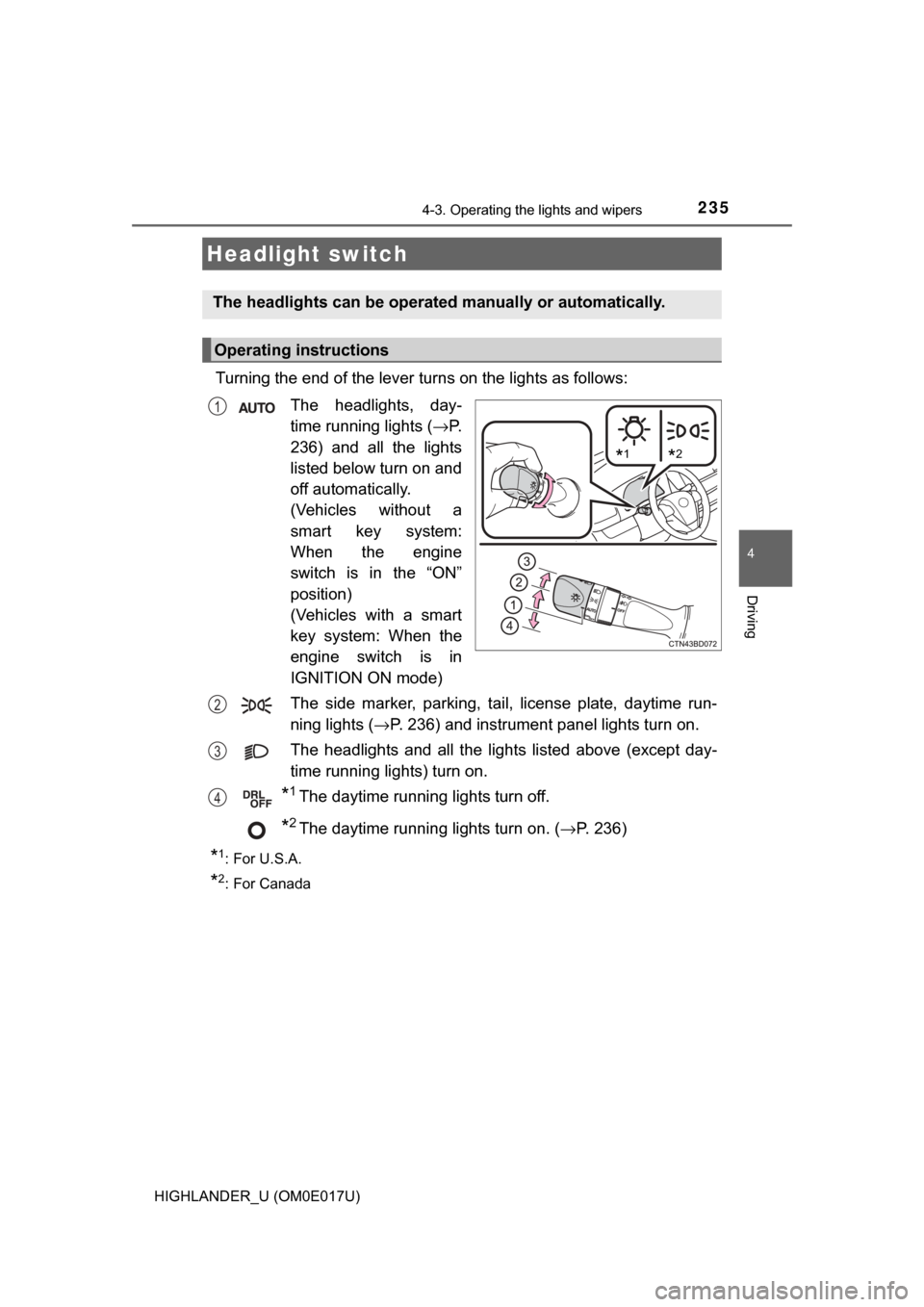
Turning the end of the lever turns on the lights as follows:The headlights, day-
time running lights ( →P.
236) and all the lights
listed below turn on and
off automatically.
(Vehicles without a
smart key system:
When the engine
switch is in the “ON”
position)
(Vehicles with a smart
key system: When the
engine switch is in
IGNITION ON mode)
The side marker, parking, tail, license plate, daytime run-
ning lights ( →P. 236) and instrument panel lights turn on.
The headlights and all the lights listed above (except day-
time running lights) turn on.
*1The daytime running lights turn off.
*2The daytime running lights turn on. ( →P. 236)
*1:For U.S.A.
*2: For Canada
Headlight switch
The headlights can be operated manually or automatically.
Operating instructions
*2*1
1
2
3
4
Page 441 of 732
4416-1. Using the air conditioning system and defogger
6
Interior features
HIGHLANDER_U (OM0E017U)
WARNING
■To prevent the windshield from fogging up
● Do not use during cool air operation in extremely humid weather.
The difference between the temperature of the outside air and that of the
windshield can cause the outer surface of the windshield to fog up, block-
ing your vision.
■ To prevent burns
● Do not touch the rear view mirror surfaces when the outside rear view mir-
ror defoggers are on.
● Do not touch the glass at lower part of the windshield or to the side of the
front pillars when the windshield wiper de-icer is on.
NOTICE
■To prevent battery discharge
Do not leave the air conditioning system on longer than necessary when the
engine is stopped.
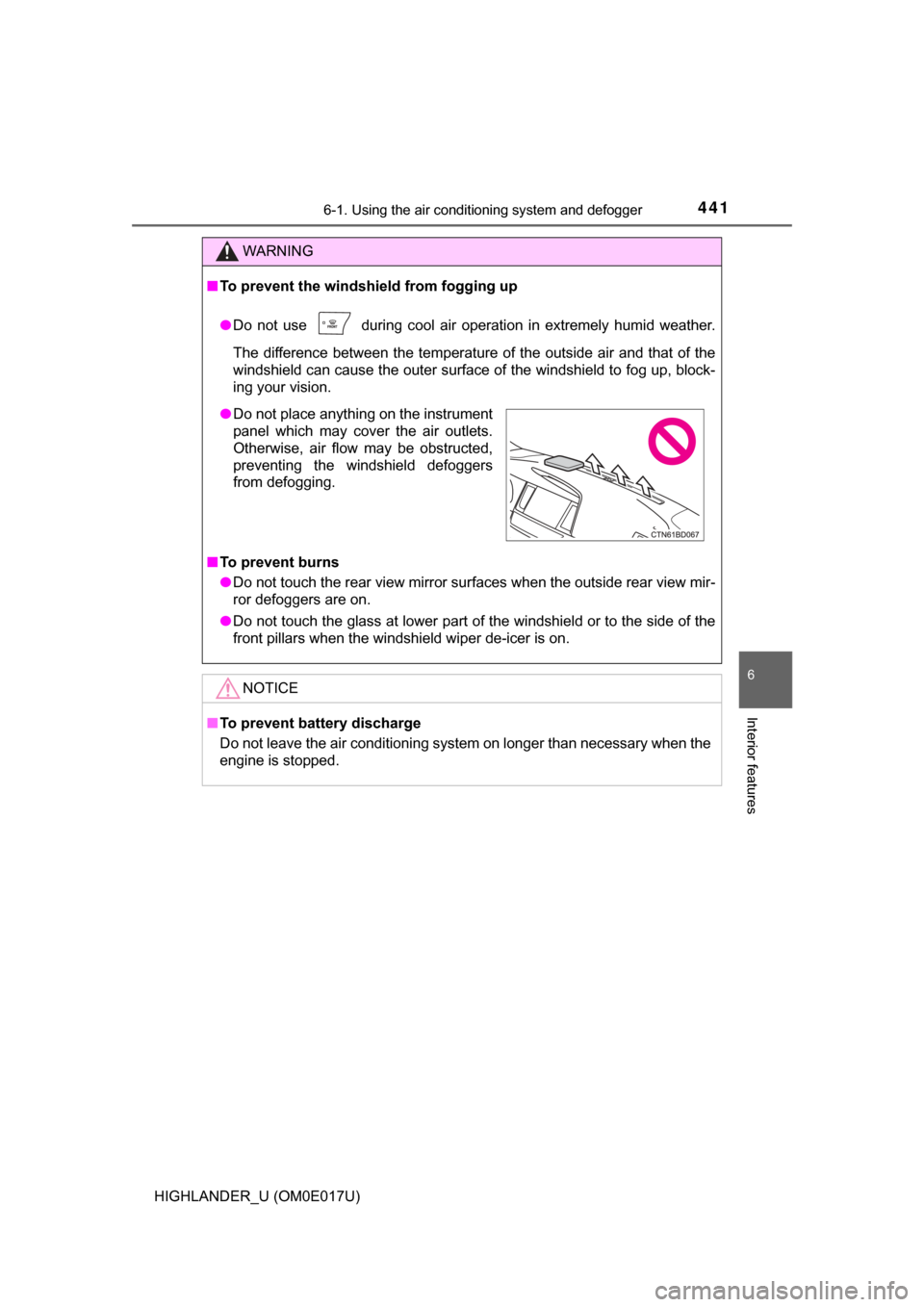
● Do not place anything on the instrument
panel which may cover the air outlets.
Otherwise, air flow may be obstructed,
preventing the windshield defoggers
from defogging.