Page 116 of 716
1162. Instrument cluster
HIGHLANDER_HV_U (OM48F12U)
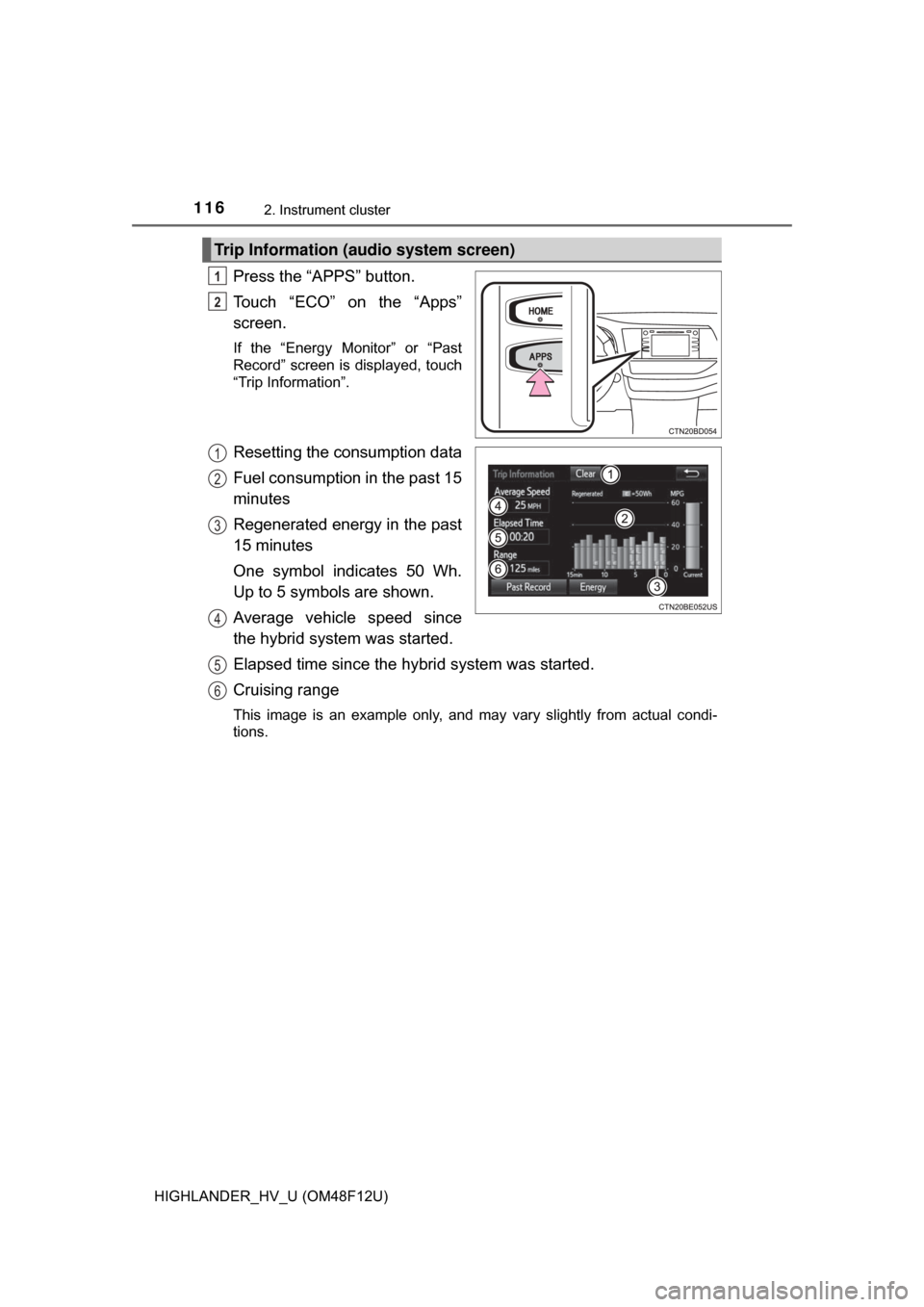
Press the “APPS” button.
Touch “ECO” on the “Apps”
screen.
If the “Energy Monitor” or “Past
Record” screen is displayed, touch
“Trip Information”.
Resetting the consumption data
Fuel consumption in the past 15
minutes
Regenerated energy in the past
15 minutes
One symbol indicates 50 Wh.
Up to 5 symbols are shown.
Average vehicle speed since
the hybrid system was started.
Elapsed time since the hybrid system was started.
Cruising range
This image is an example only, and may vary slightly from actual condi-
tions.
Trip Information (audio system screen)
1
2
1
2
3
4
5
6
Page 117 of 716
1172. Instrument cluster
2
Instrument cluster
HIGHLANDER_HV_U (OM48F12U)
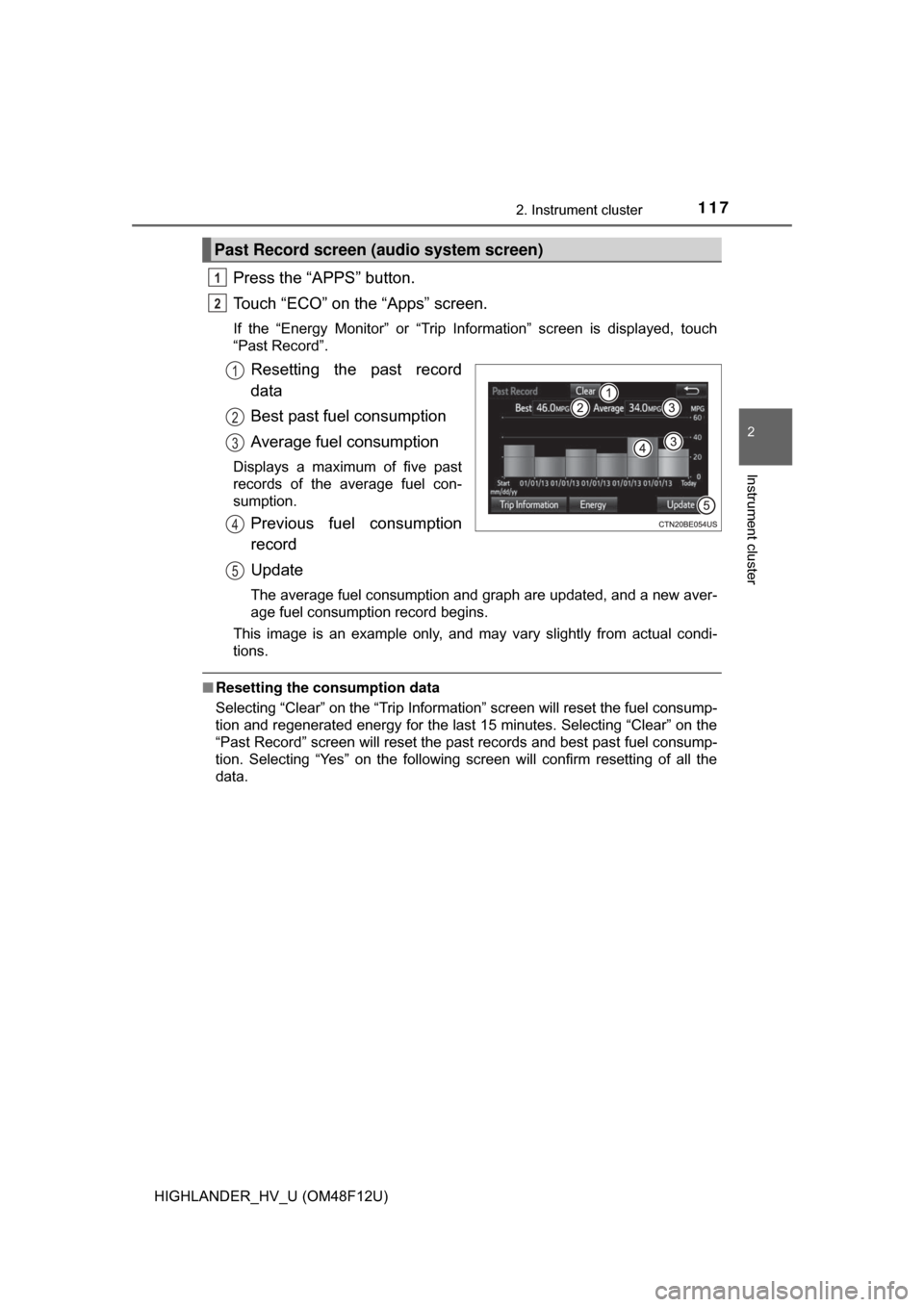
Press the “APPS” button.
Touch “ECO” on the “Apps” screen.
If the “Energy Monitor” or “Trip Information” screen is displayed, touch
“Past Record”.
Resetting the past record
data
Best past fuel consumption
Average fuel consumption
Displays a maximum of five past
records of the average fuel con-
sumption.
Previous fuel consumption
record
Update
The average fuel consumption and graph are updated, and a new aver-
age fuel consumption record begins.
This image is an example only, and may vary slightly from actual condi-
tions.
■ Resetting the consumption data
Selecting “Clear” on the “Trip Information” screen will reset the fuel consump-
tion and regenerated energy for the last 15 minutes. Selecting “Clear” on the
“Past Record” screen will reset the past records and best past fuel consump-
tion. Selecting “Yes” on the following screen will confirm resetting of all the
data.
Past Record screen (audio system screen)
1
2
1
2
3
4
5
Page 121 of 716

1213-1. Key information
3
Operation of each component
HIGHLANDER_HV_U (OM48F12U)
To take out the mechanical key,
push the release button and take
the key out.
The mechanical key can only be
inserted in one direction, as the
key only has grooves on one side.
If the key cannot be inserted in a
lock cylinder, turn it over and re-
attempt to insert it.
After using the mechanical key, store it in the electronic key. Carry the
mechanical key together with the electronic key. If the electronic key bat-
tery is depleted or the entry function does not operate properly, you will
need the mechanical key. (→P. 623)
■Panic mode
■ When required to leave the vehicle’s key with a parking attendant
Lock the glove box as circumstances demand. ( →P. 451)
Remove the mechanical key for your own use and provide the attendant with
the electronic key only.
■ If you lose your keys
New genuine keys can be made by your Toyota dealer using the mechanical
key and the key number stamped on your key number plate. Keep the plate in
a safe place such as your wallet, not in the vehicle.
Using the mechanical key
When is pressed for longer than
about one second, an alarm will sound
intermittently and the vehicle lights will
flash to deter any person from trying to
break into or damage your vehicle.
To stop the alarm, press any button on the
electronic key.
Page 128 of 716

1283-2. Opening, closing and locking the doors
HIGHLANDER_HV_U (OM48F12U)
■Switching the door unlock function
It is possible to set which doors the entry function unlocks using the wireless
remote control.
Turn the power switch off.
When the indicator light on the key surface is not on, press and hold ,
or for approximately 5 seconds while pressing and holding
.
The setting changes each time an operation is performed, as shown below.
(When changing the setting continuously, release the buttons, wait for at least
5 seconds, and repeat step .)
For vehicles with an alarm: To prevent unintended triggering of the alarm,
unlock the doors using the wireless remote control and open and close a door
once after the settings have been changed. (If a door is not opened within 60
seconds after is pressed, the doors will be locked again and the alarm
will automatically be set.)
In case that the alarm is triggered, immediately stop the alarm. ( →P. 94)
1
2
2
Multi-information
displayUnlocking functionBeep
Holding the driver’s door handle
unlocks only the driver's door.Exterior:
Beeps 3 times
Interior:
Pings once
Holding a passenger’s door
handle unlocks all the doors.
Holding a door handle unlocks
all the doors.
Exterior:
Beeps twice
Interior:
Pings once
Page 134 of 716
1343-2. Opening, closing and locking the doors
HIGHLANDER_HV_U (OM48F12U)
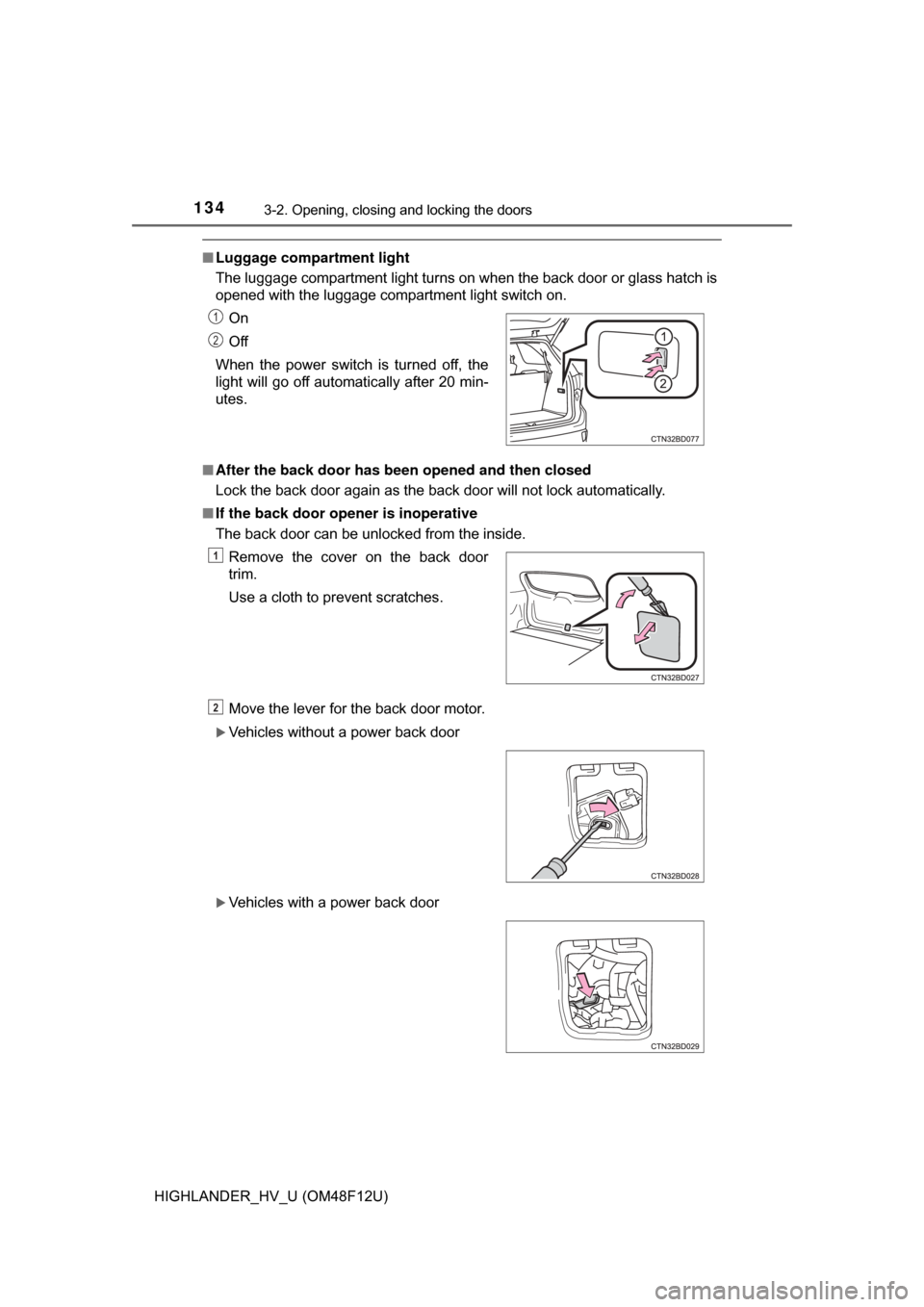
■Luggage compartment light
The luggage compartment light turns on when the back door or glass hatch is
opened with the luggage compartment light switch on.
■ After the back door has been opened and then closed
Lock the back door again as the back door will not lock automatically.
■ If the back door open er is inoperative
The back door can be unlocked from the inside.
Move the lever for the back door motor.
Vehicles without a power back door
Vehicles with a power back door On
Off
When the power switch is turned off, the
light will go off automatically after 20 min-
utes.
Remove the cover on the back door
trim.
Use a cloth to prevent scratches.
1
2
1
2
Page 135 of 716
1353-2. Opening, closing and locking the doors
3
Operation of each component
HIGHLANDER_HV_U (OM48F12U)■
The power back door can be operated when (vehicles with a power back
door)
The power back door main switch is turned on and the glass hatch is closed.
■ The power back door can be opened when (vehicles with a power back
door)
● The power switch is in ON mode and the shift lever is in P.
● The power switch is in ACCESSORY mode or off.
■ Back door closer (vehicl es with a power back door)
In the event that the back door is left slightly open, the back door closer will
automatically close it to the fully closed position.
● The back door closer will operate regardless of the power switch mode.
● The back door can be opened while the back door closer is operating by
pressing the back door opener button.
■ Power back door oper ation (vehicles with a power back door)
● A buzzer sounds and the emergency flashers flash twice to indicate that the
back door is opening/closing.
● The back door can be opened and closed manually even when the power
back door main switch is off.
■ Power back door operation using th e entry function or wireless remote
control (vehicles with a power back door)
The back door can be opened even if it is locked. All the doors are unlocked
when the power back door is operated. Make sure to lock all the doors again
when you leave the vehicle. The doors will not lock automatically after the
back door has been closed.
■ Back door closing assist (vehic les with a power back door)
If the back door is lowered manually when the back door is stopped at an
open position, the back door will fully close automatically.
■ Jam protection function (veh icles with a power back door)
● If anything obstructs the power back door while it is closing, the back door
will open slightly then stop.
● If anything obstructs the power back door while it is opening, the back door
will immediately stop.
■ Fall-down protection function ( vehicles with a power back door)
While the power back door is opening automatically, applying excessive force
to it will stop the opening operation to prevent the power back door from sud-
denly shutting.
■ Canceling the adjusted open position of the back door (vehicles with a
power back door)
Press and hold the power back door switch on the back door until a buzzer
sounds 4 times, pauses momentarily, and then sounds 2 times. The open
position is initialized to the fully opened position.
Page 137 of 716
1373-2. Opening, closing and locking the doors
3
Operation of each component
HIGHLANDER_HV_U (OM48F12U)
WARNING
■Operating the back door
Observe the following precautions.
Failure to do so may cause parts of the body to be caught, resulting in death
or serious injury.
● Remove any heavy loads, such as snow and ice, from the back door
before opening it. Failure to do so may cause the back door to suddenly
shut again after it is opened.
● When opening or closing the back door, thoroughly check to make sure
the surrounding area is safe.
● If anyone is in the vicinity, make sure they are safe and let them know that
the back door is about to open or close.
● Use caution when opening or closing the back door in windy weather as it
may move abruptly in strong wind.
● Do not pull on the back door damper stay (vehicles without a power back
door) or back door spindle (vehicles with a power back door) to close the
back door, and do not hang on the back door damper stay (vehicles with-
out a power back door) or back door spindle (vehicles with a power back
door).
Doing so may cause hands to be caught or the back door damper stay
(vehicles without a power back door) or back door spindle (vehicles with a
power back door) to break, causing an accident.
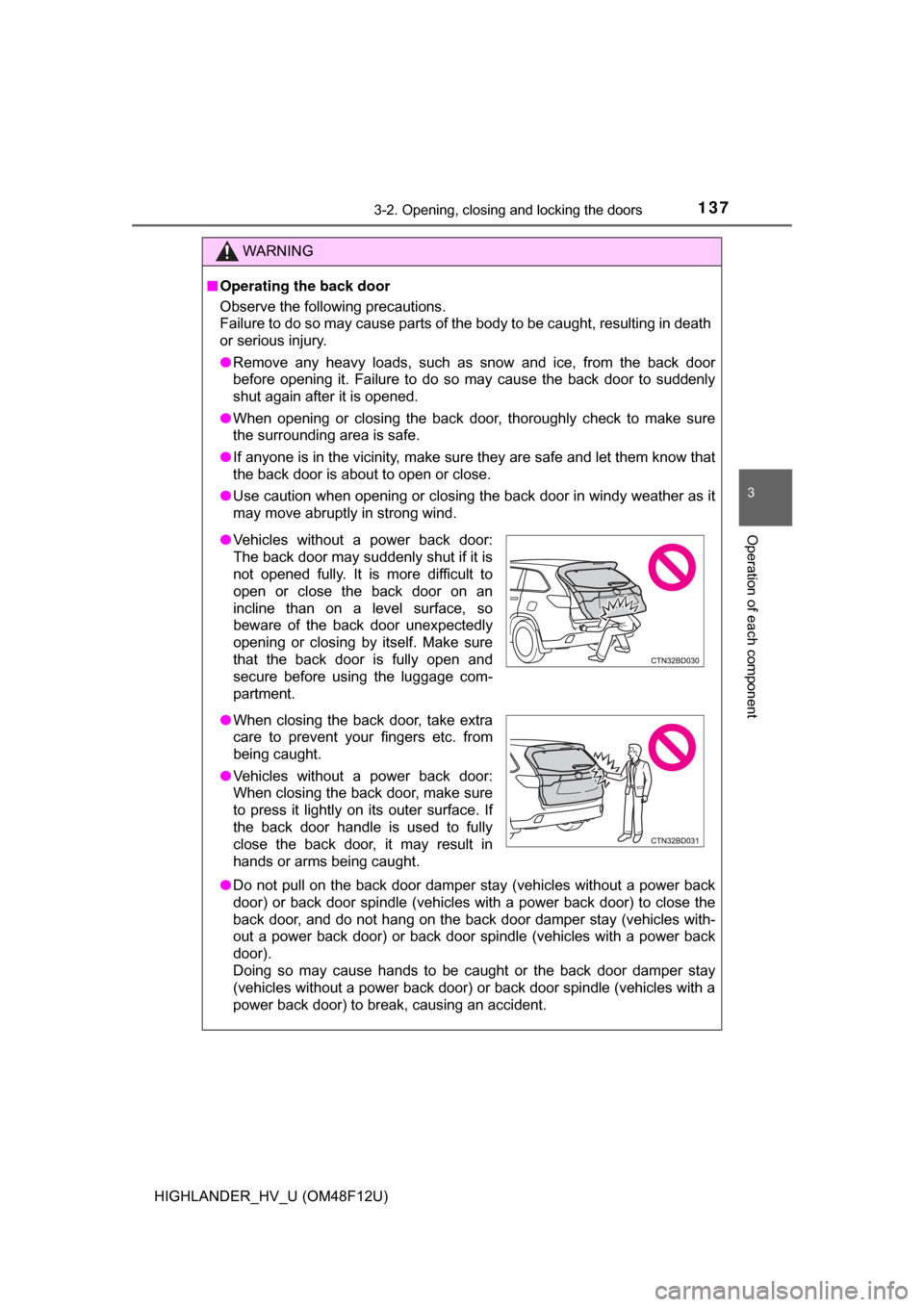
●Vehicles without a power back door:
The back door may suddenly shut if it is
not opened fully. It is more difficult to
open or close the back door on an
incline than on a level surface, so
beware of the back door unexpectedly
opening or closing by itself. Make sure
that the back door is fully open and
secure before using the luggage com-
partment.
● When closing the back door, take extra
care to prevent your fingers etc. from
being caught.
● Vehicles without a power back door:
When closing the back door, make sure
to press it lightly on its outer surface. If
the back door handle is used to fully
close the back door, it may result in
hands or arms being caught.
Page 138 of 716
1383-2. Opening, closing and locking the doors
HIGHLANDER_HV_U (OM48F12U)
WARNING
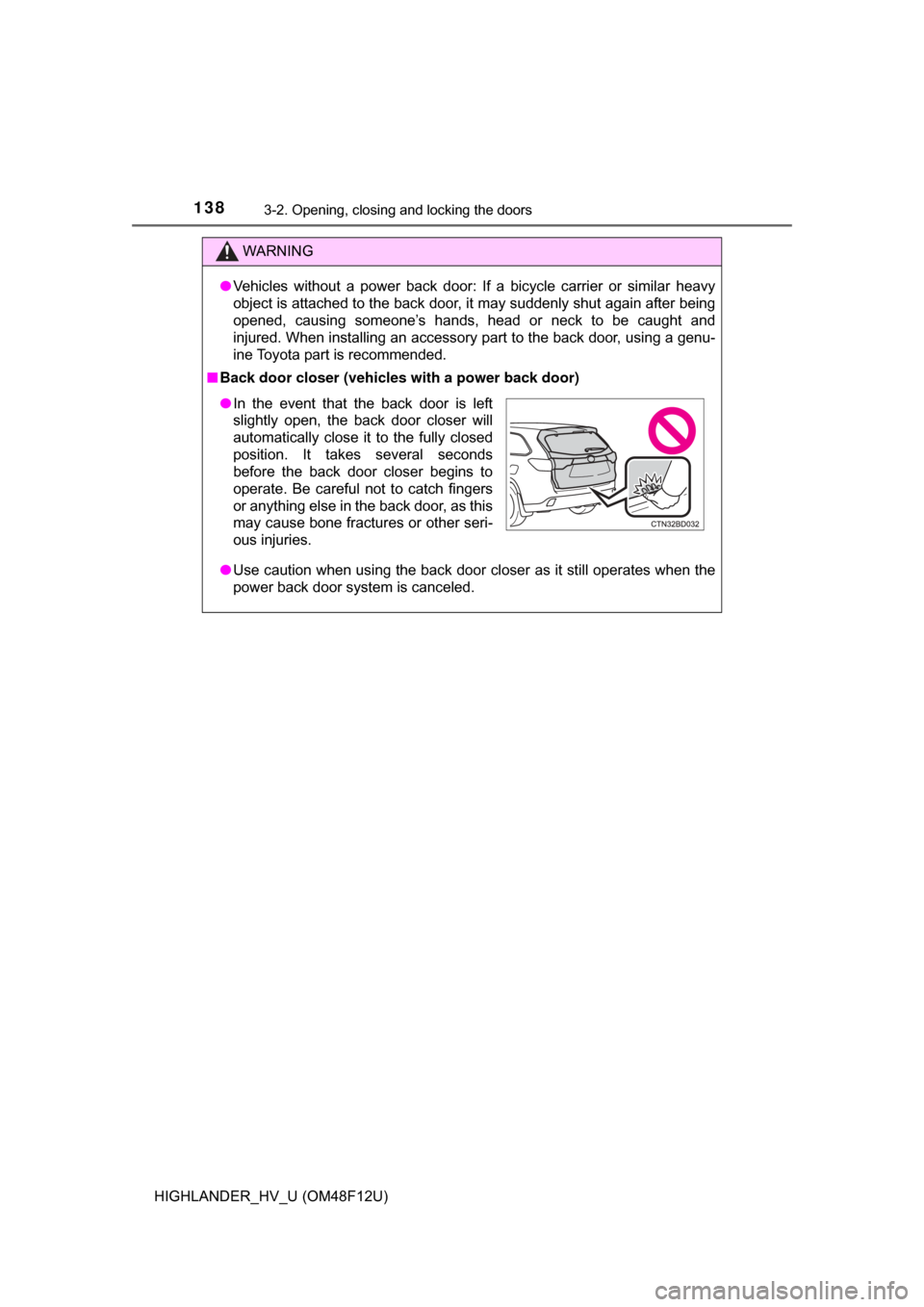
●Vehicles without a power back door: If a bicycle carrier or similar heavy
object is attached to the back door, it may suddenly shut again after being
opened, causing someone’s hands, head or neck to be caught and
injured. When installing an accessory part to the back door, using a genu-
ine Toyota part is recommended.
■ Back door closer (vehicles with a power back door)
● Use caution when using the back door closer as it still operates when the
power back door system is canceled.
●In the event that the back door is left
slightly open, the back door closer will
automatically close it to the fully closed
position. It takes several seconds
before the back door closer begins to
operate. Be careful not to catch fingers
or anything else in the back door, as this
may cause bone fractures or other seri-
ous injuries.