Page 219 of 528
2194-3. Operating the lights and wipers
4
Driving
4RUNNER (U)_(OM35B37U)
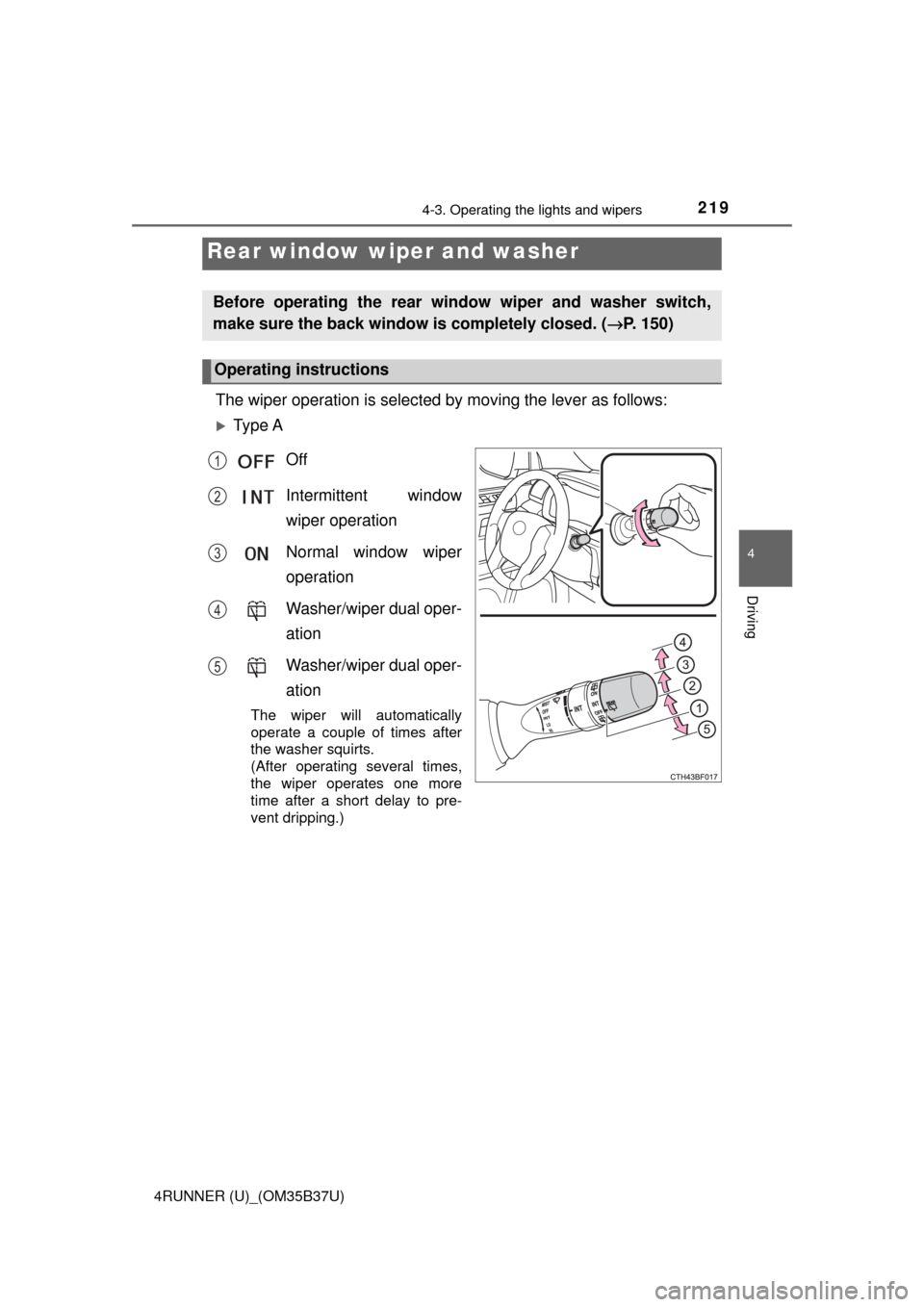
The wiper operation is selected by moving the lever as follows:
Ty p e AOff
Intermittent window
wiper operation
Normal window wiper
operation
Washer/wiper dual oper-
ation
Washer/wiper dual oper-
ation
The wiper will automatically
operate a couple of times after
the washer squirts.
(After operating several times,
the wiper operates one more
time after a short delay to pre-
vent dripping.)
Rear window wiper and washer
Before operating the rear window wiper and washer switch,
make sure the back window is completely closed. ( →P. 150)
Operating instructions
1
2
3
4
5
Page 220 of 528
2204-3. Operating the lights and wipers
4RUNNER (U)_(OM35B37U)
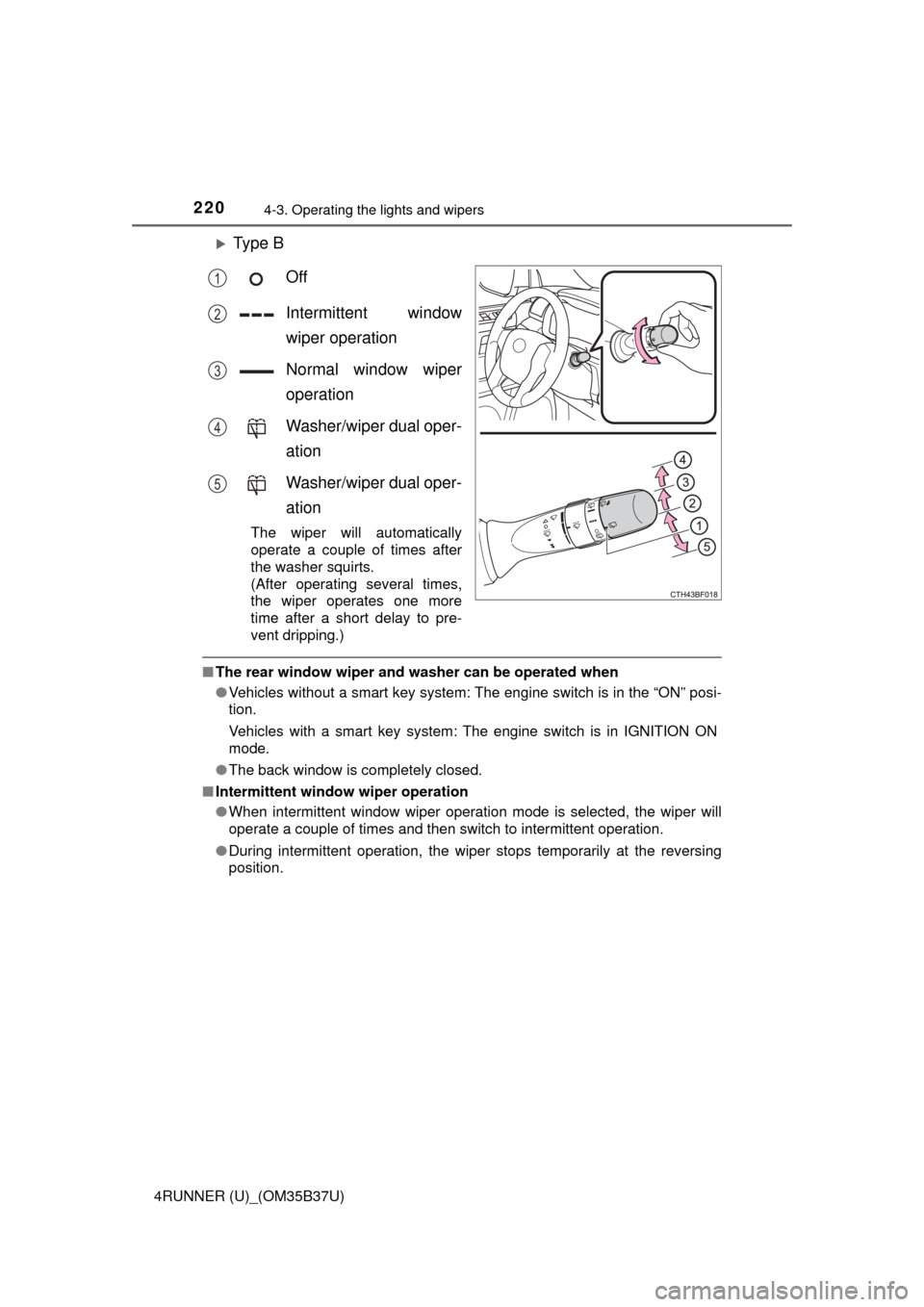
Ty p e BOff
Intermittent window
wiper operation
Normal window wiper
operation
Washer/wiper dual oper-
ation
Washer/wiper dual oper-
ation
The wiper will automatically
operate a couple of times after
the washer squirts.
(After operating several times,
the wiper operates one more
time after a short delay to pre-
vent dripping.)
■The rear window wiper and w asher can be operated when
● Vehicles without a smart key system: The engine switch is in the “ON” posi-
tion.
Vehicles with a smart key system: The engine switch is in IGNITION ON
mode.
● The back window is completely closed.
■ Intermittent window wiper operation
●When intermittent window wiper operation mode is selected, the wiper will
operate a couple of times and then switch to intermittent operation.
● During intermittent operation, the wiper stops temporarily at the reversing
position.
1
2
3
4
5
Page 221 of 528

2214-3. Operating the lights and wipers
4
Driving
4RUNNER (U)_(OM35B37U)■
When the rear window wiper and washer switch is turned off
The rear wiper will stop operation, and return to the retracted position after
approximately 3 seconds.
However, if the engine switch is turned to the “ACC” or “LOCK” position (vehi-
cles without a smart key system) or the engine switch is turned to ACCES-
SORY mode or turned off (vehicles with a smart key system) while the rear
wiper is operating, the rear wiper will stop at that position and will not return to
the retracted position.
■ If no washer fluid sprays
Check that the washer nozzle is not blocked if there is washer fluid in the
washer fluid reservoir.
■ Customization
Settings (e.g. drip prevention function) can be changed.
(Customizable features →P. 489)
NOTICE
■When the rear window is dry
Do not use the wiper, as it may damage the rear window.
■ When the washer fluid tank is empty
Do not operate the switch continually as the washer fluid pump may over-
heat.
■ When a nozzle becomes blocked
In this case, contact your Toyota dealer.
Do not try to clear it with a pin or other object. The nozzle will be damaged.
Page 251 of 528
2514-5. Using the driving support systems
4
Driving
4RUNNER (U)_(OM35B37U)
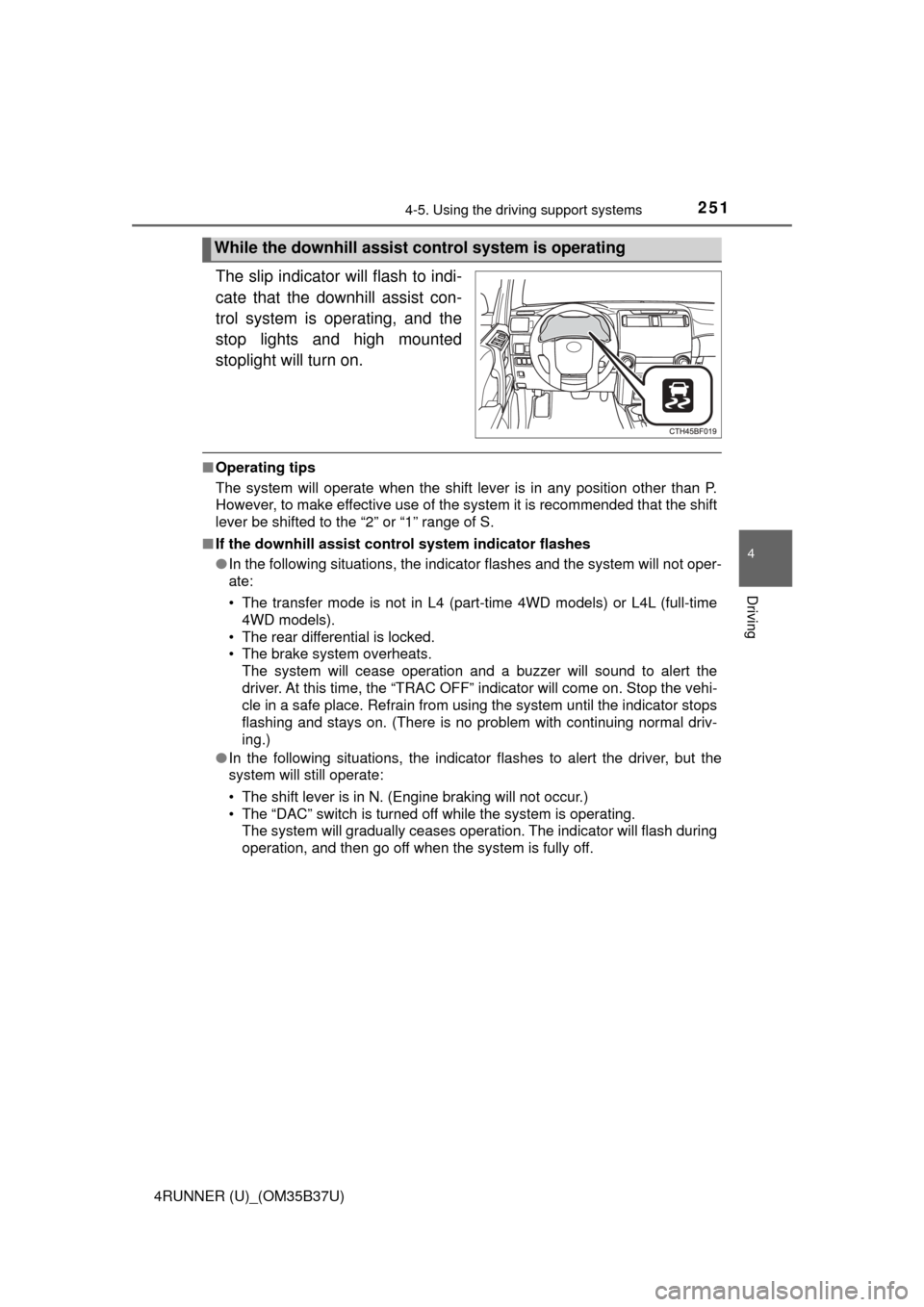
The slip indicator will flash to indi-
cate that the downhill assist con-
trol system is operating, and the
stop lights and high mounted
stoplight will turn on.
■Operating tips
The system will operate when the shift lever is in any position other than P.
However, to make effective use of the system it is recommended that the shift
lever be shifted to the “2” or “1” range of S.
■ If the downhill assist control system indicator flashes
●In the following situations, the indicator flashes and the system will not oper-
ate:
• The transfer mode is not in L4 (part-time 4WD models) or L4L (full-time
4WD models).
• The rear differential is locked.
• The brake system overheats. The system will cease operation and a buzzer will sound to alert the
driver. At this time, the “TRAC OFF” indicator will come on. Stop the vehi-
cle in a safe place. Refrain from using the system until the indicator stops
flashing and stays on. (There is no problem with continuing normal driv\
-
ing.)
● In the following situations, the indicator flashes to alert the driver, but the
system will still operate:
• The shift lever is in N. (Engine braking will not occur.)
• The “DAC” switch is turned off while the system is operating.
The system will gradually ceases operation. The indicator will flash during
operation, and then go off when the system is fully off.
While the downhill assist control system is operating
Page 264 of 528

2644-5. Using the driving support systems
4RUNNER (U)_(OM35B37U)
◆Hill-start assist control (if equipped)
Helps to prevent the vehicle from rolling backward when starting on
an incline or slippery slope
◆LSD (Limited Slip Diff erential) (if equipped)
Transfers drive power to the rear tires when front tires spin, and
vice versa, in order to improve traction
◆KDSS (Kinetic Dynamic Suspension System) (if equipped)
Enhances ride comfort and handling response by using a hydraulic
control system to cont rol the suspension stab ilizer bars in response
to road surface and driving condi tions during cornering or off-road
driving
If the vehicle is in danger of slip-
ping or if any of the drive wheels
spins, the slip indicator flashes to
indicate that the TRAC/VSC/
Trailer Sway Control systems are
operating.
If the vehicle is in danger of slip-
ping or rolling backward when
starting on an incline, or if any of
the drive wheels spins, the slip
indicator flashes to indicate that
the TRAC/VSC/Trailer Sway Con-
trol/hill-start assist control sys-
tems are operating.
The stop lights and high mounted
stoplight turn on and a buzzer
(intermittent) sounds when the hill-
start assist control system is oper-
ating.
When the TRAC/VSC/Trailer Sway Control systems are operating
(2WD models)
When the TRAC/VSC/Trailer Sway Control/hill-start assist control
systems are operating (4WD models)
Page 273 of 528
2734-6. Driving tips
4
Driving
4RUNNER (U)_(OM35B37U)
Perform the following according to the driving conditions:
● Do not try to forcibly open a window or move a wiper that is frozen.
Pour warm water over the frozen area to melt the ice. Wipe away
the water immediately to prevent it from freezing.
● To ensure proper operation of the climate control system fan,
remove any snow that has accumulated on the air inlet vents in
front of the windshield.
● Check for and remove any excess ice or snow that may have accu-
mulated on the exterior lights, vehicle’s roof, chassis, around the
tires or on the brakes.
● Remove any snow or mud from the bottom of your shoes before
getting in the vehicle.
Accelerate the vehicle slowly, keep a safe distance between you and
the vehicle ahead, and drive at a reduced speed suitable to road con-
ditions.
● Park the vehicle and move the shift lever to P without setting the
parking brake. The parking brake may freeze up, preventing it from
being released. If the vehicle is parked without setting the parking
brake, make sure to block the wheels.
Failure to do so may be dangerous because it may cause the vehi-
cle to move unexpectedly, pos sibly leading to an accident.
● If the vehicle is parked without se tting the parking brake, confirm
that the shift lever ca nnot be moved out of P
*.
*: The shift lever will be locked if it is attempted to be shifted from P to any
other position without depressing the brake pedal. If the shift lever can be
shifted from P, there may be a problem with the shift lock system. Have the
vehicle inspected by your Toyota dealer immediately.
Before driving the vehicle
When driving the vehicle
When parking the vehicle
Page 281 of 528

281
Interior features5
4RUNNER (U)_(OM35B37U)5-1. Using the
air conditioning system
and defogger
Manual air conditioning system............................. 282
Automatic air conditioning system............................. 288
Seat heaters/seat ventilators........................ 295
5-2. Using the interior lights Interior lights list ................ 297
• Interior lights ................. 298
• Personal lights .............. 298
5-3. Using the storage features
List of storage features ..... 300
• Glove box...................... 301
• Console box .................. 301
• Cup holders .................. 302
• Auxiliary box ................. 304
• Coin holder/tissue pocket/
pen holder ..................... 305
• Bottle holders ................ 306
Luggage compartment features ........................... 307 5-4. Other interior features
Other interior features ....... 312
• Sun visors ..................... 312
• Vanity mirrors................ 312
• Clock ............................. 313
• Outside temperature display........................... 314
• Power outlets (120 V AC) .................... 315
• Power outlets ................ 320
• Armrest ......................... 322
• Assist grips ................... 323
Garage door opener.......... 324
Safety Connect ................. 331
Page 297 of 528
297
5
Interior features
4RUNNER (U)_(OM35B37U)
5-2. Using the interior lights
Interior lights list
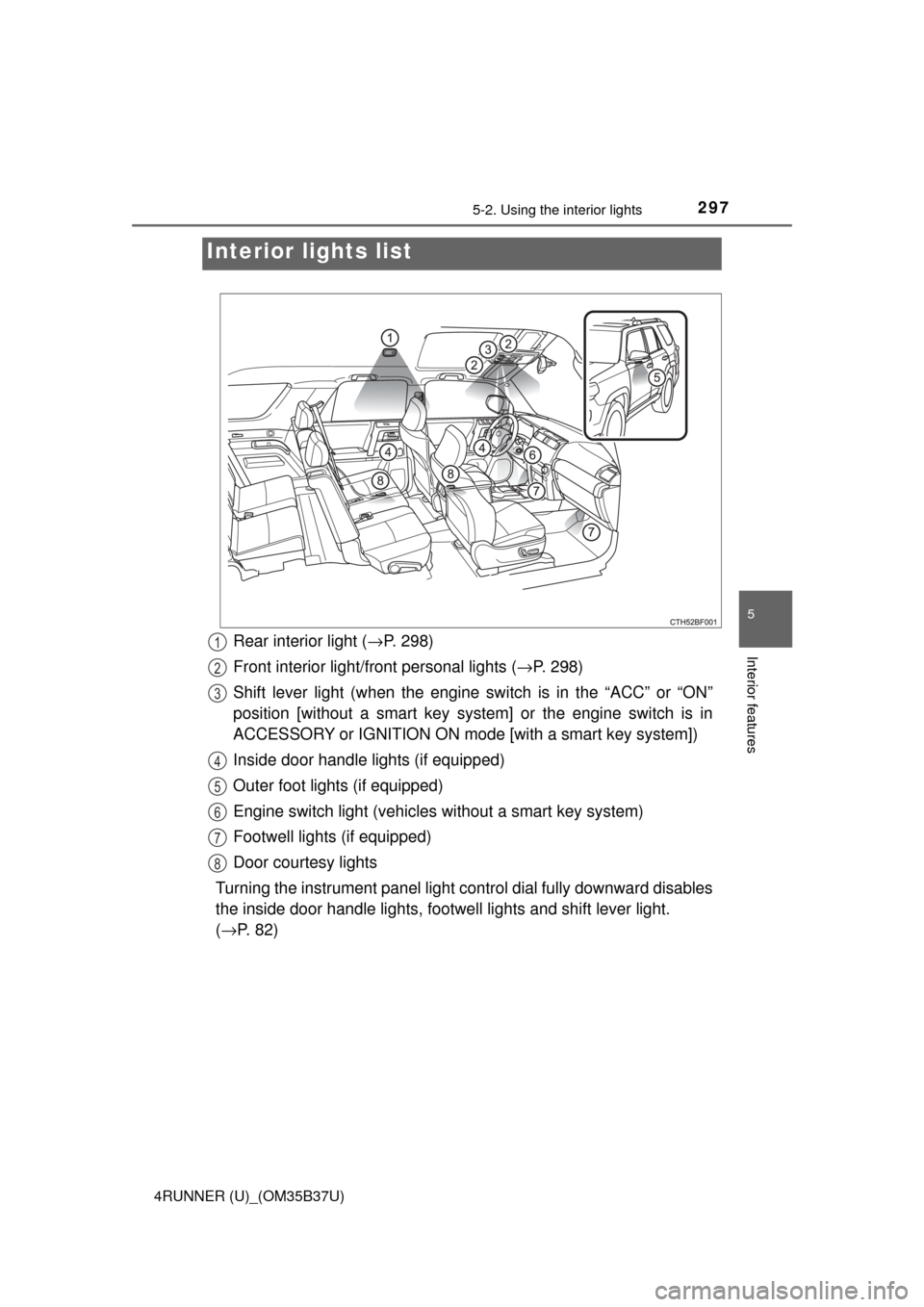
Rear interior light ( →P. 298)
Front interior light/fr ont personal lights ( →P. 298)
Shift lever light (when the engine sw itch is in the “ACC” or “ON”
position [without a smart key syst em] or the engine switch is in
ACCESSORY or IGNITION ON mode [with a smart key system])
Inside door handle lights (if equipped)
Outer foot lights (if equipped)
Engine switch light (vehicles without a smart key system)
Footwell lights (if equipped)
Door courtesy lights
Turning the instrument panel light control dial fully downward disables
the inside door handle lights, footwe ll lights and shift lever light.
( → P. 82)1
2
3
4
5
6
7
8