Page 155 of 528

1553-5. Opening, closing the windows and moon roof
3
Operation of each component
4RUNNER (U)_(OM35B37U)
■The moon roof can be operated when
Vehicles without a smart key system
The engine switch is in the “ON” position.
Vehicles with a smart key system
The engine switch is in IGNITION ON mode.
■ Operating the moon roof af ter turning the engine off
Vehicles without a smart key system
The moon roof can be operated for approximately 45 seconds even after the
engine switch is turned to the “ACC” or “LOCK” position. They cannot, how-
ever, be operated once either front door is opened.
Vehicles with a smart key system
The moon roof can be operated for approximately 45 seconds after the
engine switch is turned to ACCESSORY mode or turned off. It cannot, how-
ever, be operated once either front door is opened.
■ Jam protection function
If an object is detected between the moon roof and the frame while the moon
roof is closing or tilting down, travel is stopped and the moon roof opens
slightly.
■ To reduce moon roof wind noise
When the moon roof is opened automatically, it will stop slightly before the
fully open position. Driving with the moon roof in this position can help reduce
wind noise.
■ Sunshade
The sunshade can be opened and closed manually. However, the sunshade
will open automatically when the moon roof is opened.
Page 159 of 528

159
Driving4
4RUNNER (U)_(OM35B37U)4-1. Before driving
Driving the vehicle ............. 160
Cargo and luggage ........... 170
Vehicle load limits ............. 175
Trailer towing..................... 176
Dinghy towing ................... 192
4-2. Driving procedures Engine (ignition) switch (vehicles without a
smart key system) ........... 193
Engine (ignition) switch (vehicles with a
smart key system) ........... 196
Automatic transmission ..... 201
Turn signal lever................ 206
Parking brake .................... 207
4-3. Operating the lights and wipers
Headlight switch ................ 208
Fog light switch ................. 214
Windshield wipers and washer ............................ 216
Rear window wiper and washer ............................ 219 4-4. Refueling
Opening the fuel tank cap .................................. 222
4-5. Using the driving support systems
Cruise control .................... 225
Intuitive parking assist....... 229
Four-wheel drive system (part-time 4WD
models) ........................... 235
Four-wheel drive system (full-time 4WD
models) ........................... 239
Active traction control system ............................ 243
AUTO LSD system............ 245
Rear differential lock system ............................ 247
Downhill assist control system ............................ 250
Crawl Control .................... 253
Multi-terrain Select ............ 256
Driving assist systems ...... 263
4-6. Driving tips Winter driving tips ............. 272
Off-road precautions ......... 276
Page 193 of 528
193
4
Driving
4RUNNER (U)_(OM35B37U)
4-2. Driving procedures
Check that the parking brake is set.
Check that the shift lever is set in P.
Firmly depress the brake pedal.
Turn the engine switch to the “START” position to start the engine.
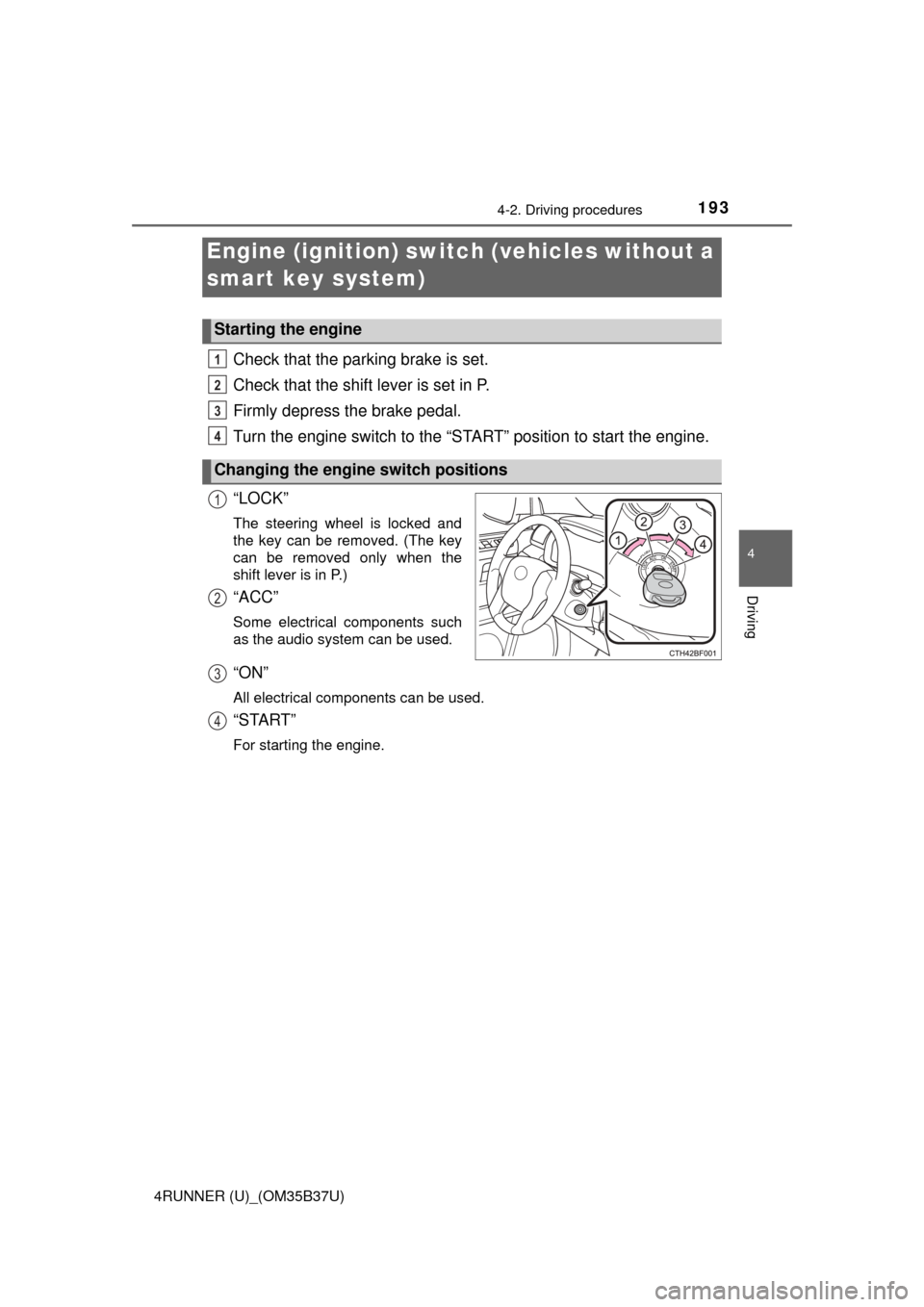
“LOCK”
The steering wheel is locked and
the key can be removed. (The key
can be removed only when the
shift lever is in P.)
“ACC”
Some electrical components such
as the audio system can be used.
“ON”
All electrical components can be used.
“START”
For starting the engine.
Engine (ignition) swi tch (vehicles without a
smart key system)
Starting the engine
Changing the engine switch positions
1
2
3
4
1
2
3
4
Page 196 of 528
1964-2. Driving procedures
4RUNNER (U)_(OM35B37U)
Check that the parking brake is set.
Check that the shift lever is set in P.
Firmly depress the brake pedal.
The engine switch indicator will turn green. If the indicator does not turn
green, the engine cannot be started.
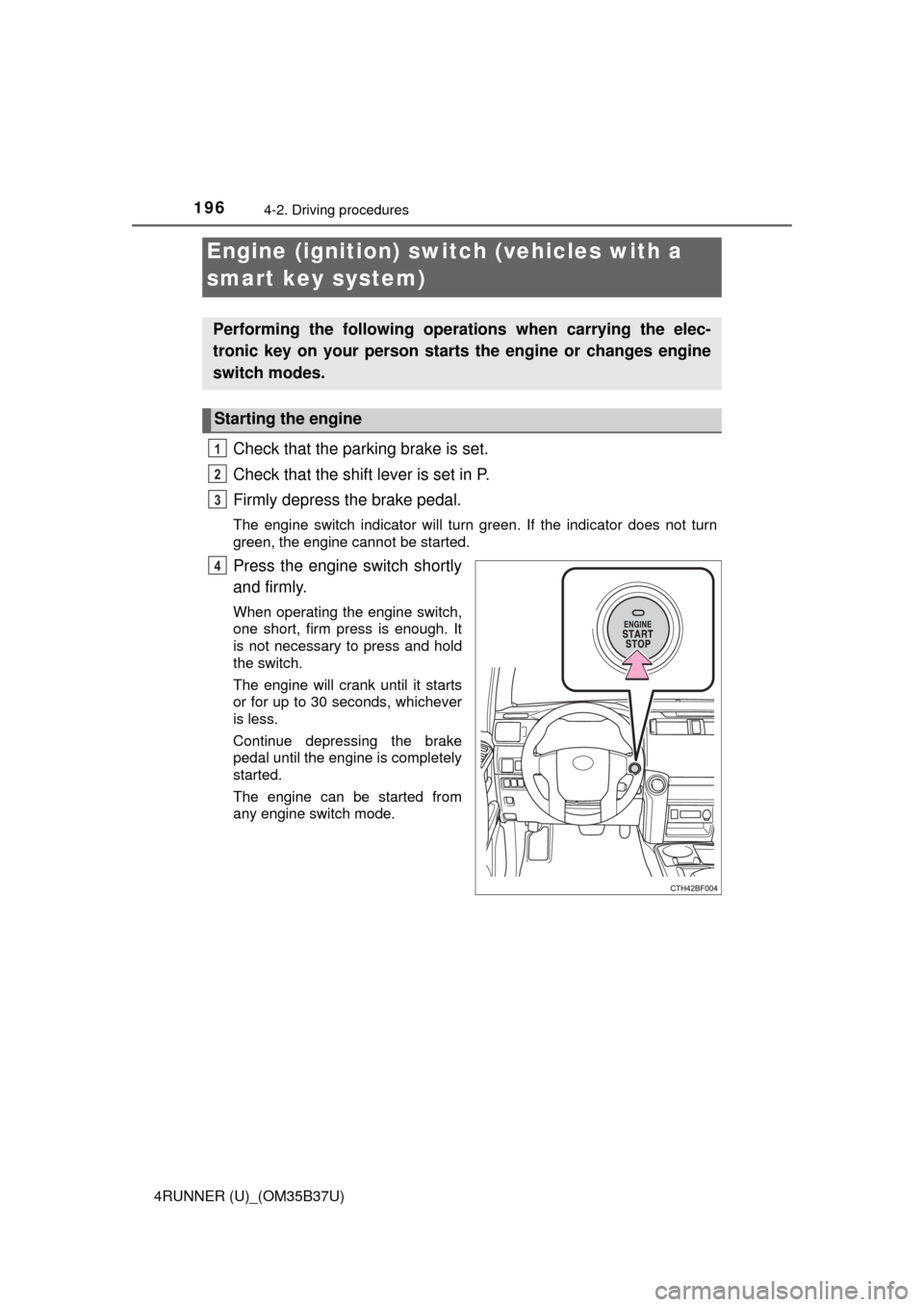
Press the engine switch shortly
and firmly.
When operating the engine switch,
one short, firm press is enough. It
is not necessary to press and hold
the switch.
The engine will crank until it starts
or for up to 30 seconds, whichever
is less.
Continue depressing the brake
pedal until the engine is completely
started.
The engine can be started from
any engine switch mode.
Engine (ignition) switch (vehicles with a
smart key system)
Performing the following operati ons when carrying the elec-
tronic key on your person starts the engine or changes engine
switch modes.
Starting the engine
1
2
3
4
Page 197 of 528
1974-2. Driving procedures
4
Driving
4RUNNER (U)_(OM35B37U)
Stop the vehicle.
Set the parking brake (
→P. 207), and shift the shift lever to P.
Press the engine switch.
Release the brake pedal and check t hat the indicator on the engine
switch is off.
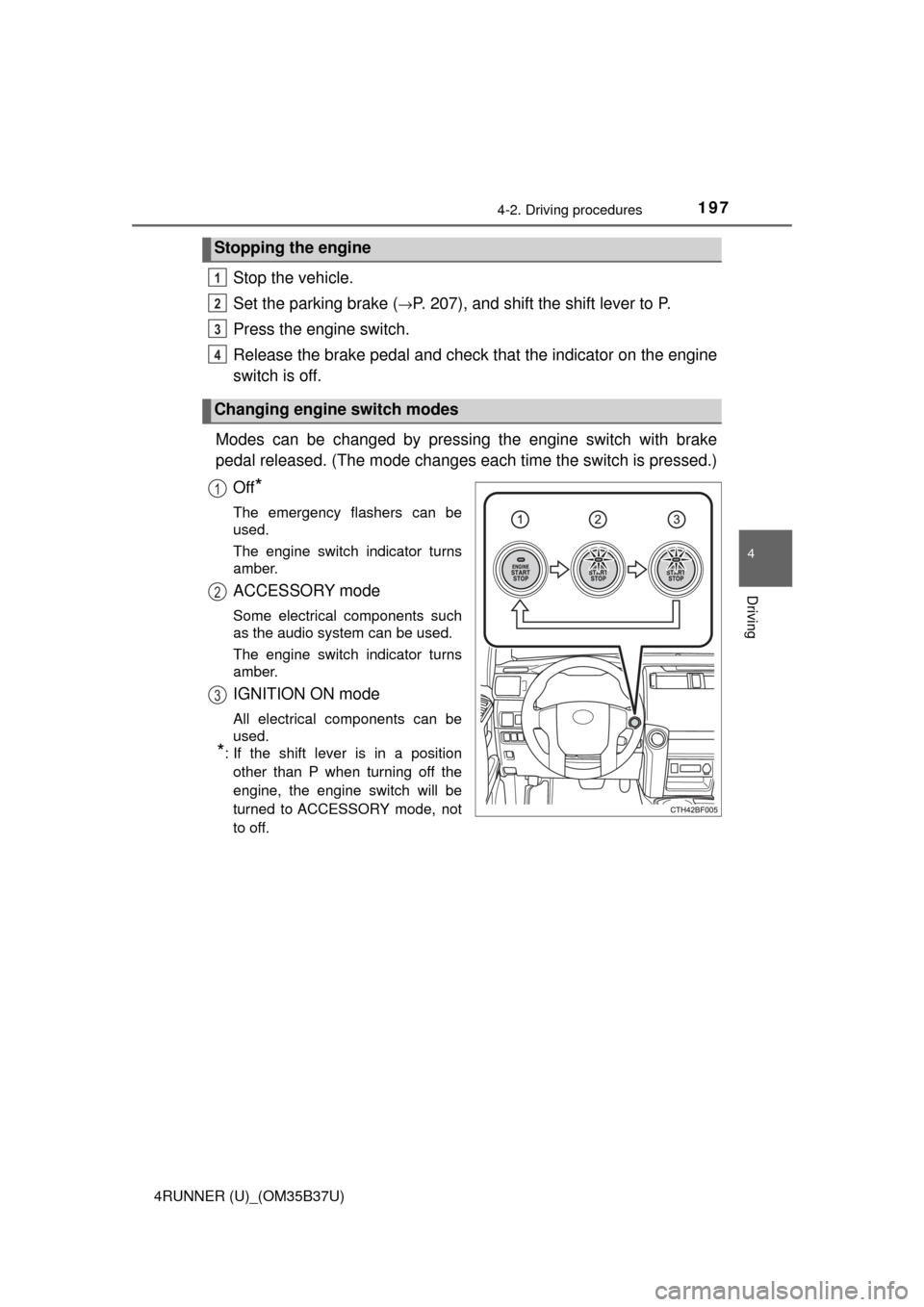
Modes can be changed by pressing the engine switch with brake
pedal released. (The mode changes ea ch time the switch is pressed.)
Off
*
The emergency flashers can be
used.
The engine switch indicator turns
amber.
ACCESSORY mode
Some electrical components such
as the audio system can be used.
The engine switch indicator turns
amber.
IGNITION ON mode
All electrical components can be
used.
*: If the shift lever is in a position other than P when turning off the
engine, the engine switch will be
turned to ACCESSORY mode, not
to off.
Stopping the engine
Changing engine switch modes
1
2
3
4
1
2
3
Page 198 of 528

1984-2. Driving procedures
4RUNNER (U)_(OM35B37U)
If the engine is stopped with the shift lever in a position other than P,
the engine switch will not be turned off but instead be turned to
ACCESSORY mode. Perform the following procedure to turn the
switch off:
Check that the parking brake is set.
Shift the shift lever to P.
Check that the indicator on th e engine switch is illuminated in
amber and then press the engine switch once.
Check that the indicator on the engine switch is off.
■Auto power off function
If the vehicle is left in ACCESSORY mode for more than 20 minutes or IGNI-
TION ON mode (the engine is not running) for more than an hour with th\
e
shift lever in P, the engine switch will automatically turn off. However, this
function cannot entirely prevent battery discharge. Do not leave the vehicle
with the engine switch in ACCESSORY or IGNITION ON mode for long peri-
ods of time when the engine is not running.
■ Electronic key battery depletion
→P. 9 4
■ Conditions affecting operation
→P. 107
■ Notes for the entry function
→P. 108
■ If the engine does not start
The engine immobilizer system may not have been deactivated. ( →P. 70)
Contact your Toyota dealer.
■ Steering lock
After turning the engine switch off and opening and closing the doors, the
steering wheel will be locked due to the steering lock function. Operating the
engine switch again automatically cancels the steering lock.
When stopping the engine with the shift lever in a position other
than P
1
2
3
4
Page 200 of 528

2004-2. Driving procedures
4RUNNER (U)_(OM35B37U)
CAUTION
■When starting the engine
Always start the engine while sitting in the driver’s seat. Do not depress the
accelerator pedal while starting the engine under any circumstances.
Doing so may cause an accident resulting in death or serious injury.
■ Caution while driving
If engine failure occurs while the vehicle is moving, do not lock or open the
doors until the vehicle reaches a safe and complete stop. Activation of the
steering lock in this circumstance may lead to an accident, resulting in
death or serious injury.
■ Stopping the engine in an emergency
If you want to stop the engine in an emergency while driving the vehicle,
press and hold the engine switch for more than 2 seconds, or press it briefly
3 times or more in succession. ( →P. 407)
However, do not touch the engine switch while driving except in an emer-
gency. Turning the engine off while driving will not cause loss of steering or
braking control, but the power assist to these systems will be lost. This will
make it more difficult to steer and brake, so you should pull over and stop
the vehicle as soon as it is safe to do so.
NOTICE
■ To prevent battery discharge
Do not leave the engine switch in ACCESSORY or IGNITION ON mode for
long periods of time without the engine running.
■ When starting the engine
● Do not race a cold engine.
● If the engine becomes difficult to start or stalls frequently, have your vehi-
cle checked by your Toyota dealer immediately.
Page 201 of 528
2014-2. Driving procedures
4
Driving
4RUNNER (U)_(OM35B37U)
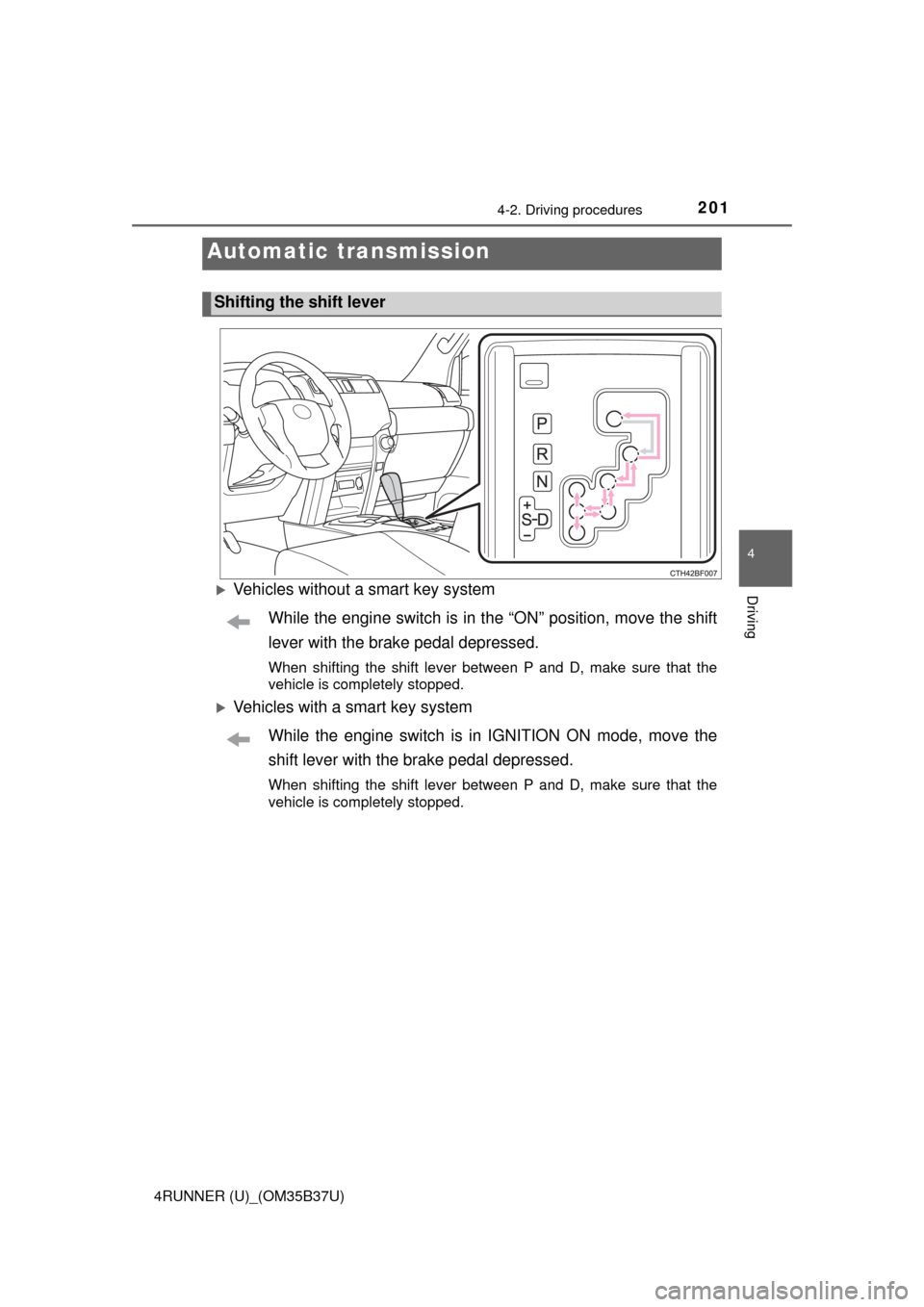
Vehicles without a smart key systemWhile the engine switch is in t he “ON” position, move the shift
lever with the brake pedal depressed.
When shifting the shift lever between P and D, make sure that the
vehicle is completely stopped.
Vehicles with a smart key system
While the engine switch is in IGNITION ON mode, move the
shift lever with the brake pedal depressed.
When shifting the shift lever between P and D, make sure that the
vehicle is completely stopped.
Automatic transmission
Shifting the shift lever