2017 TOYOTA 4RUNNER ignition
[x] Cancel search: ignitionPage 134 of 528

1343-3. Adjusting the seats
4RUNNER (U)_(OM35B37U)
■To stop the position recall operation part-way through
Perform any of the following:
● Press the “SET” button.
● Press button “1” or “2”.
● Operate any of the seat adjustment switches (only cancels seat position
recall).
■ Seat positions that can be memorized ( →P. 120)
All adjusted positions can be recorded.
■ Operating the driving position memo ry after turning the engine switch
off
Recorded seat positions can be activated up to 180 seconds after the driver’s
door is opened and another 60 seconds after it is closed again.
■ In order to correctly use the dr iving position memory function
If a seat position is already in the furthest possible position and the seat is
operated in the same direction, the recorded position may be slightly different
when it is recalled.
Each electronic key can be registered to recall your preferred driving
position.
■Registering procedure
Record your driving position to button “1” or “2” before performing
the following:
Carry only the key you want to re gister, and then close the driver’s
door.
If 2 or more keys are in the vehicle, the driving position cannot be
recorded properly.
Check that the shift lever is in P.
Turn the engine switch to IGNITION ON mode.
Recall the driving position that you want to record.
Memory recall function
1
2
3
Page 135 of 528

1353-3. Adjusting the seats
3
Operation of each component
4RUNNER (U)_(OM35B37U)
While pressing the recalled
button, press and hold the
door lock switch (either lock
or unlock) until the buzzer
sounds.
If the button could not be regis-
tered, the buzzer sounds contin-
uously for approximately 3
seconds.
■
Recall procedure
Make sure that the doors are locked before recalling the driving
position. Carry the electronic ke y that has been registered to the
driving position, and then unlock and open the driver’s door using
the smart system or wireless remote control.
The driving position will move to the recorded position.
If the driving position is in a position that has already been recorded, the
seat will not move.
■
Cancelation procedure
Carry only the key you want to cancel and then close the driver’s
door.
If 2 or more keys are in the vehicle, the driving position cannot be
canceled properly.
Turn the engine switch to IGNITION ON mode.
While pressing the “SET” button, press and hold the door lock
switch (either lock or unlock) until the buzzer sounds twice.
If the button could not be canceled, the buzzer sounds continuously for
approximately 3 seconds.
■Recalling the driving position us ing the memory recall function
● Different driving positions can be registered for each electronic key. There-
fore, the driving position that is recalled may be different depending on the
key being carried.
● If a door other than the driver’s door is unlocked with the smart system, the
driving position cannot be recalled. In this case, press the driving position
button which has been set.
■ Customization
The unlock door settings of the memory recall function can be customized.
(Customizable features: →P. 489)
4
1
2
Page 143 of 528
1433-4. Adjusting the steering wheel and mirrors
3
Operation of each component
4RUNNER (U)_(OM35B37U)
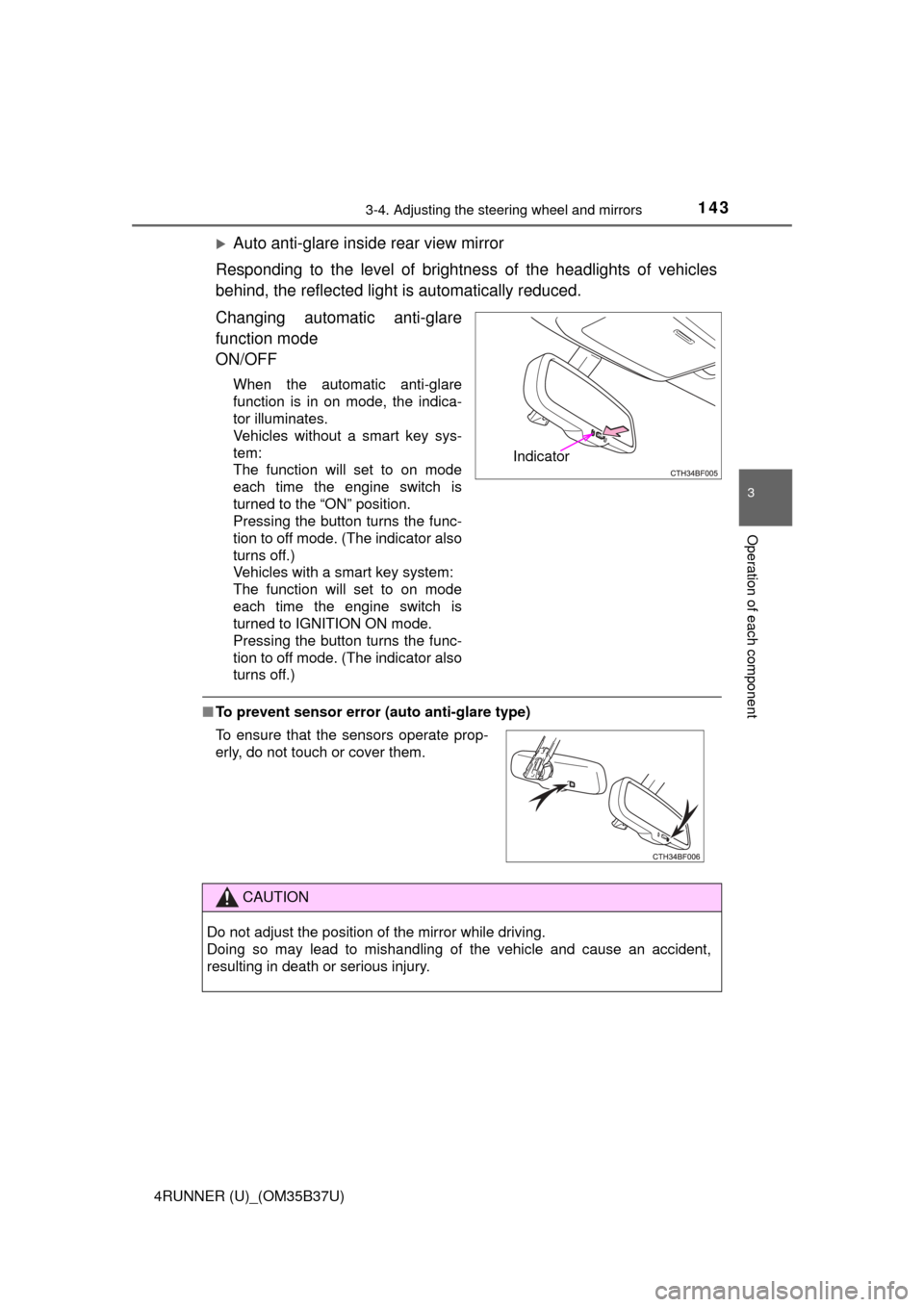
Auto anti-glare inside rear view mirror
Responding to the level of brightne ss of the headlights of vehicles
behind, the reflected light is automatically reduced.
Changing automatic anti-glare
function mode
ON/OFF
When the automatic anti-glare
function is in on mode, the indica-
tor illuminates.
Vehicles without a smart key sys-
tem:
The function will set to on mode
each time the engine switch is
turned to the “ON” position.
Pressing the button turns the func-
tion to off mode. (The indicator also
turns off.)
Vehicles with a smart key system:
The function will set to on mode
each time the engine switch is
turned to IGNITION ON mode.
Pressing the button turns the func-
tion to off mode. (The indicator also
turns off.)
■ To prevent sensor error (a uto anti-glare type)
Indicator
To ensure that the sensors operate prop-
erly, do not touch or cover them.
CAUTION
Do not adjust the position of the mirror while driving.
Doing so may lead to mishandling of the vehicle and cause an accident,
resulting in death or serious injury.
Page 145 of 528
1453-4. Adjusting the steering wheel and mirrors
3
Operation of each component
4RUNNER (U)_(OM35B37U)
■Mirror angle can be adjusted when
Vehicles without a smart key system
The engine switch is in the “ACC” or “ON” position.
Vehicles with a smart key system
The engine switch is in ACCESSORY or IGNITION ON mode.
■ When the mirrors are fogged up
The outside rear view mirrors can be cleared using the mirror defoggers. Turn
on the rear window defogger to turn on the outside rear view mirror defog-
gers. ( →P. 284, 290)
CAUTION
■Important points while driving
Observe the following precautions while driving.
Failure to do so may result in loss of control of the vehicle and cause an
accident, resulting in death or serious injury.
● Do not adjust the mirrors while driving.
● Do not drive with the mirrors folded.
● Both the driver and passenger side mirrors must be extended and properly
adjusted before driving.
■ When a mirror is moving
To avoid personal injury and mirror malfunction, be careful not to get your
hand caught by the moving mirror.
■ When the mirror de foggers are operating
Do not touch the rear view mirror surfaces, as they can become very hot
and burn you.
Page 147 of 528

1473-5. Opening, closing the windows and moon roof
3
Operation of each component
4RUNNER (U)_(OM35B37U)
■The power windows can be operated when
Vehicles without a smart key system
The engine switch is in the “ACC” or “ON” position.
Vehicles with a smart key system
The engine switch is in IGNITION ON mode.
■ Operating the power windows a fter turning the engine off
Vehicles without a smart key system
The power windows can be operated for approximately 45 seconds even
after the engine switch is turned to the “ACC” or “LOCK” position. They can-
not, however, be operated once either front door is opened.
Vehicles with a smart key system
The power windows can be operated for approximately 45 seconds even
after the engine switch is turned to ACCESSORY mode or turned off. They
cannot, however, be operated once either front door is opened.
■ Jam protection function
If an object becomes jammed between the window and the window frame
while the window is closing, window movement is stopped and the window is
opened slightly.
■ Catch protection function
If an object becomes caught between the door and window while the window
is opening, window movement is stopped.
Page 148 of 528

1483-5. Opening, closing the windows and moon roof
4RUNNER (U)_(OM35B37U)■
When the window cannot be opened or closed
When the jam protection function or catch protection function operates
unusually and the door window cannot be opened or closed, perform the fol-
lowing operations with the power window switch of that door.
●Stop the vehicle. With the engine switch in the “ON” position
*1 or in IGNI-
TION ON mode
*2, within 4 seconds of the jam protection function or catch
protection function activating, continuously operate the power window
switch in the one-touch closing direction or one-touch opening direction so
that the door window can be opened and closed.
● If the door window cannot be opened and closed even when performing the
above operations, perform the following procedure for function initialization.
Turn the engine switch to the “ON” position
*1 or to IGNITION ON
mode
*2.
Pull and hold the power window switch in the one-touch closing direction
and completely close the door window.
Release the power window switch for a moment, resume pulling the
switch in the one-touch closing direction, and hold it there for approxi-
mately 6 seconds or more.
Press and hold the power window switch in the one-touch opening direc-
tion. After the door window is completely opened, continue holding the
switch for an additional 1 second or more.
Release the power window switch for a moment, resume pushing the
switch in the one-touch opening direction, and hold it there for approxi-
mately 4 seconds or more.
Pull and hold the power window switch in the one-touch closing direction
again. After the door window is completely closed, continue holding the
switch for a further 1 second or more.
If you release the switch while the window is moving, start again from t\
he
beginning.
If the window reverses and cannot be fully closed or opened, have the vehicle
inspected by your Toyota dealer.
*1: Vehicles without a smart key system
*2: Vehicles with a smart key system
■ Door lock linked window operation
●The power windows can be opened and closed using the key or mechanical
key.
* (→ P. 98, 451)
● The power windows can be opened using the wireless remote control.
*
(→P. 97)
*: These settings must be customized at your Toyota dealer.
■ Customization
Settings (e.g. key linked operation) can be changed.
(Customizable features →P. 489)
1
2
3
4
5
6
Page 151 of 528
1513-5. Opening, closing the windows and moon roof
3
Operation of each component
4RUNNER (U)_(OM35B37U)
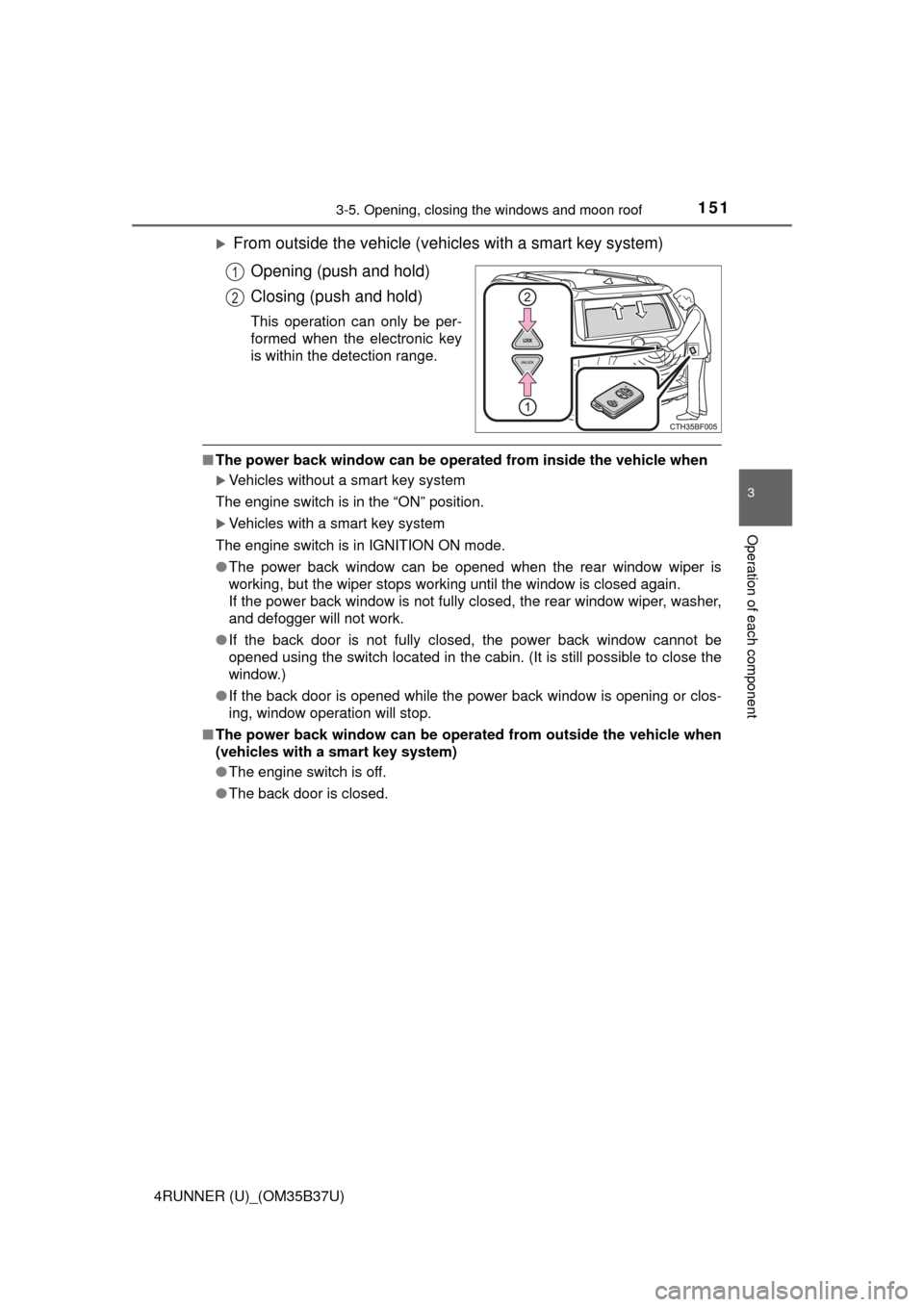
From outside the vehicle (vehicles with a smart key system)Opening (push and hold)
Closing (push and hold)
This operation can only be per-
formed when the electronic key
is within the detection range.
■The power back window can be operat ed from inside the vehicle when
Vehicles without a smart key system
The engine switch is in the “ON” position.
Vehicles with a smart key system
The engine switch is in IGNITION ON mode.
● The power back window can be opened when the rear window wiper is
working, but the wiper stops working until the window is closed again.
If the power back window is not fully closed, the rear window wiper, washer,
and defogger will not work.
● If the back door is not fully closed, the power back window cannot be
opened using the switch located in the cabin. (It is still possible to close the
window.)
● If the back door is opened while the power back window is opening or clos-
ing, window operation will stop.
■ The power back window can be operated from outside the vehicle when
(vehicles with a smart key system)
●The engine switch is off.
● The back door is closed.
1
2
Page 152 of 528

1523-5. Opening, closing the windows and moon roof
4RUNNER (U)_(OM35B37U)■
Operating the power back window from inside the vehicle after turning
the engine off
Vehicles without a smart key system
The power back window can be operated for approximately 45 seconds even
after the engine switch is turned to the “ACC” or “LOCK” position. It cannot,
however, be operated once either front door is opened.
Vehicles with a smart key system
The power back window can be operated for approximately 45 seconds even
after the engine switch is turned to ACCESSORY mode or turned off. It can-
not, however, be operated once either front door is opened.
■ Jam protection function
If an object becomes caught between the window and the window frame, win-
dow travel is stopped and the window is opened slightly.
■ When the power back window does not close normally
If the jam protection function is operating abnormally and a window cannot be
closed, perform the following operations using the power back window
switch.
●Vehicles without a smart key system: After stopping the vehicle, the window
can be closed by holding the power back window switch in the one-touch
closing position while the engine switch is turned to the “ON” position.
● Vehicles with a smart key system: After stopping the vehicle, the window
can be closed by holding the power back window switch in the one-touch
closing position while the engine switch is turned to IGNITION ON mode.
● If the window still cannot be closed even by carrying out the operation
explained above, initialize the function by performing the following proce-
dure.
Hold the power back window switch in the one-touch closing position.
Continue holding the switch for a further 6 seconds after the window has
closed.
Hold the power back window switch in the one-touch opening position.
Continue holding the switch for a further 2 seconds after the window has
opened completely.
Hold the power back window switch in the one-touch closing position
once again. Continue holding the switch for a further 2 seconds after the
window has closed.
If you release the switch while the window is moving, start again from t\
he
beginning.
If the window continues to close but then re-open slightly even after perform-
ing the above procedure correctly, have the vehicle inspected by your Toyota
dealer.
■ Customization
Settings (e.g. linked operation) can be changed.
(Customizable features →P. 489)
1
2
3