2017 TESLA MODEL X door
[x] Cancel search: doorPage 148 of 198
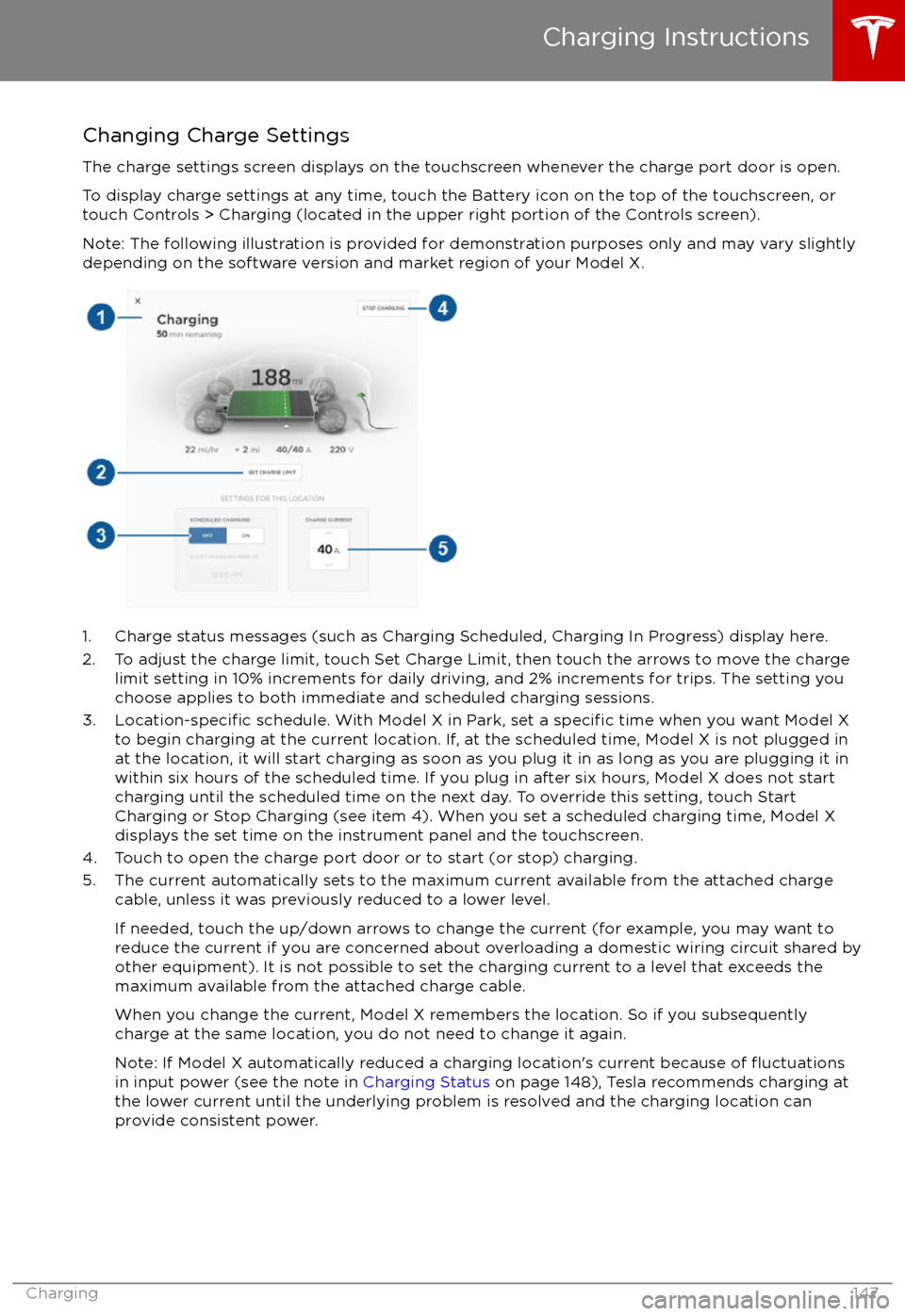
Changing Charge SettingsThe charge settings screen displays on the touchscreen whenever the charge port door is open.
To display charge settings at any time, touch the Battery icon on the top of the touchscreen, or touch Controls > Charging (located in the upper right portion of the Controls screen).
Note: The following illustration is provided for demonstration purposes only and may vary slightly
depending on the software version and market region of your Model X.
1. Charge status messages (such as Charging Scheduled, Charging In Progress) display here.
2. To adjust the charge limit, touch Set Charge Limit, then touch the arrows to move the charge limit setting in 10% increments for daily driving, and 2% increments for trips. The setting youchoose applies to both immediate and scheduled charging sessions.
3.
Location-specific schedule. With Model X in Park, set a specific time when you want Model X
to begin charging at the current location. If, at the scheduled time, Model X is not plugged in
at the location, it will start charging as soon as you plug it in as long as you are plugging it in
within six hours of the scheduled time. If you plug in after six hours, Model X does not start charging until the scheduled time on the next day. To override this setting, touch Start
Charging or Stop Charging (see item 4). When you set a scheduled charging time, Model X displays the set time on the instrument panel and the touchscreen.
4. Touch to open the charge port door or to start (or stop) charging.
5. The current automatically sets to the maximum current available from the attached charge cable, unless it was previously reduced to a lower level.
If needed, touch the up/down arrows to change the current (for example, you may want to
reduce the current if you are concerned about overloading a domestic wiring circuit shared by other equipment). It is not possible to set the charging current to a level that exceeds themaximum available from the attached charge cable.
When you change the current, Model X remembers the location. So if you subsequently charge at the same location, you do not need to change it again.
Note: If Model X automatically reduced a charging location
Page 151 of 198

Maintaining Tire Pressures
If you are not towing a trailer, keep tires
inflated to the pressures shown on the Tire
and Loading Information label, even if it differsfrom the pressure printed on the tire itself. The
Tire and Loading Information label is located
on the center door pillar and is visible when
the driver
Page 160 of 198

Cleaning the ExteriorTo prevent damage to the paint, immediately
remove corrosive substances (bird droppings, tree resin, dead insects, tar spots, road salt,
industrial fallout, etc). Do not wait until
Model X is due for a complete wash. If
necessary, use denatured alcohol to remove
tar spots and stubborn grease stains, then
immediately wash the area with water and a
mild, non-detergent soap to remove the
alcohol.
Follow these steps when washing the exterior
of Model X:
1. Rinse Thoroughly Before washing,
flush grime and grit from
the bodywork using a hose. Flush away
accumulations of mud in areas where
debris easily collects (such as wheel
arches and panel seams). If salt has been used on the highways (such as during
winter months), thoroughly rinse all traces of road salt from the underside of thevehicle.
2. Hand Wash
Hand wash Model X using a clean soft
cloth and cold or lukewarm water
containing a mild, good quality car
shampoo.
3. Rinse with Clean Water
After washing, rinse with clean water to
prevent soap from drying on the surfaces.
4. Dry Thoroughly and Clean Exterior Glass
After washing and rinsing, dry thoroughly
with a chamois.
Clean windows and mirrors using an automotive glass cleaner. Do not scrape,
or use any abrasive cleaning
fluid on glass
or mirrored surfaces.
Cautions for Exterior CleaningCaution: Do not use windshield treatmentfluids. Doing so can interfere with wiper
friction and cause a chattering sound.Caution: Do not use hot water and
detergents.Caution: In hot weather, do not wash in direct sunlight.Caution: If using a pressure washer,
maintain a distance of at least 12" (30 cm)
between the nozzle and the surface of
Model X. Keep the nozzle moving and do
not concentrate the water jet on any one
area.Caution: Do not aim water hoses directly
at window, door or hood seals, or through
wheel apertures onto brake components.Caution: Avoid using tight-napped or
rough cloths, such as washing mitts.Caution: If washing in an automatic car
wash, use Touchless car washes only. These car washes have no parts (brushes,
etc.) that touch the surfaces of Model X.
Using any other type of car wash could
cause damage that is not covered by the
warranty.Caution: Do not use chemical based
wheel cleaners. These can damage the
finish on the wheels.
Caution: Avoid using a high pressure
power washer on the rear view camera or
parking sensors (if equipped) and do not
clean a sensor or camera lens with a
sharp or abrasive object that can scratch
or damage its surface.
Cleaning
Maintenance159
Page 169 of 198

Load Capacity LabelingIt is important to understand how much
weight your Model X can safely carry. This
weight is called the vehicle capacity weight
and includes the weight of all occupants, cargo and any additional equipment added toyour Model X since it was manufactured.
There are up to three labels attached to Model X that state how much weight it can safely
carry. These labels are located on the center door pillar and are visible when the front door
is open:
1. Towing label (if equipped)
2. Tire and Loading Information label
3. Vehicle
Certification label
Note: Towing capability is available on your
Model X only if you have purchased the optional Towing Package.
Warning: Overloading Model X has an
adverse effect on braking and handling,
which can compromise your safety or damage Model X.Caution: Never store large amounts of
liquid in Model X. A significant spill can
cause electrical components to
malfunction.
Towing Label
If equipped with the optional towing package,
the Towing Label instructs you to refer to this owner
Page 180 of 198

Wheels and Tires GlossaryAccessory WeightThe combined weight (in excess of those items replaced) of
items available as factory installed equipment.BeadThe inner edge of a tire that is shaped to fit to the rim and form
an air tight seal. The bead is constructed of steel wires which
are wrapped, or reinforced, by the ply cords.Cold Tire PressureThe air pressure in a tire that has been standing in excess of
three hours, or driven for less than one mile.Curb WeightThe weight of a standard vehicle, including any optional
equipment fitted, and with the correct fluid levels.Gross Vehicle WeightThe maximum permissible weight of a vehicle with driver,
passengers, load, luggage, and equipment.kPa (kilo pascal)A metric unit used to measure pressure. One kilo pascal equals
approximately 0.145 psi.Maximum Inflation PressureThe maximum pressure to which the tire should be inflated.This pressure is given on the tire side wall in psi (lbf/in 2
).
Caution: This pressure marked on the tire is the maximum
allowed by the tire manufacturer. It is not the pressure
Tesla recommends using for Model X.Maximum Loaded Vehicle
WeightThe sum of curb weight, accessory weight, vehicle capacity
weight, and production options weight.Production Options WeightThe combined weight of options installed which weigh in
excess of 3 lb more than the standard items that they replaced, and are not already considered in curb or accessory weights.PSI (lbf/in 2
)Pounds per square inch (the unit used to measure tire
pressure).Recommended Tire InflationPressureTire inflation pressure, established by Tesla, which is based on
the type of tires that are mounted on the vehicle at the factory. This information can be found on the Tire and Loading
Information label located on the door pillar.RimThe metal support for a tire, or tire and tube, upon which the
tire beads are seated.Vehicle Capacity WeightThe number of seats multiplied by 150 lbs plus the rated
amount of load/luggage.
Wheels and Tires
Specifications179
Page 191 of 198

AABS (Anti-lock Braking System) 56
Acceleration (dual-motor) 106
access panel, removing 163accessoriesinstalling 166
plugging into power socket 125
adaptive headlights 53
air circulation 115
air conditioning 114
air distribution 115
air
filter 118
air suspension 120
air vents 118
airbags 33
alarm 134
all-season tires 152
always connected, setting 64
anti-lock braking (ABS) 56
audioplaying files 121
steering wheel buttons 39
volume control 121
Auto High Beam 53
Auto Lane Change 87
auto-raising suspension 119
Autopark 89
Autopilot 76
Autosteer 84
average range 64
B backup camera 66
battery (12V)complete discharge 142specifications 173Battery (high voltage)care of 142
coolant 163
specifications 174
temperature limits 142
battery (key), replacing 5
blind spot warning 94
Bluetoothdevices, playing audio files from 124
general information 126
phone, pairing and using 126
body repairs 166
body touch up 161
brake
fluid replacement 149
brakesautomatic in emergencies 96fluid level 163
overview of 56
specifications 173
brightness of displays 110
C
Cabin Overheat Protection setting 110
cabin temperature control 114
Calendar app 132
California Proposition 65 186
camera (rear view) 66
car cover 161
car washes 159
carpets, cleaning 160
CE
certifications 188
CHAdeMO 141
chains 153
change of ownership 113
charge port 143
charge port light 146
chargingcharge settings 147
components and equipment 140
instructions 143
public charging stations 141
scheduling 147
status of 148
charging locations, finding 129
child protectiondisabling liftgate and rear door handles 9
disabling rear window switches 11child seatsinstalling and using 25
cleaning 159
climate controls 114
Cold Weather controls 106
collision avoidance assist 96
console12V power socket 125
cup holders 17
USB ports 124
consumption chart 64
contact informationroadside assistance 180
Tesla 187coolantBattery, checking level of 163
Battery, replacement interval 149
copyrights 184, 185
Creep 106
cruise control 78
cup holders 17
D
dashboard overview 2
data recording 186
day mode 110
declarations of conformity 188
delivery mileage 186
devicesBluetooth, playing audio files 124
Index
190Model X Owner
Page 192 of 198

devices (continued)connecting 124
playing audio files from 123
dimensions 170
display brightness 110
dome (map) lights 50
door labels 168
Door Unlock Mode 9
doors 4
doors, opening 4
Drive gear 44
drive-away locking 9
driverprofiles 37
seat adjustment 18driver assistanceAuto Lane Change 87
Autopark 89
Autosteer 84
blind spot warning 94
collision avoidance assist 96
forward collision warning 96
overtake acceleration 78
overview 76
settings for 110
side collision avoidance 94
side collision warning 94
staying inside lane markings 94
Traffic-Aware Cruise Control 78
drivingseating position 18
starting 43
tips to maximize range 64
E
electric parking brake 57
emergency
flashers 54
emission label 167
energygained from regenerative braking 57
range information 45
energy & charging setting 110
Energy app 64
energy saving mode 64
Erase & Reset 113
event data recording 186
exteriorcar cover 161
cleaning 159
dimensions 170
lights 50
overview 3
polishing, touch up, & repair 161F
factory defaults, restoring 113
factory reset 113
fan speed, interior 115
favorite destinations 131
Favorites 128
Favorites (Media Player) 123
FCC
certifications 188
features, downloading new 138
ferries, avoiding 129
firmware (software) updates 138flash drives, playing audio files from 123flashers, warning 54flat tire repair 155floor mats 161
fluidsreplacement intervals 149
reservoirs, checking 163
fog lights 50
forward collision warning 96
front passenger detection 35
front trunk 14
G
garage doors, opening 135
gates, opening 135
GAWR 168
gears 44
glove box 16
Gross Axle Weight Rating 168
Gross Vehicle Weight Rating 168
ground clearance 170, 171
GVWR 168
H
hazard warning
flashers 54
head restraints 21
headlightsadaptive 53
after exit 53
high beams 53
heated wipers 55
heating 114
height adjustments (suspension)auto-raising 119
automatic and manual settings 120
disabling (Jack mode) 120
high beam headlights 53
high voltageBattery specifications 174
components 140
safety 149
hills, stopping on 61
Home location 131
Index
Index191
Page 193 of 198
HomeLinkFCC certification 189
programming and using 135
hood 14
horn 39, 41
I
IC
certifications 188
Ideal range 110
identification labels 167
Insane setting (dual-motor) 106
instant range 64
instrument panelcharging status 148
cleaning 160
overview of 45interiorcleaning 160
dimensions 171
lights 50
overview 2
temperature control 114
Internet radio 122
intrusion detection 134
J
J1772 141
Jack mode 120
jacking 165
K
keyFCC and IC certifications 188
how to use 4
key not inside 43
ordering extras 6
replacing battery 5
keyless entry 4
L
labelTire and Loading Information 168
vehicle certification 168
lane assist 94
lane change flash 54
lane change, automatic 87
lane departure warning 94
language setting 110
LATCH child seats, installing 28
Launch Mode 62
liftgateliftgate (continued)adjust opening height 12
opening 12
lifting 165
lightsadaptive headlights 53
hazard warning 54
headlights after exit 53
turn signals 54
load limits 168
location-based suspension 119
locking and unlocking doors 4
Ludicrous setting (dual-motor) 106
lumbar support 18
M
maintenancebrake fluid, checking 163
cleaning 159
daily and monthly checks 149
fluid replacement intervals 149
panel, removing 163
replacing wipers 162
service intervals 149
tires 150
washer
fluid, topping up 164
map updates 131
maps 128
mats 161
Max Battery Power 106
media 121
mileage upon delivery 186
mirrors 42
mobile app 139
Mobile Connectordescription 141
using 143
modifications 166
motor specifications 172
N naming 112
navigation 128
NCC
certifications 188
Neutral gear 44
NHTSA, contacting 187
night mode 110
nose cone, removing 182
O occupancy sensor 35
odometer 63
overhang dimensions 170
Index
192Model X Owner