2017 SUBARU FORESTER radio
[x] Cancel search: radioPage 371 of 634

Audio/Voice command system
&Command list
Recognizable voice commands and their
actions are shown below.
NOTE
. Some voice commands may not be
available depending on the market,
vehicle specifications or the device
connection status.
. Frequently used commands are
listed in the following tables.
. For devices that are not installed in
the vehicle, the related commands will
not be displayed on the screen. Also,
according to conditions, other com-
mands may not be displayed on the
screen.
. The functions available may vary
according to the system installed.
. Voice recognition language can be
changed. Refer to “Unit settings ”F 5-
18.
. The notations used in the com-
mands are as follows.
–<
>: Numbers, titles or
names to be spoken
– (
): There is no need to
speak the command, the voice
command system will recognize
the content. !
Basic command
Voice command Function
Back Go back one hierar-
chy or cancel the
voice recognition
(voice command top
screen)
Help Ask for help with the
current task
Cancel, Close Cancel the current
task
Ye s
No
Display OFF Turns the display off
Audio ON Turns the audio sys-
tem on
Audio OFF Turns the audio sys-
tem off
STARLINK Switch to APPS mode
!
Commands for changing the audio
mode
Voice command Function
Change to AM Switch to AM mode
Change to AM1 Switch to AM mode
band 1
Change to AM2 Switch to AM mode
band 2
Change to FM Switch to FM mode
Change to FM1 Switch to FM mode
band 1
Change to FM2 Switch to FM mode
band 2
Change to FM3 Switch to FM mode
band 3
Change to SiriusXM Switch to XM mode
Change to BT Audio Switch to Bluetooth
Audio mode
Change to CD Switch to CD mode
Change to USB Switch to USB mode
Change to iPod Switch to iPod mode
Change to aha Switch to aha radio
mode
Change to Pandora Switch to Pandora
mode
Change to AUX Switch to AUX mode
5-84
Page 372 of 634
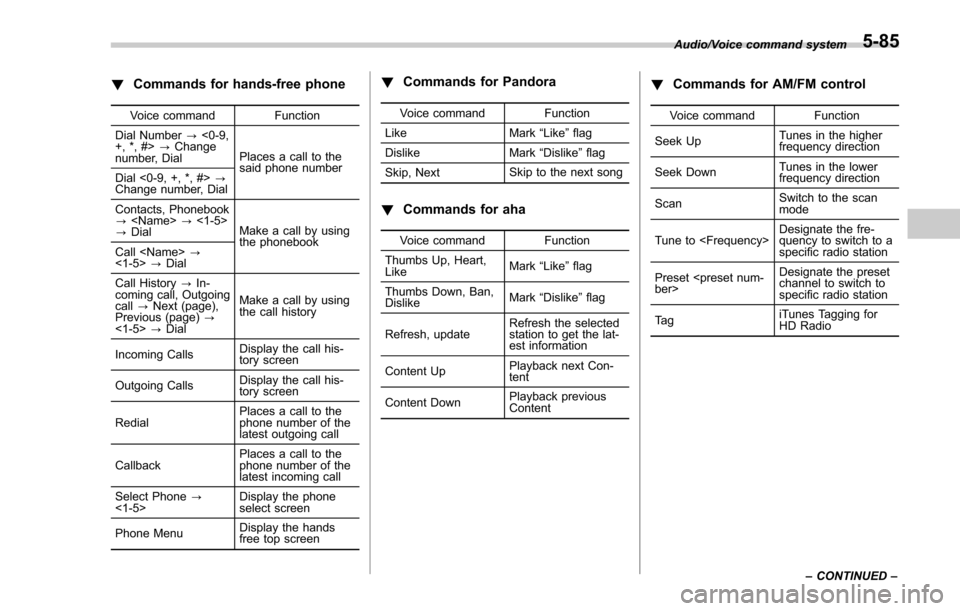
!Commands for hands-free phone
Voice command Function
Dial Number ?<0-9,
+, *, #> ?Change
number, Dial Places a call to the
said phone number
Dial <0-9, +, *, #> ?
Change number, Dial
Contacts, Phonebook
?
? Dial Make a call by using
the phonebook
Call
<1-5> ?Dial
Call History ?In-
coming call, Outgoing
call ?Next (page),
Previous (page) ?
<1-5> ?Dial Make a call by using
the call history
Incoming Calls Display the call his-
tory screen
Outgoing Calls Display the call his-
tory screen
Redial Places a call to the
phone number of the
latest outgoing call
Callback Places a call to the
phone number of the
latest incoming call
Select Phone ?
<1-5> Display the phone
select screen
Phone Menu Display the hands
free top screen
!
Commands for Pandora
Voice command Function
Like Mark “Like ”flag
Dislike Mark“Dislike ”flag
Skip, Next Skip to the next song
!
Commands for aha
Voice command Function
Thumbs Up, Heart,
Like Mark
“Like ”flag
Thumbs Down, Ban,
Dislike Mark
“Dislike ”flag
Refresh, update Refresh the selected
station to get the lat-
est information
Content Up Playback next Con-
tent
Content Down Playback previous
Content
!
Commands for AM/FM control
Voice command Function
Seek Up Tunes in the higher
frequency direction
Seek Down Tunes in the lower
frequency direction
Scan Switch to the scan
mode
Tune to
quency to switch to a
specific radio station
Preset
channel to switch to
specific radio station
Ta g iTunes Tagging for
HD Radio
Audio/Voice command system
–CONTINUED –
5-85
Page 373 of 634

Audio/Voice command system
!Commands for SiriusXM radio con-
trol
Voice command Function
Preset
channel to switch to
specific radio station
Scan Switch to the scan
mode
Channel
nel to switch to spe-
cific radio station
Category ?Next
(page), Previous
(page), <1-5> ?Next
(page), Previous
(page), <1-5> Displays the category
list screen
!
Commands for CD control
Voice command Function
Track Up Select the next track
Track Down Select the current
track
Scan Switch to the scan
mode
Repeat ?1 Track
Repeat, Repeat All Select a repeat mode
1 Track Repeat Repeat single track
Repeat All Repeat all tracks
Shuffle Plays randomly
!
Commands for MP3/WMA/AAC,
USB control
Voice command Function
Track Up Select the next track
Track Down Select the current
track
Folder Up Plays from the start of
the next folder
Folder Down Plays from the start of
the previous folder
Scan Switch to the scan
mode
Repeat ?1 Track
Repeat, Repeat
Folder, Repeat All Select a repeat mode
1 Track Repeat Repeat single track
Repeat Folder Repeat of the folder
Repeat All Repeat all tracks
Shuffle ?Shuffle
Folder, Shuffle All Select a random play
mode
Shuffle Folder Plays randomly of the
folder
Shuffle All Plays randomly
!
Commands for iPod Control
Voice command Function
Track Up Select the next track
Track Down Select the current
track
Repeat ?Repeat
One, Repeat All Select a repeat mode
Repeat One Repeat single track
Repeat All Repeat all tracks
Shuffle ?Shuffle
Track, Shuffle Album,
Shuffle OFF Select a random play
mode
Shuffle Track Shuffle all tracks
Shuffle Album Shuffle all tracks
Shuffle OFF Turn off shuffle
5-86
Page 379 of 634
Audio/Appendix
Appendix
&Certification
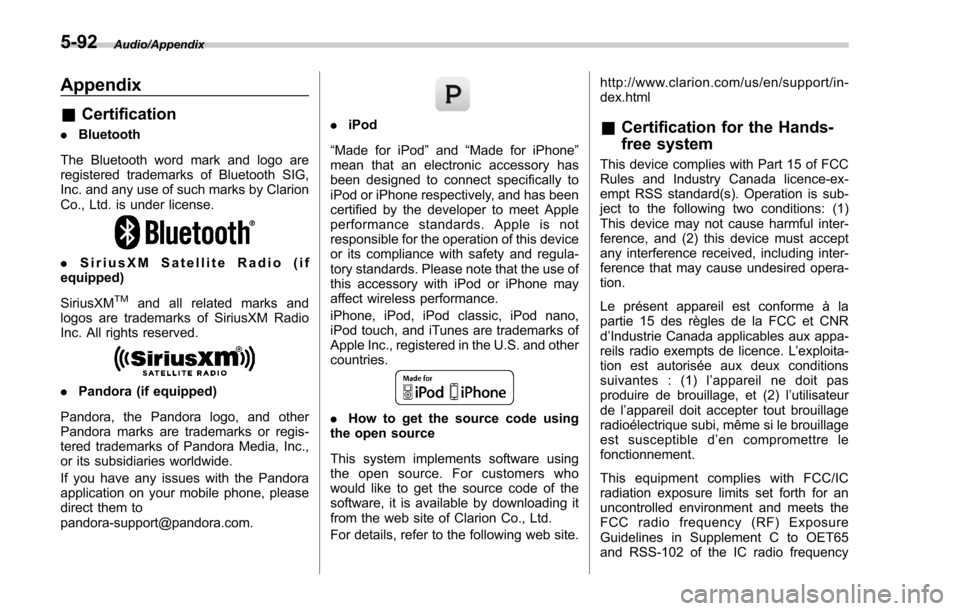
. Bluetooth
The Bluetooth word mark and logo are
registered trademarks of Bluetooth SIG,
Inc. and any use of such marks by Clarion
Co., Ltd. is under license.
. SiriusXM Satellite Radio (if
equipped)
SiriusXM
TMand all related marks and
logos are trademarks of SiriusXM Radio
Inc. All rights reserved.
. Pandora (if equipped)
Pandora, the Pandora logo, and other
Pandora marks are trademarks or regis-
tered trademarks of Pandora Media, Inc.,
or its subsidiaries worldwide.
If you have any issues with the Pandora
application on your mobile phone, please
direct them to
[email protected].
. iPod
“Made for iPod ”and “Made for iPhone”
mean that an electronic accessory has
been designed to connect specifically to
iPod or iPhone respectively, and has been
certified by the developer to meet Apple
performance standards. Apple is not
responsible for the operation of this device
or its compliance with safety and regula-
tory standards. Please note that the use of
this accessory with iPod or iPhone may
affect wireless performance.
iPhone, iPod, iPod classic, iPod nano,
iPod touch, and iTunes are trademarks of
Apple Inc., registered in the U.S. and other
countries.
. How to get the source code using
the open source
This system implements software using
the open source. For customers who
would like to get the source code of the
software, it is available by downloading it
from the web site of Clarion Co., Ltd.
For details, refer to the following web site. http://www.clarion.com/us/en/support/in-
dex.html
&
Certification for the Hands-
free system
This device complies with Part 15 of FCC
Rules and Industry Canada licence-ex-
empt RSS standard(s). Operation is sub-
ject to the following two conditions: (1)
This device may not cause harmful inter-
ference, and (2) this device must accept
any interference received, including inter-
ference that may cause undesired opera-
tion.
Le présent appareil est conforme à la
partie 15 des règles de la FCC et CNR
d’Industrie Canada applicables aux appa-
reils radio exempts de licence. L ’exploita-
tion est autorisée aux deux conditions
suivantes : (1) l ’appareil ne doit pas
produire de brouillage, et (2) l ’utilisateur
de l ’appareil doit accepter tout brouillage
radioélectrique subi, même si le brouillage
est susceptible d ’en compromettre le
fonctionnement.
This equipment complies with FCC/IC
radiation exposure limits set forth for an
uncontrolled environment and meets the
FCC radio frequency (RF) Exposure
Guidelines in Supplement C to OET65
and RSS-102 of the IC radio frequency
5-92
Page 380 of 634

(RF) Exposure rules. This equipment has
very low levels of RF energy that it
deemed to comply without maximum
permissive exposure evaluation (MPE).
Cet équipement est conforme aux limites
d’exposition aux rayonnements énoncées
pour un environnement non contrôlé et
respecte les lignes directrices d ’exposition
aux fréquences radioélectriques de la
FCC dans le Supplément C à OET65 et
d ’exposition aux fréquences radioélectri-
ques (RF) CNR-102 de l ’IC. Cet équipe-
ment émet une énergie RF très faible qui
est considérée conforme sans évaluation
de l ’exposition maximale autorisée.
FCC CAUTION
Changes or modifications not expressly
approved by the party responsible for
compliance could void the user ’s authority
to operate the equipment.
This transmitter must not be co-located or
operated in conjunction with any other
antenna or transmitter.& Certification for Mexico mod-
els
. IFETEL RCPCLPF14-250
Clarion PF-3547
. IFETEL RCPCLPF14-253
Clarion PF-3688
Audio/Appendix5-93
Page 415 of 634
Starting and operating/Starting and stopping engine (models with push–button start system)
Starting and stopping engine
(models with push-button
start system)
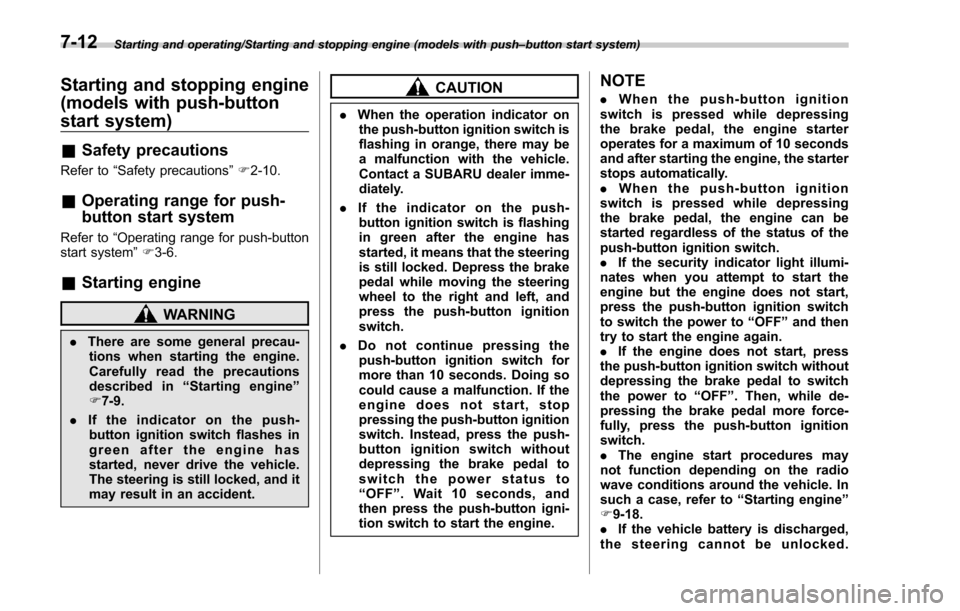
& Safety precautions
Refer to “Safety precautions ”F 2-10.
& Operating range for push-
button start system
Refer to “Operating range for push-button
start system ”F 3-6.
& Starting engine
WARNING
. There are some general precau-
tions when starting the engine.
Carefully read the precautions
described in “Starting engine ”
F 7-9.
. If the indicator on the push-
button ignition switch flashes in
green after the engine has
started, never drive the vehicle.
The steering is still locked, and it
may result in an accident.
CAUTION
. When the operation indicator on
the push-button ignition switch is
flashing in orange, there may be
a malfunction with the vehicle.
Contact a SUBARU dealer imme-
diately.
. If the indicator on the push-
button ignition switch is flashing
in green after the engine has
started, it means that the steering
is still locked. Depress the brake
pedal while moving the steering
wheel to the right and left, and
press the push-button ignition
switch.
. Do not continue pressing the
push-button ignition switch for
more than 10 seconds. Doing so
could cause a malfunction. If the
engine does not start, stop
pressing the push-button ignition
switch. Instead, press the push-
button ignition switch without
depressing the brake pedal to
switch the power status to
“ OFF ”. Wait 10 seconds, and
then press the push-button igni-
tion switch to start the engine.
NOTE
. When the push-button ignition
switch is pressed while depressing
the brake pedal, the engine starter
operates for a maximum of 10 seconds
and after starting the engine, the starter
stops automatically.
. When the push-button ignition
switch is pressed while depressing
the brake pedal, the engine can be
started regardless of the status of the
push-button ignition switch.
. If the security indicator light illumi-
nates when you attempt to start the
engine but the engine does not start,
press the push-button ignition switch
to switch the power to “OFF”and then
try to start the engine again.
. If the engine does not start, press
the push-button ignition switch without
depressing the brake pedal to switch
the power to “OFF ”. Then, while de-
pressing the brake pedal more force-
fully, press the push-button ignition
switch.
. The engine start procedures may
not function depending on the radio
wave conditions around the vehicle. In
such a case, refer to “Starting engine ”
F 9-18.
. If the vehicle battery is discharged,
the steering cannot be unlocked.
7-12
Page 461 of 634

Starting and operating/BSD/RCTA
BSD/RCTA (if equipped)
The BSD/RCTA consists of rear radar with
Blind Spot Detection and Rear Cross
Traffic Alert.
These functions enable the system to
detect objects or vehicles to the rear,
drawing attention to the driver when
changingalaneorwhendrivingin
reverse.
WARNING
The driver is responsible for driving
safely. Always be sure to check the
surroundings with your eyes when
changing lanes or reversing the
vehicle.
The system is designed to assist the
driver by monitoring the rear and
side areas of the vehicle during a
lane change or reversing. However,
you cannot rely on this system
alone in assuring the safety during
a lane change or reversing. Over-
confidence in this system could
result in an accident and lead to
serious injury or death. Since the
system operation has various limita-
tions, the flashing or illumination of
the BSD/RCTA approach indicatorlight may be delayed or it may not
operate at all even when a vehicle is
present in a neighboring lane or
approaching from either side.
The driver is responsible for paying
attention to the rear and side areas
of the vehicle.
&
System features
BSD/RCTA consists of the following func-
tions.
. To detect a vehicle in a blind spot on an
adjacent lane or a vehicle approaching at
high speed while driving the vehicle (Blind
Spot Detection)
. To detect a vehicle approaching from
the right or left while reversing the vehicle
(Rear Cross Traffic Alert)
The system uses radar sensors for the
above functions.
NOTE
The BSD/RCTA radar sensor has been
certified by the radio wave related laws
of the U.S. When driving in other
countries, certification of the country
where the vehicle is driven must be
obtained. For certification in the U.S.,
refer to “Certification for the BSD/
RCTA ”F 7-65. !
Blind Spot Detection (BSD)
1) Operating range
The system notifies the driver of vehicles
existing in the blind area. If the system
detects a vehicle existing in the blind area,
it warns the driver of dangers by illuminat-
ing the BSD/RCTA approach indicator
light(s) on the outside mirror(s). If the
driver operates the turn signal lever in the
direction where the BSD/RCTA approach
indicator light is illuminating, the system
warns the driver of dangers by flashing the
BSD/RCTA approach indicator light.
7-58
Page 468 of 634

vehicle
–When using a chassis dynam-
ometer or free roller device, etc.
– When running the engine and
makingthewheelsrotatewhile
lifting up the vehicle
. If the ignition switch is turned to the
“ LOCK ”/“ OFF ”position, the last known
status of the system is maintained. For
example, if the ignition switch is turned
to the “LOCK ”/“ OFF ”position with the
BSD/RCTA deactivated, the BSD/RCTA
will remain deactivated the next time
the ignition switch is turned to the
“ ON ”position.
. If the vehicle battery is disconnected
due to situations such as battery
terminal or fuse replacement, after the
battery is reconnected, the BSD/RCTA
will be activated.
& Certification for the BSD/
RCTA
. U.S.-spec. models
FCC ID: OAYSRR2A
CAUTION
FCC WARNING
Changes or modifications not ex-
pressly approved by the party re- sponsible for compliance could void
the user
’s authority to operate the
equipment.
This device complies with part 15 of the
FCC Rules. Operation is subject to the
following two conditions: (1) This device
may not cause harmful interference, and
(2) this device must accept any interfer-
ence received, including interference that
may cause undesired operation.
. Canada-spec. models
This device complies with Industry
Canada licence-exempt RSS standard
(s). Operation is subject to the following
two conditions: (1) this device may not
cause interference, and (2) this device
must accept any interference, including
interference that may cause undesired
operation of the device.
Le présent appareil est conforme aux
CNR d ’Industrie Canada applicables aux
appareils radio exempts de licence. L ’ex-
ploitation est autorisée aux deux condi-
tions suivantes: (1) l ’appareil ne doit pas
produire de brouillage, et (2) l ’utilisateur
de l ’appareil doit accepter tout brouillage
radioélectrique subi, même si le brouillage
est susceptible d ’en compromettre le
fonctionnement.
& Handling of radar sensors
Radar sensors
The radar sensors, one on each side of
the vehicle, are mounted inside the rear
bumper.
Starting and operating/BSD/RCTA
–CONTINUED –7-65