Page 55 of 106
Adaptive Cruise Control
52
■“Brake more” warning
The “brake more” warning is activated while Adaptive Cruise Control is tracking a lead
vehicle. This function warns the driver when it determines that the current level of
deceleration by automatic braking control is insufficient.
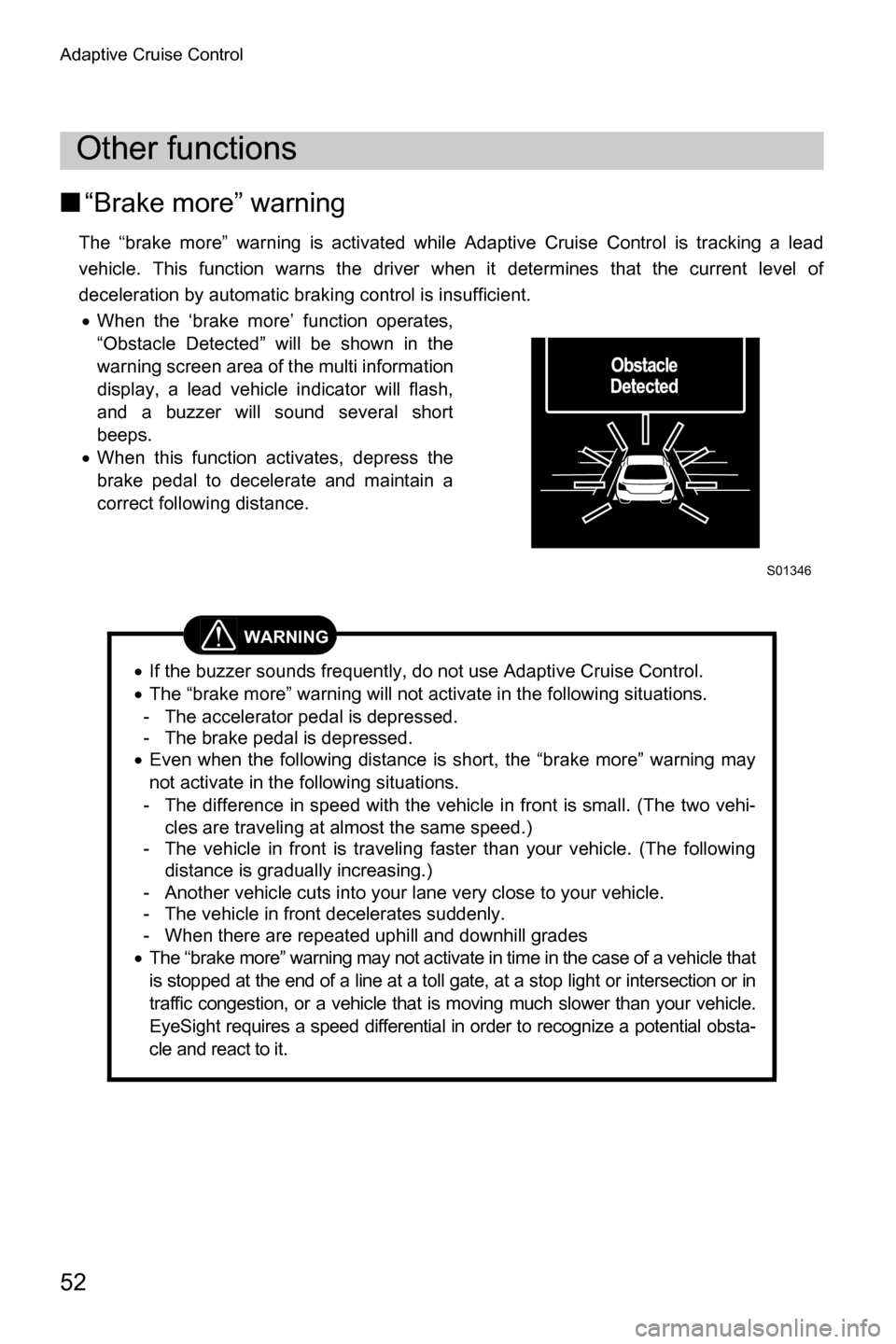
x When the ‘brake more’ function operates,
“Obstacle Detected” will be shown in the
warning screen area of the multi information
display, a lead vehicle indicator will flash,
and a buzzer will sound several short
beeps.
x When this function activates, depress the
brake pedal to decelerate and maintain a
correct following distance.
Other functions
WARNING
xIf the buzzer sounds frequently, do not use Adaptive Cruise Control.
x The “brake more” warning will not activate in the following situations.
- The accelerator pedal is depressed.
- The brake pedal is depressed.
x Even when the following distance is short, the “brake more” warning may
not activate in the following situations.
- The difference in speed with the vehicle in front is small. (The two vehi- cles are traveling at almost the same speed.)
- The vehicle in front is traveling faster than your vehicle. (The following
distance is gradually increasing.)
- Another vehicle cuts into your lane very close to your vehicle.
- The vehicle in front decelerates suddenly.
- When there are repeated uphill and downhill grades
x The “brake more” warning may not activate in time in the case of a vehicle that
is stopped at the end of a line at a toll gate, at a stop light or intersection or in
traffic congestion, or a vehicle that is moving much slower than your vehicle.
EyeSight requires a speed differential in order to recognize a potential obsta-
cle and react to it.
S01346
Page 56 of 106
Adaptive Cruise Control
53
CAUTION
The automatic braking function is released gradually approximately 2
seconds after stopping and the vehicle starts creeping forward. Be sure to
depress the brake pedal and stop the vehicle completely.
NOTE
Vehicles in front in the same traffic lane are detected by the stereo cameras
within a distance of approximately 360 ft (110 m) in the forward direction.
However the detection distance may be reduced depending on the traffic
environment, driving conditions, and conditions of the vehicle in front.
Page 78 of 106
Conventional Cruise Control
75
Conventional Cruise Control
Conventional Cruise Control is a driving support system intended to allow more comfortable
driving on expressways, freeways and interstate highways. It can be used to travel at a con-
stant speed by maintaining the vehicle speed that was set by the driver. Please remember
that you should not exceed posted speed limits.
About Conventional Cruise Control
WARNING
xWhen Conventional Cruise Control is functioning, the system does not per-
form tracking control to maintain following distance, as when using Adap-
tive Cruise Control.
Strive for safe driving and operate the brake pedal to decelerate the vehi-
cle as necessary in order to ensure a safe following distance from the vehi-
cle in front.
x Under the following conditions, do not use the Conventional Cruise
Control. Doing so may result in an accident.
- Roads with heavy traffic or roads with sharp curves You may fail to drive at a speed that is appropriate for the road condi-
tions, possibly resulting in an accident.
- Frozen roads, snow-covered roads or slippery road surfaces The tires may spin, causing loss of control of the vehicle.
- Steep downhill grades The set vehicle speed may be exceeded.
- On a steep continuous downhill grade The brakes may overheat.
CAUTION
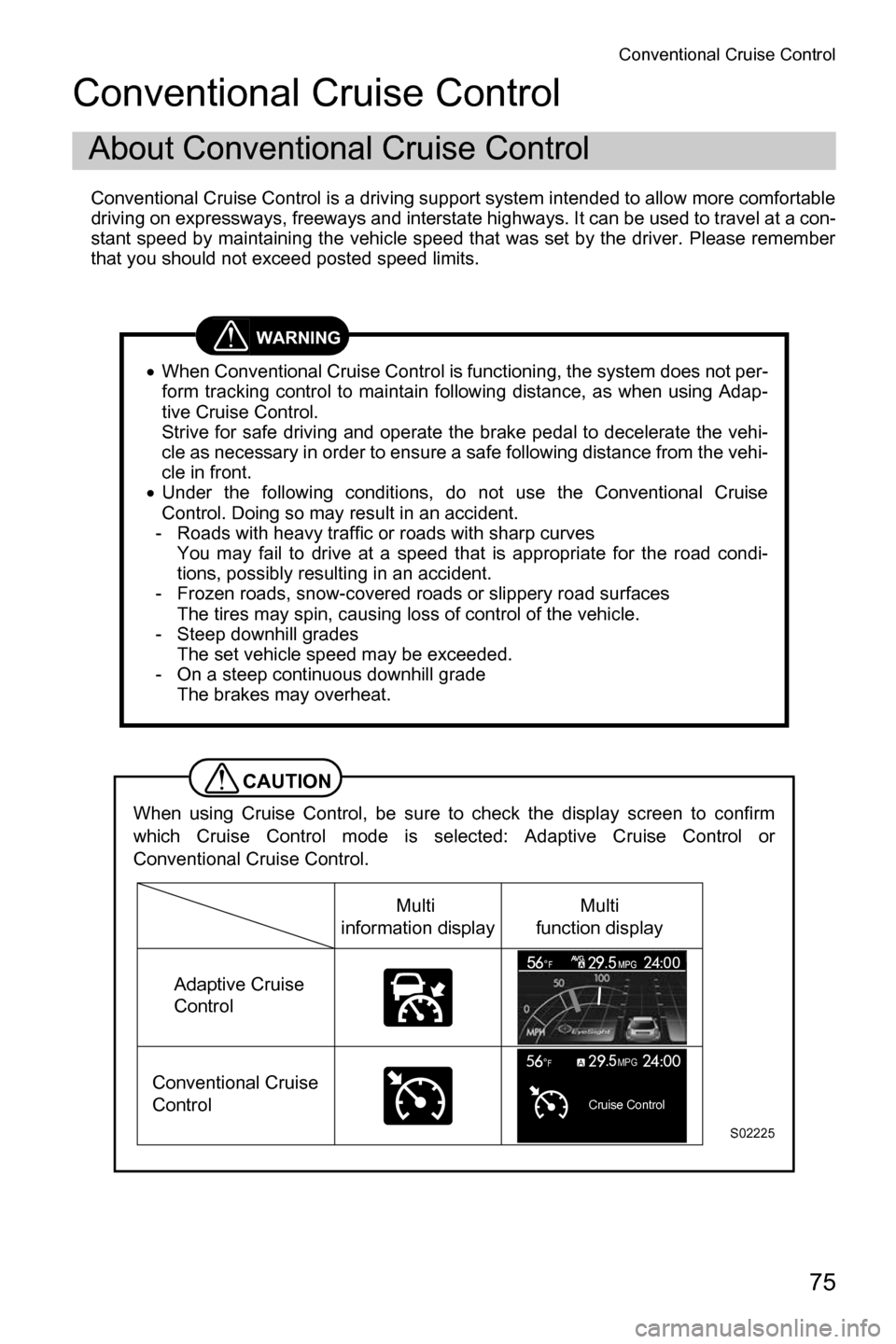
When using Cruise Control, be sure to check the display screen to confirm
which Cruise Control mode is selected: Adaptive Cruise Control or
Conventional Cruise Control.
Cruise Control
MPGF
S02225
Multi
information display
Adaptive Cruise
Control
Conventional Cruise
Control Multi
function display
Page 79 of 106
Conventional Cruise Control
76
NOTE
xWhen the (CRUISE) switch is first turned on, the Adaptive Cruise
Control is set.
x To change the Cruise Control mode, press and hold the (following
distance setting) switch for approximately 2 seconds or longer.
(This is effective only when the main Cruise Control is on and neither
Adaptive Cruise Control nor Conventional Cruise Control are set.)
x Conventional Cruise Control can be used even when EyeSight is tempo-
rarily turned off.
Page 80 of 106
Conventional Cruise Control
77
Conventional Cruise Control can be set when the following conditions are met.- The select lever is in the position and the paddle shift is not operated.
- The brake pedal is released.
- The vehicle speed is between approximately 25 MPH (40 km/h) and 90 MPH (145 km/h).
- Parking brake is released.
■ Setting Conventional Cruise Control
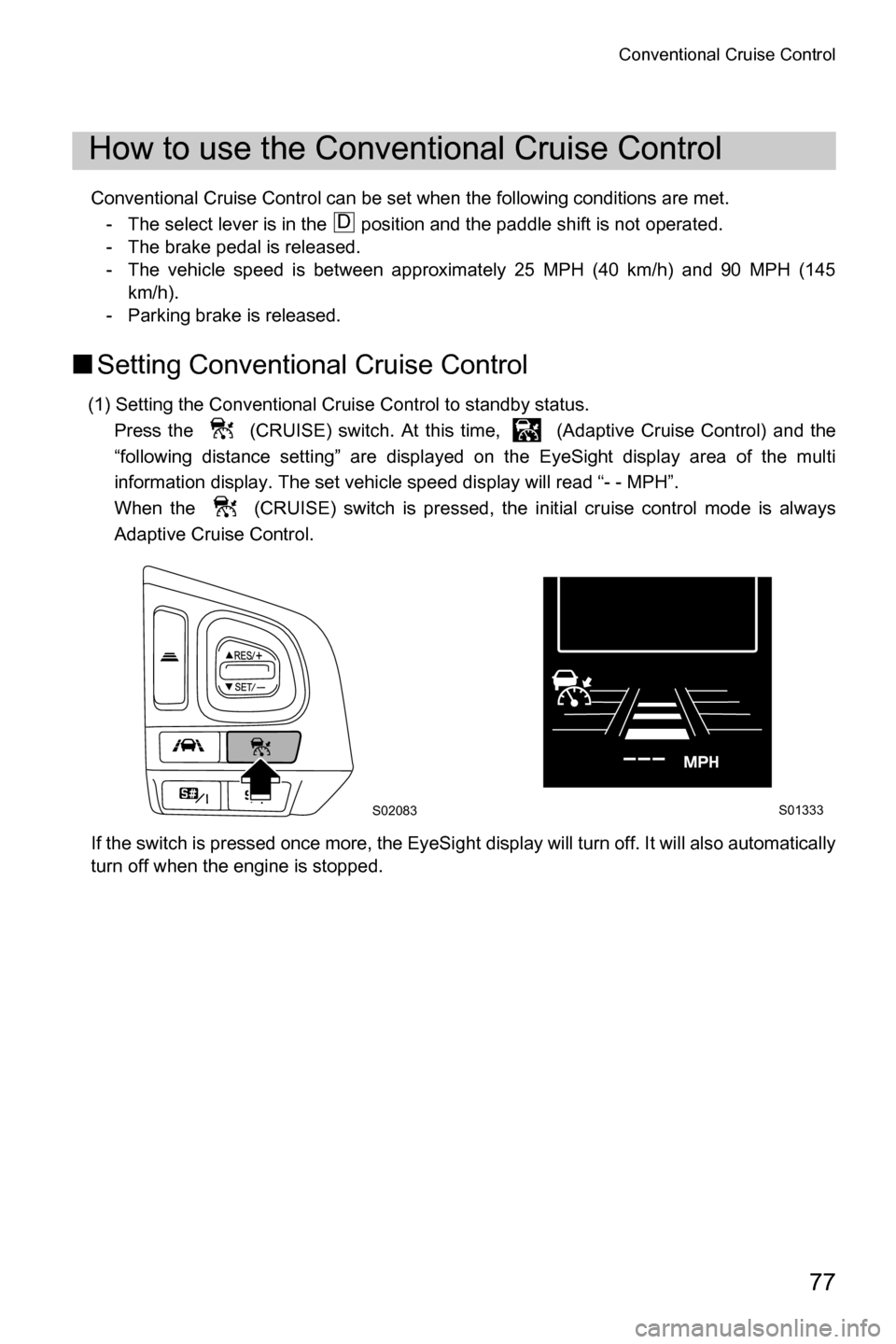
(1) Setting the Conventional Cruise Control to standby status.
Press the (CRUISE) switch. At this time, (Adaptive Cruise Control) and the
“following distance setting” are displayed on the EyeSight display area of the multi
information display. The set vehicle speed display will read “- - MPH”.
When the (CRUISE) switch is pressed, the initial cruise control mode is always
Adaptive Cruise Control.
If the switch is pressed once more, the EyeSight display will turn off. It will also automatically
turn off when the engine is stopped.
How to use the Conventional Cruise Control
D
S02083S01333
Page 81 of 106
Conventional Cruise Control
78
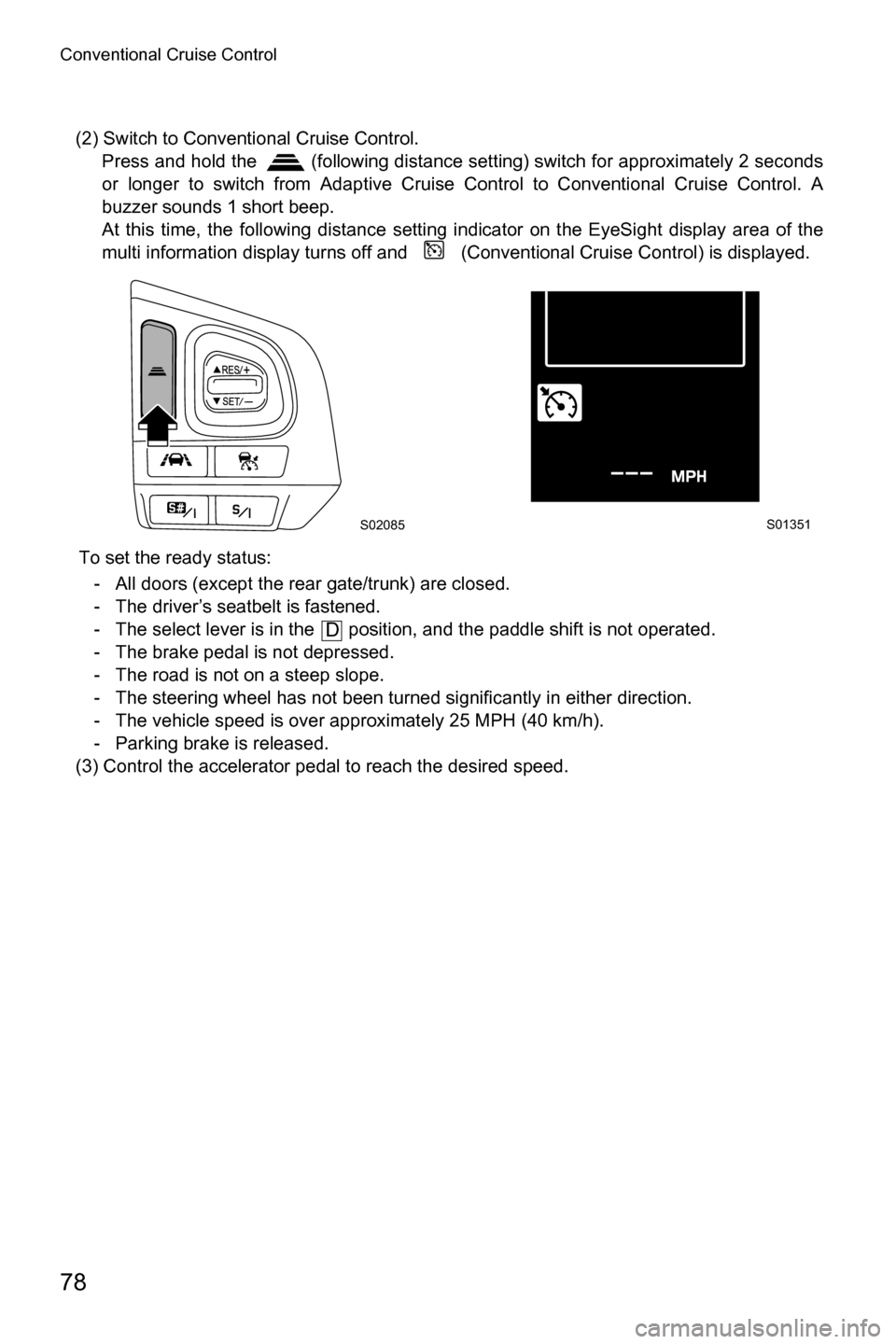
(2) Switch to Conventional Cruise Control. Press and hold the (following distance setting) switch for approximately 2 seconds
or longer to switch from Adaptive Cruise Control to Conventional Cruise Control. A
buzzer sounds 1 short beep.
At this time, the following distance setting indicator on the EyeSight display area of the
multi information display turns off and (Conventional Cruise Control) is displayed.
To set the ready status: - All doors (except the rear gate/trunk) are closed.
- The driver’s seatbelt is fastened.
- The select lever is in the position, and the paddle shift is not operated.
- The brake pedal is not depressed.
- The road is not on a steep slope.
- The steering wheel has not been turned significantly in either direction.
- The vehicle speed is over approximately 25 MPH (40 km/h).
- Parking brake is released.
(3) Control the accelerator pedal to reach the desired speed.
S02085S01351
D
Page 82 of 106
Conventional Cruise Control
79
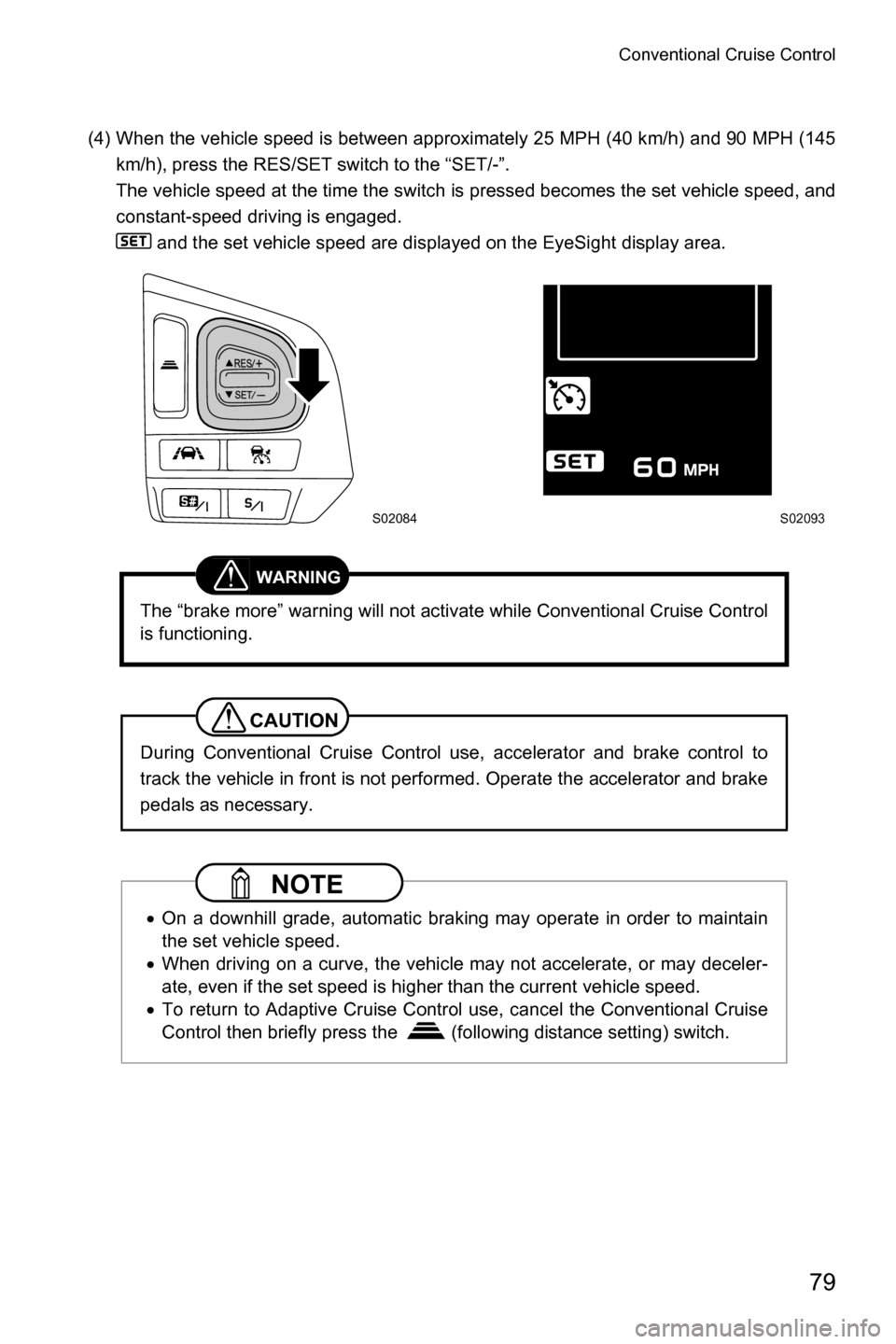
(4) When the vehicle speed is between approximately 25 MPH (40 km/h) and 90 MPH (145km/h), press the RES/SET switch to the “SET/-”.
The vehicle speed at the time the switch is pressed becomes the set vehicle speed, and
constant-speed driving is engaged. and the set vehicle speed are displayed on the EyeSight display area.
WARNING
The “brake more” warning will not activate while Conventional Cruise Control
is functioning.
CAUTION
During Conventional Cruise Control use, accelerator and brake control to
track the vehicle in front is not performed. Operate the accelerator and brake
pedals as necessary.
NOTE
xOn a downhill grade, automatic braking may operate in order to maintain
the set vehicle speed.
x When driving on a curve, the vehicle may not accelerate, or may deceler-
ate, even if the set speed is higher than the current vehicle speed.
x To return to Adaptive Cruise Control use, cancel the Conventional Cruise
Control then briefly press the (following distance setting) switch.
S02084S02093
Page 83 of 106
Conventional Cruise Control
80
■Increasing the set vehicle speed
The following two methods can be used to increase the set vehicle speed.
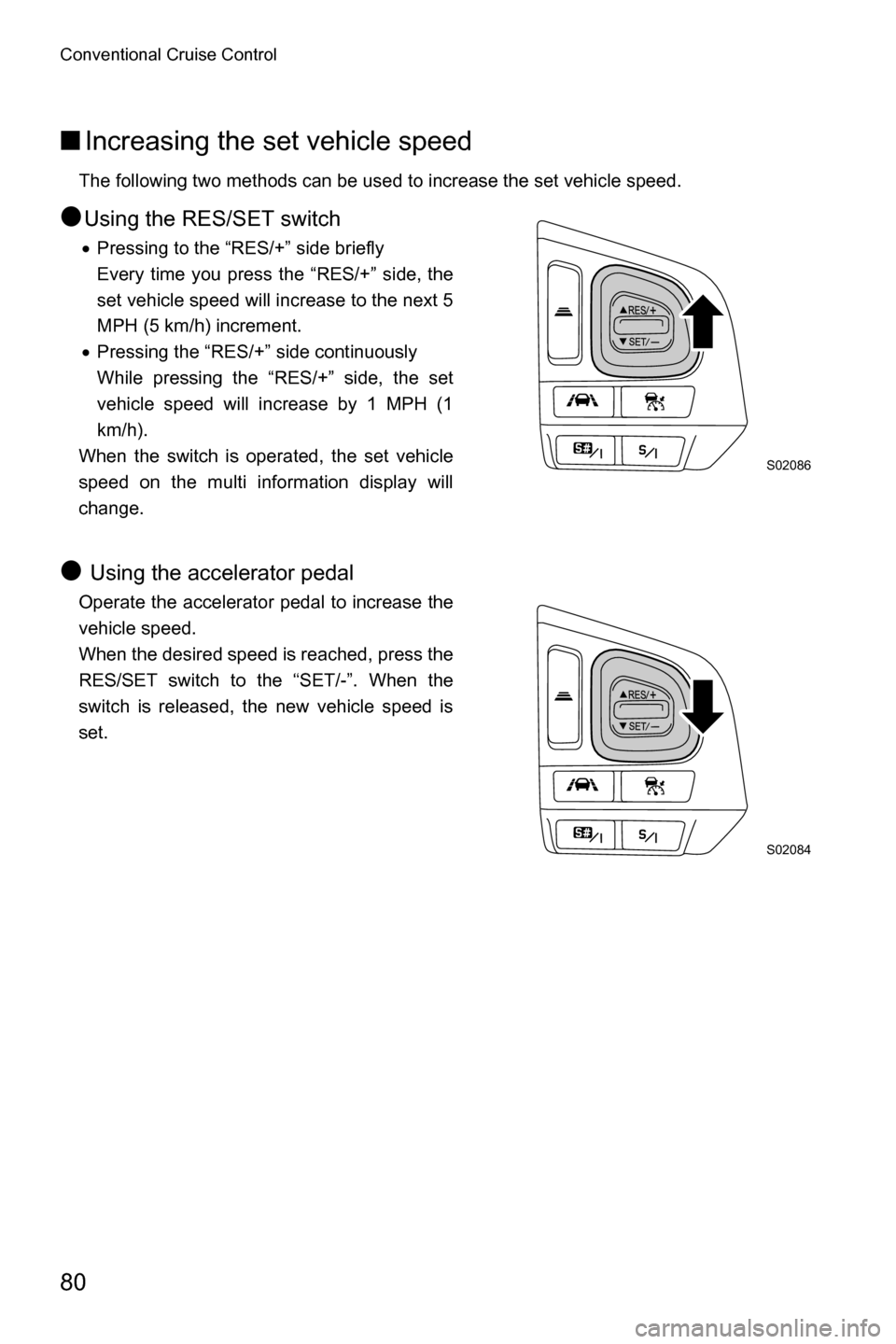
●Using the RES/SET switch
xPressing to the “RES/+” side briefly
Every time you press the “RES/+” side, the
set vehicle speed will increase to the next 5
MPH (5 km/h) increment.
x Pressing the “RES/+” side continuously
While pressing the “RES/+” side, the set
vehicle speed will increase by 1 MPH (1
km/h).
When the switch is operated, the set vehicle
speed on the multi information display will
change.
● Using the accelerator pedal
Operate the accelerator pedal to increase the
vehicle speed.
When the desired speed is reached, press the
RES/SET switch to the “SET/-”. When the
switch is released, the new vehicle speed is
set.
S02086
S02084