Page 183 of 572

Fuel consumption results screen
1) The average fuel consumption for the
entire driving distance, from when the
ignition switch was turned to the“ON”
position to when it was turned to the
“LOCK”/“OFF”position.
2) This display shows the average rate of
fuel consumption since the trip meter
was last reset. It displays the average
fuel consumption corresponding to the A
trip meter mileage or the one corre-
sponding to the B trip meter mileage.
&Self-check screen
When the ignition switch is turned to the
“ON”position, the vehicle self-check will
be performed. The screens corresponding
to the following items will appear one after
another for several seconds each.
1) Engine oil: Checks the interval of engine
oil replacement.
2) Oil filter: Checks the interval of oil filter
replacement.
3) Tires: Checks the interval of tire rotation.
4) Inspection and maintenance: Checks the
interval of inspection and maintenance.
When the checks are performed, the color
of the icon corresponding to the checked
item will turn green.
If there is no warning message, the self-
check will be complete without notification.
Example of notification
If there is a warning message or a
maintenance notification, the color of the
icon corresponding to the item will turn
yellow and the warning message or the
maintenance notification will be displayed.
Take the appropriate actions based on the
messages indicated.
NOTE
.The self-check screen can be set to
on or off. For details, refer to“On/Off
setting”F3-74.
.After performing the maintenance,
change the setting of the correspond-
ing maintenance item. For details, refer
to“Maintenance settings”F3-73.
.The maintenance notification screen
will be displayed under either of the
Instruments and controls/Multi function display
–CONTINUED–3-45
Page 186 of 572

Instruments and controls/Multi function display
!Clock
The clock can be displayed in either 12-
hour display or 24-hour display. For details
about the setting, refer to“Current date
and time setting”F3-56.
NOTE
If the vehicle battery is disconnected,
the clock shown in the information bar
will be reset. Set the time again after
the vehicle battery is connected. For
details about the setting, refer to“To p
display setting”F3-65.!Fuel consumption screen
1) Average fuel consumption corresponding
to the driving distance of each trip meter
2) Current fuel consumption
3) Driving range on remaining fuel
The displayed location can be custo-
mized. For details, refer to“Fuel consump-
tion screen setting”F3-66.!ECO gauge screen (if equipped)
1) Average fuel consumption corresponding
to the driving distance of each trip meter
2) ECO gauge
The gauge pointer shows the difference
between the current fuel consumption and
the average fuel consumption that is
displayed on the center part of the screen.
If the gauge pointer moves toward the
green side, this indicates better fuel
efficiency.
3-48
Page 189 of 572

!EyeSight screen (models with
EyeSight system)
1) Current vehicle speed
2) Set vehicle speed
3) Preceding vehicle
4) Your vehicle
This screen displays the status of the
EyeSight system. For details, refer to the
Owner’s Manual supplement for the
EyeSight system.!Triple meter screen
Triple meter screen (display example)
This screen displays up to three optional
pieces of information that can be selected
from the following items.
The items shown in the triple meter screen
can be changed. For details, refer to
“Triple meter setting”F3-69.
Item Details
Average vehicle speed (Average
vehicle speed for the entire driving
time from when the trip meter was
reset)
Lifetime fuel consumption
Engine oil temperature
Accelerator opening ratio
Journey time (the time that has
elapsed since the ignition switch
was turned to the“ON”position) (if
equipped)
Journey distance (the distance
that has been driven since the
ignition switch was turned to the
“ON”position)
Average fuel consumption for the
entire driving distance from when
the ignition switch was turned to
the“ON”position
Boost pressure Instruments and controls/Multi function display
–CONTINUED–
3-51
Page 193 of 572
Top menu Menu option Description Page
Initialize
Reset to Defaults Reset all settings to the default settings. Yes or No 3-86
Lifetime Fuel Consumption Reset Clear logged lifetime fuel consumption data. Yes or No 3-87
Go Back Return to the top menu.—
Go Back
—Return to the top menu.— Instruments and controls/Multi function display
–CONTINUED–
3-55
Page 224 of 572
Instruments and controls/Multi function display
3. After the selection screen is displayed,
operate the“”or“”switch to show the
“Initialize”item. Then, push thebutton.
!Reset to factory default settings
1. Perform the preparation steps accord-
ing to“Preparation for initialization”F3-
85.
2. Operate the“”or“”switch to
select the“Reset to Defaults”item. Then
push the
button.
3. The system will prompt a Yes/No
dialogue (“No”is selected first). To return
to the factory default settings, select“Ye s”by operating the“
”switch.
4. Confirm the setting by pushing thebutton.
5. The system will notify you that the
setting is complete.
3-86
Page 225 of 572
!Lifetime fuel consumption resetting
1. Perform the preparation steps accord-
ing to“Preparation for initialization”F3-
85.
2. Operate the“”or“”switch to
select the“Lifetime Fuel Consumption
Resetting”item. Then push the
button.
3. The system will prompt a Yes/No
dialogue (“No”is selected first). To reset
the lifetime fuel consumption, select“Ye s”
by operating the“
”switch.
4. Confirm the setting by pushing thebutton.
5. Reconfirmation will be displayed. If
you are sure you want to proceed, select
“Ye s”by operating the“
”switch.
6. Confirm the setting again by pushing
thebutton.
Instruments and controls/Multi function display
–CONTINUED–3-87
Page 234 of 572
Instruments and controls/Wiper and washer
winter, use SUBARU Windshield
Washer Fluid or the equivalent.
Refer to“Windshield washer
fluid”F11-28.
Also, when driving the vehicle
when there are freezing tempera-
tures, use non-freezing type wi-
per blades.
.Do not clean the wiper blades
with gasoline or a solvent, such
as paint thinner or benzine. This
will cause deterioration of the
wiper blades.
NOTE
.The windshield wiper motor is pro-
tected against overloads by a circuit
breaker. If the motor operates continu-
ously under an unusually heavy load,
the circuit breaker may trip to stop the
motor temporarily. If this happens, park
your vehicle in a safe place, turn off the
wiper switch, and wait for approxi-
mately 10 minutes. The circuit breaker
will reset itself, and the wipers will
again operate normally.
.Clean your rubber wiper blades and
window glass periodically with a
washer solution to prevent streaking,
and to remove accumulations of road
salt or road film. Operate the wind-shield washer for at least 1 second so
that washer solution will be sprinkled
all over the windshield or rear window.
.Grease, wax, insects or other mate-
rial on the windshield or the rubber
wiper blades results in jerky wiper
operation and streaking on the glass.
If you cannot remove those streaks
after operating the washer or if the
wiper operation is jerky, clean the outer
surface of the windshield or rear win-
dow and the wiper blades using a
sponge or soft cloth with a neutral
detergent or mild-abrasive cleaner.
After cleaning, rinse the window glass
and rubber wiper blades with clean
water. The glass is clean if no beads
form on the glass when you rinse with
water.
.If you cannot eliminate the streaking
even after following this procedure,
replace the rubber wiper blades with
new ones. For replacement instruc-
tions, refer to“Replacement of wiper
blades”F11-29.
&Windshield wiper and washer
switches
The wiper operates only when the ignition
switch is in the“ON”or“ACC”position.
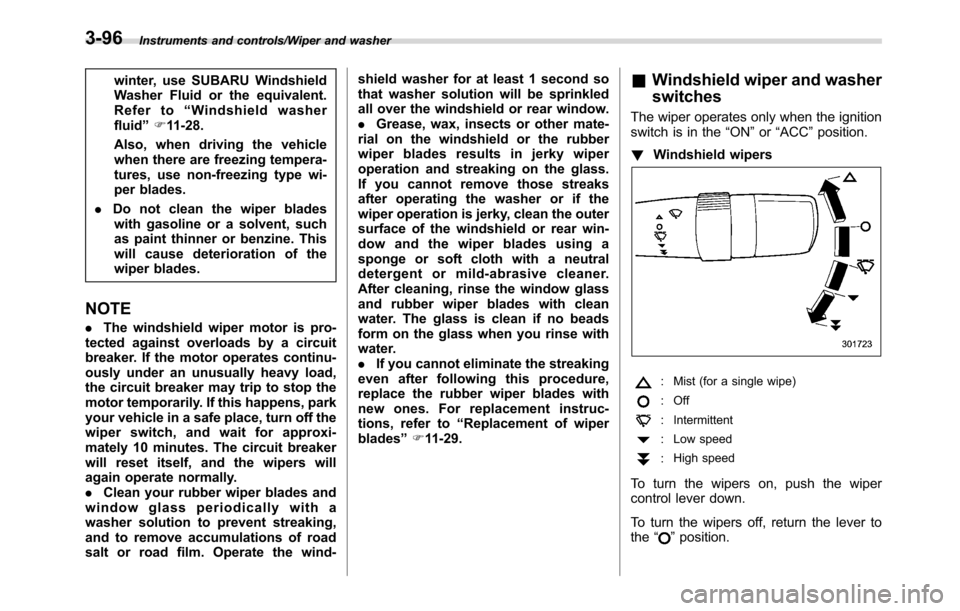
!Windshield wipers
: Mist (for a single wipe)
: Off
: Intermittent
: Low speed
:High speed
To turn the wipers on, push the wiper
control lever down.
To turn the wipers off, return the lever to
the“
”position.
3-96
Page 274 of 572

Audio/Audio set
!General settings
Touch the
tab for the audio unit basic
settings.
Item Function
System
LanguageSelect to change the language.
Button
BeepsSelect to set the sound beeps
on/off.
System
SoftwareSelect to update software ver-
sions. This menu is not used in
usual operation.
Reset to
Factory
SettingSelect to reset the device to
factory settings. This menu is not
used in usual operation.
After resetting to factory settings,
turn ignition off and on again.
!Bluetooth settings
Touch the
tab to set Bluetooth.
Item Function
BT De-
vices Con-
nectionSelect to pair/connect the Blue-
tooth devices.
In-Car-De-
vice settingSelect to enter the Bluetooth
device name or PIN-code.
For details, refer to“Bluetooth®settings”
F5-65.!Sound settings
Touch the
tab to set the sound quality.
Item Function
Balance/
FaderSelect to adjust speaker volume
balance (right/left and front/rear).
Speed Vo-
lume Con-
trolSelect to adjust speaker volume
coupled to vehicle speed.
Graphic
EqualizerSelect to adjust sound quality in
each frequency band.
Sound Re-
storerSelect to add high-pitched tone
to the compressed audio file.
Volume
SmootherSelect to adjust volume differ-
ence between audio sources.
Virtual
BassSelect to add harmonic tone so
that low-pitched tone is
strengthened.
5-20


