2017 SUBARU CROSSTREK ECO mode
[x] Cancel search: ECO modePage 392 of 572

Starting and operating/Continuously variable transmission
transmission fluid to overheat.
.Never move the vehicle rearward
by inertia with the select lever set
in a forward driving position or
move the vehicle forward by
inertia with the select lever set
in the“R”position. Doing so may
result in an unexpected accident
or malfunction.
.When parking the vehicle, first
securely apply the parking brake
and then place the select lever in
the“P”position. Do not park for
a long time with the select lever
in any other position as doing so
could result in a dead battery.
&Continuously variable trans-
mission features
The continuously variable transmission is
electronically controlled and provides an
infinite number of forward speeds and 1
reverse speed. It also has a manual mode.
NOTE
.When the engine coolant tempera-
ture is still low, the transmission will
upshift or downshift at higher engine
speeds than when the coolant tempera-
ture is sufficiently high in order to
shorten the warm-up time and improvedriveability. The gearshift timing will
automatically shift to the normal timing
after the engine has warmed up.
.Immediately after transmission fluid
is replaced, you may feel that the
transmission operation is somewhat
unusual. This results from invalidation
of data which the on-board computer
has collected and stored in memory to
allow the transmission to shift at the
most appropriate times for the current
condition of your vehicle. Optimized
shifting will be restored as the vehicle
continues to be driven for a while.
.When driving a CVT model under
continuous heavy load conditions such
as when towing a camper or climbing a
long, steep hill, the engine speed or the
vehicle speed may automatically be
reduced. This is not a malfunction. This
phenomenon results from the engine
control function maintaining the cool-
ing performance of the vehicle. The
engine and vehicle speed will return to
a normal speed when the engine is able
to maintain the optimum cooling per-
formance after the heavy load de-
creases. Driving under a heavy load
must be performed with extreme care.
Do not try to pass a vehicle in front
when driving on an uphill slope while
towing..The continuously variable transmis-
sion is a chain type system that
provides superior transmission effi-
ciency for maximum fuel economy. At
times, depending on varying driving
conditions, a chain operating sound
may be heard that is characteristic of
this type of system.
&Select lever
!Select lever positions
1) Select lever button
7-24
Page 393 of 572

: With the brake pedal depressed, shift
while pressing the select lever button in.
: Shift while pressing the select lever
button in.
: Shift without pressing the select lever
button.
The select lever has four positions,“P”,
“R”,“N”,“D”and it also has an“M”gate.
NOTE
For some models, to protect the engine
while the select lever is in the“P”or
“N”position, the engine is controlled
so that the engine speed may not
become too high even if the accelerator
pedal is depressed hard.
!P (Park)
This position is for parking the vehicle and
starting the engine. In this position, thetransmission is mechanically locked to
prevent the vehicle from rolling freely.
When you park the vehicle, first apply the
parking brake firmly, then shift into the“P”
position. Do not hold the vehicle with only
the mechanical friction of the transmis-
sion.
To shift the select lever from the“P”
position to any other position, you should
depress the brake pedal fully then move
the select lever. This prevents the vehicle
from lurching when it is started.
!R (Reverse)
This position is for backing the vehicle. To
shift from the“N”to“R”position, stop the
vehicle completely then move the lever to
the“R”position while pressing the select
lever button in.
When the ignition switch has been turned
to the“LOCK”/“OFF”position, movement
of the select lever from the“N”to“R”
position is possible for a limited time
period by depressing the brake pedal,
and then it becomes impossible. For
details, refer to“Shift lock function”F7-28.
!N (Neutral)
This position is for restarting a stalled
engine. In this position, the transmission is
neutral, meaning that the wheels and
transmission are not locked. Therefore,the vehicle will roll freely, even on the
slightest incline unless the parking brake
or foot brake is applied.
Avoid coasting with the transmission in
neutral. Engine braking has no effect in
this condition.
WARNING
Do not drive the vehicle with the
select lever in the“N”(neutral)
position. Engine braking has no
effect in this condition and the risk
of an accident is consequently in-
creased.
NOTE
If the select lever is in the“N”position
when you stop the engine for parking,
you may not subsequently be able to
move it to the“R”and“P”positions. If
this happens, turn the ignition switch to
the“ON”position. You will then be able
to move the select lever to the“P”
position.
!D (Drive)
This position is for normal driving. The
transmission shifts automatically and con-
tinuously into a suitable gear according to
the vehicle speed and the acceleration
Starting and operating/Continuously variable transmission
–CONTINUED–7-25
Page 395 of 572

Type B
1) Upshift indicator
2) Downshift indicator
3) Gear position indicator
When the manual mode is selected, the
gear position indicator and upshift indica-
tor and/or downshift indicator on the
combination meter illuminate.
The gear position indicator shows the
currently selected gear in the 1st-to-6th-
gear range. The upshift and downshift
indicators show when a gear shift is
possible. When the upshift indicator“
”
illuminates, upshifting is possible. When
the downshift indicator“
”illuminates,
downshifting is possible. When both in-
dicators illuminate, upshifting and down-
shifting are both possible. When the
vehicle stops (for example, at trafficsignals), the downshift indicator turns off.
Gearshifts can be performed using the
shift paddle behind the steering wheel.
To upshift to the next higher gear position,
pull the shift paddle that has“+”indicated
on it. To downshift to the next lower gear
position, pull the shift paddle that has“–”
indicated on it.
To deselect the manual mode, return the
select lever to the“D”position from the“M”
position.
CAUTION
Do not place or hang anything on
the shift paddles. Doing so may
result in accidental gear shifting.
NOTE
Please read the following points care-
fully and bear them in mind when using
the manual mode.
.If you attempt to shift down when
the engine speed is too high, i.e., when
a downshift would push the tachometer
needle beyond the red zone, beeps will
be emitted to warn you that the down-
shift is not possible.
.If you attempt to shift up when the
vehicle speed is too low, the transmis-
sion will not respond.
.You can perform a skip-shift (for
example, from 4th to 2nd) by operating
the shift paddle twice in rapid succes-
sion.
.The transmission automatically se-
lects 1st gear when the vehicle stops
moving.
.If the temperature of the transmis-
sion fluid becomes too high, the“AT
OIL TEMP”warning light on the combi-
nation meter will illuminate. Immedi-
ately stop the vehicle in a safe location
and let the engine idle until the warning
light turns off.
Starting and operating/Continuously variable transmission
–CONTINUED–7-27
Page 405 of 572
above-mentioned situations.
NOTE
.When the switch has been pressed
to deactivate the Vehicle Dynamics
Control system, the Vehicle Dynamics
Control system automatically reacti-
vates itself the next time the ignition
switch is turned to the“LOCK”/“OFF”
position and the engine is restarted.
.If the switch is held down for 30
seconds or longer, the indicator light
turns off, the Vehicle Dynamics Control
system is activated, and the system
ignores any further pressing of the
switch. To make the switch usable
again, turn the ignition switch to the
“LOCK”/“OFF”position and restart the
engine.
.When the switch is pressed to
deactivate the Vehicle Dynamics Con-
trol system, the vehicle’s running per-
formance is comparable with that of a
vehicle that does not have a Vehicle
Dynamics Control system. Do not de-
activate the Vehicle Dynamics Control
system except when absolutely neces-
sary.
.Even when the Vehicle Dynamics
Control system is deactivated, compo-
nents of the brake control system may
still activate. When the brake control
system is activated, the Vehicle Dy-namics Control operation indicator
light flashes.
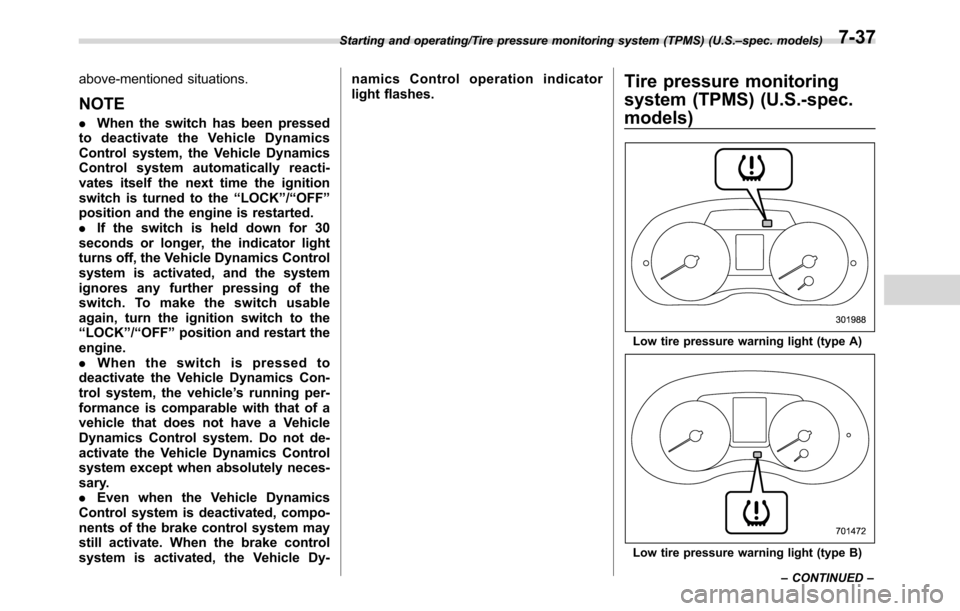
Tire pressure monitoring
system (TPMS) (U.S.-spec.
models)
Low tire pressure warning light (type A)
Low tire pressure warning light (type B) Starting and operating/Tire pressure monitoring system (TPMS) (U.S.–spec. models)
–CONTINUED–
7-37
Page 409 of 572

Hill start assist system
WARNING
.The Hill start assist system is a
device only for helping the driver
to START the vehicle on an uphill
grade. To prevent accidents
when the vehicle is parked on a
slope, be sure to firmly set the
parking brake. When setting the
parking brake, make sure that the
vehicle remains stationary when
the clutch pedal (MT models) and
brake pedal (both MT and CVT
models) are released.
.Do not turn the ignition switch to
the“LOCK”/“OFF”position while
the Hill start assist system is
operating. The Hill start assist
system will be deactivated and
may lead to an accident.
The Hill start assist system is a device to
make the following vehicle operations
easier.
1) Starting forward facing uphill
2) Starting backward facing downhill
A) Brake pedal (both MT models and CVT
models)
B) Clutch pedal (MT models only)
In both these cases, the Hill start assist
system operates under the following con-ditions.
.when the clutch pedal is depressed
while the brake pedal is also depressed
(MT models)
.when the vehicle has stopped with the
brake pedal depressed (CVT models)
Braking power is maintained temporarily
(for approximately 2 seconds) by the Hill
start assist system after the brake pedal is
released. The driver is therefore able to
start the vehicle in the same way as on a
level grade, just using the clutch pedal
(MT models only) and accelerator pedal
(all models).
If the braking power of the Hill start assist
system is insufficient after the brake pedal
is released, apply more braking power by
depressing the brake pedal again.
The Hill start assist system may not
operate on slight grades. Also, the Hill
start assist system does not operate in the
following cases.
Starting and operating/Hill start assist system
–CONTINUED–7-41
Page 423 of 572

&BSD/RCTA OFF switch
BSD/RCTA OFF switch
BSD/RCTA OFF indicator
If the BSD/RCTA OFF switch is pressed,
the BSD/RCTA OFF indicator appears on
the multi information display of the combi-nation meter, and the BSD/RCTA is
deactivated.
Press the switch again to activate the
BSD/RCTA. The BSD/RCTA OFF indica-
tor will disappear.
NOTE
.In the following cases, the system
may not operate properly due to
blocked radar waves. Press the BSD/
RCTA OFF switch to deactivate the
system.
–When towing a trailer
–When a bicycle carrier or other
item is fitted to the rear of the
vehicle
–When using a chassis dynam-
ometer or free roller device, etc.
–When running the engine and
making the wheels rotate while
lifting up the vehicle
.If the ignition switch is turned to the
“LOCK”/“OFF”position, the last known
status of the system is maintained. For
example, if the ignition switch is turned
to the“LOCK”/“OFF”position with the
BSD/RCTA deactivated, the BSD/RCTA
will remain deactivated the next time
the ignition switch is turned to the
“ON”position.
.If the vehicle battery is disconnected
duetosituationssuchasbatteryterminal or fuse replacement, after the
battery is reconnected, the BSD/RCTA
will be activated.
&Certification for the BSD/
RCTA
U.S.-spec. models:
FCC ID: OAYSRR2A
CAUTION
FCC WARNING
Changes or modifications not ex-
pressly approved by the party re-
sponsible for compliance could void
the user’s authority to operate the
equipment.
This device complies with part 15 of the
FCC Rules. Operation is subject to the
following two conditions: (1) This device
may not cause harmful interference, and
(2) this device must accept any interfer-
ence received, including interference that
may cause undesired operation.
Starting and operating/BSD/RCTA
–CONTINUED–7-55
Page 424 of 572

Starting and operating/BSD/RCTA
Canada-spec. models:&Handling of radar sensors
Radar sensors
The radar sensors, one on each side of
the vehicle, are mounted inside the rear
bumper.
CAUTION
To ensure correct operation of the
BSD/RCTA, observe the following
precautions.
.Always keep the bumper surface
near the radar sensors clean.
.Do not affix any stickers or other
items on the bumper surface
near the radar sensors. For de-
tails, consult your SUBARU deal-
er.
.Do not modify the bumper near
the radar sensors.
.Do not paint the bumper near the
radar sensors.
.Do not expose the bumper near
the radar sensors to strong im-
pacts. If a sensor becomes mis-
aligned, a system malfunction
may occur, including the inability
to detect vehicles entering the
detection areas. If any strong
shock is applied to the bumper,
be sure to contact your SUBARU
dealer for inspection.
.Do not disassemble the radar
sensors.
7-56
Page 427 of 572

New vehicle break-in driving–the first
1,000 miles (1,600 km)..................................... 8-2
Fuel economy hints............................................ 8-2
Engine exhaust gas (carbon monoxide)............ 8-2
Catalytic converter.............................................. 8-3
Periodic inspections........................................... 8-4
Driving in foreign countries............................... 8-4
Driving tips for AWD models.............................. 8-4
Off road driving................................................... 8-6
Before driving..................................................... 8-6
During driving..................................................... 8-6
After driving........................................................ 8-7
Winter driving...................................................... 8-8Operation during cold weather............................. 8-8
Driving on snowy and icy roads.......................... 8-9
Corrosion protection.......................................... 8-10
Snow tires......................................................... 8-10Tire chains........................................................ 8-11
Rocking the vehicle........................................... 8-11
Loading your vehicle......................................... 8-12
Vehicle capacity weight...................................... 8-13
GVWR and GAWR (Gross Vehicle Weight Rating
and Gross Axle Weight Rating)........................ 8-13
Roof rail............................................................ 8-14
Trailer hitch (dealer option)............................... 8-15Connecting a trailer........................................... 8-16
If not towing a trailer.......................................... 8-17
Trailer towing..................................................... 8-17Warranties and maintenance.............................. 8-17
Maximum load limits.......................................... 8-18
Trailer Hitches................................................... 8-21
Connecting a trailer........................................... 8-22
Trailer towing tips.............................................. 8-23
Driving tips
8