2017 SUBARU BRZ lock
[x] Cancel search: lockPage 88 of 540

86 1-6. Security system
Activating/deactivating the alarm system
Check that both side doors and the trunk lid are closed.
Turn the push-button ignition switch to “ON” mode.
Open the driver’s door while
pressing and holding on
the power door lock switch and
continue to press for
approximately 10 seconds after
the driver’s door has opened.
The alarm system changes
between activated and deacti-
vated as follows.
■Deactivating or stopping the alarm
Perform one of the following to deactivate or stop the alarm:
●Unlock the doors using the “keyless access” entry function.
●Unlock the doors using the remote keyless entry system.
●Turn the push-button ignition switch to “ACC” or “ON” mode,
or start the engine. (The alarm will be deactivated or stopped
after a few seconds.)
STEP 1
STEP 2
STEP 3
Alarm statusHornMulti-information dis-
play
Deactivated Sounds twice AL oF
Activated Sounds once AL on
Page 89 of 540
87 1-6. Security system
1
Before driving
■System maintenance
The vehicle has a maintenance-free type alarm system.
■Items to check before locking the vehicle
To prevent unexpected triggering of the alarm and vehicle theft, make sure
of the following.
●Nobody is in the vehicle.
●The windows are closed before the alarm is set.
●No valuables or other personal items are left in the vehicle.
■Opening and closing the trunk lid
●If the alarm setting operations are performed with the trunk lid left open,
the alarm will not be set. After closing the trunk lid, the alarm is set after
30 seconds or more elapse.
●When the trunk lid is unlocked using the “keyless access” entry function
or remote keyless entry system while the alarm is set, the alarm goes
into standby mode. After closing the trunk lid, the alarm is set again after
30 seconds or more elapse.
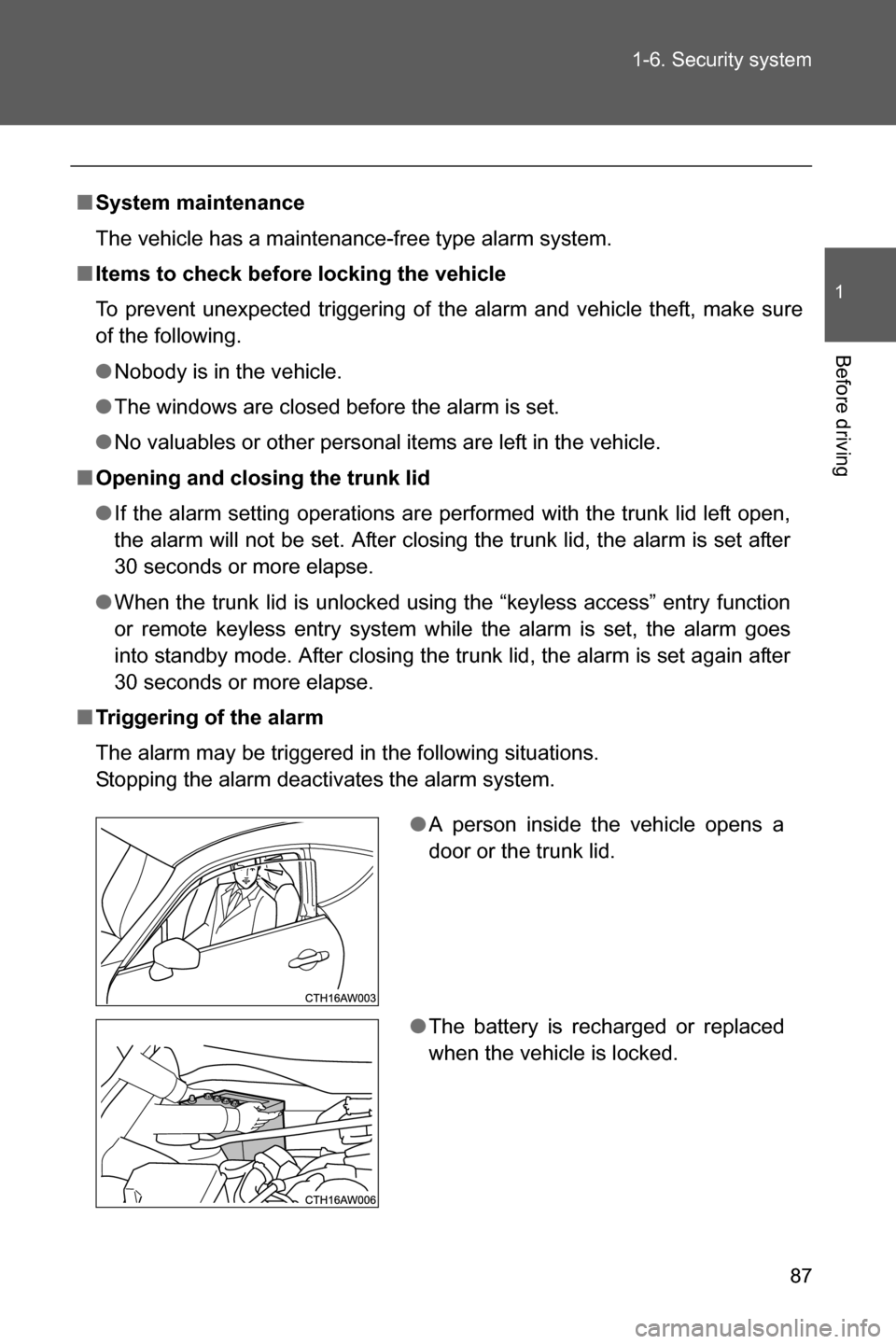
■Triggering of the alarm
The alarm may be triggered in the following situations.
Stopping the alarm deactivates the alarm system.
●A person inside the vehicle opens a
door or the trunk lid.
●The battery is recharged or replaced
when the vehicle is locked.
Page 91 of 540
89
1
Before driving
1-7. Safety information
Correct driving posture
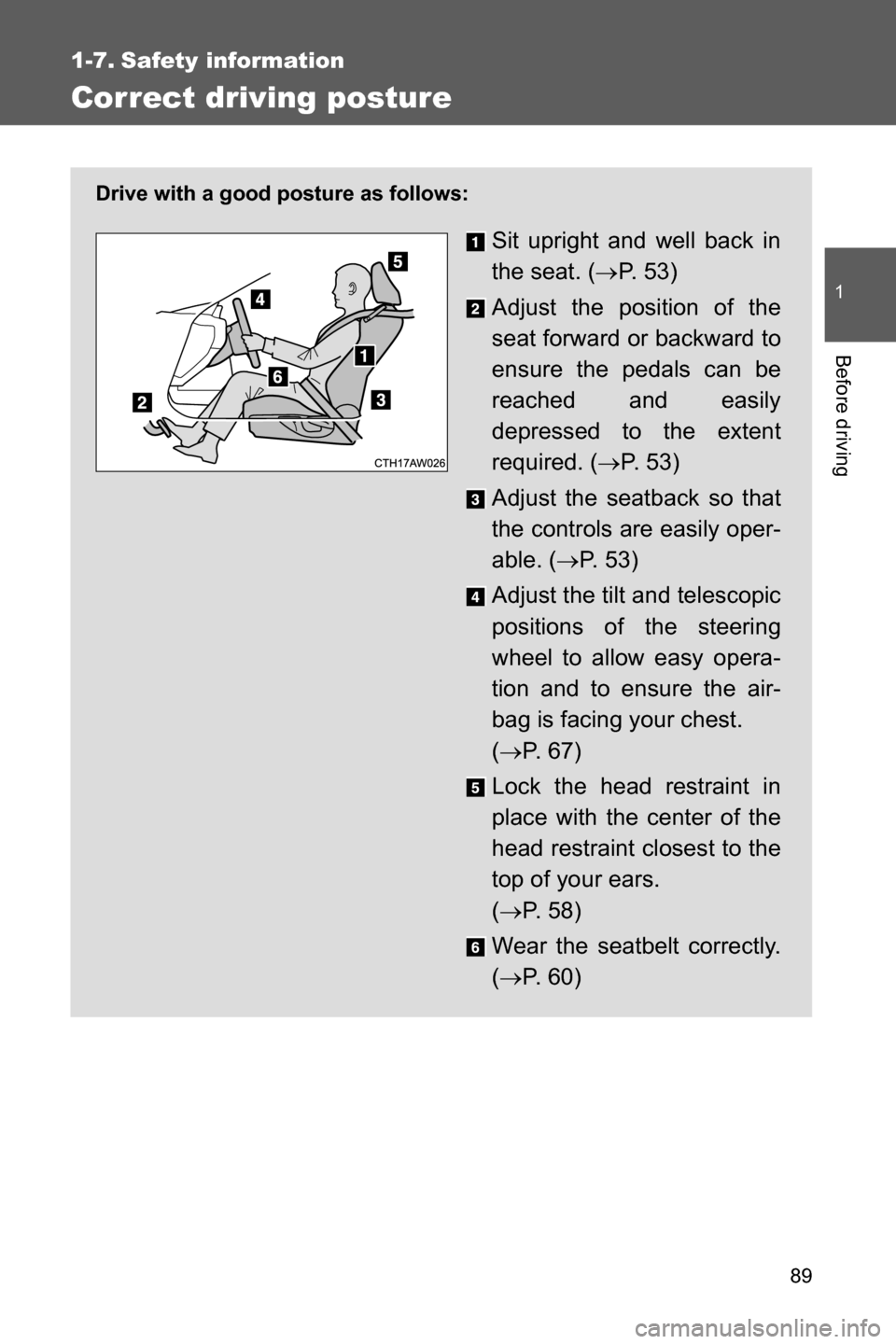
Drive with a good posture as follows:
Sit upright and well back in
the seat. (oP. 5 3 )
Adjust the position of the
seat forward or backward to
ensure the pedals can be
reached and easily
depressed to the extent
required. (oP. 53)
Adjust the seatback so that
the controls are easily oper-
able. (oP. 5 3 )
Adjust the tilt and telescopic
positions of the steering
wheel to allow easy opera-
tion and to ensure the air-
bag is facing your chest.
(oP. 6 7 )
Lock the head restraint in
place with the center of the
head restraint closest to the
top of your ears.
(oP. 5 8 )
Wear the seatbelt correctly.
(oP. 6 0 )
Page 92 of 540

90 1-7. Safety information
WARNING
■While driving
●Do not adjust the position of the driver's seat.
Doing so could cause the driver to lose control of the vehicle.
●Do not place a cushion between the driver or passenger and the seatback.
A cushion may prevent correct posture from being achieved, and reduce
the effectiveness of the seatbelt and head restraint, increasing the risk of
death or serious injury to the driver or passenger.
●Do not place anything under the front seats.
Objects placed under the front seats may become jammed in the seat
tracks and stop the seat from locking in place. This may lead to an acci-
dent resulting in serious injury or death. The adjustment mechanism may
also be damaged.
■Adjusting the seat position
●Take care when adjusting the seat position to ensure that other passen-
gers are not injured by the moving seat.
●Do not put your hands under the seat or near the moving parts to avoid
injury.
Fingers or hands may become jammed in the seat mechanism.
Page 104 of 540

102 1-7. Safety information
■If the front passenger’s frontal airbag ON indicator illuminates and the
OFF indicator turns off even when an infant or a small child is in a child
restraint system (including booster seat)
Turn the ignition switch to the “LOCK” position (vehicles without a keyless
access with push button start system), or turn the push-button ignition switch
off (vehicles with a keyless access with push button start system) if the front
passenger’s frontal airbag ON indicator illuminates and the OFF indicator
turns off even when an infant or a small child is in a child restraint system
(including booster seat). Remove the child restraint system from the seat. By
referring to the child restraint manufacturer’s recommendations as well as
the child restraint system installation procedures in “Child restraint systems”
(oP. 139), correctly install the child restraint system. Turn the ignition switch
to the “ON” position (vehicles without a keyless access with push button start
system), or turn the push-button ignition switch to the “ON” mode (vehicles
with a keyless access with push button start system) and make sure that the
front passenger’s frontal airbag ON indicator turns off and the OFF indicator
illuminates.
If still the ON indicator remains illuminated while the OFF indicator turns off,
take the following actions.
●Ensure that no article is placed on the seat other than the child restraint
system and the child occupant.
●Ensure that the backward-forward position and seatback of front passen-
ger’s seat are locked into place securely by moving the seat back and
forth.
If the ON indicator still remains illuminated while the OFF indicator turns off
after taking relevant corrective actions described above, relocate the child
restraint system to the rear seat and immediately contact your SUBARU
dealer for an inspection.
NOTE
When a child who has outgrown a child restraint system or a small adult is
seated in the front passenger’s seat, the SUBARU advanced frontal airbag
system may or may not activate the front passenger’s SRS frontal airbag
depending on the occupant’s seating posture. The child should always wear
the seatbelt when sitting in the seat irrespective of whether the airbag is
deactivated or activated. If the front passenger’s SRS frontal airbag is acti-
vated (the ON indicator remains illuminated while the OFF indicator turns
off), take the following actions.
Page 106 of 540

104 1-7. Safety information
■If the passenger’s frontal airbag OFF indicator illuminates and the ON
indicator turns off even when the front passenger’s seat is occupied by
an adult
This can be caused by the adult incorrectly sitting in the front passenger’s
seat. Turn the ignition switch to the “LOCK” position (vehicles without a key-
less access with push button start system), or turn the push-button ignition
switch off (vehicles with a keyless access with push button start system).
Ask the front passenger to set the seatback to the upright position, sit up
straight in the center of the seat cushion, correctly fasten the seatbelt, posi-
tion his/her legs out forward, and adjust the seat to the rearmost position.
Turn the ignition switch to the “ON” position (vehicles without a keyless
access with push button start system), or turn the push-button ignition switch
to the “ON” mode (vehicles with a keyless access with push button start sys-
tem). If the OFF indicator remains illuminated while the ON indicator remains
off, take the following actions.
●Vehicles without a keyless access with push button start system:
Turn the ignition switch to the “LOCK” position.
Vehicles with a keyless access with push button start system:
Turn the push-button ignition switch off.
●Make sure that the front passenger does not use a blanket, seat cushion,
seat cover, seat heater or massager, etc.
●If wearing excessive layers of clothing, the front passenger should
remove any unnecessary items before sitting in the front passenger’s
seat, or should sit in a rear seat.
●Next, turn the ignition switch to the “ON” position and wait 6 seconds to
allow the system to complete self-checking. Following the system check,
both indicators turn off for 2 seconds. Now, the ON indicator should illu-
minate while the OFF indicator remains off.
If the OFF indicator still remains illuminated while the ON indicator remains
off, ask the occupant to move to the rear seat and immediately contact your
SUBARU dealer for an inspection.
Page 136 of 540
134 1-7. Safety information
If the passenger’s frontal airbag OFF indicator illuminates and the ON indicator
turns off even when the front passenger’s seat is occupied by an adult
This can be caused by an adult incorrectly sitting in the front passen-
ger’s seat. Perform the following.
Vehicles without a keyless access with push button start sys-
tem:
The engine switch is turned to the “LOCK” position.
Vehicles with a keyless access with push button start system:
Turn the push-button ignition switch off.
Ask the front passenger to set the seatback to the upright
position, sit up straight in the center of the seat cushion, cor-
rectly wear the seatbelt, position his/her legs out forward, and
adjust the seat to the rearmost position.
Vehicles without a keyless access with push button start sys-
tem:
The engine switch is turned to the “ON” position.
Vehicles with a keyless access with push button start system:
The push-button ignition switch is turned to “ON” mode.
If the OFF indicator remains illuminated while the ON indicator
remains off, perform the following.
• Vehicles without a keyless access with push button start
system:
The engine switch is turned to the “LOCK” position.
Vehicles with a keyless access with push button start sys-
tem:
Turn the push-button ignition switch off.
• Make sure that the front passenger is not using a blanket,
seat cushion, seat cover or seat heater, etc.
• If wearing excessive layers of clothing, the front passenger
should remove any unnecessary items before sitting in the
front passenger seat, or should sit in a rear seat.
STEP 1
STEP 2
STEP 3
STEP 4
Page 137 of 540

135 1-7. Safety information
1
Before driving
Turn the engine switch to the “ON” position (vehicles without a
keyless access with push button start system), or the push-
button ignition switch to “ON” mode (vehicles with a keyless
access with push button start system). The ON and OFF indi-
cators illuminate for 6 seconds during the system check and
after the system check is performed, the ON and OFF indica-
tors turn off for 2 seconds. Then, the OFF indicator remains
off while the ON indicator is illuminated. If the ON indicator
remains off and the OFF indicator is illuminated, move the
occupant to the rear seat backwards and immediately contact
your SUBARU dealer and have the vehicle inspected.
If the front passenger’s frontal airbag ON indicator illuminates and the OFF indicator turns off
even when an infant or a small child is in a child restraint system (including booster seat)
This can be caused by the child restraint system being installed incor-
rectly. Perform the following.
Vehicles without a keyless access with push button start sys-
tem:
The engine switch is turned to the “LOCK” position.
Vehicles with a keyless access with push button start system:
Turn the push-button ignition switch off.
Remove the child restraint system from the seat. By referring
to the child restraint manufacturer’s recommendations as well
as the child restraint system installation procedure in “child
restraint system”, correctly reinstall the child restraint system.
STEP 5
STEP 1
STEP 2