2017 Seat Alhambra wheel
[x] Cancel search: wheelPage 102 of 320

Operation
– Manual
g
earbox . . . . . . . . . . . . . . . . 192
– Automatic
gearbox . . . . . . . . . . . . . 192
12 volt power socket . . . . . . . . . . . . . .170
Auto Hold Switch -
. . . . . . . . 205
Electronic parking brake switch
. . . . . . . . . . . . . . . . . . . . . . . . . . . . . . . 187
Start-up push button (Keyless Ac-
ces
s closing and start-up system)
Ignition lock . . . . . . . . . . . . . . . . . . . . . . 182
Pedals . . . . . . . . . . . . . . . . . . . . . . . . . . . 192
23 24
25
26
27
28 Steering column adjustment lev-
er
. . . . . . . . . . . . . . . . . . . . . . . . . . . . . . . . 57
Fuse box cover . . . . . . . . . . . . . . . . . . . 90
Lever for:
– Crui
se C
ontrol System (CCS) –
– – – – . .219
Open bonnet lever . . . . . . . . . . . . . . . . 268
Controls for: – Electric w
indows . . . . . . . . . . . . . 125
– Child
proof locks . . . . . . . . . . . . . 119
29 30
31
32
33 Note
● Some of the it ems
of equipment listed here
are fitted only on certain model versions or
are optional extras.
● In versions with the steering wheel on the
right, the lay
out of the control elements is
somewhat different. But the symbols as-
signed to the controls correspond to the sym-
bols used in the versions with the steering
wheel on the left Instruments
V iew of
in
strument panel Fig. 118
Instrument panel, on dash panel Details of the instruments
››
›
Fig. 118: Clock set button1)
.
1 –
Pr e
s
s button to select the hour or
minut e di
s
play.
100
Page 108 of 320

Operation
Communications and multimedia
St eerin
g wheel
controls*
Operating the audio system + telephone Fig. 120
Controls on the steering wheel. The steering wheel includes a multifunction
modu
l
e fr
om where it is possible to control
the audio, telephone and radio/navigation functions without needing to distract the
driver.
●
c ontro
l of the available audio functions (ra-
dio, audio CD, MP3, iPod ®1)
, USB 1)
, SD 1)
) and
the Bluetooth system from the steering
wheel.
ButtonRadioMedia (except AUX)AUXTelephone a)Navigation a)
ATurn: Turn volume up/down
Press: MuteTurn: Turn volume up/downPress: PauseTurn: Turn volume up/down Press: MuteTurn: Turn volume up/downPress: MuteTurn: Turn volume up/downPress: Mute 1)
Depending on the vehicle equipment.
106
Page 111 of 320

Communications and multimedia Function
Press the button for more than 2 seconds
: to
obtain help from the network of SEAT dealers
in the event of a breakdown.
a) Not operational if a SEAT Media system 2.2 navigation system
with voice control is fitted.
Information and assistance calls Communication with the SEAT Customer Care
Serv
ic
e is established using the and but-
tons of the three button unit 1)
. The system
will automatically connect you with the Assis-
tance Centre of the relevant country. You will
only be able to make calls if your mobile is
turned on and connected to the pre-installed
Bluetooth.
Information call
The Information call button offers in-
formation on the SEAT brand and selected
additional services related to traffic and your
travel.
To establish communication, press the but-
ton for more than 2 seconds.
In countries where there is no information tel-
ephone number, an information call is made
after pressing the button. Assistance call
The assistance call
button giv
es im-
mediate help in case of a breakdown. To this
end, the SEAT dealer network, with its mobile
assistance vehicles, is at your disposal.
To establish communication, press the
button for more than 2 seconds. Note
Calls made with the and button
s take pri-
ority over normal calls. If the or button is
pressed during a normal telephone call, this
call will be cut off and a connection will be
made to the information or assistance centre. Note
Any call made to the information service will
be interrupt ed if
the assistance button is
pressed. The connection to the assistance
service will then be made (and vice versa). Note
Mobile phone coverage must be available to
pl ac
e a call to the information and assistance
services. This service might not be available
in some countries. Activating and deactivating
Switching on the speech control system
● Press the button on the mu
lti-function
steering wheel.
● OR: press the button in the three button
unit
in the headliner .
● Wait for the acoustic signal.
● Give the command.
● Follow the dialogue instructions (extended
dialogue).
Ending
voice control
● Press the button on the mu
lti-function
steering wheel.
● OR: press the button in the three button
unit
in the headliner .
Interrupting the instructions
● During the instructions, press the button
on the mu
lti-function steering wheel.
● OR: press the button in the three button
unit
in the headliner .
● You will be able to give a command imme-
diately
afterwards. 1)
Depending upon country.
109
Technical data
Advice
Operation
Emergencies
Safety
Page 112 of 320
Operation
Opening and closing V ehic
l
e key set
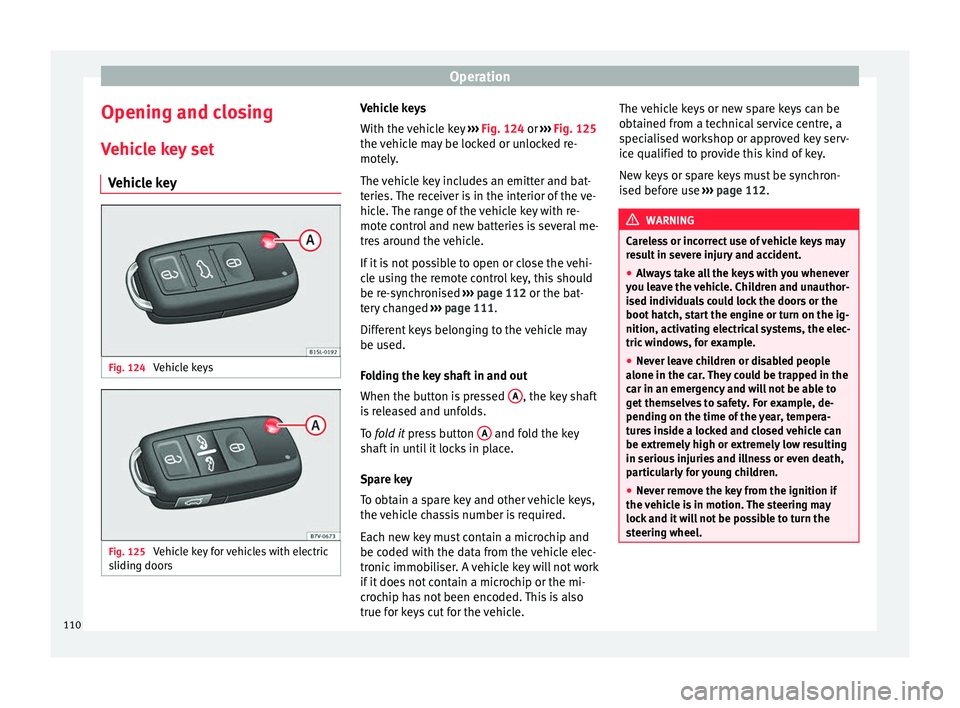
Vehicle key Fig. 124
Vehicle keys Fig. 125
Vehicle key for vehicles with electric
s lidin
g door
s Vehicle keys
W
ith the v
ehicle key ››› Fig. 124 or ››› Fig. 125
the vehicle may be locked or unlocked re-
motely.
The vehicle key includes an emitter and bat-
teries. The receiver is in the interior of the ve-
hicle. The range of the vehicle key with re-
mote control and new batteries is several me-
tres around the vehicle.
If it is not possible to open or close the vehi-
cle using the remote control key, this should
be re-synchronised ››› page 112 or the bat-
tery changed ››› page 111.
Different keys belonging to the vehicle may
be used.
Folding the key shaft in and out
When the button is pressed A , the key shaft
i s
r
eleased and unfolds.
To fold it press button A and fold the key
sh af
t
in until it locks in place.
Spare key
To obtain a spare key and other vehicle keys,
the vehicle chassis number is required.
Each new key must contain a microchip and
be coded with the data from the vehicle elec-
tronic immobiliser. A vehicle key will not work
if it does not contain a microchip or the mi-
crochip has not been encoded. This is also
true for keys cut for the vehicle. The vehicle keys or new spare keys can be
obtained fr
om a technical service centre, a
specialised workshop or approved key serv-
ice qualified to provide this kind of key.
New keys or spare keys must be synchron-
ised before use ››› page 112. WARNING
Careless or incorrect use of vehicle keys may
re s
ult in severe injury and accident.
● Always take all the keys with you whenever
you le
ave the vehicle. Children and unauthor-
ised individuals could lock the doors or the
boot hatch, start the engine or turn on the ig-
nition, activating electrical systems, the elec-
tric windows, for example.
● Never leave children or disabled people
alone in the car
. They could be trapped in the
car in an emergency and will not be able to
get themselves to safety. For example, de-
pending on the time of the year, tempera-
tures inside a locked and closed vehicle can
be extremely high or extremely low resulting
in serious injuries and illness or even death,
particularly for young children.
● Never remove the key from the ignition if
the vehic
le is in motion. The steering may
lock and it will not be possible to turn the
steering wheel. 110
Page 135 of 320

Lights and visibility
Note
● The v ehic
le battery will discharge and run
down if the hazard warning lights remain on
for too long (even with the ignition turned
off).
● In some vehicles, the brake lights will flash
when brakin
g abruptly at speeds of approxi-
mately 80 km/h (50 mph) to warn vehicles
travelling behind. If braking continues, the
hazard warning lights system will automati-
cally be turned on at a speed of less than ap-
proximately 10 km/h (6 mph). The brake
lights remain lit. Upon accelerating, the haz-
ard warning lights will be automatically
turned off. Adhesive strips for headlights or ad-
ju
s
tin
g headlights In those countries where vehicles drive on
the other s
ide of
the r
oad to the home coun-
try, the asymmetric dipped beam may dazzle
drivers of oncoming vehicles. Therefore,
when driving abroad, adhesive strips should
be attached to the headlights or the head-
lights should be adjusted accordingly.
The direction of the headlights can be adjus-
ted from the instrument panel, in the Tou-
rist light submenu of the Configura-
tion menu ›››
page 30.
For those vehicles in which it is not possible
to adjust the headlights from the menu, ad- hesive strips are used to cover certain parts
of the hea
dlamp cover or the headlights may
be adjusted at a specialised workshop. For
further information, please refer to a special-
ised workshop. SEAT recommends visiting a
technical service. Note
Use of the Tourist light option and the
adhe s
ives on the headlights is only allowed if
they are to be used for a short period of time.
To modify the direction of the headlights per-
manently, please take the vehicle to a speci-
alised workshop. SEAT recommends visiting a
technical service centre. Headlight range control, lighting of
the in
s
trument
panel and controls Fig. 141
Next to the steering wheel: instru-
ment and sw it
ch lighting control 1 and
he a
dlight
range control 2 1
Instrument and switch lighting
When the he a
dlights
are switched on, the
brightness of the instruments and switch
lighting can be regulated by turning the
switch ››› Fig. 141 1 .
2 Headlight range control
The he a
dlight
range control ››› Fig. 141 2 is
modified ac c
or
ding to the value of the head-
light beam and the vehicle load status. This
offers the driver optimum visibility and the
headlights do not dazzle oncoming drivers
››› .
The he a
dlights
can only be adjusted when
the dipped beam is switched on.
To reset, turn switch ››› Fig. 141 2 :
ValueVehicle load status
a)
–Two front occupants, luggage compart-
ment empty
1All seats occupied, luggage compartment
empty
2All seats occupied, luggage compartment
full With trailer and minimum drawbar load
3Driver only, luggage compartment full With
trailer and maximum drawbar load
a)
If the vehicle load does not correspond to those shown in the
table, it is possible to select intermediary positions.»
133
Technical data
Advice
Operation
Emergencies
Safety
Page 138 of 320

Operation
●
The inter v
al wipe speed varies according to
the vehicle speed. The faster the vehicle is
moving, the more often the windscreen is
cleaned.
● The rear wiper is automatically switched on
when the winds
creen wiper is on and the car
is in reverse gear. Windscreen wiper functions
Windscreen wiper performance in different sit-
uations
If the vehicle
is at a stand-
stillThe activated position provisionally
changes to the previous position.
During auto-
matic wipe
The air conditioner comes on for ap-
proximately 30 seconds in air recircula-
tion mode to prevent the smell of the
windscreen washer fluid entering the
inside the vehicle.
For the inter-
val wipeIntervals between wipes depend on the
vehicle's speed. The higher the vehicle
speed the shorter the intervals.
Heated windscreen washer jets
The he
atin
g on
ly thaws the frozen jets, it
does not thaw the water in the washer hoses.
The heated windscreen washer jets automati-
cally adjust the heat depending on the ambi-
ent temperature when the ignition is switch-
ed on. Headlight wash/wipe system
The headlight
washers/wipers clean the
headlight lenses.
After the ignition is switched on, the first and
every fifth time the windscreen washer is
switched on, the headlights are also washed.
Therefore, the windscreen wiper lever should
be pulled towards the steering wheel when
the dipped beam or main beam are on. Any
incrusted dirt (such as insects) should be
cleaned regularly (e.g. when refuelling).
To ensure the headlight washers work cor-
rectly in winter, any snow which has got into
the bumper jet supports should be cleaned
away. If necessary, remove snow with an anti-
icing spray. Note
The wiper will try to wipe away any obstacles
that ar
e on the windscreen. The wiper will
stop moving if the obstacle blocks its path.
Remove the obstacle and switch the wiper
back on again. Rain sensor*
Fig. 144
Windscreen wiper lever: adjusting
the r ain sen
sor A Fig. 145
Rain sensor sensitive surface The rain sensor controls the frequency of the
w
ind
s
creen wiper intervals, depending on
the amount of rain ››› . The sensitivity of the
r ain sen
sor c
an be adjusted manually. Man-
ual wipe ››› page 135.
136
Page 141 of 320

Lights and visibility
Exterior mirrors Fig. 148
In the driver door: exterior mirror
c ontr
o
ls Read the additional information carefully
› ›
›
page 16
Turn the knob to the required position:
Electric folding exterior mirrors
››› .
Switch on the exterior mirror heating This only
heats up if the ambient temperature is less
than +20°C (+68°F).
Adjust the left-hand exterior mirror by turning
the knob forward, backward, to the right or to
the left.
Adjust the right-hand exterior mirror by turning
the knob forward, backward, to the right or to
the left .
Zero position. Exterior mirror unfolded, exterior
mirror heating off, adjustment of exterior mir-
ror not possible. Synchronised mirror adjustment
●
In the Settings - Convenience menu,
sel ect
whether or not
the mirrors should
move in synchronisation ›››
page 26.
● Turn the knob to position L.
● Adjust the left-hand exterior mirror. The
right ext
erior mirror will be adjusted at the
same time (synchronised).
● If necessary the right exterior mirror adjust-
ment ma
y need correcting. turn the control to
position R.
Automatic anti-dazzle exterior mirror, driver
side
The automatic anti-dazzle exterior mirror is
controlled in the same way as the automatic
anti-dazzle rear vision mirror ››› page 138.
Store the reverse settings for the passenger
exterior mirror ● Select the vehicle key in which the setting
is t
o be stored.
● Use this key to unlock the vehicle.
● Connect the automatic parking brake.
● Turn the exterior mirror knob to position R
(pas
senger side).
● Switch the ignition on.
● Move the gear lever to neutral.
● Access the Settings menu on the instru-
ment
panel display using the multifunction steering wheel buttons and select
Conven-
ience .
● Select the Rear vision mirror ad-
justment function (if
it is already checked,
uncheck it and check the option again).
● Select reverse gear.
● Adjust the front passenger side exterior
mirror so that
you can see, for example, the
kerb area.
● The new position of the mirror will be stor-
ed automatic
ally and allocated to the vehicle
key that was used to unlock the vehicle. For
vehicles with seat memory, please see
››› page 144.
Activating the passenger exterior mirror set-
tings
● Turn the exterior mirror knob to position R.
● With the ignition switched on, select re-
verse g
ear.
● The stored position of the passenger exteri-
or mirror for r
everse gear is deleted when
driving forwards at 15 km/h (9 mph), or if the
knob is turned from position R to another po-
sition. WARNING
Fold and unfold the exterior mirror, taking
car e t
o avoid injuries.
● Only fold or unfold the exterior mirror when
there is
no-one in the way of the mirror. » 139
Technical data
Advice
Operation
Emergencies
Safety
Page 164 of 320

Operation
●
The roof ant
enna, the range of the panor-
amic sliding sunroof and the boot hatch
should not be affected by the roof carrier sys-
tem and the load being transported.
● Take extra care not to let the hatch strike
the roof lo
ad when opening. For the sake of the environment
The vehicle uses more fuel when the roof car-
rier sy st
em is fitted. Fastening the base supports and the
r
oof
c
arrier system Fig. 174
Attachment points for the basic sup-
por t and the r
oof carrier system The mounts are the basis of a complete roof
c
arrier sy
s
tem. Special fixtures must then be
added in order to safely transport luggage,
bicycles, skis, surf boards, boats, etc. on the roof. All these system components are availa-
ble fr
om a technical service centre.
Securing the base supports and roof carrier
system
Always secure the base supports and roof
carrier system correctly.
The roof carrier system must always be instal-
led exactly according to the instructions pro-
vided.
The position openings are located on the in-
ner side of the side roof rods ››› Fig. 174. WARNING
If the base supports and the roof carrier sys-
tem ar e inc
orrectly fitted or used in an unsuit-
able manner, the entire system could break
free causing accident and injury.
● Always take the manufacturer assembly in-
structions
into account.
● Only use base supports and roof carrier
syst
ems that are not damaged and are cor-
rectly fitted.
● The base support should only be fitted to
the points indic
ated in the diagram
››› Fig. 174.
● Secure the base supports and roof carrier
syst
em correctly.
● Check the screws and attachments before
driving and af
ter a short distance. During
each long journey, check the attachments
during every break. ●
Alw a
ys fit the roof carrier system correctly
for wheels, skis, surfboards, etc.
● Never modify or repair the basic supports
or roof c
arrier system. Note
Read and take into account the instructions
inc luded w ith the r
oof carrier system fitted
and keep them in the vehicle. Loading the roof carrier
Loads can only be correctly secured when the
r
oof
c
arrier system is correctly fitted ››› .
M ax
imum authori
sed roof load
The maximum authorised roof load is 100 kg
(220 lbs). The roof load includes the roof car-
rier system and the load being transported
››› .
A lw
a
ys check the roof carrier system weight
and the weight of the load to be transported
and, if necessary, weigh them. Never exceed
the maximum authorised roof load.
If you are using a roof carrier with a lower
weight rating, you cannot transport the maxi-
mum roof load. Do not exceed the maximum
weight limit for the roof carrier given in the
fitting instructions.
162