Page 154 of 294
2.28
SPEED LIMITER (3/3)
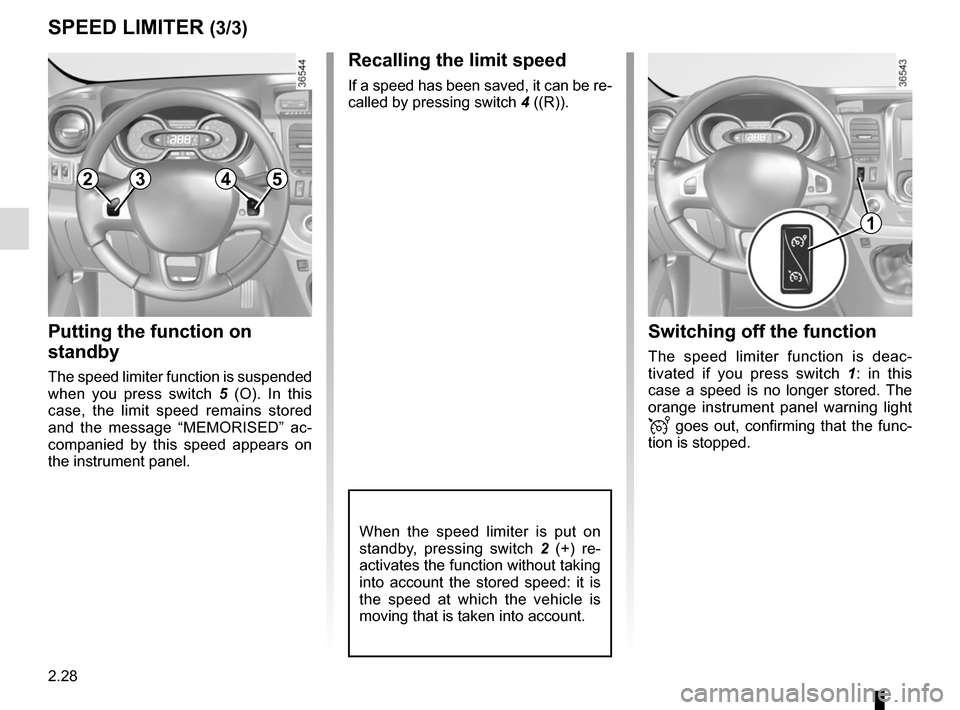
Recalling the limit speed
If a speed has been saved, it can be re-
called by pressing switch 4 ((R)).
Putting the function on
standby
The speed limiter function is suspended
when you press switch 5 (O). In this
case, the limit speed remains stored
and the message “MEMORISED” ac-
companied by this speed appears on
the instrument panel.
Switching off the function
The speed limiter function is deac-
tivated if you press switch 1 : in this
case a speed is no longer stored. The
orange instrument panel warning light
goes out, confirming that the func-
tion is stopped.
When the speed limiter is put on
standby, pressing switch 2 (+) re-
activates the function without taking
into account the stored speed: it is
the speed at which the vehicle is
moving that is taken into account.
2354
1
Page 156 of 294
2.30
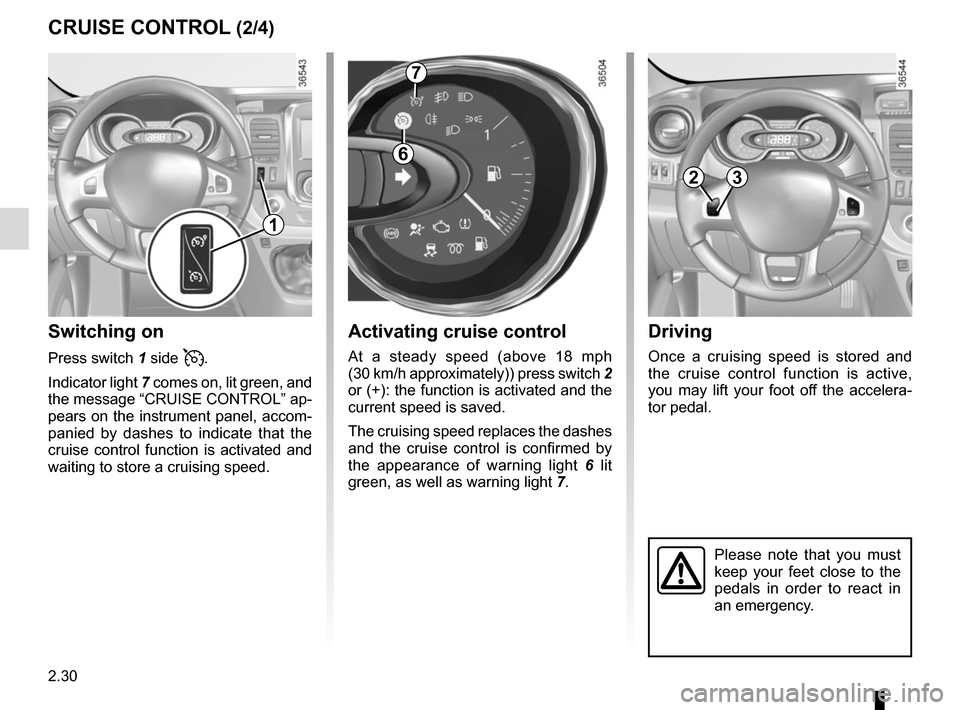
Driving
Once a cruising speed is stored and
the cruise control function is active,
you may lift your foot off the accelera-
tor pedal.
Please note that you must
keep your feet close to the
pedals in order to react in
an emergency.
Activating cruise control
At a steady speed (above 18 mph
(30 km/h approximately)) press switch 2
or (+): the function is activated and the
current speed is saved.
The cruising speed replaces the dashes
and the cruise control is confirmed by
the appearance of warning light 6 lit
green, as well as warning light 7.
Switching on
Press switch 1 side .
Indicator light 7 comes on, lit green, and
the message “CRUISE CONTROL” ap-
pears on the instrument panel, accom-
panied by dashes to indicate that the
cruise control function is activated and
waiting to store a cruising speed.
CRUISE CONTROL (2/4)
7
6
23
1
Page 158 of 294
2.32
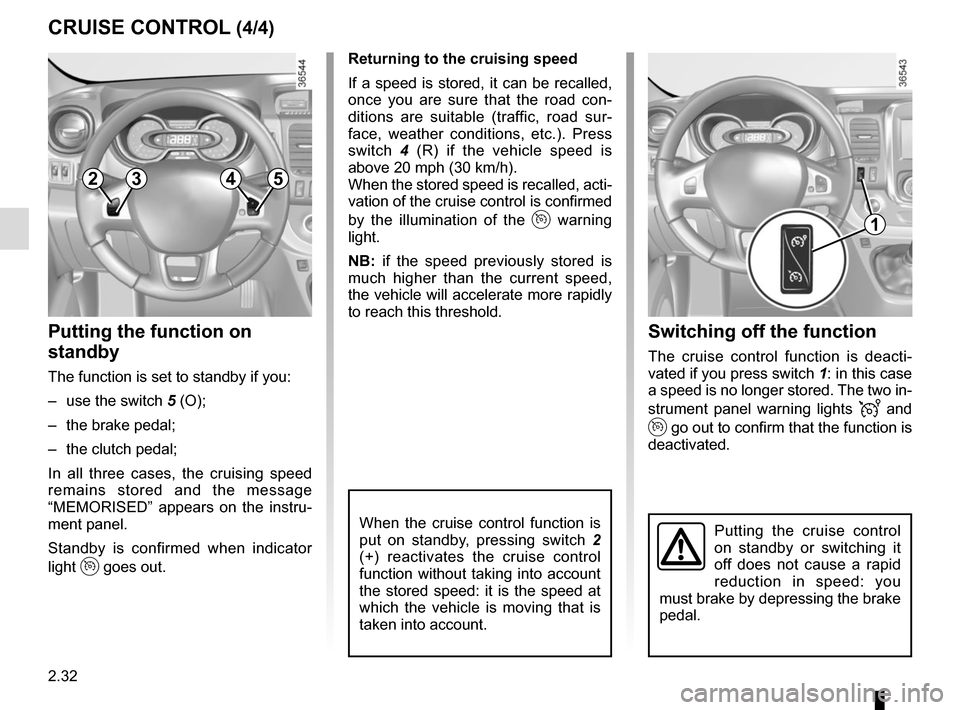
Switching off the function
The cruise control function is deacti-
vated if you press switch 1: in this case
a speed is no longer stored. The two in-
strument panel warning lights
and
go out to confirm that the function is
deactivated.
Returning to the cruising speed
If a speed is stored, it can be recalled,
once you are sure that the road con-
ditions are suitable (traffic, road sur-
face, weather conditions, etc.). Press
switch
4 (R) if the vehicle speed is
above 20 mph (30 km/h).
When the stored speed is recalled, acti-
vation of the cruise control is confirmed
by the illumination of the
warning
light.
NB: if the speed previously stored is
much higher than the current speed,
the vehicle will accelerate more rapidly
to reach this threshold.
When the cruise control function is
put on standby, pressing switch 2
(+) reactivates the cruise control
function without taking into account
the stored speed: it is the speed at
which the vehicle is moving that is
taken into account.
Putting the function on
standby
The function is set to standby if you:
– use the switch 5 (O);
– the brake pedal;
– the clutch pedal;
In all three cases, the cruising speed
remains stored and the message
“MEMORISED” appears on the instru-
ment panel.
Standby is confirmed when indicator
light
goes out.
CRUISE CONTROL (4/4)
Putting the cruise control
on standby or switching it
off does not cause a rapid
reduction in speed: you
must brake by depressing the brake
pedal.
2354
1
Page 159 of 294
2.33
VEHICLE WITH OVERSPEED FUNCTION
The vehicle speed may be permanently
set at a fixed value depending on the
vehicle or on local legislation.
To adjust the value or activate/deacti-
vate the function, consult an approved
dealer.
In the event of statutory limits (depend-
ing on the vehicle), this function may
not be deactivated.
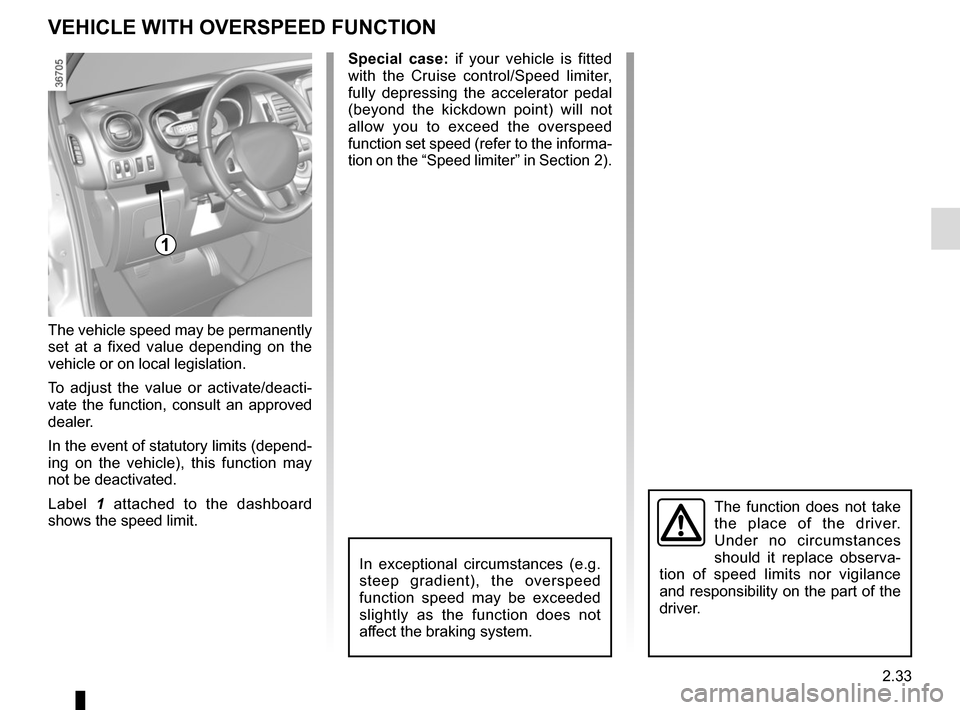
Label 1 attached to the dashboard
shows the speed limit. Special case:
if your vehicle is fitted
with the Cruise control/Speed limiter,
fully depressing the accelerator pedal
(beyond the kickdown point) will not
allow you to exceed the overspeed
function set speed (refer to the informa-
tion on the “Speed limiter” in Section 2).
In exceptional circumstances (e.g.
steep gradient), the overspeed
function speed may be exceeded
slightly as the function does not
affect the braking system.
The function does not take
the place of the driver.
Under no circumstances
should it replace observa-
tion of speed limits nor vigilance
and responsibility on the part of the
driver.
1
Page 160 of 294
2.34
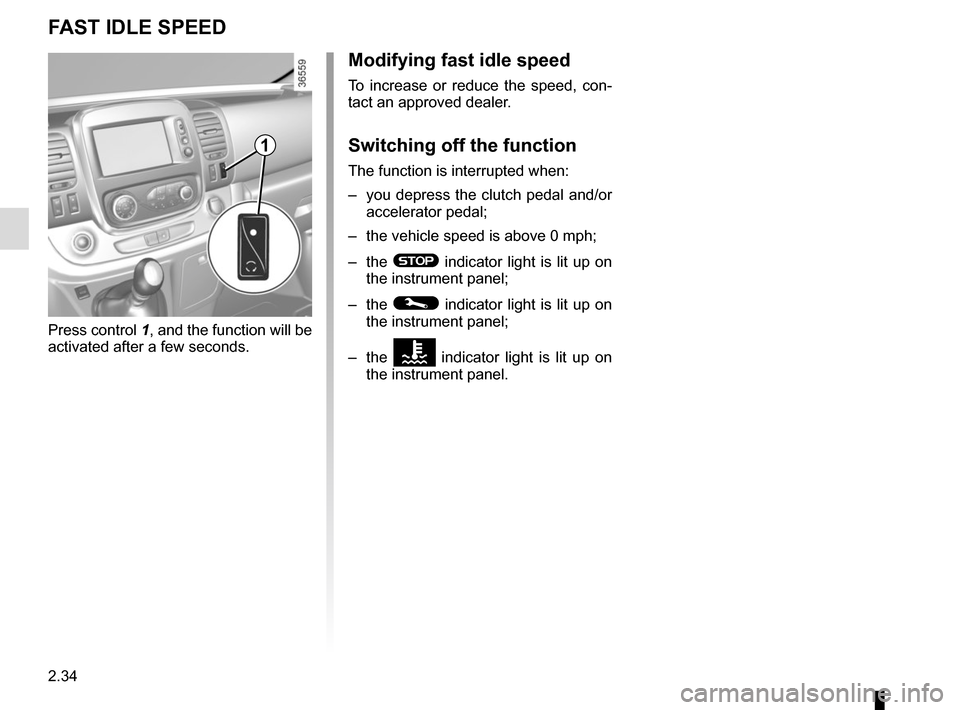
FAST IDLE SPEED
Press control 1, and the function will be
activated after a few seconds.
Modifying fast idle speed
To increase or reduce the speed, con-
tact an approved dealer.
Switching off the function
The function is interrupted when:
– you depress the clutch pedal and/or accelerator pedal;
– the vehicle speed is above 0 mph;
– the
® indicator light is lit up on
the instrument panel;
– the
© indicator light is lit up on
the instrument panel;
– the
Ô indicator light is lit up on
the instrument panel.
1
Page 162 of 294

2.36
Temporary deactivation of
the system
Press switch 2 to deactivate the system.
The indicator light built into the switch
lights up to remind you that the system
is deactivated.
Pressing the switch again will reacti-
vate the system and switch off the in-
dicator light.
Depending on the vehicle, you can de-
activate the parking distance control
from the touch-screen. Please see the
equipment instructions for further infor-
mation.
PARKING DISTANCE CONTROL (2/2)
Adjusting the parking
distance control volume
Depending on the vehicle, certain set-
tings can be adjusted from the touch-
screen 1. Please see the equipment in-
structions for further information.
The system is automatically reactivated
after the ignition is switched off and the
engine restarted.
Prolonged deactivation of the
system
You can deactivate the system perma-
nently by pressing and holding switch 2.
The warning light built into the switch
remains lit constantly.
The deactivated system can be re-
activated by pressing and holding the
switch again.
Operating faults
Depending on the vehicle, when the
system detects an operating fault, the
message “check parking distance con-
trol” appears on the instrument panel,
accompanied by the warning light
© and a beep lasting approxi-
mately 5 seconds. Please contact an
authorised dealer.
2
1
Page 164 of 294
2.38
REVERSING CAMERA (2/2)
The screen shows a reverse image.
The frames are a representation
projected on a flat surface. This in-
formation is to not be taken into ac-
count when superimposed on a
vertical object or an object on the
ground.
Objects which appear on the edge
of the screen may be deformed.
In very bright light (snow, vehicle in
sunshine etc.), the camera vision
may be adversely affected.
If the rear doors are open or poorly
closed, the message “BOOT OPEN”
appears and, depending on the ve-
hicle, the camera display disap-
pears.
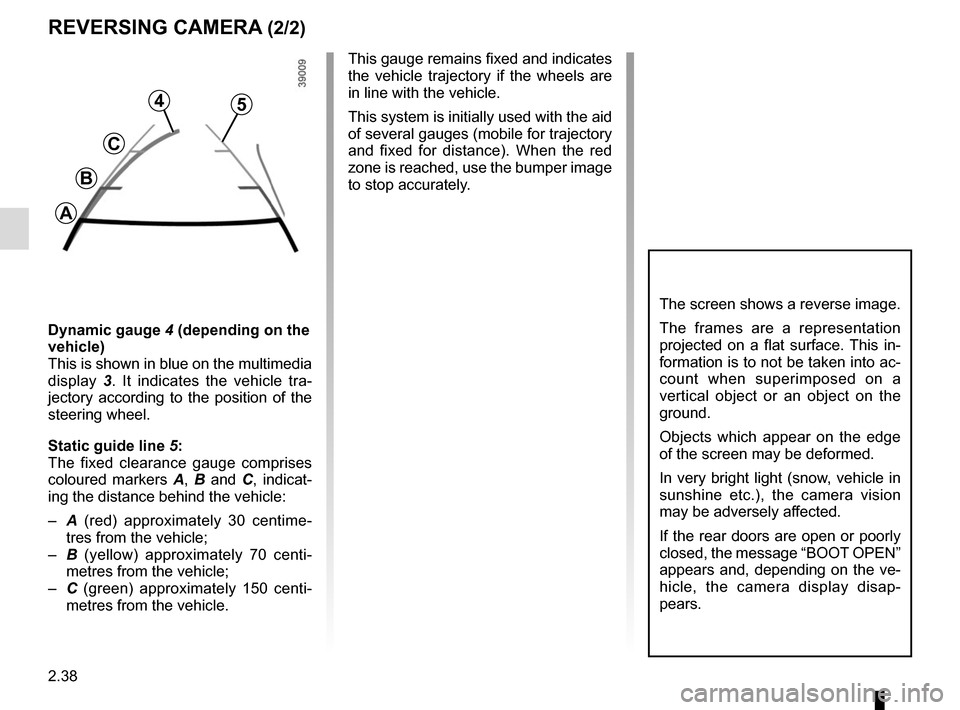
Dynamic gauge 4 (depending on the
vehicle)
This is shown in blue on the multimedia
display 3. It indicates the vehicle tra-
jectory according to the position of the
steering wheel.
Static guide line 5:
The fixed clearance gauge comprises
coloured markers A, B and C , indicat-
ing the distance behind the vehicle:
– A (red) approximately 30 centime-
tres from the vehicle;
– B (yellow) approximately 70 centi-
metres from the vehicle;
– C (green) approximately 150 centi-
metres from the vehicle. This gauge remains fixed and indicates
the vehicle trajectory if the wheels are
in line with the vehicle.
This system is initially used with the aid
of several gauges (mobile for trajectory
and fixed for distance). When the red
zone is reached, use the bumper image
to stop accurately.
4
C
B
A
5
Page 165 of 294

3.1
Section 3: Your comfort
Air Vents . . . . . . . . . . . . . . . . . . . . . . . . . . . . . . . . . . . .\
. . . . . . . . . . . . . . . . . . . . . . . . . . . . . . . . . . 3.2
Manual air conditioning/heating system . . . . . . . . . . . . . . . . . . . . . . . . . . . . . . . . . . . .\
. . . . . . . . . . 3.4
Automatic climate control . . . . . . . . . . . . . . . . . . . . . . . . . . . . . . . . . . . .\
. . . . . . . . . . . . . . . . . . . . . 3.8
Air conditioning: information and advice on use . . . . . . . . . . . . . . . . . . . . . . . . . . . . . . . . . . . .\
. . . . 3.12
Additional heating and air conditioning . . . . . . . . . . . . . . . . . . . . . . . . . . . . . . . . . . . .\
. . . . . . . . . . . 3.14
Windows . . . . . . . . . . . . . . . . . . . . . . . . . . . . . . . . . . . .\
. . . . . . . . . . . . . . . . . . . . . . . . . . . . . . . . . . 3.15
Sun visor . . . . . . . . . . . . . . . . . . . . . . . . . . . . . . . . . . . .\
. . . . . . . . . . . . . . . . . . . . . . . . . . . . . . . . . . 3.17
Interior lighting . . . . . . . . . . . . . . . . . . . . . . . . . . . . . . . . . . . . \
. . . . . . . . . . . . . . . . . . . . . . . . . . . . . . 3.18
Passenger compartment storage/fittings . . . . . . . . . . . . . . . . . . . . . . . . . . . . . . . . . . . . \
. . . . . . . . . . 3.20
Ashtray, accessories socket . . . . . . . . . . . . . . . . . . . . . . . . . . . . . . . . . . . .\
. . . . . . . . . . . . . . . . . . . 3.29
Rear bench seat: functions . . . . . . . . . . . . . . . . . . . . . . . . . . . . . . . . . . . .\
. . . . . . . . . . . . . . . . . . . . 3.32
Luggage cover . . . . . . . . . . . . . . . . . . . . . . . . . . . . . . . . . . . . \
. . . . . . . . . . . . . . . . . . . . . . . . . . . . . . 3.36
Luggage net. . . . . . . . . . . . . . . . . . . . . . . . . . . . . . . . . . . . \
. . . . . . . . . . . . . . . . . . . . . . . . . . . . . . . . 3.37
Transporting objects . . . . . . . . . . . . . . . . . . . . . . . . . . . . . . . . . . . .\
. . . . . . . . . . . . . . . . . . . . . . . . . 3.39
Transporting objects: . . . . . . . . . . . . . . . . . . . . . . . . . . . . . . . . . . . . \
. . . . . . . . . . . . . . . . . . . . . . . . . 3.41 towing, attachments . . . . . . . . . . . . . . . . . . . . . . . . . . . . . . . . . . . . \
. . . . . . . . . . . . . . . . . . . . 3.41
Multimedia equipment . . . . . . . . . . . . . . . . . . . . . . . . . . . . . . . . . . . . \
. . . . . . . . . . . . . . . . . . . . . . . . 3.42