Page 162 of 294

2.36
Temporary deactivation of
the system
Press switch 2 to deactivate the system.
The indicator light built into the switch
lights up to remind you that the system
is deactivated.
Pressing the switch again will reacti-
vate the system and switch off the in-
dicator light.
Depending on the vehicle, you can de-
activate the parking distance control
from the touch-screen. Please see the
equipment instructions for further infor-
mation.
PARKING DISTANCE CONTROL (2/2)
Adjusting the parking
distance control volume
Depending on the vehicle, certain set-
tings can be adjusted from the touch-
screen 1. Please see the equipment in-
structions for further information.
The system is automatically reactivated
after the ignition is switched off and the
engine restarted.
Prolonged deactivation of the
system
You can deactivate the system perma-
nently by pressing and holding switch 2.
The warning light built into the switch
remains lit constantly.
The deactivated system can be re-
activated by pressing and holding the
switch again.
Operating faults
Depending on the vehicle, when the
system detects an operating fault, the
message “check parking distance con-
trol” appears on the instrument panel,
accompanied by the warning light
© and a beep lasting approxi-
mately 5 seconds. Please contact an
authorised dealer.
2
1
Page 171 of 294
3.7
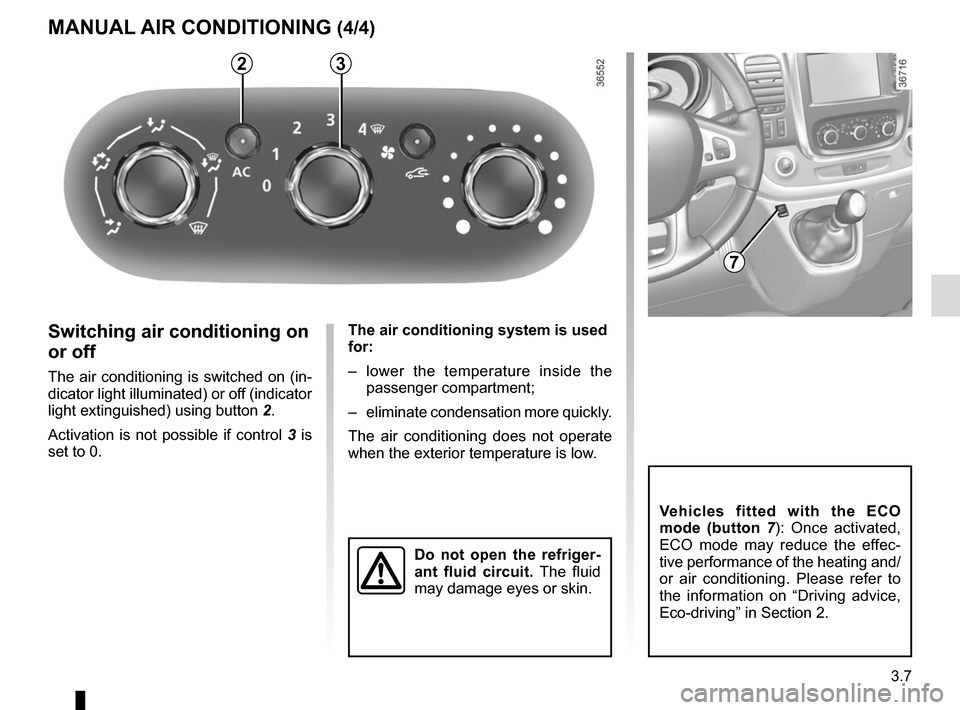
The air conditioning system is used
for:
– lower the temperature inside the passenger compartment;
– eliminate condensation more quickly.
The air conditioning does not operate
when the exterior temperature is low.
32
MANUAL AIR CONDITIONING (4/4)
Switching air conditioning on
or off
The air conditioning is switched on (in-
dicator light illuminated) or off (indicator
light extinguished) using button 2.
Activation is not possible if control 3 is
set to 0.
Do not open the refriger-
ant fluid circuit. The fluid
may damage eyes or skin.
Vehicles fitted with the ECO
mode (button 7 ): Once activated,
ECO mode may reduce the effec-
tive performance of the heating and/
or air conditioning. Please refer to
the information on “Driving advice,
Eco-driving” in Section 2.
7
Page 174 of 294
3.10
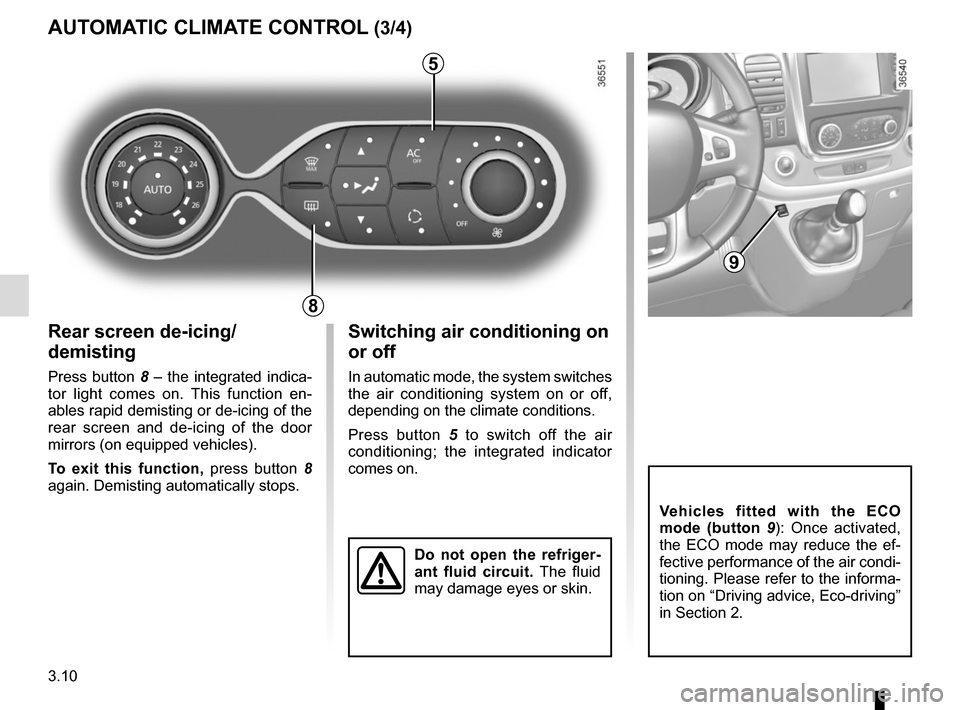
Rear screen de-icing/
demisting
Press button 8 – the integrated indica-
tor light comes on. This function en-
ables rapid demisting or de-icing of the
rear screen and de-icing of the door
mirrors (on equipped vehicles).
To exit this function, press button 8
again. Demisting automatically stops.
AUTOMATIC CLIMATE CONTROL (3/4)
8
Switching air conditioning on
or off
In automatic mode, the system switches
the air conditioning system on or off,
depending on the climate conditions.
Press button 5 to switch off the air
conditioning; the integrated indicator
comes on.
5
Vehicles fitted with the ECO
mode (button 9 ): Once activated,
the ECO mode may reduce the ef-
fective performance of the air condi-
tioning. Please refer to the informa-
tion on “Driving advice, Eco-driving”
in Section 2.
9
Do not open the refriger-
ant fluid circuit. The fluid
may damage eyes or skin.
Page 180 of 294
3.16
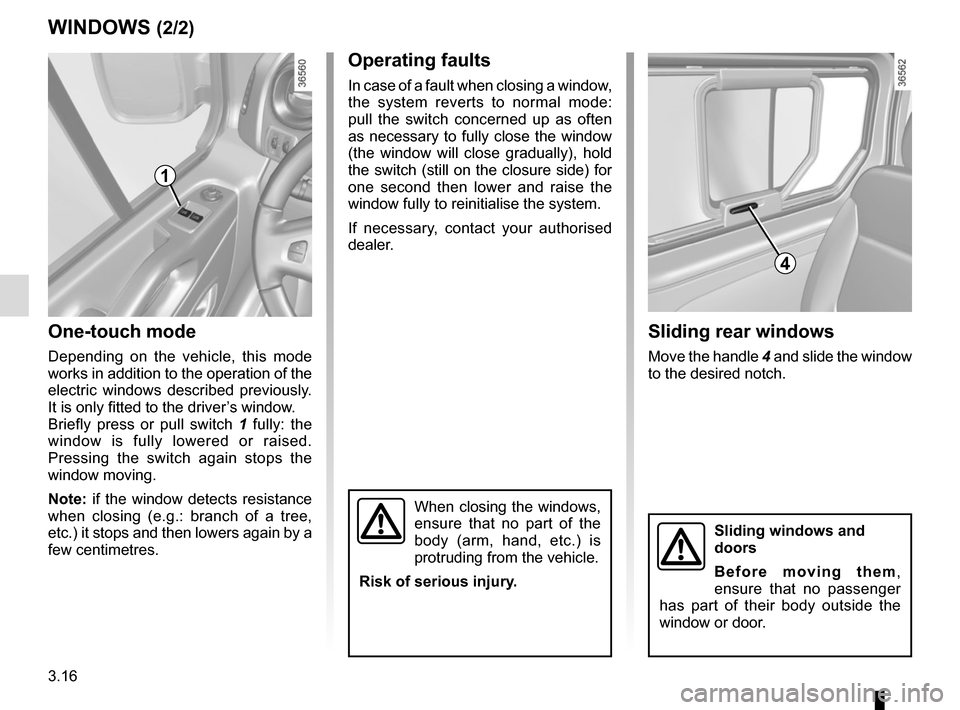
One-touch mode
Depending on the vehicle, this mode
works in addition to the operation of the
electric windows described previously.
It is only fitted to the driver’s window.
Briefly press or pull switch 1 fully: the
window is fully lowered or raised.
Pressing the switch again stops the
window moving.
Note: if the window detects resistance
when closing (e.g.: branch of a tree,
etc.) it stops and then lowers again by a
few centimetres.
WINDOWS (2/2)
When closing the windows,
ensure that no part of the
body (arm, hand, etc.) is
protruding from the vehicle.
Risk of serious injury.
Operating faults
In case of a fault when closing a window,
the system reverts to normal mode:
pull the switch concerned up as often
as necessary to fully close the window
(the window will close gradually), hold
the switch (still on the closure side) for
one second then lower and raise the
window fully to reinitialise the system.
If necessary, contact your authorised
dealer.
1
Sliding rear windows
Move the handle 4 and slide the window
to the desired notch.
4
Sliding windows and
doors
Before moving them,
ensure that no passenger
has part of their body outside the
window or door.
Page 214 of 294

4.8
Level 2
It is normal for the level to drop as the
brake shoes become worn, but it must
never drop lower than the “MINI" warn-
ing line.
If you wish to check the disc and drum
wear yourself, you should obtain the
document explaining the checking pro-
cedure from the manufacturer’s net-
work or web site.
Topping up
After any operation on the hydraulic cir-
cuit, a specialist must replace the brake
fluid.
Only use fluids approved by our
Technical Department (and taken from
a sealed container).
Replacement interval
Refer to the Maintenance Document for
your vehicle.
Brake fluid level
The level should be read with the engine
switched off and on level ground.
This should be checked frequently,
and immediately if you notice even the
slightest loss in braking efficiency.
LEVELS (2/3)
2
Consult your approved dealer at
once if you notice an abnormal or
repeated drop in any of the fluid
levels.
Frequency of checking coolant level
Check the coolant level regularly
(very severe damage is likely to be
caused to the engine if it runs out of
coolant).
If the level needs to be topped up, only
use products approved by our Technical
Department which ensure:
– protection against freezing;
– an anti-corrosion protection for the cooling system.
Replacement interval
Refer to the Maintenance Document for
your vehicle.
Page 216 of 294
4.10
TYRE PRESSURE (1/2)
A
For your safety, please re-
spect the speed limit.
When they need to be re-
placed, only tyres of the
same make, size, type and profile
should be used on a single axle.
They must: either have a load ca-
pacity and speed rating at least
equal to those of the original
tyres, or conform to those recom-
mended by an authorised dealer.
Failure to heed these instructions
could endanger your safety and
affect your vehicle’s roadworthi-
ness.
Risk of loss of control of the ve-
hicle.
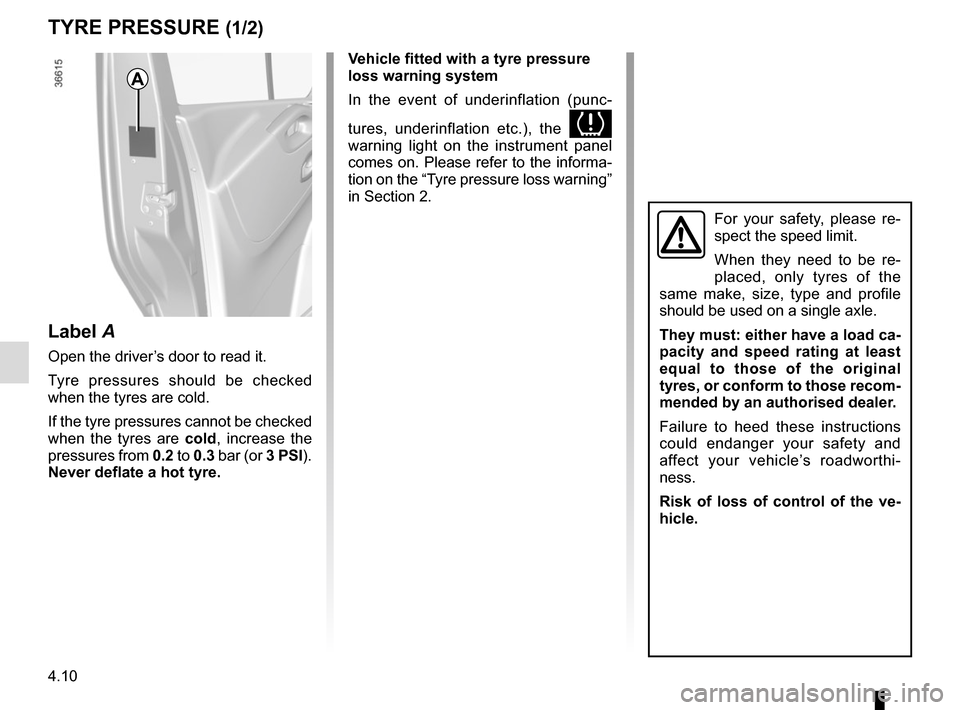
Label A
Open the driver’s door to read it.
Tyre pressures should be checked
when the tyres are cold.
If the tyre pressures cannot be checked
when the tyres are cold, increase the
pressures from 0.2 to 0.3 bar (or 3 PSI).
Never deflate a hot tyre. Vehicle fitted with a tyre pressure
loss warning system
In the event of underinflation (punc-
tures, underinflation etc.), the
warning light on the instrument panel
comes on. Please refer to the informa-
tion on the “Tyre pressure loss warning”
in Section 2.
Page 234 of 294
5.12
TYRES (2/3)
1
2
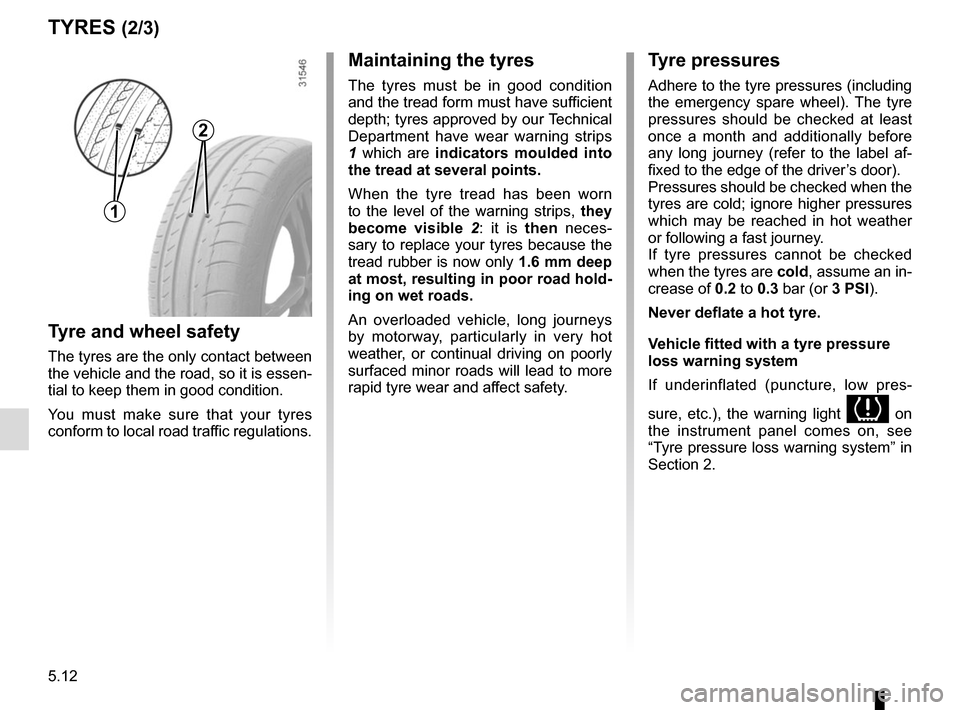
Maintaining the tyres
The tyres must be in good condition
and the tread form must have sufficient
depth; tyres approved by our Technical
Department have wear warning strips
1 which are indicators moulded into
the tread at several points.
When the tyre tread has been worn
to the level of the warning strips, they
become visible 2: it is then neces-
sary to replace your tyres because the
tread rubber is now only 1.6 mm deep
at most, resulting in poor road hold-
ing on wet roads.
An overloaded vehicle, long journeys
by motorway, particularly in very hot
weather, or continual driving on poorly
surfaced minor roads will lead to more
rapid tyre wear and affect safety.
Tyre and wheel safety
The tyres are the only contact between
the vehicle and the road, so it is essen-
tial to keep them in good condition.
You must make sure that your tyres
conform to local road traffic regulations.
Tyre pressures
Adhere to the tyre pressures (including
the emergency spare wheel). The tyre
pressures should be checked at least
once a month and additionally before
any long journey (refer to the label af-
fixed to the edge of the driver’s door).
Pressures should be checked when the
tyres are cold; ignore higher pressures
which may be reached in hot weather
or following a fast journey.
If tyre pressures cannot be checked
when the tyres are cold, assume an in-
crease of 0.2 to 0.3 bar (or 3 PSI).
Never deflate a hot tyre.
Vehicle fitted with a tyre pressure
loss warning system
If underinflated (puncture, low pres-
sure, etc.), the warning light
on
the instrument panel comes on, see
“Tyre pressure loss warning system” in
Section 2.
Page 252 of 294

5.30
ACCESSORIES
Electrical and electronic accessories
Before installing this type of accessory (particularly for transmitters\
/receivers: frequency bandwidth, power level, po-
sition of the aerial, etc.), make sure it is compatible with your vehic\
le. You can get advice from an authorised dealer.
Connect accessories with a maximum power of 120 Watts only. Fire hazard. When several accessory sockets are
used at the same time, the total power of the connected accessories must\
not exceed 180 watts.
No work may be carried out on the vehicle’s electrical or radio circuits, except by authorised dealers: an incorre\
ctly connecte d
system may result in damage being caused to the electrical equipment and\
/or the components connected to it.
If the vehicle is fitted with any aftermarket electrical equipment, make\
sure that the installation is correctly protected by a fuse.
Establish the rating and position of this fuse.
Using the diagnostic socket
The use of electronic accessories on the diagnostic socket may cause ser\
ious disturbance to the vehicle’s electronic systems.
For your safety we recommend that you use only electronic accessories ap\
proved by the manufacturer, consult an Approved
Dealer. Serious accident risk.
Use of transmitting/receiving devices (telephones, CB equipment etc.).\
Telephones and CB equipment with integrated aerials may cause interferenc\
e to the electronic systems originally fitted to the
vehicle: it is advisable only to use equipment with an external aerial. \
Furthermore, we remind you of the need to conform
to the legislation in force concerning the use of such equipment.
Fitting aftermarket accessories
If you wish to install accessories on the vehicle: please contact an aut\
horised dealer. Also, to ensure the correct operation o f
your vehicle, and to avoid any risk to your safety, we recommend that you use only accessories specifically designed for y\
our
vehicle, which are the only accessories for which the manufacturer will \
provide a warranty.
If you are using an anti-theft device, only attach it to the brake pedal\
.
Obstructions to the driver
On the driver’s side, only use mats suitable for the vehicle, attached with the pre-fi\
tted components, and check the fitting re gu-
larly. Do not lay one mat on top of another. There is a risk of wedging the pedals.