Page 103 of 294

1.97
TRIP COMPUTER AND WARNING SYSTEM: operating fault messages
These appear with the © warning light and mean that you should drive very carefully to an author\
ised dealer as
soon as possible. If you fail to follow this recommendation, you risk da\
maging your vehicle.
They disappear when the display selection key is pressed or after severa\
l seconds and are stored in the computer log. The
© warning light stays on. Examples of operating fault messages are given \
in the following pages.
Examples of messages Interpreting the display selected
« CLEAN DIESEL FILTER » Indicates the presence of water in the diesel filter; contact an approve\
d Dealer
as soon as possible.
« CHECK VEHICLE » Indicates a fault in one of the pedal sensors, battery management system\
or oil
level sensor.
« CHECK AIRBAG » Indicates a fault in the restraint system in addition to the seat belts.\
In the event
of an accident, it is possible that they may not be triggered.
« Check antipollution system » – Indicates a fault in the vehicle’s emission control system.
– Indicates a fault in the emissions reduction system when it is accompani\
ed
by the
warning light. Refer to the information on «Additive tank» in
Section 1.
Page 106 of 294
1.100
Display B
Vehicles fitted with touch-screen
multimedia, navigation aid systems,
telephones, etc.
Refer to the separate instructions for
the function to understand the special
features of this equipment.
External temperature
indicator
Special note:
When the exterior temperature is - 3°C
to + 3°C, the °C characters flash (sig-
nalling a risk of ice on the road).
External temperature in-
dicator
As ice formation is related
to climatic exposure, local
air humidity and temperature, the
external temperature alone is not
sufficient to detect ice.
CLOCK AND EXTERIOR TEMPERATURE (2/2)
If the power supply is cut (battery disconnected, supply wire cut, etc.\
), the clock
must be reset.
We recommend that you do not adjust these settings while driving.
B
Page 116 of 294
1.110
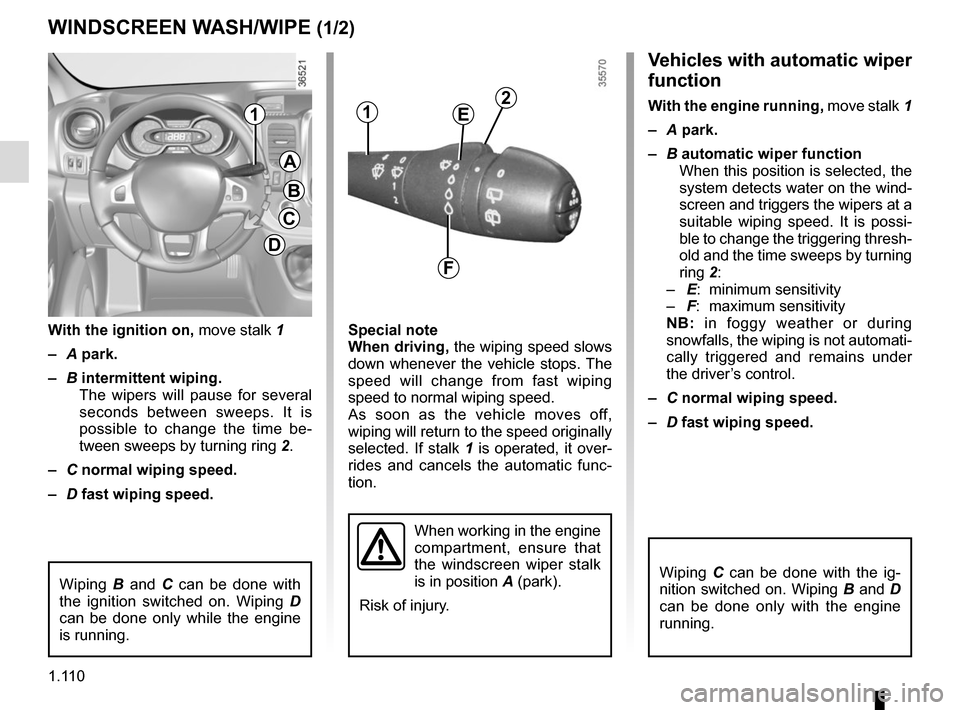
Vehicles with automatic wiper
function
With the engine running, move stalk 1
– A park.
– B automatic wiper function
When this position is selected, the
system detects water on the wind-
screen and triggers the wipers at a
suitable wiping speed. It is possi-
ble to change the triggering thresh-
old and the time sweeps by turning
ring 2:
– E: minimum sensitivity
– F: maximum sensitivity
NB: in foggy weather or during
snowfalls, the wiping is not automati-
cally triggered and remains under
the driver’s control.
– C normal wiping speed.
– D fast wiping speed.
Special note
When driving,
the wiping speed slows
down whenever the vehicle stops. The
speed will change from fast wiping
speed to normal wiping speed.
As soon as the vehicle moves off,
wiping will return to the speed originally
selected. If stalk 1 is operated, it over-
rides and cancels the automatic func-
tion.
With the ignition on,
move stalk 1
– A park.
– B intermittent wiping.
The wipers will pause for several
seconds between sweeps. It is
possible to change the time be-
tween sweeps by turning ring 2.
– C normal wiping speed.
– D fast wiping speed.
WINDSCREEN WASH/WIPE (1/2)
A
B
C
D
11
When working in the engine
compartment, ensure that
the windscreen wiper stalk
is in position A (park).
Risk of injury.
2E
F
Wiping B and C can be done with
the ignition switched on. Wiping D
can be done only while the engine
is running.Wiping C can be done with the ig-
nition switched on. Wiping B and D
can be done only with the engine
running.
Page 122 of 294

1.116
Please ensure that you comply with the
legislation of your country.
It is important to remember that failure
to respect regulations in force could
lead to legal action being taken against
the vehicle owner.
Operating principleThe use of additives reduces exhaust
emissions by transforming the pollut-
ants into water vapour and nitrogen.
FillingCapacity of the fuel tank: 20 litres ap-
proximately.
Open the front left door to open the
cover A. Unscrew the cap 1.
ADDITIVE TANK (1/4)
A
1
Fuel filler cap: this is spe-
cific.
If you have to replace it,
make sure it is identical to
the original cap. Contact an appro-
ved Dealer. Do not wash the filler
area with a high pressure washer.
Vehicle fitted with the Stop and
Start function
To fill up with additive, the engine
must be stopped (and not on
standby): stop the engine (Please
See “Starting, stopping the engine”
in Section 2).
No work whatsoever is
permitted on any part of
the system. To prevent
damage, only qualified per-
sonnel from our network may work
on the system.
Topping upAfter filling the additive
tank, check that the cap and
cover are closed, start the
engine and WAIT 10 seconds with
the vehicle stationary, engine
running before setting off again.
If this operation is not carried out,
the filling of the tank will not be
taken into account automatically
until after several dozens of minutes
of driving. The message “--- TOP UP
ADBLUE” and/or the warning lights
will continue to appear until the fill-
ing has been taken into account by the system.
If the warning “XXXX
KM FAILURE TOP UP
ADBLUE” appears, fill the
additive tank and refer to
the filling instructions.
Risk of immobilisation of the
vehicle.
Page 125 of 294
1.119
ADDITIVE TANK (4/4)
System fault
The integrated indicator lights described below are accompanied by a bee\
p.
Indicator lights Message Readings
and © come
on. « CHECK ANTI- -
POLLUTION SYSTEM »
Indicates a fault in the system. Contact your approved dealer as soon
as possible.
and © come
on. « XXXX KM FAILURE
ANTIPOLLUTION »Indicates that in less than 682 miles (1100 km) it will become im-
possible to restart the vehicle
. These warnings will be repeated
every 60 miles (100 km). Contact your approved dealer as soon as
possible.
and © come
on. « 0KM FAILURE TOP
UP ADBLUE »
Indicates that after the ignition is switched off
the vehicle will not re-
start . Call an approved Dealer.
Page 138 of 294

2.12
DRIVING ADVICE, ECO-DRIVING (1/4)
Driving style indicator 2
Informs you about the driving style
adopted in real time. You will be notified
by the colour of warning light 2.
– Green: measured, economical driv- ing;
– Yellow: opt for a calmer driving style;
– Orange: driving too fast.
To activate/deactivate the driving style
indicator, please see the multimedia
system instructions.
1
2
Gear change indicator 1
Depending on the vehicle, to obtain op-
timum consumption levels, a warning
light on the instrument panel lets you
know the best time to move up or down
a gear:
Š move up a gear;
‰ move down a gear.
Fuel consumption is accredited in ac-
cordance with a standard regulatory
method. Identical for all manufactu-
rers, this enables vehicles to be com-
pared with one another. Consumption
in real time depends on vehicle usage
conditions, the equipment fitted and the
user’s driving style. To optimise fuel
consumption, please refer to the fol-
lowing advice.
Depending on the vehicle, you will have
various functions which enable you to
lower your fuel consumption:
– the rev counter;
– gear change indicator;
– the driving style indicator;
– the journey record and eco-driving
advice via the multimedia display;
– ECO mode – activated by the ECO button.
If fitted on the vehicle, the navigation
system provides additional information.
Page 139 of 294

2.13
DRIVING ADVICE, ECO-DRIVING (2/4)
An overall rating from 0 to 100 is dis-
played to let you assess your eco driv-
ing performance. The higher the rating,
the lower the fuel consumption.
Eco advice is given to help improve
your performance.
With your favourite journeys saved, you
can evaluate your performance.
For more information, please see the
multimedia system instructions.
5
ECO mode
ECO mode is a function which op-
timises fuel consumption. It acts on
certain power consuming systems in
the vehicle (heating, air conditioning,
power-assisted steering, etc.) and on
certain driving actions (acceleration,
gear changing, cruise control, deceler-
ation, etc.).
Activating the function
Press switch 4.
The 5
warning light comes on on
the instrument panel to confirm activa-
tion.
While driving, it is possible to leave the
ECO mode temporarily in order to im-
prove engine performance.
For this, depress the accelerator pedal
firmly and fully.
ECO mode is reactivated when you
take pressure off the accelerator pedal.
Disabling the function
Press switch 4.
The 5
light goes out on the instru-
ment panel to confirm deactivation.
4
3
Journey record
Once the engine is switched off, you
will see “Journey record” displayed on
the screen 3, enabling you to view in-
formation relating to your last journey.
This indicates:
– average fuel consumption;
– number of miles/kilometres travelled;
– number of miles/kilometres saved.
Page 141 of 294
2.15
DRIVING ADVICE, ECO-DRIVING (4/4)
Advice on use
– Favour ECO mode.
– Electricity is fuel; switch off all the electrical components which are
not really needed. However (safety
first), keep your lights on when the
visibility is bad (“see and be seen”).
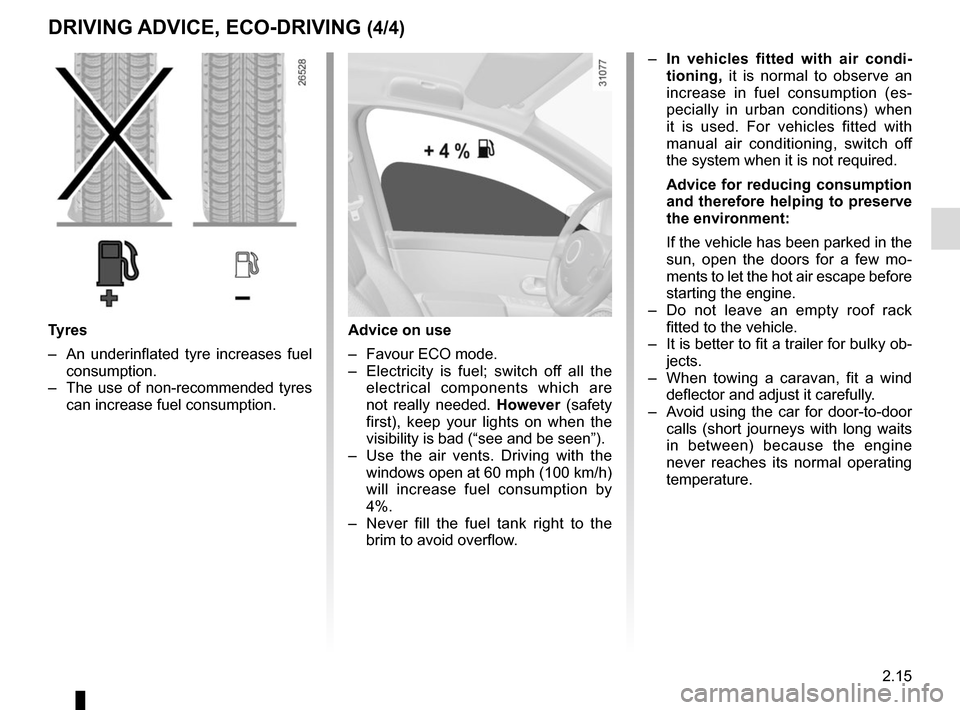
– Use the air vents. Driving with the windows open at 60 mph (100 km/h)
will increase fuel consumption by
4%.
– Never fill the fuel tank right to the brim to avoid overflow.
– In vehicles fitted with air condi-
tioning, it is normal to observe an
increase in fuel consumption (es-
pecially in urban conditions) when
it is used. For vehicles fitted with
manual air conditioning, switch off
the system when it is not required.
Advice for reducing consumption
and therefore helping to preserve
the environment:
If the vehicle has been parked in the
sun, open the doors for a few mo-
ments to let the hot air escape before
starting the engine.
– Do not leave an empty roof rack fitted to the vehicle.
– It is better to fit a trailer for bulky ob- jects.
– When towing a caravan, fit a wind deflector and adjust it carefully.
– Avoid using the car for door-to-door calls (short journeys with long waits
in between) because the engine
never reaches its normal operating
temperature.
Tyres
– An underinflated tyre increases fuel consumption.
– The use of non-recommended tyres can increase fuel consumption.


System fault
The integrated indicator lights described below are accompanied by a bee\
p.
Indicator lights Message Readings
and © come
on. « CHECK ANTI- -
POLLUTION SY")