2017 RENAULT MEGANE Eco
[x] Cancel search: EcoPage 3 of 96

GB.1
User precautions . . . . . . . . . . . . . . . . . . . . . . . . . . . . . . . . . . . . \
. . . . . . . . . . . . . . . . . . . . . . . . . . . . GB.3
general information . . . . . . . . . . . . . . . . . . . . . . . . . . . . . . . . . . . .\
. . . . . . . . . . . . . . . . . . . . . . . . . . GB.4General description . . . . . . . . . . . . . . . . . . . . . . . . . . . . . . . . . . . .\
. . . . . . . . . . . . . . . . . . . . GB.4
Introduction to the controls . . . . . . . . . . . . . . . . . . . . . . . . . . . . . . . . . . . . \
. . . . . . . . . . . . . . . GB.5
SD card: use, initialisation . . . . . . . . . . . . . . . . . . . . . . . . . . . . . . . . . . . .\
. . . . . . . . . . . . . . . GB.14
operating principles . . . . . . . . . . . . . . . . . . . . . . . . . . . . . . . . . . . .\
. . . . . . . . . . . . . . . . . . . . GB.16
Switching on/off . . . . . . . . . . . . . . . . . . . . . . . . . . . . . . . . . . . .\
. . . . . . . . . . . . . . . . . . . . . . . GB.20
Add and manage favourites . . . . . . . . . . . . . . . . . . . . . . . . . . . . . . . . . . . . \
. . . . . . . . . . . . . . GB.21
Using voice recognition . . . . . . . . . . . . . . . . . . . . . . . . . . . . . . . . . . . .\
. . . . . . . . . . . . . . . . . GB.22
Navigation . . . . . . . . . . . . . . . . . . . . . . . . . . . . . . . . . . . .\
. . . . . . . . . . . . . . . . . . . . . . . . . . . . . . . . . GB.28 Enter a destination . . . . . . . . . . . . . . . . . . . . . . . . . . . . . . . . . . . . \
. . . . . . . . . . . . . . . . . . . . . GB.28
Volume and voice . . . . . . . . . . . . . . . . . . . . . . . . . . . . . . . . . . . . \
. . . . . . . . . . . . . . . . . . . . . . GB.33
Reading a map . . . . . . . . . . . . . . . . . . . . . . . . . . . . . . . . . . . . \
. . . . . . . . . . . . . . . . . . . . . . . . GB.34
Guidance . . . . . . . . . . . . . . . . . . . . . . . . . . . . . . . . . . . .\
. . . . . . . . . . . . . . . . . . . . . . . . . . . . GB.35
Preparing a route . . . . . . . . . . . . . . . . . . . . . . . . . . . . . . . . . . . . \
. . . . . . . . . . . . . . . . . . . . . . GB.39
Traffic information . . . . . . . . . . . . . . . . . . . . . . . . . . . . . . . . . . . . \
. . . . . . . . . . . . . . . . . . . . . . GB.40
Displaying the map . . . . . . . . . . . . . . . . . . . . . . . . . . . . . . . . . . . . \
. . . . . . . . . . . . . . . . . . . . . GB.43
Navigation services . . . . . . . . . . . . . . . . . . . . . . . . . . . . . . . . . . . . \
. . . . . . . . . . . . . . . . . . . . GB.44
Z.E. Services . . . . . . . . . . . . . . . . . . . . . . . . . . . . . . . . . . . .\
. . . . . . . . . . . . . . . . . . . . . . . . . GB.46
Recharging station . . . . . . . . . . . . . . . . . . . . . . . . . . . . . . . . . . . . \
. . . . . . . . . . . . . . . . . . . . . GB.47
Range . . . . . . . . . . . . . . . . . . . . . . . . . . . . . . . . . . . . \
. . . . . . . . . . . . . . . . . . . . . . . . . . . . . . . GB.48
Adding, managing saved addresses . . . . . . . . . . . . . . . . . . . . . . . . . . . . . . . . . . . .\
. . . . . . . GB.49
Navigation settings . . . . . . . . . . . . . . . . . . . . . . . . . . . . . . . . . . . . \
. . . . . . . . . . . . . . . . . . . . . GB.50
Multimedia . . . . . . . . . . . . . . . . . . . . . . . . . . . . . . . . . . . . \
. . . . . . . . . . . . . . . . . . . . . . . . . . . . . . . . . GB.52 Listen to the radio . . . . . . . . . . . . . . . . . . . . . . . . . . . . . . . . . . . . \
. . . . . . . . . . . . . . . . . . . . . . GB.52
Media . . . . . . . . . . . . . . . . . . . . . . . . . . . . . . . . . . . . \
. . . . . . . . . . . . . . . . . . . . . . . . . . . . . . . GB.57
Photo reader . . . . . . . . . . . . . . . . . . . . . . . . . . . . . . . . . . . .\
. . . . . . . . . . . . . . . . . . . . . . . . . GB.58
Video playback . . . . . . . . . . . . . . . . . . . . . . . . . . . . . . . . . . . . \
. . . . . . . . . . . . . . . . . . . . . . . . GB.59
Multimedia settings . . . . . . . . . . . . . . . . . . . . . . . . . . . . . . . . . . . .\
. . . . . . . . . . . . . . . . . . . . GB.60
Page 4 of 96

GB.2
Pairing/unpairing a telephone . . . . . . . . . . . . . . . . . . . . . . . . . . . . . . . . . . . .\
. . . . . . . . . . . . GB.62
Phone . . . . . . . . . . . . . . . . . . . . . . . . . . . . . . . . . . . .\
. . . . . . . . . . . . . . . . . . . . . . . . . . . . . . . . . . . . GB.63 Pairing/unpairing a telephone . . . . . . . . . . . . . . . . . . . . . . . . . . . . . . . . . . . .\
. . . . . . . . . . . . GB.63
Connecting/disconnecting a telephone . . . . . . . . . . . . . . . . . . . . . . . . . . . . . . . . . . . .\
. . . . . GB.64
Managing the phone memory . . . . . . . . . . . . . . . . . . . . . . . . . . . . . . . . . . . .\
. . . . . . . . . . . . GB.65
Making, receiving a call . . . . . . . . . . . . . . . . . . . . . . . . . . . . . . . . . . . .\
. . . . . . . . . . . . . . . . . GB.66
Call log . . . . . . . . . . . . . . . . . . . . . . . . . . . . . . . . . . . . \
. . . . . . . . . . . . . . . . . . . . . . . . . . . . . . GB.68
During a call . . . . . . . . . . . . . . . . . . . . . . . . . . . . . . . . . . . . \
. . . . . . . . . . . . . . . . . . . . . . . . . . GB.69
Phone Settings . . . . . . . . . . . . . . . . . . . . . . . . . . . . . . . . . . . . \
. . . . . . . . . . . . . . . . . . . . . . . . GB.70
Vehicle . . . . . . . . . . . . . . . . . . . . . . . . . . . . . . . . . . . . \
. . . . . . . . . . . . . . . . . . . . . . . . . . . . . . . . . . . . GB.71 Eco² driving . . . . . . . . . . . . . . . . . . . . . . . . . . . . . . . . . . . .\
. . . . . . . . . . . . . . . . . . . . . . . . . . GB.71
Parking distance control, reversing camera . . . . . . . . . . . . . . . . . . . . . . . . . . . . . . . . . . . . \
. . GB.72
Electric vehicle . . . . . . . . . . . . . . . . . . . . . . . . . . . . . . . . . . . . \
. . . . . . . . . . . . . . . . . . . . . . . . GB.74
Take care . . . . . . . . . . . . . . . . . . . . . . . . . . . . . . . . . . . .\
. . . . . . . . . . . . . . . . . . . . . . . . . . . . GB.76
On-board computer, vehicle settings . . . . . . . . . . . . . . . . . . . . . . . . . . . . . . . . . . . .\
. . . . . . . GB.78
Services . . . . . . . . . . . . . . . . . . . . . . . . . . . . . . . . . . . . \
. . . . . . . . . . . . . . . . . . . . . . . . . . . . . . . . . . . GB.79 Introduction to the Services menu . . . . . . . . . . . . . . . . . . . . . . . . . . . . . . . . . . . .\
. . . . . . . . . GB.79
Downloading and installing applications . . . . . . . . . . . . . . . . . . . . . . . . . . . . . . . . . . . .\
. . . . GB.80
Services settings . . . . . . . . . . . . . . . . . . . . . . . . . . . . . . . . . . . .\
. . . . . . . . . . . . . . . . . . . . . . GB.84
System. . . . . . . . . . . . . . . . . . . . . . . . . . . . . . . . . \
. . . . . . . . . . . . . . . . . . . . . . . . . . . . . . . . . . . . . . . GB.85 System settings . . . . . . . . . . . . . . . . . . . . . . . . . . . . . . . . . . . .\
. . . . . . . . . . . . . . . . . . . . . . . GB.85
Operating faults . . . . . . . . . . . . . . . . . . . . . . . . . . . . . . . . . . . . \
. . . . . . . . . . . . . . . . . . . . . . . . . . . . . GB.88
Page 6 of 96

GB.4
GENERAL DESCRIPTION
Menu screen
N Go to previous page.
P Name of menu.
Q Go to next page.
R Name of function or of sub-menu.
S Return to previous menu.
Welcome screen
A Audio information.
B System notifications.
C Phone menu access/Status of con-nected phone/Access to the voice
recognition screen of connected
telephone.
D Exterior temperature.
E Time.
F Traffic information.
G Instructions for navigation and dis- tance to next change of direction.
Drive to...
Home Saved loca- tions Address
Recent desti-
nations TomTom
Places Charging
station
FM1
flow
Menu Preset 3
ANQC
R
BPDE
F
G
HIKLM
H Pop-up menu.
I Navigation map.
J Current vehicle position.
K Favourites.
L Driving eco²/Energy for electric ve-
hicles.
M Main menu.
Note: You can change the configura-
tion of the welcome screen. Please see
the information on “Welcome screen” in
the “System settings” section.
SJ
Page 14 of 96

GB.12
41Rotate: search for radio stations/change track or audio file.
Press: change radio mode (preset/list/frequency).
42 Activate/deactivate voice recognition.
INTRODUCTION TO THE CONTROLS (8/9)
Control on the steering wheel
with voice command
3536
41
3738
3942
Page 16 of 96
GB.14
Upon delivery of your new vehicle, you
have a few days to update your maps
free of charge. After this, updates will
become payable.SD card
A SD card is supplied with the naviga-
tion system. Amongst other things, this
includes maps for your country or set of
countries.
Before using the SD card, check that it
is not locked.
Updates (especially of maps) are pub-
lished regularly. They are only avail-
able for download by inserting the SD
card of your navigation system into
your computer’s SD port, online at the
“R-Link Store”.
SD CARD: USE, INITIALISATION (1/2)
Only use your SD card for operat-
ing and updating your navigation
system. Do not insert any other
device (camera, portable GPS,
etc.), or in another vehicle.
Only use an SD card which is com-
patible with your vehicle's naviga-
tion system.
You can also download maps cover-
ing more countries than your origi-
nal map (e.g. Western Europe).
Page 21 of 96
GB.19
OPERATING PRINCIPLES (4/4)Introduction to the main
menu
To access the main menu, press “Menu”
from the welcome screen.
The system is made up of six major
sections, all of which can be accessed
from the main menu:
Navigation
This function includes all the satellite
navigation features, road maps, traffic
information, services LIVE and warning
areas.
Multimedia
This function enables management of
the radio, and audio and video play-
back.
Phone
This function is used to pair the system
with a mobile phone and to use the
hands-free mode.
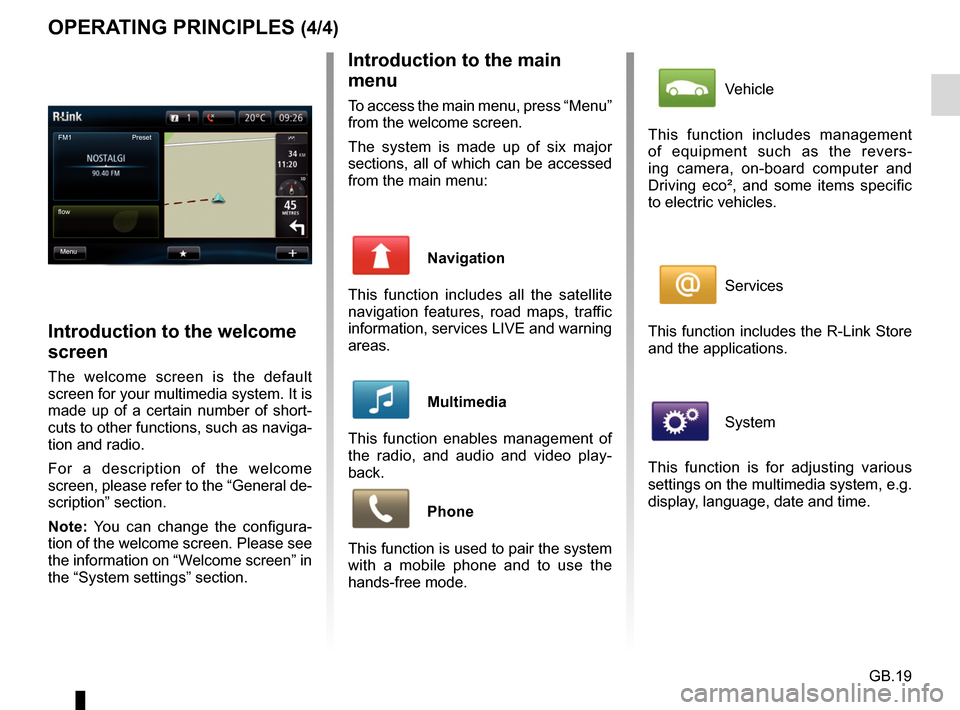
Introduction to the welcome
screen
The welcome screen is the default
screen for your multimedia system. It is
made up of a certain number of short-
cuts to other functions, such as naviga-
tion and radio.
For a description of the welcome
screen, please refer to the “General de-
scription” section.
Note: You can change the configura-
tion of the welcome screen. Please see
the information on “Welcome screen” in
the “System settings” section.
FM1
flow Preset
Menu
Vehicle
This function includes management
of equipment such as the revers-
ing camera, on-board computer and
Driving eco², and some items specific
to electric vehicles.
Services
This function includes the R-Link Store
and the applications.
System
This function is for adjusting various
settings on the multimedia system, e.g.
display, language, date and time.
Page 24 of 96

GB.22
USING VOICE RECOGNITION (1/6)
Voice recognition system
Your multimedia system has a voice
recognition system
which allows
voice control of some functions and ap-
plications of the multimedia system and
your phone. This enables you to use
your multimedia system or your phone
while keeping your hands on the steer-
ing wheel.
From the main voice control menu, you
can use voice control to control three
functions of your multimedia system:
– navigation;
– telephone;
– installed applications.
Note: the position of the voice recogni-
tion button
varies (control on steer-
ing wheel or column). To find out more,
please see your driver’s handbook.
Activation of the multimedia
system's voice recognition
To activate the voice recognition
system, press the voice recognition
button
in your vehicle. The touch-
screen will display the main voice con-
trol menu.
Page 25 of 96

GB.23
1
Voice control main menu Destination
Exit Help Phone Applications
Central icon
Depending on the system status, differ-
ent central icons can be displayed:
– “Micro” icon: the system is ready to
receive your voice commands;
– “Loading” icon: the system is loading data;
– “Loudspeaker” icon: the system is giving you information via its voice
synthesizer.
Voice recognition indicator 1
The voice recognition indicator 1 is
made up of colour markers and a cen-
tral icon.
USING VOICE RECOGNITION (2/6)
Colour markers
The colour markers are used to opti-
mise voice recognition:
– green marker: optimal voice recogni- tion;
– orange marker: good voice recogni- tion;
– red marker: average voice recogni- tion.