2017 RENAULT CAPTUR Media
[x] Cancel search: MediaPage 81 of 96

GB.79
INTRODUCTION TO THE SERVICES MENU
Access the “My
services” menu
From the main menu, press “My serv-
ices”.
The “My services” menu gives you
access to the following:
– “R-Link Store”;
– “Navigation services”;
– “Settings”;
– “R-Link E-guide”;
– “Email”;
– “User profiles”;
– “Renault Assistance”;
– your apps.
Some services are accessible for
free during the trial period. You can
extend the subscription online at www.
MyRenault.com or through your coun-
try’s R-Link Store .
Introduction to “R-Link
Store”
R-Link Store is the applications store
for your multimedia system. Here you
can buy applications or subscriptions
to services through a secure online
system.
Please refer to the “Downloading and
installing applications from R-Link
Store” section for more information.
“Navigation services”
Please refer to the “Navigation serv-
ices” section.
“Settings”
This menu brings together the manage-
ment tools for applications and con-
nections. Please refer to the “Services
Settings” section for more information.
“R-Link E-guide”
This menu brings together all the in-
structions. They can be consulted from
your multimedia system.
“Email”
This menu allows you to view your
emails, only with the vehicle stationary.
“User profiles”
This menu enables you to customise
your user profile.
“Renault Assistance”
This menu gives you access to
RENAULT assistance.
Page 82 of 96
GB.80
DOWNLOADING AND INSTALLING APPLICATIONS (1/4)
R-Link Store is an online store enabling
you to buy applications, services and
content. R-Link Store can be accessed
directly from your multimedia system
or from a computer connected to the
Internet.
You must install R-Link Toolbox soft-
ware on your computer to be able to
download applications and map up-
dates on the SDcard. Please refer to
"Downloading and installing applica-
tions from a computer" in this section.
Note: some products can only be pur-
chased via a computer connected to
the Internet on the R-Link Store. If so, a
message will be displayed to notify you.
Please refer to “Downloading and in-
stalling applications from a computer”.
Note: some applications are paid. For
further information about buying appli-
cations, please see the general condi-
tions of sale.
Downloading and installing
applications from R-Link
Store
From the “Services” menu, press “R-
Link Store”.
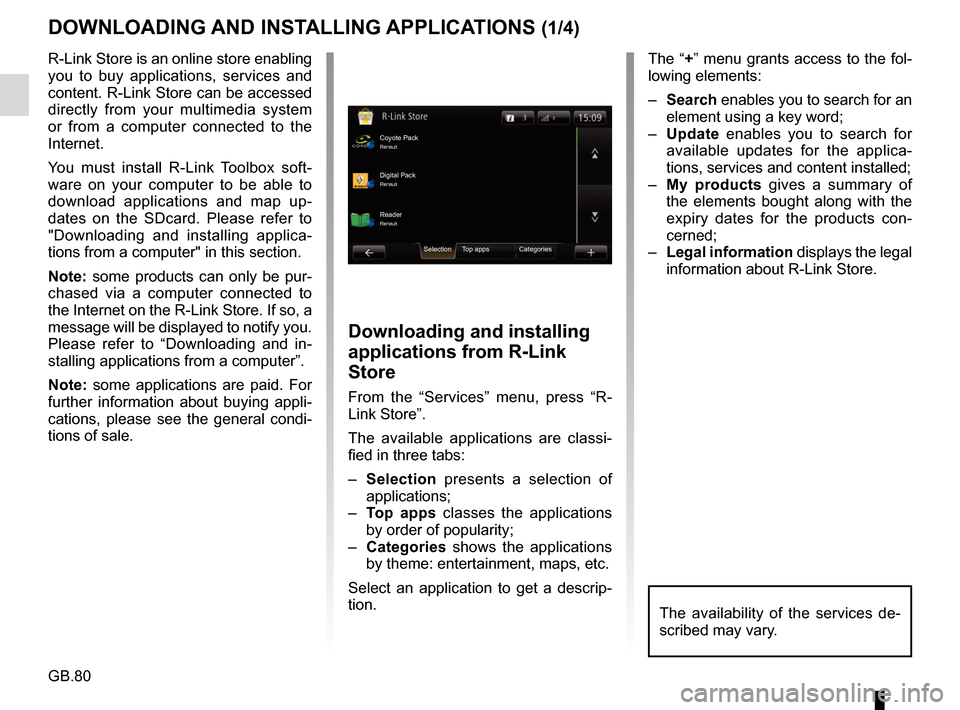
The available applications are classi-
fied in three tabs:
– Selection presents a selection of
applications;
– Top apps classes the applications
by order of popularity;
– Categories shows the applications
by theme: entertainment, maps, etc.
Select an application to get a descrip-
tion.
The “+” menu grants access to the fol-
lowing elements:
– Search enables you to search for an
element using a key word;
– Update enables you to search for
available updates for the applica-
tions, services and content installed;
– My products gives a summary of
the elements bought along with the
expiry dates for the products con-
cerned;
– Legal information displays the legal
information about R-Link Store.
Coyote PackRenault
Reader Digital Pack
Selection Top apps CategoriesRenault Renault
The availability of the services de-
scribed may vary.
Page 83 of 96

GB.81
Pay using My Renault account
Enter the e-mail address and pass-
word for your My Renault account, then
press “OK”.
Choose a credit or debit card from
those already linked to your My Renault
account, or add a new one.
Enter the card details, then press
“Confirm”.
Your application download will begin
immediately. Once the application has
been downloaded, its icon will be dis-
played in the “Services” menu.
Note: the download time for the appli-
cation can vary depending on the size
of the application and on the reception
quality on the mobile network.
Note: to use this type of payment,
you must first create a My Renault ac-
count. Please see the information on
“Creating an account in My Renault”
open the next page.
DOWNLOADING AND INSTALLING APPLICATIONS (2/4)
Paying by credit or debit card
Enter a valid e-mail address, then press
“OK”.
Enter the card details, then press
“Done”.
Your application download will begin
immediately. Once the application is
downloaded, its icon is displayed in the
“Services” menu.
Note: the download time for the appli-
cation can vary depending on the size
of the application and on the reception
quality on the mobile network.
Note: The card details you enter in
the system when making a purchase
may be saved. To delete them from the
system, please see the information on
“Deleting card details”.
Press “Purchase” to choose the type of
payment.
The multimedia system system offers
two types of payment: by My Renault
account or by credit or debit card.
Select one of the two options, tick the
box to accept the general conditions of
sale for R-Link Store, then go on to pay-
ment.
Note: it is mandatory to enter an e-mail
address. An invoice will be sent to this
address, along with the user and instal-
lation instructions, depending on the
application purchased.
Product detailsBuy
Read all your content using this application!
Please note: this application only works in France
and is subject to an annual subscription with
our supplier.
Reader
Category: reader
Version: 1.0 Size: 0.98 MB
Author: Reader
For safety reasons, carry
out these operations when
the vehicle is stationary.
Page 84 of 96
GB.82
Downloading and installing
applications from a computer
You can also download applications
from a computer connected to the
Internet (particularly useful for large
files). You can also manage your prod-
ucts from your computer and transfer
them to your multimedia system via the
system SD card.
Note: some products can only be pur-
chased from a computer connected to
the Internet, from the www.renault.com
website.Searching for updates
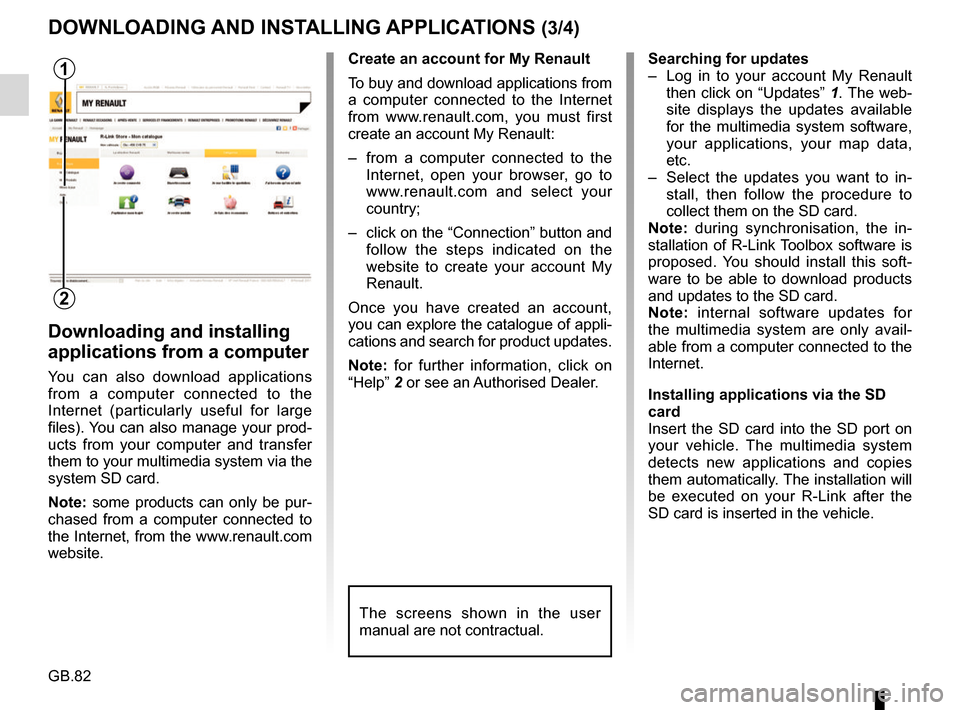
– Log in to your account My Renault
then click on “Updates” 1. The web-
site displays the updates available
for the multimedia system software,
your applications, your map data,
etc.
– Select the updates you want to in- stall, then follow the procedure to
collect them on the SD card.
Note: during synchronisation, the in-
stallation of R-Link Toolbox software is
proposed. You should install this soft-
ware to be able to download products
and updates to the SD card.
Note: internal software updates for
the multimedia system are only avail-
able from a computer connected to the
Internet.
Installing applications via the SD
card
Insert the SD card into the SD port on
your vehicle. The multimedia system
detects new applications and copies
them automatically. The installation will
be executed on your R-Link after the
SD card is inserted in the vehicle.
DOWNLOADING AND INSTALLING APPLICATIONS (3/4)
The screens shown in the user
manual are not contractual.
1
2
Create an account for My Renault
To buy and download applications from
a computer connected to the Internet
from www.renault.com, you must first
create an account My Renault:
– from a computer connected to the Internet, open your browser, go to
www.renault.com and select your
country;
– click on the “Connection” button and follow the steps indicated on the
website to create your account My
Renault.
Once you have created an account,
you can explore the catalogue of appli-
cations and search for product updates.
Note: for further information, click on
“Help” 2 or see an Authorised Dealer.
Page 85 of 96

GB.83
DOWNLOADING AND INSTALLING APPLICATIONS (4/4)
Managing personal data
The system stores e-mail addresses
and card details in the memory.
Deleting an e-mail address
When you purchase on R-Link Store,
when you enter an e-mail address,
press the button at the far right of the “E-
mail” line. The list of e-mail addresses
saved in the system is displayed.
Press 1 opposite the address you wish
to delete. The address is immediately
deleted. Deleting credit or debit card data
When you make a purchase with a
credit or debit card, press “Pay with a
card already saved in the memory” on
the purchase confirmation form. The
list of credit or debit cards saved in the
system is displayed.
Press
2 opposite the card data to be
deleted. The credit or debit card data is
immediately deleted.
Note: the vehicle must be connected to
a mobile network to be able to delete
card data.
1
1
2
2
2
R-Link Store R-Link Store
[email protected] 4970XXXXXXXXXX16
4970XXXXXXXXXX32
4970XXXXXXXXXX64
[email protected]
Anne
Martin
Christophe 08/
2017
04/
2013
11/
2015
123
Restore factory settings
From the main menu, press “System”,
then “System settings”.
This menu lets you reset all the system
settings and/or delete all personal data.
Data sharing
You can authorise or reject data sharing
from the moment the system is started.
Please refer to the “Starting, Stopping”
section.
Refusing to share data stops the con-
nections of applications and services.
Page 90 of 96
GB.88
OPERATING FAULTS (1/3)
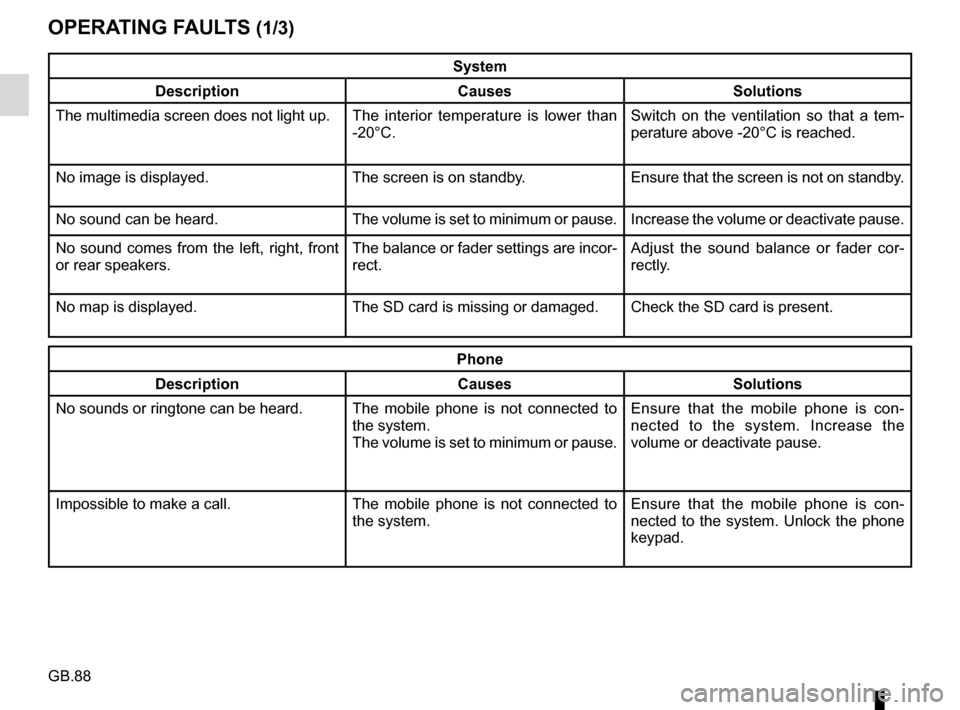
System
Description Causes Solutions
The multimedia screen does not light up. The interior temperature is lower than
-20°C. Switch on the ventilation so that a tem-
perature above -20°C is reached.
No image is displayed. The screen is on standby. Ensure that the screen is not on standby.
No sound can be heard. The volume is set to minimum or pause. Increase the volume or deactivate pause.
No sound comes from the left, right, front
or rear speakers. The balance or fader settings are incor-
rect.Adjust the sound balance or fader cor-
rectly.
No map is displayed. The SD card is missing or damaged. Check the SD card is present.
Phone
Description Causes Solutions
No sounds or ringtone can be heard. The mobile phone is not connected to
the system.
The volume is set to minimum or pause.Ensure that the mobile phone is con-
nected to the system. Increase the
volume or deactivate pause.
Impossible to make a call. The mobile phone is not connected to
the system.Ensure that the mobile phone is con-
nected to the system. Unlock the phone
keypad.