2017 RENAULT ALASKAN change wheel
[x] Cancel search: change wheelPage 198 of 340

EU RED Directive 2014/53/EU
Hereby, Robert Bosch Car Multimedia GmbH de-
clares that the radio equipment type LCN2K70A00/ LCN2K70A10 is in compliance with Directive 2014/
53/EU. The full text of the EU declaration of confor-
mity is available at the following internet address:
http://cert.bosch-carmultimedia.net
Any change of the radio equipment or usage with
other accessories, components or software as
specified will make are-assessment according com-
pliance to the legal approval necessary. Frequency Band
Radiated
Power
(EIRP) Hints/Restriction
2400 MHz –2480
MHz Bluetooth
<10 mW Internal not acces-
sible by user CONTROL BUTTONS AND
MICROPHONE
Steering wheel switch:
1. Volume control +/ −s
witch
2. Phone send
button
3. Phone end
button
4. Tuning
switch
Control panel:1. Phone button
Microphone:
Microphone is located near the map lights.
PAIRING PROCEDURE
NOTE
The connecting procedure must be performed
when the vehicle is stationary. If the vehicle starts
moving during the procedure, the procedure will
be cancelled.
1. Push the
2. Touch the [Telephone &Bluetooth] key.
3. Touch the [Pair New Device] key. If no device has been paired yet all other options
will be unavailable.
4. Initiate the pairing process from the handset. The system will display the message asking if PIN is
displayed on your Bluetooth® device.
1. If the PIN is displayed on your Bluetooth® de- vice, select [Yes] to complete the pairing pro-
cess.
2. If the PIN is not displayed on your Bluetooth® device, select [No] and complete the pairing pro-
cess according to the instructions in the Blue- tooth® device’s Owner’s Manual.
For more information, see the Bluetooth® device’s
Owner’s Manual. JVH0853XZ
JVH1083XZ
4-66 Display screen, heater and air conditioner, and audio system
Page 199 of 340

PHONEBOOK
To access the vehicle phonebook:
1. Push the button on the control panel.
2. Select the “Contacts” key.
3. Choose the desired entry from the displayed list.
4. The number of the entry will be displayed on the screen. Touch the number to initiate dialling.
NOTE
To scroll quickly through the list, touch the “A-Z”
key in the upper right corner of the screen. Turn
the ENTER/Scroll dial to choose aletter or num-
ber and then push the ENTER/Scroll dial. The list
will move to the first entry that begins with that
number or letter.
MAKING ACALL
To make acall, follow the procedure below:
1. Push the on the control panel. The “Phone”
screen will appear on the display.
2. Select one of the following options to make a call:
• “Contacts”: Select the name from an entry
stored in the vehicle phonebook.
• “Call Lists”: Select the name from the incom-
ing, outgoing or missed.
• “Redial”: Dial the last outgoing call from the
vehicle. •
“ ”: Input the phone number manually us-
ing akeypad displayed on the screen. For
information on how to use the touch screen,
see “How to use touch screen display” in this
section.
RECEIVING ACALL
When acall is placed to the connected phone, the
display will change to phone mode.
To accept the incoming call, take one of the follow-
ing actions.
• Push the button on the steering wheel.
• Touch the “ ”i
con on the screen.
To reject the incoming call, take one of the following
actions.
• Push the button on the steering wheel.
• Touch the red phone “ ”i
con on the screen.
DURING ACALL
While acall is active, the following options are avail-
able on the screen:
• “Handset”
Select this option to switch control of the phone
call over to the handset.
• “Mute Mic.”
Select this option to mute the microphone. Se-
lect again to reactivate the microphone. •
“ ”i
con
Select to end the phone call.
ENDING ACALL
To end aphone call, select the [ ]i
con on the
screen or push the < >b
utton on the steering
wheel.
BLUETOOTH® SETTINGS
To access the Bluetooth® settings screen:
1. Push the
2. Touch the [Telephone &Bluetooth] key.
Available setting items:
• [Telephone Setup]
See “Telephone setup” later in this section for
details.
• [Pair New Device]
Select to pair
anew Bluetooth® device to the
Bluetooth® Hands-Free Phone System.
• [Select Paired Device]
Select to choose
aBluetooth® device from alist
of those devices paired to the Bluetooth®
Hands-Free Phone System.
• [Delete Paired Device]
Select to delete
aBluetooth® device from alist
of those devices connected/paired to the
Bluetooth® Hands-Free Phone System.
Display screen, heater and air conditioner, and audio system 4-67
Page 210 of 340

•
Be sure to check the brakes immediately af-
ter driving in mud or water. See “Brake
system” later in this section for wet brakes.
• Avoid parking your vehicle on steep hills. If
you get out of the vehicle and it rolls forward,
backward or sideways, you could be injured.
• Whenever you drive off-road through sand,
mud or water as deep as the wheel hub, more
frequent maintenance may be required. See
the maintenance information in
aseparate
maintenance booklet.
• Rinse the underside of the vehicle with fresh
water after driving through mud or sand. Re-
move any brush or sticks that are trapped. The turbocharger system uses engine oil for lubrica-
tion and cooling of its rotating components. The tur-
bocharger turbine turns at extremely high speeds
and it can reach an extremely high temperature. It is
essential to maintain
aflow of clean oil through the
turbocharger system. Asudden interruption to the
oil supply may cause amalfunction in the turbo-
charger.
To ensure prolonged life and performance of the
turbocharger, it is essential to comply with the fol-
lowing maintenance procedure:
CAUTION
• Change the engine oil of the turbo-charged
diesel engine as prescribed. See the sepa-
rately provided maintenance booklet for addi-
tional information.
• Use only the recommended engine oil. For
details, refer to the maintenance service
booklet for your vehicle.
• If the engine has been operating at high rpm
for an extended period of time, let it idle for a
few minutes prior to shutdown.
• Do not accelerate the engine to high rpm im-
mediately after starting it.
• When starting the engine at ambient tempera-
tures below −5°C (23°F), an engine protection
mode may be activated. During this time, the
engine output is reduced. The engine protec-
tion mode is switched off automatically after
am
aximum of 3minutes (provided the accel-
erator pedal is released completely). Driving your vehicle to fit the circumstances is es-
sential for your safety and comfort. As
adriver, you
should be the one who knows best how to drive in
the given circumstances.
ENGINE COLD START PERIOD
Due to the higher engine speeds, when the engine
is cold, extra caution must be exercised when se-
lecting agear during the engine warm-up period
after starting the engine.
LOADING LUGGAGE
Loads and their distribution and the attachment of
equipment (roof baggage carriers, etc.) will consid-
erably change the driving characteristics of the ve-
hicle. Your driving style and speed must be adjusted
according to the circumstances.
DRIVING IN WET CONDITIONS
• Avoid accelerating or stopping suddenly.
• Avoid sharp turning or lane changing suddenly.
• Avoid following too close to the vehicle in front.
When water covers the road surface with water
puddles, small water streams, etc., reduce speed to
prevent hydroplaning which can cause skidding and
loss of control. Worn tyres will increase this risk.
DRIVING IN WINTER CONDITIONS • Drive cautiously.
• Avoid accelerating or stopping suddenly.
• Avoid sharp turning or lane changing suddenly.
TURBOCHARGER SYSTEM CARE WHEN DRIVING
5-8 Starting and driving
Page 212 of 340

Accordingly, when the TPMS indicator light illumi-
nates, safely stop the vehicle to check the tyres as
soon as possible and inflate the tyres to the proper
pressure. Driving on asignificantly under-inflated
tyre causes the tyre to overheat and can lead to tyre
failure. Under-inflation also reduces fuel efficiency
and tyre tread life which may affect the vehicle’s
handling and stopping ability.
NOTE
The TPMS is not asubstitute for proper tyre main-
tenance. It is the driver’s responsibility to main-
tain correct tyre pressure, even if under-inflation
has not reached the level to trigger the illumina-
tion of the TPMS indicator light j
a.
The TPMS indicator light flashes for ashort period
and then turns on continuously if the system is not
operating properly. This sequence will continue
upon subsequent vehicle start-ups as long as the
malfunction exists (missing or faulty TPMS sensor
or TPMS system malfunction). When the malfunc-
tion warning light is illuminated, the system may not be able to detect or signal low tyre pressure as
intended. TPMS malfunctions may occur for avari-
ety of reasons including the installation of replace-
ment or alternate tyres or wheels on the vehicle that
prevent the TPMS from functioning properly. Always
check the TPMS indicator light after replacing one
or more tyres or wheels on your vehicle to ensure
that the replacement or alternate tyres and wheels
allow the TPMS to continue to function properly.
• The TPMS does not monitor the tyre pressure of
the spare tyre.
• The TPMS will activate only when the vehicle is
driven at speeds above 25 km/h (16 MPH). Also,
this system may not detect
asudden drop in tyre
pressure (for example aflat tyre while driving).
• The TPMS indicator light may not automatically
turn off when the tyre pressure is adjusted.
After
the tyre is inflated to the recommended COLD
tyre pressure,d rive the vehicle at speeds above
25 km/h (16 MPH) to activate the TPMS. See
“Adjusting TPMS target pressure” later in this
section
• Following
achange in the outside temperature,
the TPMS indicator light may illuminate even if
the tyre pressure has been adjusted properly.
Adjust the tyre pressure to the recommended
COLD tyre pressure again when the tyres are
cold, and reset the TPMS.
For additional information, see “TPMS tempera-
ture calibration” later in this section. WARNING
• If the TPMS indicator light illuminates while
driving:
–a void sudden steering manoeuvres
–a void abrupt braking
–r educe vehicle speed
–p ull off the road to asafe location
–s top the vehicle as soon as possible
• Driving with under-inflated tyres may perma-
nently damage the tyres and increase the like-
lihood of tyre failure. Serious vehicle damage
could occur which may lead to an accident
and could result in serious personal injury.
• Check the tyre pressure for all four tyres. Ad-
just the tyre pressure to the recommended
COLD tyre pressure shown on the tyre plac-
ard to turn the TPMS indicator light “OFF”. In
case of
aflat tyre, replace it with aspare tyre
as soon as possible. (See “Flat tyre” in the
“6. In case of emergency” section for chang-
ing aflat tyre.)
• When
aspare tyre is mounted or awheel is
replaced, the TPMS will not function and the
TPMS indicator light will flash for approxi-
mately 1minute. The light will remain on after
1m inute. Be sure to follow all instructions for
wheel replacement and mount the TPMS sys-
tem correctly. NIC2225
5-10 Starting and driving
Page 213 of 340

•
Replacing tyres with those not originally speci-
fied by RENAULT could affect the proper op-
eration of the TPMS.
• RENAULT recommends using only the Emer-
gency Tyre Sealant provided with your vehicle.
Other tyre sealants may damage the valve
stem seal which can cause the tyre to lose air
pressure. Visit an approved dealer or quali-
fied workshop as soon as possible after using
tyre repair sealant (for models equipped with
the emergency tyre puncture repair kit).
CAUTION
• The TPMS may not function properly when the
wheels are equipped with tyre chains or the
wheels are buried in snow.
• Do not place metallised film or any metal parts
(antenna, etc.) on the windows. This may
cause poor reception of the signals from the
tyre pressure sensors, and the TPMS will not
function properly.
Some devices and transmitters may tempo-
rarily interfere with the operation of the TPMS
and cause the TPMS indicator light to illumi-
nate. Some examples are:
–F acilities or electric devices using similar
radio frequencies are near the vehicle.
–I fatransmitter set to similar frequencies is
being used in or near the vehicle. –I
fac omputer (or similar equipment) or a
DC/AC converter is being used in or near
the vehicle.
–I fdevices which transmit electrical noise
are connected to the vehicle’s 12V power
supply.
• When inflating the tyres and checking the tyre
pressure, never bend the valves.
• Special aluminium valves are fitted to mount
the TPMS sensors on the wheels. The TPMS
sensor is fixed at the wheels by
anut. The nut
needs to be correctly fitted at atorque setting
of 7.5 ±0.5 N•m. If the TPMS sensor is tight-
ened exceeding the limit, there is apossibility
the sensor grommet will be damaged. If the
sensor is tightened under the limit, there is a
possibility of causing an air leak.
• Use valve caps that comply with the factory-
fitted valve cap specifications.
• Do not use metal valve caps.
• Fit the valve caps properly. Without the valve
caps the valve and tyre pressure monitor sen-
sors could be damaged.
• Do not damage the valves and sensors when
storing the wheels or fitting different tyres.
• Replace the sensor grommet and washer dur-
ing
atyre change. Once they have been re-
moved, the sensor grommet and washer can-
not be reused and must be replaced. The
TPMS sensors can be used again. •
Use caution when using tyre inflation equip-
ment with
arigid air supply tube, as leverage
applied by the long nozzle can damage the
valve stem.
Starting and driving 5-11
Page 214 of 340
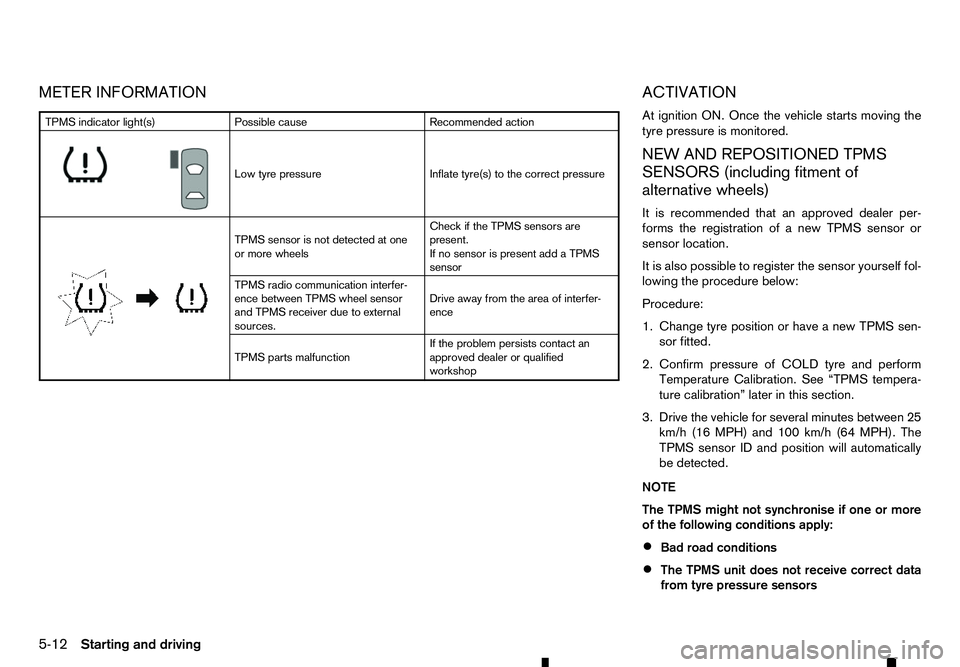
METER INFORMATION
ACTIVATION
At ignition ON. Once the vehicle starts moving the
tyre pressure is monitored.
NEW AND REPOSITIONED TPMSSENSORS (including fitment of
alternative wheels)
It is recommended that an approved dealer per-
forms the registration of anew TPMS sensor or
sensor location.
It is also possible to register the sensor yourself fol-
lowing the procedure below:
Procedure:
1. Change tyre position or have anew TPMS sen-
sor fitted.
2. Confirm pressure of COLD tyre and perform Temperature Calibration. See “TPMS tempera-
ture calibration” later in this section.
3. Drive the vehicle for several minutes between 25 km/h (16 MPH) and 100 km/h (64 MPH). The
TPMS sensor ID and position will automatically
be detected.
NOTE
The TPMS might not synchronise if one or more
of the following conditions apply:
• Bad road conditions
• The TPMS unit does not receive correct data
from tyre pressure sensors TPMS indicator light(s)
Possible cause Recommended action
m Low
tyre pressure
Inflate tyre(s) to the correct pressure
m TPMS
sensor is not detected at one
or more wheels Check if the TPMS sensors are
present.
If no sensor is present add aTPMS
sensor
TPMS radio communication interfer-
ence between TPMS wheel sensor
and TPMS receiver due to external
sources. Drive away from the area of interfer-
ence
TPMS parts malfunction If the problem persists contact an
approved dealer or qualified
workshop
5-12 Starting and driving
Page 219 of 340

When the ignition switch is pushed without depress-
ing the brake pedal (automatic transmission model)
or the clutch pedal (manual transmission model),
the ignition switch position will change as follows:
• Push once to change to “ACC”.
• Push two times to change to “ON”.
• Push three times to change to “OFF”.
• Push four times to return to “ACC”.
• Open or close any door to return to “LOCK”
from the “OFF” position.
LOCK position
The ignition switch and steering lock can only be
locked at this position.
The ignition switch will be unlocked when it is
pushed to the “ACC” position while carrying the
Remote Control Key. ACC position
The electrical accessory power activates at this po-
sition without the engine turned on.
ON position
The ignition system and the electrical accessory
power activate at this position without the engine
turned on.
OFF position
The engine is turned off with the steering wheel
unlocked.
REMOTE CONTROL KEY BATTERY
DISCHARGE
If the battery of the Remote Control Key is dis-
charged, or environmental conditions interfere with
the Remote Control Key operation, start the engine
according to the following procedure:
1.
Automatic Transmission (AT) model:
Move the shift lever to the P(Park) position. Manual Transmission (MT) model:
Move the shift lever to the
N(Neutral) position.
2. Firmly depress the brake pedal.
3. Touch the ignition switch with the Remote Con- trol Key as illustrated. (A chime will sound.)
4. Push the ignition switch while depressing the brake pedal (AT model) or the clutch pedal (MT
model) within 10 seconds after the chime
sounds. The engine will start.
After step 3isperformed, when the ignition switch
is pushed without depressing the brake pedal (AT
model) or the clutch pedal (MT model), the ignition
switch position will change to “ACC”.
NOTE
• When the ignition switch is pushed to the
“ACC” or “ON” position or the engine is started
by the above procedures, the Key Battery low
warning appears on the vehicle information
display even if the Remote Control Key is in-
side the vehicle. This is not
amalfunction. To
turn off the warning, touch the ignition switch
with the Remote Control Key again.
• If the Key Battery low warning appears on the
vehicle information display, replace the bat-
tery as soon as possible. (See “Remote Con-
trol Key battery replacement” in the “8. Main-
tenance and do-it-yourself” section.) JVS0241XZ
SSD0944Z
Starting and driving
5-17
Page 230 of 340

4WD mode
switch Wheels driven Indicator
Use conditions Operation of 4WD mode switch
(See “4WD mode switch operation” later in this section.)
4WD mode <4LO>
<2WD> Rear wheels
m -
For
driving on dry,
paved roads. Shifting between the <2WD> and <4H> drive
modes can be done while driving.
The indicator will change when the drive mode is
changed.
Shifting between the <2WD> and <4H> modes
must be performed at
aspeed below 100 km/h
(60 MPH).
<4H> Four wheels
m -
For
driving on rough,
sandy or snow-
covered roads.
<4LO> Neutral
m Blinking
The
4LO indicator
blinks when shifting
between <4H> and
<4LO>. Shifting between the <4H> and <4LO> drive
modes:
•S
top the vehicle, depress the clutch pedal (MT
models) and the brake pedal and shift the shift
lever to the N(Neutral) position.
•D epress and turn the 4WD mode switch. The
4WD mode switch will not shift between <4H>
and <4LO> if the transmission is not in the N
(Neutral) position or the vehicle is moving.
•W ait for the 4LO indicator to stop blinking and
stay on or off before shifting your transmission into gear or releasing the clutch pedal (MT
models).
Four wheels
m Stay
on*
For use when
maximum power and
traction are required
at low speeds (for
example, on steep
grades or rocky,
sandy, muddy
roads).
*: When the <4LO> position is selected, the
ESP system is disabled and the ESP off
indicator light illuminates. See “Warning lights,
indicator lights and audible reminders” in the
“2. Instruments and controls” section.
5-28 Starting and driving