Page 87 of 404
85
Second row seats
Rear head restraints
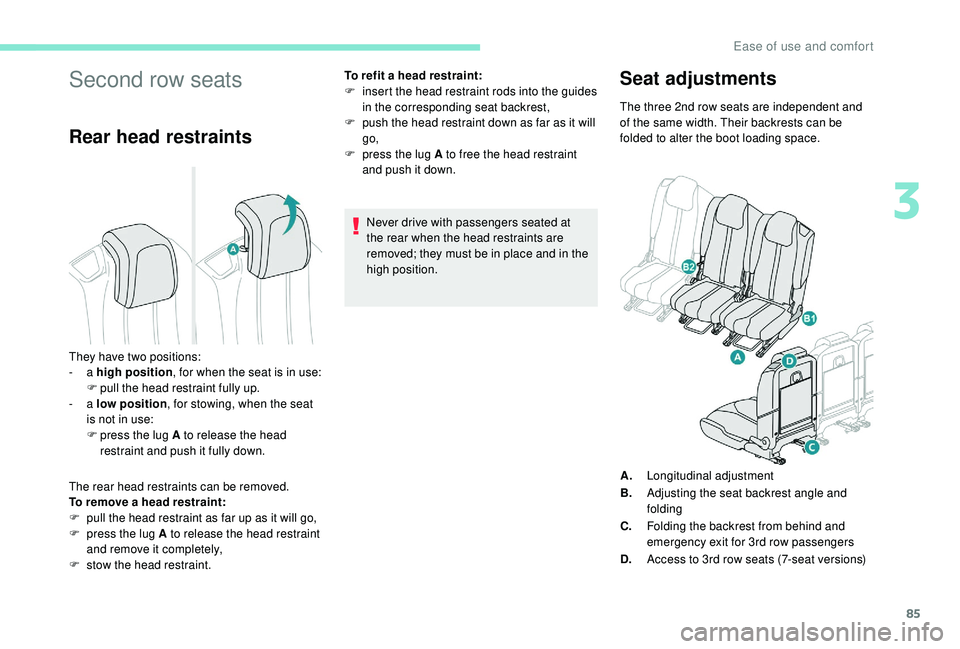
The rear head restraints can be removed.
To remove a head restraint:
F
p
ull the head restraint as far up as it will go,
F
p
ress the lug A to release the head restraint
and remove it completely,
F
s
tow the head restraint. To refit a head restraint:
F
i
nsert the head restraint rods into the guides
in the corresponding seat backrest,
F
p
ush the head restraint down as far as it will
go,
F
p
ress the lug A to free the head restraint
and push it down.
Never drive with passengers seated at
the rear when the head restraints are
removed; they must be in place and in the
high position.
Seat adjustments
They have two positions:
- a high position , for when the seat is in use:
F
p
ull the head restraint fully up.
-
a low position , for stowing, when the seat
is not in use:
F
p
ress the lug A to release the head
restraint and push it fully down. The three 2nd row seats are independent and
of the same width. Their backrests can be
folded to alter the boot loading space.
A. Longitudinal adjustment
B. Adjusting the seat backrest angle and
folding
C. Folding the backrest from behind and
emergency exit for 3rd row passengers
D. Access to 3rd row seats (7-seat versions)
3
Ease of use and comfort
Page 236 of 404
234
Standard viewZoom view
Obstacles may appear further away than
they actually are in reality.
It is important to check the sides of the
vehicle during the manoeuvre, using the
mirrors.
The rear parking sensors also provide
information on the vehicle's surroundings.
180° view
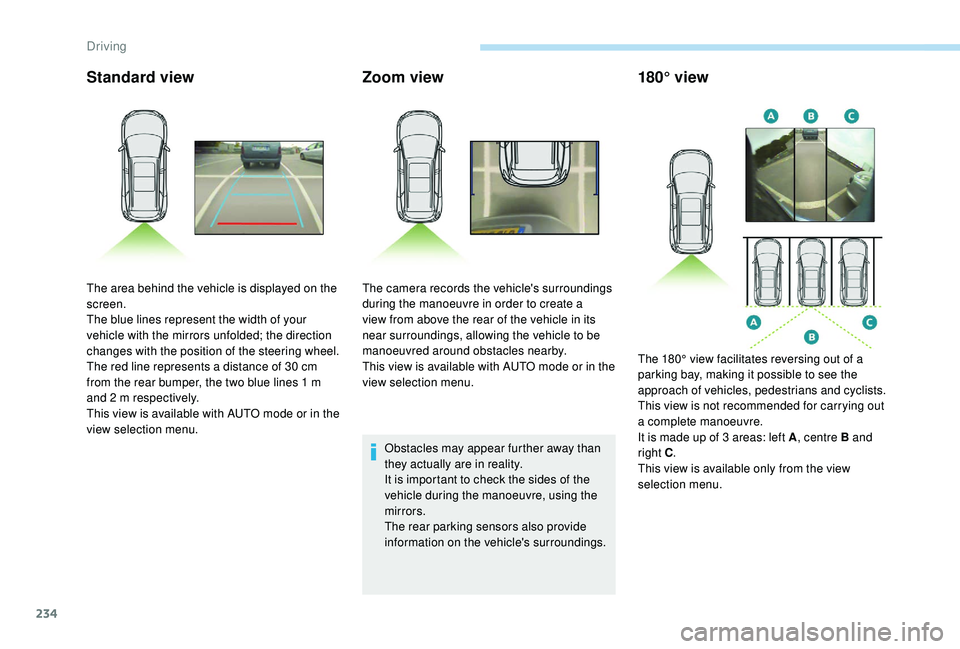
The area behind the vehicle is displayed on the
screen.
The blue lines represent the width of your
vehicle with the mirrors unfolded; the direction
changes with the position of the steering wheel.
The red line represents a distance of 30
cm
from the rear bumper, the two blue lines 1
m
and 2
m respectively.
This view is available with AUTO mode or in the
view selection menu. The camera records the vehicle's surroundings
during the manoeuvre in order to create a
view from above the rear of the vehicle in its
near surroundings, allowing the vehicle to be
manoeuvred around obstacles nearby.
This view is available with AUTO mode or in the
view selection menu.
The 180° view facilitates reversing out of a
parking bay, making it possible to see the
approach of vehicles, pedestrians and cyclists.
This view is not recommended for carrying out
a complete manoeuvre.
It is made up of 3
areas: left A, centre B and
right C .
This view is available only from the view
selection menu.
Driving
Page 238 of 404
236
AUTO modeStandard viewZoom view
Obstacles may appear further away than
they actually are in reality.
It is important to check the sides of the
vehicle during the manoeuvre, using the
mirrors.
The front and rear parking sensors also
provide information on the vehicle's
surroundings.
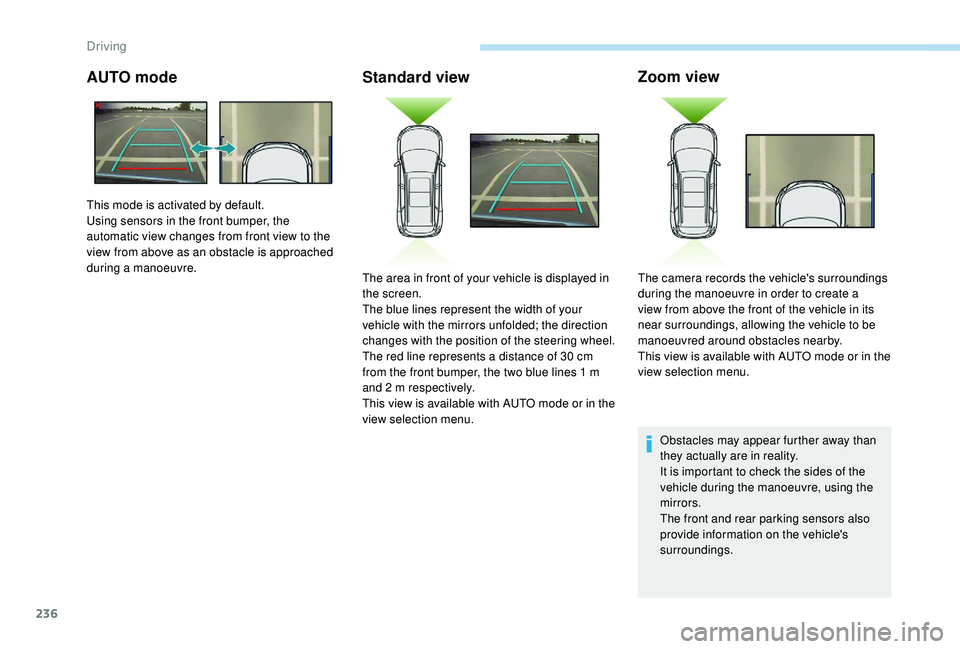
This mode is activated by default.
Using sensors in the front bumper, the
automatic view changes from front view to the
view from above as an obstacle is approached
during a manoeuvre.
The area in front of your vehicle is displayed in
the screen.
The blue lines represent the width of your
vehicle with the mirrors unfolded; the direction
changes with the position of the steering wheel.
The red line represents a distance of 30
cm
from the front bumper, the two blue lines 1
m
and 2
m respectively.
This view is available with AUTO mode or in the
view selection menu. The camera records the vehicle's surroundings
during the manoeuvre in order to create a
view from above the front of the vehicle in its
near surroundings, allowing the vehicle to be
manoeuvred around obstacles nearby.
This view is available with AUTO mode or in the
view selection menu.
Driving