2017 PEUGEOT 5008 tailgate
[x] Cancel search: tailgatePage 57 of 404

55
Deadlocking
At the first press on one of the locking controls,
illumination of the direction indicators for a few
seconds signals:
-
t
he locking of the vehicle for versions
without alarm,
-
t
he activation of the alarm for other
versions.
Depending on version, the door mirrors fold.
At the second press, illumination of the
direction indicators for a few seconds signals
the deadlocking of the vehicle for versions
without alarm.
F
W
ith the electronic key in recognition
zone A , press with your finger or thumb on
the door handle of one of the front doors
(at the markings) or on the locking control
located on the tailgate (on the right). F
W
ithin five seconds, press one of these
locking controls again to deadlock the
vehicle.
For safety and theft protection reasons,
do not leave your electronic key in the
vehicle, even when you are close to it.
It is recommended that you keep it with
you.
Accumulations (water, dust, grime, salt,
etc.) on the inner sur face of the door
handle may affect detection.
If cleaning the inner sur face of the door
handle using a cloth does not restore
detection, contact a PEUGEOT dealer or a
qualified workshop.
A sudden splash of water (stream of water,
high pressure jet washer, etc.) may be
identified by the system as the desire to
open the vehicle. Deadlocking renders the interior door
controls inoperative.
It also deactivates the interior central
locking button on the dashboard.
Therefore, never leave anyone inside the
vehicle when it is deadlocked.
2
Access
Page 66 of 404
64
Closing
When a door is not closed correctly:-
w
ith the engine running or the
vehicle moving (speed below
6
mph (10 km/h)), this warning
lamp comes on, accompanied by
an alert message displayed for a
few seconds.
-
w
ith the vehicle moving (speed
above 6
mph (10 km/h)), in
addition to the warning lamp and
alert message, an audible signal
sounds for a few seconds.
Boot
Opening the tailgate
With the exterior tailgate control
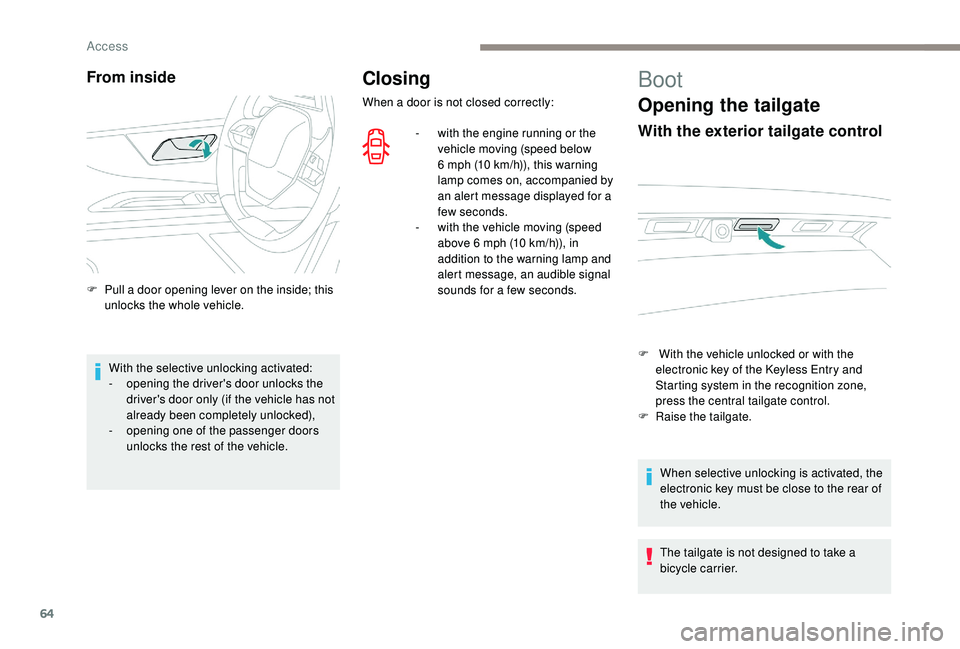
F With the vehicle unlocked or with the electronic key of the K eyless Entry and
Starting system in the recognition zone,
press the central tailgate control.
F
Ra
ise the tailgate.
When selective unlocking is activated, the
electronic key must be close to the rear of
the vehicle.
The tailgate is not designed to take a
bicycle carrier.
From inside
F Pull a door opening lever on the inside; this unlocks the whole vehicle.
With the selective unlocking activated:
-
o
pening the driver's door unlocks the
driver's door only (if the vehicle has not
already been completely unlocked),
-
o
pening one of the passenger doors
unlocks the rest of the vehicle.
Access
Page 67 of 404
65
Closing the tailgate
F Lower the tailgate using the interior grips.
F R elease the grips and press down on the
outside of the tailgate to close it.
If the tailgate is not properly closed: -
e
ngine running, this warning
lamp and a message appear in
the instrument panel for a few
seconds,
-
v
ehicle moving (speed above
6
mph (10 km/h)), this warning
lamp and a message appear in
the instrument panel for a few
seconds, accompanied by an
audible signal.
Hands-free tailgate
General points
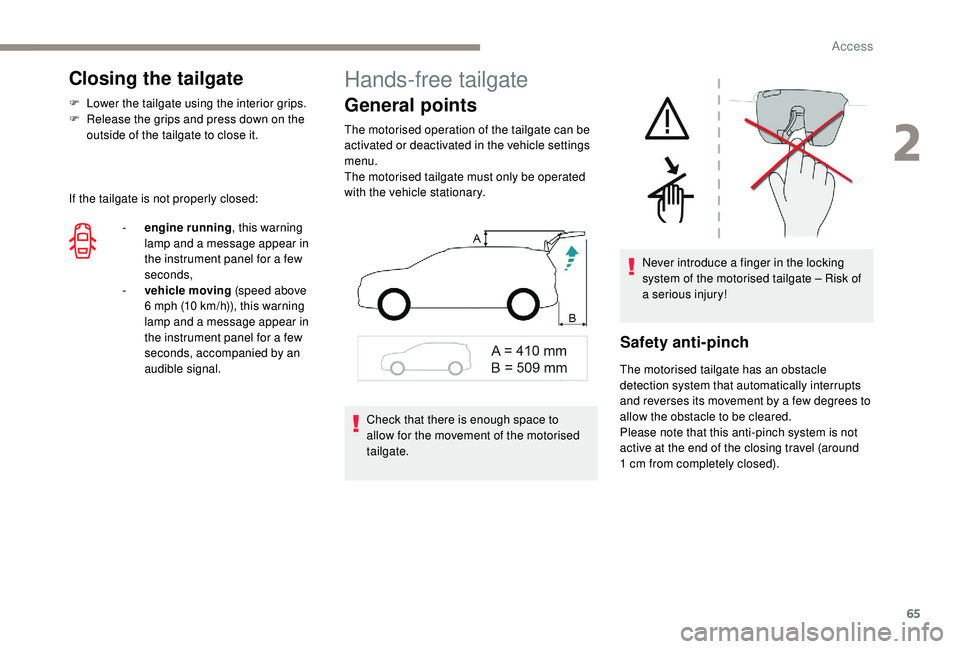
The motorised operation of the tailgate can be
activated or deactivated in the vehicle settings
menu.
The motorised tailgate must only be operated
with the vehicle stationary.
Safety anti-pinch
The motorised tailgate has an obstacle
detection system that automatically interrupts
and reverses its movement by a few degrees to
allow the obstacle to be cleared.
Please note that this anti-pinch system is not
active at the end of the closing travel (around
1
cm from completely closed).
Check that there is enough space to
allow for the movement of the motorised
tailgate. Never introduce a finger in the locking
system of the motorised tailgate – Risk of
a serious injury!
2
Access
Page 68 of 404
66
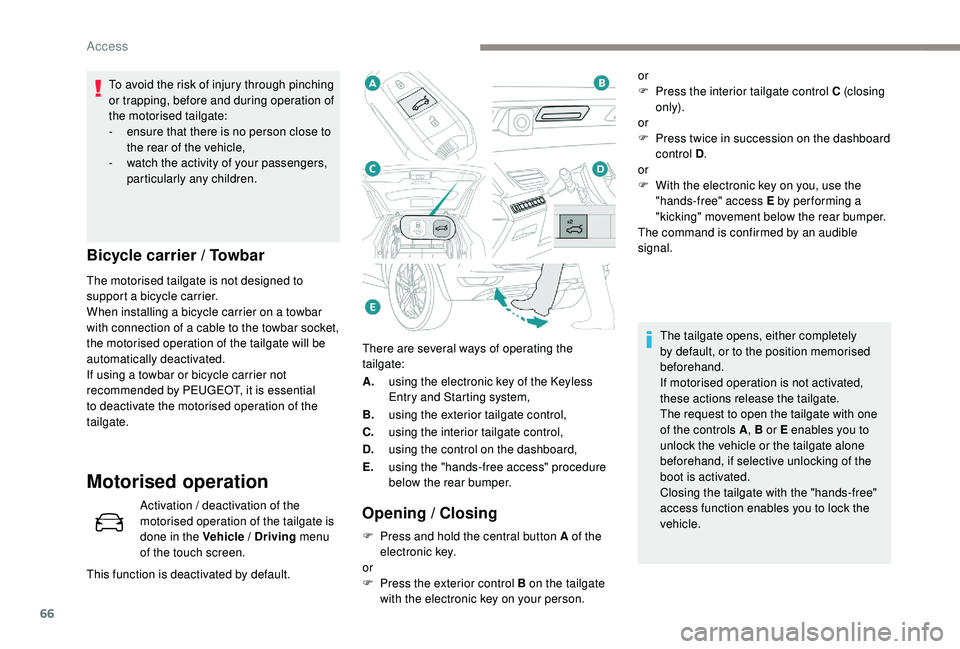
There are several ways of operating the
tailgate:
A.using the electronic key of the
K
eyless
Entry and Starting system,
B. using the exterior tailgate control,
C. using the interior tailgate control,
D. using the control on the dashboard,
E. using the "hands-free access" procedure
below the rear bumper.
Opening / Closing
Bicycle carrier / Towbar
The motorised tailgate is not designed to
support a bicycle carrier.
When installing a bicycle carrier on a towbar
with connection of a cable to the towbar socket,
the motorised operation of the tailgate will be
automatically deactivated.
If using a towbar or bicycle carrier not
recommended by PEUGEOT, it is essential
to deactivate the motorised operation of the
tailgate.
Motorised operation
Activation / deactivation of the
motorised operation of the tailgate is
done in the Vehicle / Driving
menu
of the touch screen.
This function is deactivated by default. To avoid the risk of injury through pinching
or trapping, before and during operation of
the motorised tailgate:
-
e
nsure that there is no person close to
the rear of the vehicle,
-
w
atch the activity of your passengers,
particularly any children.
F
P
ress and hold the central button A of the
electronic key.
or
F
P
ress the exterior control B on the tailgate
with the electronic key on your person. or
F
P
ress the interior tailgate control C (closing
only).
or
F
P
ress twice in succession on the dashboard
control D .
or
F
W
ith the electronic key on you, use the
"hands-free" access E by per forming a
"kicking" movement below the rear bumper.
The command is confirmed by an audible
signal.
The tailgate opens, either completely
by default, or to the position memorised
beforehand.
If motorised operation is not activated,
these actions release the tailgate.
The request to open the tailgate with one
of the controls A , B or E enables you to
unlock the vehicle or the tailgate alone
beforehand, if selective unlocking of the
boot is activated.
Closing the tailgate with the "hands-free"
access function enables you to lock the
vehicle.
Access
Page 69 of 404
67
Hands-Free Tailgate Access
Activation and deactivation of the
"Hands-Free Tailgate Access"
function is done in the Vehicle /
Driving menu of the touch screen.
This function is deactivated by default.
Ensure that you are steady on your
feet before per forming the quick foot
movement.
Take care not to touch the exhaust system
which may be hot – Risk of burns!At any point, It is possible to interrupt the
operation of the tailgate.
Pressing one of these controls again
interrupts the movement that is under way.
Following the interruption of a movement,
pressing one of these controls again
reverses the movement.
Automatic locking using the
"Hands-Free Tailgate Access" function
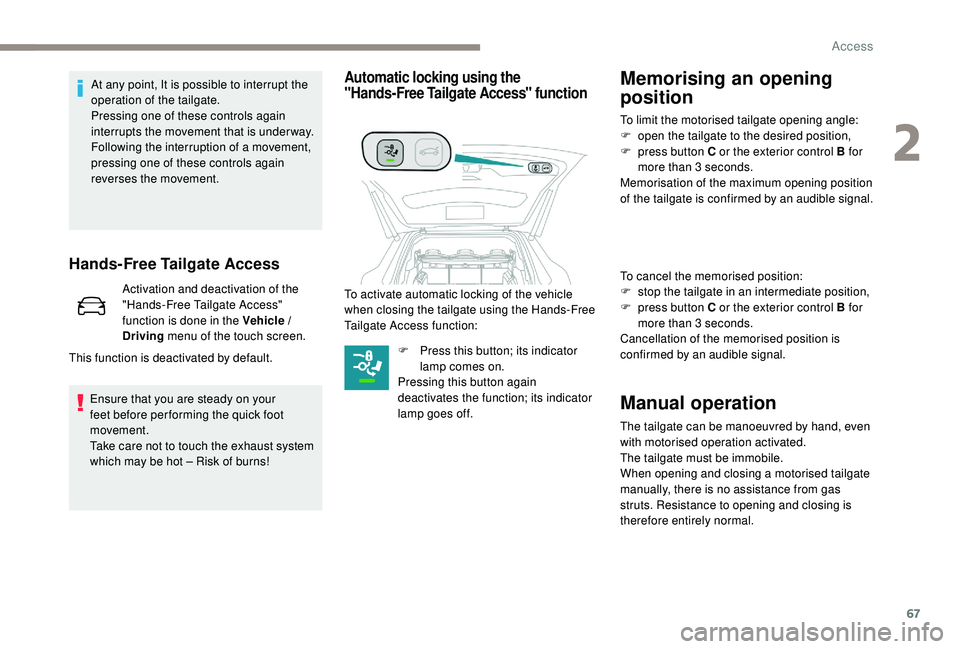
To activate automatic locking of the vehicle
when closing the tailgate using the Hands-Free
Tailgate Access function:
F
P
ress this button; its indicator
lamp comes on.
Pressing this button again
deactivates the function; its indicator
lamp goes off.
Memorising an opening
position
To limit the motorised tailgate opening angle:
F o pen the tailgate to the desired position,
F
p
ress button C or the exterior control B for
more than 3
seconds.
Memorisation of the maximum opening position
of the tailgate is confirmed by an audible signal.
To cancel the memorised position:
F
s
top the tailgate in an intermediate position,
F
p
ress button C or the exterior control B for
more than 3
seconds.
Cancellation of the memorised position is
confirmed by an audible signal.
Manual operation
The tailgate can be manoeuvred by hand, even
with motorised operation activated.
The tailgate must be immobile.
When opening and closing a motorised tailgate
manually, there is no assistance from gas
struts. Resistance to opening and closing is
therefore entirely normal.
2
Access
Page 70 of 404

68
Precautions in use
Recommendations related
to the "Hands-Free Tailgate
Access" function
If several kicking movements to operate the
tailgate have no effect, wait a few seconds
before trying again.
The function automatically deactivates in heavy
rain or following a build-up of snow.If it does not work, check that the electronic key
is not exposed to a source of electromagnetic
pollution (smartphone etc.).
The function may not work correctly with a
prosthetic leg.
The function may not work correctly if your
vehicle is fitted with a towbar.
In some circumstances, the tailgate may open
or close by itself, particularly if:
-
y
ou hitch or unhitch a trailer,
-
y
ou fit or remove a bicycle carrier,
-
y
ou load or unload bicycles from a bicycle
c a r r i e r,
-
y
ou place or lift something behind the
vehicle,
-
an
animal approaches the rear bumper,
-
y
ou are washing your vehicle,
-
y
our vehicle is being serviced,
-
y
ou are accessing the spare wheel
(depending on version).
To avoid such operating problems, keep the
electronic key away from the sensor zone or
deactivate the "Hands-Free Tailgate Access"
function.
In wintry conditions
In the event of an accumulation of snow
on the tailgate, clear the snow before
commanding a motorised opening of the
tailgate.
The formation of ice can block the tailgate
and prevent its opening: wait until the ice
melts with the heating of the passenger
compartment.
When washing
When washing the vehicle in an automatic
car wash, do not forget to lock your vehicle
to avoid the risk of unexpected opening.
Reinitialising the motorised
tailgate
This operation is necessary where there is no
movement – after detection of an obstacle,
connecting or recharging the battery, etc.
F
O
pen the tailgate manually, if necessary.
F
F
ully close the tailgate manually.
If the problem persists, contact a PEUGEOT
dealer or a qualified workshop. Repeatedly opening and closing of the
motorised tailgate can cause overheating
of its electric motor, after which opening
and closing will not be possible.
Allow at least 10
minutes for the electric
motor to cool down before operating the
tailgate again.
If you are unable to wait, operate it
manually.
Access
Page 235 of 404
233
This system is a visual aid that cannot in
any circumstances replace the need for
vigilance on the part of the driver.
The images provided by the camera(s)
may be distorted by the relief.
In the presence of areas in shade, or in
conditions of bright sunlight or inadequate
lighting, the image may be darkened and
with lower contrast.
Maintenance
In bad or wintry weather, ensure that the
sensors and camera lenses are not covered
with mud, ice or snow.
Check the cleanliness of the camera lenses
regularly.
If necessary, clean the camera lenses with a
soft, dry cloth.
High pressure jet wash
When washing your vehicle, keep the tip of the
lance at least 30 cm from the cameras.
Visiopark 1
Rear vision
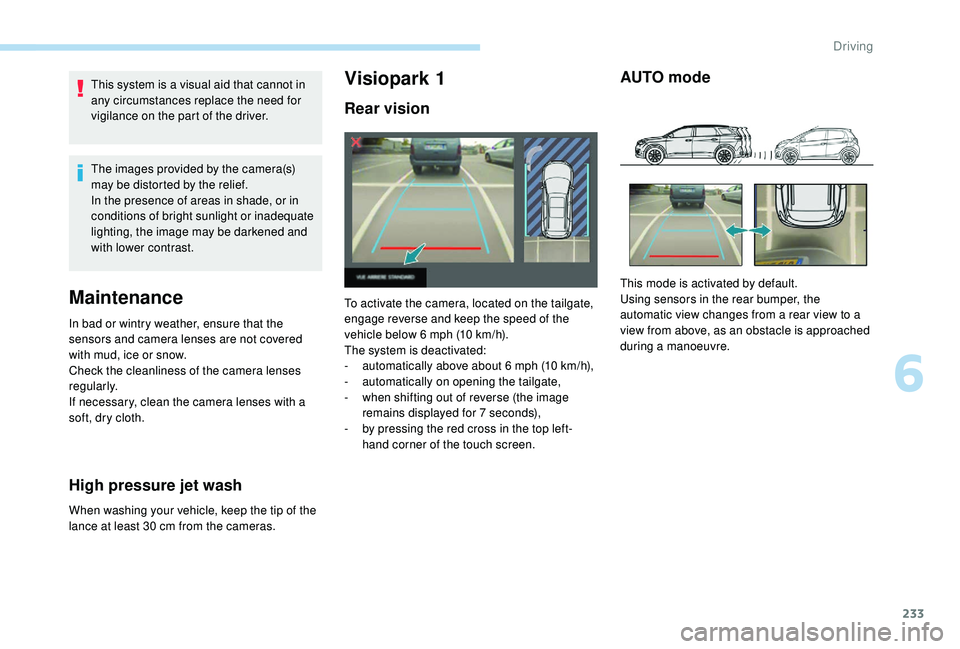
To activate the camera, located on the tailgate,
engage reverse and keep the speed of the
vehicle below 6
mph (10 km/h).
The system is deactivated:
-
a
utomatically above about 6 mph (10 km/h),
-
a
utomatically on opening the tailgate,
-
w
hen shifting out of reverse (the image
remains displayed for 7
seconds),
-
b
y pressing the red cross in the top left-
hand corner of the touch screen.
AUTO mode
This mode is activated by default.
Using sensors in the rear bumper, the
automatic view changes from a rear view to a
view from above, as an obstacle is approached
during a manoeuvre.
6
Driving
Page 237 of 404
235
Visiopark 2
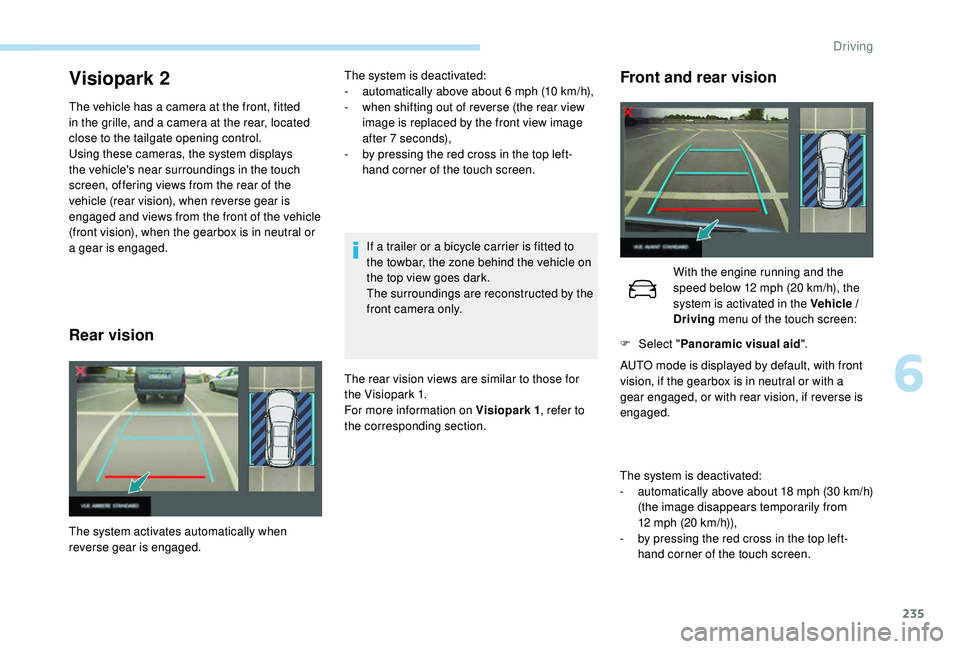
The vehicle has a camera at the front, fitted
in the grille, and a camera at the rear, located
close to the tailgate opening control.
Using these cameras, the system displays
the vehicle's near surroundings in the touch
screen, offering views from the rear of the
vehicle (rear vision), when reverse gear is
engaged and views from the front of the vehicle
(front vision), when the gearbox is in neutral or
a gear is engaged.
Rear vision
If a trailer or a bicycle carrier is fitted to
the towbar, the zone behind the vehicle on
the top view goes dark.
The surroundings are reconstructed by the
front camera only.
The rear vision views are similar to those for
the Visiopark 1.
For more information on Visiopark 1 , refer to
the corresponding section.
The system activates automatically when
reverse gear is engaged. The system is deactivated:
-
a
utomatically above about 6 mph (10 km/h),
-
w
hen shifting out of reverse (the rear view
image is replaced by the front view image
after 7
seconds),
-
b
y pressing the red cross in the top left-
hand corner of the touch screen.
Front and rear vision
The system is deactivated:
- a utomatically above about 18 mph (30 km/h)
(the image disappears temporarily from
12
mph (20 km/h)),
-
b
y pressing the red cross in the top left-
hand corner of the touch screen. With the engine running and the
speed below 12
mph (20 km/h), the
system is activated in the Vehicle /
Driving menu of the touch screen:
F
Sel
ect "
Panoramic visual aid ".
AUTO mode is displayed by default, with front
vision, if the gearbox is in neutral or with a
gear engaged, or with rear vision, if reverse is
engaged.
6
Driving