2017 Peugeot 308 ESP
[x] Cancel search: ESPPage 174 of 392

172
308_en_Chap06_conduite_ed01-2016
Operating fault
In the event of a fault with the system, this
warning lamp comes on continuously.
Have it checked by a P
e
uge
Ot
dealer or a
qualified workshop.
In the event of a fault in S
tO
P mode, the
vehicle may stall.
All of the instrument panel warning lamps come
on.
Depending on version, an alert message may
also be displayed, asking you to place the gear
lever in position N and put your foot on the
brake pedal.
You must switch off the ignition, then start the
engine again.
th
e Stop & Start system requires
a 12
V battery of a special specification.
All work on this type of battery must be
carried out only by a P
e
uge
Ot
dealer
or a qualified workshop.
For more information on
the 12 V batter y , refer to the
corresponding section.
If the system has been deactivated
in S
tO
P mode, the engine restarts
immediately.
At any time, press the "ECO OFF" switch to
deactivate the system.
th
is is confirmed by the switch warning lamp
coming on accompanied by a message.
Deactivation / Reactivation
the system is reactivated automatically
at every new engine start by the driver.
Press the "ECO OFF" switch again.
th
e system is active again; this is confirmed
by the switch warning lamp going off,
accompanied by a message. Opening the bonnet
Driving on flooded roads
Before driving through a flooded road,
it is strongly recommended that you
deactivate the Stop & Start system.
For more information on Driving
advice
, particularly on flooded roads,
refer to the corresponding section. Before doing anything under the
bonnet, deactivate the Stop & Start
system to avoid the risk of injury related
to an automatic change to S
tA
R
t
mode.
Driving
Page 175 of 392

173
308_en_Chap06_conduite_ed01-2016
Memorising speeds
Memorising
this function allows speeds to be saved, which can then be offered to set the two systems: the speed limiter (to limit the speed of the vehicle) or the
cruise control (for a vehicle cruising speed).
You can memorise up to six speed settings for each of the two systems. By default, some speed settings are already memorised.F
S
elect the system for which you want to
memorise new speed settings:
th
is function is accessible in the touch screen.
F
e
n
ter the new value using the numerical
keypad and confirm.
F
C
onfirm to save the modification and quit
the menu.
●
s
peed limiter
or
F
P
ress the button corresponding to the
speed setting you want to modify.
Touch screen
F Select " Speed settings " in the
" Driving assistance " menu.
●
c
ruise control.
As a safety measure, the driver must
carry out these operations when
stationary.
6
Driving
Page 176 of 392

174
308_en_Chap06_conduite_ed01-2016
Steering mounted controls
6. Speed limiter on / pause indication.
7. Speed limiter mode selection indication.
8.
P
rogrammed speed setting.
Speed limiter "LIMIt"
System which prevents the vehicle from exceeding the speed programmed by the driver.
the speed limiter cannot, in any circumstances,
replace the need to observe speed limits, nor can it
replace the need for vigilance on the part of the driver.
Once the programmed speed limit is reached,
additional pressure on the accelerator pedal
has no effect.
1.
Sel
ect speed limiter mode.
2.
D
ecrease programmed speed.
3.
In
crease programmed speed.
4.
S
peed limiter on / pause.
5.
D
isplay the list of memorised speeds (on
versions with touch screen tablet).Displays in the instrument panel
S witching on the speed limiter requires
a programmed speed of at least 20 mph
(30
km/h).
th
e speed limiter is paused by operation of the
control.
th
e programmed speed can be exceeded
temporarily by pressing the accelerator firmly
beyond the point of resistance.
to r
eturn to the programmed speed, simply
release the accelerator pedal until the vehicle
returns to the programmed speed limit.
the programmed speed remains in the
memory when the ignition is switched off.
For more information on Memorising
speeds , refer to the corresponding
section.
Driving
Page 177 of 392
175
308_en_Chap06_conduite_ed01-2016
Switching on / Pause
F turn the thumbwheel 1 to the "LIMIT"
position: the speed limiter mode is selected
but is not switched on (Pause).
F
S
witch the speed limiter back on by
pressing button 4 , if the speed displayed
is suitable (by default, the last speed
programmed).
F
Y
ou can temporarily stop the speed limiter
by pressing button 4 again: the display
confirms that it has been stopped (Pause). You do not have to switch the speed limiter on
in order to set the speed.
Once the function is selected, you can modify
the speed setting by:
-
u
sing buttons 2 and 3, increasing or
decreasing the speed displayed:
F
b
y successive short presses, to modify
by + or - 1 mph (1 km/h),
F
b
y a maintained press, to modify in steps
of + or - 5 mph (5 km/h). -
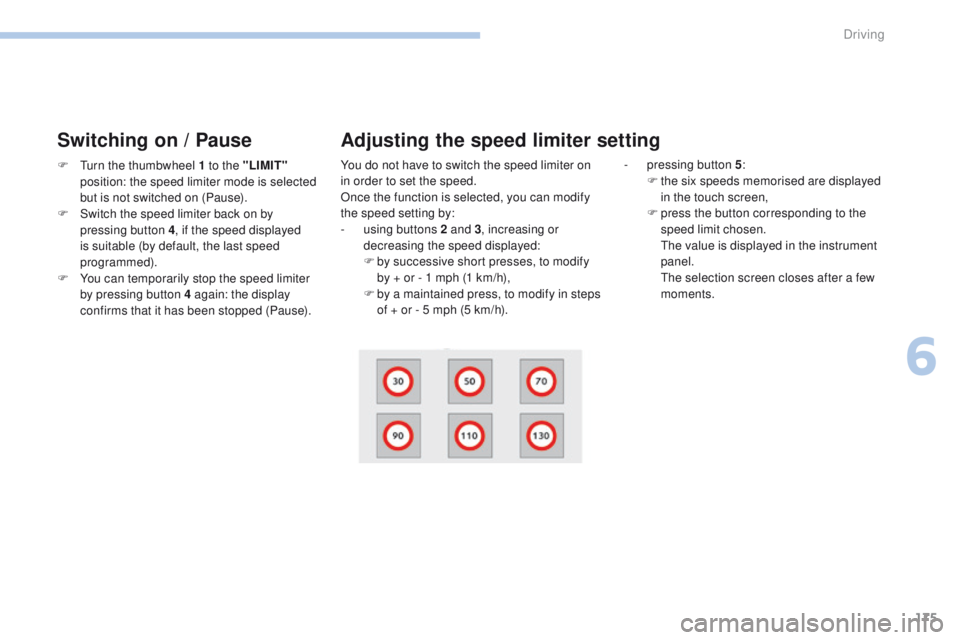
p ressing button 5
:
F t he six speeds memorised are displayed
in the touch screen,
F
p
ress the button corresponding to the
speed limit chosen.
t
h
e value is displayed in the instrument
panel.
t
h
e selection screen closes after a few
moments.
Adjusting the speed limiter setting
6
Driving
Page 179 of 392

177
308_en_Chap06_conduite_ed01-2016
Steering mounted controls
6. Cruise control pause / resume indication.
7. Cruise control mode selection indication.
8.
P
rogrammed speed setting.
Cruise control "CRu ISe"
System which automatically maintains the speed of the vehicle at the value programmed by the driver, without any action on the accelerator pedal.
the cruise control system cannot, in any circumstances,
replace the need to observe speed limits, nor can it
replace the need for vigilance on the part of the driver.
You are advised to keep your feet near the pedals at
all times.
the cruise control is switched on manually: it
requires a minimum vehicle speed of 25 mph
(40 km/h).
1.
Sel
ect cruise control mode.
2.
S
et the current speed as the speed
setting
/ Decrease the speed setting.
3.
S
et the current speed as the speed
setting
/ Increase the speed setting.
4.
P
ause / resume cruise control.
5.
D
isplay the list of memorised speeds.Displays in the instrument panel
Switching off the ignition cancels any
programmed speed value.
th
e cruise control is paused
manually or
by pressing the brake or clutch pedal or
on triggering of the e SC system for safety
reasons.
It is possible to exceed the programmed speed
temporarily by pressing the accelerator pedal.
to r
eturn to the programmed speed, simply
release the accelerator pedal until the
programmed cruise speed is reached again. With a manual gearbox, third or fourth gear
(depending on engine) or higher must be
engaged.
With an automatic gearbox, second gear or
higher must be engaged.
For more information on Memorising
speeds, refer to the corresponding
section.
6
Driving
Page 182 of 392

180
308_en_Chap06_conduite_ed01-2016
Dynamic cruise control "CRuISe"
this systems allows the vehicle's speed to be
maintained at a value set by the driver.
In addition it allows (when circumstances
permit) an inter-vehicle time that you have
selected to be maintained between your vehicle
and the one in front.Principles of operation
using a radar with a range of about 100 metres,
located at the front of the vehicle, this system
detects a vehicle running in front of your
vehicle.
It automatically adapts the speed of your
vehicle to that of the vehicle in front.
If the vehicle in front is running more slowly,
the system progressively reduces the speed of
your vehicle using just engine braking (as if the
driver had pressed the "-" b ut to n).
If your vehicle is too close to, or approaching
too quickly the vehicle in front, the dynamic
cruise control is automatically deactivated.
th
e driver is then alerted by an audible signal,
accompanied by a message.
If the vehicle in front accelerates or changes
lane, the dynamic cruise control progressively
accelerates your vehicle to return to the
programmed speed.
If the driver operates a direction indicator to
overtake a slower vehicle, the dynamic cruise
control allows your vehicle to temporarily
approach the vehicle in front to assist the
overtaking manoeuvre, though never exceeding
the programmed speed.
Switching between the types of cruise control
If you want to use the "standard" cruise control,
it is possible to deactivate the dynamic cruise
control in the touch screen.
th
e cruise control selection thumbwheel must
be in the "CR
uI
S
e" p
osition, other wise the
choice will not be taken into account.
For more information on the Cruise
control , refer to the corresponding
section.
th
e state of the system is memorised on
switching off the ignition. F
P
ress the button
to change from
dynamic cruise
control to "standard"
cruise control and
vice-versa.
th
e dynamic cruise control operates
by day and at night, in fog or moderate
rainfall.
the system does not act on the braking
system, but works only with engine
braking.
the regulation range is limited: there will
no longer be any adjustment of speed if
the difference between the programmed
speed setting and the speed of the
vehicle in front becomes too great.
th
e selection of this system deactivates
the display of inter-vehicle time.
If the difference between the
programmed speed setting and the
speed of the vehicle in front is too
great, the speed cannot be adjusted:
the cruise control is automatically
deactivated.
Driving
Page 183 of 392

181
308_en_Chap06_conduite_ed01-2016
the dynamic cruise control is switched on
manually, it requires that the speed of the
vehicle be between 25 mph (40 km/h) and
90
mph (150 km/h).
General points
the dynamic cruise control can be paused
manually with the control, or automatically:
-
b
y pressing the brake or clutch pedal,
-
i
n the event of operation of the e SC, for
safety reasons,
-
i
n the event of an action on the electric
parking brake control,
-
w
hen an inter-vehicle time threshold is
reached (calculated according to the
relative speeds of your vehicle and the
vehicle in front and the inter-vehicle time
setting chosen),
-
w
hen the distance between your vehicle
and the one in front becomes too small,
-
w
hen the speed of the vehicle in front is
too
low,
-
w
hen the speed of your vehicle becomes
too low.
the dynamic cruise control cannot in any
circumstances replace the observation
of speed limits, nor the need for the
vigilance on the part of the driver.
It is recommended that you always keep
your feet close to the pedals.
the inter-vehicle time setting is
memorised when switching off the
ignition.
With a manual gearbox, third or fourth gear
(depending on engine) or higher must be
engaged.
With an automatic gearbox, second gear or
higher must be engaged.
If the cruise speed setting is above 90 mph
(150 km/h), the dynamic cruise control switches
to normal cruise control mode (without
automatic adjustment of the safety inter-vehicle
distance).
1.
Sel
ect cruise control mode.
2.
S
et the current speed as the cruise speed
setting / Reduce the cruise speed setting.
3.
S
et the current speed as the cruise speed
setting / Increase the cruise speed setting.
4.
P
ause / resume cruise control.
5.
D
isplay the list of memorised speeds and
adjust the inter-vehicle time.
Steering mounted controls
For more information on Memorising
speeds , refer to the corresponding
section.
6
Driving
Page 197 of 392

195
308_en_Chap06_conduite_ed01-2016
Blind spot monitoring system
Operation
A warning lamp appears in the door mirror on
the side in question:
-
i
mmediately, when being overtaken,
-
a
fter a delay of about one second, when
overtaking a vehicle slowly.th
is driving assistance system warns the driver
of the presence of another vehicle in the blind
spot angle of their vehicle (areas hidden from
the driver's field of vision), as soon as this
presents a potential danger. Sensors fitted in the front and rear bumpers
monitor the blind spots.
th
is system is designed to improve safety when driving and is in no circumstances a
substitute for the use of the interior rear view mirror and door mirrors. It is the driver's
responsibility to constantly check the traffic, to assess the distances and relative speeds of
other vehicles and to predict their movements before deciding whether to change lane.
th
e blind spot monitoring system does not replace the need for vigilance on the part of the
driver. Activation of the system is done in
the "
Driving assistance " menu of
the touch screen.
F
P
ress this button (depending on
version) to activate the system;
the associated indicator lamp
comes on.
th
is indicator lamp comes on in the
instrument panel.
6
Driving