Page 6 of 466
NISSAN CARES...
Both NISSAN and your NISSAN dealer are dedicated to serving all your automotive needs. Your satisfaction with your vehicle and your NISSAN dealer are
our primary concerns. Your NISSAN dealer is always available to assist you with all your automobile sales and service needs.
However, if there is something that your NISSAN
dealer cannot assist you with or you would like to
provide NISSAN directly with comments or
questions, please contact the NISSAN Con-
sumer Affairs Department using our toll-free
number:
For U.S. customers1-800-NISSAN-1
(1-800-647-7261)
For Canadian customers 1-800-387-0122 The Consumer Affairs Department will ask for the
following information:
– Your name, address, and telephone number
– Vehicle identification number (attached to the
top of the instrument panel on the driver’s
side)
– Date of purchase
– Current odometer reading
– Your NISSAN dealer’s name
– Your comments or questions
OR You can write to NISSAN with the information at:
For U.S. customers
Nissan North America, Inc.
Consumer Affairs Department
P.O. Box 685003
Franklin, TN 37068-5003
or via e-mail at:
[email protected]
For Canadian customers Nissan Canada Inc.
5290 Orbitor Drive
Mississauga, Ontario L4W 4Z5
or via e-mail at:
[email protected]
If you prefer, visit us at:
www.nissanusa.com (for U.S. customers) or
www.nissan.ca (for Canadian customers)
We appreciate your interest in NISSAN and thank you for buying a quality NISSAN vehicle.
NISSAN CUSTOMER CARE PROGRAM
Page 8 of 466
Table of
ContentsIllustrated table of contents
Safety—Seats, seat belts and supplemental restraint system
Instruments and controls
Pre-driving checks and adjustments
Display screen, heater, air conditioner, audio and phone systems
Starting and driving
In case of emergency
Appearance and care
Do-it-yourself
Maintenance and schedules
Technical and consumer information
Index
0
1
2
3
4
5
6
7
8
9
10
11
Page 16 of 466
15. Shift lever (P. 5-16)
16. Push-button ignition switch (P. 5-11)
17. Cruise control switches(if so equipped) (P. 5-39)
Intelligent Cruise Control (ICC)
switches (if so equipped) (P. 5-41)
18. Driver supplemental knee air bag
(P. 1-48)
19. Bluetooth® Hands-Free Phone
System/Audio control switches
(P. 4-54)
20. Hood release (P. 3-21) Fuel door release (P. 3-27)
Powered rear seatback switch (P. 1-2)
21. Fuse box (P. 8-18)
22. Power liftgate main switch
(if so equipped) (P. 3-21)
Heated steering wheel switch
(if so equipped) (P. 2-40)
Vehicle Dynamic Control (VDC) OFF
switch (P. 2-41)
23. Instrument brightness control (P. 2-33) Twin trip odometer reset switch (P. 2-3)
*: Refer to the separate Navigation System Own-
er’s Manual (if so equipped) .
Refer to the page number indicated in pa-
rentheses for operating details.
Illustrated table of contents0-7
Page 92 of 466
15. Shift lever (P. 5-16)
16. Push-button ignition switch (P. 5-11)
17. Cruise control switches(if so equipped) (P. 5-39)
Intelligent Cruise Control (ICC)
switches (if so equipped) (P. 5-41)
18. Driver supplemental knee air bag
(P. 1-48)
19. Bluetooth® Hands-Free Phone
System/Audio control switches
(P. 4-54)
20. Hood release (P. 3-21) Fuel door release (P. 3-27)
Powered rear seatback switch (P. 1-2)
21. Fuse box (P. 8-18)
22. Power liftgate main switch
(if so equipped) (P. 3-21)
Heated steering wheel switch
(if so equipped) (P. 2-40)
Vehicle Dynamic Control (VDC) OFF
switch (P. 2-41)
23. Instrument brightness control (P. 2-33) Twin trip odometer reset switch (P. 2-3)
*: Refer to the separate Navigation System Own-
er’s Manual (if so equipped) .
Refer to the page number indicated in pa-
rentheses for operating details.
1. Tachometer
2. Warning and indicator lights
3. Vehicle information displayOdometer
Twin Trip Odometer 4. Speedometer
5. Fuel gauge
6. Engine coolant temperature gauge
LIC2920
METERS AND GAUGES
Instruments and controls2-3
Page 104 of 466
The vehicle information display is located to the
left of the speedometer. It displays such items as:● Vehicle settings
● Drive system warnings and settings
● Forward Emergency Braking (FEB) system
(if so equipped)
● Predictive Forward Collision Warning
(PFCW) system (if so equipped)
● Blind Spot Warning (BSW) (if so equipped)
● Rear Cross Traffic Alert (RCTA) (if so
equipped) ●
Cruise control system information (if so
equipped)
● Intelligent Cruise Control (ICC) system in-
formation (if so equipped)
● NISSAN Intelligent Key® operation informa-
tion
● Indicators and warnings
● Tire pressure information
The display will be interrupted when a phone call
is received. Phone calls can be answered or
rejected through the steering wheel controls.HOW TO USE THE VEHICLE
INFORMATION DISPLAY
The vehicle information display can be changed
using the buttons
and OK located on the
steering wheel.
1. OK — change or select an item in the vehicle information display
2.
— go back or forward through
the vehicle information menu items or to
change from one display screen to the next
(i.e. trip, TPMS, fuel economy)
3.
— scroll up or down the vehicle infor-
mation menu items.
LIC3224LIC3010
VEHICLE INFORMATION DISPLAY
Instruments and controls2-15
Page 105 of 466
The OK,andbuttons also
control audio and control panel functions. For
additional information, refer to “Steering wheel
switch for audio control” in the “Display screen,
heater, air conditioner, audio and phone systems”
section of this manual.
STARTUP DISPLAY
When the vehicle in placed in the ON or ACC
position the screens that display in the vehicle
information display include:
● Active system status (if so equipped)
● Trip computer
● Tire pressure information
● Fuel economy ●
Warnings
● Outside air temperature
● Odometer/Twin Trip Odometer
● Audio
● Navigation (if so equipped)
● Settings
Warnings will only display if there are any pres-
ent. For additional information on warnings and
indicators, refer to “Vehicle information display
warnings and indicators” in this section.
To control what items display in the vehicle infor-
mation display, refer to “Main menu selection” in
this section.
SETTINGS
The setting mode allows you to change the infor-
mation displayed in the vehicle information display:
● Driver Assistance (if so equipped)
● Customize Display
● Vehicle Settings
● Maintenance
● Clock
● TPMS Settings
● Unit / Language
● Key-Linked Settings
● Factory Reset
2-16Instruments and controls
Page 110 of 466
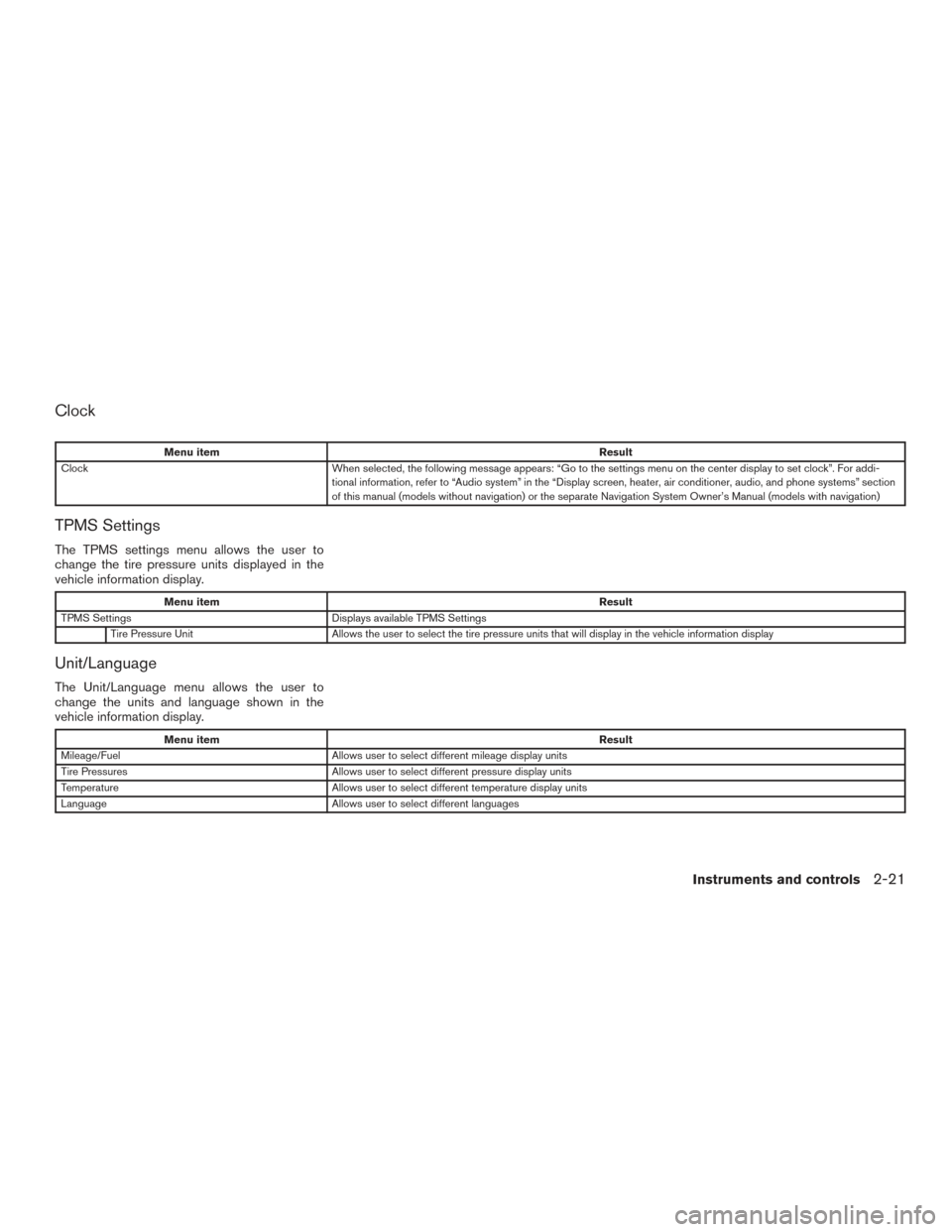
Clock
Menu itemResult
Clock When selected, the following message appears: “Go to the settings menu on the center display to set clock”. For addi-
tional information, refer to “Audio system” in the “Display screen, heater, air conditioner, audio, and phone systems” section
of this manual (models without navigation) or the separate Navigation System Owner’s Manual (models with navigation)
TPMS Settings
The TPMS settings menu allows the user to
change the tire pressure units displayed in the
vehicle information display.
Menu item Result
TPMS Settings Displays available TPMS Settings
Tire Pressure Unit Allows the user to select the tire pressure units that will display in the vehicle information display
Unit/Language
The Unit/Language menu allows the user to
change the units and language shown in the
vehicle information display.
Menu item Result
Mileage/Fuel Allows user to select different mileage display units
Tire Pressures Allows user to select different pressure display units
Temperature Allows user to select different temperature display units
Language Allows user to select different languages
Instruments and controls2-21
Page 131 of 466
The E-call (SOS) system switch is used in com-
bination with a NissanConnectSMServices sub-
scription to call for assistance in case of an
emergency.
Pushing the switch will (with a paid subscription)
reach a Response Specialist that will provide
assistance based on the situation described by
the vehicle’s occupant. For additional informa-
tion, or to enroll your vehicle, refer to
www.NissanUSA.com/connect,
www.Nissan.ca/NissanConnect, or
www.Nissan.ca/NissanConnect/fr or call
855–426–6628.12V OUTLETS
The power outlets are for powering electrical
accessories such as cellular telephones. They
are rated at 12 volt, 120W (10A) maximum.
The vehicle’s power outlets are powered only
when the ignition switch is in the ACC (if so
equipped) or ON position.
Open the cap to use a power outlet.
CAUTION
● The outlet and plug may be hot during
or immediately after use.
● Only certain power outlets are designed
for use with a cigarette lighter unit. Do
not use any other power outlet for an
accessory lighter. It is recommended
that you visit a NISSAN dealer for addi-
tional information.
● Do not use with accessories that exceed
a 12 volt, 120W (10A) power draw.
LIC3357
Instrument Panel
LIC3002
Center Console
LIC2616
E-CALL (SOS) SWITCH (if so
equipped) POWER OUTLETS
2-42Instruments and controls