Page 103 of 416

2-24Instruments and controls
Seat belt warning chime
The seat belt warning chime will sound for about
6 seconds unless the driver’s seat belt is
securely fastened.The Integrated Control System is located below
the audio system or navigation system (if so
equipped) . Two Integrated Control System
modes can be selected: Drive mode and
Climate Control mode.
Depending on which Integrated Control System
mode is selected (Drive mode or Climate
Control mode) , the screen display and some
button functions will change.
.
Drive mode
In the Drive mode, three types of driving
modes can be selected: NORMAL, SPORT
and ECO. See “Drive mode” (P.5-22). In
addition, while in the Drive mode, SETUP,
Drive information and ECO information can
be displayed and adjusted. See “Drive
mode” (P.2-24) .
. Climate Control mode
In the Climate Control mode, the climate
control can be set and adjusted. See
“Automatic air conditioner (with Integrated
Control System)” (P.4-32) .
DRIVE MODE
When the Drive mode select button is pressed,
the display and buttons appear as shown.
INTEGRATED CONTROL SYSTEM (if
so equipped)
Page 104 of 416
SIC4623
1. Drive mode select button
2. SETUP button
3. Drive mode NORMAL button
4. Drive mode SPORT button
5. Drive mode ECO button
6. Display screen
7. Drive information button8. ECO information button
9. ENTER button/Selection dial
SETUP FUNCTION
While in the Drive mode, the following items can
be set up by pressing the SETUP button.
.
Display Brightness
. Button Brightness
. Clock Time Setting
. Select Language
. Select Units
. Auto Interior Illumination
. Selective Door unlock
. Auto Headlight Sensitivity (if so equipped)
. CLIMATE ECO
NOTE:
. The SETUP function cannot be ad-
justed while driving.
. When the battery is disconnected, the
SETUP memory is erased and reverts to
the default settings. If necessary, reset
the SETUP memory after reconnecting
the battery.
Instruments and controls2-25
Page 105 of 416
2-26Instruments and controls
SIC4617
Setting Display Brightness and Button
Brightness
1. Press the Drive Mode Select button.
2. Press the SETUP button.
3. Turn the Selection dial to “Display Bright-ness” or “Button Brightness” then press the
ENTER button.
SIC4557
4. Turn the Selection dial to + to increasebrightness or to íto decrease brightness,
then press the ENTER button to apply the
selection.
Display Brightness and Button Brightness can
be manually adjusted during the day (when the
headlight switch is off) or at night (when the
headlight switch is on) .
When the bar is at the minimum or maximum
brightness level, the brightness level is the same
as the daytime level (headlight switch is on) or
nighttime level (headlight switch off) .
Clock Time Setting
NOTE:
Clock Time Setting is used for displaying
the ECO information. See “Eco informa-
tion” (P.2-31) .
Page 109 of 416
2-30Instruments and controls
SIC4583
4. Turn the Selection dial to + to increasesensitivity or to íto decrease sensitivity,
then press the ENTER button to apply the
selection.
JVI0324X
DRIVE INFORMATION
While in the Drive mode, push the Drive
information button to display elapsed time,
average speed and trip distance. Pressing the
Drive information button a second time will
display the G (gravity) -Force screen.
Elapsed time
The elapsed time shows the time since the last
reset.
Average speed (km/h or MPH)
The average speed shows the average vehicle
speed since the last reset.
Trip distance (km or MILES)
The trip distance shows the distance driven
since the last reset.
To reset the elapsed time, average speed and
trip distance, push the ENTER button for more
than one second. All three drive information
displays will reset at the same time.
Page 110 of 416
SIC4618
G-Force screen
The G (gravity) -Force screen displays the
current acceleration and deceleration (front-to-
rear) and cornering (side-to-side) G-Force on
the vehicle.
ECO INFORMATION
CAUTION
Do not adjust the display controls while
driving so that full attention may given
to vehicle operation.The following ECO INFO mode will appear on
the display by pushing the ECO information
button, then turning the selection dial to scroll
through the different screens.
While driving, only one ECO information screen
is displayed. The vehicle must be stopped to
scroll through the different screens.
Instruments and controls2-31
Page 111 of 416
2-32Instruments and controls
JVI1165X
Daily Reset
Records of up to the past 4 days of fuel
consumption can be shown on the display.
Weekly Reset
Records of up to the past 4 weeks of each
week’s fuel consumption can be shown on the
display.NOTE:
When the clock is not set, the ECO
information (daily and weekly) cannot be
used.
Reset at Start
Records of up to the past 4 times of each time of
ignition switch ON fuel consumption can be
shown on the display.
Manual Reset
Records of up to the past 4 times of resetting
fuel consumption can be shown on the display.
The displayed ECO INFO can be reset by
pushing the ENTER button for longer than 1
second.
Page 122 of 416

Instrument brightness control
The instrument brightness control operates
when the ignition switch is in the ON position.
Push the control knob
*Ato adjust the bright-
ness of the instrument panel lights. The bright-
ness indicator
*Bwill be shown briefly in the
vehicle information display when the control is
turned.
When the brightness level reaches the maximum
or minimum, a beep will sound.
SIC3671
TURN SIGNAL SWITCH
*1Turn signal
Move the lever up or down to signal the turning
direction. When the turn is completed, the turn
signals cancel automatically.
*2Lane change signal
Move the lever up or down until the turn signal
begins to flash, but the lever does not latch, to
signal a lane change. Hold the lever until the lane
change is completed.
Move the lever up or down until the turn signal
begins to flash, but the lever does not latch, and
release the lever. The turn signal will automati-
cally flash three times. Choose the appropriate method to signal a lane
change based on road and traffic conditions.
Instruments and controls2-43
Page 154 of 416
.Do not fill a portable fuel container
in the vehicle or trailer. Static elec-
tricity can cause an explosion of
flammable liquid, vapor or gas in
any vehicle or trailer. To reduce the
risk of serious injury or death when
filling portable fuel containers:
— Always place the container on
the ground when filling.
— Do not use electronic devices when filling.
— Keep the pump nozzle in contact with the container while you are
filling it.
— Use only approved portable fuel containers for flammable liquid.
CAUTION
. If fuel is spilled on the vehicle body,
flush it away with water to avoid
paint damage.
. Insert the cap straight into the fuel-
filler tube, then tighten until the
fuel-filler cap clicks. Failure to tight-
en the fuel-filler cap properly may cause the
malfunction indicator
light (MIL) to illuminate. If the
light illuminates because the fuel-
filler cap is loose or missing, tighten
or install the cap and continue to
drive the vehicle. The
light
should turn off after a few driving
trips. If the
light does not turn
off after a few driving trips, have the
vehicle inspected. It is recom-
mended you visit a NISSAN dealer
for this service.
For additional information, see
“Malfunction Indicator Light (MIL)”
(P.2-22) .
. The LOOSE FUEL CAP warning
message will be displayed if the
fuel-filler cap is not properly tigh-
tened. It may take a few driving trips
for the message to be displayed.
Failure to tighten the fuel-filler cap
properly after the LOOSE FUEL CAP
warning message is displayed may
cause the
Malfunction Indicator
Light (MIL) to illuminate.
SPA2809
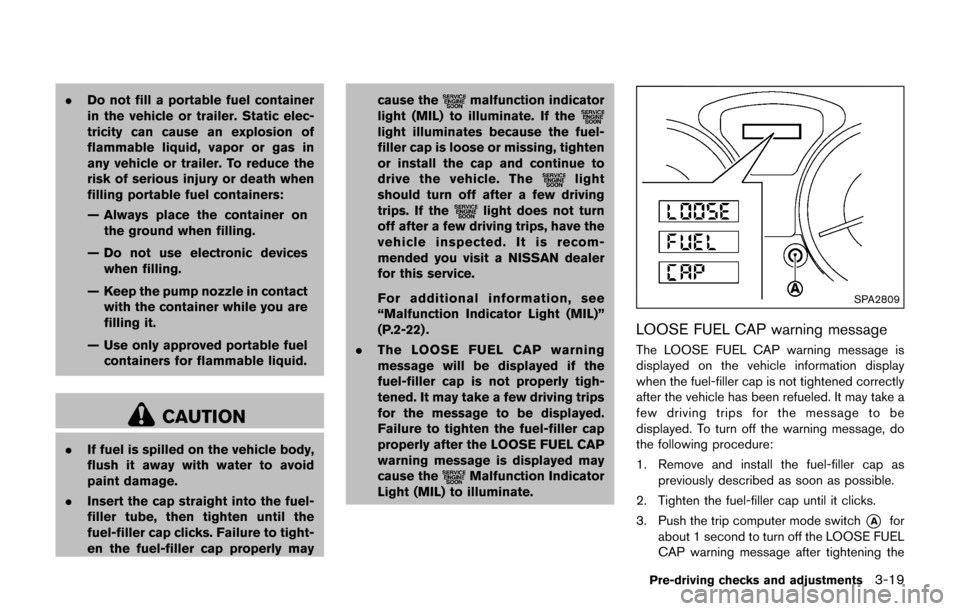
LOOSE FUEL CAP warning message
The LOOSE FUEL CAP warning message is
displayed on the vehicle information display
when the fuel-filler cap is not tightened correctly
after the vehicle has been refueled. It may take a
few driving trips for the message to be
displayed. To turn off the warning message, do
the following procedure:
1. Remove and install the fuel-filler cap as
previously described as soon as possible.
2. Tighten the fuel-filler cap until it clicks.
3. Push the trip computer mode switch
*Afor
about 1 second to turn off the LOOSE FUEL
CAP warning message after tightening the
Pre-driving checks and adjustments3-19