2017 NISSAN JUKE battery
[x] Cancel search: batteryPage 178 of 416
SAA1980
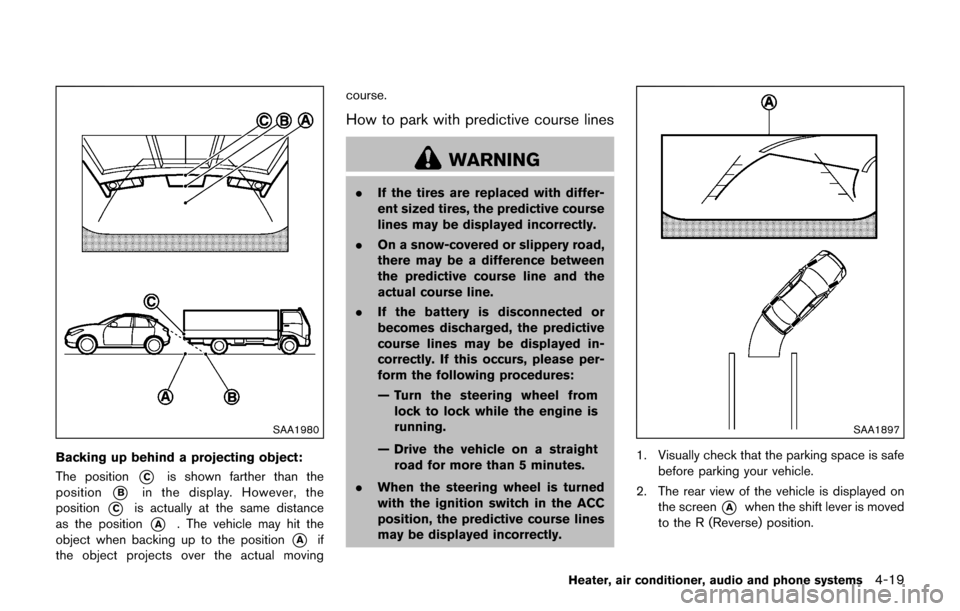
Backing up behind a projecting object:
The position
*Cis shown farther than the
position
*Bin the display. However, the
position
*Cis actually at the same distance
as the position
*A. The vehicle may hit the
object when backing up to the position
*Aif
the object projects over the actual moving course.
How to park with predictive course lines
WARNING
.
If the tires are replaced with differ-
ent sized tires, the predictive course
lines may be displayed incorrectly.
. On a snow-covered or slippery road,
there may be a difference between
the predictive course line and the
actual course line.
. If the battery is disconnected or
becomes discharged, the predictive
course lines may be displayed in-
correctly. If this occurs, please per-
form the following procedures:
— Turn the steering wheel from
lock to lock while the engine is
running.
— Drive the vehicle on a straight road for more than 5 minutes.
. When the steering wheel is turned
with the ignition switch in the ACC
position, the predictive course lines
may be displayed incorrectly.
SAA1897
1. Visually check that the parking space is safe
before parking your vehicle.
2. The rear view of the vehicle is displayed on the screen
*Awhen the shift lever is moved
to the R (Reverse) position.
Heater, air conditioner, audio and phone systems4-19
Page 196 of 416

Satellite radio reception (if so equipped):
When the satellite radio is used for the first time
or the battery has been replaced, the satellite
radio may not work properly. This is not a
malfunction. Wait more than 10 minutes with the
satellite radio ON and the vehicle away from any
metal or large buildings for the satellite radio to
receive all of the necessary data.
The satellite radio mode requires an active
SiriusXM Satellite Radio subscription. The sa-
tellite radio is not available in Alaska, Hawaii and
Guam.
Satellite radio performance may be affected if
cargo carried on the roof blocks the satellite
radio signal.
If possible, do not put cargo near the satellite
antenna.
A buildup of ice on the satellite radio antenna
can affect satellite radio performance. Remove
the ice to restore satellite radio reception.
SAA0480
Compact Disc (CD) player
.Do not force a compact disc into the CD
insert slot. This could damage the CD
and/or CD player.
. During cold weather or rainy days, the
player may malfunction due to the
humidity. If this occurs, remove the CD and dehumidify or ventilate the player
completely.
. The player may skip while driving on
rough roads.
. The CD player sometimes cannot func-
tion when the passenger compartment
temperature is extremely high. De-
crease the temperature before use.
. Only use high quality 4.7 in (12 cm)
round discs that have the “COMPACT
disc DIGITAL AUDIO” logo on the disc
or packaging.
. Do not expose the CD to direct sun-
light.
. CDs that are of poor quality, dirty,
scratched, covered with fingerprints,
or that have pin holes may not work
properly.
. The following CDs may not work prop-
erly:
—Copy control compact discs (CCCD)
— Recordable compact discs (CD-R)
— Rewritable compact discs (CD-RW)
. Do not use the following CDs as they
may cause the CD player to malfunc-
tion.
—3.1 in (8 cm) discs
Heater, air conditioner, audio and phone systems4-37
Page 206 of 416

Apps button:
The
button launches the Smartphone
Integration mode. See “NissanConnectSMApp
smartphone integration” (P.4-75) .
FM-AM Radio operation
radio (FM·AM) band select:
Push the
button to change the band as
follows:
AM ?FM1 ?FM2? AM
TUNE (Tuning):
Turn the TUNE·FOLDER knob for manual tuning.
SEEK tuning:
Push the
orbutton to tune from low to
high or high to low frequencies and to stop at
the next broadcasting station.
SCAN tuning:
Push the
button to tune from low to high
frequencies and stop at each broadcasting
station for several seconds. Pushing the button
again during this several seconds period will
stop SCAN tuning and the radio will remain
tuned to that station.
If the
button is not pushed within this
period, SCAN tuning moves to the next station.
toRadio memory buttons:
Up to 12 stations can be set for the FM band (6
each for FM1 and FM2) and 6 stations can be
set for the AM band.
1. Choose the radio band using the
button.
2. Tune to the desired station.
3. Push and hold the desired station preset button
tountil beep sounds.
4. The station indicator will then come on. The station is now set to the button memory.
5. Other buttons can be set in the same manner.
If the battery cable is disconnected, or if the fuse
opens, the station memory will be erased. In that
case, reset the desired stations.
CD player operation
Place the ignition switch in the ON or ACC
position. Insert the Compact Disc (CD) into the
slot with the label side facing up. The CD will be
guided automatically into the slot and start
playing.
After loading the CD, the number of tracks on
the CD and the play time will appear on the
display.
If another audio source is already operating, it
will automatically turn off and the CD will play. If the system has been turned off while the CD
was playing, pushing the Power button will start
the CD.
CD PLAY:
When the CD button is pushed while a CD is
loaded, the CD will start playing.
SEEK TRACK:
When the
orbutton is pushed and hold
while the CD is being played, the CD will play
while fast forwarding or rewinding. When the
button is released, the CD will return to normal
play speed.
When the
orbutton is pushed while
the CD is being played, the next track or the
beginning of the current track on the CD will be
played. Push the
button again to select the
previous track.
Heater, air conditioner, audio and phone systems4-47
Page 209 of 416
4-50Heater, air conditioner, audio and phone systems
CAUTION
.Do not force the USB device into the
USB port. Inserting the USB device
tilted or up-side-down into the port
may damage the port. Make sure
that the USB device is connected
correctly into the USB port.
. Do not grab the USB port cover (if
so equipped) when pulling the USB
device out of the port. This could
damage the port and the cover.
. Do not leave the USB cable in a
place where it can be pulled unin-
tentionally. Pulling the cable may
damage the port.
Refer to your device manufacturer’s owner
information regarding the proper use and care
of the device.
Connecting iPod
Š:
The USB connection port is located on the
lower part of the instrument panel. Connect the
iPod
Šcable to the USB connector. See “USB
(Universal Serial Bus) connection port” (P.4-48) .
When the audio system operates, the system
will switch to the iPod
Šmode automatically. The
battery of the iPodŠis charged while the cable is connected to the vehicle.
Depending on the version of the iPod
Š, the
display on the iPodŠshows a NISSAN or
Accessory Attached screen when the connec-
tion is completed. When the iPod
Šis connected
to the vehicle, the iPodŠmusic library can only
be operated by the vehicle audio controls.
*iPod
Šand iPhoneŠare a trademark of Apple
Inc., registered in the U.S. and other countries.
Compatibility:
The following models are compatible:
. iPod nano
Š1G (Firmware version 1.3.1 -)
. iPod nanoŠ2G (Firmware version 1.1.3 -)
. iPod nanoŠ3G (Firmware version 1.0.0 -)
. iPod nanoŠ4G (Firmware version 1.0.2 -)
. iPod nanoŠ5G (Firmware version 1.0.1 -)
. iPod nanoŠ6G (Firmware version 1.0 -)
. iPod nanoŠ7G (Firmware version 1.0.0 -)
. iPodŠ5G (Firmware version 1.2.1 -)
. iPod classicŠ(Firmware version 1.0.0 -)
. iPod TouchŠ(iOS 1.1 -)
. iPod TouchŠ2G (iOS 2.1.1 -)
. iPod TouchŠ3G (iOS 3.1 -)
. iPod TouchŠ4G (iOS 4.1 -)
. iPod TouchŠ5G (iOS 6.0.0 -) .
iPhone
Š(iOS 1.0.0 - 2.2.1)
. iPhoneŠ3G (iOS 2.1 -)
. iPhoneŠ3GS (iOS 3.0 -)
. iPhoneŠ4/4S (iOS 4.0 -)
. iPhoneŠ5 (iOS 6.0.0 -)
Operations attributable to firmware update by
Apple are not guaranteed.
iPod
Šmain operation:
The system operates when the ignition switch is
in the ON or ACC position. Push the
button
repeatedly to switch to the iPodŠmode.
If the system was turned off while the iPodŠwas
playing, pushing the Power button will start the
iPod
Š.
If another audio source is playing and the iPodŠ
is connected, pushing thebutton repeat-
edly will change the system to the iPodŠmode.
When in the iPodŠmode, the interface for iPodŠ
operation is shown on the audio display. The
items on the menu list can be scrolled by turning
the TUNE·FOLDER dial while the iPod
Šis
operational. To select an item, push the
ENTER/SETTING button. The following items
in the iPod
Šmenu appear on the display.
. Now playing
. Playlists
Page 215 of 416

4-56Heater, air conditioner, audio and phone systems
station.
toStation memory operations:
12 stations can be set for the FM band (6 each
for FM1 and FM2) and 6 stations can be set for
the AM band.
1. Choose the radio band using the
button.
2. Tune to the desired station.
3. Push and hold the desired station preset button
tountil beep sounds.
4. The station indicator will then come on. Memorizing is now complete.
5. Other buttons can be set in the same manner.
If the battery cable is disconnected, or if the fuse
opens, the station memory will be erased. In that
case, reset the desired stations.
CD player operation
Place the ignition switch in the ON or ACC
position, and insert the compact disc (CD) into
the slot with the label side facing up. The CD will
be guided automatically into the slot and start
playing.
After loading the CD, the number of tracks on
the CD and the play time will appear on the
display.
If another audio source is already operating, it
will automatically turn off and the CD will play.
If the system was turned off while the CD was
playing, pushing the Power button will start the
CD.
PLAY:
With a CD loaded, press the
button until
the CD mode is displayed on the screen.
Next/Previous Track and Fast
Forward/Rewind :
When the
orbutton is pushed and hold
while the CD is being played, the CD will play
while fast forwarding or rewinding. When the
button is released, the CD will return to normal
play speed.
When the
orbutton is pushed while
the CD is being played, the next track or the beginning of the current track on the CD will be
played. Push the
button again to select the
previous track.
RPT (repeat) button:
When the
button is pushed while the CD is
played, the play pattern can be changed as
follows:
(CD)
(Normal) ⇔1 Track Repeat
(CD with compressed audio files)
(Normal) ?1 Folder Repeat ?1 Track Repeat
? (Normal)
RDM (random) button:
When the
button is pushed while a CD is
being played, the play pattern can be changed
as follows:
(CD)
(Normal) ⇔1 Disc Random
(CD with compressed audio files)
(Normal) ?1 Disc Random ?1 Folder
Random ?(Normal)
CD eject button:
When the
button is pushed with the CD
loaded, the CD will be ejected.
Page 217 of 416
4-58Heater, air conditioner, audio and phone systems
Next/Previous File and Fast
Forward/Rewind:
When the
orbutton is pushed and held
while a USB memory is being played, the USB
memory will play while forwarding or rewinding.
When the button is released, the USB memory
will return to normal play speed.
When the
orbutton is pushed while
the USB memory is being played, the next track
or the beginning of the current track on the USB
memory will be played. Push the
button
again to select the previous track.
Folder selection:
To change to another folder in the USB memory,
choose a folder displayed on the screen using
the TUNE·SCROLL knob.
REPEAT (RPT):
When the RPT button is pushed while the USB
memory is played, the play pattern can be
change as follows.
To change the play mode, push the RPT button
repeatedly and the mode will change as follows.
(Normal) ?1 Folder Repeat ?1 Track Repeat
? (Normal)
RANDOM (RDM):
When the RDM button is pushed while a USB
memory is being played, the play pattern can be
changed as follows.
To change the play mode, push the RDM button
repeatedly, and the mode will change as follows.
(Normal) ?All Random ?1 Folder Random ?
(Normal)
BACK button:
When the BACK button is pushed, it returns to
the previous display.
iPodŠplayer operation
WARNING
Do not connect, disconnect or operate
the USB device while driving. Doing so
can be a distraction. If distracted you
could lose control of your vehicle and
cause an accident or serious injury.
CAUTION
. Do not force the USB device into the
USB port. Inserting the USB device
tilted or up-side-down into the port
may damage the port. Make sure
that the USB device is connected
correctly into the USB port.
. Do not grab the USB port cover (if
so equipped) when pulling the USB
device out of the port. This could
damage the port and the cover.
. Do not leave the USB cable in a
place where it can be pulled unin-
tentionally. Pulling the cable may
damage the port.
Refer to your device manufacturer’s owner
information regarding the proper use and care
of the device.
Connecting iPod
Š:
The USB port is located on the lower part of the
instrument panel. Connect the iPod
Šcable to
the USB connector. See “USB (Universal Serial
Bus) connection port” (P.4-57) . When the audio
system operates, the system will switch to the
iPod
Šmode automatically. The battery of the
iPodŠis charged while the cable is connected to
Page 224 of 416

3. The channel indicator will then come on andthe sound will resume. Programming is now
complete.
4. Other keys can be set in the same manner.
If the battery cable is disconnected or if the fuse
opens, the radio memory will be erased. In that
case, reset the desired stations.
Presets can also be selected by touching the
desired preset number on the screen.
Compact Disc (CD) player operation
If the radio is already operating, it automatically
turns off and the compact disc begins to play.
CD button:
When the CD button is pushed with the system
off and the compact disc loaded, the system will
turn on and the compact disc will start to play.
When the CD button is pushed with a compact
disc loaded and the radio playing, the radio will
automatically be turned off and the compact
disc will start to play. CD/MP3/WMA display mode:
Menu item
CD/MP3 display mode While listening to a CD or an MP3/WMA CD, certain text may be displayed (when a
CD encoded with text is being used) . Depending on how the CD or MP3/WMA CD
is encoded, the text is displayed listing the artist, album and song title. There are
other keys displayed on the screen when a CD is playing:
Random Touch the “Random” key to apply a random play pattern to the CD. If an MP3 CD is
playing, touching “Random” or alternates between Random Folder, and Random All.
This text will appear on the display. To cancel Random mode, touch the “Random”
key until the key is no longer highlighted.
Repeat Touch the “Repeat” key to apply a repeat play pattern to the CD. If an MP3 CD is
playing, touching “Repeat” alternates between repeating the current song and
repeating the current folder. This text will appear on the display. To cancel Repeat
mode, touch the “Repeat” key until the key is no longer highlighted.
Browse Touch the “Browse” key to display the titles on the CD in list format. Touch the title of
a song in the list to begin playing that song. If an MP3 CD is playing, touching the
“Browse” key will also list the folders on the disc. Follow the procedure for selecting
a song with the touch-screen to choose a folder.
Heater, air conditioner, audio and phone systems4-65
Page 228 of 416
CAUTION
.Do not force the USB device into the
USB port. Inserting the USB device
tilted or up-side-down into the port
may damage the port. Make sure
that the USB device is connected
correctly into the USB port.
. Do not grab the USB port cover (if
so equipped) when pulling the USB
device out of the port. This could
damage the port and the cover.
. Do not leave the USB cable in a
place where it can be pulled unin-
tentionally. Pulling the cable may
damage the port.
Refer to your device manufacturer’s owner
information regarding the proper use and care
of the device.
To connect an iPod
Što the vehicle so that the
iPodŠcan be controlled with the audio system
controls and display screen, use the USB port
located on the lower center of the instrument
panel. Connect the iPod
Š-specific end of the
cable to the iPodŠand the USB end of the cable
to the USB port on the vehicle. If your iPodŠ
supports charging via a USB connection, its battery will be charged while connected to the
vehicle with the ignition switch in the ACC or
ON position.
While connected to the vehicle, the iPod
Šmay
only be able to be operated by the vehicle audio
controls.
To disconnect the iPod
Šfrom the vehicle,
remove the USB end of the cable from the
USB port on the vehicle, then remove the cable
from the iPod
Š.
iPodŠis a trademark of Apple Inc., registered in
the U.S. and other countries.
Compatibility:
The following models are compatible:
. iPod Classic
Š5th generation (firmware
version 1.3.0 or later)
. iPod Classic
Š6th generation (firmware
version 2.0.1 or later)
. iPod Classic
Š6th (6.1) generation (firmware
version 2.0.1 or later)
. iPod Classic
Š6th (6.2) generation (firmware
version 2.0.4 or later)
. iPod Touch
Š2nd generation (firmware ver-
sion 4.2.1 or later)*
. iPod Touch
Š3rd generation (firmware ver-
sion 5.1.1 or later) .
iPod Touch
Š4th generation (firmware ver-
sion 6.1.3 or later)
. iPod Touch
Š5th generation (firmware ver-
sion 6.1.3 or later)
. iPod nano
Š- 2nd generation (firmware
version 1.1.3 or later)
. iPod nano
Š- 3rd generation (firmware
version 1.1.3 or later)
. iPod nano
Š- 4th generation (firmware
version 1.0.4 or later)
. iPod nano
Š- 5th generation (firmware
version 1.0.2 or later)
. iPod nano
Š- 6th generation (firmware
version 1.2 or later)
. iPod nano
Š- 7th generation (firmware
version 1.2 or later)
. iPhone
Š3G (firmware version 4.2.1 or later)
. iPhoneŠ3GS (firmware version 5.1.1or
later)
. iPhone
Š4 (firmware version 6.1.3 or later)
. iPhoneŠ4S (firmware version 6.1.3 or later)
. iPhoneŠ5 (firmware version 6.1.3 or later)
* Some features of this iPodŠmay not be fully
functional.
Make sure that your iPod
Šfirmware is updated
to the version indicated above.
Heater, air conditioner, audio and phone systems4-69