2017 NISSAN GT-R check
[x] Cancel search: checkPage 42 of 248
3. Audio system
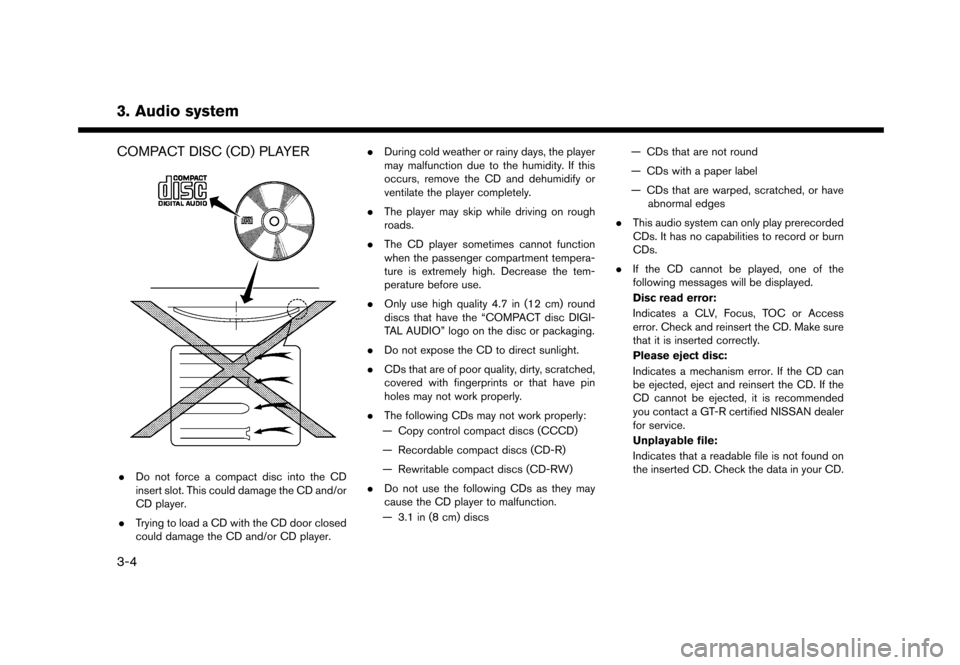
COMPACT DISC (CD) PLAYER
.Do not force a compact disc into the CD
insert slot. This could damage the CD and/or
CD player.
. Trying to load a CD with the CD door closed
could damage the CD and/or CD player. .
During cold weather or rainy days, the player
may malfunction due to the humidity. If this
occurs, remove the CD and dehumidify or
ventilate the player completely.
. The player may skip while driving on rough
roads.
. The CD player sometimes cannot function
when the passenger compartment tempera-
ture is extremely high. Decrease the tem-
perature before use.
. Only use high quality 4.7 in (12 cm) round
discs that have the “COMPACT disc DIGI-
TAL AUDIO” logo on the disc or packaging.
. Do not expose the CD to direct sunlight.
. CDs that are of poor quality, dirty, scratched,
covered with fingerprints or that have pin
holes may not work properly.
. The following CDs may not work properly:
— Copy control compact discs (CCCD)
— Recordable compact discs (CD-R)
— Rewritable compact discs (CD-RW)
. Do not use the following CDs as they may
cause the CD player to malfunction.
— 3.1 in (8 cm) discs — CDs that are not round
— CDs with a paper label
— CDs that are warped, scratched, or have
abnormal edges
. This audio system can only play prerecorded
CDs. It has no capabilities to record or burn
CDs.
. If the CD cannot be played, one of the
following messages will be displayed.
Disc read error:
Indicates a CLV, Focus, TOC or Access
error. Check and reinsert the CD. Make sure
that it is inserted correctly.
Please eject disc:
Indicates a mechanism error. If the CD can
be ejected, eject and reinsert the CD. If the
CD cannot be ejected, it is recommended
you contact a GT-R certified NISSAN dealer
for service.
Unplayable file:
Indicates that a readable file is not found on
the inserted CD. Check the data in your CD.
3-4
Page 43 of 248
USB (Universal Serial Bus) CONNEC-
TION PORTS
WARNING
Do not connect, disconnect or operate
the USB device while driving. Doing so
can be a distraction. If distracted you
could lose control of your vehicle and
cause an accident or serious injury.
NOTICE
.Do not force the USB device into the
USB port. Inserting the USB device
tilted or up-side-down into the port
may damage the port. Make sure that
the USB device is connected correctly
into the USB port.
. Do not grab the USB port cover (if so
equipped) when pulling the USB
device out of the port. This could
damage the port and the cover.
. Do not leave the USB cable in a place
where it can be pulled unintention-
ally. Pulling the cable may damage
the port. The vehicle is not equipped with a USB device.
USB devices should be purchased separately as
necessary.
This system cannot be used to format USB
devices. To format a USB device, use a personal
computer.
In some states/areas, the USB device for the
front seats plays only sound without images for
regulatory reasons, even when the vehicle is
parked.
This system supports various USB memory
devices, USB hard drives and iPod
Šplayers.
Some USB devices may not be supported by this
system.
. Partitioned USB devices may not be played
correctly.
. Some characters used in other languages
(Chinese, Japanese, etc.) are not displayed
properly on the display. Using English
language characters with a USB device is
recommended.
General notes for USB use:
Refer to your device manufacturer’s owner
information regarding the proper care of the
device. Notes for iPod
Šuse:
. Improperly plugging in the iPodŠmay cause
a checkmark to be displayed on and off
(flickering) . Always make sure that the iPod
Š
is connected properly.
. Audiobooks may not play in the same order
as they appear on an iPod
Š.
3. Audio system
3-5
Page 47 of 248
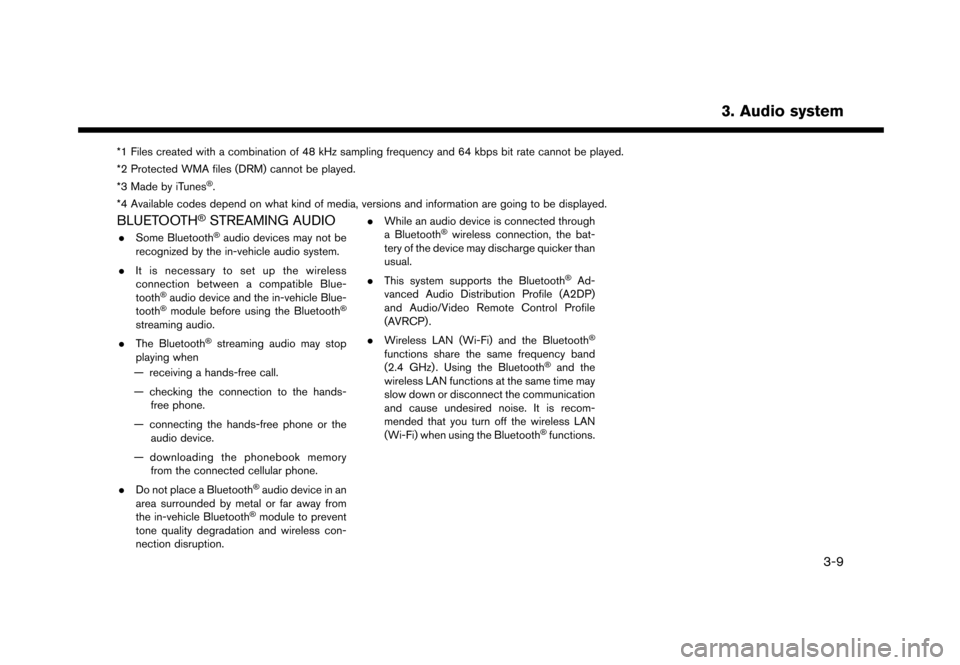
*1 Files created with a combination of 48 kHz sampling frequency and 64 kbps bit rate cannot be played.
*2 Protected WMA files (DRM) cannot be played.
*3 Made by iTunes
Š.
*4 Available codes depend on what kind of media, versions and information are going to be displayed.
BLUETOOTHŠSTREAMING AUDIO
. Some BluetoothŠaudio devices may not be
recognized by the in-vehicle audio system.
. It is necessary to set up the wireless
connection between a compatible Blue-
tooth
Šaudio device and the in-vehicle Blue-
toothŠmodule before using the BluetoothŠ
streaming audio.
. The Bluetooth
Šstreaming audio may stop
playing when
— receiving a hands-free call.
— checking the connection to the hands- free phone.
— connecting the hands-free phone or the audio device.
— downloading the phonebook memory from the connected cellular phone.
. Do not place a Bluetooth
Šaudio device in an
area surrounded by metal or far away from
the in-vehicle Bluetooth
Šmodule to prevent
tone quality degradation and wireless con-
nection disruption. .
While an audio device is connected through
a Bluetooth
Šwireless connection, the bat-
tery of the device may discharge quicker than
usual.
. This system supports the Bluetooth
ŠAd-
vanced Audio Distribution Profile (A2DP)
and Audio/Video Remote Control Profile
(AVRCP) .
. Wireless LAN (Wi-Fi) and the Bluetooth
Š
functions share the same frequency band
(2.4 GHz) . Using the BluetoothŠand the
wireless LAN functions at the same time may
slow down or disconnect the communication
and cause undesired noise. It is recom-
mended that you turn off the wireless LAN
(Wi-Fi) when using the Bluetooth
Šfunctions.
3. Audio system
3-9
Page 78 of 248
![NISSAN GT-R 2017 R35 Multi Function Display Owners Manual 4. Hands-Free Phone
Available item Action
[Use Handset] Transfer the call to the cellularphone.
[Mute]/[Cancel
Mute] When muted, your voice will
not be heard by the person on
the other end of the line](/manual-img/5/524/w960_524-77.png "NISSAN GT-R 2017 R35 Multi Function Display Owners Manual 4. Hands-Free Phone
Available item Action
[Use Handset] Transfer the call to the cellularphone.
[Mute]/[Cancel
Mute] When muted, your voice will
not be heard by the person on
the other end of the line")
4. Hands-Free Phone
Available item Action
[Use Handset] Transfer the call to the cellularphone.
[Mute]/[Cancel
Mute] When muted, your voice will
not be heard by the person on
the other end of the line.
[Dial Number] Using the touch tone, send digits to the connected party
for using services such as
voicemail.
[Switch Call]* Answer another incoming call. The person you are talking to
will be placed on hold. Push
once more to speak to the
person on hold again.
*: Available when a call is received while on the
line with another person. The availability of this
function depends on the phone device.
INFO:
To adjust the person’s voice to be louder or
quieter, push + or - side of <
>on the
steering wheel or turn
on the phone.
HANDS-FREE TEXT MESSAGING
ASSISTANT
WARNING
. Use the text messaging feature after
parking your vehicle in a safe loca-
tion. If you have to use the feature
while driving, exercise extreme cau-
tion at all times so full attention may
be given to vehicle operation.
. Laws in some jurisdictions may re-
strict the use of “Text-to-Speech.”
Check local regulations before using
this feature.
. Laws in some jurisdictions may re-
strict the use of some of the applica-
tions and features, such as social
networking and texting. Check local
regulations for any requirements.
. If you are unable to devote full
attention to vehicle operation while
using the text messaging feature, pull
off the road to a safe location and
stop your vehicle.
NOTE:
This feature is disabled if the connected
device does not support it. See the phone’s
Owner’s Manual for details and instruc-
tions.
The system allows for the sending and receiving
of text messages through the vehicle interface.
Receiving a message
When the cellular phone connected to the
vehicle receives a text message, a notification
will appear on the touch screen display with a
tone.
To check the message, touch [Read]. Touch
[Ignore] to save the message to be checked later.
4-6
Page 84 of 248
![NISSAN GT-R 2017 R35 Multi Function Display Owners Manual 4. Hands-Free Phone
Available
ItemsAction
[Play] Play the recorded voice tag.
[Store] Touch to record a voice tag for the phone number.
[Replace] Touch to rerecord the voice tag.
[Delete] Touch to del](/manual-img/5/524/w960_524-83.png "NISSAN GT-R 2017 R35 Multi Function Display Owners Manual 4. Hands-Free Phone
Available
ItemsAction
[Play] Play the recorded voice tag.
[Store] Touch to record a voice tag for the phone number.
[Replace] Touch to rerecord the voice tag.
[Delete] Touch to del")
4. Hands-Free Phone
Available
ItemsAction
[Play] Play the recorded voice tag.
[Store] Touch to record a voice tag for the phone number.
[Replace] Touch to rerecord the voice tag.
[Delete] Touch to delete the voice tag.
BLUETOOTHŠSETTING
The BluetoothŠsetting can be changed.
1. Touch [Settings] on the Launch Bar.
2. Touch [Bluetooth].
Available item Action
[Bluetooth] If this setting is turned off, the connection between the BluetoothŠdevices and the in-vehicle BluetoothŠ
module will be canceled.
[Connect Device] Connects to the BluetoothŠdevice. Up to 5 devices can be registered.
[Select BT Device] [Phone]Registered devices are shown on the list. Select a BluetoothŠdevice from the list.
Information of the selected device can be edited and the device can also be deleted from the device list.
[Audio Player]
[Edit Bluetooth Information] [OK] Touch to apply the changes after editing the Bluetooth
Šinformation.
[PIN] PIN code can be checked and changed.
[Device Name] Device Name can be checked and changed.
[Device Address] Device Address can be checked.
4-12
Page 90 of 248
![NISSAN GT-R 2017 R35 Multi Function Display Owners Manual 5. Information
VIEWING ECO DRIVE REPORT
Your driving score will be displayed in real time,
with 100 points designated as the score for ideal
eco-driving.
1. Touch [Info] on the Launch Bar.
2. Touch [V](/manual-img/5/524/w960_524-89.png "NISSAN GT-R 2017 R35 Multi Function Display Owners Manual 5. Information
VIEWING ECO DRIVE REPORT
Your driving score will be displayed in real time,
with 100 points designated as the score for ideal
eco-driving.
1. Touch [Info] on the Launch Bar.
2. Touch [V")
5. Information
VIEWING ECO DRIVE REPORT
Your driving score will be displayed in real time,
with 100 points designated as the score for ideal
eco-driving.
1. Touch [Info] on the Launch Bar.
2. Touch [Vehicle] and touch [Eco Drive Re-port].
Touch [Log] to view the Drive Report history.
Touch [Reset] to clear the past records.
To improve your score: . When starting off, depress the accelerator
gently.
. When cruising, accelerate and decelerate as
little as possible.
. When decelerating, release the accelerator
early.
VIEWING TIRE PRESSURE INFOR-
MATION
The tire pressure will be displayed for reference.
The pressure indication “** psi” on the screen
means that the tire pressure is being measured.
After a few driving trips, the pressure for each tire
will be displayed.
In case of low tire pressure, low tire pressure
screen will be displayed. Check the pressure for
all tires.
Tire pressure rises and falls depending on the
heat caused by the vehicle’s traveling condition
and the temperature.
To change the measurement units, touch [Select
Units].
The units can also be changed from the Settings
menu.
“Language and unit settings” (page 2-20)
WARNING
.When a wheel is replaced, tire pres-
sure will not be indicated, the TPMS
will not function and the low tire
pressure warning light will flash for
approximately 1 minute. The light will
remain on after 1 minute. It is recom-
mended you contact a NISSAN dealer
or GT-R certified NISSAN dealer as
soon as possible for tire replacement
and/or system resetting.
. Replacing tires with those not origin-
ally specified by NISSAN could affect
the proper operation of the TPMS.
5-6
Page 91 of 248
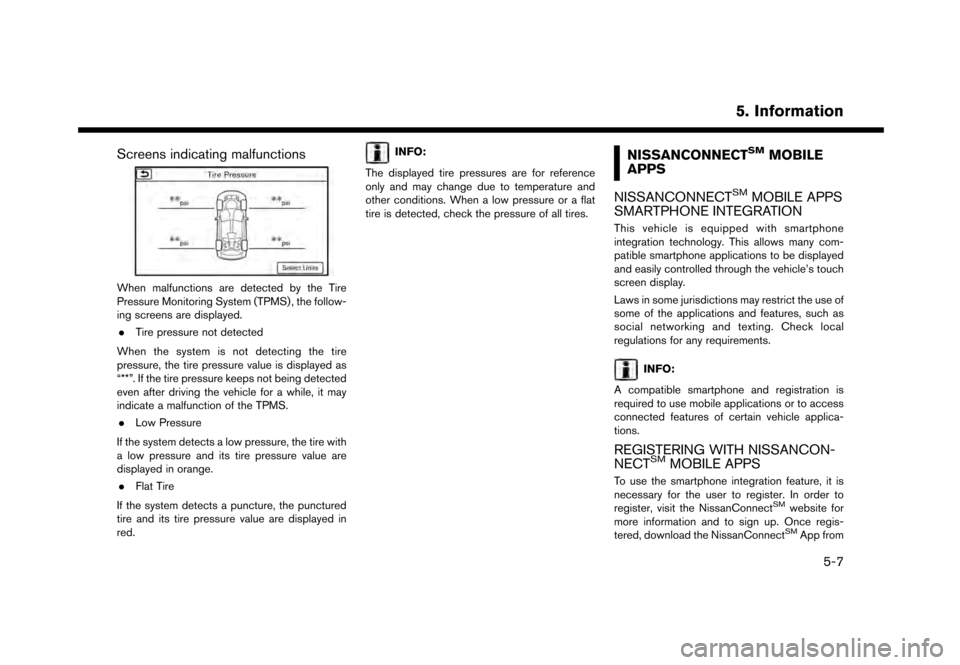
Screens indicating malfunctions
When malfunctions are detected by the Tire
Pressure Monitoring System (TPMS) , the follow-
ing screens are displayed.. Tire pressure not detected
When the system is not detecting the tire
pressure, the tire pressure value is displayed as
“**”. If the tire pressure keeps not being detected
even after driving the vehicle for a while, it may
indicate a malfunction of the TPMS. . Low Pressure
If the system detects a low pressure, the tire with
a low pressure and its tire pressure value are
displayed in orange. . Flat Tire
If the system detects a puncture, the punctured
tire and its tire pressure value are displayed in
red.
INFO:
The displayed tire pressures are for reference
only and may change due to temperature and
other conditions. When a low pressure or a flat
tire is detected, check the pressure of all tires.NISSANCONNECTSMMOBILE
APPS
NISSANCONNECT
SMMOBILE APPS
SMARTPHONE INTEGRATION
This vehicle is equipped with smartphone
integration technology. This allows many com-
patible smartphone applications to be displayed
and easily controlled through the vehicle’s touch
screen display.
Laws in some jurisdictions may restrict the use of
some of the applications and features, such as
social networking and texting. Check local
regulations for any requirements.
INFO:
A compatible smartphone and registration is
required to use mobile applications or to access
connected features of certain vehicle applica-
tions.
REGISTERING WITH NISSANCON-
NECTSMMOBILE APPS
To use the smartphone integration feature, it is
necessary for the user to register. In order to
register, visit the NissanConnect
SMwebsite for
more information and to sign up. Once regis-
tered, download the NissanConnect
SMApp from
5. Information
5-7
Page 94 of 248
5. Information
WARNING
.Please note that the Automatic Colli-
sion Notification service and Emer-
gency Call function cannot be used in
the following conditions:
— Emergency functions and services will not be available without a paid
subscription to NissanConnect
SM
Services.
— The NissanConnect
SMServices
network system is disabled.
— The vehicle moves outside the service area where the TCU (Tele-
matics Control Unit) is connected
to the system.
— The vehicle is outside the area where the cellular network service
is receivable.
— The vehicle is in a location with poor signal reception such as tun-
nels, underground parking gar-
ages, behind buildings or in
mountainous areas.
— The line is busy. — The TCU (Telematics Control Unit)
or other systems of your vehicle
are not working properly.
— It may not be possible to make an emergency call depending on the
severity of a collision and/or emer-
gency.
. Park the vehicle in a safe location
and set the parking brake before
operating
. Only use this service in case of an
emergency. There may be a penalty
for inappropriate use of the service.
. Radio waves could adversely affect
electric medical equipment. Indivi-
duals who use a pacemaker should
contact the device manufacturer re-
garding any possible effects before
using the system.
. The TCU (Telematics Control Unit)
antenna is installed inside the upper
central part of the instrument panel.
An occupant should not get any
closer to the antenna than specified
by the pacemaker manufacturer. The
radio waves from the TCU antenna
may adversely affect the operation of
the pacemaker while using the Nis- sanConnect
SMServices.
INFO:
. NissanConnect
SMServices features are
dependent upon subscription enrollment
and the telematics device being in operative
condition, cellular connectivity, navigation
map data and GPS satellite signal reception.
Terms and conditions of the NissanCon-
nect
SMServices Subscription Agreement
apply.
. Enrollment is required in order to receive
NissanConnect
SMServices. The services
that can be received vary depending on the
plan in which you are enrolled.
. A six-month trial is included beginning on the
date of purchase, however you must still be
enrolled and activated to use services.
. After the trial period, you must enroll in a paid
subscription for NissanConnect
SMServices
to continue using the features. The services
that can be received vary depending on the
plan to which you subscribe.
. Laws in some jurisdictions may restrict the
use of “Text-to-Speech.” Check local reg-
ulations before using this feature.
5-10