2017 NISSAN GT-R check
[x] Cancel search: checkPage 96 of 248
5. Information
.Send to Car:
Customers can access turn-by-turn naviga-
tion provided by Google maps and sent
directly to the NissanConnect
SMvehicle.
. Journey Planner:
Customers can create a multiple way-point
route via Journey Planner on the NissanCon-
nect
SMServices website and send the de-
tails directly to their vehicle.
. Destination Download:
Customers can search for different locations
via the NissanConnect
SMServices website
and send them directly to their vehicle.
. Connected Search:
Customers can access Internet search en-
gines directly from the vehicle to find exact
destinations to navigate to.
. Assisted Search:
Customers can use Assisted Search to get
further destination assistance via operator
service or live Response Specialist for more
detailed information.
“Searching by using Voice Menu but-
ton on map” (page 6-25)
. Stolen Vehicle Locator:
In the event that the customer’s vehicle is
stolen, after filing a police report the custo- mer can contact NissanConnect
SMServices
via phone and report the vehicle stolen. At
that point, NissanConnect
SMServices emer-
gency support staff will work with authorities
to attempt to recover the vehicle.
. Valet Alert:
Customers will be notified if their vehicle is
driven more than 0.2 miles once they activate
Valet Alert via the NissanConnect
SMSer-
vices website or Companion App.
Notice to BluetoothŠHands-Free
Phone users
The BluetoothŠHands-Free Phone System will
be disabled and not be able to take phone calls
while the vehicle is connected to the Nissan-
Connect
SMServices Response Specialists or
the emergency support staff at the NissanCon-
nect
SMService Response Center. This is to
avoid various services by NissanConnectSM
Services Response Specialists (such as As-
sisted Search) and NissanConnectSMServices
emergency support staff being interrupted by
incoming calls. Incoming phone calls received
while the vehicle is connected to the Service
Center will not be listed in the call history of the
Bluetooth
ŠHands-free phone system. However
those incoming calls may be listed in the call
history of your mobile phone, depending on its capabilities. After disconnecting communication
with the NissanConnect
SMServices Response
Specialist or NissanConnectSMServices emer-
gency support staff, check the incoming call
history on your mobile phone when it is safe to do
so.
Service application
A separately purchased NissanConnectSMSer-
vices subscription is required. For more details,
refer to the NissanConnect
SMServices website
or contact the NissanConnectSMServices sup-
port line.
NissanConnect
SMServices website:
For U.S.
www.nissanusa.com/connect
For Canada
www.nissan.ca/nissanconnect (English)
www.nissan.ca/nissanconnect/fr (French)
NissanConnect
SMServices support
line:
1-855-426-6628
5-12
Page 100 of 248
5. Information
4. Touch a preferred folder. A list of informationfeeds is displayed. The content is announced
by the system (Text-to-Speech) while the
vehicle is being driven, or if parked, you can
read the content on the display.
INFO:
. Touch [Stop] during communication with the
NissanConnect
SMServices Data Center to
cancel the connection.
. A message is displayed when the commu-
nication is disconnected while downloading
information due to a poor communication
status. Select [Yes] to restart the download.
. Laws in some jurisdictions may restrict the
use of “Text-to-Speech.” Check local reg-
ulations before using this feature.
. Some terminology such as personal names,
place names, special terms, symbols, etc.
may not be announced correctly. This is not a
malfunction.
. The system will pause announcements when
interrupted by the voice guidance given by
the navigation system. When the voice
guidance finishes, the system will restart
the announcement. .
The volume can be adjusted when the
system announces the information.
“Volume and Beeps settings”
(page 2-19)
. The selected content is read out while the
vehicle is being driven, or if parked, you can
read the content on the display.
. Content settings can be made using the
NissanConnect
SMServices website. For
more details, refer to the NissanConnectSM
Services website or contact the NissanCon-
nectSMServices support line.
NissanConnectSMServices website:
For U.S.
www.nissanusa.com/connect
For Canada
www.nissan.ca/nissanconnect (English)
www.nissan.ca/nissanconnect/fr (French)
NissanConnect
SMServices support
line:
1-855-426-6628
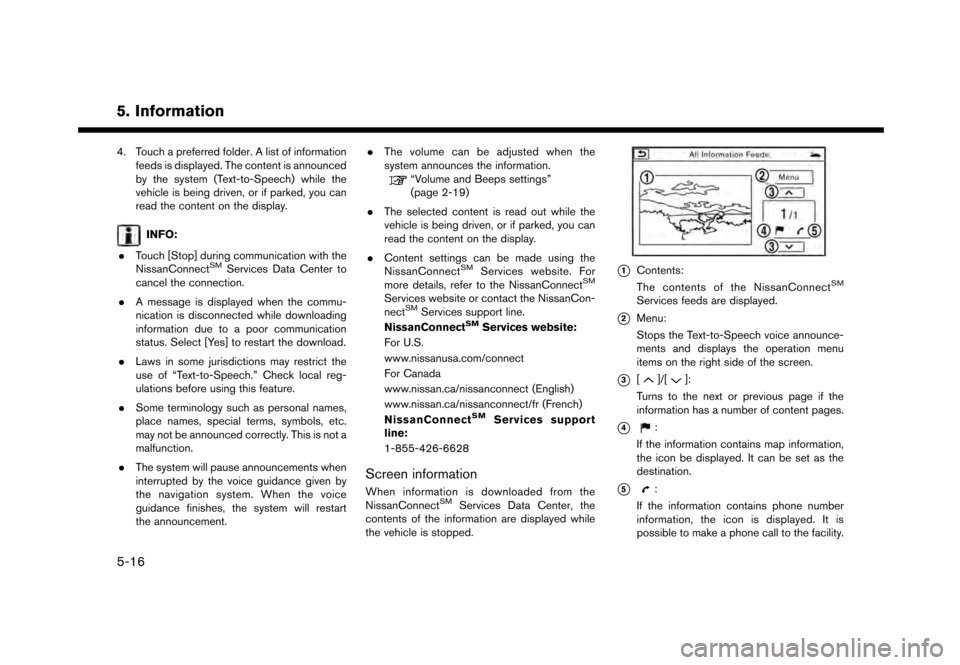
Screen information
When information is downloaded from the
NissanConnectSMServices Data Center, the
contents of the information are displayed while
the vehicle is stopped.
*1Contents:
The contents of the NissanConnectSM
Services feeds are displayed.
*2Menu:
Stops the Text-to-Speech voice announce-
ments and displays the operation menu
items on the right side of the screen.
*3[]/[]:
Turns to the next or previous page if the
information has a number of content pages.
*4:
If the information contains map information,
the icon be displayed. It can be set as the
destination.
*5:
If the information contains phone number
information, the icon is displayed. It is
possible to make a phone call to the facility.
5-16
Page 104 of 248
5. Information
SiriusXM TRAVEL LINK
SiriusXM Travel Link information is a subscription
service offered by SiriusXM Satellite Radio. It is
necessary to subscribe to use the SiriusXM
Travel Link information.
This service provides real-time information re-
garding current weather, fuel prices, sports
scores, stock tickers and movie times where
available. The SiriusXM Travel Link is broadcast
to the vehicle by SiriusXM Satellite Radio.
The service enables you to view the following
information on the navigation system:
*Current information around the destination
*Detailed information and forecasts of an area of
interest
*Countrywide and local maps with the current
weather, temperature, warnings and road condi-
tion information
*List of warning/watches events detected
around the current location
*Pop-up messages on the navigation screen with
voice announcements when warnings and
watches are detected around the current loca-
tion
SXM service menus can be accessed from the
information screen.
“Information menu” (page 5-2)
WARNING
SiriusXM Travel Link information is not a
substitute for attentive driving. Weather
conditions change constantly and emer-
gency situations can arise without warn-
ing. Relying only on SiriusXM Travel Link
information could result in serious per-
sonal injury.
VIEWING SiriusXM TRAVEL LINK
SiriusXM Satellite Radio and SiriusXM Travel
Link subscriptions are sold separately or as a
package, and are continuous until you call
SiriusXM to cancel. See SiriusXM Customer
Agreement for complete terms at www.siriusxm.
com (for U.S.) or www.siriusxm.ca (for Canada) .
SiriusXM Travel Link is available in select
markets.
For more information, refer to the SiriusXM
website or call Listener Care.SiriusXM website:
For U.S.
www.siriusxm.com/travellink
For Canada www.siriusxm.ca/siriusxm-traffic-services/
siriusxm-travel-link (English)
www.siriusxm.ca/fr/services-siriusxm-
traffic/siriusxm-travel-link (French)
Listener Care:
For U.S.
1-877-447-0011
For Canada
1-877-438-9677
INFO:
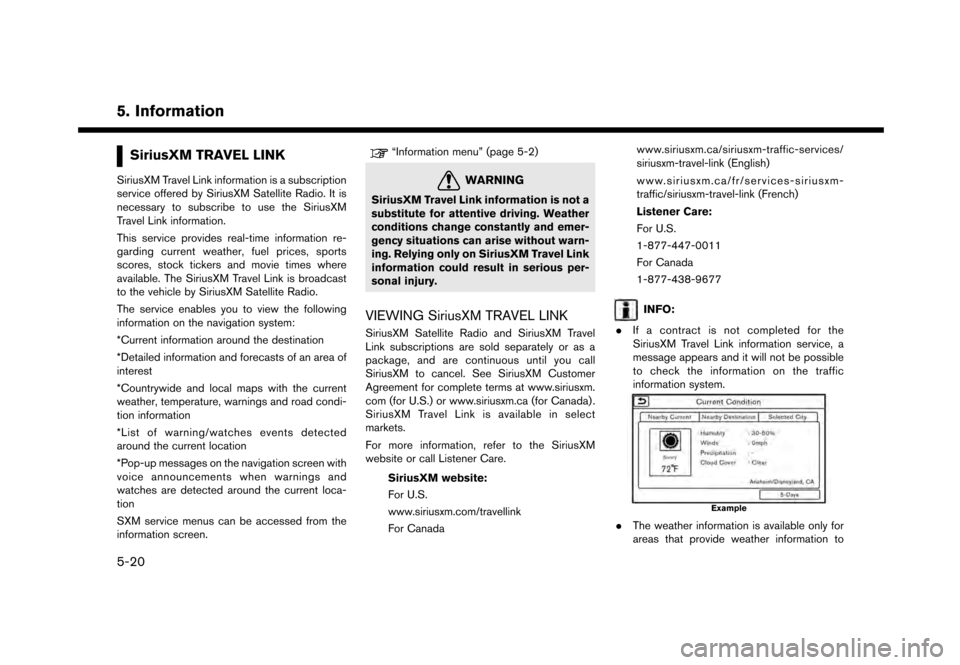
. If a contract is not completed for the
SiriusXM Travel Link information service, a
message appears and it will not be possible
to check the information on the traffic
information system.
Example
.The weather information is available only for
areas that provide weather information to
5-20
Page 124 of 248
![NISSAN GT-R 2017 R35 Multi Function Display Owners Manual 6. Navigation
4. Enter the state/province, house number,street and city of the destination and then
touch [OK]. The route is displayed.
5. Touch [Start] to start route guidance.
Voice command
1. Push](/manual-img/5/524/w960_524-123.png "NISSAN GT-R 2017 R35 Multi Function Display Owners Manual 6. Navigation
4. Enter the state/province, house number,street and city of the destination and then
touch [OK]. The route is displayed.
5. Touch [Start] to start route guidance.
Voice command
1. Push")
6. Navigation
4. Enter the state/province, house number,street and city of the destination and then
touch [OK]. The route is displayed.
5. Touch [Start] to start route guidance.
Voice command
1. Push <
>located on the steering wheel.
2. After the tone sounds, speak a command.
Use the following voice command to search for a
destination by address:
“Street Address”*
*: This voice command operation is available only
when the language setting is in English.
FINDING NEARBY PLACE
A facility located near the current vehicle location
can be set as the destination.
1. Touch [Navi] on the Launch Bar.
2. Touch [Nearby Points of Interest]. The category list is displayed.
3. Select [Emergency Services] for example.
4. Select preferred category from the sub
category list.
5. Touch the preferred destination from the list.The position of the selected location is
displayed in the preview on the touch screen
display.
INFO:
.If the suggested route is already set, by
touching [Show Along Route] on the
touch screen display, the system displays
only the facilities located along the route.
.A maximum of 100 facilities can bedisplayed on the list screen.
6. Touch [Start] to start route guidance.
INFO:
. Depending on the type of facility, a message
asking if you have checked the facility
availability may be displayed. Touch [Yes] or
[No] after reading the message.
. You can also set the destination by touching
[
] when scrolling the map and selecting
[Nearby POIs] from the menu.
. Nearby Points of Interest category list can be
customized from [Customize Nearby POIs].
“Navigation settings” (page 6-54)
6-18
Page 125 of 248
Voice command
1. Push <
>located on the steering wheel.
2. After the tone sounds, speak a command.
Use the following voice command to set a nearby
place as a destination:
“Nearby”
FINDING POINTS OF INTEREST
This allows you to find a facility by name or by
category. Specify the region and city of the
destination to find it more quickly.
NOTE:
Locations and business hours of facilities
are subject to change, which may not be
reflected in the map data. Double-check
this information before you go to an
emergency facility to ensure that you can
receive the proper support. Otherwise, you
may not receive emergency help when you
arrive at the destination.
A confirmation message also appears on
the navigation screen. Follow the displayed
instructions and check the items required.
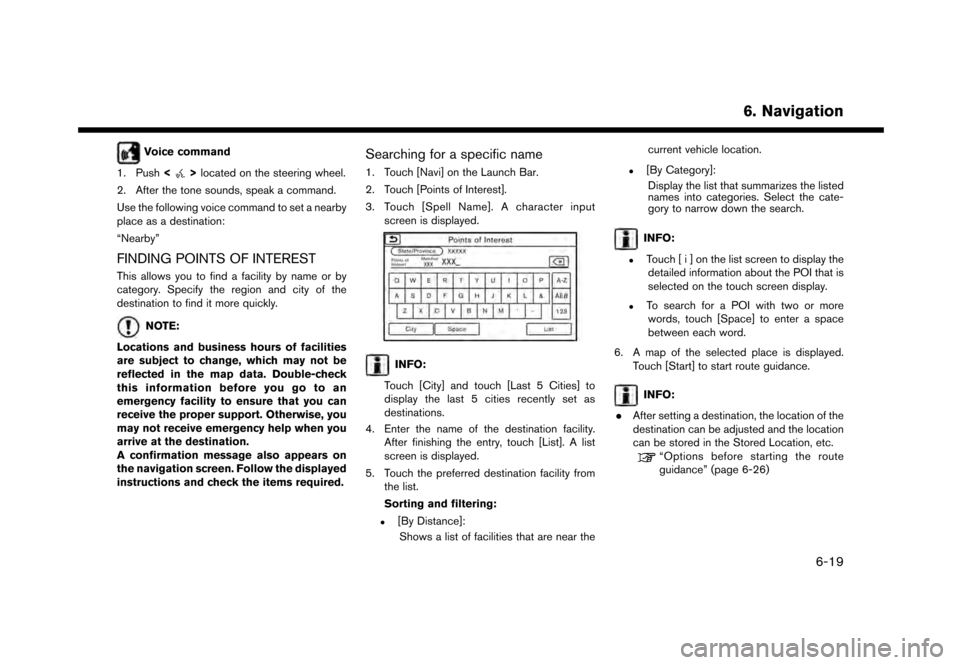
Searching for a specific name
1. Touch [Navi] on the Launch Bar.
2. Touch [Points of Interest].
3. Touch [Spell Name]. A character input screen is displayed.
INFO:
Touch [City] and touch [Last 5 Cities] to
display the last 5 cities recently set as
destinations.
4. Enter the name of the destination facility. After finishing the entry, touch [List]. A list
screen is displayed.
5. Touch the preferred destination facility from the list.
Sorting and filtering:
.[By Distance]:
Shows a list of facilities that are near the current vehicle location.
.[By Category]:
Display the list that summarizes the listed
names into categories. Select the cate-
gory to narrow down the search.
INFO:
.Touch [ i ] on the list screen to display thedetailed information about the POI that is
selected on the touch screen display.
.To search for a POI with two or more
words, touch [Space] to enter a space
between each word.
6. A map of the selected place is displayed. Touch [Start] to start route guidance.
INFO:
. After setting a destination, the location of the
destination can be adjusted and the location
can be stored in the Stored Location, etc.
“Options before starting the route
guidance” (page 6-26)
6. Navigation
6-19
Page 150 of 248
6. Navigation
4. Touch a preferred events from the list tocheck the detailed information and the map.
Displaying urgent traffic information
When an urgent event is found around the
current vehicle location, a message pops up
automatically on the touch screen display with a
voice announcement.
The message includes the icon, event type, event
information and the direct distance from the
current location to the event.
INFO:
. Urgent traffic information is displayed re-
gardless of whether [Use Traffic Info] func-
tion is on or off.
“Traffic information setting”
(page 6-45)
. When there are multiple urgent events, the
event with the shortest direct distance from
the current location is displayed.
. If the urgent event is on the recommended
route, and if a detour is found, the detour
route notification screen is displayed when
the vehicle approaches the detour point.
Traffic information on map
With a subscription to SiriusXM Traffic service,
traffic information is displayed on both 2D map
and Birdview
TMmap screen.“Notes on SiriusXM Traffic information”
(page 5-21)
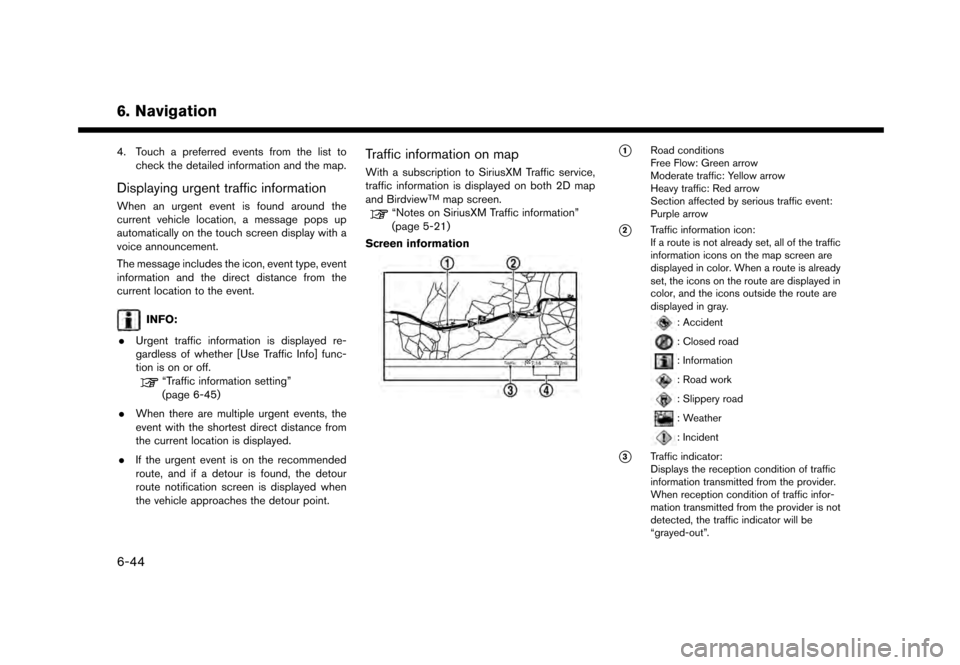
Screen information
*1Road conditions
Free Flow: Green arrow
Moderate traffic: Yellow arrow
Heavy traffic: Red arrow
Section affected by serious traffic event:
Purple arrow
*2Traffic information icon:
If a route is not already set, all of the traffic
information icons on the map screen are
displayed in color. When a route is already
set, the icons on the route are displayed in
color, and the icons outside the route are
displayed in gray.
: Accident
: Closed road
: Information
: Road work
: Slippery road
: Weather
: Incident
*3Traffic indicator:
Displays the reception condition of traffic
information transmitted from the provider.
When reception condition of traffic infor-
mation transmitted from the provider is not
detected, the traffic indicator will be
“grayed-out”.
6-44
Page 168 of 248
6. Navigation
— The endpoint of the route may not exactlymatch the destination.
— If you calculate a route on a main road, the system may display a route from another
main road. This may be because the
position of the vehicle icon is not accu-
rate. In this case, park the vehicle in a safe
location and reset the vehicle icon, or
continue driving to see if the position of
the vehicle icon is automatically adjusted
before recalculating the route.
— There are cases in which the system shows an indirect route to reach the
destination or waypoints, if you set them
from stored or facility information. In order
to correct this, you must be careful about
the traffic direction, especially when lanes
with different travel directions are shown
separately, such as interchanges and
service areas.
— This system makes no distinction be- tween limited traffic control and total
control (blockage) . It may show an
indirect route even if the road is usable.
— Even if the ferry preference is set to OFF, a route that uses a ferry line may be
suggested.ROUTE GUIDANCE
INFO:
The system will announce street names when the
system language is set to English. Street names
are not announced when the system is set to
French or Spanish.
Repeating voice guidance
This function is available throughout route
guidance, from the time after the route calcula-
tion is completed until the vehicle arrives at the
destination. Push and hold
Page 214 of 248
![NISSAN GT-R 2017 R35 Multi Function Display Owners Manual 8. Multi function meter
Checking time log
You can review the list of past measured times.
1. Touch [TIME LOG]. The list screen will bedisplayed.
2. Touch the record you wish to display. Themenu screen](/manual-img/5/524/w960_524-213.png "NISSAN GT-R 2017 R35 Multi Function Display Owners Manual 8. Multi function meter
Checking time log
You can review the list of past measured times.
1. Touch [TIME LOG]. The list screen will bedisplayed.
2. Touch the record you wish to display. Themenu screen")
8. Multi function meter
Checking time log
You can review the list of past measured times.
1. Touch [TIME LOG]. The list screen will bedisplayed.
2. Touch the record you wish to display. Themenu screen will be displayed.
3. Touch [Stop Watch Times]. The details of theselected record will be displayed.
Saving to USB device
You can save the time records saved in the
system onto a USB device.
1. Insert the USB device into the USB port.
2. Touch [TIME LOG]. The list screen will bedisplayed.
3. Touch the record you wish to display. The
menu screen will be displayed.
8-22