2017 NISSAN ARMADA USB
[x] Cancel search: USBPage 299 of 614
4-102Monitor, heater, air conditioner, audio, phone and voice recognition systems
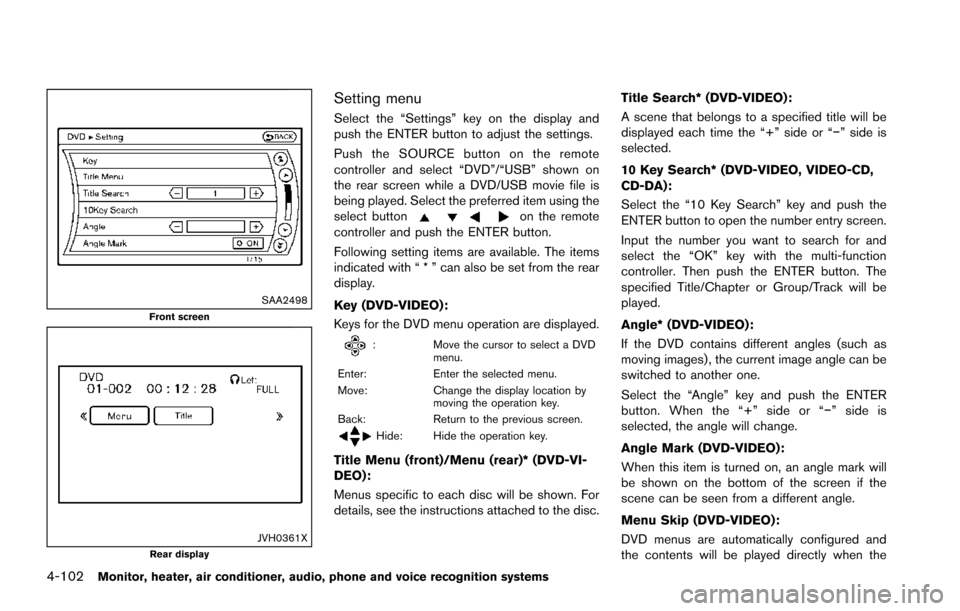
SAA2498Front screen
JVH0361XRear display
Setting menu
Select the “Settings” key on the display and
push the ENTER button to adjust the settings.
Push the SOURCE button on the remote
controller and select “DVD”/“USB” shown on
the rear screen while a DVD/USB movie file is
being played. Select the preferred item using the
select button
on the remote
controller and push the ENTER button.
Following setting items are available. The items
indicated with “ * ” can also be set from the rear
display.
Key (DVD-VIDEO) :
Keys for the DVD menu operation are displayed.
: Move the cursor to select a DVD
menu.
Enter: Enter the selected menu.
Move: Change the display location by
moving the operation key.
Back: Return to the previous screen.
Hide: Hide the operation key.
Title Menu (front)/Menu (rear)* (DVD-VI-
DEO):
Menus specific to each disc will be shown. For
details, see the instructions attached to the disc. Title Search* (DVD-VIDEO) :
A scene that belongs to a specified title will be
displayed each time the “+” side or “í” side is
selected.
10 Key Search* (DVD-VIDEO, VIDEO-CD,
CD-DA):
Select the “10 Key Search” key and push the
ENTER button to open the number entry screen.
Input the number you want to search for and
select the “OK” key with the multi-function
controller. Then push the ENTER button. The
specified Title/Chapter or Group/Track will be
played.
Angle* (DVD-VIDEO):
If the DVD contains different angles (such as
moving images) , the current image angle can be
switched to another one.
Select the “Angle” key and push the ENTER
button. When the “+” side or “í
” side is
selected, the angle will change.
Angle Mark (DVD-VIDEO):
When this item is turned on, an angle mark will
be shown on the bottom of the screen if the
scene can be seen from a different angle.
Menu Skip (DVD-VIDEO):
DVD menus are automatically configured and
the contents will be played directly when the
Page 301 of 614
4-104Monitor, heater, air conditioner, audio, phone and voice recognition systems
SETUP button:
Push the SETUP button to display the rear seat
display settings. (See “Rear display settings”
(P.4-104) .)
BACK button:
Push to go back to the previous screen or
cancel the selection.
Volume:
To adjust the speaker volume push
oron the volume control button.
This button is used to control the volume from
the vehicle speakers. To adjust the volume of the
headphones, use the volume knob that is
attached to the headphones.
Keypad:
: PLAY/PAUSE button
: STOP button
: FORWARD button
: REWIND button
: FORWARD button for commercial skip (forDVD-VIDEO and DVD-VR)
: REWIND button for commercial skip (forDVD-VIDEO and DVD-VR)
Key illumination button:
If the key illumination button is pushed, the
buttons on the remote controller will be lit up.
Rear display settings
Display mode adjustment of the rear seat
displays can be performed while a DVD or
USB movie is being played. Set the rear display
select switch on the remote controller to either L
or R according to the display you want to set,
and then push the SETUP button. It is not
possible to make display mode adjustments to
the left and right displays at the same time.
Aspect:
Select the display size from “FULL”, “NORMAL”,
“CINEMA” or “WIDE”.
Picture Mode:
Select the Picture Mode from “NORMAL”,
“DYNAMIC”, “CINEMA”, “GAME” .
To adjust the display brightness automatically,
select the “Brightness” key and then select from
“DARKER”, “NORMAL” or “BRIGHTER”. When
adjusting manually, select “OFF” and push
ENTER button on the remote controller.
To adjust tint, color or contrast, select a key
using the select button (
or) , push
ENTER on the remote controller.
Push the BACK button on the remote controller
to apply the settings and return to the previous
display.
To return the adjustment levels to the default
value, select “Execute” next to “Initialization” push the select button (
,) on the remote
controller and push the ENTER button. The
“Execute” key is deactivated when the picture
mode settings are already in the default value.
Color System:
To choose the color system, select from
“NTSC”, “PAL”, “PAL-60”, “PAL-M”, “PAL-N” or
“AUTO” .
3D Y/C filter:
Set to ON/OFF push the select button (
or) and push ENTER button on the remote
controller. When turned on, small characters
and an outline of the shapes will be displayed
more clearly than when turned off.
AUX Volume Setting:
This is only active when in the Rear AUX mode.
To set the AUX volume, select from “HIGH”,
“LOW” or “MIDDLE” .
Page 302 of 614
OPERATING TIPS
.The images from a device that is connected
to the rear auxiliary input jacks cannot be
viewed on the front displays.
. It is not possible to display different video
files, such as DVD or video files in the USB
memory, on the front and rear displays at the
same time.
. It is not possible to play an audio file and a
video file in the same USB memory at the
same time.
Multiple source display
It is possible to play different sources on each
display. The following example shows how to
operate multiple sources.
It is also possible to set in the front display. For
more details, see “REAR DISPLAY settings”
(P.4-15) .
1. Display a video file in the front display by
selecting the DVD mode.
2. Set the rear display select switch on the remote controller to the L side and push the
POWER button. The left rear display will
turn on and the DVD screen will be
displayed.
(If “Auto Display” is set to ON, the display
will turn on automatically.) 3. Set the rear display select switch on the
remote controller to the R side and push the
POWER button. The right rear display will
turn on and the DVD screen will be
displayed.
(If “Auto Display” is set to ON, the display
will turn on automatically.)
4. Switch the source on the front display to an audio source. The sound from the speakers
switches according to the front display. The
rear display continues to display the DVD.
5. Turn on a pair of headphones and listen to the DVD on the rear displays using the
headphones.
6. Connect an auxiliary device to the AUX jack, set the rear display select switch to the L or
R side and push the SOURCE button to
select “Rear AUX”. The selected side of the
rear display will switch to the AUX mode.
The other rear display will continue to
display the DVD.
7. Turn on the other pair of headphones. If the sound from the headphones is not from the
AUX jacks, switch the channel with the
channel select switch on the headphones.
CARE AND MAINTENANCE
Use a lightly dampened, lint free cloth to clean
the surfaces of your DVD Entertainment System
(DVD player face, screen, remote controller,
etc.) .
CAUTION
.Do not use any solvents or cleaning
solutions when cleaning the video
system.
. Do not use excessive force on the
monitor screen.
. Avoid touching or scratching the
monitor screen as it may become
dirty or damaged.
. Do not attempt to operate the
system in extreme temperature con-
ditions [below í48F( í208 C) and
above 1588F (708C)].
. Do not attempt to operate the
system in extreme humidity condi-
tions (less than 10% or more than
75%) .
Monitor, heater, air conditioner, audio, phone and voice recognition systems4-105
Page 332 of 614
Audio Commands:
CommandAction
CD Starts to play a CD.
FM Turns to the FM band, selecting the station last played.
AM Turns to the AM band, selecting the station last played.
XM Turns to the SiriusXM Satellite Radio band, selecting the station last played.
USB Turns on the USB memory.
Bluetooth Audio Turns on the Bluetooth
Šaudio player.
AUX Turns on the AUX.
Monitor, heater, air conditioner, audio, phone and voice recognition systems4-135
Page 606 of 614
11 Index
A
ABS (Anti-lock Braking System) ......................... 5-137
Advanced Air Bag System ....................................... 1-58
Aiming controlHeadlights ............................................................. 2-39
Air bag system Advanced Air Bag System ................................ 1-58
Front passenger air bag and status light ...... 1-60
Front-seat mounted side-impact
supplemental air bag system ............................ 1-65
Roof-mounted curtain side-impact and
rollover supplemental air bag system ............. 1-65
Air bag warning labels .............................................. 1-68
Air bag warning light ..................................... 1-68, 2-16
Air cleaner housing filter ........................................... 8-15
Air conditioner Air conditioner operation ................................... 4-52
Air conditioner service ....................................... 4-58
Air conditioner specification label ................. 10-12
Air conditioning system refrigerant and
lubricant recommendations .................... 4-58, 10-7
Automatic air conditioner .................................. 4-54
In-cabin microfilter ............................................... 4-58
Alarm, How to stop alarm (see vehicle
security system) .......................................................... 2-31
Alcohol, drugs and driving ....................................... 5-10
Antenna ......................................................................... 4-92
Anti-lock Braking System (ABS) ......................... 5-137
Anti-lock Braking System (ABS) warning light .... 2-11
Appearance care Exterior appearance care ..................................... 7-2
Interior appearance care ....................................... 7-4
Armrest .......................................................................... 1-10
Around View
ŠMonitor .............................................. 4-29 Audible reminders ...................................................... 2-20
Audio operation precautions ................................... 4-59
Audio system ............................................................... 4-59
Steering wheel audio controls ......................... 4-91
Auto closure ................................................................. 3-25
Autolight system ......................................................... 2-37
Automatic Air conditioner ...................................................... 4-54
Automatic Transmission Fluid (ATF) .................. 8-8
Door locks ................................................................ 3-6
Drive positioner .................................................... 3-33
Driving with automatic transmission ............... 5-18
Seat positioner ..................................................... 3-33
Average fuel consumption and speed .................. 2-28
Avoiding collision and rollover .................................. 5-8
B
Back door (See liftgate) ........................................... 3-22
Back-up Collision Intervention (BCI) ..................... 5-56
Battery ........................................................................... 8-11 Battery saver system ............................... 2-39, 2-64
Intelligent Key ....................................................... 8-21
Variable voltage control system ....................... 8-13
Before starting the engine ....................................... 5-15
Belts (See drive belts) .............................................. 8-13
Blind Spot Intervention
Š(BSI) ................................ 5-43
Blind Spot Intervention (BSI) ON
indicator light ............................................................... 2-17
Blind Spot Warning (BSW) .................................... 5-33
Blind Spot Warning (BSW)/Blind Spot
Intervention (BSI) system warning light ................ 2-12
Bluetooth
ŠHands-Free Phone System ............. 4-106
BluetoothŠstreaming audio ..................................... 4-81
Booster seats .............................................................. 1-48 Brake
Anti-lock Braking System (ABS) ................... 5-137
Brake booster ....................................................... 8-18
Brake fluid ................................................................ 8-9
Brake system ...................................................... 5-136
Parking brake operation ..................................... 5-22
Warning light ........................................................ 2-12
Break-in schedule .................................................... 5-121
Brightness control Display ON/OFF button ........................................ 4-8
Instrument panel .................................................. 2-40
Bulb check/instrument panel ................................... 2-11
Bulb replacement ....................................................... 8-24
C
Cabin air filter .............................................................. 4-58
CAMERA button ........................................................... 4-8
Capacities and
recommended fluids/lubricants ............................... 10-2
Car phone or CB radio .......................................... 4-106
Cargo floor box ........................................................... 2-56
Cargo light ................................................................... 2-67
Catalytic converter, Three way catalyst .................. 5-4
CD/DVD/USB memory care and cleaning .......... 4-90
Center multi-function control panel ......................... 4-4
Chassis and body maintenance ............................. 9-11
Child restraints ............................................................ 1-31 Booster seats ....................................................... 1-48
LATCH system ..................................................... 1-33
Precautions on child restraints ........................ 1-31
Top tether strap ................................................... 1-36
Child safety .................................................................. 1-28
Child safety rear door lock ........................................ 3-6
Chimes
Audible reminders ............................................... 2-20
Page 611 of 614
11-6
Starting the engine ............................................. 5-16
STATUS button ............................................................. 4-8
Status light, Front passenger air bag .................... 1-60
Steering Heated steering wheel ....................................... 2-42
Power steering ................................................... 5-135
Power steering fluid ............................................... 8-8
Steering-wheel-mounted controls
for audio ................................................................. 4-91
Tilt/telescopic steering ....................................... 3-29
Storage ......................................................................... 2-50
Sun visors ..................................................................... 3-29
Sunglasses holder ...................................................... 2-52
Supplemental air bag warning labels .................... 1-68
Supplemental air bag warning light ........... 1-68, 2-16
Supplemental restraint system ................................ 1-52 Precautions on supplemental
restraint system .................................................... 1-52
Switch Autolight switch ................................................... 2-37
Fog light switch ................................................... 2-42
Hazard warning flasher switch ............................ 6-2
Headlight aiming control .................................... 2-39
Headlight switch .................................................. 2-37
Ignition switch ...................................................... 5-18
Power door lock switch ........................................ 3-5
SNOW mode switch .......................................... 2-47
Turn signal switch ................................................ 2-41
Vehicle Dynamic Control (VDC)
OFF switch ............................................................ 2-48
T
Tachometer ..................................................................... 2-7
Temperature gauge, Engine coolant
temperature gauge ....................................................... 2-7 Theft (NISSAN Vehicle Immobilizer System) ,
Engine start .................................................................. 2-31
Three-way catalyst ....................................................... 5-4
Tilt/telescopic steering .............................................. 3-29
Tire
Pressure, Low tire pressure warning light .... 2-15
Tire replacement indicator ................................. 2-26
Tires Flat tire ...................................................................... 6-3
Tire and Loading information label .... 8-31, 10-12
Tire chains ............................................................. 8-36
Tire dressing ............................................................ 7-4
Tire pressure ......................................................... 8-30
Tire pressure information (display) ................. 4-10
Tire Pressure Monitoring
System (TPMS) ............................................. 5-5, 6-3
Tire rotation ........................................................... 8-37
Types of tires ........................................................ 8-36
Uniform tire quality grading ............................. 10-29
Wheel/tire size ..................................................... 10-9
Wheels and tires ................................................. 8-30
To p Tether strap child restraints .............................. 1-36
Touch screen ................................................................. 4-5
TOW mode ............................................................... 5-132
TOW mode switch ..................................................... 2-47
Towing Flat towing ........................................................... 10-29
Tow truck towing ................................................. 6-16
Towing a trailer ................................................... 10-17
Towing safety ...................................................... 10-21
TPMS, Tire Pressure Monitoring System ...... 5-5, 6-3 TPMS with Easy Fill Tire Alert ............................ 5-8
Trailer towing ............................................................ 10-17
Transceiver HomeLink
ŠUniversal Transceiver ................... 2-67 Transmission
Automatic Transmission Fluid (ATF) .................. 8-8
Driving with automatic transmission ............... 5-18
Transmission shift lever lock release .............. 5-21
Transmitter (See remote keyless
entry system) ............................................................... 3-15
Traveling or registering your vehicle in
another country ........................................................ 10-10
Trip computer .............................................................. 2-27
Trip odometer .............................................................. 2-28
Turn signal switch ....................................................... 2-41
U
Underbody cleaning ..................................................... 7-3
Uniform tire quality grading ................................... 10-29
USB (Universal Serial Bus) connection port ....... 4-77
V
Vanity mirror ................................................................. 3-33
Vanity mirror lights ...................................................... 2-66
Variable voltage control system .............................. 8-13
Vehicle Dimensions ............................................................ 10-9
Identification number (VIN) ............................. 10-10
Loading information .......................................... 10-13
Recovery (freeing a stuck vehicle) .................. 6-19
Security system .................................................... 2-30
Vehicle Dynamic Control (VDC)
OFF switch ............................................................ 2-48
Vehicle Dynamic Control (VDC) system ...... 5-138
Vehicle Dynamic Control (VDC)
warning light ......................................................... 2-17
Vehicle information and settings (display) ....... 4-8
Vehicle information display ....................................... 2-20
Ventilators ..................................................................... 4-51