2017 NISSAN ARMADA Dca
[x] Cancel search: DcaPage 438 of 614
switch*3.)
For details about the conventional (fixed speed)
cruise control mode, see “Intelligent Cruise
Control (ICC)” (P.5-69) .
When the engine is turned off, the system is
automatically turned off.
SSD0959
SSD1102
HOW TO ENABLE/DISABLE THE DCA
SYSTEM
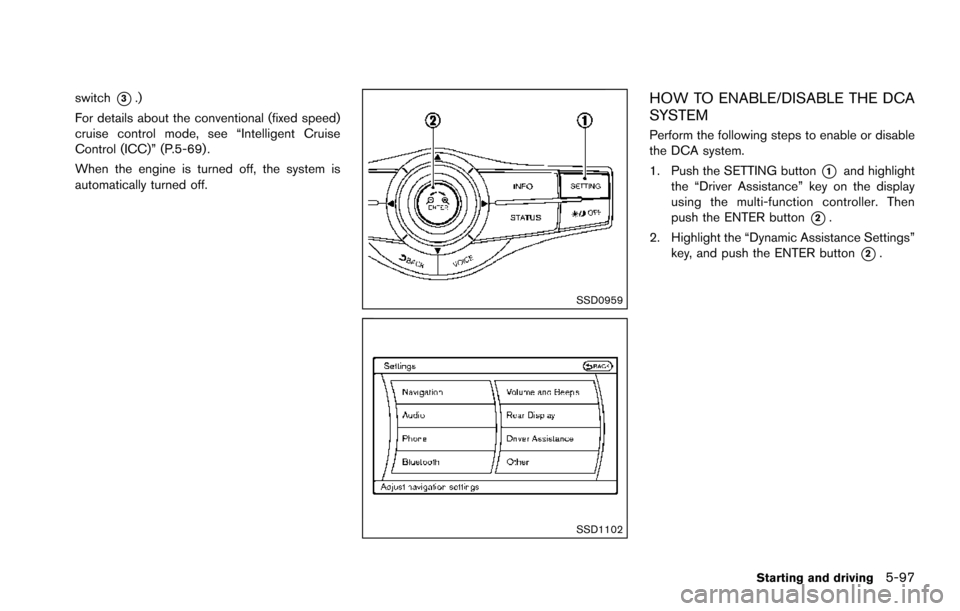
Perform the following steps to enable or disable
the DCA system.
1. Push the SETTING button
*1and highlight
the “Driver Assistance” key on the display
using the multi-function controller. Then
push the ENTER button
*2.
2. Highlight the “Dynamic Assistance Settings” key, and push the ENTER button
*2.
Starting and driving5-97
Page 439 of 614
5-98Starting and driving
SSD1002
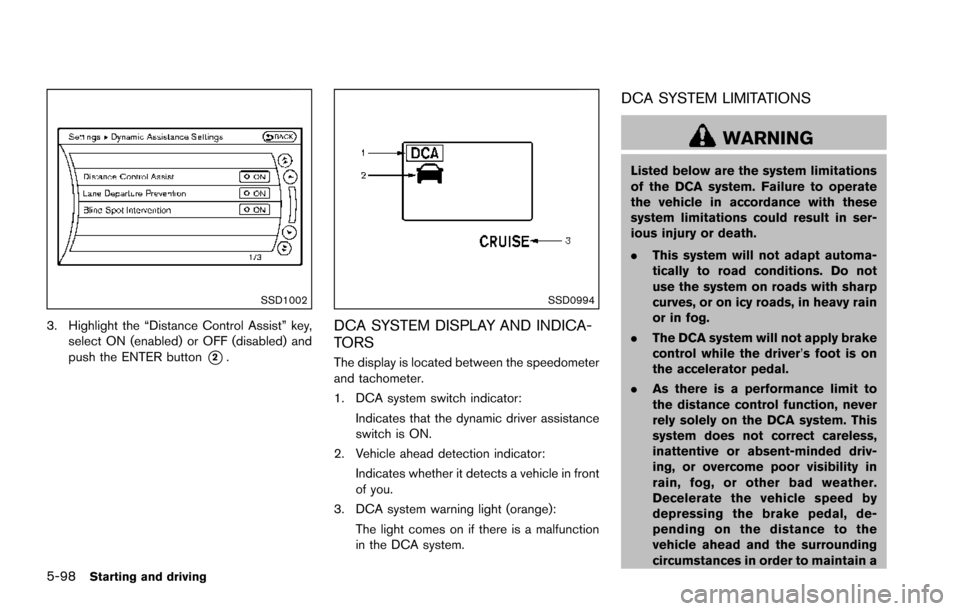
3. Highlight the “Distance Control Assist” key,select ON (enabled) or OFF (disabled) and
push the ENTER button
*2.
SSD0994
DCA SYSTEM DISPLAY AND INDICA-
TORS
The display is located between the speedometer
and tachometer.
1. DCA system switch indicator:
Indicates that the dynamic driver assistance
switch is ON.
2. Vehicle ahead detection indicator: Indicates whether it detects a vehicle in front
of you.
3. DCA system warning light (orange): The light comes on if there is a malfunction
in the DCA system.
DCA SYSTEM LIMITATIONS
WARNING
Listed below are the system limitations
of the DCA system. Failure to operate
the vehicle in accordance with these
system limitations could result in ser-
ious injury or death.
.This system will not adapt automa-
tically to road conditions. Do not
use the system on roads with sharp
curves, or on icy roads, in heavy rain
or in fog.
. The DCA system will not apply brake
control while the driver’s foot is on
the accelerator pedal.
. As there is a performance limit to
the distance control function, never
rely solely on the DCA system. This
system does not correct careless,
inattentive or absent-minded driv-
ing, or overcome poor visibility in
rain, fog, or other bad weather.
Decelerate the vehicle speed by
depressing the brake pedal, de-
pending on the distance to the
vehicle ahead and the surrounding
circumstances in order to maintain a
Page 440 of 614
safe distance between vehicles.
. The system may not detect the
vehicle in front of you in certain
road or weather conditions. To avoid
accidents, never use the DCA sys-
tem under the following conditions:
— On roads with sharp curves
— On slippery road surfaces such
as on ice or snow, etc.
— On off-road surfaces such as on sand or rock, etc.
— During bad weather (rain, fog, snow, etc.)
— When rain, snow or dirt adhere to the system sensor
— On steep downhill roads (fre- quent braking may result in
overheating the brakes)
— On repeated uphill and downhill roads
— When towing a trailer or other vehicle
. In some road or traffic conditions, a
vehicle or object can unexpectedly
come into the sensor detection
zone and cause automatic braking. You may need to control the dis-
tance from other vehicles using the
accelerator pedal. Always stay alert
and avoid using the DCA system
when it is not recommended in this
section.
The radar sensor will not detect the following
objects:
. Stationary and slow moving vehicles
. Pedestrians or objects in the roadway
. Oncoming vehicles in the same lane
. Motorcycles traveling offset in the travel lane
The following are some conditions in which the
sensor cannot detect the signals:
. When the snow or road spray from traveling
vehicles reduces the sensor’s visibility
. When excessively heavy baggage is loaded
in the rear seat or the luggage room of your
vehicle
Starting and driving5-99
Page 443 of 614
5-102Starting and driving
JVS0892X
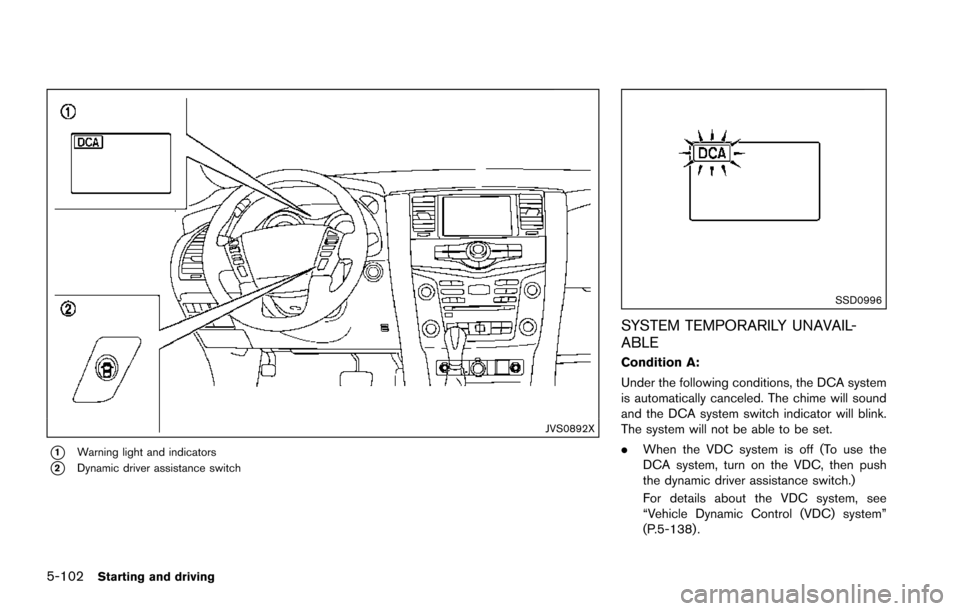
*1Warning light and indicators
*2Dynamic driver assistance switch
SSD0996
SYSTEM TEMPORARILY UNAVAIL-
ABLE
Condition A:
Under the following conditions, the DCA system
is automatically canceled. The chime will sound
and the DCA system switch indicator will blink.
The system will not be able to be set.
.When the VDC system is off (To use the
DCA system, turn on the VDC, then push
the dynamic driver assistance switch.)
For details about the VDC system, see
“Vehicle Dynamic Control (VDC) system”
(P.5-138) .
Page 444 of 614
.When the VDC or ABS (including the
traction control system) operates
. When the SNOW mode switch is ON (To
use the DCA system, turn off the SNOW
mode switch, then turn on the dynamic
driver assistance switch
*2.)
For details about the SNOW mode switch,
see “SNOW mode switch” (P.2-47).
. When the 4WD shift switch is in the 4H or
4L position (for 4WD models)
. When the radar signal is temporarily inter-
rupted
Action to take:
When the conditions listed above are no longer
present, turn the system off with the dynamic
driver assistance switch
*2. Turn the DCA
system back on to use the system.
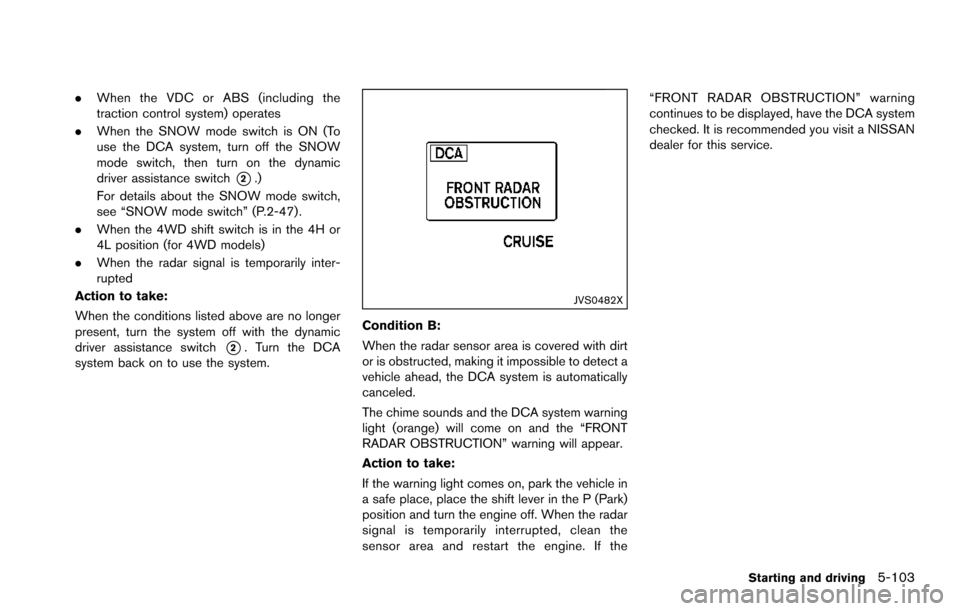
JVS0482X
Condition B:
When the radar sensor area is covered with dirt
or is obstructed, making it impossible to detect a
vehicle ahead, the DCA system is automatically
canceled.
The chime sounds and the DCA system warning
light (orange) will come on and the “FRONT
RADAR OBSTRUCTION” warning will appear.
Action to take:
If the warning light comes on, park the vehicle in
a safe place, place the shift lever in the P (Park)
position and turn the engine off. When the radar
signal is temporarily interrupted, clean the
sensor area and restart the engine. If the “FRONT RADAR OBSTRUCTION” warning
continues to be displayed, have the DCA system
checked. It is recommended you visit a NISSAN
dealer for this service.
Starting and driving5-103
Page 445 of 614
5-104Starting and driving
SSD0999
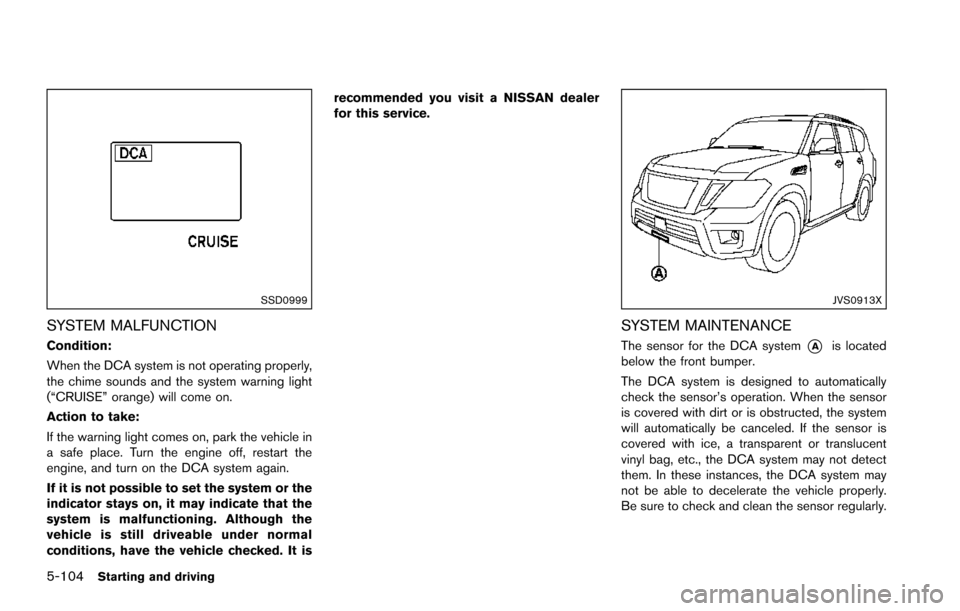
SYSTEM MALFUNCTION
Condition:
When the DCA system is not operating properly,
the chime sounds and the system warning light
(“CRUISE” orange) will come on.
Action to take:
If the warning light comes on, park the vehicle in
a safe place. Turn the engine off, restart the
engine, and turn on the DCA system again.
If it is not possible to set the system or the
indicator stays on, it may indicate that the
system is malfunctioning. Although the
vehicle is still driveable under normal
conditions, have the vehicle checked. It isrecommended you visit a NISSAN dealer
for this service.
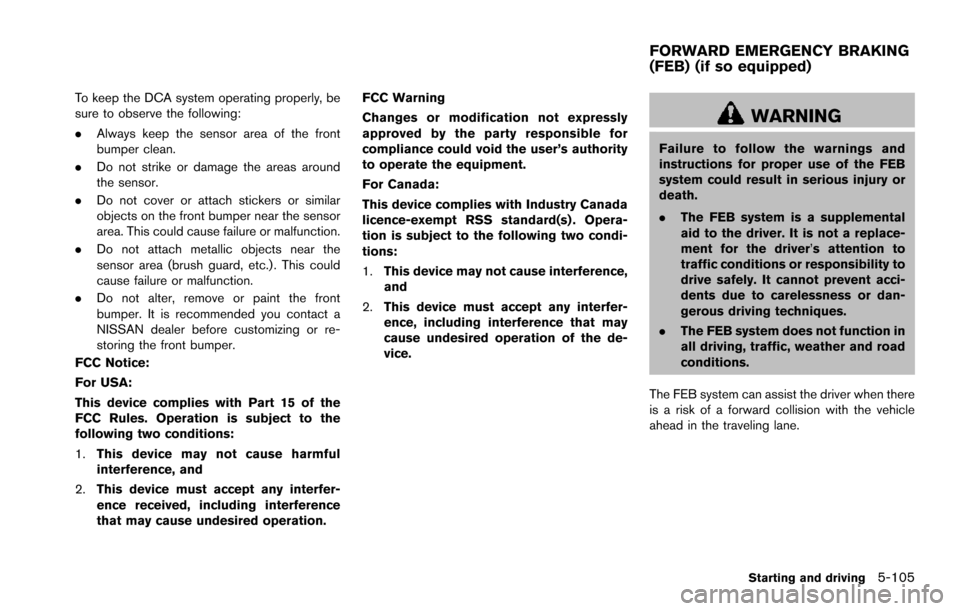
JVS0913X
SYSTEM MAINTENANCE
The sensor for the DCA system*Ais located
below the front bumper.
The DCA system is designed to automatically
check the sensor’s operation. When the sensor
is covered with dirt or is obstructed, the system
will automatically be canceled. If the sensor is
covered with ice, a transparent or translucent
vinyl bag, etc., the DCA system may not detect
them. In these instances, the DCA system may
not be able to decelerate the vehicle properly.
Be sure to check and clean the sensor regularly.
Page 446 of 614
To keep the DCA system operating properly, be
sure to observe the following:
.Always keep the sensor area of the front
bumper clean.
. Do not strike or damage the areas around
the sensor.
. Do not cover or attach stickers or similar
objects on the front bumper near the sensor
area. This could cause failure or malfunction.
. Do not attach metallic objects near the
sensor area (brush guard, etc.) . This could
cause failure or malfunction.
. Do not alter, remove or paint the front
bumper. It is recommended you contact a
NISSAN dealer before customizing or re-
storing the front bumper.
FCC Notice:
For USA:
This device complies with Part 15 of the
FCC Rules. Operation is subject to the
following two conditions:
1. This device may not cause harmful
interference, and
2. This device must accept any interfer-
ence received, including interference
that may cause undesired operation. FCC Warning
Changes or modification not expressly
approved by the party responsible for
compliance could void the user’s authority
to operate the equipment.
For Canada:
This device complies with Industry Canada
licence-exempt RSS standard(s) . Opera-
tion is subject to the following two condi-
tions:
1.
This device may not cause interference,
and
2. This device must accept any interfer-
ence, including interference that may
cause undesired operation of the de-
vice.
WARNING
Failure to follow the warnings and
instructions for proper use of the FEB
system could result in serious injury or
death.
.The FEB system is a supplemental
aid to the driver. It is not a replace-
ment for the driver’s attention to
traffic conditions or responsibility to
drive safely. It cannot prevent acci-
dents due to carelessness or dan-
gerous driving techniques.
. The FEB system does not function in
all driving, traffic, weather and road
conditions.
The FEB system can assist the driver when there
is a risk of a forward collision with the vehicle
ahead in the traveling lane.
Starting and driving5-105
FORWARD EMERGENCY BRAKING
(FEB) (if so equipped)
Page 599 of 614
10-28Technical and consumer information
can safely change lanes.
. Use the Tow mode or downshift the
transmission to a lower gear for engine
braking when driving down steep or long
hills. This will help slow the vehicle without
applying the brakes.
. Avoid holding the brake pedal down too
long or too frequently. This could cause the
brakes to overheat, resulting in reduced
braking efficiency.
. Increase your following distance to allow for
greater stopping distances while towing a
trailer. Anticipate stops and brake gradually.
. NISSAN recommends that the cruise con-
trol not be used while towing a trailer.
. While towing a trailer, do not use the
following systems (if so equipped):
— the Lane Departure Warning (LDW)
system
— the Lane Departure Prevention (LDP) system
— the Blind Spot Warning (BSW) system
— the Blind Spot Intervention
Š(BSI) sys-
tem
— the Back-up Collision Intervention (BCI) system
— the Intelligent Cruise Control (ICC) system — the Distance Control Assist (DCA) sys-
tem
— the Forward Emergency Braking (FEB) system
— the Predictive Forward Collision Warning (PFCW) system
. Some states or provinces have specific
regulations and speed limits for vehicles
that are towing trailers. Obey the local
speed limits.
. Check your hitch, trailer wiring harness
connections, and trailer wheel lug nuts after
50 miles (80 km) of travel and at every
break.
. When launching a boat, do not allow the
water level to go over the exhaust tail pipe or
rear bumper.
. Make sure you disconnect the trailer lights (if
so equipped) before backing the trailer into
the water or the trailer lights may burn out.
When towing a trailer, the transmission
fluid should be changed more frequently.
For additional information, see the "9.
Maintenance and schedules" section.
TOW mode
Using TOW mode is recommended when pull-
ing a heavy trailer or hauling a heavy load. Push
the TOW MODE switch to activate tow mode.
The TOW MODE indicator light in the meter
illuminates when TOW mode is selected. Push
the TOW MODE switch again to turn TOW
mode off. TOW mode is automatically cancelled
when the ignition switch is placed in the OFF
position.
TOW mode includes the following features:
. Grade logic — Adjusts transmission shifts
when pulling a trailer or hauling a load up a
grade.
. Downhill Speed Control (DSC) — automa-
tically downshifts when driving down a
grade with a trailer or heavy load to help
control vehicle speed.
Driving the vehicle in the TOW mode with no
trailer/load or light trailer/light load will not cause
any damage. However, fuel economy may be
reduced and the transmission/engine driving
characteristics may feel unusual.
When towing a trailer, the transmission
fluid should be changed more frequently.
For additional information, see the "9.
Maintenance and schedules" section.