2017 NISSAN ARMADA Sus
[x] Cancel search: SusPage 260 of 614
.DTS and DTS Digital Surround “” are
registered trademarks of Digital Theater
Systems, Inc.
Parental level (parental control):
DVDs with the parental control setting can be
played with this system. Please use your own
judgement to set the parental control with the
system.
Disc selection:
The following disc formats can be played with
the DVD drive.
. DVD-VIDEO
. VIDEO-CD
. CD-DA (Conventional Compact Disc)
. DTS-CD
USB (Universal Serial Bus) Connection
Port
WARNING
Do not connect, disconnect or operate
the USB device while driving. Doing so
can be a distraction. If distracted you
could lose control of your vehicle and
cause an accident or serious injury.
CAUTION
.Do not force the USB device into the
USB port. Inserting the USB device
tilted or up-side-down into the port
may damage the port. Make sure
that the USB device is connected
correctly into the USB port.
. Do not grab the USB port cover
when pulling the USB device out of
the port. This could damage the port
and the cover.
. Do not leave the USB cable in a
place where it can be pulled unin-
tentionally. Pulling the cable may
damage the port.
The vehicle is not equipped with a USB device.
USB devices should be purchased separately
as necessary.
This system cannot be used to format USB
devices. To format a USB device, use a personal
computer.
In some states/area, the USB device for the
front seats plays only sound without images for
regulatory reasons, even when the vehicle is
parked.
This system supports various USB memory devices, USB hard drives and iPod
Šplayers.
Some USB devices may not be supported by
this system.
. Partitioned USB devices may not play
correctly.
. Some characters used in other languages
(Chinese, Japanese, etc.) may not appear
properly in the display. Using English lan-
guage characters with a USB device is
recommended.
General notes for USB use:
Refer to your device manufacturer’s owner
infomation regarding the proper use care of
the device.
Notes for iPod
Šuse:
“Made for iPod”, “Made for iPhone”, and “Made
for iPad” mean that an electronic accessory has
been designed to connect specifically to iPod
Š,
iPhoneŠ, or iPadŠ, respectively, and has been
certified by the developer to meet Apple
performance standards.
Apple is not responsible for the operation of this
device or its compliance with safety and
regulatory standards.
Please note that the use of this accessory with
iPod
Š, iPhoneŠ, or iPadŠmay affect wireless
performance.
iPad
Š, iPhoneŠ,iPodŠ, iPod classicŠ,iPod
Monitor, heater, air conditioner, audio, phone and voice recognition systems4-63
Page 345 of 614
5-4Starting and driving
WARNING
.Do not leave children or adults who
would normally require the support
of others alone in your vehicle. Pets
should not be left alone either. They
could accidentally injure themselves
or others through inadvertent op-
eration of the vehicle. Also, on hot,
sunny days, temperatures in a
closed vehicle could quickly become
high enough to cause severe or
possibly fatal injuries to people or
animals.
. Properly secure all cargo to help
prevent it from sliding or shifting.
Do not place cargo higher than the
seatbacks. In a sudden stop or
collision, unsecured cargo could
cause personal injury.
EXHAUST GAS (carbon monoxide)
WARNING
.Do not breathe exhaust gases; they
contain colorless and odorless car-
bon monoxide. Carbon monoxide is dangerous. It can cause uncon-
sciousness or death.
. If you suspect that exhaust fumes
are entering the vehicle, drive with
all windows fully open, and have the
vehicle inspected immediately.
. Do not run the engine in closed
spaces such as a garage.
. Do not park the vehicle with the
engine running for any extended
length of time.
. Keep the liftgate closed while driv-
ing, otherwise exhaust gases could
be drawn into the passenger com-
partment. If you must drive with the
liftgate open, follow these precau-
tions:
1) Open all the windows.
2) Set the
air recirculation to
off and the fan control to high to
circulate the air.
. If electrical wiring or other cable
connections must pass to a trailer
through the seal on the liftgate or
the body, follow the manufacturer’s
recommendation to prevent carbon
monoxide entry into the vehicle. .
The exhaust system and body
should be inspected by a qualified
mechanic whenever:
— The vehicle is raised for service.
— You suspect that exhaust fumes
are entering into the passenger
compartment.
— You notice a change in the sound of the exhaust system.
— You have had an accident invol- ving damage to the exhaust
system, underbody, or rear of
the vehicle.
THREE-WAY CATALYST
The three-way catalyst is an emission control
device installed in the exhaust system. Exhaust
gases in the three-way catalyst are burned at
high temperatures to help reduce pollutants.
WARNING
. The exhaust gas and the exhaust
system are very hot. Keep people,
animals or flammable materials
away from the exhaust system com-
ponents.
PRECAUTIONS WHEN STARTING
AND DRIVING
Page 370 of 614
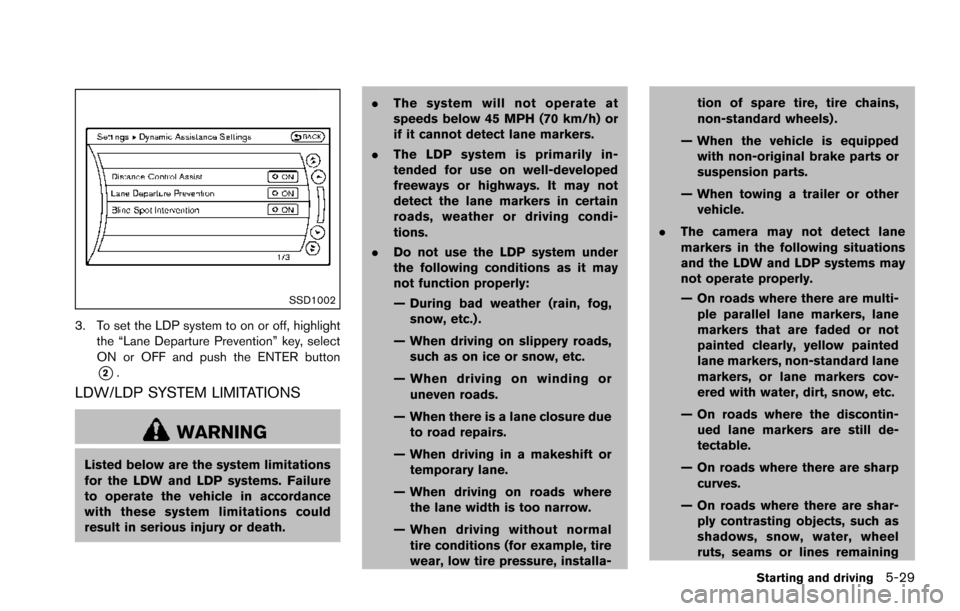
SSD1002
3. To set the LDP system to on or off, highlightthe “Lane Departure Prevention” key, select
ON or OFF and push the ENTER button
*2.
LDW/LDP SYSTEM LIMITATIONS
WARNING
Listed below are the system limitations
for the LDW and LDP systems. Failure
to operate the vehicle in accordance
with these system limitations could
result in serious injury or death. .
The system will not operate at
speeds below 45 MPH (70 km/h) or
if it cannot detect lane markers.
. The LDP system is primarily in-
tended for use on well-developed
freeways or highways. It may not
detect the lane markers in certain
roads, weather or driving condi-
tions.
. Do not use the LDP system under
the following conditions as it may
not function properly:
— During bad weather (rain, fog,
snow, etc.) .
— When driving on slippery roads, such as on ice or snow, etc.
— When driving on winding or uneven roads.
— When there is a lane closure due to road repairs.
— When driving in a makeshift or temporary lane.
— When driving on roads where the lane width is too narrow.
— When driving without normal tire conditions (for example, tire
wear, low tire pressure, installa- tion of spare tire, tire chains,
non-standard wheels) .
— When the vehicle is equipped with non-original brake parts or
suspension parts.
— When towing a trailer or other vehicle.
. The camera may not detect lane
markers in the following situations
and the LDW and LDP systems may
not operate properly.
— On roads where there are multi-
ple parallel lane markers, lane
markers that are faded or not
painted clearly, yellow painted
lane markers, non-standard lane
markers, or lane markers cov-
ered with water, dirt, snow, etc.
— On roads where the discontin- ued lane markers are still de-
tectable.
— On roads where there are sharp curves.
— On roads where there are shar- ply contrasting objects, such as
shadows, snow, water, wheel
ruts, seams or lines remaining
Starting and driving5-29
Page 390 of 614
.Do not use the BSI system under the
following conditions because the
system may not function properly.
— During bad weather. (For exam-
ple: rain, fog, snow, etc.)
— When driving on slippery roads, such as on ice or snow, etc.
— When driving on winding or uneven roads.
— When there is a lane closure due to road repairs.
— When driving in a makeshift or temporary lane.
— When driving on roads where the lane width is too narrow.
— When driving with a tire that is not within normal tire conditions
(for example, tire wear, low tire
pressure, installation of spare
tire, tire chains, non-standard
wheels) .
— When the vehicle is equipped with non-original brake parts or
suspension parts.
— When towing a trailer or other vehicle. .
Excessive noise (for example, audio
system volume, open vehicle win-
dow) will interfere with the chime
sound, and it may not be heard.
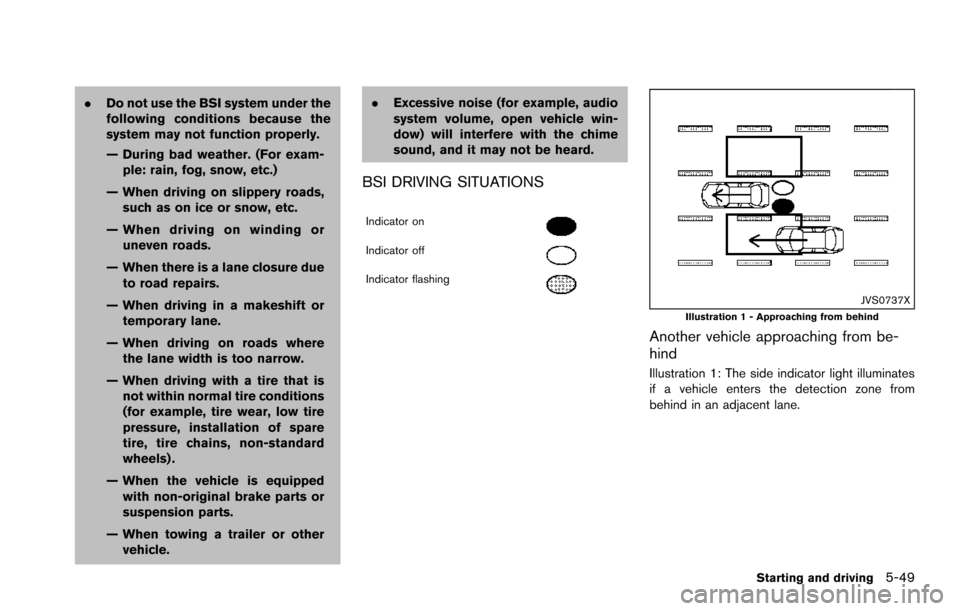
BSI DRIVING SITUATIONS
Indicator on
Indicator off
Indicator flashing
JVS0737XIllustration 1 - Approaching from behind
Another vehicle approaching from be-
hind
Illustration 1: The side indicator light illuminates
if a vehicle enters the detection zone from
behind in an adjacent lane.
Starting and driving5-49
Page 406 of 614
.The following conditions may re-
duce the ability of the radar sensors
to detect other vehicles:
— Severe weather
— Road spray
— Ice/frost/dirt build up on the
vehicle
. Do not attach stickers (including
transparent material) , install acces-
sories or apply additional paint near
the radar sensors. These conditions
may reduce the ability of the radar
sensors to detect other vehicles.
. The sonar sensors detect stationary
objects behind the vehicle. The
sonar sensor may not detect:
— Small or moving objects
— Wedge-shaped objects
— Object close to the bumper (less
than approximately 1 ft (30 cm))
— Thin objects such as rope, wire and chain, etc.
. The brake engagement by the BCI
system is not as effective on a slope
as it is on flat ground. When on a
steep slope the system may not function properly.
. Do not use the BCI system under the
following conditions because the
system may not function properly.
— When driving with a tire that is
not within normal tire conditions
(for example, tire wear, low tire
pressure, installation of spare
tire, tire chains, non-standard
wheels) .
— When the vehicle is equipped with non-original brake parts or
suspension parts.
— When towing a trailer or other vehicle.
. Excessive noise (for example, audio
system volume, open vehicle win-
dow) will interfere with the chime
sound, and it may not be heard.
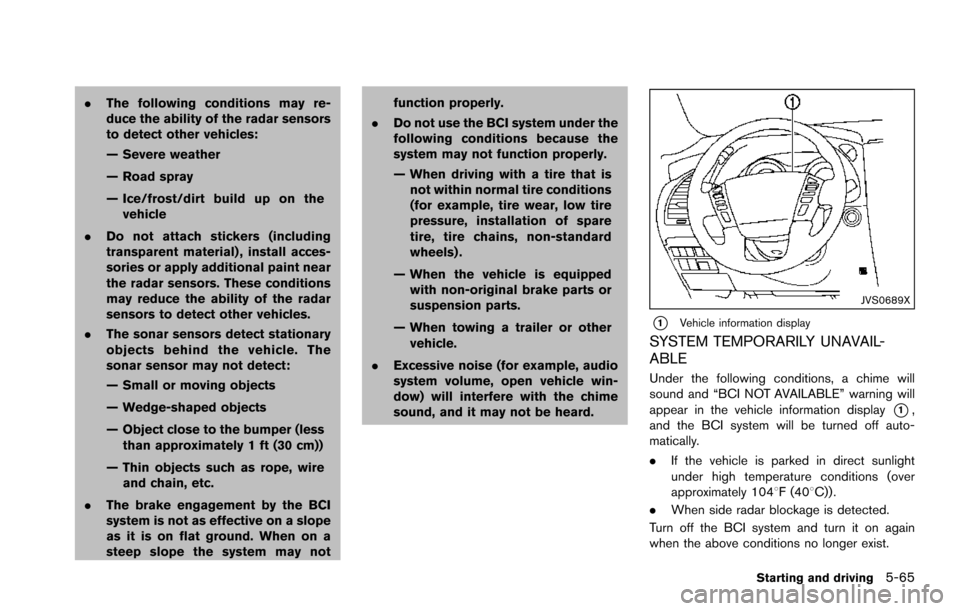
JVS0689X
*1Vehicle information display
SYSTEM TEMPORARILY UNAVAIL-
ABLE
Under the following conditions, a chime will
sound and “BCI NOT AVAILABLE” warning will
appear in the vehicle information display
*1,
and the BCI system will be turned off auto-
matically.
. If the vehicle is parked in direct sunlight
under high temperature conditions (over
approximately 1048F (408C)) .
. When side radar blockage is detected.
Turn off the BCI system and turn it on again
when the above conditions no longer exist.
Starting and driving5-65
Page 463 of 614
5-122Starting and driving
.Recirculating the cool air in the cabinwhen the A/C is on reduces cooling load.
4. Drive at economical speeds and distances.
.Observing the speed limit and not ex- ceeding 60 MPH (97 km/h) (where
legally allowed) can improve fuel effi-
ciency due to reduced aerodynamic
drag.
.Maintaining a safe following distancebehind other vehicles reduces unneces-
sary braking.
.Safely monitoring traffic to anticipatechanges in speed permits reduced brak-
ing and smooth acceleration changes.
.Select a gear range suitable to road conditions.
5. Use cruise control.
.Using cruise control during highway driving helps maintain a steady speed.
.Cruise control is particularly effective in providing fuel savings when driving on
flat terrains.
6. Plan for the shortest route.
.Utilize a map or navigation system to determine the best route to save time.
7. Avoid idling.
.Shutting off your engine when safe for stops exceeding 30-60 seconds saves fuel and reduces emissions.
8. Buy an automated pass for toll roads.
.Automated passes permit drivers to use special lanes to maintain cruising speed
through the toll and avoid stopping and
starting.
9. Winter warm up.
.Limit idling time to minimize impact to fuel economy.
.Vehicles typically need no more than 30seconds of idling at start-up to effectively
circulate the engine oil before driving.
.Your vehicle will reach its ideal operatingtemperature more quickly while driving
versus idling.
10. Keeping your vehicle cool.
.Park your vehicle in a covered parking area or in the shade whenever possible.
.When entering a hot vehicle, opening thewindows will help to reduce the inside
temperature faster, resulting in reduced
demand on your A/C system. .
Keep your engine tuned up.
. Follow the recommended scheduled main-
tenance.
. Keep the tires inflated to the correct
pressure. Low tire pressure increases tire
wear and lowers fuel economy.
. Keep the wheels in correct alignment.
Improper alignment increases tire wear and
lowers fuel economy.
. Use the recommended viscosity engine oil.
(See “Engine oil and oil filter recommenda-
tion” (P.10-6) .)
INCREASING FUEL ECONOMY
Page 474 of 614
SSD0622
WARNING
.The sonar system is a convenience
but it is not a substitute for proper
parking. Always look around and
check that it is safe to do so before
parking. Always move slowly.
. Read and understand the limita-
tions of the sonar system as con-
tained in this section. Inclement
weather may affect the function of
the sonar system; this may include
reduced performance or a false
activation. .
This system is not designed to
prevent contact with small or mov-
ing objects.
. The system is designed as an aid to
the driver in detecting large station-
ary objects to help avoid damaging
the vehicle. The system will not
detect small objects below the
bumper, and may not detect objects
that are too close to the bumper or
on the ground.
. If your vehicle sustains damage to
the bumper fascia, leaving it mis-
aligned or bent, the sensing zone may be altered causing inaccurate
measurement of obstacles or false
alarms.
CAUTION
Keep the interior of the vehicle as quiet
as possible to hear the tone clearly.
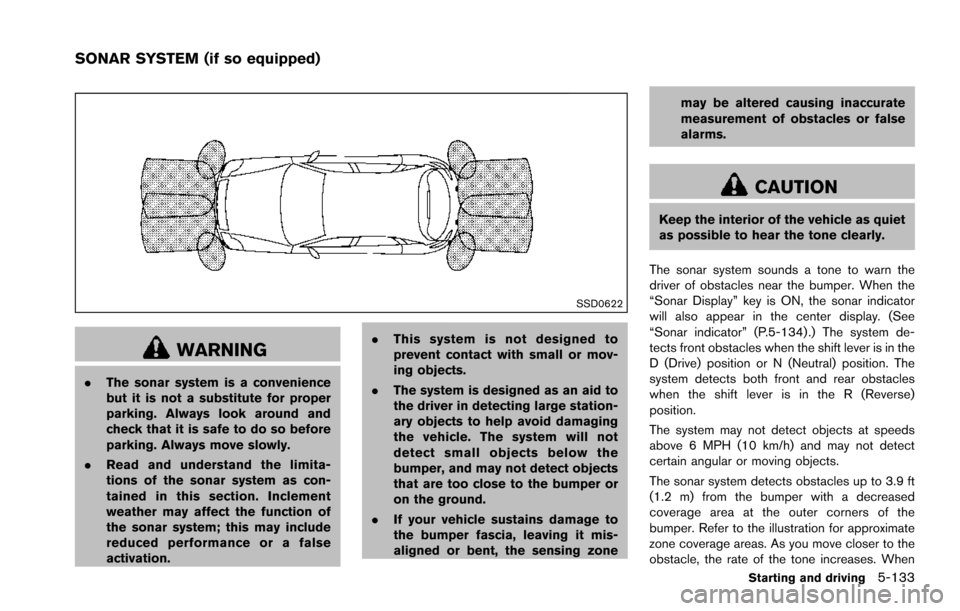
The sonar system sounds a tone to warn the
driver of obstacles near the bumper. When the
“Sonar Display” key is ON, the sonar indicator
will also appear in the center display. (See
“Sonar indicator” (P.5-134) .) The system de-
tects front obstacles when the shift lever is in the
D (Drive) position or N (Neutral) position. The
system detects both front and rear obstacles
when the shift lever is in the R (Reverse)
position.
The system may not detect objects at speeds
above 6 MPH (10 km/h) and may not detect
certain angular or moving objects.
The sonar system detects obstacles up to 3.9 ft
(1.2 m) from the bumper with a decreased
coverage area at the outer corners of the
bumper. Refer to the illustration for approximate
zone coverage areas. As you move closer to the
obstacle, the rate of the tone increases. When
Starting and driving5-133
SONAR SYSTEM (if so equipped)
Page 480 of 614
The computer has a built-in diagnostic feature
that tests the system each time you start the
engine and move the vehicle forward or in
reverse at a slow speed. When the self-test
occurs, you may hear a “clunk” noise and/or feel
a pulsation in the brake pedal. This is normal and
is not an indication of a malfunction.
WARNING
.The VDC system is designed to help
improve driving stability but does
not prevent accidents due to abrupt
steering operation at high speeds or
by careless or dangerous driving
techniques. Reduce vehicle speed
and be especially careful when driv-
ing and cornering on slippery sur-
faces and always drive carefully.
. Do not modify the vehicle’s suspen-
sion. If suspension parts such as
shock absorbers, struts, springs,
stabilizer bars, bushings and
wheels are not NISSAN recom-
mended for your vehicle or are
extremely deteriorated, the VDC
system may not operate properly.
This could adversely affect vehicle
handling performance, and the VDC warning light
may illuminate.
. If brake related parts such as brake
pads, rotors and calipers are not
NISSAN recommended or are extre-
mely deteriorated, the VDC system
may not operate properly and the
VDC warning light
may illumi-
nate.
. If engine control related parts are
not NISSAN recommended or are
extremely deteriorated, the VDC
warning light
may illuminate.
. When driving on extremely inclined
surfaces such as higher banked
corners, the VDC system may not
operate properly and the VDC warn-
ing light
may illuminate. Do not
drive on these types of roads.
. When driving on an unstable sur-
face such as a turntable, ferry,
elevator or ramp, the VDC warning
light
may illuminate. This is not
a malfunction. Restart the engine
after driving onto a stable surface.
. If wheels or tires other than the
NISSAN recommended ones are
used, the VDC system may not
operate properly and the VDC warn- ing light
may illuminate.
. The VDC system is not a substitute
for winter tires or tire chains on a
snow covered road.
Starting and driving5-139