2017 NISSAN ARMADA Ignition
[x] Cancel search: IgnitionPage 240 of 614
SONAR SYSTEM OPERATION
The system gives the tone for front objects when
the shift lever is in the D (Drive) position and
both front and rear objects when the shift lever is
in the R (Reverse) position.
When the camera image is shown on the center
display, the system shows the sonar indicator
regardless of the shift lever position.
The system is deactivated at speeds above 6
MPH (10 km/h) . It is reactivated at lower
speeds.
The colors of the sonar indicators and the
distance guide lines in the front, front-wide, rear
and rear-wide views indicate different distances
to the object.
When the objects are detected, the indicator
(green) appears and blinks and the tone sounds
intermittently. When the vehicle moves closer to
the object, the color of the indicator turns yellow
and the rate of the blinking and the rate of the
tone increase. When the vehicle is very close to
the object, the indicator stops blinking and turns
red, and the tone sounds continuously.
The intermittent tone will stop after 3 seconds
when an object is detected by only the sonar
and the distance does not change.
The tone will stop when the object is no longer
near the vehicle.
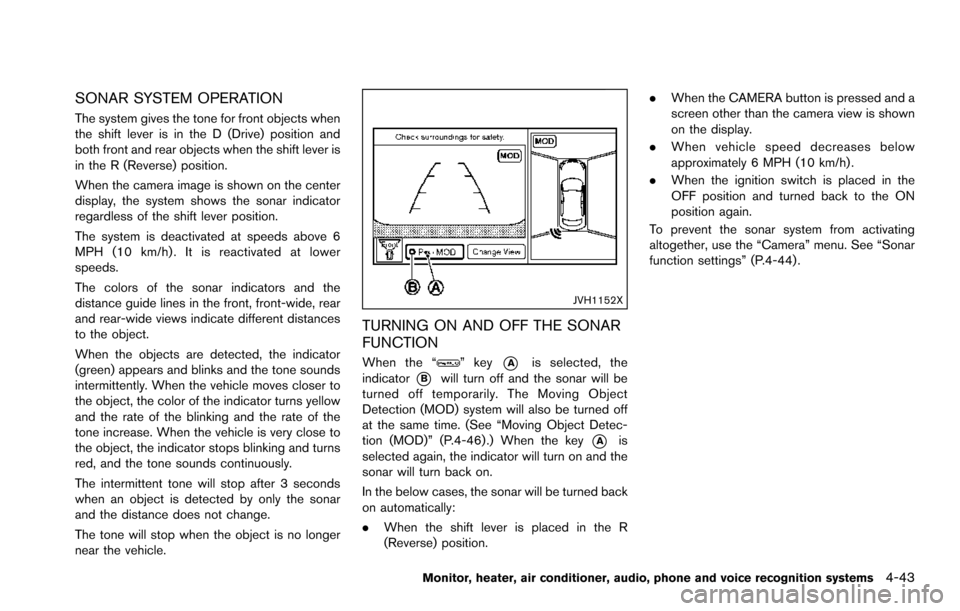
JVH1152X
TURNING ON AND OFF THE SONAR
FUNCTION
When the “” key*Ais selected, the
indicator
*Bwill turn off and the sonar will be
turned off temporarily. The Moving Object
Detection (MOD) system will also be turned off
at the same time. (See “Moving Object Detec-
tion (MOD)” (P.4-46) .) When the key
*Ais
selected again, the indicator will turn on and the
sonar will turn back on.
In the below cases, the sonar will be turned back
on automatically:
. When the shift lever is placed in the R
(Reverse) position. .
When the CAMERA button is pressed and a
screen other than the camera view is shown
on the display.
. When vehicle speed decreases below
approximately 6 MPH (10 km/h) .
. When the ignition switch is placed in the
OFF position and turned back to the ON
position again.
To prevent the sonar system from activating
altogether, use the “Camera” menu. See “Sonar
function settings” (P.4-44) .
Monitor, heater, air conditioner, audio, phone and voice recognition systems4-43
Page 242 of 614
the ignition switch is placed in the ON position,
“Sonar is OFF” is displayed briefly.
Towing Mode:
When this item is turned ON, only the rear sonar
is OFF. The amber markers are displayed at the
rear corners of the vehicle icon.
Show Camera when Sonar Activate:
When this item is turned ON, the camera view is
automatically shown on the display in the case
that the distance to the objects measured by the
sonar is becoming short.
Sonar Sensitivity:
Adjust the sensitivity level of the sensor higher
(right) or lower (left) .
SONAR SYSTEM LIMITATIONS
WARNING
Listed below are the system limitations
for the sonar function. Failure to oper-
ate the vehicle in accordance with these
system limitations could result in ser-
ious injury or death.
.Inclement weather or ultrasonic
sources such as an automatic car
wash, a truck’ s compressed-air
brakes or a pneumatic drill may affect the function of the system,
including reduced performance or a
false activation.
. This function is designed as an aid
to the driver in detecting large
stationary objects to help avoid
damaging the vehicle.
. The system is not designed to pre-
vent contact with small or moving
objects.
. The system will not detect small
objects below the bumper, and may
not detect objects close to the
bumper or on the ground.
. The system may not detect the
following objects:
— Fluffy objects such as snow,
cloth, cotton, grass or wool.
— Thin objects such as rope, wire or chain.
— Wedge-shaped objects.
. If your vehicle sustains damage to
the bumper fascia, leaving it mis-
aligned or bent, the sensing zone
may be altered causing inaccurate
measurement of objects or false
alarms.
CAUTION
Excessive noise (such as audio system
volume or an open vehicle window) will
interfere with the tone and it may not be
heard.
SYSTEM TEMPORARILY UNAVAIL-
ABLE
When the amber markers are displayed at the
corners of the vehicle icon and the function
cannot be activated from the Camera setting
menu (the setting items are grayed out) , the
sonar system may be malfunctioning.
SYSTEM MAINTENANCE
CAUTION
Keep the surface of the sonar sensors
(located on the front and rear bumper
fascia) free from accumulations of
snow, ice and dirt. Do not scratch the
surface of the sonar sensors when
cleaning. If the sensors are covered,
the accuracy of the sonar function will
be diminished.
Monitor, heater, air conditioner, audio, phone and voice recognition systems4-45
Page 244 of 614
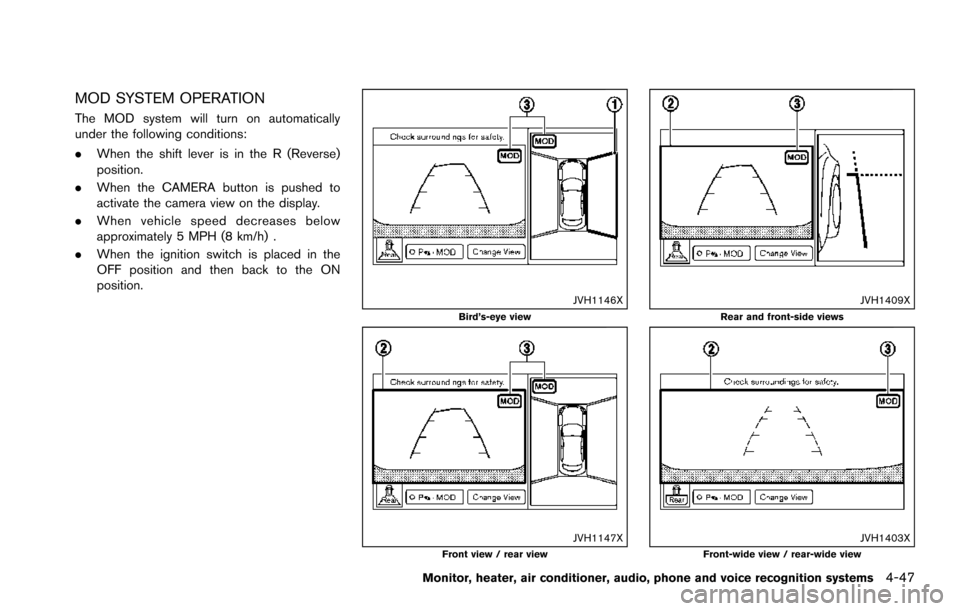
MOD SYSTEM OPERATION
The MOD system will turn on automatically
under the following conditions:
.When the shift lever is in the R (Reverse)
position.
. When the CAMERA button is pushed to
activate the camera view on the display.
. When vehicle speed decreases below
approximately 5 MPH (8 km/h) .
. When the ignition switch is placed in the
OFF position and then back to the ON
position.
JVH1146XBird’s-eye view
JVH1147XFront view / rear view
JVH1409XRear and front-side views
JVH1403XFront-wide view / rear-wide view
Monitor, heater, air conditioner, audio, phone and voice recognition systems4-47
Page 256 of 614
AUDIO OPERATION PRECAUTIONS
Radio
Push the ignition switch to the ACC or ON
position and push the radio band select button
to turn on the radio. If you listen to the radio with
the engine not running, the ignition switch
should be pushed to the ACC position.
Radio reception is affected by station signal
strength, distance from radio transmitter, build-
ings, bridges, mountains and other external
influences. Intermittent changes in reception
quality normally are caused by these external
influences.
Using a cellular phone in or near the
vehicle may influence radio reception
quality.
Radio reception:
Your NISSAN radio system is equipped with
state-of-the-art electronic circuits to enhance
radio reception. These circuits are designed to
extend reception range, and to enhance the
quality of that reception.
However there are some general characteristics
of both FM and AM radio signals that can affect
radio reception quality in a moving vehicle, even
when the finest equipment is used. These
characteristics are completely normal in a given
reception area, and do not indicate any mal-function in your NISSAN radio system.
Reception conditions will constantly change
because of vehicle movement. Buildings, terrain,
signal distance and interference from other
vehicles can work against ideal reception.
Described below are some of the factors that
can affect your radio reception.
Some cellular phones or other devices may
cause interference or a buzzing noise to come
from the audio system speakers. Storing the
device in a different location may reduce or
eliminate the noise.
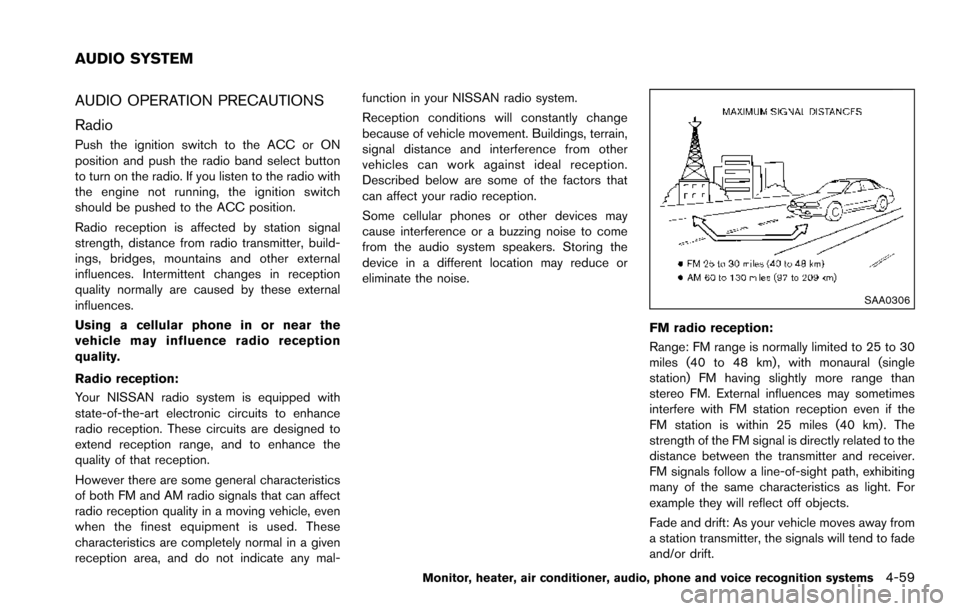
SAA0306
FM radio reception:
Range: FM range is normally limited to 25 to 30
miles (40 to 48 km) , with monaural (single
station) FM having slightly more range than
stereo FM. External influences may sometimes
interfere with FM station reception even if the
FM station is within 25 miles (40 km). The
strength of the FM signal is directly related to the
distance between the transmitter and receiver.
FM signals follow a line-of-sight path, exhibiting
many of the same characteristics as light. For
example they will reflect off objects.
Fade and drift: As your vehicle moves away from
a station transmitter, the signals will tend to fade
and/or drift.
Monitor, heater, air conditioner, audio, phone and voice recognition systems4-59
AUDIO SYSTEM
Page 267 of 614
4-70Monitor, heater, air conditioner, audio, phone and voice recognition systems
JVH1405X
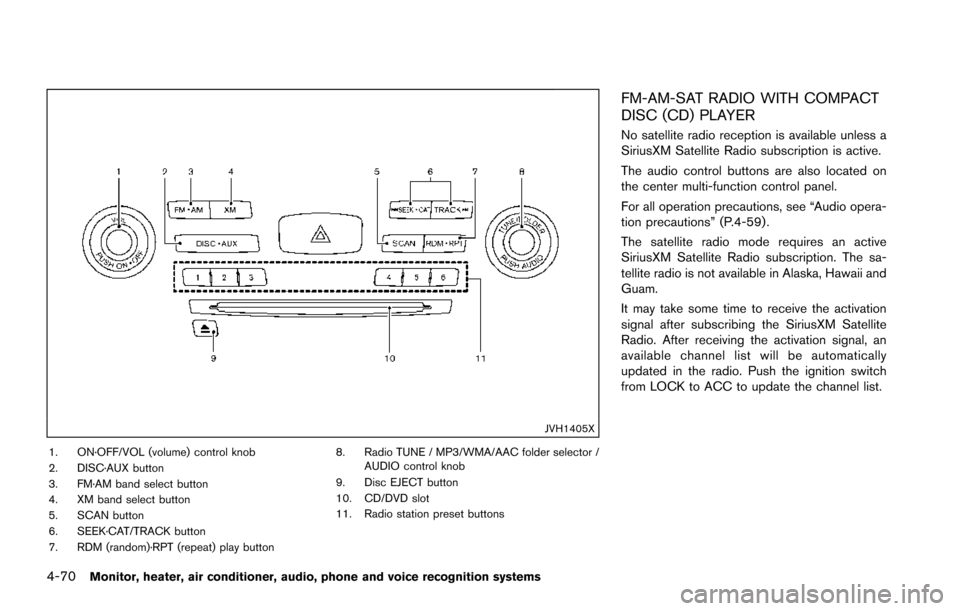
1. ON·OFF/VOL (volume) control knob
2. DISC·AUX button
3. FM·AM band select button
4. XM band select button
5. SCAN button
6. SEEK·CAT/TRACK button
7. RDM (random)·RPT (repeat) play button8. Radio TUNE / MP3/WMA/AAC folder selector /
AUDIO control knob
9. Disc EJECT button
10. CD/DVD slot
11. Radio station preset buttons
FM-AM-SAT RADIO WITH COMPACT
DISC (CD) PLAYER
No satellite radio reception is available unless a
SiriusXM Satellite Radio subscription is active.
The audio control buttons are also located on
the center multi-function control panel.
For all operation precautions, see “Audio opera-
tion precautions” (P.4-59) .
The satellite radio mode requires an active
SiriusXM Satellite Radio subscription. The sa-
tellite radio is not available in Alaska, Hawaii and
Guam.
It may take some time to receive the activation
signal after subscribing the SiriusXM Satellite
Radio. After receiving the activation signal, an
available channel list will be automatically
updated in the radio. Push the ignition switch
from LOCK to ACC to update the channel list.
Page 268 of 614
Audio main operation
Head unit:
The auto loudness circuit enhances the low and
high frequency ranges automatically in both
radio reception and CD playback.
ON·OFF/Volume control:
Push the ignition switch to the ACC or ON
position, and then push the ON·OFF button
while the system is off to turn on the last audio
source, which was playing immediately before
the system was turned off. While the system is
on, pushing the ON·OFF button turns the system
off.
Turn the VOL control knob to adjust the volume.
Adjusting tone quality and speaker bal-
ance:
To adjust Bass, Treble, Balance and Fade, push
the AUDIO control knob. When the display
shows the setting you want to change (Bass,
Treble, Balance and Fade) , rotate the AUDIO
control knob to set the desired setting. For the
other setting methods, see “Audio settings”
(P.4-13) .
Switching the display:
Pushing the DISC·AUX button will switch the
displays as follows:
iPod
Š/USB?CD/DVD ?BluetoothŠstream- ing audio
?AUX ?iPod
Š/USB
Linking Intelligent Key (if so equipped):
The audio settings can be memorized for each
Intelligent Key. For more details, see “Setting
memory function” (P.3-35) .
FM-AM-SAT radio operation
When the radio band select button is pushed
while the ignition switch is in the ACC or ON
position, the radio will come on at the channel
last played.
The last channel played will also come on when
the ON·OFF button is pushed to ON.
If another audio source is playing when the radio
band select button is turned to ON, the audio
source will automatically be turned off and the
last radio channel played will come on.
When the stereo broadcast signal is weak, the
radio will automatically change from stereo to
monaural reception.
radio (FM·AM) band select:
Pushing the FM·AM radio band select button will
change the band as follows:
AM ?FM1 ?FM2 ?AM
radio (SiriusXM Satellite Radio)
band select:
Pushing the XM radio band select button will
change the band as follows:
XM1 ?XM2 ?XM3 ?XM1
The satellite radio is not available in Alaska,
Hawaii and Guam.
TUNE (Tuning):
. For AM and FM radio
Turn the radio TUNE knob for manual tuning.
. For SiriusXM Satellite Radio
Turn the radio TUNE knob to seek channels
from all of the categories when any category
is not selected.
SEEK tuning:
. For AM and FM radio
Push the SEEK·CAT or TRACK button
orto tune from low to high or high to
low frequencies and to stop at the next
broadcasting station.
. For SiriusXM Satellite Radio
Push the SEEK·CAT or TRACK button
orto tune to the first channel of the next
or previous category.
During satellite radio reception, the following
notices will be displayed under certain condi-
Monitor, heater, air conditioner, audio, phone and voice recognition systems4-71
Page 269 of 614
4-72Monitor, heater, air conditioner, audio, phone and voice recognition systems
tions.
.NO SIGNAL (No signal is received while the
SAT tuner is connected.)
. OFF AIR (Broadcasting signed off)
. CHECK ANTENNA (Antenna connection
error)
. LOADING (When the initial setting is
performed)
. UPDATING (When the satellite radio sub-
scription is not active)
. INVALID CH (Invalid channel is received.)
SCAN tuning:
Push the SCAN tuning button to tune from low
to high frequencies and stop at each broad-
casting station/channel for 5 seconds. Pushing
the button again during this 10 seconds period
will stop SCAN tuning and the radio will remain
tuned to that station/channel.
If the SCAN tuning button is not pushed within 5
seconds, SCAN tuning moves to the next
station/channel.
*1to*6Station memory operations:
12 stations/channels can be set for the FM band
(6 each for FM1 and FM2) , 18 for SiriusXM
Satellite Radio (6 each for XM1, XM2 and XM3)
and 6 stations can be set for the AM band. 1. Choose the radio band using the radio band
select button.
2. Tune to the desired station/channel using the SEEK·CAT, TRACK, SCAN button or the
radio TUNE knob.
3. Push and hold the desired station preset button
*1to*6until the radio mutes.
4. The station indicator will then come on and the sound will resume. Memorizing is now
complete.
5. Other buttons can be set in the same manner.
If the battery cable is disconnected, or if the fuse
opens, the radio memory will be erased. In that
case, reset the desired stations/channels.
Menu (SiriusXM Satellite Radio):
When the “Menu” key on the display is selected
while the SiriusXM Satellite Radio is being
played, the menu list will be displayed.
The following items are available.
. Preset List
Displays the preset channel list. If 1 of the 6
preset stations listed is touched and held,
the current station will be stored as the new
preset.
. Customize Channel List
Selects specific channels to skip while using the TUNE, SEEK·CAT or Menu-Categories
feature.
. Favorite Artists & Songs
Stores the current artist or song that is being
played. Touch the “Alert” key to be reminded
when the stored artist or song is playing on a
station while listening to SiriusXM Satellite
Radio.
. Categories
Selecting a category will go to the first
channel in that category as defined by
SiriusXM Satellite Radio.
. Direct Tune
Inputs the channel number by using a
keypad.
Compact Disc (CD) player operation
Push the ignition switch to the ACC or ON
position and insert the Compact Disc (CD) into
the slot with the label side facing up. The CD will
be guided automatically into the slot and start
playing.
After loading the CD, the number of tracks on
the CD and the play time will appear on the
display.
If the radio is already operating, it will auto-
matically turn off and the CD will play.
If the system has been turned off while the CD
was playing, pushing the ON·OFF button will
Page 281 of 614
4-84Monitor, heater, air conditioner, audio, phone and voice recognition systems
SAA2510
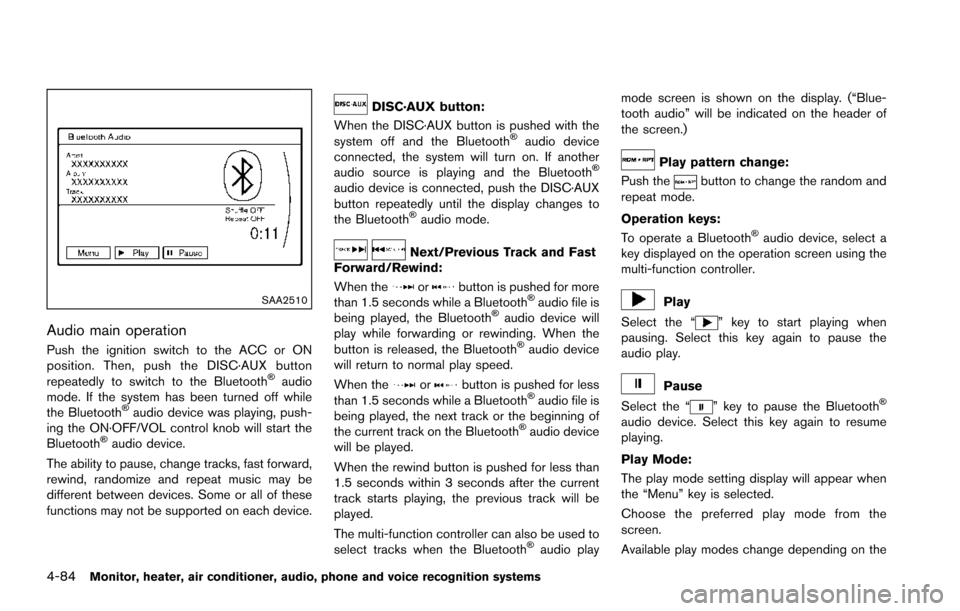
Audio main operation
Push the ignition switch to the ACC or ON
position. Then, push the DISC·AUX button
repeatedly to switch to the Bluetooth
Šaudio
mode. If the system has been turned off while
the Bluetooth
Šaudio device was playing, push-
ing the ON·OFF/VOL control knob will start the
Bluetooth
Šaudio device.
The ability to pause, change tracks, fast forward,
rewind, randomize and repeat music may be
different between devices. Some or all of these
functions may not be supported on each device.
DISC·AUX button:
When the DISC·AUX button is pushed with the
system off and the Bluetooth
Šaudio device
connected, the system will turn on. If another
audio source is playing and the Bluetooth
Š
audio device is connected, push the DISC·AUX
button repeatedly until the display changes to
the Bluetooth
Šaudio mode.
Next/Previous Track and Fast
Forward/Rewind:
When the
orbutton is pushed for more
than 1.5 seconds while a BluetoothŠaudio file is
being played, the BluetoothŠaudio device will
play while forwarding or rewinding. When the
button is released, the Bluetooth
Šaudio device
will return to normal play speed.
When the
orbutton is pushed for less
than 1.5 seconds while a BluetoothŠaudio file is
being played, the next track or the beginning of
the current track on the Bluetooth
Šaudio device
will be played.
When the rewind button is pushed for less than
1.5 seconds within 3 seconds after the current
track starts playing, the previous track will be
played.
The multi-function controller can also be used to
select tracks when the Bluetooth
Šaudio play mode screen is shown on the display. (“Blue-
tooth audio” will be indicated on the header of
the screen.)
Play pattern change:
Push the
button to change the random and
repeat mode.
Operation keys:
To operate a Bluetooth
Šaudio device, select a
key displayed on the operation screen using the
multi-function controller.
Play
Select the “
” key to start playing when
pausing. Select this key again to pause the
audio play.
Pause
Select the “
” key to pause the BluetoothŠ
audio device. Select this key again to resume
playing.
Play Mode:
The play mode setting display will appear when
the “Menu” key is selected.
Choose the preferred play mode from the
screen.
Available play modes change depending on the