2017 MITSUBISHI OUTLANDER SPORT Bluetooth
[x] Cancel search: BluetoothPage 221 of 399

Bluetooth® 2.0 interface (if so equipped) 5-158 Features and controls
5
6. The system will ask if you really want to delete the selected telephone number(s). To go ahead with the deletion, answer “Yes.”Answer “No,” the system will cancel deleting the telephone number(s) and then return to Step 4.7. When the telephone number deletion is complete, the voice guide will say “
N00580400058
You can delete all registered information from the vehicle phonebook. 1. Press the SPEECH button (except for vehicles with Mitsubishi Multi-Commu-nication System) or PICK-UP button (for vehicles with Mitsubishi Multi-Commu- nication System).2. Say “Phonebook.”
3. The voice guide will say “Select one of the following: new entry, edit number, edit name, list names, delete, erase all, or import contact.” Say “Erase all.”4. For confirmation purposes, the voice guide will ask “Are you sure you want to erase everything from your hands-freesystem phonebook?” Answer “Yes.” Answer “No” to cancel the deletion of all registered information in the phonebookand return to the main menu. 5. The voice guide will say “You are about to delete everything from your hands-free system phonebook. Do you want to con-tinue?” Answer “Yes” to continue. Answer “No” to cancel the deletion of all registered information in the phonebookand return to the main menu. 6. The voice guide will say “Please wait, erasing the hands-free system phone-book” and then the system will delete all data in the phonebook. When the deletion is complete, the voiceguide will say “Hands-free system phone- book erased” and then the system will return to the main menu.
N00566201091
All entries in the phonebook stored in the cel-lular phone can be transferred in a batch andregistered in the mobile phonebook.
Up to 7 mobile phonebooks, each containing up to 1,000 names, can be registered. The Bluetooth
® 2.0 interface automatically
converts from text to voice the names regis- tered in the transferred phonebook entries,and creates names. Follow the steps below to transfer to the mobile phonebook the phonebook stored in the cellular phone.
Erasing the phonebook
Mobile phonebook
NOTE
Only the mobile phonebook transferred from the connected cellular phone can be used with that cellular phone. You cannot change the names and telephone numbers in the phonebook entries registeredin the mobile phonebook. You cannot select and delete specific phonebook entries, either. To change or delete any of the above, changethe applicable information in the source phonebook of the cellular phone and then transfer the phonebook again.
To import a devices phonebook
NOTE
Transfer should be completed while the vehi- cle is parked. Before transferring, make sure that the vehicle is parked in a safe location.
BK0239500US.book
158 ページ 2016年5月13日 金曜日 午前8時53分
Page 222 of 399

Bluetooth® 2.0 interface (if so equipped)
Features and controls 5-159
5
1. Press the SPEECH button (except for vehicles with Mitsubishi Multi-Commu-nication System) or PICK-UP button (for vehicles with Mitsubishi Multi-Commu- nication System).2. Say “Phonebook.”3. The voice guide will say “Select one of the following: new entry, edit number, edit name, list names, delete, erase all, orimport contact.” Say “Import contact.”
4. The voice guide will say “Would you like to import a single entry or all contacts?” Say “All contacts.” 5. The voice guide will say “Importing thecontact list from the mobile phonebook. This may take several minutes to com- plete. Would you like to continue?”Answer “Yes,” transferring to the mobile phonebook the phonebook stored in the cellular phone will start.Answer “No,” the system will return tothe main menu.
6. When the transfer is complete, the voice guide will say “Import complete” and then the system will return to the main menu.
N00566301135
Model name: MMC or MDGMY10FCC ID: CB2MDGMY10 orNT8MDGMY10IC: 279B-MDGMY10 or 3043A-MDGMY10 Your Bluetooth
® 2.0 interface operates on a
radio frequency subject to Federal Communi-cations Commission (FCC) Rules (For vehi- cles sold in U.S.A.) and Industry Canada Rules (For vehicles sold in Canada). Thisdevice complies with Part 15 of the FCC Rules and RSS-210 of the Industry Canada Rules. Operation is subject to the followingtwo conditions: This device may not cause harmful inter- ference. This device must accept any interference received, including interference that may cause undesired operation.
The already stored phonebook in the mobile phonebook is overwritten by the stored phonebook in the cellular phone. All or part of data may not be transferred, even when the cellular phone supports Blue- tooth
®, depending on the compatibility of
the device. Only a home, a work, and a mobile number can be imported. The maximum supported telephone number length is 19 digits. Any telephone number of20 digits or more will be truncated to the first 19 digits. If telephone numbers contain characters other than 0 to 9,
*, # or +, these characters
are deleted before the transfer. For the connection settings on the cellular phone side, refer to the instructions for the cellular phone.NOTE
NOTE
The transfer may take some time to complete depending on the number of contacts. If the Bluetooth
® 2.0 interface could not be
connected to the Bluetooth
® compatible cel-
lular phone, the voice guide will say “Unable to transfer contact list from phone” and then the system will return to the main menu. If you press the HANG-UP button or press and hold the SPEECH button during the datatransfer, the transfer will be cancelled and the system will return to the main menu. If an error occurs during the data transfer, all transfers will be cancelled and the voice guide will say “Unable to complete thephonebook import” and then the system will return to the main menu. If there are no contacts in the phonebook, the voice guide will say “There are no contacts on the connected phone.”
General information
BK0239500US.book
159 ページ 2016年5月13日 金曜日 午前8時53分
Page 225 of 399
USB input terminal (if so equipped) 5-162 Features and controls
5
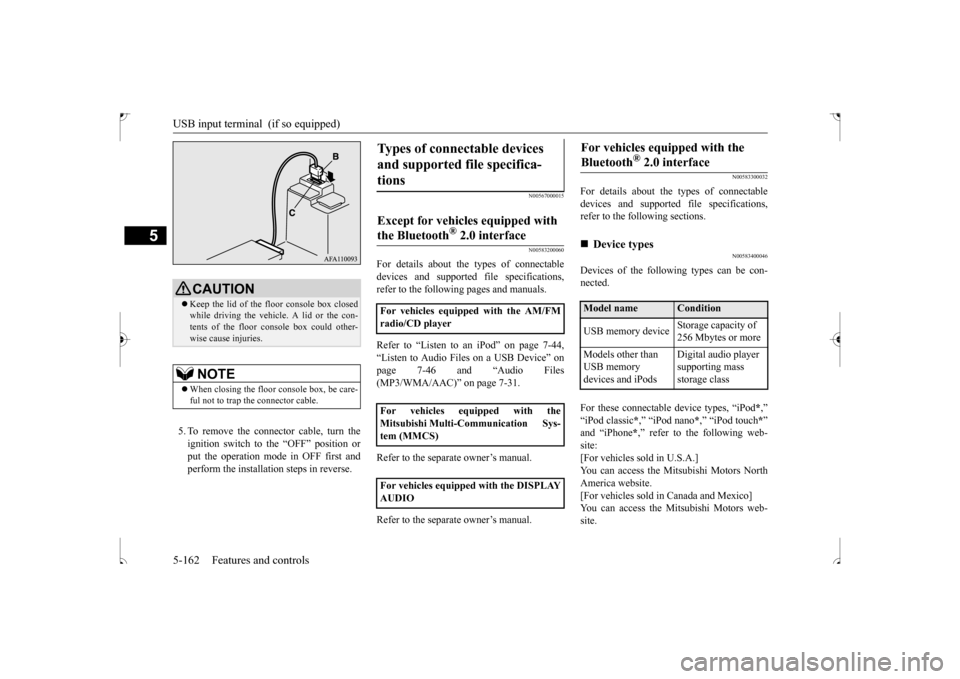
5. To remove the connector cable, turn the ignition switch to the “OFF” position orput the operation mode in OFF first and perform the installation steps in reverse.
N00567000015 N00583200060
For details about the types of connectable devices and supported file specifications,refer to the following pages and manuals. Refer to “Listen to an iPod” on page 7-44, “Listen to Audio Files on a USB Device” on page 7-46 and “Audio Files (MP3/WMA/AAC)” on page 7-31. Refer to the separate owner’s manual. Refer to the separate owner’s manual.
N00583300032
For details about the types of connectable devices and supported file specifications, refer to the following sections.
N00583400046
Devices of the following types can be con-nected. For these connectable device types, “iPod
*,”
“iPod classic
*,” “iPod nano
*,” “iPod touch
*”
and “iPhone
*,” refer to the following web-
site:[For vehicles sold in U.S.A.] You can access the Mitsubishi Motors North America website.[For vehicles sold in Canada and Mexico] You can access the Mitsubishi Motors web- site.
CAUTION Keep the lid of the floor console box closed while driving the vehicle. A lid or the con- tents of the floor console box could other- wise cause injuries.NOTE
When closing the floor console box, be care- ful not to trap the connector cable.
Types of connectable devices and supported file specifica- tions
Except for vehicles equipped with the Bluetooth
® 2.0 interface
For vehicles equipped with the AM/FM radio/CD player For vehicles equipped with the Mitsubishi Multi-Communication Sys- tem (MMCS) For vehicles equipped with the DISPLAY AUDIO
For vehicles equipped with the Bluetooth
® 2.0 interface
Device types Model name
Condition
USB memory device
Storage capacity of 256 Mbytes or more
Models other than USB memory devices and iPods
Digital audio player supporting mass storage class
BK0239500US.book
162 ページ 2016年5月13日 金曜日 午前8時53分
Page 258 of 399
7
Comfort controlsVents .........................................
.......................................................7-2
Manual air conditioning-Type 1
(if so equipped) ............................7-4
Manual air conditioning-Type 2
(if so equipped) ............................7-9
Automatic air conditioning-Type1 (if so equipped) ......................7-14Automatic air conditioning-Type2 (if so equipped) ......................7-19 Important air conditioning op
erating tips ......................................7-24
Air purifier ......................
...............................................................7-25
AM/FM radio/CD player (if so equipped) .....................................7-25 Handling of Discs .
.................................................
........................7-29
Audio Files (MP3/WMA/
AAC) ....................................................7-31
Important Points on Safety fo
r the Customer ................................7-35
Operation Keys ...............
...............................................................7-35
Listen to Radio ......
.................................................
........................7-38
Listen to Satellite Radio (if so equipped) .......................................7-40 Listen to CDs ..................
...............................................................7-42
Listen to MP3s ......
.................................................
........................7-43
Listen to an iPod ...
.................................................
........................7-44
Listen to Audio Files on
a USB Device .........................................7-46
To play iPod/USB memory device tracks via voice operation (vehicles with Bluetooth
® 2.0 interface)
...................................7-49
Listen to Bluetooth Audio (i
f so equipped) ....................................7-52
Display Indicator ..
.................................................
........................7-54
Audio Quality and Volume Balance Adjustment ...........................7-55System Settings .....
.................................................
........................7-56
Troubleshooting ..............
...............................................................7-60
Clock (if so equipped)
............................................
........................7-62
General information about
your radio ...........................................7-63
BK0239500US.bo
ok 1 ページ 2016年5月13日 金曜日 午前8時53分
Page 284 of 399
![MITSUBISHI OUTLANDER SPORT 2017 3.G Owners Manual AM/FM radio/CD player (if so equipped)
Comfort controls 7-27
7
For vehicles with a Bluetooth
® 2.0 interface,
the types of devices that can be connectedmay vary. [For vehicles sold in U.S.A.]](/manual-img/19/7550/w960_7550-283.png "MITSUBISHI OUTLANDER SPORT 2017 3.G Owners Manual AM/FM radio/CD player (if so equipped)
Comfort controls 7-27
7
For vehicles with a Bluetooth
® 2.0 interface,
the types of devices that can be connectedmay vary. [For vehicles sold in U.S.A.]")
AM/FM radio/CD player (if so equipped)
Comfort controls 7-27
7
For vehicles with a Bluetooth
® 2.0 interface,
the types of devices that can be connectedmay vary. [For vehicles sold in U.S.A.] For details, access the Mitsubishi MotorsNorth America website. [For vehicles sold in Canada and Mexico] For details, access the Mitsubishi Motorswebsite. Please read and agree to the “Warn- ing about Links to the Web Sites of Other Companies”. The websites mentioned abovemay connect you to websites other than the Mitsubishi Motors website. http://www.mitsubishi-motors.com/en/prod-ucts/index.htmlNOTE
BK0239500US.bo
ok 27 ページ 2016年5月13日 金曜日 午前8時53分
Page 295 of 399
Listen to Radio 7-38 Comfort controls
7
N00716800068
N00716900098
This explains how to
listen to AM and FM
radio broadcasts. Press the RADIO key to switch the band. Switch between AM and FM bands. The selected band is indicated on the display.
13-
5 key Play/Pause Bluetooth Audio
*2, and use
as preset key 5 for radio.
14-
6 key Return during audio track search, and stop Bluetooth Audio
*2.
For radio, use as preset key 6.
15-
key/ key
For audio, select audio track/file; forradio, perform automatic station selec- tion. Select channels in the satellite radio*
1.
16- MENU key
Switch to Menu mode.
17-
/SEL key
Adjust audio quality and select items.For radio, manually select stations. Select channels in the satellite radio*
1.
*1: Requires a satellite tuner connection.*2: Requires a separately-purchased Blue- tooth-capable audio device in equip- ment by type (vehicles with a Bluetooth
® 2.0 interface).
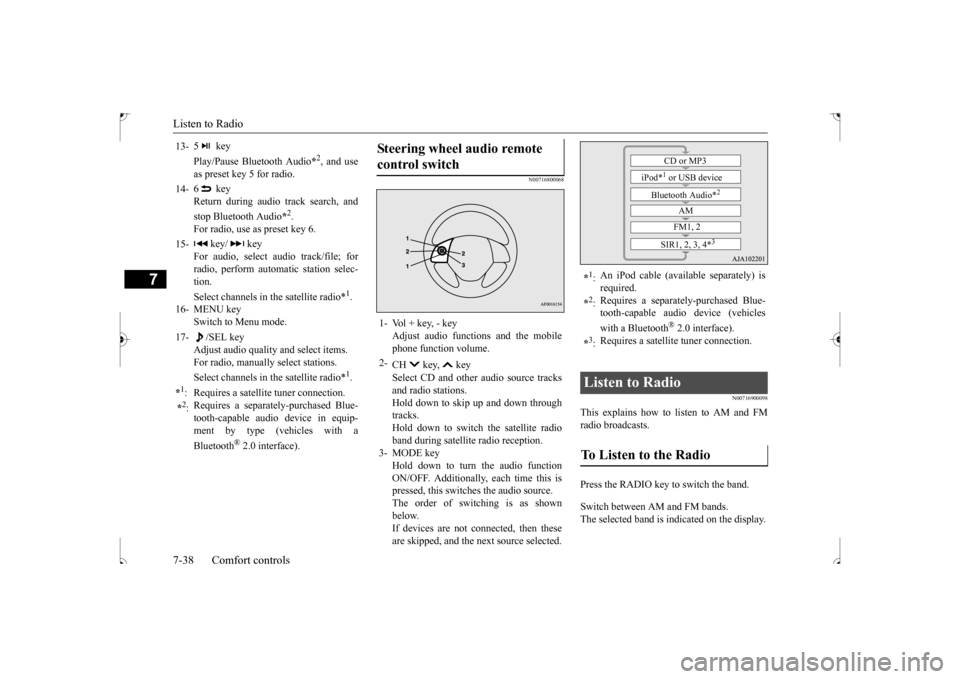
Steering wheel audio remote control switch 1- Vol + key, - key
Adjust audio functions and the mobilephone function volume.
2-
CH key, key Select CD and other audio source tracks and radio stations.Hold down to skip up and down through tracks. Hold down to switch the satellite radioband during satellite radio reception.
3- MODE key
Hold down to turn the audio functionON/OFF. Additionally, each time this is pressed, this switches the audio source. The order of switching is as shownbelow.If devices are not connected, then these are skipped, and the next source selected.
*1: An iPod cable (available separately) is required.
*2: Requires a separately-purchased Blue- tooth-capable audio device (vehicles with a Bluetooth
® 2.0 interface).
*3: Requires a satellite tuner connection.
Listen to Radio To Listen to the Radio
CD or MP3
iPod*
1 or USB device
Bluetooth Audio*
2
AM FM1, 2
SIR1, 2, 3, 4*
3
BK0239500US.bo
ok 38 ページ 2016年5月13日 金曜日 午前8時53分
Page 301 of 399

Listen to an iPod 7-44 Comfort controls
7
Press the SCAN key. Play the first 10 seconds of each track in the folder currently being played in order. Search folders and files, and select a track. 1. Turn the /SEL key to select the folder. 2. Press the /SEL key. Files within the selected folder are dis- played. 3. Turn the /SEL key to select the file.4. Press the /SEL key. This plays the selected file (track).
N00717300073
By connecting commercially-available iPod/iPhone devices to this product, you canplay back tracks on these through the product.
Scan Playback (SCAN)
NOTE
Press this button again during playback if you wish to hear that track, and that trackwill play normally.
Search Tracks
NOTE
While the folder is selected, press the 6 key to cancel track search mode.
If there is no operation for 10 seconds after selecting the folder, then track search mode will be cancelled. Select the folder, and hold down the /SEL key to start playback from the first track in that folder. While the file is selected, press the 6 key to return to the previous operation. While the file is selected, hold down the 6 key to cancel track search mode. If there is no operation for five seconds after selecting the file, that file is played back. Disc operations such as
selecting a track will
cancel track search mode.
Listen to an iPod
CAUTION Do not leave the iPod/iPhone unattended in the vehicle. Never hold these devices in your hand to operate while driving, as this is dangerous. No indemnification for data loss resulting when the iPod/iPhone is connected to the product will be possible.NOTE
Depending on how the devices are handled, audio files being damaged or lost, therefore it is recommended that data be backed up.NOTE
Depending on the generation, model, or soft- ware version of the iPod/iPhone, playback on this product may not be possible.( P.7-26) Additionally, playback as
explained in this document may not be possi- ble. For vehicles with a Bluetooth
® 2.0 interface,
the types of devices that can be connectedmay vary. [For vehicles sold in U.S.A.] For details, access the Mitsubishi Motors North America website. [For vehicles sold in Canada and Mexico]For details, access the Mitsubishi Motors website. Please read and agree to the “Warn- ing about Links to the Web Sites of OtherCompanies”. The websites mentioned above may connect you to websites other than the Mitsubishi Motors website.http://www.mitsubishi-motors.com/en/prod- ucts/index.html Regarding how to connect the iPod/iPhone, refer to “How to connect an iPod” on page 5-161. When connecting the iPod/iPhone, use a commercially-available iPod connectioncable.CAUTION
BK0239500US.bo
ok 44 ページ 2016年5月13日 金曜日 午前8時53分
Page 302 of 399

Listen to an iPod
Comfort controls 7-45
7
Press the MEDIA key to set the iPod as the source. The selected source is indicated on the dis- play. Press the key or key to select the track. This enables selection of the next or previous track. Hold down the 3 key or the 4 key. Fast forward/rewind is possible.
Repeat playback and shuffle playback are possible. Press the 1RPT key. Repeat playback of th
e track currently being
played. Press the 2RDM key. Play tracks in the category currently being played in a random order. Hold down the 2RDM key.
Set up the device in order that no unsafe actions, such as plugging in the connection cable are taken while driving. When inserting and removing the iPod/iPhone, for safety’s sake first stop the vehicle. Depending on the status of the iPod/iPhone, it may take some time until the device is rec- ognized, or playback starts. Buttons on the product will not operate while the iPod/iPhone is connected. iPod/iPhone specifications and settings may mean that a connection is not possible, orresult in differences in operation or display. Depending on audio data in the iPod/iPhone, track information may not be displayed cor- rectly. Depending on the status of the vehicle and device, the iPod/iPhone may not play back after starting the engine. Data containing copyright information may not play back. It is recommended that the iPod/iPhone equalizer settings be set to flat. Operate the iPod/iPhone while connected to this product. If the iPod/iPhone is connected via Bluetooth as a Bluetooth-capable audio device, then do not connect the iPod/iPhone using an iPod cable. Connection using both methods willresult in erroneous operation.NOTE
If an iPod/iPhone does not operate correctly, then remove the iPod/iPhone from the prod- uct, reset, then reconnect.
Play iPod Select the Track (File) Fast Forward or Rewind
NOTE
Switch Playback Mode Repeat Playback (RPT)
NOTE
Pressing again will cancel.
Shuffle Playback (RDM)
NOTE
Pressing again will cancel.
Album Shuffle Playback
BK0239500US.bo
ok 45 ページ 2016年5月13日 金曜日 午前8時53分