2017 MITSUBISHI OUTLANDER speed control
[x] Cancel search: speed controlPage 297 of 521
Warning lights 5-216 Features and controls
5
N00520300147 N00520401552
This light comes on when the ignition switch is turned to the “ON” position (engine off) orthe operation mode is put in ON. When the engine is started, the light should go off a few seconds later. A warning is alsodisplayed in the multi information display. The warning light also illuminates after start- ing the engine under the following condi-tions. When the parking brake is still applied. When the brake fluid level is low. When the brake system circuit is not working properly.
When the vehicle is moving at more than 5 mph (8 km/h) and parking brake applied, abuzzer will sound to inform the driver that the parking brake is not properly release. Before driving, be sure
that the parking brake
is fully released and
brake warning light is
off.
N00591200030
This warning light will illuminate when there is a fault in the Electric parking brake system. Normally, this warning light illuminateswhen the operation mode is put in ON, and goes off in a few seconds.
NOTE
The ECO drive assist is displayed only when vehicle is driven with
the selector lever in
the “D” (DRIVE) positi
on or when vehicle is
driven in the sport mode (for vehicles equipped with sportroni
c steering wheel pad-
dle shifter).
Warning lights Brake warning light (red) and buzzer
CAUTION If the brake warning light and the Anti-lock braking system warning
light are illuminated
at the same time, the braking force distribu- tion function will not ope
rate, so the vehicle
may be destabilized
during sudden braking
under the following conditions.• When the brake warn
ing light does not go
out even when the parking brake is released.• When the brake warning light stays onwhile driving.• If the above occurs,
avoid sudden braking
and high-speed driving. Park the vehicle in a safe place, and contact an authorized Mit-subishi Motors dealer or a repair facility of your choice as soon as possible.
The vehicle should be bro
ught to a halt in the
following manner when
brake performance
is deteriorated.• Confirm that the vehicle slows down whenyou press down on the brake pedal harderthan usual. In some cases, the brake pedal may go all the way to the floor.
• Should the brakes fail, use engine braking to reduce your speed and observe the fol-lowings.[Vehicles with the parking brake of the lever type] Carefully pull the parking brake lever.[Vehicles with the Electric parking brake] Keep pulling the Electric parking brake switch. (Refer to “Electric parking brake” Depress the brake peda
l to illuminate the
stop lights to alert
the vehicles behind you.
Electric parking brake warning light (yellow)
(if so equipped)
BK0239700US.book 216 ページ 2016年6月16日 木曜日 午前10時58分
Page 300 of 521
Information screen display (Vehicle equipped with the multi information display - Type 1)
Features and controls 5-219
5
N00590300034
This light comes on when the washer fluid is running low.If the light comes on, replenish the container with washer fluid. Refer to “Washer fluid” on page 9-12.Refer to “Capacity” on page 11-7.
N00558301064 N00558401179
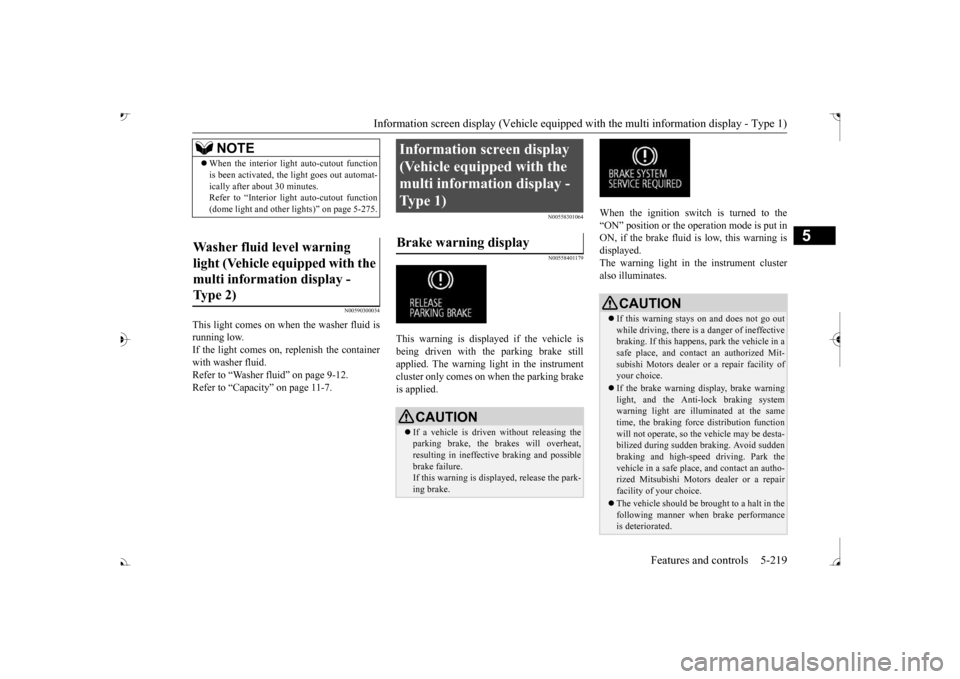
This warning is displayed if the vehicle is being driven with the parking brake stillapplied. The warning light in the instrument cluster only comes on when the parking brake is applied.
When the ignition switch is turned to the “ON” position or the operation mode is put inON, if the brake fluid is low, this warning is displayed. The warning light in the instrument cluster also illuminates.
NOTE
When the interior light
auto-cutout function
is been activated, th
e light goes out automat-
ically after about 30 minutes.Refer to “Interior light
auto-cutout function
(dome light and other
lights)” on page 5-275.
Washer fluid level warning light (Vehicle equipped with the multi information display - Type 2)
Information screen display (Vehicle equipped with the multi information display - Type 1) Brake warning display
CAUTION If a vehicle is driven
without releasing the
parking brake, the brakes will overheat, resulting in ineffectiv
e braking and possible
brake failure. If this warning is displayed, release the park- ing brake.
CAUTION If this warning stays on and does not go out while driving, there is
a danger of ineffective
braking. If this happens, park the vehicle in a safe place, and contac
t an authorized Mit-
subishi Motors dealer or
a repair facility of
your choice. If the brake warning display, brake warning light, and the Anti-lock braking system warning light are illuminated at the same time, the braking forc
e distribution function
will not operate, so the
vehicle may be desta-
bilized during sudden braking. Avoid sudden braking and high-speed driving. Park thevehicle in a safe place, and contact an autho- rized Mitsubishi Motors dealer or a repair facility of your choice. The vehicle should be br
ought to a halt in the
following manner when
brake performance
is deteriorated.
BK0239700US.book 219 ページ 2016年6月16日 木曜日 午前10時58分
Page 301 of 521

Combination headlights and dimmer switch 5-220 Features and controls
5
N00558601113
If there is a fault in the charging system, the warning display is displayed on the informa- tion screen in the multi information display.The warning light in the instrument cluster also illuminates.
N00558701101
If the engine oil pressure drops while the engine is running, the warning display is dis-played on the information screen in the multi information display.
N00522501892
• Confirm that the vehicle slows down when you press down on the brake pedal harderthan usual. In some cases, the brake pedalmay go all the way to the floor.• Should the brakes fail, use engine brakingto reduce your speed and observe the fol- lowings. [Vehicles with the parking brake of thelever type] Carefully pull the parking brake lever. [Vehicles with the Electric parking brake]Keep pulling the Electric parking brake switch. (Refer to “Electric parking brake” Depress the brake peda
l to illuminate the
stop lights to alert th
e vehicles behind you.
Charging system warning dis- play
CAUTION
CAUTION If warnings are displa
yed while the engine is
running, park your vehicl
e in a safe place as
soon as possible and c
ontact an authorized
Mitsubishi Motors dealer
or a repair facility
of your choice to have the system checked.
Oil pressure warning display
CAUTION If the vehicle is driven while the engine oil is low, or the oil level is normal but the warn-ing is displayed, th
e engine may overheat
and damage may result. If the warning is displayed while the engine is running, park your ve
hicle in a safe place
as soon as possible and
check the engine oil
level.
If this warning display comes on when the engine oil level is pr
oper, have your vehicle
checked at an authorized Mitsubishi Motorsdealer or a repair fa
cility of your choice.
NOTE
The oil pressure wa
rning display does not
show the amount of oil. The oil level must be checked using the dipstick.
Combination headlights and dimmer switch Headlights
NOTE
Do not leave the headli
ghts and other lights
on for a long period of time when the engine is not running. The battery will run down.CAUTION
BK0239700US.book 220 ページ 2016年6月16日 木曜日 午前10時58分
Page 306 of 521
Combination headlights and dimmer switch
Features and controls 5-225
5
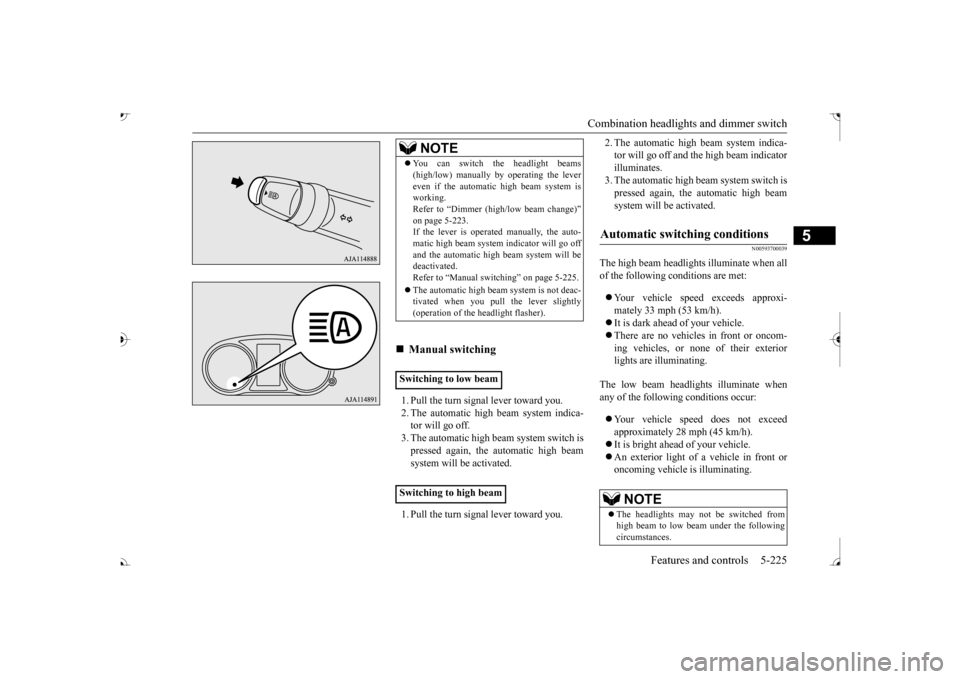
1. Pull the turn signal lever toward you. 2. The automatic high beam system indica-tor will go off. 3. The automatic high beam system switch is pressed again, the
automatic high beam
system will be activated. 1. Pull the turn signal lever toward you.
2. The automatic high beam system indica- tor will go off and the high beam indicatorilluminates. 3. The automatic high beam system switch is pressed again, the
automatic high beam
system will be activated.
N00593700039
The high beam headlight
s illuminate when all
of the following
conditions are met:
Your vehicle speed exceeds approxi- mately 33 mph (53 km/h). It is dark ahead of your vehicle. There are no vehicles in front or oncom- ing vehicles, or none
of their exterior
lights are illuminating.
The low beam headlights illuminate when any of the followi
ng conditions occur:
Your vehicle speed does not exceed approximately 28 mph (45 km/h). It is bright ahead of your vehicle. An exterior light of a vehicle in front or oncoming vehicle is illuminating.
NOTE
You can switch the headlight beams (high/low) manually
by operating the lever
even if the automatic high beam system isworking. Refer to “Dimmer (high/low beam change)” on page 5-223.If the lever is operated manually, the auto- matic high beam system
indicator will go off
and the automatic high beam system will bedeactivated. Refer to “Manual swit
ching” on page 5-225.
The automatic high beam
system is not deac-
tivated when you pull
the lever slightly
(operation of the he
adlight flasher).
Manual switching
Switching to low beam Switching to high beam
Automatic switching conditions
NOTE
The headlights may not be switched from high beam to low beam under the following circumstances.
BK0239700US.book 225 ページ 2016年6月16日 木曜日 午前10時58分
Page 313 of 521

Wiper and washer switch 5-232 Features and controls
5
N00523001751
The windshield wiper and washer can be operated with the ignition switch or the oper- ation mode is in ON or ACC. If the blades are frozen to the windshield, donot operate the wipers
until the ice has melted
and the blades are freed, otherwise the wiper motor may be damaged.
NOTE
If the headlights are switched to high beam, the front fog lights will
go out; they will illu-
minate again when the headlights areswitched back to low beam. If the light switch is rotated to the “OFF” or “ ” position while the front fog lights are illuminated, they will automatically turn off. They can be turned back on again by rotatingthe combination he
adlights and dimmer
switch back to “ ” position, and turning the knob in the direction of the “ON” posi- tion. Do not use fog lights except in conditions of fog, otherwise excessi
ve light glare may
temporarily blind oncom
ing vehicle drivers.
Wiper and washer switch
CAUTIONIf the washer is used in cold weather, the washer fluid sprayed against the glass may freeze, which may hi
nder visibility. Warm
the glass with the defro
ster before using the
washer.
Windshield wipers
NOTE
To ensure a clear rearward view, the rear window wiper will automatically performseveral continuous opera
tions if the selector
lever is put in the “R” position while the windshield wipers
are operating.
Refer to “Rear window wiper and washer” on page 5-236.
Except for vehicle with rain sensor MIST- Misting function
The wipers will operate once.
OFF- OffINT- Intermittent
(Speed sensitive)
LO- Slow HI- Fast
BK0239700US.book 232 ページ 2016年6月16日 木曜日 午前10時58分
Page 314 of 521

Wiper and washer switch
Features and controls 5-233
5
With the lever in the “INT” (speed sensitive intermittent operation)
position, the intermit-
tent intervals can be adjusted by turning the knob (A).
The misting function can be used when the ignition switch or the
operation mode is in
ON or ACC. The wipers will operate once if the wiper lever is raised to the “MIST” position and released. This operation
is useful when it is
drizzling, etc. The wi
pers will continue to
operate while the lever is held in the “MIST” position.
The windshield wipers can be operated with the ignition switch or
the operation mode is in
ON or ACC. If the blades are frozen to the windshield orrear window, do not operate the wipers until the ice has melted and the blades are freed, otherwise the wiper mo
tor may be damaged.
To adjust intermittent intervals 1- Fast 2- Slow
NOTE
The speed-sensitive-
operation function of
the windshield wipers
can be de
activated.
For further informati
on, please contact your
authorized Mitsubishi Motors dealer or a repair facility of your choice. On vehiclesequipped with Mitsubishi Multi-Communi- cation System, screen operations can be used to make the adjustment.Refer to separate owne
r’s manual for details.
Misting function
Vehicle with rain sensor MIST- Misting function
The wipers will operate once.
OFF- OffAUTO- Auto-wiper control
Rain sensor The wipers will automaticallyoperate depending on the degree of wetness on the windshield.
LO- SlowHI- Fast
BK0239700US.book 233 ページ 2016年6月16日 木曜日 午前10時58分
Page 316 of 521

Wiper and washer switch
Features and controls 5-235
5
With the lever in the “AUTO” position, it is possible to adjust the sensitivity of the rainsensor by turning the knob (B).
Move the lever in the direction of the arrow and release, to operate the wipers once. Use this function when you are driving in mist or drizzle. The wipers will operate once if the lever is raised to the “MIST” position and releasedwhen the ignition switch or the operation mode is in ON or ACC. The wipers will con- tinue to operate while the lever is held in the “MIST” position.
The wipers will operate once if the lever is moved to the “AUTO” position and the knob(C) is turned in the “+” direction when the ignition switch or the
operation mode is in
ON.
N00504601354
The windshield washer can be operated withthe ignition switch or the operation mode in ON or ACC. The washer fluid will be sprayed onto thewindshield by pulling th
e lever toward you.
When the wipers are not in operation or in intermittent operation,
by pulling the lever
toward you, the wipers
will operate several
times while the washer
fluid is being sprayed.
To adjust the sensitivity of the rain sensor “+”- Higher sensitivity to rain “-”- Lower sensitivity to rain
NOTE
Automatic wiper operation (rain sensitive) can be changed to in
termittent operation,
either vehicle speed se
nsitive or not vehicle
speed sensitive.For further informati
on, please contact your
authorized Mitsubishi Motors dealer or a repair facility of your choice.On vehicles equipped
with Mitsubishi Multi-
Communication System,
screen operations
can be used to make the adjustment.Refer to the separate owner’s manual for details.
Misting function
Windshield washer
BK0239700US.book 235 ページ 2016年6月16日 木曜日 午前10時58分
Page 324 of 521

Bluetooth® 2.0 interface
Features and controls 5-243
5
N00564101113
The Bluetooth
® 2.0 interface is equipped
with a voice recognition function. Simply say voice commands and you can per- form various operations and make or receivehands-free calls. With the Bluetooth
® 2.0 interface, voice rec-
ognition is possible fo
r US English, North
American Spanish, Canadian French and Jap-anese. The factory se
tting is “English.”
vehicles with Mitsubishi Multi-Commu- nication System) or
PICK-UP button (for
vehicles with Mitsubishi Multi-Commu-nication System). 2. Say “Setup.” 3. Say “Language.”4. The voice guide wi
ll say “Select a lan-
guage: English, Spanis
h, French or Japa-
nese.” Say the desired language.(Example: “English”)
5. The voice guide will say “English (Span- ish, French or Japanese) selected. Is thiscorrect?” Say “Yes.” Step 4. 6. When the voice guide says “English (Spanish, French or Japanese) selected,” the language change process will be com- pleted and the system will return to themain menu.
NOTE
If a cellular phone is within close proximity of the microphone, it may distort the soundquality. In this case, place the cellular phoneas far as possible from the microphone.
Voice recognition function
NOTE
If the voice command that you say differs from the predefined command or cannot be recognised due to ambient noise or some other reason, the Bluetooth
® 2.0 interface
will ask you for the voice command again up to 3 times.
For best performance and further reduction of ambient noise, the vehicle windowsshould be closed, lower the blower speed andrefrain from conversat
ion with your passen-
gers while engaging
the voice recognition
function. Some voice commands have alternative commands. Depending on the sele
cted language, some
functions may not
be available.
Language can be change
d by using the audio
control panel besides
the following proce-
dure. For details, refer to
“System settings” on
page 7-44. For DISPLAY AUDIO and Mit-subishi Multi-Communication System, refer to the separate owner’s manuals.
Selecting the language
NOTE
NOTE
The voice guide will
repeat the same mes-
sage twice. The first message is in the cur- rent language, and the
second message is in
the selected language. If many entries are registered in the vehicle phonebook, changing th
e language will take
a longer time. Changing the language
deletes the mobile
phonebook imported to the Bluetooth
® 2.0
interface. If you wish to use it, you will have to import it again.
BK0239700US.book 243 ページ 2016年6月16日 木曜日 午前10時58分