2017 MITSUBISHI OUTLANDER steering
[x] Cancel search: steeringPage 278 of 521

Indicator light, warning light, and information screen display list (multi information display - Type 1)
Features and controls 5-197
5
The driver's door is open when the operation mode is in any mode other than OFF.
Put the operation mode in OFF. Refer to “Operation mode
ON reminder system” on
page 5-36.
An attempt was made to lock all the doors and the liftgate when the operati
on mode is in any mode
other than OFF.
Put the operation mode in OFF. Refer to “Operation mode
OFF reminder system” on
page 5-20.
There is a fault in the steering wheel lock.
Park your vehicle in a safe
place as soon as possible
and contact an authorized
Mitsubishi Motors dealer
or a repair facility of your
choice to have the system
checked.
There is a fault in the electrical system.
Park your vehicle in a safe
place as soon as possible
and contact an authorized
Mitsubishi Motors dealer
or a repair facility of your
choice to have the system
checked.
The engine is overheated.
Park the vehicle in a safe place and take corrective measures. Refer to “Engine overh
eating” on page 8-4.
The automatic transaxle or CVT fluid temperature is increased.
Park the vehicle in a safe place and take corrective measures. Refer to “Automatic tr
ansaxle” on page 5-67.
Refer to “Continuously variable transmission (CVT)” on page 5-75.
Screen
Cause
Do this (Reference)
BK0239700US.book 197 ページ 2016年6月16日 木曜日 午前10時58分
Page 295 of 521
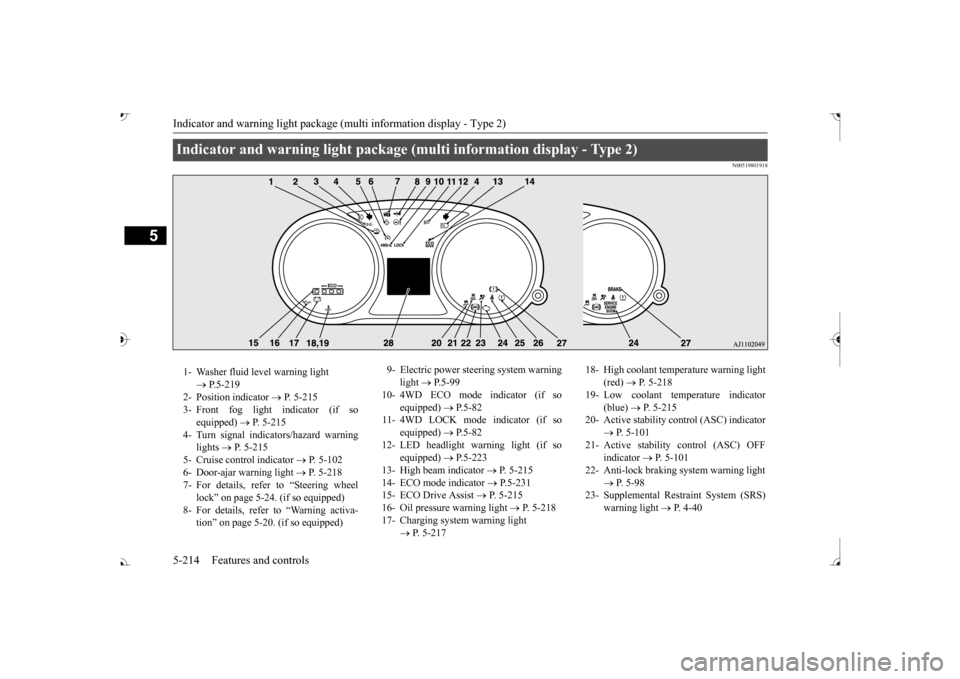
Indicator and warning light package (multi information display - Type 2) 5-214 Features and controls
5
N00519801918
Indicator and warning light package (multi information display - Type 2) 1- Washer fluid level warning light
P.5-219
2- Position indicator
P. 5-215
3- Front fog light indicator (if so
equipped)
P. 5-215
4- Turn signal indicators/hazard warning
lights
P. 5-215
5- Cruise control indicator
P. 5-102
6- Door-ajar warning light
P. 5-218
7- For details, refer to “Steering wheel
lock” on page 5-24. (if so equipped)
8- For details, refer
to “Warning activa-
tion
Page 297 of 521
Warning lights 5-216 Features and controls
5
N00520300147 N00520401552
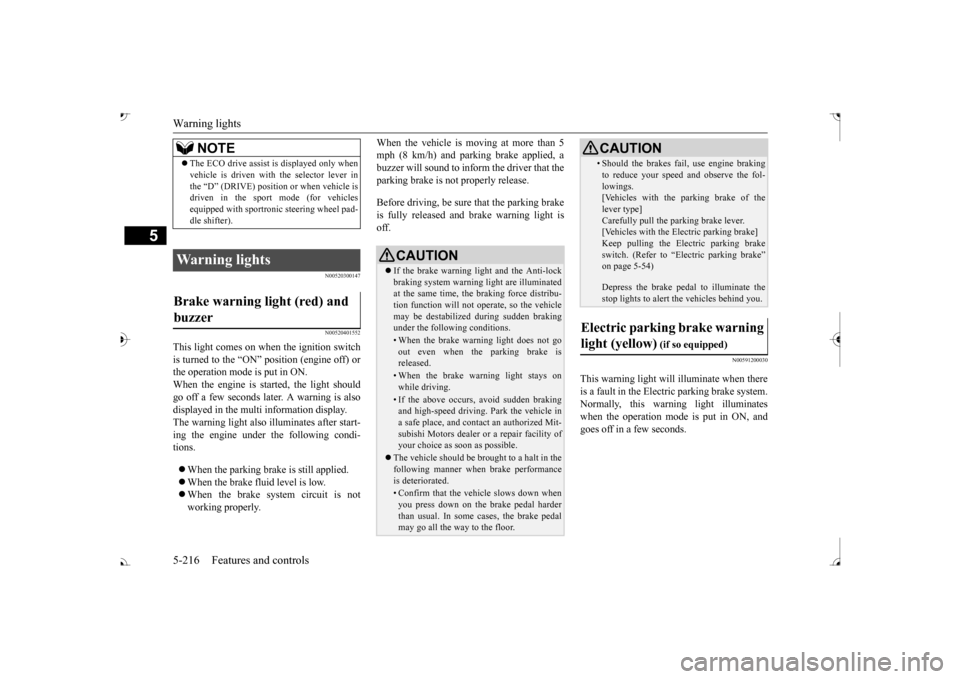
This light comes on when the ignition switch is turned to the “ON” position (engine off) orthe operation mode is put in ON. When the engine is started, the light should go off a few seconds later. A warning is alsodisplayed in the multi information display. The warning light also illuminates after start- ing the engine under the following condi-tions. When the parking brake is still applied. When the brake fluid level is low. When the brake system circuit is not working properly.
When the vehicle is moving at more than 5 mph (8 km/h) and parking brake applied, abuzzer will sound to inform the driver that the parking brake is not properly release. Before driving, be sure
that the parking brake
is fully released and
brake warning light is
off.
N00591200030
This warning light will illuminate when there is a fault in the Electric parking brake system. Normally, this warning light illuminateswhen the operation mode is put in ON, and goes off in a few seconds.
NOTE
The ECO drive assist is displayed only when vehicle is driven with
the selector lever in
the “D” (DRIVE) positi
on or when vehicle is
driven in the sport mode (for vehicles equipped with sportroni
c steering wheel pad-
dle shifter).
Warning lights Brake warning light (red) and buzzer
CAUTION If the brake warning light and the Anti-lock braking system warning
light are illuminated
at the same time, the braking force distribu- tion function will not ope
rate, so the vehicle
may be destabilized
during sudden braking
under the following conditions.• When the brake warn
ing light does not go
out even when the parking brake is released.• When the brake warning light stays onwhile driving.• If the above occurs,
avoid sudden braking
and high-speed driving. Park the vehicle in a safe place, and contact an authorized Mit-subishi Motors dealer or a repair facility of your choice as soon as possible.
The vehicle should be bro
ught to a halt in the
following manner when
brake performance
is deteriorated.• Confirm that the vehicle slows down whenyou press down on the brake pedal harderthan usual. In some cases, the brake pedal may go all the way to the floor.
• Should the brakes fail, use engine braking to reduce your speed and observe the fol-lowings.[Vehicles with the parking brake of the lever type] Carefully pull the parking brake lever.[Vehicles with the Electric parking brake] Keep pulling the Electric parking brake switch. (Refer to “Electric parking brake” Depress the brake peda
l to illuminate the
stop lights to alert
the vehicles behind you.
Electric parking brake warning light (yellow)
(if so equipped)
BK0239700US.book 216 ページ 2016年6月16日 木曜日 午前10時58分
Page 311 of 521
Turn signal lever 5-230 Features and controls
5
N00522601529
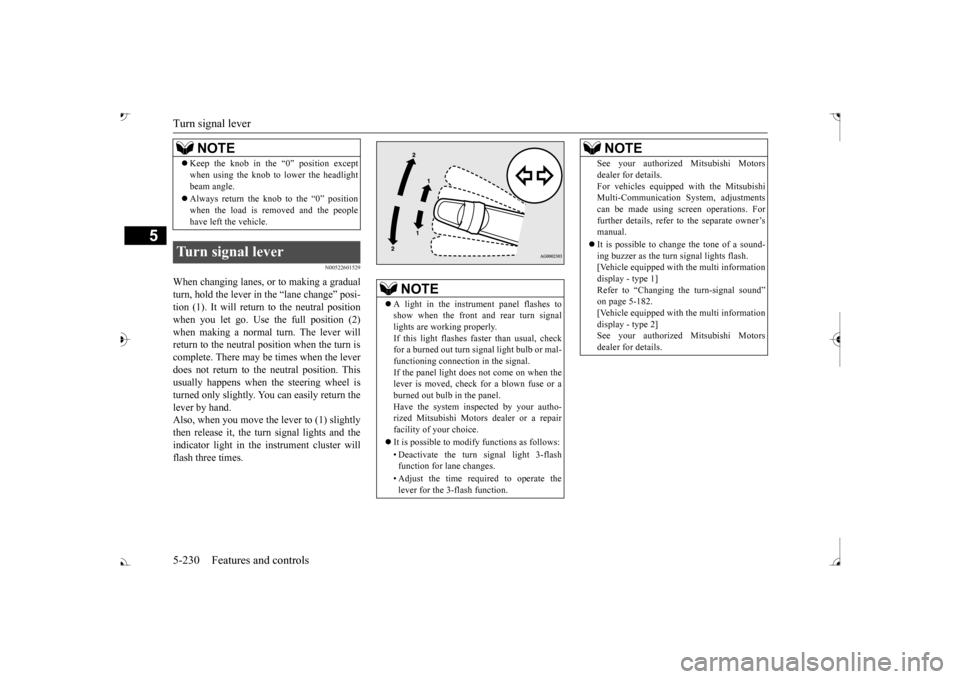
When changing lanes, or to making a gradual turn, hold the lever in the “lane change” posi-tion (1). It will return
to the neutral position
when you let go. Use the full position (2) when making a normal turn. The lever willreturn to the neutral position when the turn is complete. There may be times when the lever does not return to the neutral position. Thisusually happens when the steering wheel is turned only slightly. You can easily return the lever by hand.Also, when you move the lever to (1) slightly then release it, the turn signal lights and the indicator light in the instrument cluster willflash three times. Keep the knob in the “0” position except when using the knob to lower the headlightbeam angle. Always return the knob to the “0” position when the load is removed and the peoplehave left the vehicle.
Turn signal lever
NOTE
NOTE
A light in the instrument panel flashes to show when the front and rear turn signallights are working properly. If this light flashes fa
ster than usual, check
for a burned out turn signal light bulb or mal-functioning connect
ion in the signal.
If the panel light does not come on when the lever is moved, check for a blown fuse or aburned out bulb in the panel. Have the system inspected by your autho- rized Mitsubishi Motors dealer or a repairfacility of your choice. It is possible to modify functions as follows: • Deactivate the turn signal light 3-flash function for lane changes. • Adjust the time required to operate the lever for the 3-flash function.
See your authorized Mitsubishi Motorsdealer for details.For vehicles equipped
with the Mitsubishi
Multi-Communication System, adjustments can be made using sc
reen operations. For
further details, refer to the separate owner’smanual. It is possible to cha
nge the tone of a sound-
ing buzzer as the turn signal lights flash. [Vehicle equipped with the multi information display - type 1]Refer to “Changing the turn-signal sound” on page 5-182. [Vehicle equipped with the multi informationdisplay - type 2] See your authorized Mitsubishi Motors dealer for details.NOTE
BK0239700US.book 230 ページ 2016年6月16日 木曜日 午前10時58分
Page 320 of 521
Heated steering wheel switch (if so equipped)
Features and controls 5-239
5
N00589100032
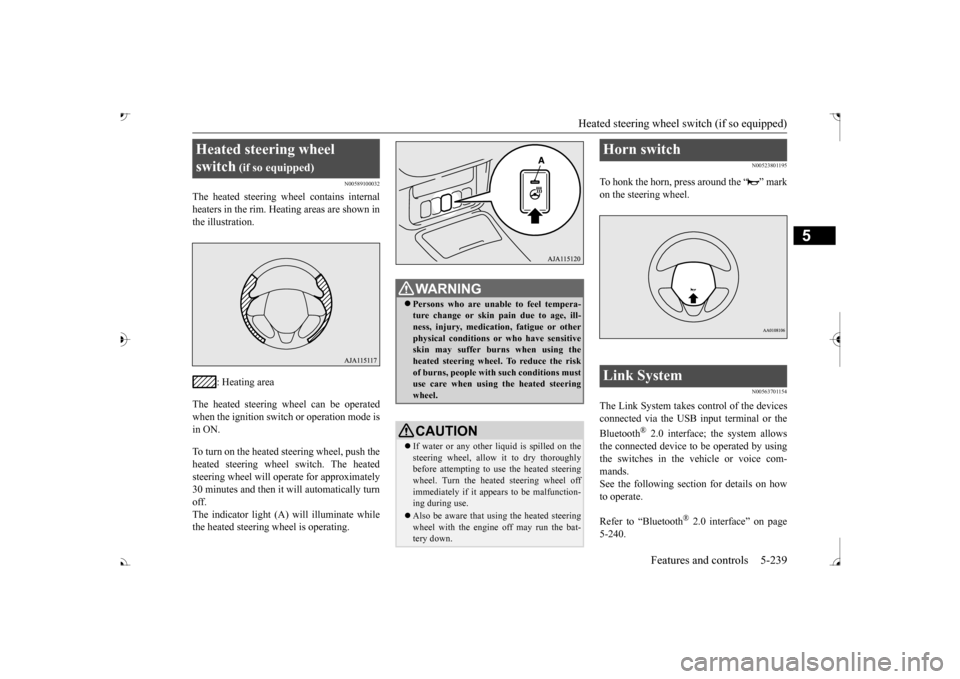
The heated steering wh
eel contains internal
heaters in the rim. Heating areas are shown in the illustration.
: Heating area
The heated steering wheel can be operated when the ignition switch or operation mode is in ON. To turn on the heated steering wheel, push the heated steering wheel switch. The heated steering wheel will ope
rate for approximately
30 minutes and then it
will automatically turn
off. The indicator light (A) will illuminate while the heated steering wheel is operating.
N00523801195
To honk the horn, press around the “ ” markon the steering wheel.
N00563701154
The Link System takes control of the devicesconnected via the USB input terminal or the Bluetooth
® 2.0 interface; the system allows
the connected device to be operated by using the switches in the vehicle or voice com-mands. See the following section for details on how to operate. Refer to “Bluetooth
® 2.0 interface” on page
5-240.
Heated steering wheel switch
(if so equipped)
Persons who are unable
to feel tempera-
ture change or skin
pain due to age, ill-
ness, injury, medicati
on, fatigue or other
physical conditions or
who have sensitive
skin may suffer burns when using theheated steering wheel. To reduce the risk of burns, people with such conditions must use care when using the heated steeringwheel.CAUTION If water or any other li
quid is spilled on the
steering wheel, allow it to dry thoroughly before attempting to use the heated steering wheel. Turn the heated steering wheel offimmediately if it appe
ars to be malfunction-
ing during use. Also be aware that us
ing the heated steering
wheel with the engine off may run the bat- tery down.
Horn switch Link System
BK0239700US.book 239 ページ 2016年6月16日 木曜日 午前10時58分
Page 322 of 521

Bluetooth® 2.0 interface
Features and controls 5-241
5
Steering control switch and microphone P.5-241 Voice recognition function
P.5-243
Useful voice commands
P.5-244
Speaker enrollment function
P.5-245
Connecting the Bluetooth
® 2.0 interface and
the Bluetooth
® device
P.5-247
Operating a music player connected via Blue- tooth
® P.5-253
How to make or receive hands-free calls P.5-253 Phonebook function
P.5-255
N00564001109
Press this button to increase the volume.
If you place the Bluetooth
® device in the
vehicle’s third seat or luggage compartment, you may not be able to use the Bluetooth
®
2.0 interface. Some Bluetooth
® devices are not compatible
with the Bluetooth
® 2.0 interface.
You can confirm the Link System software version by pressing the HANG-UP button 3 times (press and hold 2 times and then press briefly) within 10 seconds. For detail of the Bluetooth
® 2.0 interface,
refer to the following website: [For vehicles sold in U.S.A.] You can access the Mitsubishi Motors NorthAmerica website. [For vehicles sold in Canada and Mexico] You can access the Mitsubishi Motors web-site. Please read and agree to the “Warning about Links to the Web Sites of Other Companies”,the websites mentioned above may connect you to websites other than the Mitsubishi Motors website.http://www.mitsubishi-motors.com/en/prod- ucts/index.html Software updates by ce
llular phone/digital
audio device manufacturers may change/alter devi
ce connectivity.
NOTE
Steering control switch and microphone 1- Volume up button 2- Volume down button 3- SPEECH button4- PICK-UP button 5- HANG-UP button 6- MicrophoneVolume up button
BK0239700US.book 241 ページ 2016年6月16日 木曜日 午前10時58分
Page 336 of 521

Bluetooth® 2.0 interface
Features and controls 5-255
5
You can redial the last
number called, based
on the history of dialed calls in the paired cel-lular phone. Use the following procedure to redial. 1. Press the SPEECH button (except for vehicles with Mitsubishi Multi-Commu- nication System) or PICK-UP button (forvehicles with Mitsubishi Multi-Commu- nication System). 2. Say “Redial.”
N00565700018
During a call, press the SPEECH button toenter voice recognitio
n mode, then say
“
a call you need to sim-
ulate the pressing of a phone button as a
response to an automated system, press the SPEECH button and speak “1 2 3 4 poundsend” and the 1234# will be sent via your cel- lular phone.
N00565801045
If an incoming phone call is received whilethe ignition switch or
the operation mode is in
ON or ACC, the audio sy
stem will be auto-
matically turned on and switched to the incoming call, even when the audio systemwas originally off. The voice guide a
nnouncement for the
incoming call will be output from the frontpassenger’s seat speaker. If the CD player or radio was playing when the incoming call was received, the audio sys-tem will mute the sound from the CD player or radio and output onl
y the incoming call.
To receive the call, press the PICK-UP buttonon the steering wheel control switch. When the call is over, the audio system will return to its previous state.
N00565900010
At any time during a ca
ll, you can mute the
vehicle microphone.
Pressing the SPEECH button and then saying “Mute” during a call will turn ON the mutefunction and mute the microphone. Saying “Mute off” in the same way will turn off the mute function and cancel the mute onthe microphone.
N00566600014
The Bluetooth
® 2.0 interface can switch
between hands-free m
ode (hands-free calls)
and private mode (calls
using cellular phone).
If you press the SPEECH button and say“Transfer call” duri
ng a hands-free call, you
can stop the hands-free m
ode and talk in pri-
vate mode. To return to hands-free mode, press the SPEECH button again and say “Transfer call.”The Bluetooth
® 2.0 interface has 2 types of
unique phonebooks that are different from thephonebook stored in the cellular phone. They are the vehicle phonebook and the mobile phonebook.
NOTE
When the confirmation function is on, the system will check if
the name and location of
the receiver are correct. If the name is cor-rect, answer “Yes.”
or location to call,
answer “No.” The system will return to Step3.
RedialingSend function
Receiving calls Mute function
Switching between hands-free mode and private mode Phonebook function
BK0239700US.book 255 ページ 2016年6月16日 木曜日 午前10時58分
Page 369 of 521

Vehicle preparation before driving 6-4 Driving safety
6
N00629001709
For a safer and more enjoyable trip, always check for the following: Before starting the vehicle, make certain that you and all passengers are seated andwearing their seat
belts properly (with
children in the rear seat, in appropriate restraints), and that all the doors and theliftgate are locked.
Move the driver’s seat as far backward as possible, while keeping good visibility,and good control of the steering wheel, brakes, accelerator, and controls. Check the instrument panel indicators and multi-information display
for any possible prob-
lem. Similarly, the front
passenger seat should
also be moved as fa
r back as possible.
Make sure that infants and small children are properly restrained in accordance with all laws and
regulations.
Check these by selecting the defroster mode, and set the blower swit
ch on high. You should
be able to feel the air blowing against thewindshield. Refer to “Defrosti
ng or defogging (wind-
shield, door windows)” on page 7-12 Check all the tires for heavy tread wear or uneven wear patterns. Look for stones, nails,glass, or other objects
stuck in the tread. Look
for any tread cuts or
sidewall cracks. Check
the wheel nuts for tightness, and the tires(including spare tire) for proper pressure.
Replace your tires before they are heavily worn out.As your vehicle is equi
pped with a tire pres-
sure monitoring system, there is a risk of damage to the tire inflation pressure sensorswhen the tire is replaced on the rim. Tire replacement should, onl
y, be performed by an
authorized Mitsubishi Motors dealer. Have someone watch wh
ile you turn all the
exterior lights on and off. Also check the turn signal indicators and hi
gh-beam indicators on
the instrument panel. Check the ground under the vehicle after parking overnight, for
fuel, water, oil, or
other leaks. Make sure
all the fluid levels are
correct. Also, if you
can smell fuel, you need
to find out why imme
diately and have it
fixed.
N00629201134
Even this vehicle’s sa
fety equipment, and
your safest driving, ca
nnot guarantee that you
can avoid an accident or injury. However, if
Vehicle preparation before driving Seat belts and seats
Defrosters Tires
Lights Fluid leaks Safe driving techniques
BK0239700US.book 4 ページ 2016年6月16日 木曜日 午前10時58分