2017 MITSUBISHI OUTLANDER media
[x] Cancel search: mediaPage 100 of 521
Free-hand Advanced Securi
ty Transmitter (F.A.S.T.-key) (if so equipped)
Features and controls 5-19
5
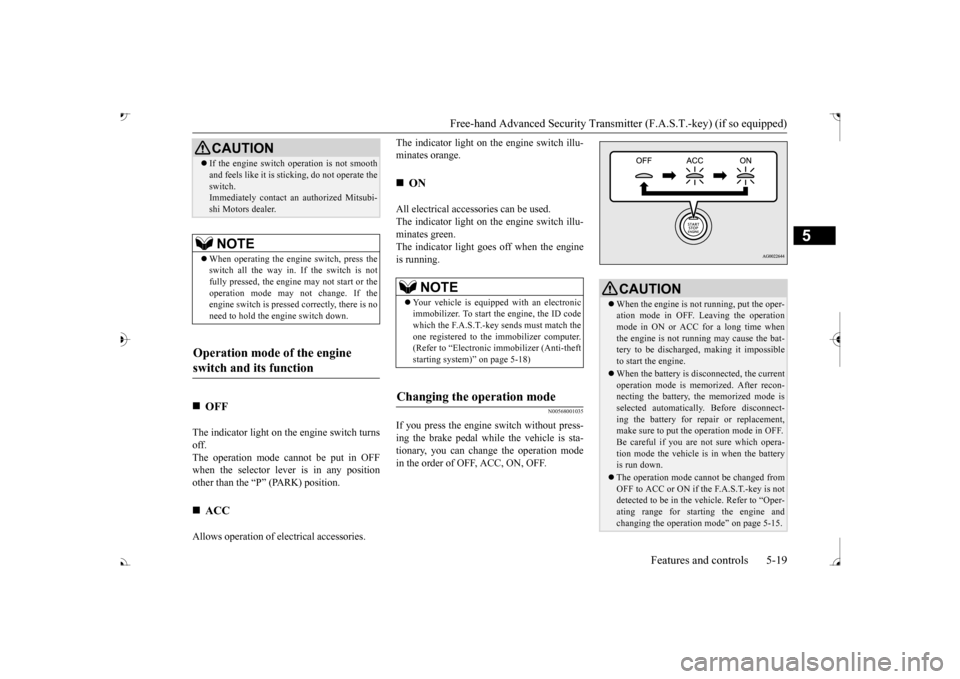
The indicator light on the engine switch turns off. The operation mode cannot be put in OFF when the selector lever is in any positionother than the “P” (PARK) position. Allows operation of el
ectrical accessories.
The indicator light on
the engine switch illu-
minates orange. All electrical accessories can be used. The indicator light on
the engine switch illu-
minates green.The indicator light goes off when the engine is running.
N00568001035
If you press the engine
switch without press-
ing the brake pedal whil
e the vehicle is sta-
tionary, you can change the operation modein the order of OFF, ACC, ON, OFF.
If the engine switch
operation is not smooth
and feels like it is st
icking, do not operate the
switch.Immediately contact an authorized Mitsubi- shi Motors dealer.NOTE
When operating the engi
ne switch, press the
switch all the way in. If the switch is not fully pressed, the engine may not start or theoperation mode may
not change. If the
engine switch is presse
d correctly, there is no
need to hold the e
ngine switch down.
Operation mode of the engine switch and its function
OFF
ACC CAUTION
ON NOTE
Your vehicle is equippe
d with an electronic
immobilizer. To start
the engine, the ID code
which the F.A.S.T.-key sends must match theone registered to the immobilizer computer. (Refer to “Electronic immobilizer (Anti-theft starting system)” on page 5-18)
Changing the operation mode
CAUTION When the engine is not running, put the oper- ation mode in OFF. Leaving the operationmode in ON or ACC for a long time when the engine is not running may cause the bat- tery to be discharged
, making it impossible
to start the engine. When the battery is disconnected, the current operation mode is memo
rized. After recon-
necting the battery, the memorized mode is selected automaticall
y. Before disconnect-
ing the battery for re
pair or replacement,
make sure to put the operation mode in OFF. Be careful if you are not sure which opera-tion mode the vehicle is in when the battery is run down. The operation mode cannot be changed from OFF to ACC or ON if the F.A.S.T.-key is not detected to be in the
vehicle. Refer to “Oper-
ating range for star
ting the engine and
changing the operation mode” on page 5-15.
BK0239700US.book 19 ページ 2016年6月16日 木曜日 午前10時58分
Page 106 of 521

Free-hand Advanced Securi
ty Transmitter (F.A.S.T.-key) (if so equipped)
Features and controls 5-25
5
N00514601399
The operation mode can be in any mode to start the engine. The starter motor will be turning for up to approximately 15 seconds if the engine switch is released at once. Pressing the engine switch again while the starter motor is still turning will stop the startermotor. The starter motor will be turning for up to approximately 30 seconds while theengine switch
is pressed.
If the engine does not start, wait for a while and then attempt to start the engineagain. Trying repeatedly with the engine or starter motor still turning will damage the starter mechanism. If the engine will not start because the bat- tery is weak or discharged, refer to “Jump-starting the engine” on page 8-2for instructions. A longer warm up period will only con- sume extra fuel. The engine is warmed up enough for driv- ing when the bar graph of engine coolanttemperature display starts to move or the low coolant temperature indicator goes out. Refer to “Engine
coolant temperature
display” on page 5-171 or “Low coolant temperature indica
tor” on page 5-215.
Your vehicle is equipped with an electroni- cally controlled fuel injection system. This system automatically controls fuel injection. There is usually no need
to depress the accel-
erator pedal when starting the engine. To prevent battery drai
n, wait a few seconds
between attempts to restart the engine. 1. Make sure all occupants are properly seated with seat belts fastened. 2. Make sure the parking brake is applied. 3. Press and hold the brake pedal downfirmly with your right foot. 4. Make sure the selector
lever is in the “P”
If there is a fault in the steering wheel lock, the warning display will
appear. Immediately
stop the vehicle in a sa
fe place and contact
an authorized Mitsubishi Motors dealer. Warning display
Starting and stopping the engine
Tips for starting
NOTE
WA R N I N G Never run the engine in
a closed or poorly
ventilated area any longer than is neededto move your vehicle
out of the area. Car-
bon monoxide gas, wh
ich is odorless and
extremely poisonous, could build up andcause serious injury or death.CAUTION Do not push-start the vehicle.
Do not run the engine at high rpms or drive at high speeds until the engine has had achance to warm up.
Starting the engine
NOTE
After the engine has not started for a while, the brake pedal effort needed to start the engine may become grea
ter. If this occurs,
depress the brake pedal more firmly thanusual.CAUTION
BK0239700US.book 25 ページ 2016年6月16日 木曜日 午前10時58分
Page 107 of 521

Free-hand Advanced
Security Transmitter (F.A.S
.T.-key) (if so equipped)
5
5. Press the engine switch. 6. Confirm that all warning lights and warn-ing displays are functioning properly.
After several attempts
, you may experience
that the engine still does not start. 1. Make sure that all electric devices, such as lights, air conditi
oning blower and rear
window defogger, are turned off. 2. While depressing the brake pedal, pressthe accelerator peda
l halfway and hold it
there, then crank th
e engine. Release the
accelerator pedal, immediately after theengine starts.
3. If the engine still wi
ll not start, the engine
could be flooded with too much gasoline.While depressing the brake pedal, push the accelerator pedal all the way down and hold it there, then press the engineswitch to crank the engine. If the engine does not start after 5 to 6 seconds, push the engine switch to stop cranking theengine, and release th
e accelerator pedal.
Put the operation mode in OFF. Wait a few seconds, and then press the engine switch to crank the engine again while depressing the brake pedal, but do notpush the accelerator pedal. If the engine fails to start, repeat these procedures. If the engine still will
not start, contact your
local Mitsubishi Motors dealer or a repair facility of your choi
ce for assistance.
Startability of the en
gine with an ambient
temperature of -22 °F (-30 °C) or lowerWhen the ambient temperature is -22 °F (-30 °C) or lower, it may not be possible to start from a standstill even wi
th the selector lever
in the
Page 119 of 521
Liftgate (except for vehicles e
quipped with the power liftgate)
5-38 Features and controls
5
door can be opened using the inside door han- dle.
N00510101282
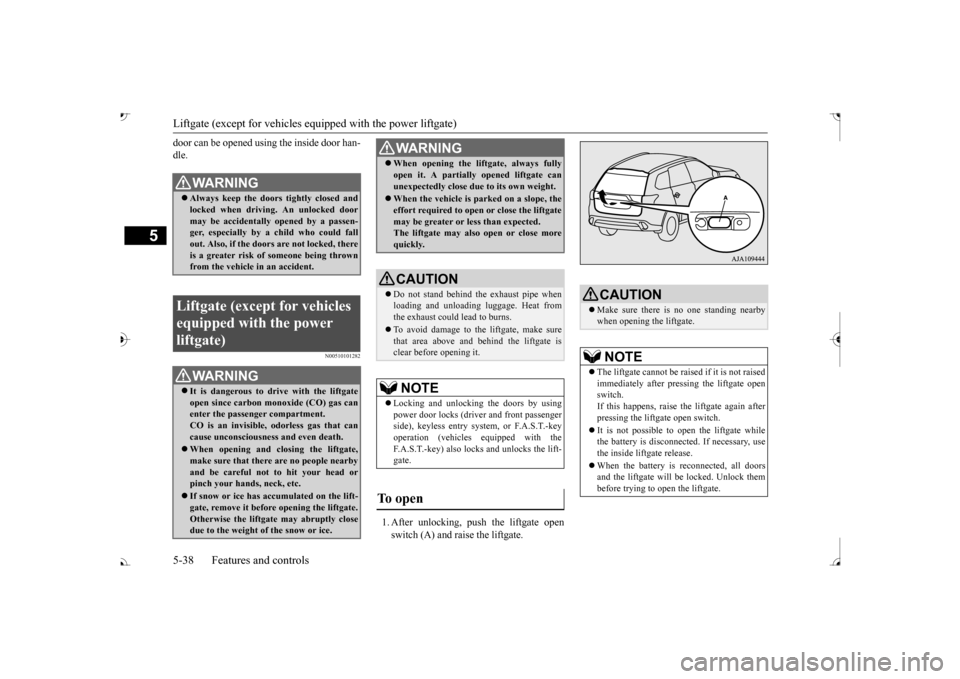
1. After unlocking, push the liftgate open switch (A) and raise the liftgate.
WA R N I N G Always keep the door
s tightly closed and
locked when driving. An unlocked door may be accidentally
opened by a passen-
ger, especially by
a child who could fall
out. Also, if the doors are not locked, there is a greater risk of someone being thrown from the vehicle
in an accident.
Liftgate (except for vehicles equipped with the power liftgate)
WA R N I N G It is dangerous to drive with the liftgate open since carbon mo
noxide (CO) gas can
enter the passenger compartment. CO is an invisible, odorless gas that cancause unconsciousness and even death. When opening and cl
osing the liftgate,
make sure that there are no people nearbyand be careful not to hit your head or pinch your hands, neck, etc. If snow or ice has ac
cumulated on the lift-
gate, remove it before
opening the liftgate.
Otherwise the liftgate may abruptly closedue to the weight of the snow or ice.
When opening the lift
gate, always fully
open it. A partially opened liftgate canunexpectedly close due to its own weight. When the vehicle is parked on a slope, the effort required to open or close the liftgatemay be greater or less than expected. The liftgate may also open or close more quickly.CAUTION Do not stand behind the exhaust pipe when loading and unloading
luggage. Heat from
the exhaust could lead to burns. To avoid damage to the liftgate, make sure that area above and behind the liftgate is clear before opening it.NOTE
Locking and unlocking the doors by using power door locks (driver and front passenger side), keyless entry system, or F.A.S.T.-keyoperation (vehicles
equipped with the
F.A.S.T.-key) also locks and unlocks the lift- gate.
To open
WA R N I N G
CAUTION Make sure there is no one standing nearby when opening the liftgate.NOTE
The liftgate cannot be rais
ed if it is not raised
immediately after pressing the liftgate open switch.If this happens, raise th
e liftgate again after
pressing the liftgate open switch. It is not possible to open the liftgate while the battery is disconnect
ed. If necessary, use
the inside liftgate release. When the battery is reconnected, all doors and the liftgate will be locked. Unlock thembefore trying to open the liftgate.
BK0239700US.book 38 ページ 2016年6月16日 木曜日 午前10時58分
Page 125 of 521

Power liftgate (if so equipped) 5-44 Features and controls
5
After the power liftgate has opened automati- cally, if it is detected that the power liftgate is dropping due to factors such as accumulated snow, the power liftgate will close automati-cally. A warning buzzer w
ill sound continuously
while the drop prevention mechanism is oper-ating.
If the engine is starte
d while the power lift-
gate is operating, the power liftgate may intermittently move or stop moving to pre- vent the power liftgate
from moving abruptly.
Approximately 10 seconds after the power liftgate has fully closed
or opened, power lift-
gate operation will again resume.
N00576300030
When the power liftgate main switch is off,the power liftgate can be manually openedand closed. After unlocking the power
liftgate, push the
power liftgate open
switch (A) and pull up
the power liftgate.
WA R N I N G The auto reverse mech
anism will not oper-
ate just before the power liftgate becomesfully closed. Therefore, be careful not to trap a hand, part of your body or an object at this time. When the power liftgate is closed manu- ally, the auto reverse mechanism will notoperate. If the auto reverse mechanism has been repeatedly activated
, the power liftgate
may stop and then, de
pending on its posi-
tion, may abruptly open
or close. Once the
power liftgate is completely closed or open, automatic operation will be resumed.
CAUTION Do not damage the auto reverse sensor, when loading or unloading luggage. If the sensor isdamaged, the power lift
gate will not close
automatically.
Drop prevention mechanism
NOTE
If snow has accumula
ted on the power lift-
gate, remove it befo
re operating the power
liftgate. Do not install any accessory other than Mit- subishi Motors Genui
ne parts on the power
liftgate. The drop prevention mechanismmay be activated due to
the weight of the
accessory. The drop prevention mechanism could be activated if you attempt to close the liftgate manually immediately af
ter the power lift-
gate has been comple
tely opened automati-
cally.
Sudden operation prevention mechanism
CAUTION The auto reverse will not operate while the sudden operation preven
tion mechanism is
activated.
Manual operation
BK0239700US.book 44 ページ 2016年6月16日 木曜日 午前10時58分
Page 126 of 521
Power liftgate (if so equipped) Features and controls 5-45
5
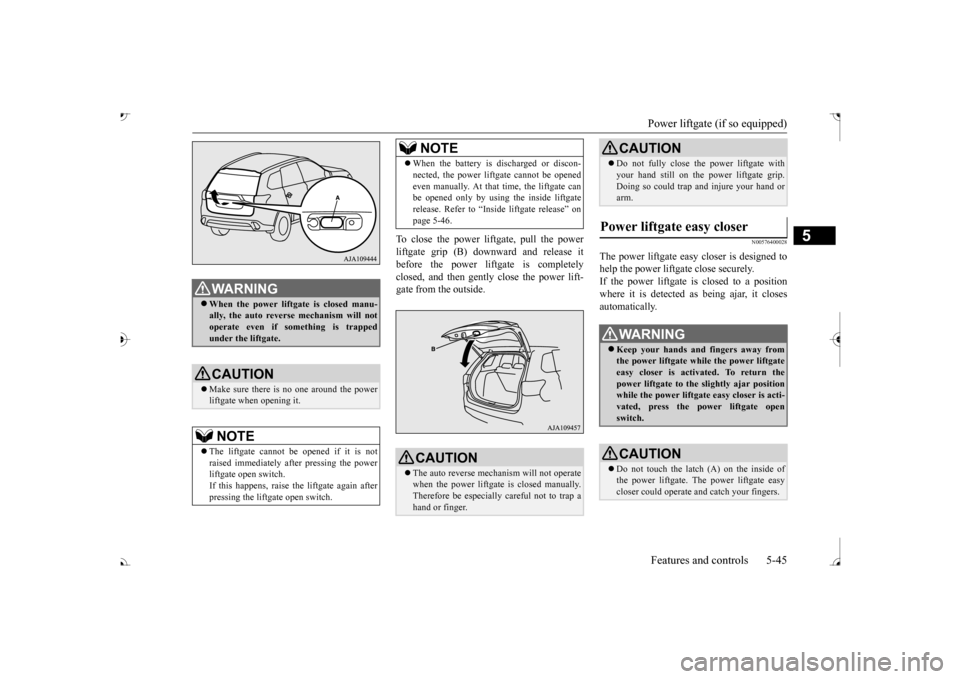
To close the power liftgate, pull the power liftgate grip (B) dow
nward and release it
before the power liftgate is completely closed, and then gently close the power lift- gate from the outside.
N00576400028
The power liftgate easy closer is designed tohelp the power liftgate close securely.If the power liftgate is closed to a position where it is detected as being ajar, it closes automatically.
WA R N I N G When the power liftgate is closed manu- ally, the auto reverse mechanism will notoperate even if so
mething is trapped
under the liftgate.CAUTION Make sure there is no one around the power liftgate when opening it.NOTE
The liftgate cannot be opened if it is not raised immediately after pressing the powerliftgate open switch. If this happens, raise the liftgate again after pressing the liftgate open switch.
When the battery is discharged or discon- nected, the power liftgate cannot be openedeven manually. At that time, the liftgate canbe opened only by using the inside liftgate release. Refer to “Inside liftgate release” on page 5-46.CAUTION The auto reverse mechanism will not operate when the power liftgate
is closed manually.
Therefore be especially careful not to trap ahand or finger.NOTE
Do not fully close the power liftgate with your hand still on the power liftgate grip.Doing so could trap and injure your hand orarm.
Power liftgate easy closer
WA R N I N G Keep your hands and fingers away from the power liftgate while the power liftgate easy closer is activated. To return thepower liftgate to the sl
ightly ajar position
while the power liftgate easy closer is acti- vated, press the power liftgate openswitch.CAUTION Do not touch the latch (A) on the inside of the power liftgate. Th
e power liftgate easy
closer could operate
and catch your fingers.
CAUTION
BK0239700US.book 45 ページ 2016年6月16日 木曜日 午前10時58分
Page 138 of 521
Steering wheel height
and reach adjustment
Features and controls 5-57
5
Warning light (yellow) Warning display If there is a malfunction in the system, the warning light will come on. In addition, the warning display appears on the information screen in the multi information display.
Under normal conditions, the warning light only comes on when the operation mode isput in ON and goes off a few seconds later.
N00511501241
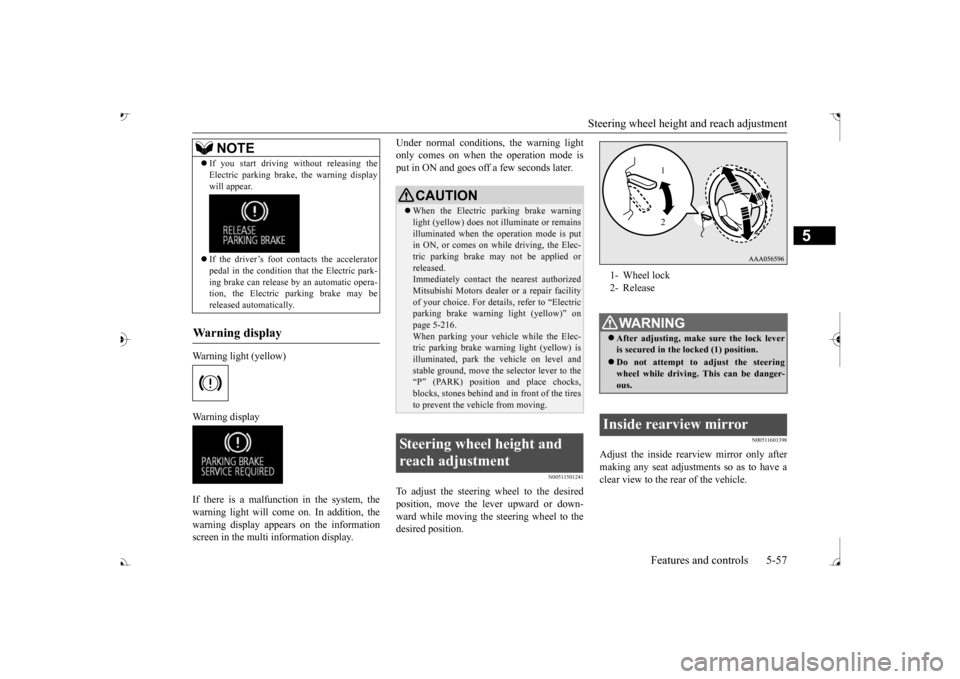
To adjust the steering wheel to the desiredposition, move the lever upward or down- ward while moving the steering wheel to the desired position.
N00511601398
Adjust the inside rearview mirror only after making any seat adjustme
nts so as to have a
clear view to the rear of the vehicle.
If you start driving wi
thout releasing the
Electric parking brake, the warning displaywill appear. If the driver’s foot contacts the accelerator pedal in the condition th
at the Electric park-
ing brake can release by an automatic opera-tion, the Electric parking brake may be released automatically.
Wa r n i n g d is p la y
NOTE
CAUTION When the Electric parking brake warning light (yellow) does not
illuminate or remains
illuminated when the operation mode is put in ON, or comes on while driving, the Elec- tric parking brake may not be applied orreleased. Immediately contact the nearest authorized Mitsubishi Motors dealer
or a repair facility
of your choice. For detail
s, refer to “Electric
parking brake warni
ng light (yellow)” on
page 5-216.When parking your vehi
cle while the Elec-
tric parking brake warning light (yellow) is illuminated, park th
e vehicle on level and
stable ground, move the
selector lever to the
“P” (PARK) position and place chocks, blocks, stones behind and
in front of the tires
to prevent the vehicle from moving.
Steering wheel height and reach adjustment
1- Wheel lock 2- ReleaseWA R N I N G After adjusting, make sure the lock lever is secured in the locked (1) position. Do not attempt to adjust the steering wheel while driving. This can be danger-ous.
Inside rearview mirror
1 2
BK0239700US.book 57 ページ 2016年7月1日 金曜日 午後3時15分
Page 148 of 521
Automatic transaxle (if so equipped)
Features and controls 5-67
5
5. Turn the ignition switch to the “ON” posi- tion and make certain that all warninglights are functioning properly before starting the engine. 6. Turn the ignition switch to the “START”
ng the accelerator
pedal. Release the ignition switch when the engine starts.
After several attempts, you may experience that the engine still does not start. 1. Make sure that all electric devices, such as lights, air conditio
ning blower and rear
window defogger, are turned off. 2. While depressing the brake pedal, press the accelerator peda
l halfway and hold it
there, then crank th
e engine. Release the
accelerator pedal, immediately after the engine starts.
3. If the engine still will not start, the engine could be flooded with too much gasoline.While depressing the brake pedal, push the accelerator pedal all the way down and hold it there, then crank the engine for5 to 6 seconds. Retu
rn the ignition switch
to the “OFF” or “LOCK” position and release the accelerator pedal. Wait a fewseconds, and then crank the engine again for 5 to 6 seconds while depressing the brake pedal, but do no
t push the accelera-
tor pedal. Release the ignition key if the engine starts. If the
engine fails to start,
repeat these procedures
. If the engine still
will not start, cont
act your local Mitsubi-
shi Motors dealer or
a repair facility of
your choice for assistance.
When the ambient temperature is -22 °F (-30 °C) or lower, it may not be possible to start from a standstill even with the selector lever in the