2017 MITSUBISHI OUTLANDER lock
[x] Cancel search: lockPage 304 of 521
![MITSUBISHI OUTLANDER 2017 3.G Owners Manual Combination headlights and dimmer switch
Features and controls 5-223
5
[For vehicles equipped with the F.A.S.T.- key]The operation mode is changed to OFF or ACC and the driver’s door is not opened.](/manual-img/19/7536/w960_7536-303.png "MITSUBISHI OUTLANDER 2017 3.G Owners Manual Combination headlights and dimmer switch
Features and controls 5-223
5
[For vehicles equipped with the F.A.S.T.- key]The operation mode is changed to OFF or ACC and the driver’s door is not opened.")
Combination headlights and dimmer switch
Features and controls 5-223
5
[For vehicles equipped with the F.A.S.T.- key]The operation mode is changed to OFF or ACC and the driver’s door is not opened.
If the combination
headlights and dimmer
switch is turned to the “ ” or “ ” posi- tion again after the engine is turned off, the about 3-minute auto
-cutout function
described above will not
work. The lights (the
parking lights, tail lig
hts and license plate
lights) will stay on and will not turn off auto- matically.
N00584500028
This warning light will illuminate when thereis a malfunction in the LED headlights.
N00549801236
[When using a key to
start the engine]
If the driver’s door is opened with the key in the “OFF” or “LOCK” or “ACC” position orremoved from the ignition switch while the lights are on, the tone will sound to remind you to turn off the lights. [When using the F.A.S.T.-key to start the engine] If the driver’s door is opened with the opera-tion mode is put in OFF or ACC, or if the operation mode is changed to OFF while the lights are on, the tone will sound to remindyou to turn off the lights. In either case, the lights will turn off automat- ically and so will the tone. Or you can turn the light switch to th
e “OFF” position to stop
the tone.
N00549901178
To change the headlights from high beam to low beam and vice vers
a, pull the turn signal
lever to (1). Switch the headlights to lowbeam as a courtesy whenever there are oncoming vehicles, or when there is traffic moving ahead of you. An illuminated blue
NOTE
The light auto-cutout f
unction can be deacti-
vated. See your authorized Mitsubishi Motorsdealer for details. For vehicles equipped
with the Mitsubishi
Multi-Communication System, adjustmentscan be made using screen operations. For further details, refer to the separate owner’s manual.
When you want to keep the lights on:
LED headlight warning light
(if
so equipped)
NOTE
If the warning light illuminates, there may be a malfunction in the unit. Contact an autho- rized Mitsubishi Motors
dealer or a repair
facility of your choice
to have the system
checked.Type 1 Type 2
Headlight reminder buzzer Dimmer (high/low beam change)
BK0239700US.book 223 ページ 2016年6月16日 木曜日 午前10時58分
Page 307 of 521

Combination headlights and dimmer switch 5-226 Features and controls
5
The sensitivity of the se
nsor can be temporar-
ily lowering in the following ways. 1. Park your vehicle in a safe place and the ignition switch is turned to the “OFF” or “LOCK” position or the operation mode is put in OFF.2. Press the automatic high beam system switch more than 15 times within 5 sec- onds after operation mode is turned on.
• A vehicle in front
or oncoming vehicle is
hindered by any object
such as continuous
bends, elevated median/i
sland, traffic signs,
roadside trees. • Your vehicle passes
an oncoming vehicle
suddenly on a bend with poor visibility. • Another vehicle crosse
s ahead of your vehi-
cle.
The headlights may remain at low beam (or be switched from high beam to low beam) when a reflective object (e.g. street light, traffic signal, noticeboard and signboard) Any of the following factors may influence the headlight beam switching timing: • How brightly the exteri
or lights of a vehicle
in front or oncoming
vehicle il
luminate.
• Movement or direction
of a vehicle in front
or oncoming vehicle. • Only right or left exte
rior light of a vehicle
in front or oncoming
vehicle is illuminat-
ing. • A vehicle in front or
oncoming vehicle is a
motorcycle. • Road conditions (gradient, bends and road surface). • The number of occupa
nts and luggage load.
The automatic high beam
system recognises
environmental conditi
ons by sensing a light
source ahead of your ve
hicle. Therefore, you
may feel like someth
ing is not quite right
when the headlight beams are switched auto- matically.NOTE
The system may not de
tect a light vehicle
such as a bicycle. The system may not detect an ambient brightness precisely. Th
is causes the traffic
to be dazzled by high beam or the low beamto be maintained. In such cases, you should switch the headli
ght beams manually.
• In bad weather (heavy
rain, fog, snow or
sandstorm). • The windshield is dirty or fogged up. • The windshield is cracked or broken.• The sensor is deformed or dirty. • A light, which is simila
r to the headlights or
tail lights, is shining around your vehicle. • A vehicle in front
or oncoming vehicle is
driven without lights, the exterior lights are dirty or discoloured, or the direction of theheadlight beams is adjusted improperly. • It becomes dark and bright suddenly and continuously around your vehicle. • Your vehicle is driven on uneven surfaces.• Your vehicle is driven on a winding road. • A reflective object such as a noticeboard or a mirror reflects a li
ght ahead of your vehi-
cle. • When lights of the vehicle in front or head- lights of an oncoming ve
hicle blend into the
other lights. • The rear end of a vehicle in front (such as a container truck) re
flect a strong light.
• Your vehicle's headlight
is broken or dirty.
NOTE
• Your vehicle is inclined due to a flat tire or towing. • The warning display appears. (Refer to “System
problem warning” on
page 5-227.)
Observe the precautions below to maintain good usage conditions: • Do not attempt to di
sassemble the sensor.
• Do not affix a sticker or label on the wind- shield near the sensor. • Avoid overload. • Do not modify your vehicle.• When the windshield is replaced, use the Mitsubishi Motors
genuine parts.
To adjust the sensitivity of the sensor
NOTE
BK0239700US.book 226 ページ 2016年6月16日 木曜日 午前10時58分
Page 308 of 521

Combination headlights and dimmer switch
Features and controls 5-227
5
N00593800027
If a problem occurs with the system, the fol- lowing warning display will appear to the type of the problem. If a failure is detected in the system, the fol- lowing warning display will appear and the automatic high beam system will automati- cally be turned off. If the warning display remains even after theignition switch is turned to the “OFF” or “LOCK” position or the operation mode is put in OFF and then turned back to ON,please contact an au
thorized Mitsubishi
Motors dealer. [When the automatic high beam system is malfunctioning]
[When the sensor is malfunctioning]
If the system becomes temporarily unavail- able due to the high or low temperature of thesensor, the following warning display will appear. After the temperature of the sensor has beenin range, the system will automatically return to operation. If the warning display does not disappearafter waiting for a while, there is a possibility that the automatic high beam system has a malfunction. Contact an
authorized Mitsubi-
shi Motors dealer for inspection of the sys- tem.
System problem warning
The automatic high beam system deactivation due to fault
NOTE
If the sensor or its surrounding area becomes extremely high temperature when parking the vehicle under a blazing sun, the “AHB SERVICE REQUIRED” warning displaymay appear. If the message remains even after the tem- perature of the sensor or its surrounding areahas been in range, plea
se contact an autho-
rized Mitsubishi Motors dealer.
Sensor is too hot or cold
BK0239700US.book 227 ページ 2016年6月16日 木曜日 午前10時58分
Page 309 of 521

Combination headlights and dimmer switch 5-228 Features and controls
5
If the automatic high beam system determines that its performance has been degraded, the warning display will appear.This can occur when Foreign objects, such as dirt, snow or ice, adhere to the windshield of the sensor portion. In adverse weather
conditions, such as
rain, snow, sand storms, etc. A front vehicle or an oncoming vehicle is splashing water, snow or dirt.
When the sensor performance returns, the automatic high beam system will resumeoperation. If the warning display does not disappear after waiting for a while, there is a possibilitythat the sensor has a malfunction. Contact an authorized Mitsubishi Motors dealer for inspection of the sensor.
N00563201234
This function turns on
the front side-marker
and parking lights for
about 30 seconds after
the UNLOCK button on the remote controltransmitter is pressed when the combination headlights and dimmer sw
itch is in the “OFF” ehicles equipped with
the automatic light control). The welcome light function will ope
rate only when it is
dark outside the vehicle.
N00547301178
This function turns on the headlights in thelow beam setting for a
bout 30 seconds after
the ignition switch is turned to the “OFF” or “LOCK” position or the operation mode is put in OFF. 1. Turn the combination headlights and dim- mer switch to the “OFF” or “AUTO” matic light control).2. Turn the ignition switch to the “OFF” or “LOCK” position or put the operation mode in OFF. Also, if a key was used tostart the engine, remove the key from the ignition switch.
Windshield is dirty
Welcome light
NOTE
While the welcome light
function is operat-
ing, perform one of th
e following operations
to cancel the function. • Push the LOCK button on the remote con- trol transmitter. • Turn the combination headlights and dim- mer switch to the “ ” or “ ” position. • Turn the ignition switch to the “ON” posi- tion or put the opera
tion mode in ON.
It is possible to modify functions as follows: • The headlights can be set to come on in the low beam setting. • The welcome light fu
nction can be deacti-
vated.
For details, consult a Mitsubishi Motorsdealer.On vehicles e
quipped with Mitsubishi Multi-
Communication System, screen operations can be used to ma
ke the adjustment.
Refer to the separate
owner’s manual for
details.
Coming home light
NOTE
BK0239700US.book 228 ページ 2016年6月16日 木曜日 午前10時58分
Page 310 of 521
Headlight leveling switch (if so equipped)
Features and controls 5-229
5
3. Within 60 seconds of
turning the ignition
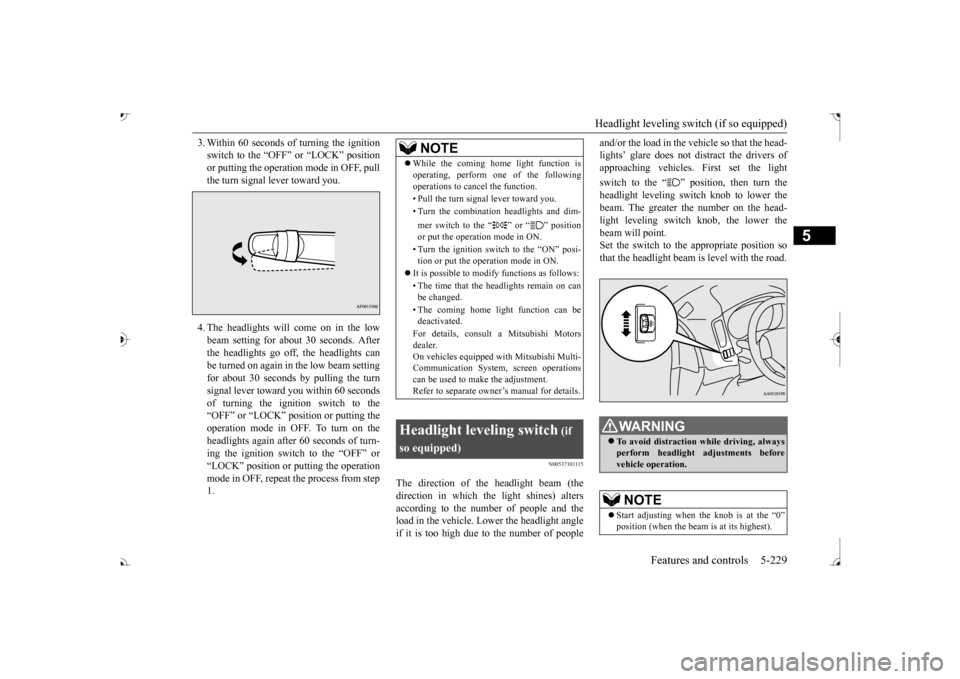
switch to the “OFF” or “LOCK” positionor putting the operation mode in OFF, pull the turn signal lever toward you. 4. The headlights will come on in the low beam setting for about 30 seconds. After the headlights go off, the headlights can be turned on again in
the low beam setting
for about 30 seconds by pulling the turnsignal lever toward you within 60 seconds of turning the ignition switch to the “OFF” or “LOCK” position or putting theoperation mode in OFF. To turn on the headlights again after 60 seconds of turn- ing the ignition switch to the “OFF” or“LOCK” position or
putting the operation
mode in OFF, repeat the process from step 1.
N00537101115
The direction of the headlight beam (thedirection in which the light shines) alters according to the number of people and the load in the vehicle. Lo
wer the headlight angle
if it is too high due to the number of people
and/or the load in the vehicle so that the head- lights’ glare does not distract the drivers ofapproaching vehicles
. First set the light
switch to the “ ” position, then turn the headlight leveling swit
ch knob to lower the
beam. The greater th
e number on the head-
light leveling switch knob, the lower the beam will point. Set the switch to the appropriate position sothat the headlight beam is level with the road.
NOTE
While the coming home light function is operating, perform one of the followingoperations to cancel the function. • Pull the turn signal lever toward you. • Turn the combination headlights and dim- mer switch to the “ ” or “ ” position or put the operation mode in ON. • Turn the ignition switch to the “ON” posi- tion or put the operation mode in ON.
It is possible to modify functions as follows: • The time that the he
adlights remain on can
be changed. • The coming home light function can be deactivated. For details, consult a Mitsubishi Motors dealer. On vehicles equipped
with Mitsubishi Multi-
Communication System, screen operationscan be used to ma
ke the adjustment.
Refer to separate owne
r’s manual for details.
Headlight leveling switch
(if
so equipped)
To avoid distraction while driving, always perform headlight adjustments before vehicle operation.NOTE
Start adjusting when the knob is at the “0”
is at its highest).
BK0239700US.book 229 ページ 2016年6月16日 木曜日 午前10時58分
Page 318 of 521

Wiper deicer switch (if so equipped)
Features and controls 5-237
5
N00523501277
N00584400027
The electric rear window
defogger switch can
be operated when the engine is running.When the front wipers have frozen to the windshield at the parked
positions, turning on
this switch will heat the windshield to makethe wipers operable. Press the electric rear window defogger switch and the deicer will operate.
N00523701468
The rear window defogger can be used when the engine is running. The indicator light (A) will come on whenyou press the electric rear window defogger switch. Electric current will flow through the heating wires on the rear window to helpclear away moisture or frost.
If the knob is in the “OFF” position, turn the knob to the “INT” position twice quickly tooperate the rear window
wiper continuously.
(continuous operation mode) Turn the knob to the “OFF” position to stop the rear window wipe
r continuous operation.
The wiper intermittent
operation time can be
adjusted.See your authorized Mitsubishi Motors dealer for details. For vehicles equipped
with the Mitsubishi
Multi-Communication System, adjustments can be made using screen operations. For further details, refer to the separate owner’smanual. The washer fluid reservoir is located in the engine compartment. Check the fluid level re
gularly and refill if
necessary. (Refer to
“Washer fluid” on page
9-12.)
Precautions to observe when using wipers and washers
CAUTION If the washer is used
in cold weather, the
washer fluid sprayed onto the glass might freeze, blocking your vi
ew. Heat the glass
with the defroster befo
re using the washer.
NOTE
NOTE
Do not use the wipers when the windshield is dry. This could scratch the glass and wear thewiper blades prematurely. Before using the wipe
rs in cold weather,
check to be sure that the wiper blades are notfrozen to the windshield or rear window. Using the wipers while the blades are frozen could cause the wiper motor to burn out. If the moving wipers be
come blocked part-
way through a sweep by ic
e or other deposits
on the glass, the wipers may temporarily stop operating to prevent the motor from over- heating. In this case, park the vehicle in asafe place, turn the ignition switch to the “OFF” position or put
the operation mode in
OFF, and then remove
the ice or other depos-
its. Because the wipers will
start operating again
after the wiper motor cools down, check thatthe wipers operate
before using them.
Avoid using the washer for more than 20 sec- onds at a time. Do not operate the washer when the washer fluid reservoir is empty or the pump may fail. During cold weather, add a recommended washer solution that will not freeze in thewasher fluid reservoir. Otherwise the washer may not work or may be damaged. Replace the wiper blades when they are worn. Use the proper size replacement blades. For further info
rmation, please con-
tact your authorized
Mitsubishi Motors
dealer.
Wiper deicer switch
(if so
equipped)
NOTE
The wiper deicer is
activated/de
activated,
depending on the operation of the rear win- dow defogger. Refer to
“Electric rear win-
dow defogger switch
” on page 5-237.
Electric rear window defog- ger switch
BK0239700US.book 237 ページ 2016年6月16日 木曜日 午前10時58分
Page 326 of 521

Bluetooth® 2.0 interface
Features and controls 5-245
5
7. When the registration of the passcode is completed, the voice
guide will say “Pass-
code is enabled” and the system will return to the main menu.
If a passcode has been
set and the security
function is enabled, the voice guide will say “Hands-free system is
locked. State the pass-
code to continue” when the SPEECH button (except for vehicles with Mitsubishi Multi- Communication System) or PICK-UP button(for vehicles with Mitsubishi Multi-Commu- nication System) is pres
sed to enter voice rec-
ognition mode. Say th
e 4-digit passcode
number to enter the passcode. If the entered passcode is wrong, the voice guide will say “<4-digit passcode>, Incorrect
passcode. Please try again.” Enter the correct passcode. Use the following procedure to turn off the security function by di
sabling the passcode.
1. Press the SPEECH button (except for vehicles with Mitsubishi Multi-Commu- nication System) or
PICK-UP button (for
vehicles with Mitsubishi Multi-Commu-nication System). 2. Say “Setup.” 3. Say “Passcode.”4. The voice guide will say “Passcode is enabled. Would you like to disable it?” Answer “Yes.” the passcode and return to the main menu.
5. When the disabling of the passcode is completed, the voice
guide will say “Pass-
code is disabled”
and the system will
return to the main menu.
N00564700011
The Bluetooth
® 2.0 interface can use the
speaker enrollment function to create a voice model for one person per language. This makes it easier for the Bluetooth
® 2.0
interface to recognise
voice commands said
by you. You can turn a voice model registered with the speaker enrollment function on and offwhenever you want.
N00564801181
It takes about 2 to 3 mi
nutes to complete the
speaker enrollment process. To ensure the best results, run through the process while in the driver’s seat, in an envi-ronment that is as quiet as possible (when there is no rain or strong winds and the vehi- cle windows are closed).
Please turn off your
phone while in speaker enrollment to prevent interruption of the process. Use the following procedure for speakerenrollment.
NOTE
Passcode will be requi
red to access the sys-
tem after the next ignition cycle. It is required for a little time after engine stop that the entered
passcode is actually
recorded in the system.If the ignition switch
or the operation mode
is made to ACC or
ON or the engine is
started immediately afte
r engine stop, there
is a case when the entered passcode is not recorded in the system. At this time, please try to enter the passcode again.
Entering the passcode
NOTE
You can reenter the passcode as many times as you want. If you have forgotten your passcode, say “Cancel” to quit the voice input mode and then check with an authorized Mitsubishi Motors dealer.
Disabling the passcode
NOTE
System must be unlocked to disable the pass- code.
Speaker enrollment function Speaker enrollment
BK0239700US.book 245 ページ 2016年6月16日 木曜日 午前10時58分
Page 344 of 521
USB input terminal
Features and controls 5-263
5
off and on, the user is encouraged to try to correct the interference by
one or more of the
following measures: Reorient or relocate
the receiving antenna.
Increase the sepa
ration between the
equipment and receiver. Connect the equipment into an outlet on a circuit different from that to which the receiver is connected. Consult the dealer or an experienced radio/TV technician for help.
ICES Notice: This Class B digital apparatus complies with Canadian ICES-003.
N00566401136
N00566701142
You can connect your USB memory device or iPod
* to play music files stored in the USB
memory device or iPod.This section explains how to connect and remove a USB memory device or iPod. See the following sect
ion for details on how
to play music files. Refer to “Listen to an iPod” on page 7-32. Refer to “Listen to Audio Files on a USBDevice” on page 7-34. Refer to “To play iPod/USB memory device tracks via voice ope
ration” on page 7-37.
* : “iPod” is a registered trademark of Apple Inc. in the United Stat
es and other countries.
N00566801156
1. Park your vehicle in a safe place and turn the ignition switch to the “LOCK” posi-tion or put the operation mode in OFF.
Enrollment commands
USB input terminal How to connect a USB memory device
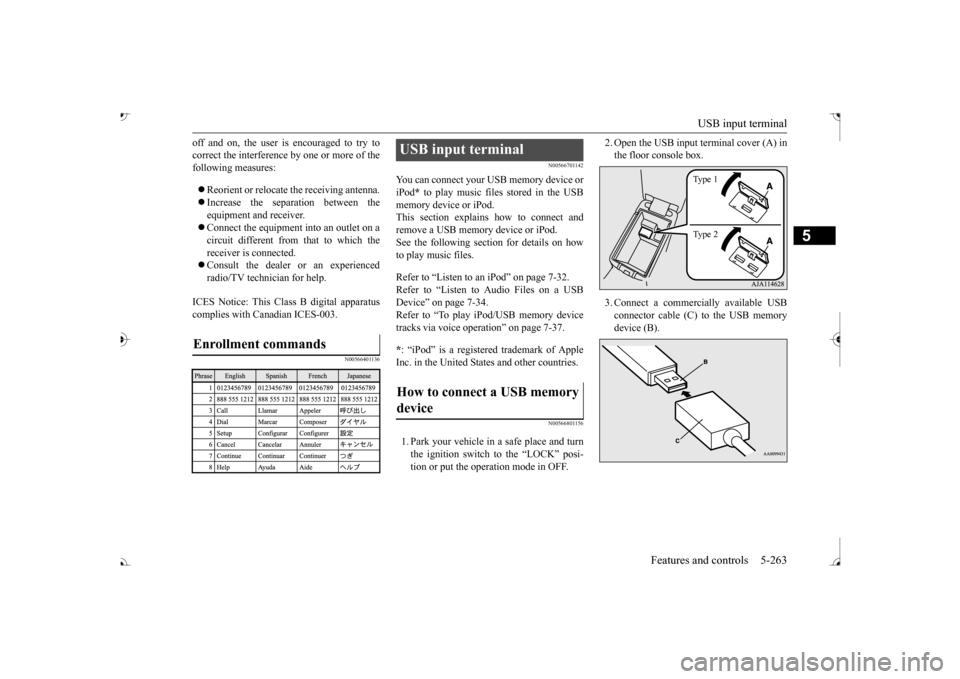
2. Open the USB input
terminal cover (A) in
the floor console box. 3. Connect a commercia
lly available USB
connector cable (C) to the USB memory device (B).
Ty p e 1 Ty p e 2
BK0239700US.book 263 ページ 2016年6月16日 木曜日 午前10時58分