2017 MITSUBISHI OUTLANDER lock
[x] Cancel search: lockPage 345 of 521
USB input terminal 5-264 Features and controls
5
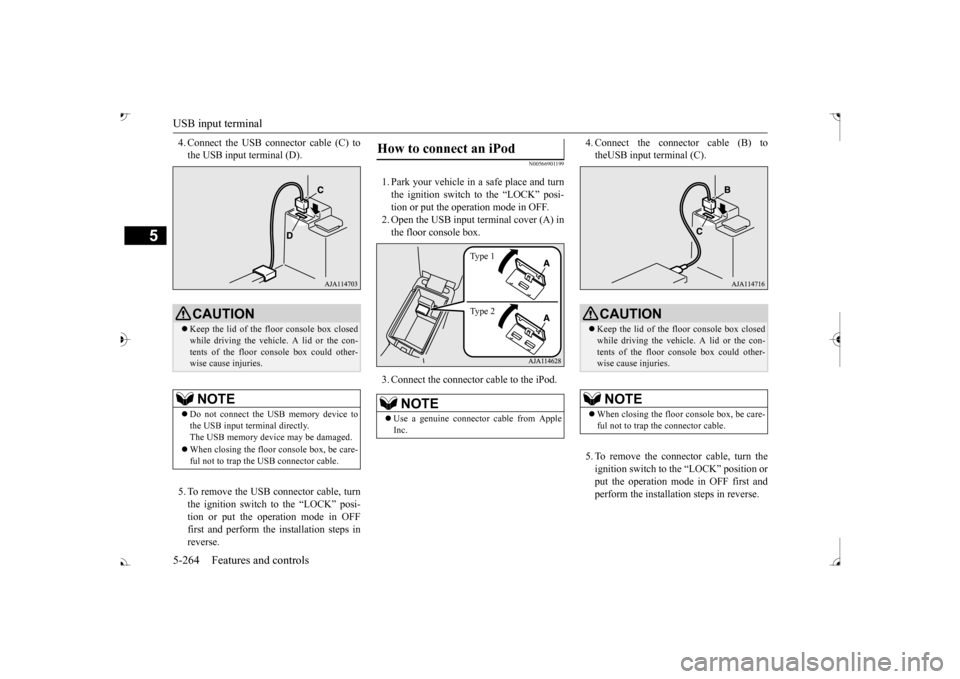
4. Connect the USB connector cable (C) to the USB input terminal (D). 5. To remove the USB connector cable, turn the ignition switch to the “LOCK” posi- tion or put the operation mode in OFFfirst and perform the installation steps in reverse.
N00566901199
1. Park your vehicle in
a safe place and turn
the ignition switch to the “LOCK” posi-tion or put the operation mode in OFF. 2. Open the USB input terminal cover (A) in the floor console box. 3. Connect the connector cable to the iPod.
4. Connect the connector cable (B) to theUSB input terminal (C). 5. To remove the connect
or cable, turn the
ignition switch to the “LOCK” position orput the operation mode in OFF first and perform the installation steps in reverse.
CAUTION Keep the lid of the floor console box closed while driving the vehicle. A lid or the con- tents of the floor console box could other- wise cause injuries.NOTE
Do not connect the US
B memory device to
the USB input term
inal directly.
The USB memory devi
ce may be damaged.
When closing the floor
console box, be care-
ful not to trap the USB connector cable.
How to connect an iPod
NOTE
Use a genuine connector
cable from Apple
Inc.
Ty p e 1 Ty p e 2
CAUTION Keep the lid of the floor console box closed while driving the vehicle. A lid or the con- tents of the floor console box could other- wise cause injuries.NOTE
When closing the floor
console box, be care-
ful not to trap the connector cable.
BK0239700US.book 264 ページ 2016年6月16日 木曜日 午前10時58分
Page 346 of 521
USB input terminal
Features and controls 5-265
5
N00567001083 N00567101130
Devices of the following types can be con- nected. For these connectable
device types, “iPod*,”
“iPod classic*,”
“iPod nano*,” “iPod touch*”
site: [For vehicles sold in U.S.A.] You can access the Mitsubishi Motors NorthAmerica website. [For vehicles sold in
Canada and Mexico]
You can access the Mitsubishi Motors web-site. Please read and agree to the “Warning about Links to the Web Sites of Other Com-
panies”. The websites
mentioned above may
connect you to websites
other than the Mit-
subishi Motors website. http://www.mitsubishi-
motors.com/en/prod-
ucts/index.html * : “iPod,” “iPod classic,” “iPod nano,” “iPod touch,” and “iPhone” marks of Apple Inc. in the United States and other countries.
N00567201056
You can play music files of the followingspecifications that are saved in a USB mem- ory device or other
device supporting mass
storage class. When
you connect your iPod,
playable file specif
ications depend on the
connected iPod.
Types of connectable devices and supported file specifica-tions Device types Model name
Condition
USB memory device
Storage capac- ity of 256 Mbytes or more
Models other than USB memory devices and iPods
Digital audio player support- ing mass stor-age class
NOTE
Depending on the type of the USB memory device or other devi
ce connected, the con-
nected device may not
function properly or
the available functi
ons may be limited.
It is recommended to use an iPod with firm- ware updated to th
e latest version.
You can charge your
iPod by connecting it to
the USB input terminal
when the ignition
switch or the operation mode is in ON or ACC. Do not keep your US
B memory device or
iPod in your vehicle. It is recommended that you back up the files in case of
data damage.
Do not connect to the USB input terminal any device (hard disk
, card reader, memory
reader, etc.) other
than the connectable
devices specified in the previous section. The device and/or data
may be damaged. If
any of these devices
was connected by mis-
take, remove it after turning the ignition switch to the “LOCK” position or putting the operation mode in OFF.
File specifications Item
Condition
File format
MP3, WMA, AAC, WAV
Maximum number of levels (including the root)
Level 8
Number of folders 700 Number of files 65,535
NOTE
BK0239700US.book 265 ページ 2016年6月16日 木曜日 午前10時58分
Page 349 of 521
HomeLink® Wireless Control System (if so equipped) 5-268 Features and controls
5
N00554301040
HomeLink
® Wireless Contro
l System is a
registered trademark of Gentex Corporation. HomeLink
® provides a convenient way to
replace up to 3 hand-held radio-frequency (RF) transmitters used to activate devicessuch as gate operators
, garage door openers,
entry door locks, security systems, even home lighting. Additional HomeLink
® information
can be found at www.homelink.com, www.youtube.com/HomeLinkGentex, or by calling the toll-free HomeLink
®-Hotline at 1-
800-355-3515.
N00584600029
Some garage door openers manufactured after 1995 have “rolli
ng code protection”.
To program a garage door openerequipped with “rolli
ng code protection”; cess the garage door
opener motor to press the motor’s “Learn”
For convenience, use
a ladder and another pe
rson to assist you.
It is recommended that a new battery be placed in the hand-held
transmitter of the
device being progr
ammed to HomeLink
®
for quicker training and accurate trans- mission of the radio-frequency signal.
HomeLink
® Wireless Con-
trol System
(if so equipped)
WA R N I N G Do not use HomeLink
® with any garage
door opener that la
cks safety stop and
reverse features as required by U.S. Fed- eral Regulations.
A garage door opener
which cannot detect an object in the path of a closing garage d
oor and then auto-
matically stop and reverse, does not meetcurrent U.S. Federal
Regulations. Using a
garage door opener wi
thout these features
increases the risk of serious injury ordeath.
During programming, your garage door or gate may open or close. Make sure thatpeople and objects are clear of the garagedoor or gate that
you are programming.
NOTE
Once HomeLink
® is programmed, retain the
original transmitter for future programming procedures (for example, new vehicle pur-chases). Upon sale of the vehicle, the pro- grammed HomeLink
® buttons should be
erased for security purposes. Refer to “Cleaning the progra
mmed information” on
page 5-272. You can program a ma
ximum of 3 devices.
To change or replace any of the 3 devicesafter it has been in
itially programmed, you
must first erase the current settings. See “Cleaning the programmed information”on page 5-272 or “Reprogramming a single HomeLink
® button” on page 5-272.
WA R N I N G
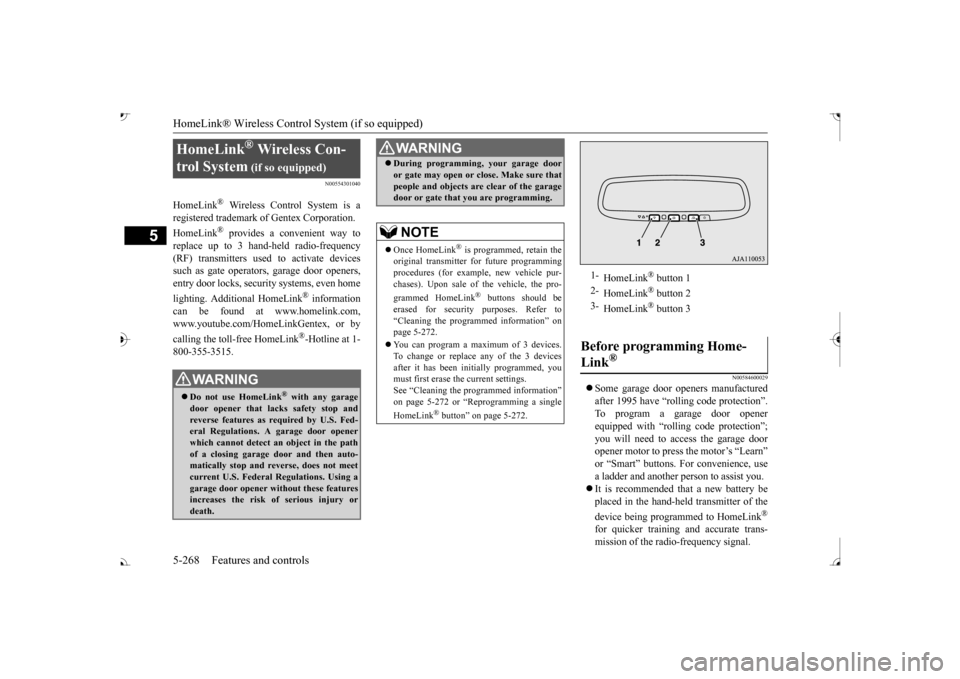
1-
HomeLink
® button 1
2-
HomeLink
® button 2
3-
HomeLink
® button 3
Before programming Home- Link
®
BK0239700US.book 268 ページ 2016年6月16日 木曜日 午前10時58分
Page 352 of 521
HomeLink® Wireless Control System (if so equipped)
Features and controls 5-271
5
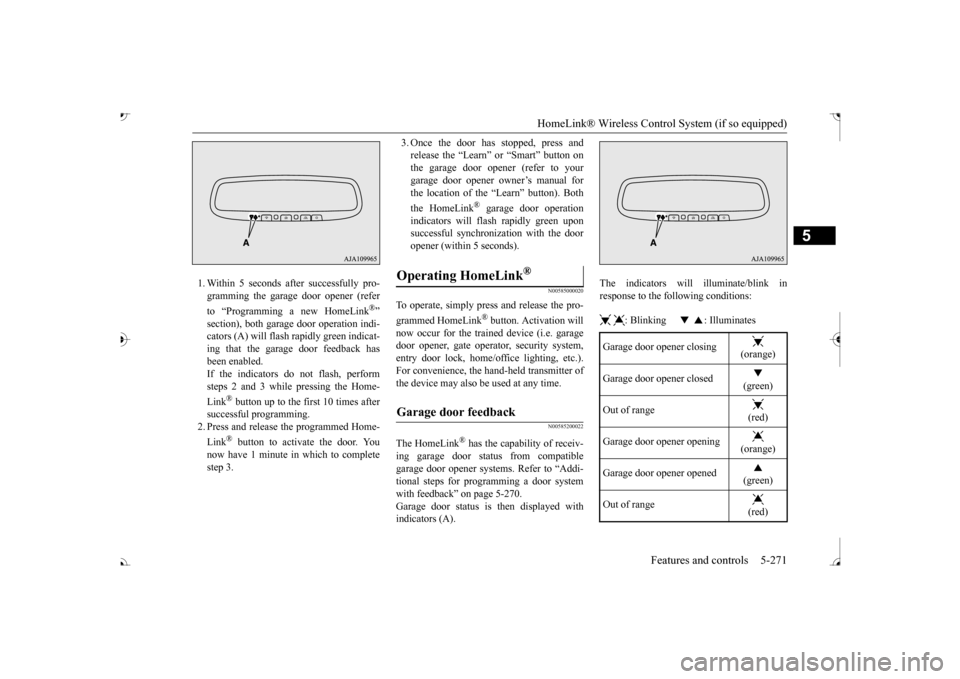
1. Within 5 seconds after successfully pro- gramming the garage door opener (refer to “Programming a new HomeLink
®”
section), both garage door operation indi- cators (A) will flash
rapidly green indicat-
ing that the garage
door feedback has
been enabled. If the indicators do not flash, performsteps 2 and 3 while pressing the Home- Link
® button up to the first 10 times after
successful programming.2. Press and release the programmed Home- Link
® button to activate the door. You
now have 1 minute in which to completestep 3.
3. Once the door has stopped, press and release the “Learn”
or “Smart” button on
the garage door opener (refer to your garage door opener owner’s manual for the location of the “Learn” button). Both the HomeLink
® garage door operation
indicators will fl
ash rapidly green upon
successful synchron
ization with the door
opener (within 5 seconds).
N00585000020
To operate, simply press and release the pro- grammed HomeLink
® button. Activation will
now occur for the traine
d device (i.e. garage
door opener, gate operat
or, security system,
entry door lock, home/of
fice lighting, etc.).
For convenience, the ha
nd-held transmitter of
the device may also be
used at any time.
N00585200022
The HomeLink
® has the capability of receiv-
ing garage door status from compatible garage door opener systems. Refer to “Addi- tional steps for programming a door systemwith feedback” on page 5-270. Garage door status is then displayed with indicators (A).
The indicators will illuminate/blink in response to the following conditions: : Blinking : Illuminates
Operating HomeLink
®
Garage door feedback
Garage door opener closing
(orange)
Garage door opener closed
(green)
Out of range
(red)
Garage door opener opening
(orange)
Garage door opener opened
(green)
Out of range
(red)
BK0239700US.book 271 ページ 2016年6月16日 木曜日 午前10時58分
Page 354 of 521

Interior lights
Features and controls 5-273
5
This equipment complies with FCC radiation exposure limits set fo
rth for an uncontrolled
environment. End Users must follow the spe- cific operating instruct
ions for satisfying RF
exposure compliance. This transmitter must be at least 12 inches (20 cm) from the user and must not be co-loc
ated or operating in
conjunction with any other antenna or trans- mitter. The term “IC:” before the certification/regis-tration number only si
gnifies that Industry
Canada technical specifications were met.
N00525301660
N00525401528
CAUTION The transmitter has been tested and complies with FCC and IC rules.Changes or modifica
tions not expressly
approved by the party responsible for com- pliance could void the user’s authority to operate the device.
Interior lights
NOTE
Be aware that leaving the light illuminated with the engine off may run the batterydown. Never leave the vehi
cle without checking
that the light is off.1- Cargo room light
P.5-275
2- Dome light (rear)
P.5-274
3- Dome light (front)/Reading lights
P.5-273
4- Downlight
P.5-220
5- Front foot lights
P.5-275
Dome light (front)/Reading lights Dome light (front)
1- (DOOR) When any of the doors or the liftgate isopened, the dome light
illuminates; when
any of them are closed, the dome light goes off after approxi
mately 30 seconds.
However, the light go
es off immediately
if: The doors and the liftgate are closed while the ignition switch is in the “ON” position or the operation mode is in ON. The driver’s door is closed while the lock knob is in the lock position, after all the other doors are closed.
BK0239700US.book 273 ページ 2016年6月16日 木曜日 午前10時58分
Page 355 of 521
Interior lights 5-274 Features and controls
5
2- (OFF) The dome light stays off regardless of any door or the liftgate being opened or closed.
N00537601165
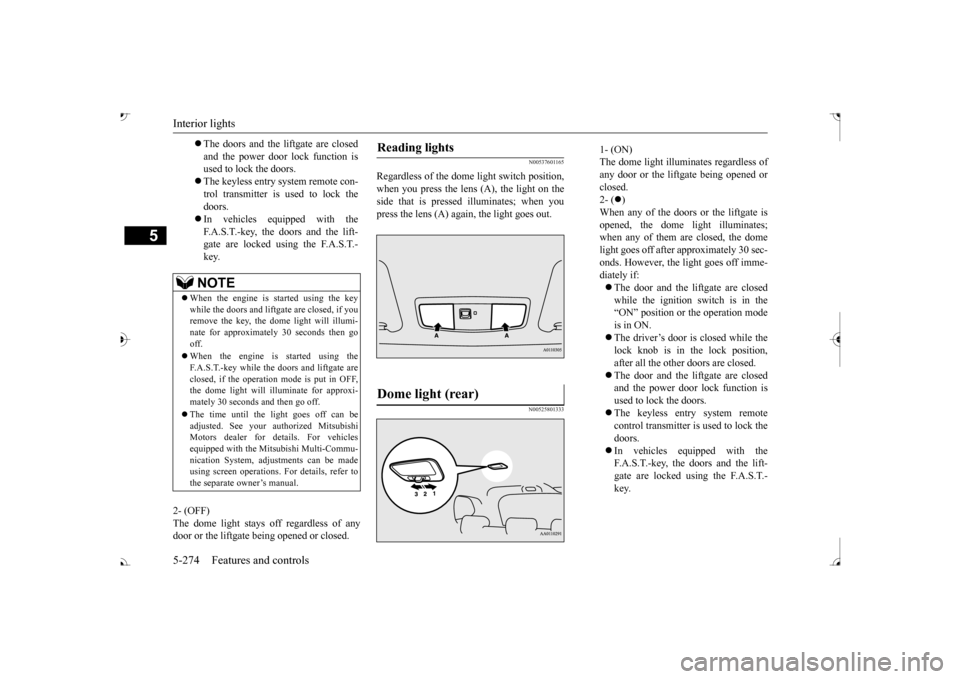
Regardless of the dom
e light switch position,
when you press the lens (A), the light on the side that is pressed illuminates; when youpress the lens (A) again, the light goes out.
N00525801333
The doors and the liftgate are closed and the power door lock function is used to lock the doors. The keyless entry system remote con- trol transmitter is used to lock the doors. In vehicles equipped with the F.A.S.T.-key, the doors and the lift- gate are locked using the F.A.S.T.-key.NOTE
When the engine is started using the key while the doors and liftga
te are closed, if you
remove the key, the do
me light will illumi-
nate for approximately 30 seconds then go off. When the engine is started using the F.A.S.T.-key while the doors and liftgate areclosed, if the operation mode is put in OFF, the dome light will il
luminate for approxi-
mately 30 seconds and then go off. The time until the light goes off can be adjusted. See your authorized MitsubishiMotors dealer for details. For vehicles equipped with the Mitsubishi Multi-Commu- nication System, adju
stments can be made
using screen operations. For details, refer to the separate owner’s manual.
Reading lights Dome light (rear)
1- (ON) The dome light illuminates regardless ofany door or the liftgate being opened or closed. 2- (
)
When any of the doors or the liftgate is opened, the dome
light illuminates;
when any of them are closed, the domelight goes off after approximately 30 sec- onds. However, the light goes off imme- diately if: The door and the liftgate are closed while the ignition switch is in the“ON” position or the operation mode is in ON. The driver’s door is closed while the lock knob is in the lock position, after all the other doors are closed. The door and the liftgate are closed and the power door lock function is used to lock the doors. The keyless entry system remote control transmitter is used to lock the doors. In vehicles e
quipped with the
F.A.S.T.-key, the doors and the lift- gate are locked using the F.A.S.T.- key.
BK0239700US.book 274 ページ 2016年6月16日 木曜日 午前10時58分
Page 356 of 521
Interior lights
Features and controls 5-275
5
3- (OFF) The dome light stays off regardless of anydoor or the liftgate being opened or closed.
N00526101186
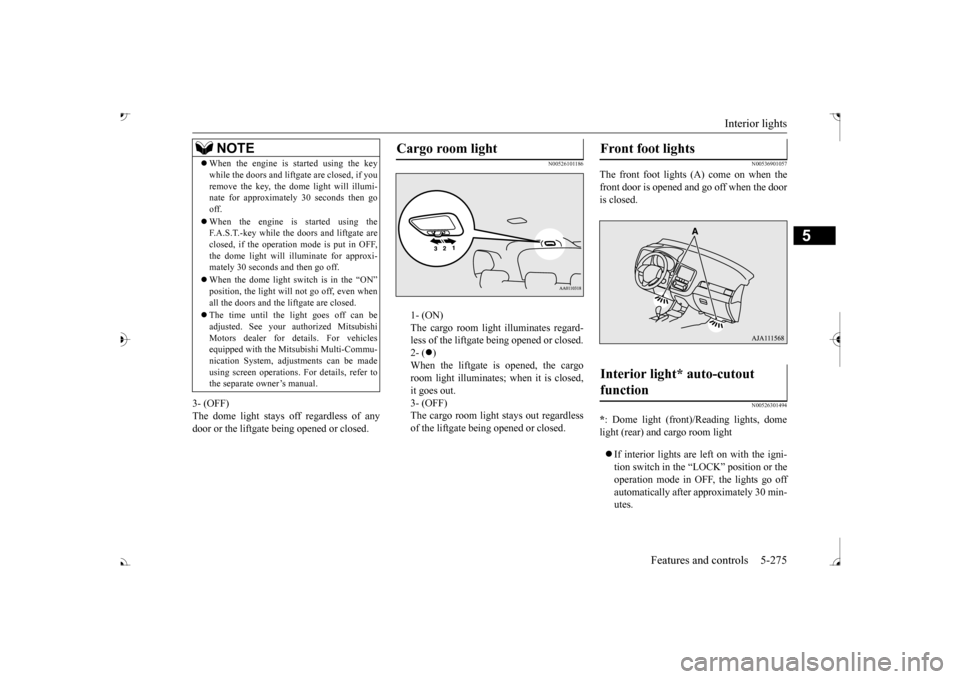
1- (ON) The cargo room light illuminates regard- less of the liftgate be
ing opened or closed.
2- (
)
When the liftgate is opened, the cargo room light illuminates; when it is closed,it goes out. 3- (OFF) The cargo room light stays out regardlessof the liftgate being opened or closed.
N00536901057
The front foot lights (A) come on when the front door is opened and go off when the door is closed.
N00526301494
* : Dome light (front)/Reading lights, dome light (rear) and cargo room light If interior lights are left on with the igni- tion switch in the “LOCK” position or theoperation mode in OFF, the lights go off automatically after approximately 30 min- utes.
NOTE
When the engine is
started using the key
while the doors and liftgate are closed, if youremove the key, the dom
e light will illumi-
nate for approximately 30 seconds then go off. When the engine is started using the F.A.S.T.-key while the doors and liftgate are closed, if the operation
mode is put in OFF,
the dome light will illuminate for approxi- mately 30 seconds and then go off. When the dome light switch is in the “ON”
not go off, even when
all the doors and the liftgate are closed. The time until the light goes off can be adjusted. See your authorized MitsubishiMotors dealer for details. For vehicles equipped with the Mitsubishi Multi-Commu- nication System, adjustments can be madeusing screen operations.
For details, refer to
the separate owner’s manual.
Cargo room light
Front foot lights Interior light* auto-cutout function
BK0239700US.book 275 ページ 2016年6月16日 木曜日 午前10時58分
Page 369 of 521

Vehicle preparation before driving 6-4 Driving safety
6
N00629001709
For a safer and more enjoyable trip, always check for the following: Before starting the vehicle, make certain that you and all passengers are seated andwearing their seat
belts properly (with
children in the rear seat, in appropriate restraints), and that all the doors and theliftgate are locked.
Move the driver’s seat as far backward as possible, while keeping good visibility,and good control of the steering wheel, brakes, accelerator, and controls. Check the instrument panel indicators and multi-information display
for any possible prob-
lem. Similarly, the front
passenger seat should
also be moved as fa
r back as possible.
Make sure that infants and small children are properly restrained in accordance with all laws and
regulations.
Check these by selecting the defroster mode, and set the blower swit
ch on high. You should
be able to feel the air blowing against thewindshield. Refer to “Defrosti
ng or defogging (wind-
shield, door windows)” on page 7-12 Check all the tires for heavy tread wear or uneven wear patterns. Look for stones, nails,glass, or other objects
stuck in the tread. Look
for any tread cuts or
sidewall cracks. Check
the wheel nuts for tightness, and the tires(including spare tire) for proper pressure.
Replace your tires before they are heavily worn out.As your vehicle is equi
pped with a tire pres-
sure monitoring system, there is a risk of damage to the tire inflation pressure sensorswhen the tire is replaced on the rim. Tire replacement should, onl
y, be performed by an
authorized Mitsubishi Motors dealer. Have someone watch wh
ile you turn all the
exterior lights on and off. Also check the turn signal indicators and hi
gh-beam indicators on
the instrument panel. Check the ground under the vehicle after parking overnight, for
fuel, water, oil, or
other leaks. Make sure
all the fluid levels are
correct. Also, if you
can smell fuel, you need
to find out why imme
diately and have it
fixed.
N00629201134
Even this vehicle’s sa
fety equipment, and
your safest driving, ca
nnot guarantee that you
can avoid an accident or injury. However, if
Vehicle preparation before driving Seat belts and seats
Defrosters Tires
Lights Fluid leaks Safe driving techniques
BK0239700US.book 4 ページ 2016年6月16日 木曜日 午前10時58分