2017 MITSUBISHI OUTLANDER III lights
[x] Cancel search: lightsPage 201 of 521

Forward Collision Mitigation System (FCM) (if so equipped) 5-120 Features and controls
5
• When a vehicle ahead is not completely in your path.• When your vehicle ch
anged lanes, and
your vehicle approac
hed immediately
behind the vehicle ahead.• When a vehicle ahead
is towing a trailer.
• When a vehicle ahead is a truck loaded with freight that protrudes rearward from the cargo bed.• When the height of a vehicle ahead isextremely low or its road clearance isextremely high.• When a vehicle ahead is extremely dirty.• When a vehicle ahea
d is covered with
snow.• When a vehicle ahea
d has a large glass
surface.• When a vehicle ahead does not havereflectors (light reflector) or the positionof the reflector is low.• When a vehicle ahead is a car carrier ora similar shaped vehicle.• When accelerating and deceleratingquickly.• When driving on a sl
ippery road covered
by rain water, snow, ice, etc.• When driving on a r
oad with alternating
up and down steep slopes.• When driving on a curve.• When driving on a bumpy or rough road.• When driving in dark areas, such as in a tunnel or at night.WA R N I N G
• When the system recognizes driver’s steering, accelerati
ng, braking or gear
shifting actions as
evasive actions to
avoid collision.• When the rear of your vehicle is weigheddown with the weight of passengers and luggage.• Up to several seconds after starting driv-ing.• In adverse weather conditions, such asrain, snow, fog or sand-storm.• When the windshield of the sensor por-tion is covered with
dirt, water droplets,
snow and ice, etc.• When a vehicle ahea
d or an oncoming
vehicle is splashing water, snow or dirt. • When using a windshield washer.• If windshield wipers are not Mitsubishi Motors Genuine parts or equivalent. • When the sensor becomes extremely hotor cold.• If the battery becomes weak or runsdown.• When the sensor is affected by stronglight, such as direct sunlight or the head- lights of an oncoming vehicle.
The FCM may not detect a pedestrian in certain situations. Some of these include:• If the pedestrian is
shorter than approxi-
mately 3.2 feet (1 m) or taller thanapproximately 6.5 feet (2 m).WA R N I N G
• If the pedestrian is
wearing loose-fitting
clothes.• If part of a pedestrian’s body is hidden, such as when holding an umbrella, large bag, etc.• If a pedestrian bends forward, sits or lieson the road.• When a pedestrian is pushing/pullingsomething, such as a stroller, bicycle orwheelchair.• When pedestrians gather in a group.• When a pedestrian
clothing appears to
be nearly the same color or brightness asits surroundings.• When a pedestrian is very close to anobject, such as a vehicle.• When a pedestrian is in a dark area, suchas at night or in a tunnel.• When a pedestrian is walking fast orrunning.• When a pedestrian suddenly rushes infront of the vehicle.• When the position of
a pedestrian is close
to the edge of the vehicle.
When the system recognizes driver’s steering or accelerati
ng actions as evasive
actions to avoid a collision, FCM control and alarm functions
may be canceled.
In certain situations,
though there is little
or no risk of a collision, the FCM mayactivate. Examples include: • When overtaking a vehicle.WA R N I N G
BK0239700US.book 120 ページ 2016年6月16日 木曜日 午前10時58分
Page 218 of 521

Rear Cross Traffic Alert
(RCTA) (if so equipped)
Features and controls 5-137
5
The detection area is shown as illustrated.
Never rely solely on the RCTA when back- ing up. The RCTA is an aid system. It isnot a substitute for your safe and carefuldriving. Always check
visually behind and
all around your vehicl
e for other vehicles,
persons, animals
or obstructions.
The performance of the RCTA may vary depending on driving,
traffic and/or sur-
rounding conditions.NOTE
The Blind Spot Warning lights in the outside rearview mirrors on bot
h sides will blink,
even when only one vehicle is approaching from one side.WA R N I N G
Detection areas
CAUTION In certain situations, the RCTA may not detect a vehicle in the detection areas. Some of these situations include;• When the reversing sp
eed of your vehicle is
approximately 5 mph (18 km/h) or higher.
• If the sensor detection area is blocked by a nearby object, such as
wall or parked vehi-
cle.• When a vehicle is approaching fromstraight behind your vehicle.• When your vehicle is exiting from anangled parking spot.• Immediately after the RCTA has been turned on.• Immediately after the operation mode hasbeen put in ON.• When the bumper surface around the sensoris covered with dirt
, snow and ice, etc.
• When the sensor becomes extremely hot or cold, such as after the vehicle has been parked for a prolonged time under the blaz-ing sun or in cold weather.
If the bumper has experienced an impact, the sensor may have be
en damaged and the
RCTA may not function properly. Have the vehicle inspected at an
authorized Mitsubishi
Motors dealer.CAUTION
BK0239700US.book 137 ページ 2016年6月16日 木曜日 午前10時58分
Page 219 of 521
Rear Cross Traffic Alert
(RCTA) (if so equipped)
5-138 Features and controls
5
1. Press the Blind Spot Warning switch while the operation mode is put in ON. (Refer to “Blind Spot Warning (BSW): To operate” on page 5-134.)2. When the selector le
ver is moved to the
“R” (REVERSE) position, the RCTA will operate.
If the system detects a problem, a warning is displayed on the information screen in themulti-information display. Refer to “Blind Spot Warning (BSW): Sys- tem problem warning” on page 5-134.
N00594000026
For vehicles sold in U.S.A FCC ID:OAYSRR3A For vehicles sold in Canada Applicable law: Canada 310 Frequency bands: 24.05 - 24.25GHz Output power: less than 20 milliwatts This device complies with Part 15 of FCC Rules and Industry Ca
nada licence-exempt
RSS standard(s).Operation is subject to the following two con- ditions: This device may not
cause harmful inter-
ference. This device must ac
cept any interference
received, including interference that may cause undesired operation.
To operate
NOTE
Set the RCTA to OFF when towing. The Blind Spot Warning light in the outside rearview mirror may not look due to strongdirect sunlight or th
e glare from the head-
lights of vehicles
behind you during night
driving.
When a problem is detected in the system
General information
CAUTION Changes or modifica
tions not expressly
approved by the manufacturer for compli- ance could void the user’s authority to oper-ate the equipment.
BK0239700US.book 138 ページ 2016年6月16日 木曜日 午前10時58分
Page 222 of 521

Lane Departure Warning System (LDW) (if so equipped)
Features and controls 5-141
5
N00578100045
If a problem occurs with the system, a visual warning specific to the type of the problem is given together with an audible alarm. The alarm shown below is displayed if the system becomes tempor
arily unavailable due
to the high or low temperature of the sensor. After temperature of the sensor has been in range, the system will automatically return tooperation. If the alarm continues s
howing, there is a pos-
sibility that the LDW has a malfunction. Con-tact an authorized Mitsubishi Motors dealer for inspection of the system.
The alarm shown below is displayed if the system becomes temporarily unavailable due to the dirty windshield of the sensor portion. After having cleaned the windshield, the sys-tem will automatically return to operation. If the alarm continues showing, there is a pos- sibility that the LDW has a malfunction. Con-tact an authorized Mitsubishi Motors dealer for inspection of the sensor.
• When passing through a place where the brightness suddenly changes, such as atthe entrance to or exit of a tunnel.• When the headlights of an oncomingvehicle are very bright. • When the rear of your vehicle is weigheddown with the weight of passengers andluggage.• When the headlights
of your vehicle are
not clean or are not properly aimed.• When the front windshield is not clean.• When the front windshield wipers do notclean the windshield properly.CAUTION To maintain proper function of the LDW:• Always keep the windshield and the head- lights clean.• Do not put anything, such as a sticker, onthe front windshield in front of the sensor.• Avoid applying a shock or load to the sen-sor.• Do not attempt to deta
ch or disassemble the
sensor.• Use only Mitsubishi Motors Genuine parts when replacing the
windshield wipers.
NOTE
When driving conditions are not suitable to use the LDW, turn off the LDW.WA R N I N G
System problem warning
Sensor is too hot or cold
Windshield is dirty
BK0239700US.book 141 ページ 2016年6月16日 木曜日 午前10時58分
Page 234 of 521

Rear-view camera (if so equipped)
Features and controls 5-153
5
CAUTION The rear-view camera uses a wide-angle lens. As a result, imag
es and distances shown
on the screen are not exact. Actual distance may be different from dis- tance indicated by the
lines on the screen,
depending on the loadi
ng condition of the
vehicle and road surface condition. The reference lines for
distance and vehicle
width are based on a level, flat road surface. In the following cases, objects shown on the screen will appear to
be farther off than they
actually are.• When the rear of th
e vehicle is weighed
down with the weight of passengers and luggage in the vehicle. (Case 1)• When there is an upward slope at the back.(Case2)
Case 1 A- Actual objects B- Objects shown on the screen
CAUTION The reference lines for
distance and vehicle
width are intended to i
ndicate the distance to
a flat object such as a level, flat road surface. They may not indicate correct distance depending on the shape of an obstacle.For example, when there is an object behind the vehicle that has u
pper sections projecting
in the direction of the
vehicle, the reference
lines on the screen will indicate that point A is the farthest point a
nd point B is the closest
point to the vehicle. In
reality, point A and B
are actually the same distance from the vehi- cle, and point C is fa
rther off than point A
and B.Case 2 A- Actual objects B- Objects shown on the screen
NOTE
Mirror image is displayed on the screen. On vehicles equipped with Smartphone Link Display Audio or Mitsubishi Multi-Commu- nication System, it is
possible to change the
display language of the screen. For details, please refer to the separated owner’s manual. Under certain circumst
ances, it may become
difficult to see an image on the screen, evenwhen the system is functioning correctly. • In a dark area, such as at night. • When water drops or condensation are on the lens. • When sun light or he
adlights shine directly
into the lens.
BK0239700US.book 153 ページ 2016年6月16日 木曜日 午前10時58分
Page 238 of 521
Multi Around Monitor (if so equipped)
Features and controls 5-157
5
N00587500032
The Multi Around Monitor can only be used when the operation mode is put in ON. When you move the selector lever to the “R” view/rear-view is disp
layed on the screen of
the inside rearview mirror, the DISPLAY AUDIO, the Smartphone Link Display Audio or the Mitsubishi Multi-communication Sys-
tem. When you move the selector lever to any other position, the
display disappears.
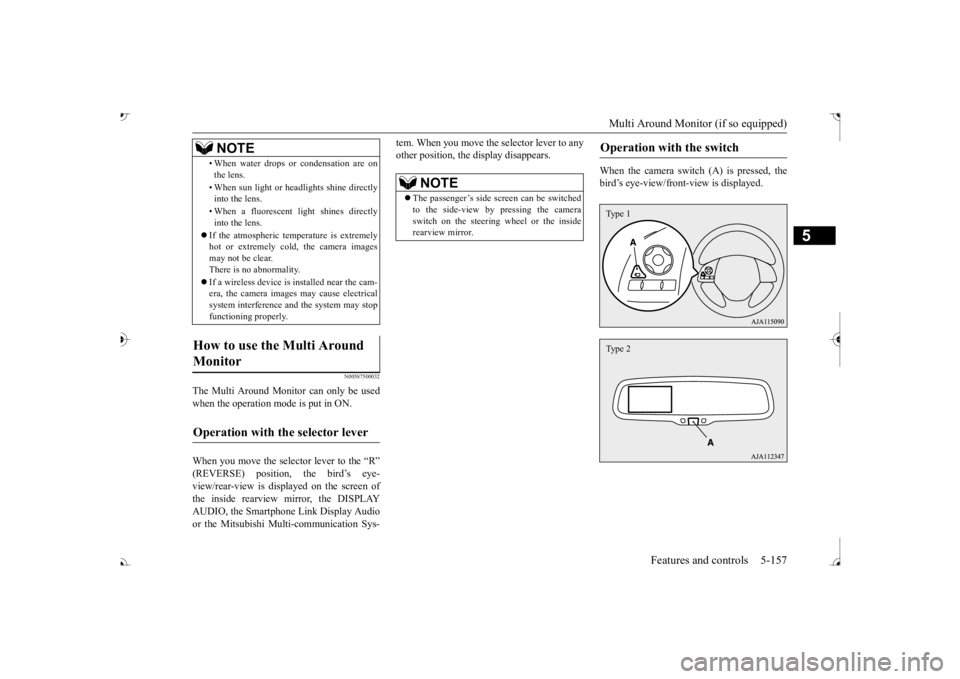
When the camera switch (A) is pressed, the bird’s eye-view/front
-view is displayed.
• When water drops or
condensation are on
the lens. • When sun light or he
adlights shine directly
into the lens. • When a fluorescent li
ght shines directly
into the lens.
If the atmospheric temperature is extremely hot or extremely cold, the camera images may not be clear.There is no abnormality. If a wireless device is installed near the cam- era, the camera images may cause electrical system interference and the system may stop functioning properly.
How to use the Multi Around Monitor
Operation with the selector lever
NOTE
NOTE
The passenger’s side sc
reen can be switched
to the side-view by pressing the camera switch on the steering wheel or the inside rearview mirror.
Operation with the switch
Type 1Type 2
BK0239700US.book 157 ページ 2016年6月16日 木曜日 午前10時58分
Page 245 of 521
Multi Information display - Type 1 5-164 Features and controls
5
N00554901248
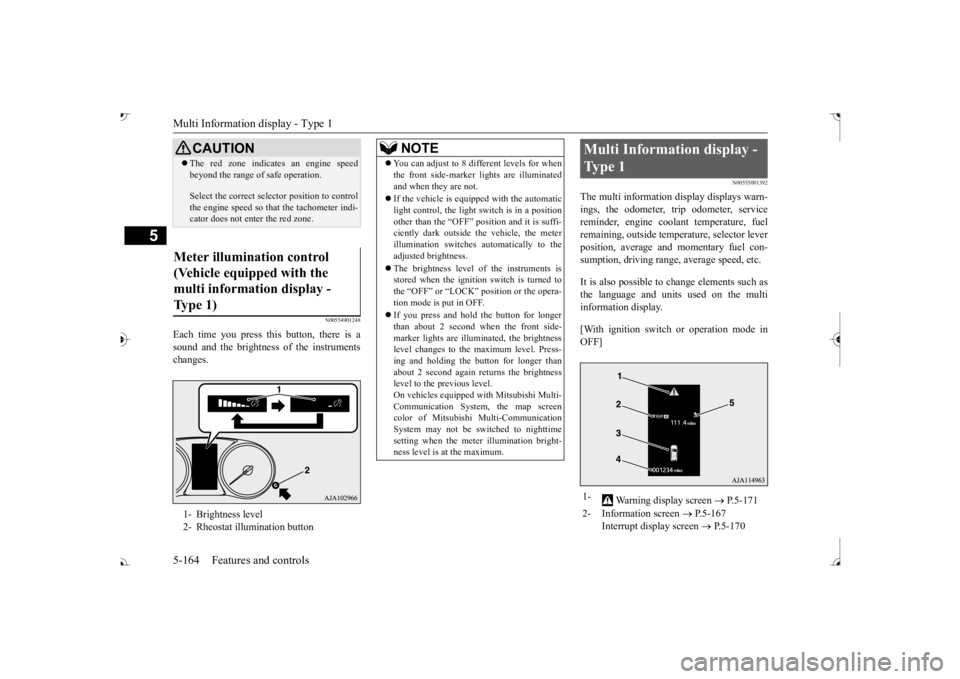
Each time you press this button, there is a sound and the brightness of the instruments changes.
N00555001392
The multi information display displays warn- ings, the odometer, trip odometer, service reminder, engine cool
ant temperature, fuel
remaining, outside temper
ature, selector lever
position, average and momentary fuel con- sumption, driving range, average speed, etc. It is also possible to change elements such as the language and units used on the multi information display. [With ignition switch or operation mode in OFF]
CAUTION The red zone indicate
s an engine speed
beyond the range of
safe operation.
Select the correct selector position to control the engine speed so that
the tachometer indi-
cator does not ente
r the red zone.
Meter illumination control (Vehicle equipped with the multi information display - Type 1) 1- Brightness level 2- Rheostat illumination button
NOTE
You can adjust to 8 different levels for when the front side-marker
lights are illuminated
and when they are not. If the vehicle is equi
pped with the automatic
light control, the light switch is in a positionother than the “OFF” position and it is suffi- ciently dark outside th
e vehicle, the meter
illumination switches automatically to theadjusted brightness. The brightness level of the instruments is stored when the ignition switch is turned to the “OFF” or “LOCK”
position or the opera-
tion mode is put in OFF. If you press and hold the button for longer than about 2 second when the front side-marker lights are illumi
nated, the brightness
level changes to the maximum level. Press- ing and holding the button for longer thanabout 2 second again returns the brightness level to the previous level. On vehicles equipped
with Mitsubishi Multi-
Communication System
, the map screen
color of Mitsubishi Multi-Communication System may not be sw
itched to nighttime
setting when the meter illumination bright- ness level is at the maximum.
Multi Information display - Type 1 1-
Warning display screen
P.5-171
2- Information screen
P.5-167
Interrupt display screen
P.5-170
BK0239700US.book 164 ページ 2016年6月16日 木曜日 午前10時58分
Page 266 of 521
Multi Information display - Type 2
Features and controls 5-185
5
N00574901039
The odometer indicates the total distance the vehicle has traveled.
N00575001037
The trip odometer indicates the distance trav-eled between two points. To return the display to 0, hold down the multi information display switch for about 2 seconds or more. Only the currently dis- played value wi
ll be reset.
Example If trip odometer is displayed, only tripodometer will be reset.
Both trip odometers and can count up to 9999.9 m
iles/kilometers.
When a trip odometer goes past 9999.9miles/kilometers, it returns to 0.0 miles/ kilometers. When disconnecting th
e battery terminal,
the memories of trip odometer displays
and are cleared, and their displays
return to “0.0 miles/kilometers”.
N00578900030
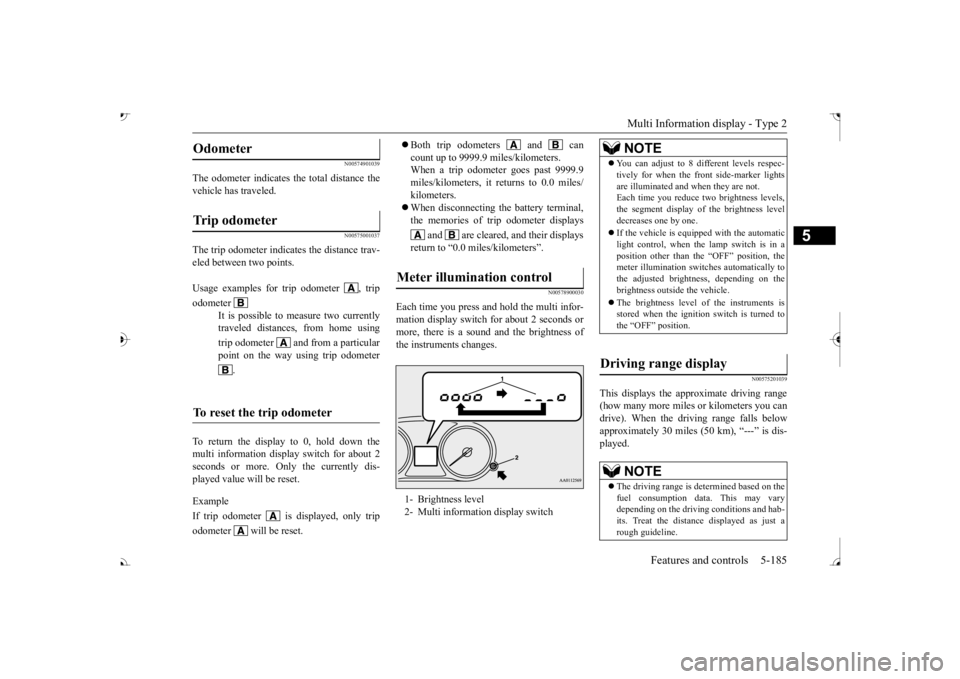
Each time you press a
nd hold the multi infor-
mation display switch for about 2 seconds ormore, there is a sound and the brightness of the instruments changes.
N00575201039
This displays the approximate driving range (how many more miles or
kilometers you can
drive). When the driving range falls below approximately 30 miles (
50 km), “---” is dis-
played.
Odometer Trip odometer Usage examples for trip odometer , trip odometer
It is possible to
measure two currently
traveled distances, from home using trip odometer and from a particular point on the way using trip odometer
.
To reset the trip odometer
Meter illumination control 1- Brightness level 2- Multi information display switch
NOTE
You can adjust to 8 di
fferent levels respec-
tively for when the front side-marker lightsare illuminated and when they are not.Each time you reduce tw
o brightness levels,
the segment display of
the brightness level
decreases one by one. If the vehicle is equi
pped with the automatic
light control, when the lamp switch is in aposition other than the
“OFF” position, the
meter illumination switches automatically to the adjusted bright
ness, depending on the
brightness outsi
de the vehicle.
The brightness level of the instruments is stored when the ignition switch is turned to the “OFF” position.
Driving range display
NOTE
The driving range is determined based on the fuel consumption data. This may vary depending on the drivi
ng conditions and hab-
its. Treat the distance displayed as just arough guideline.
BK0239700US.book 185 ページ 2016年6月16日 木曜日 午前10時58分